

[2024年更新]Professional-Machine-Learning-Engineer回答無料デモは最適で最高のリアルな試験合格させます
Professional-Machine-Learning-Engineer[2024年07月最新推薦]試験問題はあなたをパスさせる
認定試験では、機械学習モデルとシステムを設計、構築、最適化する候補者の能力を評価します。この試験は、機械学習アルゴリズム、データの前処理と機能エンジニアリング、モデルの選択とトレーニング、ハイパーパラメーターの調整、モデルの評価と展開に関する候補者の知識をテストするように設計されています。この試験では、大規模なデータセット、分散コンピューティングシステム、クラウドベースの機械学習サービスを使用する候補者の能力にも焦点を当てています。
Google Professional Machine Learning Engineer認定は、業界で高く評価され、機械学習分野における卓越性の基準として認められています。この認定を取得することは、個人がGoogle Cloudテクノロジーを使用して大規模な機械学習ソリューションを設計および実装するために必要なスキルと知識を持っていることを証明します。この認定は、個人がキャリアを進め、機械学習分野で新しい機会を開拓するのに役立つことができます。
Google Professional Machine Learning Engineer認定試験は、Google Cloudプラットフォームで機械学習モデルとシステムの設計と実装に習熟しようとする個人にとって、非常に人気の高い資格です。この認定は、機械学習の概念と機械学習モデルの構築と展開における実践的な経験を持つ強固な基盤を持つ専門家向けに設計されています。
質問 # 116
You have been asked to develop an input pipeline for an ML training model that processes images from disparate sources at a low latency. You discover that your input data does not fit in memory. How should you create a dataset following Google-recommended best practices?
- A. Convert the images to tf .Tensor Objects, and then run tf. data. Dataset. from_tensors ().
- B. Convert the images Into TFRecords, store the images in Cloud Storage, and then use the tf. data API to read the images for training
- C. Convert the images to tf .Tensor Objects, and then run Dataset. from_tensor_slices{).
- D. Create a tf.data.Dataset.prefetch transformation
正解:B
解説:
An input pipeline is a way to prepare and feed data to a machine learning model for training or inference. An input pipeline typically consists of several steps, such as reading, parsing, transforming, batching, and prefetching the data. An input pipeline can improve the performance and efficiency of the model, as it can handle large and complex datasets, optimize the data processing, and reduce the latency and memory usage1.
For the use case of developing an input pipeline for an ML training model that processes images from disparate sources at a low latency, the best option is to convert the images into TFRecords, store the images in Cloud Storage, and then use the tf.data API to read the images for training. This option involves using the following components and techniques:
* TFRecords: TFRecords is a binary file format that can store a sequence of data records, such as images, text, or audio. TFRecords can help to compress, serialize, and store the data efficiently, and reduce the data loading and parsing time. TFRecords can also support data sharding and interleaving, which can improve the data throughput and parallelism2.
* Cloud Storage: Cloud Storage is a service that allows you to store and access data on Google Cloud.
Cloud Storage can help to store and manage large and distributed datasets, such as images from different sources, and provide high availability, durability, and scalability. Cloud Storage can also integrate with other Google Cloud services, such as Compute Engine, AI Platform, and Dataflow3.
* tf.data API: tf.data API is a set of tools and methods that allow you to create and manipulate data pipelines in TensorFlow. tf.data API can help to read, transform, batch, and prefetch the data efficiently, and optimize the data processing for performance and memory. tf.data APIcan also support various data sources and formats, such as TFRecords, CSV, JSON, and images.
By using these components and techniques, the input pipeline can process large datasets of images from disparate sources that do not fit in memory, and provide low latency and high performance for the ML training model. Therefore, converting the images into TFRecords, storing the images in Cloud Storage, and using the tf.data API to read the images for training is the best option for this use case.
References:
* Build TensorFlow input pipelines | TensorFlow Core
* TFRecord and tf.Example | TensorFlow Core
* Cloud Storage documentation | Google Cloud
* [tf.data: Build TensorFlow input pipelines | TensorFlow Core]
質問 # 117
A data scientist uses an Amazon SageMaker notebook instance to conduct data exploration and analysis. This requires certain Python packages that are not natively available on Amazon SageMaker to be installed on the notebook instance.
How can a machine learning specialist ensure that required packages are automatically available on the notebook instance for the data scientist to use?
- A. Use the conda package manager from within the Jupyter notebook console to apply the necessary conda packages to the default kernel of the notebook.
- B. Install AWS Systems Manager Agent on the underlying Amazon EC2 instance and use Systems Manager Automation to execute the package installation commands.
- C. Create a Jupyter notebook file (.ipynb) with cells containing the package installation commands to execute and place the file under the /etc/init directory of each Amazon SageMaker notebook instance.
- D. Create an Amazon SageMaker lifecycle configuration with package installation commands and assign the lifecycle configuration to the notebook instance.
正解:C
解説:
Explanation
Explanation/Reference: https://towardsdatascience.com/automating-aws-sagemaker-notebooks-2dec62bc2c84
質問 # 118
You have developed a BigQuery ML model that predicts customer churn and deployed the model to Vertex Al Endpoints. You want to automate the retraining of your model by using minimal additional code when model feature values change. You also want to minimize the number of times that your model is retrained to reduce training costs. What should you do?
- A. 1. Create a Vertex Al Model Monitoring job configured to monitor training/serving skew
2. Configure alert monitoring to publish a message to a Pub/Sub queue when a monitoring alert is detected
3. Use a Cloud Function to monitor the Pub/Sub queue, and trigger retraining in BigQuery. - B. 1. Enable request-response logging on Vertex Al Endpoints
2. Schedule a TensorFlow Data Validation job to monitor training/serving skew
3. Execute model retraining if there is significant distance between the distributions - C. 1 Create a Vertex Al Model Monitoring job configured to monitor prediction drift.
2. Configure alert monitoring to publish a message to a Pub/Sub queue when a monitonng alert is detected.
3. Use a Cloud Function to monitor the Pub/Sub queue, and trigger retraining in BigQuery - D. 1. Enable request-response logging on Vertex Al Endpoints.
2 Schedule a TensorFlow Data Validation job to monitor prediction drift
3. Execute model retraining if there is significant distance between the distributions.
正解:C
解説:
The best option for automating the retraining of your model by using minimal additional code when model feature values change, and minimizing the number of times that your model is retrained to reduce training costs, is to create a Vertex AI Model Monitoring job configured to monitor prediction drift, configure alert monitoring to publish a message to a Pub/Sub queue when a monitoring alert is detected, and use a Cloud Function to monitor the Pub/Sub queue, and trigger retraining in BigQuery. This option allows you to leverage the power and simplicity of Vertex AI, Pub/Sub, and Cloud Functions to monitor your model performance and retrain your model when needed. Vertex AI is a unified platform for building and deploying machine learning solutions on Google Cloud. Vertex AI can deploy a trained model to an online prediction endpoint, which can provide low-latency predictions for individual instances. Vertex AI can also provide various tools and services for data analysis, model development, model deployment, model monitoring, and model governance. A Vertex AI Model Monitoring job is a resource that can monitor the performance and quality of your deployed models on Vertex AI. A Vertex AI Model Monitoring job can help you detect and diagnose issues with your models, such as data drift, prediction drift, training/serving skew, or model staleness. Prediction drift is a type of model monitoring metric that measures the difference between the distributions of the predictions generated by the model on the training data and the predictions generated by the model on the online data. Prediction drift can indicate that the model performance is degrading, or that the online data is changing over time. By creating a Vertex AI Model Monitoring job configured to monitor prediction drift, you can track the changes in the model predictions, and compare them with the expected predictions. Alert monitoring is a feature of Vertex AI Model Monitoring that can notify you when a monitoring metric exceeds a predefined threshold. Alert monitoring can help you set up rules and conditions for triggering alerts, and choose the notification channel for receiving alerts. Pub/Sub is a service that can provide reliable and scalable messaging and event streaming on Google Cloud. Pub/Sub can help you publish and subscribe to messages, and deliver them to various Google Cloud services, such as Cloud Functions. A Pub/Sub queue is a resource that can hold messages that are published to a Pub/Sub topic. A Pub/Sub queue can help you store and manage messages, and ensure that they are delivered to the subscribers. By configuring alert monitoring to publish a message to a Pub/Sub queue when a monitoring alert is detected, you can send a notification to a Pub/Sub topic, and trigger a downstream action based on the alert. Cloud Functions is a service that can run your stateless code in response to events on Google Cloud. Cloud Functions can help you create and execute functions without provisioning or managing servers, and pay only for the resources you use. A Cloud Function is a resource that can execute a piece of code in response to an event, such as a Pub/Sub message. A Cloud Function can help you perform various tasks, such as data processing, data transformation, or data analysis. BigQuery is a service that can store and query large-scale data on Google Cloud. BigQuery can help you analyze your data by using SQL queries, and perform various tasks, such as data exploration, data transformation, or data visualization. BigQuery ML is a feature of BigQuery that can create and execute machine learning models in BigQuery by using SQL queries.
BigQuery ML can help you build and train various types of models,such as linear regression, logistic regression, k-means clustering, matrix factorization, and deep neural networks. By using a Cloud Function to monitor the Pub/Sub queue, and trigger retraining in BigQuery, you can automate the retraining of your model by using minimal additional code when model feature values change. You can write a Cloud Function that listens to the Pub/Sub queue, and executes a SQL query to retrain your model in BigQuery ML when a prediction drift alert is received. By retraining your model in BigQuery ML, you can update your model parameters and improve your model performance and accuracy1.
The other options are not as good as option C, for the following reasons:
* Option A: Enabling request-response logging on Vertex AI Endpoints, scheduling a TensorFlow Data Validation job to monitor prediction drift, and executing model retraining if there is significant distance between the distributions would require more skills and steps than creating a Vertex AI Model Monitoring job configured to monitor prediction drift, configuring alert monitoring to publish a message to a Pub/Sub queue when a monitoring alert is detected, and using a Cloud Function to monitor the Pub/Sub queue, and trigger retraining in BigQuery. Request-response logging is a feature of Vertex AI Endpoints that can record the requests and responses that are sent to and from the online prediction endpoint. Request-response logging can help you collect and analyze the online prediction data, and troubleshoot any issues with your model. TensorFlow Data Validation is a tool that can analyze and validate your data for machine learning. TensorFlow Data Validation can help you explore, understand, and clean your data, and detect various data issues, such as data drift, data skew, or data anomalies.
Prediction drift is a type of data issue that measures the difference between the distributions of the
* predictions generated by the model on the training data and the predictions generated by the model on the online data. Prediction drift can indicate that the model performance is degrading, or that the online data is changing over time. By enabling request-response logging on Vertex AI Endpoints, and scheduling a TensorFlow Data Validation job to monitor prediction drift, you can collect and analyze the online prediction data, and compare the distributions of the predictions. However, enabling request-response logging on Vertex AI Endpoints, scheduling a TensorFlow Data Validation job to monitor prediction drift, and executing model retraining if there is significant distance between the distributions would require more skills and steps than creating a Vertex AI Model Monitoring job configured to monitor prediction drift, configuring alert monitoring to publish a message to a Pub/Sub queue when a monitoring alert is detected, and using a Cloud Function to monitor the Pub/Sub queue, and trigger retraining in BigQuery. You would need to write code, enable and configure the request-response logging, create and run the TensorFlow Data Validation job, define and measure the distance between the distributions, and execute the model retraining. Moreover, this option would not automate the retraining of your model, as you would need to manually check the prediction drift and trigger the retraining2.
* Option B: Enabling request-response logging on Vertex AI Endpoints, scheduling a TensorFlow Data Validation job to monitor training/serving skew, and executing model retraining if there is significant distance between the distributions would not help you monitor the changes in the model feature values, and could cause errors or poor performance. Training/serving skew is a type of data issue that measures the difference between the distributions of the features used to train the model and the features used to serve the model. Training/serving skew can indicate that the model is not trained on the representative data, orthat the data is changing over time. By enabling request-response logging on Vertex AI Endpoints, and scheduling a TensorFlow Data Validation job to monitor training/serving skew, you can collect and analyze the online prediction data, and compare the distributions of the features. However, enabling request-response logging on Vertex AI Endpoints, scheduling a TensorFlow Data Validation job to monitor training/serving skew, and executing model retraining if there is significant distance between the distributions would not help you monitor the changes in the model feature values, and could cause errors or poor performance. You would need to write code, enable and configure the request-response logging, create and run the TensorFlow Data Validation job, define and measure the distance between the distributions, and execute the model retraining. Moreover, this option would not monitor the prediction drift, which is a more direct and relevant metric for measuring the model performance and quality2.
* Option D: Creating a Vertex AI Model Monitoring job configured to monitor training/serving skew, configuring alert monitoring to publish a message to a Pub/Sub queue when a monitoring alert is detected, and using a Cloud Function to monitor the Pub/Sub queue, and trigger retraining in BigQuery would not help you monitor the changes in the model feature values, and could cause errors or poor performance. Training/serving skew is a type of data issue that measures the difference between the distributions of the features used to train the model and the features used to serve the model.
Training/serving skew can indicate that the model is not trained on the representative data, or that the data is changing over time. By creating a Vertex AI Model Monitoring job configured to monitor training/serving skew, you can track the changes in the model features, and compare them with the expected features. However, creating a Vertex AI Model Monitoring job configured to monitor training/serving skew, configuring alert monitoring to publish a message to a Pub/Sub queue when a monitoring alert is detected, and using a Cloud Function to monitor the Pub/Sub queue, and trigger retraining in BigQuery would not help you monitor the changes in the model feature values, and could cause errors or poor performance. You would need to write code, create and configure the Vertex AI Model Monitoring job, configure the alert monitoring, create and configure the Pub/Sub queue, and write a Cloud Function to trigger the retraining. Moreover, this option would not monitor the prediction drift, which is a more direct and relevant metric for measuring the model performance and quality1.
References:
* Preparing for Google Cloud Certification: Machine Learning Engineer, Course 3: Production ML Systems, Week 4: ML Governance
* Google Cloud Professional Machine Learning Engineer Exam Guide, Section 3: Scaling ML models in production
質問 # 119
You are developing an ML model to identify your company s products in images. You have access to over one million images in a Cloud Storage bucket. You plan to experiment with different TensorFlow models by using Vertex Al Training You need to read images at scale during training while minimizing data I/O bottlenecks What should you do?
- A. Create a Vertex Al managed dataset from your image data Access the aip_training_data_uri environment variable to read the images by using the tf. data. Dataset. Iist_flies function.
- B. Convert the images to TFRecords and store them in a Cloud Storage bucket Read the TFRecords by using the tf. ciata.TFRecordDataset function.
- C. Store the URLs of the images in a CSV file Read the file by using the tf.data.experomental.CsvDataset function.
- D. Load the images directly into the Vertex Al compute nodes by using Cloud Storage FUSE Read the images by using the tf .data.Dataset.from_tensor_slices function.
正解:B
質問 # 120
You are working with a dataset that contains customer transactions. You need to build an ML model to predict customer purchase behavior You plan to develop the model in BigQuery ML, and export it to Cloud Storage for online prediction You notice that the input data contains a few categorical features, including product category and payment method You want to deploy the model as quickly as possible. What should you do?
- A. Use the create model statement and select the categorical and non-categorical features.
- B. Use the ML. ONE_HOT_ENCODER function on the categorical features, and select the encoded categorical features and non-categorical features as inputs to create your model.
- C. Use the transform clause with the ML. ONE_HOT_ENCODER function on the categorical features at model creation and select the categorical and non-categorical features.
- D. Use the ML. ONE_HOT_ENCODER function on the categorical features, and select the encoded categorical features and non-categorical features as inputs to create your model.
正解:C
解説:
The best option for building an ML model to predict customer purchase behavior in BigQuery ML is to use the transform clause with the ML.ONE_HOT_ENCODER function on the categorical features at model creation and select the categorical and non-categorical features. This option allows you to encode the categorical features as one-hot vectors, which are binary vectors that have only one non-zero element. One-hot encoding is a common technique for handling categorical features in ML models, as it can reduce the dimensionality and sparsity of the data, and avoid the ordinality problem that arises when using numerical labels for categorical values1. The transform clause is a feature of BigQuery ML that lets you apply SQL expressions to transform the input data at model creation time. The transform clause can perform feature engineering, such as one-hot encoding, on the fly, without requiring you to create and store a new table with the transformed data2. By using the transform clause with the ML.ONE_HOT_ENCODER function, you can create and train an ML model in BigQuery ML with a single SQL statement, and export it to Cloud Storage for online prediction.
The other options are not as good as option A, for the following reasons:
* Option B: Using the ML.ONE_HOT_ENCODER function on the categorical features, and selecting the encoded categorical features and non-categorical features as inputs to create your model, would require more steps and storage than using the transform clause. TheML.ONE_HOT_ENCODER function is a BigQuery ML function that returns a one-hot encoded vector for a given categorical value. However, using this function alone would not apply the one-hot encoding to the input data at model creation time.
You would need to create a new table with the encoded features, and use that table as the input to create your model. This would incur additional storage costs and reduce the performance of the queries.
* Option C: Using the create model statement and selecting the categorical and non-categorical features, would not handle the categorical features properly and could result in a poor model performance. The create model statement is a BigQuery ML statement that creates and trains an ML model from a SQL query. However, if the input data contains categorical features, you need to encode them as one-hot vectors or use the category_count option to specify the number of categories for each feature. Otherwise, BigQuery ML would treat the categorical features as numerical values, which can introduce bias and noise into the model3.
* Option D: Using the ML.ONE_HOT_ENCODER function on the categorical features, and selecting the encoded categorical features and non-categorical features as inputs to create your model, is the same as option B, and has the same drawbacks.
References:
* Preparing for Google Cloud Certification: Machine Learning Engineer, Course 2: Data Engineering for ML on Google Cloud, Week 2: Feature Engineering
* Google Cloud Professional Machine Learning Engineer Exam Guide, Section 1: Architecting low-code ML solutions, 1.1 Developing ML models by using BigQuery ML
* Official Google Cloud Certified Professional Machine Learning Engineer Study Guide, Chapter 3: Data Engineering for ML, Section 3.2: BigQuery for ML
* One-hot encoding
* Using the TRANSFORM clause for feature engineering
* Creating a model
* ML.ONE_HOT_ENCODER function
質問 # 121
A credit card company wants to build a credit scoring model to help predict whether a new credit card applicant will default on a credit card payment. The company has collected data from a large number of sources with thousands of raw attributes. Early experiments to train a classification model revealed that many attributes are highly correlated, the large number of features slows down the training speed significantly, and that there are some overfitting issues.
The Data Scientist on this project would like to speed up the model training time without losing a lot of information from the original dataset.
Which feature engineering technique should the Data Scientist use to meet the objectives?
- A. Cluster raw data using k-means and use sample data from each cluster to build a new dataset
- B. Use an autoencoder or principal component analysis (PCA) to replace original features with new features
- C. Normalize all numerical values to be between 0 and 1
- D. Run self-correlation on all features and remove highly correlated features
正解:C
質問 # 122
You are developing a custom TensorFlow classification model based on tabular data. Your raw data is stored in BigQuery contains hundreds of millions of rows, and includes both categorical and numerical features. You need to use a MaxMin scaler on some numerical features, and apply a one-hot encoding to some categorical features such as SKU names. Your model will be trained over multiple epochs. You want to minimize the effort and cost of your solution. What should you do?
- A. 1 Write a SQL query to create a separate lookup table to scale the numerical features.
2. Deploy a TensorFlow-based model from Hugging Face to BigQuery to encode the text features.
3. Feed the resulting BigQuery view into Vertex Al Training. - B. 1 Use TFX components with Dataflow to encode the text features and scale the numerical features.
2 Export results to Cloud Storage as TFRecords.
3 Feed the data into Vertex Al Training. - C. 1 Write a SQL query to create a separate lookup table to scale the numerical features.
2 Perform the one-hot text encoding in BigQuery.
3. Feed the resulting BigQuery view into Vertex Al Training. - D. 1 Use BigQuery to scale the numerical features.
2. Feed the features into Vertex Al Training.
3 Allow TensorFlow to perform the one-hot text encoding.
正解:B
解説:
TFX (TensorFlow Extended) is a platform for end-to-end machine learning pipelines. It provides components for data ingestion, preprocessing, validation, model training, serving, and monitoring. Dataflow is a fully managed service for scalable data processing. By using TFX components with Dataflow, you can perform feature engineering on large-scale tabular data in a distributed and efficient way. You can use the Transform component to apply the MaxMin scaler and the one-hot encoding to the numerical and categorical features, respectively. You can also use the ExampleGen component to read data from BigQuery and the Trainer component to train your TensorFlow model. The output of the Transform component is a TFRecord file, which is a binary format for storing TensorFlow data. You can export the TFRecord file to Cloud Storage and feed it into Vertex AI Training, which is a managed service for training custom machine learning models on Google Cloud. References:
* TFX | TensorFlow
* Dataflow | Google Cloud
* Vertex AI Training | Google Cloud
質問 # 123
You are responsible for building a unified analytics environment across a variety of on-premises data marts. Your company is experiencing data quality and security challenges when integrating data across the servers, caused by the use of a wide range of disconnected tools and temporary solutions. You need a fully managed, cloud-native data integration service that will lower the total cost of work and reduce repetitive work. Some members on your team prefer a codeless interface for building Extract, Transform, Load (ETL) process. Which service should you use?
- A. Dataflow
- B. Dataprep
- C. Apache Flink
- D. Cloud Data Fusion
正解:D
質問 # 124
A Data Science team within a large company uses Amazon SageMaker notebooks to access data stored in Amazon S3 buckets. The IT Security team is concerned that internet-enabled notebook instances create a security vulnerability where malicious code running on the instances could compromise data privacy. The company mandates that all instances stay within a secured VPC with no internet access, and data communication traffic must stay within the AWS network.
How should the Data Science team configure the notebook instance placement to meet these requirements?
- A. Associate the Amazon SageMaker notebook with a private subnet in a VPC. Place the Amazon SageMaker endpoint and S3 buckets within the same VPC.
- B. Associate the Amazon SageMaker notebook with a private subnet in a VPC. Use IAM policies to grant access to Amazon S3 and Amazon SageMaker.
- C. Associate the Amazon SageMaker notebook with a private subnet in a VPC. Ensure the VPC has a NAT gateway and an associated security group allowing only outbound connections to Amazon S3 and Amazon SageMaker.
- D. Associate the Amazon SageMaker notebook with a private subnet in a VPC. Ensure the VPC has S3 VPC endpoints and Amazon SageMaker VPC endpoints attached to it.
正解:C
質問 # 125
You work with a data engineering team that has developed a pipeline to clean your dataset and save it in a Cloud Storage bucket. You have created an ML model and want to use the data to refresh your model as soon as new data is available. As part of your CI/CD workflow, you want to automatically run a Kubeflow Pipelines training job on Google Kubernetes Engine (GKE). How should you architect this workflow?
- A. Configure your pipeline with Dataflow, which saves the files in Cloud Storage After the file is saved, start the training job on a GKE cluster
- B. Use App Engine to create a lightweight python client that continuously polls Cloud Storage for new files As soon as a file arrives, initiate the training job
- C. Configure a Cloud Storage trigger to send a message to a Pub/Sub topic when a new file is available in a storage bucket. Use a Pub/Sub-triggered Cloud Function to start the training job on a GKE cluster
- D. Use Cloud Scheduler to schedule jobs at a regular interval. For the first step of the job. check the timestamp of objects in your Cloud Storage bucket If there are no new files since the last run, abort the job.
正解:C
解説:
This option is the best way to architect the workflow, as it allows you to use event-driven and serverless components to automate the ML training process. Cloud Storage triggers are a feature that allows you to send notifications to a Pub/Sub topic when an object is created, deleted, or updated in a storage bucket. Pub/Sub is a service that allows you to publish and subscribe to messages on various topics. Pub/Sub-triggered Cloud Functions are a type of Cloud Functions that are invoked when a message is published to a specific Pub/Sub topic. Cloud Functions are a serverless platform that allows you to run code in response to events. By using these components, you can create a workflow that starts the training job on a GKE cluster as soon as a new file is available in the Cloud Storagebucket, without having to manage any servers or poll for changes. The other options are not as efficient or scalable as this option. Dataflow is a service that allows you to create and run data processing pipelines, but it is not designed to trigger ML training jobs on GKE. App Engine is a service that allows you to build and deploy web applications, but it is not suitable for polling Cloud Storage for new files, as it may incur unnecessary costs and latency. Cloud Scheduler is a service that allows you to schedule jobs at regular intervals, but it is not ideal for triggering ML training jobs based on data availability, as it may miss some files or run unnecessary jobs. References:
* Cloud Storage triggers documentation
* Pub/Sub documentation
* Pub/Sub-triggered Cloud Functions documentation
* Cloud Functions documentation
* Kubeflow Pipelines documentation
質問 # 126
You are an ML engineer on an agricultural research team working on a crop disease detection tool to detect leaf rust spots in images of crops to determine the presence of a disease. These spots, which can vary in shape and size, are correlated to the severity of the disease. You want to develop a solution that predicts the presence and severity of the disease with high accuracy. What should you do?
- A. Develop a template matching algorithm using traditional computer vision libraries.
- B. Develop an image classification ML model to predict the presence of the disease.
- C. Develop an image segmentation ML model to locate the boundaries of the rust spots.
- D. Create an object detection model that can localize the rust spots.
正解:C
質問 # 127
You work for an organization that operates a streaming music service. You have a custom production model that is serving a "next song" recommendation based on a user's recent listening history. Your model is deployed on a Vertex Al endpoint. You recently retrained the same model by using fresh data. The model received positive test results offline. You now want to test the new model in production while minimizing complexity. What should you do?
- A. Configure a model monitoring job for the existing Vertex Al endpoint. Configure the monitoring job to detect prediction drift, and set a threshold for alerts Update the model on the endpoint from the previous model to the new model If you receive an alert of prediction drift, revert to the previous model.
- B. Capture incoming prediction requests in BigQuery Create an experiment in Vertex Al Experiments Run batch predictions for both models using the captured data Use the user's selected song to compare the models performance side by side If the new models performance metrics are better than the previous model deploy the new model to production.
- C. Deploy the new model to the existing Vertex Al endpoint Use traffic splitting to send 5% of production traffic to the new model Monitor end-user metrics, such as listening time If end-user metrics improve between models over time, gradually increase the percentage of production traffic sent to the new model.
- D. Create a new Vertex Al endpoint for the new model and deploy the new model to that new endpoint Build a service to randomly send 5% of production traffic to the new endpoint Monitor end-user metrics such as listening time If end-user metrics improve between models over time gradually increase the percentage of production traffic sent to the new endpoint.
正解:C
解説:
Traffic splitting is a feature of Vertex AI that allows you to distribute the prediction requests among multiple models or model versions within the same endpoint. You can specify the percentage of traffic that each model or model version receives, and change it at any time. Traffic splitting can help you test the new model in production without creating a new endpoint or a separate service. You can deploy the new model to the existing Vertex AI endpoint, and use traffic splitting to send 5% of production traffic to the new model. You can monitor the end-user metrics, such as listening time, to compare the performance of the new model and the previous model. If the end-user metrics improve between models over time, you can gradually increase the percentage of production traffic sent to the new model. This solution can help you test the new model in production while minimizing complexity and cost. References:
* Traffic splitting | Vertex AI
* Deploying models to endpoints | Vertex AI
質問 # 128
Your data science team has requested a system that supports scheduled model retraining, Docker containers, and a service that supports autoscaling and monitoring for online prediction requests. Which platform components should you choose for this system?
- A. Vertex AI Pipelines and App Engine
- B. Vertex AI Pipelines, Vertex AI Prediction, and Vertex AI Model Monitoring
- C. Cloud Composer, Vertex AI Training with custom containers, and App Engine
- D. Cloud Composer, BigQuery ML, and Vertex AI Prediction
正解:B
解説:
* Option A is incorrect because Vertex AI Pipelines and App Engine do not meet all the requirements of the system. Vertex AI Pipelines is a service that allows you to create, run, andmanage ML workflows using TensorFlow Extended (TFX) components or custom components1. App Engine is a service that allows you to build and deploy scalable web applications using standard or flexible environments2. However, App Engine does not support Docker containers in the standard environment, and does not provide a dedicated service for online prediction and monitoring of ML models3.
* Option B is correct because Vertex AI Pipelines, Vertex AI Prediction, and Vertex AI Model Monitoring meet all the requirements of the system. Vertex AI Prediction is a service that allows you to deploy and serve ML models for online or batch prediction, with support for autoscaling and custom containers4. Vertex AI Model Monitoring is a service that allows you to monitor the performance and fairness of your deployed models, and get alerts for any issues or anomalies5.
* Option C is incorrect because Cloud Composer, BigQuery ML, and Vertex AI Prediction do not meet all the requirements of the system. Cloud Composer is a service that allows you to create, schedule, and manage workflows using Apache Airflow. BigQuery ML is a service that allows you to create and use ML models within BigQuery using SQL queries. However, BigQuery ML does not support custom containers, and Vertex AI Prediction does not support scheduled model retraining or model monitoring.
* Option D is incorrect because Cloud Composer, Vertex AI Training with custom containers, and App Engine do not meet all the requirements of the system. Vertex AI Training is a service that allows you to train ML models using built-in algorithms or custom containers. However, Vertex AI Training does not support online prediction or model monitoring, and App Engine does not support Docker containers in the standard environment or online prediction and monitoring of ML models3.
References:
* Vertex AI Pipelines overview
* App Engine overview
* Choosing an App Engine environment
* Vertex AI Prediction overview
* Vertex AI Model Monitoring overview
* [Cloud Composer overview]
* [BigQuery ML overview]
* [BigQuery ML limitations]
* [Vertex AI Training overview]
質問 # 129
You are training an ML model using data stored in BigQuery that contains several values that are considered Personally Identifiable Information (Pll). You need to reduce the sensitivity of the dataset before training your model. Every column is critical to your model. How should you proceed?
- A. Using Dataflow, ingest the columns with sensitive data from BigQuery, and then randomize the values in each sensitive column.
- B. Use the Cloud Data Loss Prevention (DLP) API to scan for sensitive data, and use Dataflow with the DLP API to encrypt sensitive values with Format Preserving Encryption
- C. Before training, use BigQuery to select only the columns that do not contain sensitive data Create an authorized view of the data so that sensitive values cannot be accessed by unauthorized individuals.
- D. Use the Cloud Data Loss Prevention (DLP) API to scan for sensitive data, and use Dataflow to replace all sensitive data by using the encryption algorithm AES-256 with a salt.
正解:B
解説:
The best option for reducing the sensitivity of the dataset before training the model is to use the Cloud Data Loss Prevention (DLP) API to scan for sensitive data, and use Dataflow with the DLP API to encrypt sensitive values with Format Preserving Encryption. This option allows you to keep every column in the dataset, while protecting the sensitive data from unauthorized access or exposure. The Cloud DLP API can detect and classify various types of sensitive data, such as names, email addresses, phone numbers, credit card numbers, and more1. Dataflow can create scalable and reliable pipelines to process large volumes of data from BigQuery and other sources2. Format Preserving Encryption (FPE) is a technique that encrypts sensitive data while preserving its original format and length, which can help maintain the utility and validity of the data3.
By using Dataflow with the DLP API, you can apply FPE to the sensitive values in the dataset, and store the encrypted data in BigQuery or another destination. You can also use the same pipeline to decrypt the data when needed, by using the same encryption key and method4.
The other options are not as suitable as option B, for the following reasons:
* Option A: Using Dataflow to ingest the columns with sensitive data from BigQuery, and then randomize the values in each sensitive column, would reduce the sensitivity of the data, but also the utility and accuracy of the data. Randomization is a technique that replaces sensitive data with random values, which can prevent re-identification of the data, but also distort the distribution and relationships of the data3. This can affect the performance and quality of the ML model, especially if every column is critical to the model.
* Option C: Using the Cloud DLP API to scan for sensitive data, and use Dataflow to replace all sensitive data by using the encryption algorithm AES-256 with a salt, would reduce the sensitivity of the data, but also the utility and validity of the data. AES-256 is a symmetric encryption algorithm that uses a 256-bit key to encrypt and decrypt data. A salt is a random value that is added to the data before encryption, to increase the randomness and security of the encrypted data. However, AES-256 does not preserve the format or length of the original data, which can cause problems when storing or processing the data. For example, if the original data is a 10-digit phone number, AES-256 would produce a much longer and different string, which can break the schema or logic of the dataset3.
* Option D: Before training, using BigQuery to select only the columns that do not contain sensitive data, and creating an authorized view of the data so that sensitive values cannot be accessed by unauthorized individuals, would reduce the exposure of the sensitive data, but also the completeness and relevance of
* the data. An authorized view is a BigQuery view that allows you to share query results with particular users or groups, without giving them access tothe underlying tables. However, this option assumes that you can identify the columns that do not contain sensitive data, which may not be easy or accurate.
Moreover, this option would remove some columns from the dataset, which can affect the performance and quality of the ML model, especially if every column is critical to the model.
References:
* Preparing for Google Cloud Certification: Machine Learning Engineer, Course 5: Responsible AI, Week
2: Privacy
* Google Cloud Professional Machine Learning Engineer Exam Guide, Section 5: Developing responsible AI solutions, 5.2 Implementing privacy techniques
* Official Google Cloud Certified Professional Machine Learning Engineer Study Guide, Chapter 9:
Responsible AI, Section 9.4: Privacy
* De-identification techniques
* Cloud Data Loss Prevention (DLP) API
* Dataflow
* Using Dataflow and Sensitive Data Protection to securely tokenize and import data from a relational database to BigQuery
* [AES encryption]
* [Salt (cryptography)]
* [Authorized views]
質問 # 130
You are investigating the root cause of a misclassification error made by one of your models. You used Vertex Al Pipelines to tram and deploy the model. The pipeline reads data from BigQuery. creates a copy of the data in Cloud Storage in TFRecord format trains the model in Vertex Al Training on that copy, and deploys the model to a Vertex Al endpoint. You have identified the specific version of that model that misclassified: and you need to recover the data this model was trained on. How should you find that copy of the data'?
- A. Use Vertex Al Feature Store Modify the pipeline to use the feature store; and ensure that all training data is stored in it Search the feature store for the data used for the training.
- B. Find the job ID in Vertex Al Training corresponding to the training for the model Search in the logs of that job for the data used for the training.
- C. Use the logging features in the Vertex Al endpoint to determine the timestamp of the models deployment Find the pipeline run at that timestamp Identify the step that creates the data copy; and search in the logs for its location.
- D. Use the lineage feature of Vertex Al Metadata to find the model artifact Determine the version of the model and identify the step that creates the data copy, and search in the metadata for its location.
正解:D
質問 # 131
Your team is working on an NLP research project to predict political affiliation of authors based on articles they have written. You have a large training dataset that is structured like this: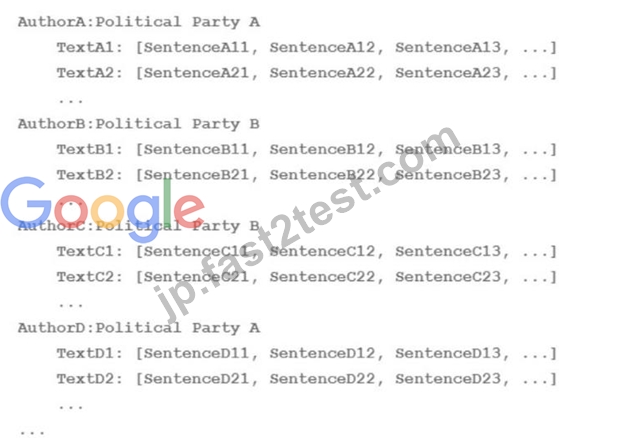
A)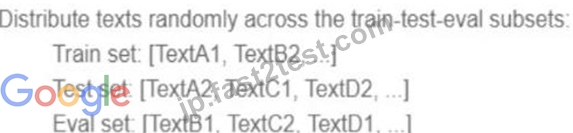
B)
C)
D)
- A. Option B
- B. Option A
- C. Option D
- D. Option C
正解:C
質問 # 132
You are an ML engineer at a bank. You have developed a binary classification model using AutoML Tables to predict whether a customer will make loan payments on time. The output is used to approve or reject loan requests. One customer's loan request has been rejected by your model, and the bank's risks department is asking you to provide the reasons that contributed to the model's decision. What should you do?
- A. Use the feature importance percentages in the model evaluation page.
- B. Vary features independently to identify the threshold per feature that changes the classification.
- C. Use the correlation with target values in the data summary page.
- D. Use local feature importance from the predictions.
正解:D
解説:
* Option A is correct because using local feature importance from the predictions is the best way to provide the reasons that contributed to the model's decision for a specific customer's loan request. Local feature importance is a measure of how much each feature affects the prediction for a given instance, relative to the average prediction for the dataset1. AutoML Tables provides local feature importance values for each prediction, which can be accessed using the Vertex AI SDK for Python or the Cloud Console2. By using local feature importance, you can explain why the model rejected the loan request based on the customer's data.
* Option B is incorrect because using the correlation with target values in the data summary page is not a good way to provide the reasons that contributed to the model's decision for a specific customer's loan request. The correlation with target values is a measure of how much each feature is linearly related to the target variable for the entire dataset, not for a single instance3. The data summary page in AutoML Tables shows the correlation with target values for each feature, as well as other statistics such as mean, standard deviation, and histogram4. However, these statistics are not useful for explaining the model's decision for a specific customer, as they do not account for the interactions between features or the non-linearity of the model.
* Option C is incorrect because using the feature importance percentages in the model evaluation page is not a good way to provide the reasons that contributed to the model's decision for a specific customer's
* loan request. The feature importance percentages are a measure of how much each feature affects the overall accuracy of the model for the entire dataset, not for a single instance5. The model evaluation page in AutoML Tables shows the feature importance percentages for each feature, as well as other metrics such as precision, recall, and confusion matrix. However, these metrics are not useful for explaining the model's decision for a specific customer, as they do not reflect the individual contribution of each feature for a given prediction.
* Option D is incorrect because varying features independently to identify the threshold per feature that changes the classification is not a feasible way to provide the reasons that contributed to the model's decision for a specific customer's loan request. This method involves changing the value of one feature at a time, while keeping the other features constant, and observing how the prediction changes.
However, this method is not practical, as it requires making multiple prediction requests, and may not capture the interactions between features or the non-linearity of the model.
References:
* Local feature importance
* Getting local feature importance values
* Correlation with target values
* Data summary page
* Feature importance percentages
* [Model evaluation page]
* [Varying features independently]
質問 # 133
You work for a toy manufacturer that has been experiencing a large increase in demand. You need to build an ML model to reduce the amount of time spent by quality control inspectors checking for product defects.
Faster defect detection is a priority. The factory does not have reliable Wi-Fi. Your company wants to implement the new ML model as soon as possible. Which model should you use?
- A. AutoML Vision model
- B. AutoML Vision Edge mobile-low-latency-1 model
- C. AutoML Vision Edge mobile-versatile-1 model
- D. AutoML Vision Edge mobile-high-accuracy-1 model
正解:B
解説:
AutoML Vision Edge is a service that allows you to create custom image classification and object detection models that can run on edge devices, such as mobile phones, tablets, or IoT devices1. AutoMLVision Edge offers four types of models that vary in size, accuracy, and latency: mobile-versatile-1,mobile-low-latency-1, mobile-high-accuracy-1, and mobile-core-ml-low-latency-12. Each model has its own trade-offs and use cases, depending on the device specifications and the application requirements.
For the use case of building an ML model to reduce the amount of time spent by quality control inspectors checking for product defects, the best model to use is the AutoML Vision Edge mobile-low-latency-1 model. This model is optimized for fast inference on mobile devices, with a latency of less than 50 milliseconds on a Pixel 1 phone2. Faster defect detection is a priority for the toy manufacturer, and the factory does not have reliable Wi-Fi, so a low-latency model that can run on the device without internet connection is ideal. The mobile-low-latency-1 model also has a small size of less than 4 MB, which makes it easy to deploy and update2. The mobile-low-latency-1 model has a slightly lower accuracy than the mobile-high-accuracy-1 model, but it is still suitable for most image classification tasks2. Therefore, the AutoML Vision Edge mobile-low-latency-1 model is the best option for this use case.
References:
* AutoML Vision Edge documentation
* AutoML Vision Edge model types
質問 # 134
You developed an ML model with Al Platform, and you want to move it to production. You serve a few thousand queries per second and are experiencing latency issues. Incoming requests are served by a load balancer that distributes them across multiple Kubeflow CPU-only pods running on Google Kubernetes Engine (GKE). Your goal is to improve the serving latency without changing the underlying infrastructure.
What should you do?
- A. Switch to the tensorflow-model-server-universal version of TensorFlow Serving
- B. Significantly increase the max_enqueued_batches TensorFlow Serving parameter
- C. Significantly increase the max_batch_size TensorFlow Serving parameter
- D. Recompile TensorFlow Serving using the source to support CPU-specific optimizations Instruct GKE to choose an appropriate baseline minimum CPU platform for serving nodes
正解:D
解説:
TensorFlow Serving is a service that allows you to deploy and serve TensorFlow models in a scalable and efficient way. TensorFlow Serving supports various platforms and hardware, such as CPU, GPU, and TPU.
However, the default TensorFlow Serving binaries are built with generic CPU instructions, which may not leverage the full potential of the CPU architecture. To improve the serving latency and performance, you can recompile TensorFlow Serving using the source code and enable CPU-specific optimizations, such as AVX, AVX2, and FMA1. These optimizations can speed up the computation and inference of the TensorFlow models, especially for deep neural networks.
Google Kubernetes Engine (GKE) is a service that allows you to run and manage containerized applications on Google Cloud using Kubernetes. GKE supports various types and sizes of nodes, which are the virtual machines that run the containers. GKE also supports different CPU platforms, which are the generations and models of the CPUs that power the nodes. GKE allows you to choose a baseline minimum CPU platform for your node pool, which is a group of nodes with the same configuration. By choosing a baseline minimum CPU platform, you can ensure that your nodes have the CPU features and capabilities that match your workload requirements2.
For the use case of serving a few thousand queries per second and experiencing latency issues, the best option is to recompile TensorFlow Serving using the source to support CPU-specific optimizations, and instruct GKE to choose an appropriate baseline minimum CPU platform for serving nodes. This option can improve the serving latency and performance without changing the underlying infrastructure, as it only involves rebuilding the TensorFlow Serving binary and selecting the CPU platform for the GKE nodes. This option can also take advantage of the CPU-only pods that are running on GKE, as it can optimize the CPU utilization and efficiency. Therefore, recompiling TensorFlow Serving using the source to support CPU-specific optimizations and instructing GKE to choose an appropriate baseline minimum CPU platform for serving nodes is the best option for this use case.
References:
* Building TensorFlow Serving from source
* Specifying a minimum CPU platform for a node pool
質問 # 135
You have created a Vertex Al pipeline that automates custom model training You want to add a pipeline component that enables your team to most easily collaborate when running different executions and comparing metrics both visually and programmatically. What should you do?
- A. Add a component to the Vertex Al pipeline that logs metrics to a BigQuery table Query the table to compare different executions of the pipeline Connect BigQuery to Looker Studio to visualize metrics.
- B. Add a component to the Vertex Al pipeline that logs metrics to Vertex ML Metadata Use Vertex Al Experiments to compare different executions of the pipeline Use Vertex Al TensorBoard to visualize metrics.
- C. Add a component to the Vertex Al pipeline that logs metrics to Vertex ML Metadata Load the Vertex ML Metadata into a pandas DataFrame to compare different executions of the pipeline. Use Matplotlib to visualize metrics.
- D. Add a component to the Vertex Al pipeline that logs metrics to a BigQuery table Load the table into a pandas DataFrame to compare different executions of the pipeline Use Matplotlib to visualize metrics.
正解:B
質問 # 136
You are training an LSTM-based model on Al Platform to summarize text using the following job submission script: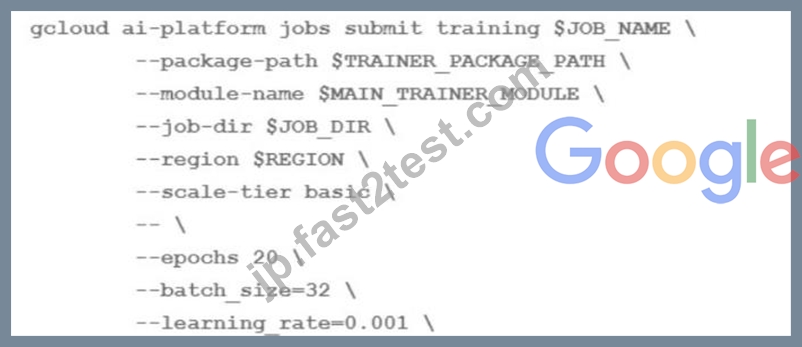
You want to ensure that training time is minimized without significantly compromising the accuracy of your model. What should you do?
- A. Modify the batch size' parameter
- B. Modify the 'learning rate' parameter
- C. Modify the 'epochs' parameter
- D. Modify the 'scale-tier' parameter
正解:C
質問 # 137
You have recently created a proof-of-concept (POC) deep learning model. You are satisfied with the overall architecture, but you need to determine the value for a couple of hyperparameters. You want to perform hyperparameter tuning on Vertex AI to determine both the appropriate embedding dimension for a categorical feature used by your model and the optimal learning rate. You configure the following settings:
For the embedding dimension, you set the type to INTEGER with a minValue of 16 and maxValue of 64.
For the learning rate, you set the type to DOUBLE with a minValue of 10e-05 and maxValue of 10e-02.
You are using the default Bayesian optimization tuning algorithm, and you want to maximize model accuracy.
Training time is not a concern. How should you set the hyperparameter scaling for each hyperparameter and the maxParallelTrials?
- A. Use UNIT_LOG_SCALE for the embedding dimension, UNIT_LINEAR_SCALE for the learning rate, and a large number of parallel trials.
- B. Use UNIT_LINEAR_SCALE for the embedding dimension, UNIT_LOG_SCALE for the learning rate, and a large number of parallel trials.
- C. Use UNIT_LOG_SCALE for the embedding dimension, UNIT_LINEAR_SCALE for the learning rate, and a small number of parallel trials.
- D. Use UNIT_LINEAR_SCALE for the embedding dimension, UNIT_LOG_SCALE for the learning rate, and a small number of parallel trials.
正解:B
解説:
The best option for performing hyperparameter tuning on Vertex AI to determine the appropriate embedding dimension and the optimal learning rate is to use UNIT_LINEAR_SCALE for the embedding dimension, UNIT_LOG_SCALE for the learning rate, and a large number of parallel trials. This option has the following advantages:
* It matches the appropriate scaling type for each hyperparameter, based on their range and distribution.
The embedding dimension is an integer hyperparameter that varies linearly between 16 and 64, so using UNIT_LINEAR_SCALE makes sense. The learning rate is a double hyperparameter that varies exponentially between 10e-05 and 10e-02, so using UNIT_LOG_SCALE is more suitable.
* It maximizes the exploration of the hyperparameter space, by using a large number of parallel trials.
Since training time is not a concern, using more trials can help find the best combination of hyperparameters that maximizes model accuracy. The default Bayesian optimization tuning algorithm can efficiently sample the hyperparameter space and converge to the optimal values.
The other options are less optimal for the following reasons:
* Option B: Using UNIT_LINEAR_SCALE for the embedding dimension, UNIT_LOG_SCALE for the learning rate, and a small number of parallel trials, reduces the exploration of the hyperparameter space, by using a small number of parallel trials. Since training time is not a concern, using fewer trials can miss some potentially good combinations of hyperparameters that maximize model accuracy. The default Bayesian optimization tuning algorithm can benefit from more trials to sample the hyperparameter space and converge to the optimal values.
* Option C: Using UNIT_LOG_SCALE for the embedding dimension, UNIT_LINEAR_SCALE for the learning rate, and a large number of parallel trials, mismatches the appropriate scaling type for each hyperparameter, based on their range and distribution. The embedding dimension is an integer hyperparameter that varies linearly between 16 and 64, so using UNIT_LOG_SCALE is not suitable.
The learning rate is a double hyperparameter that varies exponentially between 10e-05 and 10e-02, so using UNIT_LINEAR_SCALE makes less sense.
* Option D: Using UNIT_LOG_SCALE for the embedding dimension, UNIT_LINEAR_SCALE for the learning rate, and a small number of parallel trials, combines the drawbacks of option B and option C. It
* mismatches the appropriate scaling type for each hyperparameter, based on their range and distribution, and reduces the exploration of the hyperparameter space, by using a small number of parallel trials.
References:
* [Vertex AI: Hyperparameter tuning overview]
* [Vertex AI: Configuring the hyperparameter tuning job]
質問 # 138
You work for a company that captures live video footage of checkout areas in their retail stores You need to use the live video footage to build a mode! to detect the number of customers waiting for service in near real time You want to implement a solution quickly and with minimal effort How should you build the model?
- A. Use the Vertex Al Vision Occupancy Analytics model.
- B. Use the Vertex Al Vision Person/vehicle detector model
- C. Train a Seq2Seq+ object detection model on an annotated dataset by using Vertex AutoML
- D. Train an AutoML object detection model on an annotated dataset by using Vertex AutoML
正解:A
解説:
According to the official exam guide1, one of the skills assessed in the exam is to "design, build, and productionalize ML models to solve business challenges using Google Cloud technologies". The Vertex AI Vision Occupancy Analytics model2 is a specialized pre-built vision model that lets you count people or vehicles given specific inputs you add in video frames. It provides advanced features such as active zones counting, line crossing counting, and dwelling detection. This model is suitable for the use case of detecting the number of customers waiting for service in near real time. You can easily create and deploy an occupancy analytics application using Vertex AI Vision3. The other options are not relevant or optimal for this scenario.
References:
* Professional ML Engineer Exam Guide
* Occupancy analytics guide
* Create an occupancy analytics app with BigQuery forecasting
* Google Professional Machine Learning Certification Exam 2023
* Latest Google Professional Machine Learning Engineer Actual Free Exam Questions
質問 # 139
You are working on a Neural Network-based project. The dataset provided to you has columns with different ranges. While preparing the data for model training, you discover that gradient optimization is having difficulty moving weights to a good solution. What should you do?
- A. Change the partitioning step to reduce the dimension of the test set and have a larger training set.
- B. Use feature construction to combine the strongest features.
- C. Use the representation transformation (normalization) technique.
- D. Improve the data cleaning step by removing features with missing values.
正解:D
質問 # 140
A Machine Learning Specialist is assigned a TensorFlow project using Amazon SageMaker for training, and needs to continue working for an extended period with no Wi-Fi access.
Which approach should the Specialist use to continue working?
- A. Download the SageMaker notebook to their local environment, then install Jupyter Notebooks on their laptop and continue the development in a local notebook.
- B. Download the TensorFlow Docker container used in Amazon SageMaker from GitHub to their local environment, and use the Amazon SageMaker Python SDK to test the code.
- C. Install Python 3 and boto3 on their laptop and continue the code development using that environment.
- D. Download TensorFlow from tensorflow.org to emulate the TensorFlow kernel in the SageMaker environment.
正解:C
解説:
Explanation
質問 # 141
......
2024年最新のリアル無料Google Professional-Machine-Learning-Engineer試験問題集問題アンサー:https://jp.fast2test.com/Professional-Machine-Learning-Engineer-premium-file.html
Google Professional-Machine-Learning-Engineer試験良質な問題で回答:https://drive.google.com/open?id=1MD-3imVkYDmM0FOM9RjhWRfP-JuLzlp0