

Web-Development-Applications問題集には練習試験問題解答
Web-Development-ApplicationsはCourses and Certificates実際の無料試験練習テスト
質問 # 27
Given the following CSS: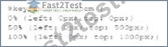
What is being configured?
- A. Processing in the browser
- B. Rendering to the canvas
- C. Processing on a server
正解:A
解説:
The given CSS configures properties that control the processing of animations directly in the browser.
* CSS Animations: CSS animations are processed by the browser's rendering engine. The animations defined by CSS are handled client-side and do not require server-side processing.
* Key Properties:
質問 # 28
Given the following JavaScript code:
What happens when this code is executed?
- A. The object with the id demo is changed to x.
- B. The object with the id innerHTML is changed to x.
- C. The object with the id innerHTML is changed to 6.
- D. The object with the demo is changed to 6.
正解:D
解説:
The provided JavaScript code sets a variable x to 6 and then assigns this value to the innerHTML of the HTML element with the id demo.
var x;
x = 6;
document.getElementById("demo").innerHTML = x;
Explanation:
* Variable Declaration: var x; declares the variable x.
* Variable Assignment: x = 6; assigns the value 6 to the variable x.
* DOM Manipulation: document.getElementById("demo").innerHTML = x; finds the element with id demo and sets its innerHTML to the value of x, which is 6.
Outcome:
* The content of the HTML element with the id demo will be changed to 6.
References:
* MDN Web Docs on getElementById
* W3C JavaScript DOM Manipulation
質問 # 29
Which element relies on the type attribute to specify acceptable values during form entry?
- A. <input>
- B. <Select>
- C. <Button>
- D. <Option>
正解:A
解説:
The <input> element relies on the type attribute to specify acceptable values during form entry. Different input types include text, email, number, password, etc.
* Input Types: The type attribute determines the kind of input control and the acceptable values for that control.
* Usage Example:
<input type="email" placeholder="Enter your email">
<input type="number" min="1" max="10">
These input elements specify acceptable values for email and number inputs respectively.
References:
* MDN Web Docs on <input>
* W3C HTML Specification on Input Types
質問 # 30
What is an advantage that a mobile has over a mobile app?
- A. It has full control of the user interface
- B. It is automatically available to all users
- C. It is automatically awe to access all device capabilities
- D. It is fully functional offline.
正解:B
解説:
A mobile website has the advantage of being automatically available to all users without the need for installation. Users can access it through their web browsers on any device with internet connectivity.
* Accessibility: Mobile websites can be accessed by simply entering a URL in a web browser. There is no need to visit an app store and install an application.
* Cross-Platform Compatibility: Mobile websites are designed to work across various devices and platforms, ensuring a broader reach.
* Automatic Updates: Updates to mobile websites are immediately available to users without requiring them to download and install new versions.
References:
* MDN Web Docs on Responsive Web Design
* W3C Mobile Web Application Best Practices
質問 # 31
What is a characteristic of JavaScript code?
- A. It must be compiled lo work.
- B. It implements across browsers.
- C. It runs inside a web browser
- D. It remains hidden from the user.
正解:C
解説:
JavaScript is a scripting language primarily used for creating and controlling dynamic website content. Here are some characteristics:
* Runs Inside a Web Browser: JavaScript code is executed in the web browser, making it possible to create interactive and dynamic web pages.
* Cross-Browser Compatibility: JavaScript is designed to be compatible across different web browsers.
* Interpreted Language: JavaScript is interpreted, meaning it does not need to be compiled before execution.
* Accessible to Users: JavaScript code is not hidden from the user; it can be viewed in the browser's developer tools.
References:
* MDN Web Docs on JavaScript
* W3C JavaScript Introduction
質問 # 32
Which attribute displays help text in an input field without specifying an actual value for the input?
- A. name
- B. Placeholder
- C. Default
- D. For
正解:B
解説:
The placeholder attribute in an <input> element displays help text in the input field without specifying an actual value for the input. This text disappears when the user starts typing.
* Placeholder Attribute: This attribute provides a hint to the user about what type of information is expected in the field.
* Usage Example:
<input type="text" placeholder="Enter your name">
The input field will show "Enter your name" as help text.
References:
* MDN Web Docs on placeholder
* W3C HTML Specification on Input Placeholder
質問 # 33
A file named application, Appchache contains the following content:
Which attribute should a developer set to application. Appchache so the four files will be cached?
- A. The src attribute of the <script> element
- B. The srcset attribute of the <source> element
- C. The manifest attribute of the <html> element
- D. The href attribute of the <Link> element
正解:C
解説:
To specify a cache manifest file for an HTML document, the manifest attribute must be set in the <html> element. This attribute tells the browser to cache the files listed in the manifest for offline use.
* Cache Manifest:
* Purpose: Specifies resources that should be cached by the browser.
* Attribute: manifest is used in the <html> tag to link the cache manifest file.
* Example:
* Given the manifest file application.appcache:
CACHE MANIFEST
CACHE:
default.html
stylesheet.css
functions.js
logo.jpg
* HTML with the manifest attribute:
<html manifest="application.appcache">
</html>
* References:
* MDN Web Docs - Offline Web applications
* W3C HTML5 Specification - manifest attribute
質問 # 34
Given the following code:
What is occurring?
- A. In-line CSS is styling the <h1> tag.
- B. An event handler is tracking keyboard strokes.
- C. JavaScript is using the DOM to make a style change.
正解:C
解説:
The given code snippet demonstrates how JavaScript can manipulate the DOM to change the style of an element.
* Code Analysis:
* Given the HTML:
<h1 id="id1">Blog Title</h1>
<button type="button" onclick="document.getElementById('id1').style.color = 'red'">Click Here</button>
* When the button is clicked, the JavaScript code within the onclick attribute changes the color of the h1 element to red.
* Explanation:
* Option A: An event handler tracking keyboard strokes is incorrect because the event handler is tracking a mouse click, not keyboard strokes.
* Option B: JavaScript is using the DOM to make a style change is correct because the onclick attribute contains JavaScript code that modifies the style of the h1 element.
* Option C: In-line CSS is styling the <h1> tag is incorrect because the style change is done via JavaScript, not inline CSS.
* References:
* MDN Web Docs - Document.getElementById()
* W3Schools - JavaScript HTML DOM
質問 # 35
Which code segment contains a conditional expression?
- A.

- B.

- C.

- D.

正解:C
解説:
A conditional expression in JavaScript is an expression that evaluates to a boolean value and controls the execution flow based on its result. The conditional (ternary) operator ? : is used for conditional expressions.
* Example Analysis:
* Option A:
var result = dataCount;
* This is a simple assignment, not a conditional expression.
* Option B:
var result = count++ > 10;
* This is a comparison but not a complete conditional expression.
* Option C:
var result = dataCount++ * 1000 == 3000000;
* This is an arithmetic operation followed by a comparison but not a complete conditional expression.
* Option D:
javascript
Copy code
var result = count >= 10 ? "Done" : getResult();
* This is a conditional (ternary) expression. If count is greater than or equal to 10, result will be "Done", otherwise, it will call getResult().
* References:
* MDN Web Docs - Conditional (ternary) operator
* W3Schools - JavaScript Conditions
質問 # 36
Which 3D transform affects the distance between the z-plane and the user?
- A.

- B.

- C.

- D.

正解:B
解説:
The perspective(n) method in CSS is used to affect the distance between the z-plane and the user, effectively changing the perspective depth of a 3D transformed element.
* perspective(n) Method: The perspective function defines how far the element is from the user. It affects the appearance of the 3D transformed element, giving it a sense of depth.
* Usage Example:
container {
perspective: 1000px;
}
In this example, the perspective is set to 1000 pixels, which defines the distance between the z-plane and the user.
* Properties:
* n: This represents the perspective distance. The lower the value, the more pronounced the perspective effect.
References:
* MDN Web Docs on perspective
* W3C CSS Transforms Module Level 1
質問 # 37
A web page has a section that contains an <article> element. The element is always 10 pixels to the right of its position.
Which type of layout positioning should the <article> element use?
- A. Static
- B. Absolute
- C. Fixed
- D. Relative
正解:D
解説:
Relative positioning in CSS positions an element relative to its normal position. Using position: relative; allows you to adjust the element's position with the top, right, bottom, or left properties.
* CSS Relative Positioning:
* Syntax:
article {
position: relative;
left: 10px;
}
* Description: Moves the element 10 pixels to the right from its normal position.
* Example:
* Given HTML:
<article>Content</article>
* Given CSS:
article {
position: relative;
left: 10px;
}
* Explanation: The <article> element will be positioned 10 pixels to the right of where it would normally appear.
* References:
* MDN Web Docs - position
* W3C CSS Positioned Layout Module Level 3
質問 # 38
Which attribute is related to moving the mouse pointer of an element?
- A. Onmouseover
- B. onmouseenter
- C. Onmouseup
- D. Onmouseout
正解:A
解説:
The onmouseover attribute in HTML and JavaScript is used to execute a script when the mouse pointer is moved over an element.
* onmouseover Attribute: This event occurs when the mouse pointer is moved onto an element. It is commonly used to change styles or content of the element when the user interacts with it by hovering.
* Usage Example:
<p onmouseover="this.style.color='red'">Hover over this text to change its color to red.</p> In this example, the text color changes to red when the mouse pointer is moved over the paragraph.
References:
* MDN Web Docs on onmouseover
* W3C HTML Specification on Events
質問 # 39
Which code segment creates a slider field that accepts a numeric value ranging from 1 through 10?
- A.

- B.

- C.

- D.

正解:B
解説:
To create a slider field that accepts a numeric value ranging from 1 through 10, the input element with type=" range" should be used. The min and max attributes define the range of acceptable values.
* HTML Input Type range:
* Purpose: The range type is used for input fields that should contain a value from a specified range.
* Attributes:
* type="range": Specifies that the input field should be a slider.
* min="1": Sets the minimum acceptable value.
* max="10": Sets the maximum acceptable value.
* Example:
* Given the HTML:
<input type="range" name="sat-level" min="1" max="10">
* Options Analysis:
* Option A:
<input type="number" name="sat-level" max="10">
* This creates a numeric input field, not a slider.
* Option B:
<input type="range" name="sat-level" min="1" max="10">
* This is the correct option that creates a slider field with the specified range.
* Option C:
<input type="number" name="sat-level" min="1" max="10">
* This creates a numeric input field, not a slider.
* Option D:
<input type="range" name="sat-level" max="10">
* This creates a slider but lacks the min attribute, so it doesn't fully meet the requirement.
* References:
* MDN Web Docs - <input type="range">
* W3Schools - HTML Input Range
By using the correct attributes, the slider field will allow users to select a value between 1 and 10.
質問 # 40
Which layout design is easiest to manage on a variety of devices?
- A. Grid
- B. Border
- C. Flow
- D. Table
正解:A
解説:
A grid layout is easiest to manage across a variety of devices due to its flexibility and ability to create responsive designs that adapt to different screen sizes.
* Grid Layout:
* Responsive Design: Grid layouts can be easily adjusted using media queries to provide a consistent user experience across devices.
* CSS Grid Example:
container {
display: grid;
grid-template-columns: repeat(auto-fill, minmax(200px, 1fr));
}
* Other Options:
* A. Flow: Often used for text, not layout.
* B. Table: Outdated and not responsive.
* D. Border: Not commonly used for complex layouts.
* References:
* MDN Web Docs - CSS Grid Layout
* W3Schools - CSS Grid Layout
質問 # 41
Which markup ensures that the data entered are either a five-digit zip code or an empty string?
- A. <input type=''number'' value=''s''
- B. <input pattern=/d(5)''>
- C. Input class ='' (0-9) (5)''>
- D. Input required min=''s'' max=''s''
正解:B
解説:
The pattern attribute in the <input> element is used to define a regular expression that the input value must match for it to be valid. The pattern \d{5} ensures that the data entered is either a five-digit zip code or an empty string (if the required attribute is not used).
* Pattern Explanation:
* \d{5}: Matches exactly five digits.
* This ensures that only a five-digit number or an empty string (if not required) is valid.
* Usage Example:
<input type="text" pattern="\d{5}" placeholder="Enter a 5-digit zip code"> This ensures that the input matches a five-digit zip code.
References:
* MDN Web Docs on pattern
* Regular Expressions Documentation
質問 # 42
A web page has the following CSS code:
Which selector should a developer use to invoke the CSS?
- A. Style
- B. Attribute
- C. class
- D. id
正解:D
解説:
To invoke the CSS provided, an ID selector is used. In CSS, the ID selector is used to style the element with the specific id attribute.
* CSS ID Selector: The syntax for the ID selector is #id, where id is the id attribute value of the HTML element.
* Usage Example:
#black {
color: black;
}
This CSS rule will apply the color: black; style to the element with id="black".
* Example in HTML:
<div id="black">This text will be black.</div>
References:
* MDN Web Docs on ID Selectors
* W3C CSS Specification on Selectors
質問 # 43
Which characters are used to enclose multiple statement in a function?
- A. Curly braces
- B. Spaces
- C. Parentheses
- D. Semicotons
正解:A
解説:
In JavaScript, curly braces {} are used to enclose multiple statements in a function, defining the block of code to be executed.
* Curly Braces: Curly braces {} are used to group multiple statements into a single block. This is necessary for defining the body of a function, loops, conditional statements, and other control structures.
* Usage Example:
function greet(name) {
let greeting = "Hello, " + name;
console.log(greeting);
}
In this example, the curly braces enclose the statements that form the body of the greet function.
References:
* MDN Web Docs on Functions
* ECMAScript Language Specification
質問 # 44
A javaScript programmer defines the following function:
What is the name of the function?
- A. Return
- B. square
- C. Number
- D. Function
正解:B
解説:
In JavaScript, the name of a function is defined after the function keyword and before the parentheses that enclose its parameters.
* Function Name: The function name is the identifier used to call the function. It is defined immediately after the function keyword.
* Usage Example:
function square(number) {
return number * number;
}
In this example, the name of the function is square.
References:
* MDN Web Docs on Functions
* ECMAScript Language Specification
質問 # 45
Given the following code: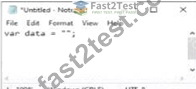
What is the value of the variable data when the code runs?
- A. An empty string
- B. Undefined
- C. Null
- D. A single-character string
正解:A
解説:
In JavaScript, assigning an empty pair of quotes to a variable creates an empty string.
* Variable Assignment:
* Given the code:
var data = "";
* The variable data is assigned an empty string.
* Explanation:
* Option A: Null is incorrect because the variable is assigned an empty string, not null.
* Option B: A single-character string is incorrect because the string is empty.
* Option C: Undefined is incorrect because the variable is assigned a value, even though it is an empty string.
* Option D: An empty string is correct because "" represents an empty string.
* References:
* MDN Web Docs - String
* W3Schools - JavaScript Strings
質問 # 46
What represents the value of the pattern attribute of an input element in an HTML
- A. A style sheet
- B. A SQL statement
- C. A JavaScript function
- D. A regular expression
正解:D
解説:
The value of the pattern attribute in an input element is a regular expression. This regular expression is used to define what constitutes a valid value for the input.
* Regular Expressions: Regular expressions (regex) are sequences of characters that define search patterns. They are commonly used for string matching and validation.
* Usage Example:
<input type="text" pattern="\d{5}" placeholder="Enter a 5-digit number"> Here, the pattern attribute value is a regular expression that validates a five-digit number.
References:
* MDN Web Docs on pattern
* Regular Expressions Documentation
質問 # 47
Given the following code:
What does the #item token do?
- A. It locates an HTML5 element by its ID
- B. It defines a JavaScript function with one parameter.
- C. It specifies a CSS3 property.
- D. It creates an XML element.
正解:A
解説:
The #item token in CSS is used to select an HTML element by its ID attribute.
* CSS ID Selector:
* Syntax: The ID selector is prefixed with a hash symbol (#) followed by the ID value of the HTML element.
* Example: If the HTML element has an attribute id="item", it can be selected and styled in CSS as:
width: 300px;
}
* Functionality:
* Selects an Element: The ID selector targets the specific HTML element with the matching id attribute.
* Specificity: ID selectors have high specificity, meaning they will override styles from type selectors and
質問 # 48
Which tag is required when importing the jQuery library?
- A. Script
- B. Section
- C. meta
- D. Body
正解:A
解説:
The <script> tag is required when importing the jQuery library into an HTML document.
* Including jQuery:
* Purpose: The <script> tag is used to embed or reference executable code (JavaScript).
* Example:
<script src="https://code.jquery.com/jquery-3.6.0.min.js"></script>
* Explanation:
* The <script> tag should be placed in the <head> or at the end of the <body> to ensure that the library is loaded before the scripts that depend on it.
* References:
* jQuery Getting Started
* MDN Web Docs - <script>
質問 # 49
Which element attaches an external CSS document to a web page?
- A. <style>
- B. <Script>
- C. <Link>
- D. <Meta>
正解:C
解説:
To attach an external CSS document to a web page, the <link> element is used within the <head> section of the HTML document.
* <link> Element:
* Purpose: Links external resources, such as stylesheets, to the HTML document.
* Attributes:
* rel="stylesheet": Specifies the relationship between the current document and the linked resource.
* href="path/to/stylesheet.css": Specifies the URL of the external stylesheet.
* Example:
<head>
<link rel="stylesheet" href="styles.css">
</head>
* Other Options:
* <style>: Used to embed internal CSS directly within the HTML document, not for linking external CSS.
* <script>: Used to embed or link to JavaScript files.
* <meta>: Provides metadata about the HTML document, not for linking stylesheets.
* References:
* W3C HTML5 Specification - The link element
* MDN Web Docs - <link>
By using the <link> element correctly, you can ensure that your web page is styled with external CSS, maintaining a separation of concerns and making your HTML more manageable.
質問 # 50
What is the purpose of cascading style sheets (CSSs)?
- A. Providing functionality that was previously provided by plug-ins
- B. Structuring and describing web page content
- C. Changing the content of a web page dynamically
- D. Setting rules to define how page content looks when rendered
正解:D
解説:
Cascading Style Sheets (CSS) are used to control the presentation of web pages, including aspects such as layout, colors, fonts, and other visual styles. They are a cornerstone technology of the World Wide Web, along with HTML and JavaScript. Here's a detailed breakdown:
* Purpose of CSS: CSS is designed to enable the separation of document content (written in HTML or a similar markup language) from document presentation, including elements such as the layout, colors, and fonts. This separation can improve content accessibility, provide more flexibility and control in the specification of presentation characteristics, enable multiple web pages to share formatting, and reduce complexity and repetition in the structural content.
* Setting Visual Rules: CSS allows developers to define rules that specify how different elements of a web page should be displayed. For example, CSS rules can change text color, font size, spacing between elements, and even the overall layout of the web page. These rules are applied by the browser to render the web page according to the defined styles.
* Cascading Nature: The term "cascading" in CSS refers to the process of combining multiple style sheets and resolving conflicts between different CSS rules. This allows developers to use different sources of style information, which can be combined in a hierarchical manner. For instance, a browser style sheet, an external style sheet, and inline styles can all contribute to the final rendering of a web page.
* Benefits of CSS:
* Consistency: By using CSS, developers can ensure a consistent look and feel across multiple web pages.
* Maintainability: CSS makes it easier to update the visual presentation of a web page without altering the HTML structure. This is particularly useful for maintaining large websites.
* Reusability: CSS rules can be reused across multiple pages, reducing redundancy and making it easier to implement changes globally.
* Examples of CSS:
css
Copy code
body {
background-color: lightblue;
}
h1 {
color: navy;
margin-left: 20px;
}
In this example, the body element is given a light blue background color, and the h1 element is styled with a navy color and a left margin of 20 pixels.
References:
* MDN Web Docs on CSS
* W3C CSS Specifications
質問 # 51
......
無料Courses and Certificates Web-Development-Applications試験問題:https://jp.fast2test.com/Web-Development-Applications-premium-file.html
Web-Development-Applications問題集でCourses and Certificates必ず合格できる練習問題集:https://drive.google.com/open?id=1aGVIllusgAKfRtj-L6YD_l2JwslP0aQE