

[2025年05月]更新のWeb-Development-Applications試験問題集、無料サンプル365日更新
まもなく無料セール終了!リアルWeb-Development-ApplicationsのPDF解答使おう
質問 # 35
Which markup ensures that the data entered are either a five-digit zip code or an empty string?
- A. Input class ='' (0-9) (5)''>
- B. <input type=''number'' value=''s''
- C. <input pattern=/d(5)''>
- D. Input required min=''s'' max=''s''
正解:C
解説:
The pattern attribute in the <input> element is used to define a regular expression that the input value must match for it to be valid. The pattern \d{5} ensures that the data entered is either a five-digit zip code or an empty string (if the required attribute is not used).
* Pattern Explanation:
* \d{5}: Matches exactly five digits.
* This ensures that only a five-digit number or an empty string (if not required) is valid.
* Usage Example:
<input type="text" pattern="\d{5}" placeholder="Enter a 5-digit zip code"> This ensures that the input matches a five-digit zip code.
References:
* MDN Web Docs on pattern
* Regular Expressions Documentation
質問 # 36
Where can users items using the HTML
- A. From a web page to another web page
- B. From a user's computer to another computer
- C. From a user's computer to a web page
- D. From a web page to a user's computer
正解:C
解説:
Using HTML, users can upload files from their computer to a web page using the <input> element with the type="file" attribute.
* File Upload Input: The <input type="file"> element is used in forms to allow users to select files from their local file system to be uploaded to a server.
* Usage Example:
The <canvas> element in HTML5 is used to render images and graphics dynamically through JavaScript. It is a powerful feature for creating graphics, game visuals, data visualizations, and other graphical content directly in the browser.
* Canvas Element: The <canvas> element is an HTML tag that, with the help of JavaScript, can be used to draw and manipulate graphics on the fly.
* Usage Example:
html
Copy code
<canvas id="myCanvas" width="200" height="100"></canvas>
<script>
var canvas = document.getElementById("myCanvas");
var ctx = canvas.getContext("2d");
ctx.fillStyle = "#FF0000";
ctx.fillRect(0, 0, 200, 100);
</script>
In this example, a red rectangle is drawn on a canvas element.
References:
* MDN Web Docs on <canvas>
* W3C HTML Canvas 2D Context Specification
<form action="/upload" method="post" enctype="multipart/form-data">
<input type="file" name="fileToUpload" id="fileToUpload">
<input type="submit" value="Upload File" name="submit">
</form>
In this example, users can choose a file from their computer and upload it to the specified server endpoint.
References:
* MDN Web Docs on <input type="file">
* W3C HTML Specification on File Upload
質問 # 37
Which element attaches an external CSS document to a web page?
- A. <Meta>
- B. <Link>
- C. <Script>
- D. <style>
正解:B
解説:
To attach an external CSS document to a web page, the <link> element is used within the <head> section of the HTML document.
* <link> Element:
* Purpose: Links external resources, such as stylesheets, to the HTML document.
* Attributes:
* rel="stylesheet": Specifies the relationship between the current document and the linked resource.
* href="path/to/stylesheet.css": Specifies the URL of the external stylesheet.
* Example:
<head>
<link rel="stylesheet" href="styles.css">
</head>
* Other Options:
* <style>: Used to embed internal CSS directly within the HTML document, not for linking external CSS.
* <script>: Used to embed or link to JavaScript files.
* <meta>: Provides metadata about the HTML document, not for linking stylesheets.
* References:
* W3C HTML5 Specification - The link element
* MDN Web Docs - <link>
By using the <link> element correctly, you can ensure that your web page is styled with external CSS, maintaining a separation of concerns and making your HTML more manageable.
質問 # 38
Which element relies on the type attribute to specify acceptable values during form entry?
- A. <Option>
- B. <Button>
- C. <input>
- D. <Select>
正解:C
解説:
The <input> element relies on the type attribute to specify acceptable values during form entry. Different input types include text, email, number, password, etc.
* Input Types: The type attribute determines the kind of input control and the acceptable values for that control.
* Usage Example:
<input type="email" placeholder="Enter your email">
<input type="number" min="1" max="10">
These input elements specify acceptable values for email and number inputs respectively.
References:
* MDN Web Docs on <input>
* W3C HTML Specification on Input Types
質問 # 39
Which attribute displays help text in an input field without specifying an actual value for the input?
- A. Default
- B. For
- C. name
- D. Placeholder
正解:D
解説:
The placeholder attribute in an <input> element displays help text in the input field without specifying an actual value for the input. This text disappears when the user starts typing.
* Placeholder Attribute: This attribute provides a hint to the user about what type of information is expected in the field.
* Usage Example:
<input type="text" placeholder="Enter your name">
The input field will show "Enter your name" as help text.
References:
* MDN Web Docs on placeholder
* W3C HTML Specification on Input Placeholder
質問 # 40
Which attribute is related to moving the mouse pointer of an element?
- A. Onmouseover
- B. Onmouseout
- C. onmouseenter
- D. Onmouseup
正解:A
解説:
The onmouseover attribute in HTML and JavaScript is used to execute a script when the mouse pointer is moved over an element.
* onmouseover Attribute: This event occurs when the mouse pointer is moved onto an element. It is commonly used to change styles or content of the element when the user interacts with it by hovering.
* Usage Example:
<p onmouseover="this.style.color='red'">Hover over this text to change its color to red.</p> In this example, the text color changes to red when the mouse pointer is moved over the paragraph.
References:
* MDN Web Docs on onmouseover
* W3C HTML Specification on Events
質問 # 41
Given the following javaScript code:
Which code segment calls the method?
- A. Window,sayhello();
- B. Obj,sayHello;
正解:B
解説:
To call the sayHello method in the given JavaScript object, you need to use the object's name followed by the method name with parentheses.
* Correct Method Call:
* Given the object definition:
var obj = {
sayHello: function() {
alert("Hello");
}
};
* To call the method sayHello on the object obj:
obj.sayHello();
* Explanation:
* Option A: Obj.sayHello; is incorrect syntax. The correct syntax is obj.sayHello();.
* Option B: Window.sayHello(); is incorrect because the method is defined in the obj object, not the window object.
* References:
* MDN Web Docs - Functions
* W3Schools - JavaScript Objects
質問 # 42
What is a characteristic of JavaScript code?
- A. It implements across browsers.
- B. It must be compiled lo work.
- C. It runs inside a web browser
- D. It remains hidden from the user.
正解:C
解説:
JavaScript is a scripting language primarily used for creating and controlling dynamic website content. Here are some characteristics:
* Runs Inside a Web Browser: JavaScript code is executed in the web browser, making it possible to create interactive and dynamic web pages.
* Cross-Browser Compatibility: JavaScript is designed to be compatible across different web browsers.
* Interpreted Language: JavaScript is interpreted, meaning it does not need to be compiled before execution.
* Accessible to Users: JavaScript code is not hidden from the user; it can be viewed in the browser's developer tools.
References:
* MDN Web Docs on JavaScript
* W3C JavaScript Introduction
質問 # 43
Given the following CSS statement: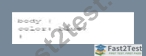
Which code segment changes the font color when the viewport is 800 pixels wide or wider?
- A.
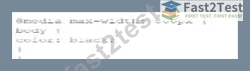
- B.
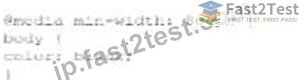
- C.

- D.

正解:D
解説:
To change the font color when the viewport is 800 pixels wide or wider, a media query with min-width:
800px is used. This ensures that the styles inside the media query are applied only when the viewport width is at least 800 pixels.
* CSS Media Queries:
* Syntax for Media Query:
@media screen and (min-width: 800px) {
body {
color: black;
}
}
* Explanation: The min-width: 800px condition ensures that the styles are applied when the viewport is 800 pixels or wider.
* Example Analysis:
* Option A:
@media screen and (min-width: 800px) {
body {
color: black;
}
}
* Correct. This applies the color: black; style to the body when the viewport is 800 pixels or wider.
* Option B:
@media min-width: 800px {
body {
color: black;
}
}
* Incorrect. Missing screen and which is required for a proper media query targeting screens.
* Option C:
@media screen and (max-width: 800px) {
body {
color: black;
}
}
* Incorrect. This applies the style when the viewport is 800 pixels or narrower.
* Option D:
@media max-width: 800px {
body {
color: black;
}
}
* Incorrect. This applies the style when the viewport is 800 pixels or narrower.
* References:
* MDN Web Docs - Using media queries
* W3Schools - CSS Media Queries
The correct use of media queries ensures that the specified styles are applied only under the desired conditions, providing a responsive design.
質問 # 44
A web developer need to ensure that a message appears if the user's browser does not support the audio files on a web page.
How should this designer code the audio element?
- A.

- B.

- C.

- D.

正解:B
解説:
To ensure that a message appears if the user's browser does not support the audio files on a web page, the developer should use the <audio> element correctly. The <audio> element supports fallback content, which is displayed if the browser does not support the specified audio formats.
* Correct Usage:
* Fallback Content: Place the message as fallback content inside the <audio> element. Browsers that do not support the audio format will display this message.
* Example:
<audio>
<source src="audio/song.mp3" type="audio/mpeg" />
No mpeg support.
</audio>
* Explanation of Options:
* Option A: Incorrect. The alt attribute is not valid for the <source> element.
* Option B: Incorrect. The alt attribute is not valid for the <audio> element.
* Option C: Incorrect. The alt attribute is used incorrectly in the <audio> element.
* Option D: Correct. The message "No mpeg support." is placed correctly as fallback content inside the <audio> element.
* References:
* W3C HTML5 Specification - The audio element
* MDN Web Docs - <audio>
Using the fallback content inside the <audio> element ensures that users with unsupported browsers receive a meaningful message, improving the overall user experience.
質問 # 45
Given the following CSS code: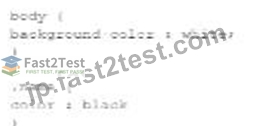
Which portion is the rule?
- A.

- B.

- C.

- D.
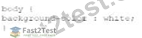
正解:D
解説:
In CSS, a rule is composed of a selector and a declaration block. The rule is the entire part that defines how styles should be applied to elements matching the selector.
* CSS Rule Components:
* Selector: Identifies the HTML elements to be styled (e.g., body, .name, #item).
* Declaration Block: Contains one or more declarations, each consisting of a property and a value, enclosed in curly braces {}.
* Example Analysis:
* Option A:
body {
background-color: white;
}
This is the full rule, consisting of the selector body and the declaration block { background-color: white; }.
* Option B:
background-color: white;
This is just a declaration, not a complete rule.
background-color: white,
This is an incorrect declaration due to the comma, and not a complete rule.
* Option D:
color: black
This is just a declaration, not a complete rule.
* References:
* W3C CSS Syntax and Basic Data Types Module Level 3
* MDN Web Docs - CSS Syntax
質問 # 46
What is the process for JavaScript from validation?
- A. User input is sent to the server after the form is completed tor validation.
- B. User input is sent to the server as fields are completed for validation.
- C. Form fields are validated as me user inputs data after form data is sent to the server.
- D. Form fields are validated after the form is submitted but before form data is sent to the server
正解:D
解説:
JavaScript form validation typically occurs after the form is submitted but before the form data is sent to the server. This allows the client-side script to check the input data and prevent the form from being submitted if the data is invalid.
* Client-Side Validation:
* Before Form Submission: JavaScript validates the form fields after the user attempts to submit the form.
* Prevent Default Submission: If the validation fails, JavaScript can prevent the form from being submitted and display appropriate error messages.
* Usage Example:
document.getElementById("myForm").addEventListener("submit", function(event) { var isValid = true;
// Perform validation checks
if (!isValid) {
event.preventDefault(); // Prevent form submission
alert("Please correct the errors.");
}
});
This example prevents form submission if the validation fails.
References:
* MDN Web Docs on Form Validation
* W3C HTML Specification on Form Submission
質問 # 47
What is the default behavior of overlay elements?
- A. Last element listed appears on top
- B. First element listed is transparent
- C. First element listed is invisible
- D. Last element listed appears on bottom
正解:A
解説:
In CSS, when elements overlap, the default behavior is that the last element listed in the HTML document appears on top.
* Stacking Context:
* Default Behavior: Elements are stacked in the order they appear in the HTML. The last element in the document tree is rendered on top.
* z-index: You can control stacking order using the z-index property, but without it, the default order applies.
* Example:
* Given HTML:
<div style="position: absolute; width: 100px; height: 100px; background-color: red;"></div>
<div style="position: absolute; width: 100px; height: 100px; background-color: blue;"></div>
* The blue div will be on top of the red div because it appears later in the HTML document.
* References:
* MDN Web Docs - Stacking context
* W3C CSS Positioned Layout Module Level 3
By understanding these fundamental CSS concepts, developers can create more effective and visually appealing web layouts.
質問 # 48
What is the effect of using the in-line validation process during user input?
- A. Larger number of errors created
- B. More successful form completion rates
- C. Slower rate of form completion
- D. Increased computation on the server
正解:B
解説:
Inline validation during user input provides immediate feedback to the user about the correctness of their input. This real-time feedback helps users correct mistakes as they go, leading to higher rates of successful form completion.
* Inline Validation: Inline validation refers to checking the validity of input data as it is entered, rather than waiting until the form is submitted. This helps users to receive immediate feedback and correct errors on the spot.
* Benefits:
* Immediate Feedback: Users can correct mistakes immediately, which helps reduce frustration and confusion.
* Increased Success Rates: By providing real-time feedback, users are more likely to complete the form correctly, resulting in higher completion rates.
* User Experience: Improves the overall user experience by making the process more interactive and user-friendly.
References:
* Nielsen Norman Group on Inline Validation
* MDN Web Docs on Constraint Validation
質問 # 49
Given the following code:
What is occurring?
- A. In-line CSS is styling the <h1> tag.
- B. JavaScript is using the DOM to make a style change.
- C. An event handler is tracking keyboard strokes.
正解:B
解説:
The given code snippet demonstrates how JavaScript can manipulate the DOM to change the style of an element.
* Code Analysis:
* Given the HTML:
<h1 id="id1">Blog Title</h1>
<button type="button" onclick="document.getElementById('id1').style.color = 'red'">Click Here</button>
* When the button is clicked, the JavaScript code within the onclick attribute changes the color of the h1 element to red.
* Explanation:
* Option A: An event handler tracking keyboard strokes is incorrect because the event handler is tracking a mouse click, not keyboard strokes.
* Option B: JavaScript is using the DOM to make a style change is correct because the onclick attribute contains JavaScript code that modifies the style of the h1 element.
* Option C: In-line CSS is styling the <h1> tag is incorrect because the style change is done via JavaScript, not inline CSS.
* References:
* MDN Web Docs - Document.getElementById()
* W3Schools - JavaScript HTML DOM
質問 # 50
Given the following code:
What does the #item token do?
- A. It creates an XML element.
- B. It locates an HTML5 element by its ID
- C. It defines a JavaScript function with one parameter.
- D. It specifies a CSS3 property.
正解:B
解説:
The #item token in CSS is used to select an HTML element by its ID attribute.
* CSS ID Selector:
* Syntax: The ID selector is prefixed with a hash symbol (#) followed by the ID value of the HTML element.
* Example: If the HTML element has an attribute id="item", it can be selected and styled in CSS as:
width: 300px;
}
* Functionality:
* Selects an Element: The ID selector targets the specific HTML element with the matching id attribute.
* Specificity: ID selectors have high specificity, meaning they will override styles from type selectors and
質問 # 51
Given the following CSS: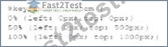
What is being configured?
- A. Processing on a server
- B. Processing in the browser
- C. Rendering to the canvas
正解:B
解説:
The given CSS configures properties that control the processing of animations directly in the browser.
* CSS Animations: CSS animations are processed by the browser's rendering engine. The animations defined by CSS are handled client-side and do not require server-side processing.
* Key Properties:
質問 # 52
Which structure tag should a developer use to place contact information on a web page?
- A. <Nav>
- B. <Main>
- C. <Aside>
- D. <footer>
正解:D
解説:
The <footer> tag is used to define a footer for a document or a section. A footer typically contains information about the author of the document, contact information, copyright details, and links to terms of use, privacy policy, etc. It is a semantic element in HTML5, which means it clearly describes its meaning to both the browser and the developer.
* Purpose of <footer>: The <footer> element represents a footer for its nearest sectioning content or sectioning root element. It typically contains information like:
* Contact information
* Copyright information
* Links to related documents
* Information about the author
* Usage Example:
<footer>
<p>Contact us at: [email protected]</p>
<p>© 2024 Example Company</p>
</footer>
In this example, the <footer> tag encloses contact information and copyright details.
* Semantic Importance: Using semantic elements like <footer> enhances the accessibility of the document and provides better context for search engines and other user devices.
References:
* MDN Web Docs on <footer>
* W3C HTML5 Specification on <footer>
質問 # 53
A web page has the following CSS code:
Which selector should a developer use to invoke the CSS?
- A. id
- B. class
- C. Attribute
- D. Style
正解:A
解説:
To invoke the CSS provided, an ID selector is used. In CSS, the ID selector is used to style the element with the specific id attribute.
* CSS ID Selector: The syntax for the ID selector is #id, where id is the id attribute value of the HTML element.
* Usage Example:
#black {
color: black;
}
This CSS rule will apply the color: black; style to the element with id="black".
* Example in HTML:
<div id="black">This text will be black.</div>
References:
* MDN Web Docs on ID Selectors
* W3C CSS Specification on Selectors
質問 # 54
Which technique should a developer use for text-based hyperlink on mobile web page?
- A. Deploying graphical links
- B. Padding the clickable area around the link
- C. Keeping links uniform
- D. Using dynamic page elements neat the link
正解:B
解説:
When designing text-based hyperlinks for mobile web pages, it is essential to ensure that the links are easily tappable. Adding padding around the clickable area increases the touch target size, making it easier for users to interact with the link on a mobile device.
* Techniques for Mobile-Friendly Links:
* Padding the Clickable Area: By adding padding, you increase the touchable area around the link, which helps prevent user frustration due to missed taps.
* CSS Example:
a {
padding: 10px;
display: inline-block;
}
* Other Options:
* B. Keeping links uniform: This refers to making all links look the same, which is good for consistency but doesn't specifically address the issue of touch targets.
* C. Deploying graphical links: While graphical links can be effective, they do not necessarily improve touch target size for text-based hyperlinks.
* D. Using dynamic page elements near the link: This can lead to a cluttered interface and does not address the touch target issue directly.
* References:
* MDN Web Docs - Touch targets
* Google Developers - Mobile Web Development
質問 # 55
......
Web-Development-Applications問題集あなたを合格させる認証試験:https://jp.fast2test.com/Web-Development-Applications-premium-file.html
最新でリアルなWGU Web-Development-Applications試験問題集解答:https://drive.google.com/open?id=1WduoDCg8fwsCj4DzLwhqqTNXnShaajqf