

2024年12月実際に出るWeb-Development-Applications試験問題集には正確で更新された問題
Web-Development-Applications試験問題集でPDF問題とテストエンジン
質問 # 18
What is an advantage that a mobile has over a mobile app?
- A. It has full control of the user interface
- B. It is automatically available to all users
- C. It is automatically awe to access all device capabilities
- D. It is fully functional offline.
正解:B
解説:
A mobile website has the advantage of being automatically available to all users without the need for installation. Users can access it through their web browsers on any device with internet connectivity.
* Accessibility: Mobile websites can be accessed by simply entering a URL in a web browser. There is no need to visit an app store and install an application.
* Cross-Platform Compatibility: Mobile websites are designed to work across various devices and platforms, ensuring a broader reach.
* Automatic Updates: Updates to mobile websites are immediately available to users without requiring them to download and install new versions.
References:
* MDN Web Docs on Responsive Web Design
* W3C Mobile Web Application Best Practices
質問 # 19
Which HTML5 attribute specifies where to send the form data for processing a form is submitted?
- A. Target
- B. Action
- C. Enctype
- D. Method
正解:B
解説:
The action attribute in the <form> element specifies the URL where the form data should be sent for processing when the form is submitted.
* Action Attribute: This attribute defines the endpoint that will handle the submitted form data.
* Usage Example:
<form action="/submit-form" method="post">
<input type="text" name="username">
<input type="submit" value="Submit">
</form>
Here, the form data is sent to the /submit-form URL when submitted.
References:
* MDN Web Docs on <form> action attribute
* W3C HTML Specification on Forms
質問 # 20
Which property or method requires a minimum of two values to apply?
- A. It requires a minimum of one value to apply
- B. It requires a minimum of two values to apply.
- C. It accepts Hex values only
- D. It accepts pixel values only.
正解:B
解説:
This question seems to be about a property or method that requires two values. Without additional context, the most common scenario that fits this description is CSS properties that define sizes or positions with two values. Examples include background-position, margin, padding, etc., where both horizontal and vertical values are needed.
References:
* MDN Web Docs on Background Position
* W3C CSS Backgrounds and Borders Module Level 3
質問 # 21
Which technique should a developer use for text-based hyperlink on mobile web page?
- A. Keeping links uniform
- B. Using dynamic page elements neat the link
- C. Deploying graphical links
- D. Padding the clickable area around the link
正解:D
解説:
When designing text-based hyperlinks for mobile web pages, it is essential to ensure that the links are easily tappable. Adding padding around the clickable area increases the touch target size, making it easier for users to interact with the link on a mobile device.
* Techniques for Mobile-Friendly Links:
* Padding the Clickable Area: By adding padding, you increase the touchable area around the link, which helps prevent user frustration due to missed taps.
* CSS Example:
a {
padding: 10px;
display: inline-block;
}
* Other Options:
* B. Keeping links uniform: This refers to making all links look the same, which is good for consistency but doesn't specifically address the issue of touch targets.
* C. Deploying graphical links: While graphical links can be effective, they do not necessarily improve touch target size for text-based hyperlinks.
* D. Using dynamic page elements near the link: This can lead to a cluttered interface and does not address the touch target issue directly.
* References:
* MDN Web Docs - Touch targets
* Google Developers - Mobile Web Development
質問 # 22
Given the following HTML statement:
And the following style:
Which line of the changes the background color of the <div> tag when the width is between 600 pixels and
900 pixels or more than 1, 100 pixels?
- A.

- B.

- C.

- D.

正解:C
解説:
The given HTML and CSS statements define a class named "example" and use media queries to change the background color of the <div> element based on the screen width. The correct CSS media query to change the background color of the <div> tag when the width is between 600 pixels and 900 pixels or more than 1100 pixels is:Copy code
@media screen and (max-width: 900px) and (min-width: 600px), (min-width: 1100px) { div.example { background: yellow;
}
}
* Understanding Media Queries:
* @media screen: Applies the styles only for screens.
* (max-width: 900px) and (min-width: 600px): Targets screen widths between 600 and 900 pixels.
* , (comma): Acts as an "or" operator in media queries.
* (min-width: 1100px): Targets screen widths greater than or equal to 1100 pixels.
* Option C Explanation:
* This option uses the correct media query syntax to apply the background color change when the screen width is between 600 and 900 pixels or when it is 1100 pixels or more.
References:
* MDN Web Docs on Media Queries
* W3C CSS Media Queries Level 4
The correct CSS media query based on the provided options is:
@media screen and (max-width: 900px) and (min-width: 600px), (min-width: 1100px) { div.example { background: yellow;
}
}
References for Media Queries:
* MDN Web Docs on Using Media Queries
* W3C CSS Media Queries Module Level 4
質問 # 23
What represents the value of the pattern attribute of an input element in an HTML
- A. A style sheet
- B. A regular expression
- C. A JavaScript function
- D. A SQL statement
正解:B
解説:
The value of the pattern attribute in an input element is a regular expression. This regular expression is used to define what constitutes a valid value for the input.
* Regular Expressions: Regular expressions (regex) are sequences of characters that define search patterns. They are commonly used for string matching and validation.
* Usage Example:
<input type="text" pattern="\d{5}" placeholder="Enter a 5-digit number"> Here, the pattern attribute value is a regular expression that validates a five-digit number.
References:
* MDN Web Docs on pattern
* Regular Expressions Documentation
質問 # 24
Given the following code:
What is occurring?
- A. JavaScript is using the DOM to make a style change.
- B. In-line CSS is styling the <h1> tag.
- C. An event handler is tracking keyboard strokes.
正解:A
解説:
The given code snippet demonstrates how JavaScript can manipulate the DOM to change the style of an element.
* Code Analysis:
* Given the HTML:
<h1 id="id1">Blog Title</h1>
<button type="button" onclick="document.getElementById('id1').style.color = 'red'">Click Here</button>
* When the button is clicked, the JavaScript code within the onclick attribute changes the color of the h1 element to red.
* Explanation:
* Option A: An event handler tracking keyboard strokes is incorrect because the event handler is tracking a mouse click, not keyboard strokes.
* Option B: JavaScript is using the DOM to make a style change is correct because the onclick attribute contains JavaScript code that modifies the style of the h1 element.
* Option C: In-line CSS is styling the <h1> tag is incorrect because the style change is done via JavaScript, not inline CSS.
* References:
* MDN Web Docs - Document.getElementById()
* W3Schools - JavaScript HTML DOM
質問 # 25
A web page has a section that contains an <article> element. The element is always 10 pixels to the right of its position.
Which type of layout positioning should the <article> element use?
- A. Static
- B. Absolute
- C. Fixed
- D. Relative
正解:D
解説:
Relative positioning in CSS positions an element relative to its normal position. Using position: relative; allows you to adjust the element's position with the top, right, bottom, or left properties.
* CSS Relative Positioning:
* Syntax:
article {
position: relative;
left: 10px;
}
* Description: Moves the element 10 pixels to the right from its normal position.
* Example:
* Given HTML:
<article>Content</article>
* Given CSS:
article {
position: relative;
left: 10px;
}
* Explanation: The <article> element will be positioned 10 pixels to the right of where it would normally appear.
* References:
* MDN Web Docs - position
* W3C CSS Positioned Layout Module Level 3
質問 # 26
Given the following markup and no style sheet:
Which control does the input element render?
- A. Button
- B. Drop-down
- C. Slider
- D. Text
正解:C
解説:
The type="range" attribute in an <input> element renders a slider control.
* HTML Input Type range:
* Purpose: The range type is used for input fields that should contain a value from a range of numbers.
* Example:
* Given the HTML:
<input id="range" name="range" type="range">
* Explanation:
* This will render as a slider that the user can move to select a value within a range.
* References:
* MDN Web Docs - <input type="range">
* W3Schools - HTML Input Range
質問 # 27
A web page has the following CSS code: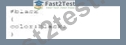
Which selector should a developer use to invoke the CSS?
- A. class
- B. Style
- C. id
- D. Attribute
正解:C
解説:
To invoke the CSS provided, an ID selector is used. In CSS, the ID selector is used to style the element with the specific id attribute.
* CSS ID Selector: The syntax for the ID selector is #id, where id is the id attribute value of the HTML element.
* Usage Example:
#black {
color: black;
}
This CSS rule will apply the color: black; style to the element with id="black".
* Example in HTML:
<div id="black">This text will be black.</div>
References:
* MDN Web Docs on ID Selectors
* W3C CSS Specification on Selectors
質問 # 28
Which characters are used to enclose multiple statement in a function?
- A. Curly braces
- B. Semicotons
- C. Parentheses
- D. Spaces
正解:A
解説:
In JavaScript, curly braces {} are used to enclose multiple statements in a function, defining the block of code to be executed.
* Curly Braces: Curly braces {} are used to group multiple statements into a single block. This is necessary for defining the body of a function, loops, conditional statements, and other control structures.
* Usage Example:
function greet(name) {
let greeting = "Hello, " + name;
console.log(greeting);
}
In this example, the curly braces enclose the statements that form the body of the greet function.
References:
* MDN Web Docs on Functions
* ECMAScript Language Specification
質問 # 29
Which structure tag should a developer use to place contact information on a web page?
- A. <Aside>
- B. <Main>
- C. <Nav>
- D. <footer>
正解:D
解説:
The <footer> tag is used to define a footer for a document or a section. A footer typically contains information about the author of the document, contact information, copyright details, and links to terms of use, privacy policy, etc. It is a semantic element in HTML5, which means it clearly describes its meaning to both the browser and the developer.
* Purpose of <footer>: The <footer> element represents a footer for its nearest sectioning content or sectioning root element. It typically contains information like:
* Contact information
* Copyright information
* Links to related documents
* Information about the author
* Usage Example:
<footer>
<p>Contact us at: [email protected]</p>
<p>© 2024 Example Company</p>
</footer>
In this example, the <footer> tag encloses contact information and copyright details.
* Semantic Importance: Using semantic elements like <footer> enhances the accessibility of the document and provides better context for search engines and other user devices.
References:
* MDN Web Docs on <footer>
* W3C HTML5 Specification on <footer>
質問 # 30
Which method retrieves periods updates about the geographic location of a user:
- A. GetContext
- B. WatchPosition
- C. getCurrentPosition
- D. ClearWatch
正解:B
解説:
The watchPosition method in the Geolocation API is used to get periodic updates about the geographic location of a user.
* watchPosition Method: This method calls the provided callback function with the user's current position as the device's location changes.
* Usage Example:
navigator.geolocation.watchPosition(function(position) {
console.log("Latitude: " + position.coords.latitude + ", Longitude: " + position.coords.longitude);
});
In this example, the watchPosition method continuously logs the user's latitude and longitude to the console as the position changes.
References:
* MDN Web Docs on watchPosition
* W3C Geolocation API Specification
質問 # 31
Give the following HTML code: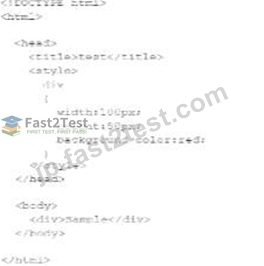
Which CSS property would make the corners of the div rounded?
- A. Border-radius
- B. Border-style
- C. Border-width
- D. Border-collapse
正解:A
解説:
To make the corners of a div element rounded, the CSS property border-radius is used. This property allows you to define how rounded the corners should be by specifying a radius.
* CSS border-radius Property:
* Syntax:
div {
border-radius: 10px;
}
* Description: The value can be in pixels (px), percentages (%), or other units. Higher values create more rounded corners.
* Example:
* Given HTML:
<div>Sample</div>
* Given CSS:
div {
width: 100px;
height: 50px;
background-color: red;
border-radius: 10px;
}
* References:
* MDN Web Docs - border-radius
* W3C CSS Backgrounds and Borders Module Level 3
質問 # 32
Given the following CSS code:
Which type of selector is used?
- A. ID
- B. Element
- C. Class
- D. Group
正解:A
解説:
The given CSS code uses the #name selector, which is an ID selector. The ID selector is used to style an element with a specific id attribute.
* ID Selector: In CSS, the ID selector is used to style the element with the specific id. The syntax for the ID selector is #id, where id is the id attribute value of the HTML element.
* Usage Example:
#name {
text-align: left;
}
This CSS rule will apply the text-align: left; style to the element with id="name".
* ID Selector Characteristics:
* An ID must be unique within a document, meaning it can be used only once per page.
* ID selectors are more specific than class selectors and element selectors.
* Example in HTML:
<div id="name">This is a div with ID "name".</div>
References:
* MDN Web Docs on CSS Selectors
* W3C CSS Specification on Selectors
質問 # 33
What should a developer correct before revalidating after a code validator reports multiple errors in code?
- A. The first reported error
- B. Only CSS errors
- C. The last reported error
- D. Only JavaScript errors
正解:A
解説:
When using a code validator to check your HTML, CSS, or JavaScript code, it's essential to address errors in a systematic manner. The correct approach is to correct the first reported error before revalidating. This method is recommended because often, the first error can cause a cascade of subsequent errors or warnings.
By fixing the first error, you may automatically resolve other errors that were reported later.
* Reasoning:
* Cascading Errors: The first error in the code might lead to multiple subsequent errors. Fixing it can sometimes resolve those cascading errors, reducing the overall number of errors in the next validation.
* Logical Flow: Addressing errors in the order they appear maintains a logical flow and makes debugging more manageable.
* Steps to Follow:
* Step 1: Run the code through the validator.
* Step 2: Identify the first reported error.
* Step 3: Correct the first error.
* Step 4: Revalidate the code to check if the error count has reduced or if new errors appear.
* Step 5: Repeat the process until all errors are resolved.
* References:
* W3C Markup Validation Service
* MDN Web Docs - Debugging HTML
* W3C CSS Validation Service
質問 # 34
What is the used to render images dynamically?
- A. Ogg
- B. MPEG-4
- C. H.264
- D. Canvas
正解:D
解説:
The <canvas> element in HTML5 is used to render images and graphics dynamically through JavaScript. It is a powerful feature for creating graphics, game visuals, data visualizations, and other graphical content directly in the browser.
* Canvas Element: The <canvas> element is an HTML tag that, with the help of JavaScript, can be used to draw and manipulate graphics on the fly.
* Usage Example:
<canvas id="myCanvas" width="200" height="100"></canvas>
<script>
var canvas = document.getElementById("myCanvas");
var ctx = canvas.getContext("2d");
ctx.fillStyle = "#FF0000";
ctx.fillRect(0, 0, 200, 100);
</script>
In this example, a red rectangle is drawn on a canvas element.
References:
* MDN Web Docs on <canvas>
* W3C HTML Canvas 2D Context Specification
質問 # 35
What should a developer increase to create space between a border and content?
- A. Width
- B. Margin
- C. Height
- D. Padding
正解:D
解説:
Padding is the CSS property used to create space between the content of an element and its border. It is an internal spacing within the element.
* CSS Box Model:
* Content: The innermost part, where text and images appear.
* Padding: The space between the content and the border.
* Border: The edge of the element.
* Margin: The space outside the border, creating space between different elements.
* Usage:
* Padding:
div {
padding: 20px;
}
* This code adds 20 pixels of padding on all sides of the content within the div element.
* References:
* MDN Web Docs - Padding
* W3C CSS Box Model
質問 # 36
Where can users items using the HTML
- A. From a web page to another web page
- B. From a web page to a user's computer
- C. From a user's computer to another computer
- D. From a user's computer to a web page
正解:D
解説:
Using HTML, users can upload files from their computer to a web page using the <input> element with the type="file" attribute.
* File Upload Input: The <input type="file"> element is used in forms to allow users to select files from their local file system to be uploaded to a server.
* Usage Example:
The <canvas> element in HTML5 is used to render images and graphics dynamically through JavaScript. It is a powerful feature for creating graphics, game visuals, data visualizations, and other graphical content directly in the browser.
* Canvas Element: The <canvas> element is an HTML tag that, with the help of JavaScript, can be used to draw and manipulate graphics on the fly.
* Usage Example:
html
Copy code
<canvas id="myCanvas" width="200" height="100"></canvas>
<script>
var canvas = document.getElementById("myCanvas");
var ctx = canvas.getContext("2d");
ctx.fillStyle = "#FF0000";
ctx.fillRect(0, 0, 200, 100);
</script>
In this example, a red rectangle is drawn on a canvas element.
References:
* MDN Web Docs on <canvas>
* W3C HTML Canvas 2D Context Specification
<form action="/upload" method="post" enctype="multipart/form-data">
<input type="file" name="fileToUpload" id="fileToUpload">
<input type="submit" value="Upload File" name="submit">
</form>
In this example, users can choose a file from their computer and upload it to the specified server endpoint.
References:
* MDN Web Docs on <input type="file">
* W3C HTML Specification on File Upload
質問 # 37
Which programming paradigm best describes JavaScript?
- A. Event-driven
- B. Object-based
- C. Function-driven
- D. Object-oriented
正解:B
解説:
JavaScript is often described as an object-based language, meaning it is centered around objects. While it supports object-oriented programming (OOP) concepts, it is more accurate to describe it as object-based due to its prototypal inheritance model rather than classical inheritance.
* Object-Based: JavaScript is built around objects and supports the creation and manipulation of objects.
* Object-Oriented Features: JavaScript supports OOP principles like encapsulation, inheritance, and polymorphism, but through prototype chains rather than class-based inheritance.
* Functional and Event-Driven: JavaScript supports functional programming and is often used in an event-driven manner, particularly in the context of web browsers.
References:
* MDN Web Docs on JavaScript Object Model
* W3C JavaScript Overview
質問 # 38
Which HTML tag should a developer use to create a drop-down list?
- A. <Select>
- B. <Section >
- C. <Output>
- D. <Option>
正解:A
解説:
The <select> tag is used in HTML to create a drop-down list. It is used in conjunction with the <option> tags to define the list items within the drop-down menu.
* Purpose of <select>: The <select> element is used to create a control that provides a menu of options.
The user can select one or more options from the list.
* Structure of Drop-down List:
* The <select> element encloses the <option> elements.
* Each <option> element represents an individual item in the drop-down list.
* Usage Example:
<label for="cars">Choose a car:</label>
<select id="cars" name="cars">
<option value="volvo">Volvo</option>
<option value="saab">Saab</option>
<option value="fiat">Fiat</option>
<option value="audi">Audi</option>
</select>
In this example, the <select> tag creates a drop-down list with four options: Volvo, Saab, Fiat, and Audi.
* Attributes of <select>:
* name: Specifies the name of the control, which is submitted with the form data.
* id: Used to associate the <select> element with a label using the <label> tag's for attribute.
* multiple: Allows multiple selections if set.
References:
* MDN Web Docs on <select>
* W3C HTML Specification on Forms
質問 # 39
What is the effect of using the in-line validation process during user input?
- A. Slower rate of form completion
- B. Increased computation on the server
- C. Larger number of errors created
- D. More successful form completion rates
正解:D
解説:
Inline validation during user input provides immediate feedback to the user about the correctness of their input. This real-time feedback helps users correct mistakes as they go, leading to higher rates of successful form completion.
* Inline Validation: Inline validation refers to checking the validity of input data as it is entered, rather than waiting until the form is submitted. This helps users to receive immediate feedback and correct errors on the spot.
* Benefits:
* Immediate Feedback: Users can correct mistakes immediately, which helps reduce frustration and confusion.
* Increased Success Rates: By providing real-time feedback, users are more likely to complete the form correctly, resulting in higher completion rates.
* User Experience: Improves the overall user experience by making the process more interactive and user-friendly.
References:
* Nielsen Norman Group on Inline Validation
* MDN Web Docs on Constraint Validation
質問 # 40
What allows a scripting language to manipulate elements on a web page?
- A. CSS
- B. DOM
- C. XML
- D. HTML
正解:B
解説:
The Document Object Model (DOM) is an API for HTML and XML documents that defines the logical structure of documents and the way a document is accessed and manipulated.
* DOM Explanation:
* The DOM represents the page so that programs can change the document structure, style, and content.
* It provides a way for scripts to update the content, structure, and style of a document while it is being viewed.
* Explanation:
* Option A: CSS is incorrect because it is used for styling web pages.
* Option B: XML is incorrect because it is a markup language, not an API for manipulating web page elements.
* Option C: HTML is incorrect because it is the markup language used to create web pages, not an API for manipulation.
* Option D: DOM is correct because it allows a scripting language to manipulate elements on a web page.
* References:
* MDN Web Docs - DOM
* W3Schools - JavaScript HTML DOM
質問 # 41
What is the default behavior of overlay elements?
- A. Last element listed appears on top
- B. Last element listed appears on bottom
- C. First element listed is transparent
- D. First element listed is invisible
正解:A
解説:
In CSS, when elements overlap, the default behavior is that the last element listed in the HTML document appears on top.
* Stacking Context:
* Default Behavior: Elements are stacked in the order they appear in the HTML. The last element in the document tree is rendered on top.
* z-index: You can control stacking order using the z-index property, but without it, the default order applies.
* Example:
* Given HTML:
<div style="position: absolute; width: 100px; height: 100px; background-color: red;"></div>
<div style="position: absolute; width: 100px; height: 100px; background-color: blue;"></div>
* The blue div will be on top of the red div because it appears later in the HTML document.
* References:
* MDN Web Docs - Stacking context
* W3C CSS Positioned Layout Module Level 3
By understanding these fundamental CSS concepts, developers can create more effective and visually appealing web layouts.
質問 # 42
......
合格させるWGU Web-Development-Applications試験最速合格にはFast2test:https://jp.fast2test.com/Web-Development-Applications-premium-file.html
Web-Development-Applications問題集で必ず試験合格させる:https://drive.google.com/open?id=1aGVIllusgAKfRtj-L6YD_l2JwslP0aQE