

220-1102事前に試験練習テストで使おう(最新845問題)
有効な220-1102試験解答PDF一年無料更新
Comptia 220-1102(Comptia A+認定試験:Core 2)認定試験は、コンピューターハードウェアとソフトウェアの分野で技術的な知識と専門知識を紹介したいITプロフェッショナルにとって必須の専門家にとって必須です。この試験は、CompTIA A+認定の第2部であり、オペレーティングシステム、セキュリティ、クラウドコンピューティング、トラブルシューティングなどの重要なトピックをカバーしています。この試験に合格することは、業界でのスキルと知識を検証するため、ITの専門家にとって重要な成果です。
質問 # 419
A network technician is deploying a new machine in a small branch office that does not have a DHCP server.
The new machine automatically receives the IP address of 169.254.0.2 and is unable to communicate with the rest of the network. Which of the following would restore communication?
- A. NTP specification
- B. Static entry
- C. ARP table
- D. APIPA address
正解:B
解説:
Explanation
A static entry is the best option to restore communication for the new machine in a small branch office that does not have a DHCP server. A static entry means manually configuring the IP address, subnet mask, default gateway, and DNS server for the network adapter of the machine. A static entry ensures that the machine has a valid and unique IP address that matches the network configuration and can communicate with the rest of the network.
The new machine automatically receives the IP address of 169.254.0.2 because it uses APIPA (Automatic Private IP Addressing), which is a feature that enables computers to self-assign an IP address when a DHCP server is not available. However, APIPA only works for local communication within the same subnet, and does not provide a default gateway or a DNS server. Therefore, the new machine is unable to communicate with the rest of the network, which may be on a different subnet or require a gateway or a DNS server to access.
The other options are not related to restoring communication for the new machine. ARP table is a cache that stores the mapping between IP addresses and MAC addresses for the devices on the network. NTP specification is a protocol that synchronizes the clocks of the devices on the network.
References:
CompTIA A+ Certification Exam Core 2 Objectives1
CompTIA A+ Core 2 (220-1102) Certification Study Guide2
What is APIPA (Automatic Private IP Addressing)? - Study-CCNA3
How to Configure a Static IP Address in Windows and OS X4
質問 # 420
An employee has repeatedly contacted a technician about malware infecting a work computer. The technician has removed the malware several times, but the user's PC keeps getting infected. Which of the following should the technician do to reduce the risk of future infections?
- A. Configure the firewall.
- B. Educate the end user
- C. Update the antivirus program.
- D. Restore the system from backups.
正解:B
解説:
Malware is software that infects computer systems to damage, disable or exploit the computer or network for various malicious purposes5. Malware is typically distributed via email attachments, fake internet ads, infected applications or websites, and often relies on user interaction to execute6. Therefore, one of the most effective ways to prevent malware infections is to educate the end user about the common signs and sources of malware, and how to avoid them7. Configuring the firewall, restoring the system from backups, and updating the antivirus program are also important security measures, but they do not address the root cause of the user's repeated infections, which is likely due to a lack of awareness or caution.
Reference5: Malware: what it is, how it works, and how to stop it - Norton6: How to Prevent Malware: 15 Best Practices for Malware Prevention7: 10 Security Tips for How to Prevent Malware Infections - Netwrix
質問 # 421
Which of the following Is a package management utility for PCs that are running the Linux operating system?
- A. man
- B. chmod
- C. grep
- D. yum
正解:D
解説:
Explanation
yum (Yellowdog Updater Modified) is a package management utility for PCs that are running the Linux operating system. It can be used to install, update and remove software packages from repositories. chmod (change mode) is a command that changes the permissions of files and directories in Linux. man (manual) is a command that displays the documentation of other commands in Linux. grep (global regular expression print) is a command that searches for patterns in text files in Linux. Verified References:
https://www.comptia.org/blog/linux-package-management https://www.comptia.org/certifications/a
質問 # 422
A systems administrator is creating a new document with a list of the websites that users are allowed to access.
Which of the following types of documents is the administrator MOST likely creating?
- A. Acceptable use policy
- B. Standard operating procedure
- C. Incident report
- D. Access control list
正解:D
解説:
Explanation
An access control list (ACL) is a list of permissions associated with a system resource (object), such as a website. An ACL specifies which users or system processes are granted access to objects, as well as what operations are allowed on given objects . A systems administrator can create an ACL to define the list of websites that users are allowed to access.
References: 1: Access-control list - Wikipedia (https://en.wikipedia.org/wiki/Access-control_list)
質問 # 423
A technician needs to configure a newly installed SSD. Which of the following tools should the technician use? (Select two).
- A. dfrgui.exe
- B. regedit.exe
- C. diskpart.msc
- D. gpedit.msc
- E. diskmgmt.msc
- F. resmon.exe
正解:C、E
解説:
To configure a new SSD, the technician would use diskmgmt.msc (Disk Management) and diskpart.msc (Diskpart). These tools allow for partitioning, formatting, and managing the SSD. Disk Management is a graphical utility that provides easy access to these tasks, while Diskpart is a command-line tool with advanced features for disk configuration.
Diskmgmt.msc: A GUI-based tool used to manage disk partitions.
Diskpart.msc: A command-line utility used for advanced disk configuration.
Reference: CompTIA A+ 220-1102 Exam Objectives, Domain 1.3 Operating Systems - Microsoft Management Console
質問 # 424
A technician receives a call from a user who is unable to open Outlook. The user states that Outlook worked fine yesterday, but the computer may have restarted sometime overnight. Which of the following is the MOST likely reason Outlook has stopped functioning?
- A. Spam filter installation
- B. Operating system update
- C. Invalid registry settings
- D. Malware infection
正解:B
解説:
Explanation
Operating system updates can sometimes cause compatibility issues with some applications, such as Outlook, that may prevent them from opening or working properly. This can happen if the update changes some system files or settings that Outlook relies on, or if the update conflicts with some Outlook add-ins or extensions. To fix this, the technician can try some of these troubleshooting steps:
Start Outlook in safe mode and disable add-ins. Safe mode is a way of starting Outlook without any add-ins or extensions that may interfere with its functionality. To start Outlook in safe mode, press and hold the Ctrl key while clicking on the Outlook icon. You should see a message asking if you want to start Outlook in safe mode. Click Yes. If Outlook works fine in safe mode, it means one of the add-ins is causing the problem. To disable add-ins, go to File > Options > Add-ins. In the Manage drop-down list, select COM Add-ins and click Go. Uncheck any add-ins that you don't need and click OK. Restart Outlook normally and check if the issue is resolved4.
Create a new Outlook profile. A profile is a set of settings and information that Outlook uses to manage your email accounts and data. Sometimes, a profile can get corrupted or damaged and cause Outlook to malfunction. To create a new profile, go to Control Panel > Mail > Show Profiles. Click Add and follow the instructions to set up a new profile with your email account. Make sure to select the option to use the new profile as the default one. Restart Outlook and check if the issue is resolved5.
Repair your Outlook data files. Data files are files that store your email messages, contacts, calendar events, and other items on your computer. Sometimes, data files can get corrupted or damaged and cause Outlook to malfunction. To repair your data files, you can use a tool called scanpst.exe, which is located in the same folder where Outlook is installed (usually C:\Program Files\Microsoft Office\root\Office16).
To use scanpst.exe, close Outlook and locate the tool in the folder. Double-click on it and browse to the location of your data file . Select the file and click Start to begin the scanning and repairing process. When it's done, restart Outlook and check if the issue is resolved.
Run the /resetnavpane command. The navigation pane is the panel on the left side of Outlook that shows your folders and accounts. Sometimes, the navigation pane can get corrupted or damaged and cause Outlook to malfunction. To reset the navigation pane, press Windows key + R to open the Run dialog box, or open the Command Prompt. Type outlook.exe /resetnavpane and hit Enter. This will clear and regenerate the navigation pane settings for Outlook. Restart Outlook and check if the issue is resolved.
質問 # 425
Which of the following attacks can a hacker use to execute code on a user's computer when the user visits a specially prepared, malicious website?
- A. SQL injection
- B. XSS
- C. DoS
- D. Spoofing
正解:B
解説:
Cross-site scripting (XSS) (Option C) allows attackers to inject malicious scripts into web pages viewed by users. When the user visits the compromised site, the script runs in the user's browser, potentially allowing the attacker to steal data or perform unauthorized actions. XSS is a common vulnerability in web applications that allows code execution.
DoS (Option A) disrupts services but doesn't involve executing code on a user's device.
Spoofing (Option B) involves impersonating another device or user but doesn't execute code.
SQL injection (Option D) attacks a database and is unrelated to executing code on the user's computer.
CompTIA A+ Core 2 Reference:
2.4 - Explain common social engineering attacks, including XSS.
質問 # 426
A user wants to acquire antivirus software for a SOHO PC. A technician recommends a licensed software product, but the user does not want to pay for a license. Which of the following license types should the technician recommend?
- A. Enterprise
- B. Corporate
- C. Open-source
- D. Personal
正解:C
解説:
Explanation
Open-source software is software that has its source code available for anyone to inspect, modify, and distribute. Open-source software is usually free of charge and does not require a license to use. Some examples of open-source antivirus software are ClamAV, Comodo, and Immunet12. The other license types are either not free or not suitable for a SOHO PC. Corporate and enterprise licenses are designed for large-scale organizations and networks, and they usually require a subscription fee. Personal licenses are for individual users and may have limited features or support.
References: 1 What is Open Source Software? - Definition from
Techopedia(https://www.tomsguide.com/us/best-antivirus,review-2588.html). 2 7 Best Lifetime License Antivirus Tools [2023 Guide] - Windows Report(https://windowsreport.com/antivirus-with-unlimited-validity/).
質問 # 427
A company-owned mobile device is displaying a high number of ads, receiving data-usage limit notifications, and experiencing slow response. After checking the device, a technician notices the device has been jailbroken. Which of the following should the technician do next?
* Run an antivirus and enable encryption.
- A. Restore the defaults and reimage the corporate OS.
- B. Back up the files and do a system restore.
- C. Undo the jailbreak and enable an antivirus.
正解:B
解説:
The best course of action for the technician is to restore the defaults and reimage the corporate OS on the device. This will remove the jailbreak and any unauthorized or malicious apps that may have been installed on the device, as well as restore the security features and policies that the company has set for its devices. This will also ensure that the device can receive the latest updates and patches from the manufacturer and the company, and prevent any data leakage or compromise from the device.
Jailbreaking is a process of bypassing the built-in security features of a device to install software other than what the manufacturer has made available for that device1. Jailbreaking allows the device owner to gain full access to the root of the operating system and access all the features1. However, jailbreaking also exposes the device to various risks, such as:
* The loss of warranty from the device manufacturers2.
* Inability to update software until a jailbroken version becomes available2.
* Increased security vulnerabilities32.
* Decreased battery life2.
* Increased volatility of the device2.
Some of the signs of a jailbroken device are:
* A high number of ads, which may indicate the presence of adware or spyware on the device3.
* Receiving data-usage limit notifications, which may indicate the device is sending or receiving data in the background without the user's knowledge or consent3.
* Experiencing slow response, which may indicate the device is running unauthorized or malicious apps that consume resources or interfere with the normal functioning of the device3.
* Finding apps or icons that the user did not install or recognize, such as Cydia, which is a storefront for jailbroken iOS devices1.
The other options are not sufficient or appropriate for dealing with a jailbroken device. Running an antivirus and enabling encryption may not detect or remove all the threats or vulnerabilities that the jailbreak has introduced, and may not restore the device to its original state or functionality. Backing up the files and doing a system restore may not erase the jailbreak or the unauthorized apps, and may also backup the infected or compromised files. Undoing the jailbreak and enabling an antivirus may not be possible or effective, as the jailbreak may prevent the device from updating or installing security software, and may also leave traces of the jailbreak or the unauthorized apps on the device.
References:
* CompTIA A+ Certification Exam Core 2 Objectives4
* CompTIA A+ Core 2 (220-1102) Certification Study Guide5
* What is Jailbreaking & Is it safe? - Kaspersky1
* Is Jailbreaking Safe? The ethics, risks and rewards involved - Comparitech3
* Jailbreaking : Security risks and moving past them2
質問 # 428
A payroll workstation has data on it that needs to be readily available and can be recovered quickly if something is accidentally removed. Which of the following backup methods should be used to provide fast data recovery in this situation?
- A. Full
- B. Synthetic
- C. Differential
- D. Incremental
正解:A
解説:
Explanation
A full backup does not depend on any previous backups, unlike differential or incremental backups, which only save the changes made since the last backup. A synthetic backup is a type of full backup that combines an existing full backup with incremental backups to create a new full backup, but it still requires multiple backup sets to recover data. Therefore, a full backup is the most suitable for the payroll workstation that needs to have its data readily available and recoverable. You can learn more about the differences between full, differential, incremental, and synthetic backups from this article.
質問 # 429
The Chief Executive Officer at a bank recently saw a news report about a high-profile cybercrime where a remote-access tool that the bank uses for support was also used in this crime. The report stated attackers were able to brute force passwords to access systems. Which of the following would best limit the bank's risk?
(Select two).
- A. Enforce account lockouts after five bad password attempts
- B. Block all support accounts from logging in from foreign countries
- C. Purchase a password manager for remote-access tool users
- D. Limit remote access to destinations inside the corporate network
- E. Configure a replacement remote-access tool for support cases
- F. Enable multifactor authentication for each support account
正解:A、F
解説:
To reduce the risk of brute force attacks, implementing multifactor authentication (MFA) is one of the most effective controls. MFA requires additional verification beyond a password, drastically lowering the chance of unauthorized access. Additionally, enforcing account lockouts after a set number of failed login attempts (e.g., five) limits brute force attempts by temporarily disabling accounts when suspicious activity occurs. While limiting access to internal destinations and blocking foreign login attempts can help, they are less reliable and can impact legitimate access. Replacing the remote tool or purchasing a password manager does not directly address brute force risks. These mitigation techniques are fundamental security practices emphasized in CompTIA A+ Core 2 Security domain.
質問 # 430
A network technician is deploying a new machine in a small branch office that does not have a DHCP server.
The new machine automatically receives the IP address of 169.254.0.2 and is unable to communicate with the rest of the network. Which of the following would restore communication?
* Static entry
- A. NTP specification
- B. ARP table
- C. APIPA address
正解:B
解説:
A static entry is the best option to restore communication for the new machine in a small branch office that does not have a DHCP server. A static entry means manually configuring the IP address, subnet mask, default gateway, and DNS server for the network adapter of the machine. A static entry ensures that the machine has a valid and unique IP address that matches the network configuration and can communicate with the rest of the network.
The new machine automatically receives the IP address of 169.254.0.2 because it uses APIPA (Automatic Private IP Addressing), which is a feature that enables computers to self-assign an IP address when a DHCP server is not available. However, APIPA only works for local communication within the same subnet, and does not provide a default gateway or a DNS server. Therefore, the new machine is unable to communicate with the rest of the network, which may be on a different subnet or require a gateway or a DNS server to access.
The other options are not related to restoring communication for the new machine. ARP table is a cache that stores the mapping between IP addresses and MAC addresses for the devices on the network. NTP specification is a protocol that synchronizes the clocks of the devices on the network.
References:
* CompTIA A+ Certification Exam Core 2 Objectives1
* CompTIA A+ Core 2 (220-1102) Certification Study Guide2
* What is APIPA (Automatic Private IP Addressing)? - Study-CCNA3
* How to Configure a Static IP Address in Windows and OS X4
質問 # 431
Users report that a network printer intermittently goes offline during the day. Which of the following commands should the technician use to confirm whether the printer has connectivity issues?
- A. nslookup
- B. netstat
- C. net
- D. ping
正解:D
解説:
To confirm whether a network printer has connectivity issues, the technician should use:
* ping: This command checks the connectivity to the printer by sending packets and measuring the response time. It helps determine if the printer is reachable on the network.
* netstat: Provides statistics and current network connections but does not directly confirm connectivity to a specific device.
* net: Used for network resources management but not specifically for checking connectivity.
* nslookup: Used for querying DNS to obtain domain name or IP address mapping, not for checking connectivity.
Reference:
CompTIA A+ 220-1102 Exam Objectives, Section 2.8: Given a scenario, use networking tools.
Network troubleshooting commands documentation.
質問 # 432
The calendar application on an employee's smartphone is experiencing frequent crashes, and the smartphone has become unresponsive. Which of the following should a technician do first to resolve the issue?
- A. Reinstall the application on the smartphone.
- B. Reset the smartphone to factory settings.
- C. Reboot the smartphone.
- D. Update the smartphone's OS.
正解:C
解説:
Rebooting the smartphone is the first and simplest step to resolve the issue of frequent crashes and unresponsiveness. Rebooting clears the memory, closes the background apps, and refreshes the system. It can also fix minor glitches and bugs that may cause the calendar app or the smartphone to malfunction12. The other options are either too drastic or unnecessary. Reinstalling the application may not solve the problem if the issue is with the smartphone itself. Updating the smartphone's OS may not be possible or helpful if the device is unresponsive or incompatible. Resetting the smartphone to factory settings will erase all the data and settings on the device, which should be the last resort.
References: 1 How to Reboot an Android Smartphone or Tablet(https://www.lifewire.com/reboot-android- smartphone-or-tablet-4127180)2 How to Restart or Shut Down a Smartphone or Tablet(https://www.
computerhope.com/issues/ch001912.htm).
質問 # 433
An administrator has submitted a change request for an upcoming server deployment. Which of the following must be completed before the change can be approved?
- A. End user acceptance
- B. Lessons learned
- C. Risk analysis
- D. Sandbox testing
正解:C
解説:
A risk analysis must be completed before a change request for an upcoming server deployment can be approved 1 Risk analysis is an important step in the change management process because it helps identify and mitigate potential risks before changes are implemented. Once the risks have been analyzed and the appropriate measures have been taken to minimize them, the change can be approved and implemented.
質問 # 434
Which of the following items require special e-waste recycling? (Select two).
* Solid-state drive
- A. Laptop battery
- B. CRT monitor
- C. Power supply
- D. A/C adapter
- E. Surge protector
正解:B、C
解説:
Some electronic items require special e-waste recycling because they contain hazardous materials that can harm the environment and human health if disposed of improperly12. Laptop batteries and CRT monitors are examples of such items.
Laptop batteries are usually made of lithium-ion or nickel-metal hydride, which are both toxic and flammable substances34. If laptop batteries are thrown in the trash, they can leak, catch fire, or explode, causing pollution and injuries5 . Therefore, laptop batteries should be recycled at authorized collection centers or through manufacturer take-back programs .
CRT monitors are old types of display devices that use cathode ray tubes, which are glass tubes that emit electrons to create images on the screen . CRT monitors contain lead, mercury, cadmium, and phosphor, which are all harmful metals that can contaminate the soil, water, and air if dumped in landfills . Therefore, CRT monitors should be recycled at certified e-waste facilities or through retailer or manufacturer trade-in programs .
References1: CompTIA A+ Certification Exam Core 2 Objectives, page 13 2: Environmental Impacts - CompTIA A+ 220-1102 - 4.53 3: The Official CompTIA A+ Core 2 Instructor Guide (Exam 220-1102), page
10-12 4: CompTIA CertMaster Learn for A+ Core 2 (220-1102) - Student Access Key5 5: [Why You Should Recycle Your Old Laptop Battery] : [How to Recycle Laptop Batteries] : [Laptop Battery Recycling] : [How to Recycle Laptop Batteries] : The Official CompTIA A+ Core 2 Instructor Guide (Exam 220-1102), page 10-
12 : CompTIA CertMaster Learn for A+ Core 2 (220-1102) - Student Access Key : [What is a CRT Monitor?]
13: [How to Recycle CRT Monitors] : [CRT Monitor Recycling] : [How to Recycle CRT Monitors]
質問 # 435
SIMULATION
A user reports that after a recent software deployment to upgrade applications, the user can no longer use the Testing program.
However, other employees can successfully use the Testing program.
INSTRUCTIONS
Review the information in each tab to verify the results of the deployment and resolve any issues discovered by selecting the:
Index number of the Event Viewer issue
First command to resolve the issue
Second command to resolve the issue
BSOD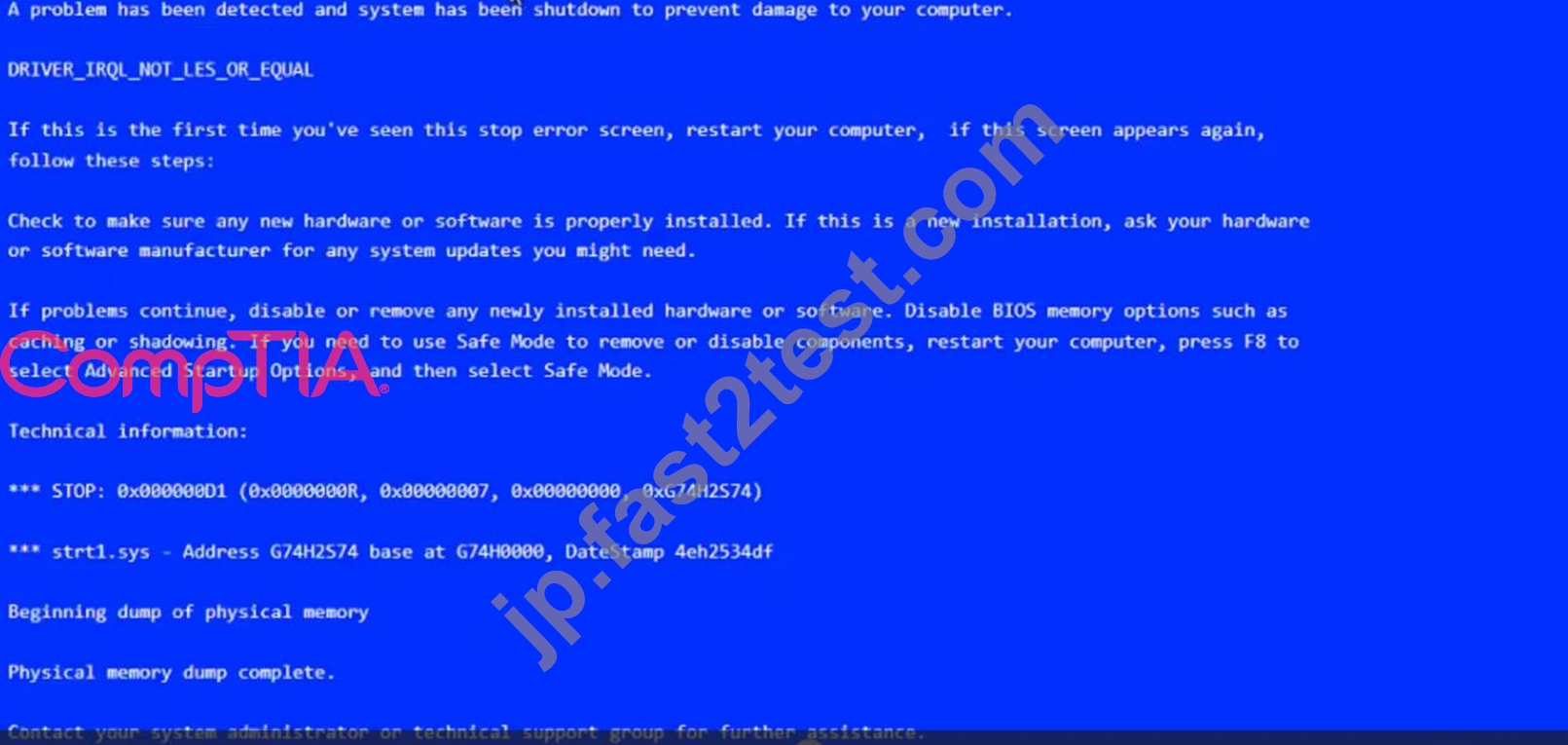
Commands: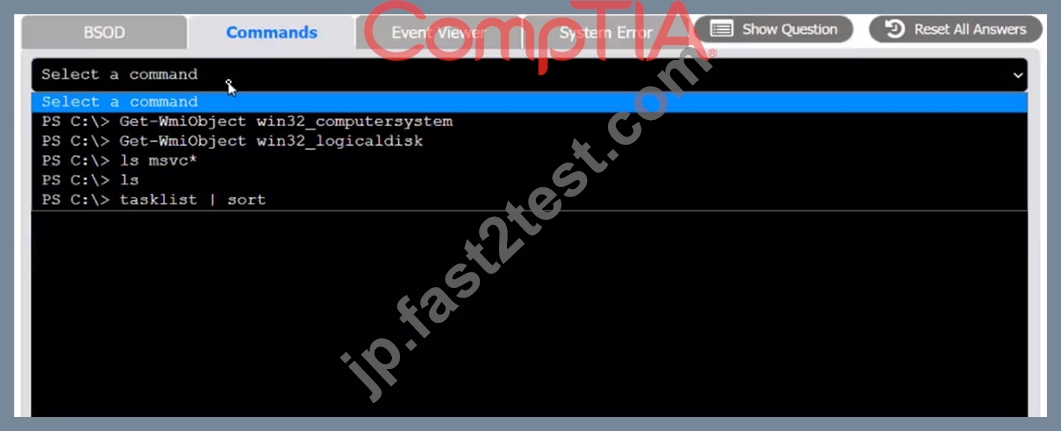
Event Viewer: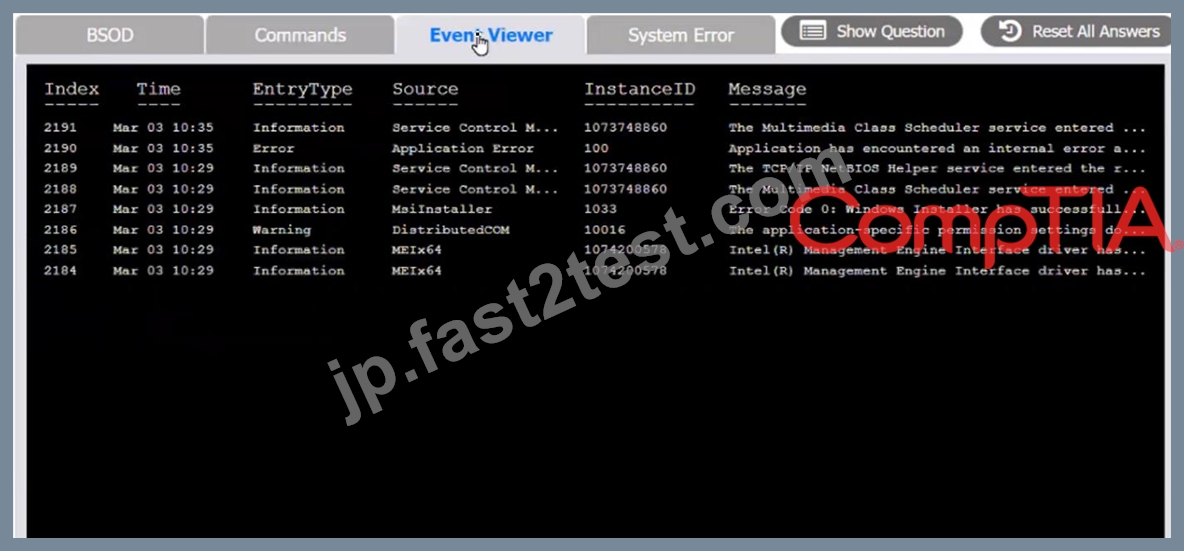
System Error: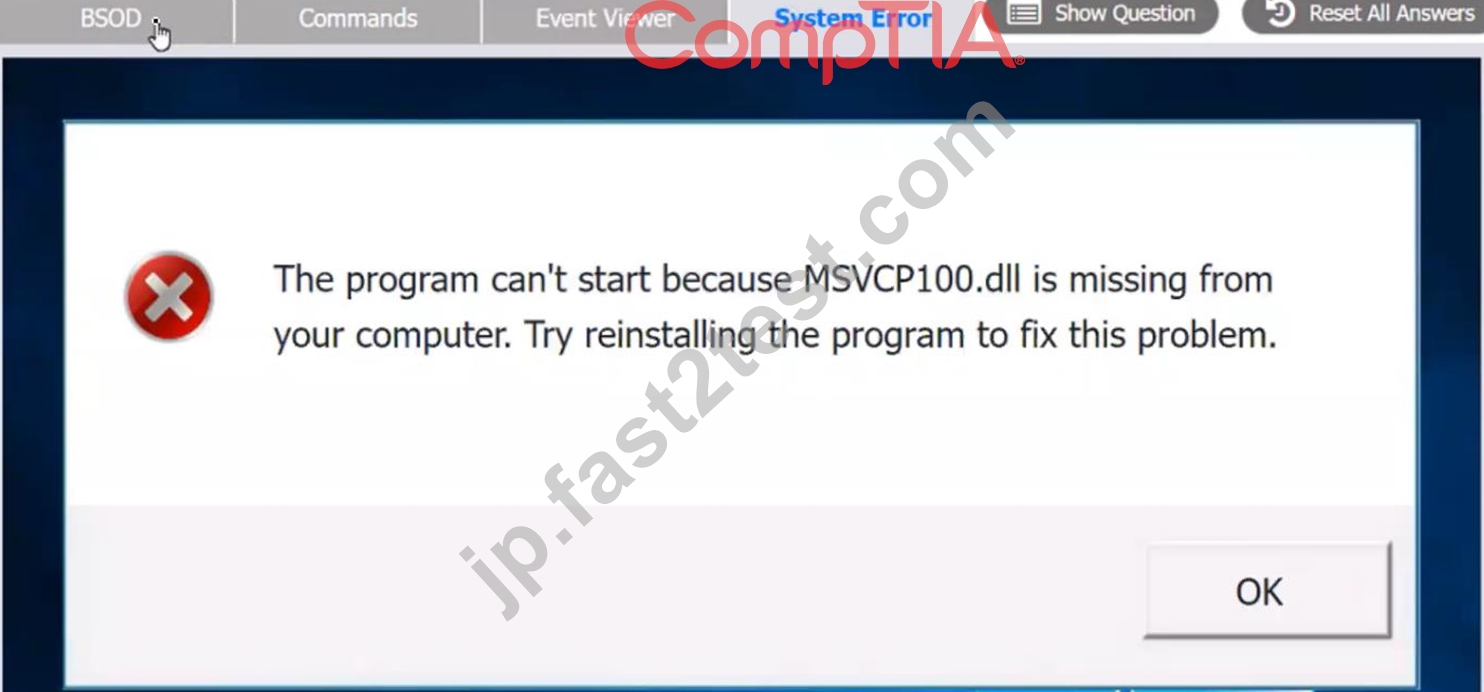

正解:
解説:
see the answer below in explanation
Explanation:
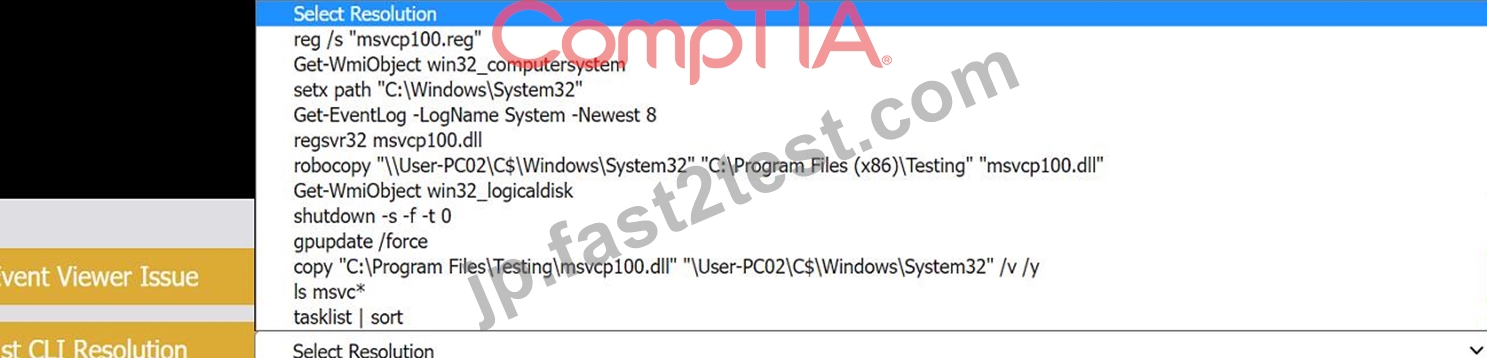
The user is experiencing a system error that prevents them from using the Testing program. The error message indicates that the file MSVCP100.dll is missing from the computer. This file is part of the Microsoft Visual C++ 2010 Redistributable Package, which is required by some applications to run properly. The error may have occurred due to a corrupted or incomplete software deployment.
To resolve this issue, the user needs to restore the missing file and register it in the system. One possible way to do this is to copy the file from another computer that has the Testing program installed and working, and then use the regsvr32 command to register it. The steps are as follows:
On another computer (User-PC02) that has the Testing program installed and working, locate the file MSVCP100.dll in the folder C:\Program Files\Testing.
Share the folder C:\Windows\System32 on User-PC02 by right-clicking on it, selecting Properties, then Sharing, then Advanced Sharing, then checking Share this folder, then clicking OK.
On the user's computer (User-PC01), open a command prompt as an administrator by clicking Start, typing cmd, right-clicking on Command Prompt, and selecting Run as administrator.
In the command prompt, type the following command to copy the file MSVCP100.dll from User-PC02 to User-PC01: copy "C:\Program Files\Testing\msvcp100.dll" "\\User-PC02\C$\Windows\System32" After the file is copied, type the following command to register it in the system: regsvr32 msvcp100.dll Restart the user's computer and try to run the Testing program again.
Therefore, based on the instructions given by the user, the correct answers are:
Select Event Viewer Issue: 2187
Select First Command: copy "C:\Program Files\Testing\msvcp100.dll" "\\User-PC02\C$\Windows\System32" Select Second Command: regsvr32 msvcp100.dll
質問 # 436
A systems administrator needs to access a hypervisor that went offline. After doing a port scan, the administrator notices that company policy is blocking the RDP default port. Which of the following ports should the administrator use to access the machine?
- A. 0
- B. 1
- C. 2
- D. 3
正解:D
解説:
When a systems administrator needs to access a hypervisor and the default RDP port (3389) is blocked by company policy, the administrator can use an alternative method. One common alternative is using SSH:
* Port 22:This is the default port for SSH (Secure Shell), which is commonly used for secure remote access to servers and hypervisors, especially in Unix/Linux environments.
* Port 23:This is the default port for Telnet, which is an unsecured protocol and generally not recommended for remote access due to security concerns.
* Port 80:This is the default port for HTTP, used for web traffic, not remote access.
* Port 3090:This is not a standard port for remote access protocols.
Using SSH (port 22) is a secure and widely accepted method for remote management of servers and hypervisors.
Reference:
CompTIA A+ 220-1102 Exam Objectives, Section 2.6: Compare and contrast network services and protocols.
SSH and remote access documentation.
質問 # 437
Which of the following items require special e-waste recycling? (Select two).
* Solid-state drive
- A. Laptop battery
- B. CRT monitor
- C. Power supply
- D. A/C adapter
- E. Surge protector
正解:B、C
解説:
Some electronic items require special e-waste recycling because they contain hazardous materials that can harm the environment and human health if disposed of improperly12. Laptop batteries and CRT monitors are examples of such items.
Laptop batteries are usually made of lithium-ion or nickel-metal hydride, which are both toxic and flammable substances34. If laptop batteries are thrown in the trash, they can leak, catch fire, or explode, causing pollution and injuries5 . Therefore, laptop batteries should be recycled at authorized collection centers or through manufacturer take-back programs .
CRT monitors are old types of display devices that use cathode ray tubes, which are glass tubes that emit electrons to create images on the screen . CRT monitors contain lead, mercury, cadmium, and phosphor, which are all harmful metals that can contaminate the soil, water, and air if dumped in landfills . Therefore, CRT monitors should be recycled at certified e-waste facilities or through retailer or manufacturer trade-in programs .
References1: CompTIA A+ Certification Exam Core 2 Objectives, page 13
2: Environmental Impacts - CompTIA A+ 220-1102 - 4.53
3: The Official CompTIA A+ Core 2 Instructor Guide (Exam 220-1102), page10-12
4: CompTIA CertMaster Learn for A+ Core 2 (220-1102) - Student Access Key5
5: [Why You Should Recycle Your Old Laptop Battery]
6: [How to Recycle Laptop Batteries]
7: [Laptop Battery Recycling]
8: [How to Recycle Laptop Batteries]
9: The Official CompTIA A+ Core 2 Instructor Guide (Exam 220-1102), page 10-13
10: CompTIA CertMaster Learn for A+ Core 2 (220-1102) - Student Access Key
11: [What is a CRT Monitor?]
12: [How to Recycle CRT Monitors] : [CRT Monitor Recycling] : [How to Recycle CRT Monitors]
質問 # 438
Which of the following types of malicious software is most likely to demand payments in cryptocurrency?
- A. Rootkit
- B. Ransomware
- C. Keylogger
- D. Cryptomining
正解:B
解説:
Comprehensive and Detailed In-Depth Explanation:
Ransomware is a type of malware that encrypts files and demands payment (usually in cryptocurrency) to decrypt them.
* B. Keylogger - Tracks keystrokes but does not demand payment.
* C. Cryptomining - Uses system resources to mine cryptocurrency without the user's consent.
* D. Rootkit - Hides malicious software but does not demand payment.
Reference:
CompTIA A+ 220-1102, Objective 2.5 - Common Security Threats
質問 # 439
A user receives a call from someone who claims to be from the user's bank and requests information to ensure the user's account is safe. Which of the following social-engineering attacks is the user experiencing?
- A. Phishing
- B. Vishing
- C. Smishing
- D. Whaling
正解:B
解説:
Explanation
The user is experiencing a vishing attack. Vishing stands for voice phishing and is a type of social-engineering attack that uses phone calls or voice messages to trick users into revealing personal or financial information. Vishing attackers often pretend to be from legitimate organizations, such as banks, government agencies or service providers, and use various tactics, such as urgency, fear or reward, to persuade users to comply with their requests. Phishing is a type of social-engineering attack that uses fraudulent emails or websites to trick users into revealing personal or financial information. Phishing does not involve phone calls or voice messages. Smishing is a type of social-engineering attack that uses text messages or SMS to trick users into revealing personal or financial information. Smishing does not involve phone calls or voice messages. Whaling is a type of social-engineering attack that targets high-profile individuals, such as executives, celebrities or politicians, to trick them into revealing personal or financial information. Whaling does not necessarily involve phone calls or voice messages. References: CompTIA A+ Core 2 (220-1002) Certification Exam Objectives Version 4.0, Domain 3.1
質問 # 440
A remote user is experiencing issues with Outlook settings and asks a technician to review the settings. Which of the following can the technician use to access the user's computer remotely?
- A. RMM
- B. RDP
- C. SSH
- D. VPN
正解:B
解説:
One of the possible ways to access the user's computer remotely is to use RDP, which stands for Remote Desktop Protocol. RDP is a protocol that allows a user to connect to another computer over a network and use its graphical interface. RDP is commonly used for remote desktop software, such as Microsoft Remote Desktop Connection1. To use RDP, the user's computer must run RDP server software, and the technician must run RDP client software. The technician can then enter the user's IP address or hostname, and provide the appropriate credentials to log in to the user's computer. Once connected, the technician can view and control the user's desktop, and review the Outlook settings.
質問 # 441
......
CompTIA A+ Certification Exam: Core 2無料更新認定サンプル問題:https://jp.fast2test.com/220-1102-premium-file.html
試験本場前にトレンドなCompTIA 220-1102のPDF問題集を試そう:https://drive.google.com/open?id=1ZpSGTN-znoCIdmNH1SKW6Jt2CVsANriX