

[2024年05月14日] 完全版最新の220-1102問題集で100%カバー率問題と解答があなたをリアル試験で合格させる
最新220-1102試験問題集で有効最新の問題集
Comptia 220-1102試験は、コンピューターハードウェアとソフトウェアの分野でのキャリアを促進しようとしているITの専門家にとって不可欠です。この認定試験は世界的に認識されており、ITの専門家にとって業界標準です。候補者の知識とスキルを検証するだけでなく、彼らの職業へのコミットメントも示しています。したがって、この試験に合格することは、ITキャリアを成功させるための重要なステップです。
CompTIA 220-1102 (CompTIA A+ 認定試験:Core 2) は、コンピュータ技術者のための世界的に認められた認定試験である CompTIA A+ 認定試験の第2部です。この試験は、ソフトウェアのトラブルシューティング、オペレーティングシステム、セキュリティなど、複数の領域における候補者の知識とスキルをテストするように設計されています。この試験は、認定 IT プロフェッショナルになるための重要なステップであり、技術産業でのキャリアアップを支援することができます。
質問 # 87
Which of the following editions of Windows 10 requires reactivation every 180 days?
- A. Pro for Workstation
- B. Enterprise
- C. Home
- D. Pro
正解:B
解説:
Explanation
Windows 10 Enterprise is an edition of Windows 10 that is designed for large organizations that need advanced security and management features. Windows 10 Enterprise can be activated using different methods, such as Multiple Activation Key (MAK), Active Directory-based Activation (ADBA), or Key Management Service (KMS)1. KMS is a method of activation that uses a local server to activate multiple devices on a network. KMS activations are valid for 180 days and need to be renewed periodically by connecting to the KMS server2. If a device does not renew its activation within 180 days, it will enter a grace period of 30 days, after which it will display a warning message and lose some functionality until it is reactivated3. The other editions of Windows 10 do not require reactivation every 180 days. Windows 10 Pro for Workstation is an edition of Windows 10 that is designed for high-performance devices that need advanced features such as ReFS file system, persistent memory, and faster file sharing. Windows 10 Pro for Workstation can be activated using a digital license or a product key. Windows 10 Home is an edition of Windows 10 that is designed for personal or home use. Windows 10 Home can be activated using a digital license or a product key. Windows
10 Pro is an edition of Windows 10 that is designed for business or professional use. Windows 10 Pro can be activated using a digital license or a product key. None of these editions require reactivation every 180 days unless there are significant hardware changes or other issues that affect the activation status.
質問 # 88
A technician receives a call from a user who is unable to open Outlook. The user states that Outlook worked fine yesterday, but the computer may have restarted sometime overnight. Which of the following is the MOST likely reason Outlook has stopped functioning?
- A. Spam filter installation
- B. Invalid registry settings
- C. Malware infection
- D. Operating system update
正解:D
解説:
Operating system updates can sometimes cause compatibility issues with some applications, such as Outlook, that may prevent them from opening or working properly. This can happen if the update changes some system files or settings that Outlook relies on, or if the update conflicts with some Outlook add-ins or extensions. To fix this, the technician can try some of these troubleshooting steps:
Start Outlook in safe mode and disable add-ins. Safe mode is a way of starting Outlook without any add-ins or extensions that may interfere with its functionality. To start Outlook in safe mode, press and hold the Ctrl key while clicking on the Outlook icon. You should see a message asking if you want to start Outlook in safe mode. Click Yes. If Outlook works fine in safe mode, it means one of the add-ins is causing the problem. To disable add-ins, go to File > Options > Add-ins. In the Manage drop-down list, select COM Add-ins and click Go. Uncheck any add-ins that you don't need and click OK. Restart Outlook normally and check if the issue is resolved4.
Create a new Outlook profile. A profile is a set of settings and information that Outlook uses to manage your email accounts and data. Sometimes, a profile can get corrupted or damaged and cause Outlook to malfunction. To create a new profile, go to Control Panel > Mail > Show Profiles. Click Add and follow the instructions to set up a new profile with your email account. Make sure to select the option to use the new profile as the default one. Restart Outlook and check if the issue is resolved5.
Repair your Outlook data files. Data files are files that store your email messages, contacts, calendar events, and other items on your computer. Sometimes, data files can get corrupted or damaged and cause Outlook to malfunction. To repair your data files, you can use a tool called scanpst.exe, which is located in the same folder where Outlook is installed (usually C:\Program Files\Microsoft Office\root\Office16). To use scanpst.exe, close Outlook and locate the tool in the folder. Double-click on it and browse to the location of your data file (usually C:\Users\username\AppData\Local\Microsoft\Outlook). Select the file and click Start to begin the scanning and repairing process. When it's done, restart Outlook and check if the issue is resolved.
Run the /resetnavpane command. The navigation pane is the panel on the left side of Outlook that shows your folders and accounts. Sometimes, the navigation pane can get corrupted or damaged and cause Outlook to malfunction. To reset the navigation pane, press Windows key + R to open the Run dialog box, or open the Command Prompt. Type outlook.exe /resetnavpane and hit Enter. This will clear and regenerate the navigation pane settings for Outlook. Restart Outlook and check if the issue is resolved.
質問 # 89
A technician is troubleshooting a customer's PC and receives a phone call. The technician does not take the call and sets the phone to silent. Which of the following BEST describes the technician's actions?
- A. Set and meet timelines
- B. Adhere to user privacy policy
- C. Avoid distractions
- D. Deal appropriately with customer's confidential material .
正解:C
解説:
Explanation
The technician's action of setting the phone to silent while troubleshooting the customer's PC is an example of avoiding distractions. By setting the phone to silent, the technician is ensuring that they are able to focus on the task at hand without any distractions that could potentially disrupt their workflow. This is an important practice when handling customer's confidential material, as it ensures that the technician is able to focus on the task and not be distracted by any external sources. Furthermore, it also adheres to user privacy policies, as the technician is not exposing any confidential information to any external sources.
質問 # 90
A technician needs to transfer a file to a user's workstation. Which of the following would BEST accomplish this task utilizing the workstation's built-in protocols?
- A. RMM
- B. MSRA
- C. VPN
- D. SMB
正解:D
解説:
SMB stands for Server Message Block, which is a network file sharing protocol that allows applications on a computer to read and write to files and to request services from server programs in a computer network. SMB is a built-in protocol in Windows operating systems and can be used to transfer files between computers over a network. The technician can use SMB to access a file share on the user's workstation and copy the file to or from it. VPN stands for virtual private network, which is a technology that creates a secure and encrypted connection over a public network. VPN is not a built-in protocol in Windows operating systems and does not directly transfer files between computers. RMM stands for remote monitoring and management, which is a type of software solution that allows remote management and monitoring of devices and networks. RMM is not a built-in protocol in Windows operating systems and does not directly transfer files between computers. MSRA stands for Microsoft Remote Assistance, which is a feature that allows a user to invite another user to view or control their computer remotely. MSRA is not a protocol, but an application that uses Remote Desktop Protocol (RDP) to establish a connection. MSRA does not directly transfer files between computers.
https://www.pcmag.com/picks/the-best-desktop-workstations
質問 # 91
A systems administrator is creating a new document with a list of the websites that users are allowed to access.
Which of the following types of documents is the administrator MOST likely creating?
- A. Incident report
- B. Access control list
- C. Standard operating procedure
- D. Acceptable use policy
正解:B
解説:
An access control list (ACL) is a list of permissions associated with a system resource (object), such as a website. An ACL specifies which users or system processes are granted access to objects, as well as what operations are allowed on given objects1. A systems administrator can create an ACL to define the list of websites that users are allowed to access.
References: 1: Access-control list - Wikipedia (https://en.wikipedia.org/wiki/Access-control_list)
質問 # 92
Which of the following is the proper way for a technician to dispose of used printer consumables?
- A. Proceed with the custom manufacturer's procedure.
- B. Proceed with the disposal of consumables in standard recycling bins.
- C. Proceed with the disposal of consumables in standard trash receptacles.
- D. Empty any residual ink or toner from consumables before disposing of them in a standard recycling bin.
正解:A
解説:
Explanation
When it comes to disposing of used printer consumables , it is important to follow the manufacturer's instructions or guidelines for proper disposal, as different types of consumables may require different disposal procedures. Some manufacturers provide specific instructions for proper disposal, such as sending the used consumables back to the manufacturer or using special recycling programs.
Therefore, the proper way for a technician to dispose of used printer consumables is to proceed with the custom manufacturer's procedure , if provided. This option ensures that the disposal is handled in an environmentally friendly and safe manner.
質問 # 93
A technician is unable to join a Windows 10 laptop to a domain Which of the following is the MOST likely reason?
- A. The laptop does not have an onboard Ethernet adapter
- B. The domain's processor compatibility is not met
- C. The Laptop does not have all current Windows updates installed
- D. The laptop has Windows 10 Home installed
正解:D
解説:
https://partners.comptia.org/docs/default-source/resources/comptia-a-220-1102-exam-objectives-(3-0)
質問 # 94
A large company is changing its password length requirements. The Chief Information Officer is mandating that passwords now be at least 12 characters long, instead of 10. Which of the following should be used to adjust this setting?
- A. Access control lists
- B. Group Policy
- C. Authenticator applications
- D. User accounts
正解:B
解説:
Group Policy is a feature of Windows that allows administrators to manage and configure settings for computers and users on a network12. One of the settings that can be controlled by Group Policy is the password policy, which defines the rules for creating and changing passwords, such as minimum length, complexity, expiration, and history34. By using Group Policy, the Chief Information Officer can enforce the new password length requirement for all users and computers in the company's domain, without having to manually adjust each user account or device.
Reference: 1: The Official CompTIA A+ Core 2 Student Guide (Exam 220-1102), page 10-11 2: CompTIA A+ Certification Exam Core 2 Objectives, page 13 3: The Official CompTIA A+ Core 2 Instructor Guide (Exam 220-1102), page 10-12 4: CompTIA A+ Certification Exam: Core 2 (220-1102) Exam Objectives
質問 # 95
A new employee was hired recently. Which of the following documents will the new employee need to sign before being granted login access to the network?
- A. UAC
- B. AUP
- C. MSDS
- D. EULA
正解:B
解説:
Explanation
A new employee will need to sign an AUP before being granted login access to the network. An AUP is an Acceptable Use Policy that defines the rules and guidelines for using network resources and services in an organization. An AUP typically covers topics such as security, privacy, ethics, compliance and liability issues related to network usage. An AUP helps protect the organization and its users from legal, regulatory and reputational risks associated with network activities. An MSDS is a Material Safety Data Sheet that provides information about hazardous substances and how to handle them safely. An MSDS is not related to network access or usage. A EULA is an End User License Agreement that specifies the terms and conditions for using a software product or service. A EULA is usually provided by software vendors or developers and does not apply to network access or usage in general. A UAC is a User Account Control that is a security feature that prompts users for permission or confirmation before performing certain actions that require elevated privileges or affect system settings. A UAC is not a document that needs to be signed by users but a mechanism that helps prevent unauthorized changes or malware infections on a system. References: CompTIA A+ Core 2 (220-1002) Certification Exam Objectives Version 4.0, Domain 5.1
質問 # 96
A large company is changing its password length requirements. The Chief Information Officer is mandating that passwords now be at least 12 characters long, instead of 10. Which of the following should be used to adjust this setting?
- A. Access control lists
- B. Group Policy
- C. Authenticator applications
- D. User accounts
正解:B
解説:
Group Policy is a feature of Windows that allows administrators to manage and configure settings for computers and users on a network12. One of the settings that can be controlled by Group Policy is the password policy, which defines the rules for creating and changing passwords, such as minimum length, complexity, expiration, and history34. By using Group Policy, the Chief Information Officer can enforce the new password length requirement for all users and computers in the company's domain, without having to manually adjust each user account or device.
References1: The Official CompTIA A+ Core 2 Student Guide (Exam 220-1102), page 10-11 2: CompTIA A+ Certification Exam Core 2 Objectives, page 13 3: The Official CompTIA A+ Core 2 Instructor Guide (Exam
220-1102), page 10-12 4: CompTIA A+ Certification Exam: Core 2 (220-1102) Exam Objectives
質問 # 97
A technician is selling up a newly built computer. Which of the following is the FASTEST way for the technician to install Windows 10?
- A. Unattended installation
- B. Factory reset
- C. System Restore
- D. In-place upgrade
正解:A
解説:
An unattended installation is the fastest way to install Windows 10 on a newly built computer. It uses an answer file that contains all the configuration settings and preferences for the installation, such as language, product key, partition size, etc. It does not require any user interaction or input during the installation process.
Factory reset, System Restore and in-place upgrade are not methods of installing Windows 10 on a new computer, but ways of restoring or updating an existing Windows installation. Verified References:
https://www.comptia.org/blog/what-is-an-unattended-installation https://www.comptia.org/certifications/a
質問 # 98
A user's mobile phone has become sluggish A systems administrator discovered several malicious applications on the device and reset the phone. The administrator installed MDM software. Which of the following should the administrator do to help secure the device against this threat in the future? (Select TWO).
- A. Enable developer mode
- B. Block a third-party application installation
- C. Prevent GPS spoofing
- D. Prevent a device root
- E. Require a PIN on the unlock screen
- F. Disable biometric authentication
正解:B、E
解説:
Explanation
[email protected]
質問 # 99
A technician installed a known-good, compatible motherboard on a new laptop. However, the motherboard is not working on the laptop. Which of the following should the technician MOST likely have done to prevent damage?
- A. Connected a proper ESD strap
- B. Completed an inventory of tools before use
- C. Practiced electrical fire safety
- D. Removed all jewelry
正解:D
質問 # 100
A user is unable to log in to the network. The network uses 802.1X with EAP-TLS to authenticate on the wired network. The user has been on an extended leave and has not logged in to the computer in several months. Which of the following is causing the login issue?
- A. Application crash
- B. Profile rebuild needed
- C. Service not started
- D. Expired certificate
- E. OS update failure
正解:D
解説:
Explanation
EAP-TLS is a method of authentication that uses certificates to establish a secure tunnel between the client and the server3. The certificates have a validity period and must be renewed before they expire1. If the user has been on an extended leave and has not logged in to the computer in several months, it is possible that the certificate on the client or the server has expired and needs to be renewed2. The other options are not directly related to EAP-TLS authentication or 802.1X network access.
質問 # 101
A technician receives a call from a user who is unable to open Outlook. The user states that Outlook worked fine yesterday, but the computer may have restarted sometime overnight. Which of the following is the MOST likely reason Outlook has stopped functioning?
- A. Spam filter installation
- B. Invalid registry settings
- C. Malware infection
- D. Operating system update
正解:D
解説:
Operating system updates can sometimes cause compatibility issues with some applications, such as Outlook, that may prevent them from opening or working properly. This can happen if the update changes some system files or settings that Outlook relies on, or if the update conflicts with some Outlook add-ins or extensions. To fix this, the technician can try some of these troubleshooting steps:
* Start Outlook in safe mode and disable add-ins. Safe mode is a way of starting Outlook without any
* add-ins or extensions that may interfere with its functionality. To start Outlook in safe mode, press and hold the Ctrl key while clicking on the Outlook icon. You should see a message asking if you want to start Outlook in safe mode. Click Yes. If Outlook works fine in safe mode, it means one of the add-ins is causing the problem. To disable add-ins, go to File > Options > Add-ins. In the Manage drop-down list, select COM Add-ins and click Go. Uncheck any add-ins that you don't need and click OK. Restart Outlook normally and check if the issue is resolved4.
* Create a new Outlook profile. A profile is a set of settings and information that Outlook uses to manage your email accounts and data. Sometimes, a profile can get corrupted or damaged and cause Outlook to malfunction. To create a new profile, go to Control Panel > Mail > Show Profiles. Click Add and follow the instructions to set up a new profile with your email account. Make sure to select the option to use the new profile as the default one. Restart Outlook and check if the issue is resolved5.
* Repair your Outlook data files. Data files are files that store your email messages, contacts, calendar events, and other items on your computer. Sometimes, data files can get corrupted or damaged and cause Outlook to malfunction. To repair your data files, you can use a tool called scanpst.exe, which is located in the same folder where Outlook is installed (usually C:\Program Files\Microsoft Office\root\Office16).
To use scanpst.exe, close Outlook and locate the tool in the folder. Double-click on it and browse to the location of your data file (usually C:\Users\username\AppData\Local\Microsoft\Outlook). Select the file and click Start to begin the scanning and repairing process. When it's done, restart Outlook and check if the issue is resolved.
* Run the /resetnavpane command. The navigation pane is the panel on the left side of Outlook that shows your folders and accounts. Sometimes, the navigation pane can get corrupted or damaged and cause Outlook to malfunction. To reset the navigation pane, press Windows key + R to open the Run dialog box, or open the Command Prompt. Type outlook.exe /resetnavpane and hit Enter. This will clear and regenerate the navigation pane settings for Outlook. Restart Outlook and check if the issue is resolved.
質問 # 102
An implementation specialist is replacing a legacy system at a vendor site that has only one wireless network available. When the specialist connects to Wi-Fi. the specialist realizes the insecure network has open authentication. The technician needs to secure the vendor's sensitive data. Which of the following should the specialist do FIRST to protect the company's data?
- A. Configure MFA on the network.
- B. Connect to the vendor's network using a VPN.
- C. Manually configure an IP address, a subnet mask, and a default gateway.
- D. Change the network location to private.
正解:B
解説:
Explanation
The first thing that the specialist should do to protect the company's data on an insecure network with open authentication is to connect to the vendor's network using a VPN. A VPN stands for Virtual Private Network and is a technology that creates a secure and encrypted connection over a public or untrusted network. A VPN can protect the company's data by preventing eavesdropping, interception or modification of the network traffic by unauthorized parties. A VPN can also provide access to the company's internal network and resources remotely. Manually configuring an IP address, a subnet mask and a default gateway may not be necessary or possible if the vendor's network uses DHCP to assign network configuration parameters automatically. Manually configuring an IP address, a subnet mask and a default gateway does not protect the company's data from network attacks or threats. Changing the network location to private may not be advisable or effective if the vendor's network is a public or untrusted network. Changing the network location to private does not protect the company's data from network attacks or threats. Configuring MFA on the network may not be feasible or sufficient if the vendor's network has open authentication and does not support or require MFA. Configuring MFA on the network does not protect the company's data from network attacks or threats. References: CompTIA A+ Core 2 (220-1002) Certification Exam Objectives Version 4.0, Domain
3.3
質問 # 103
A user called the help desk lo report an Issue with the internet connection speed on a laptop. The technician thinks that background services may be using extra bandwidth. Which of the following tools should the technician use to investigate connections on the laptop?
- A. net user
- B. net use
- C. nslookup
- D. netstat
正解:D
解説:
Explanation
netstat is a tool that can be used to investigate connections on a Windows machine. It displays information about the active TCP connections, listening ports, routing tables, network statistics, etc. nslookup is a tool that can be used to query DNS servers and resolve domain names to IP addresses. net use is a tool that can be used to connect or disconnect network drives or printers. net user is a tool that can be used to create or modify user accounts on a Windows machine. Verified References: https://www.comptia.org/blog/what-is-netstat
https://www.comptia.org/certifications/a
質問 # 104
Welcome to your first day as a Fictional Company. LLC helpdesk employee. Please work the tickets in your helpdesk ticket queue.
Click on individual tickers to see the ticket details. View attachments to determine the problem.
Select the appropriate issue from the 'issue' drop-down menu. Then, select the MOST efficient resolution from the 'Resolution' drop-down menu. Finally, select the proper command or verification to remediate or confirm your fix of the issue from the Verify Resolve drop-down menu.

正解:
解説:

質問 # 105
A user calls the help desk to report potential malware on a computer. The anomalous activity began after the user clicked a link to a free gift card in a recent email The technician asks the user to describe any unusual activity, such as slow performance, excessive pop-ups, and browser redirections. Which of the following should the technician do NEXT?
- A. Have the user check for recently installed applications and outline those installed since the link in the email was clicked
- B. Guide the user to reboot the machine into safe mode and verify whether the anomalous activities are still present
- C. Instruct the user to disconnect the Ethernet connection to the corporate network.
- D. Advise the user to run a complete system scan using the OS anti-malware application
正解:C
解説:
First thing you want to do is quarantine/disconnect the affected system from the network so whatever malicious software doesn't spread.
質問 # 106
Applications on a computer are not updating, which is preventing the user from opening certain files. Which of the following MMC snap-ins should the technician launch next to continue troubleshooting the issue?
- A. perfmon.msc
- B. devmgmt.msc
- C. gpedit.msc
正解:B
解説:
devmgmt.msc is the MMC snap-in that opens the Device Manager, a tool that allows the technician to view and manage the hardware devices and their drivers on the computer1. If the applications are not updating properly, it could be due to outdated, corrupted, or incompatible drivers that prevent the hardware from functioning normally. The technician can use the Device Manager to update, uninstall, rollback, or disable the drivers, as well as scan for hardware changes, troubleshoot problems, and view device properties2.
gpedit.msc is the MMC snap-in that opens the Group Policy Editor, a tool that allows the technician to configure the local or domain group policy settings for the computer or a group of computers3. Group policy settings can affect the security, performance, and functionality of the system, but they are not directly related to the application updates or the hardware drivers.
perfmon.msc is the MMC snap-in that opens the Performance Monitor, a tool that allows the technician to monitor and analyze the performance of the system and its components, such as processor, memory, disk, network, etc4. Performance Monitor can display real-time data or collect log data for later analysis, as well as generate reports and alerts based on the performance counters5. Performance Monitor can help the technician identify and diagnose performance issues, but it does not provide a way to manage the hardware drivers.
Reference:
The Official CompTIA A+ Core 2 Study Guide6, page 223, 225, 227, 228.
質問 # 107
An application user received an email indicating the version of the application currently in use will no longer be sold. Users with this version of the application will no longer receive patches or updates either. Which of the following indicates a vendor no longer supports a product?
- A. UAC
- B. AUP
- C. EULA
- D. EOL
正解:D
解説:
Explanation
EOL (end-of-life) is a term that indicates a vendor no longer supports a product. It means that the product will no longer be sold, updated or patched by the vendor, and that the users should migrate to a newer version or alternative product. AUP (acceptable use policy), EULA (end-user license agreement) and UAC (user account control) are not terms that indicate a vendor no longer supports a product. Verified References:
https://www.comptia.org/blog/what-is-end-of-life https://www.comptia.org/certifications/a
質問 # 108
An executive has contacted you through the help-desk chat support about an issue with a mobile device.
Assist the executive to help resolve the issue.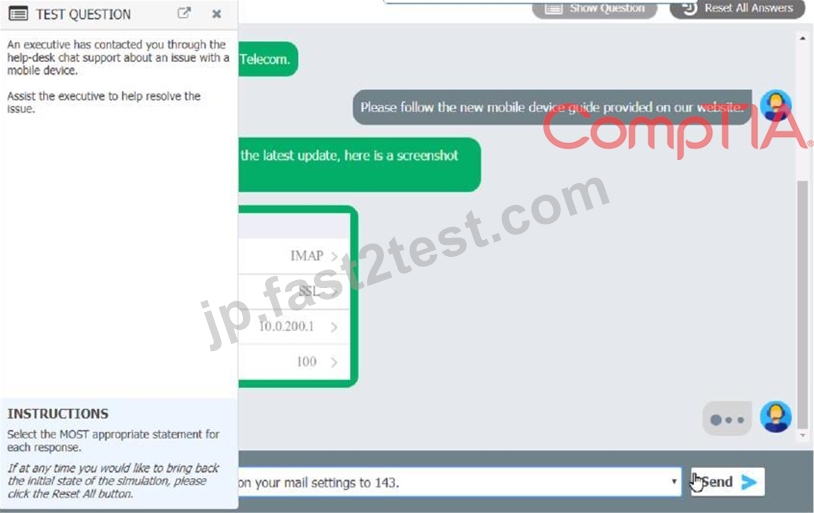

Which of the following should be done NEXT?
- A. Send an email to Telecom to inform them of the Issue and prevent reoccurrence.
- B. Tell the user to take time to fix it themselves next time.
- C. Close the ticket out.
- D. Educate the user on the solution that was performed.
正解:D
質問 # 109
A network administrator is deploying a client certificate to be used for Wi-Fi access for all devices in an organization. The certificate will be used in conjunction with the user's existing username and password.
Which of the following BEST describes the security benefits realized after this deployment?
- A. All Wi-Fi traffic will be encrypted in transit.
- B. Rogue access points will not connect.
- C. Multifactor authentication will be forced for Wi-Fi.
- D. Eavesdropping attempts will be prevented.
正解:A
解説:
The security benefits realized after deploying a client certificate to be used for Wi-Fi access for all devices in an organization are that all Wi-Fi traffic will be encrypted in transit. This means that any data transmitted over the Wi-Fi network will be protected from eavesdropping attempts. Rogue access points will not connect to the network because they will not have the client certificate. However, multifactor authentication will not be forced for Wi-Fi because the client certificate is being used in conjunction with the user's existing username and password12
質問 # 110
A user reports a computer is running slow. Which of the following tools will help a technician identity the issued
- A. Disk Cleanup
- B. Disk Management
- C. Group Policy Editor
- D. Resource Monitor
正解:D
解説:
Resource Monitor will help a technician identify the issue when a user reports a computer is running slow1
質問 # 111
Welcome to your first day as a Fictional Company. LLC helpdesk employee. Please work the tickets in your helpdesk ticket queue.
Click on individual tickers to see the ticket details. View attachments to determine the problem.
Select the appropriate issue from the 'issue' drop-down menu. Then, select the MOST efficient resolution from the 'Resolution' drop-down menu. Finally, select the proper command or verification to remediate or confirm your fix of the issue from the Verify Resolve drop-down menu.
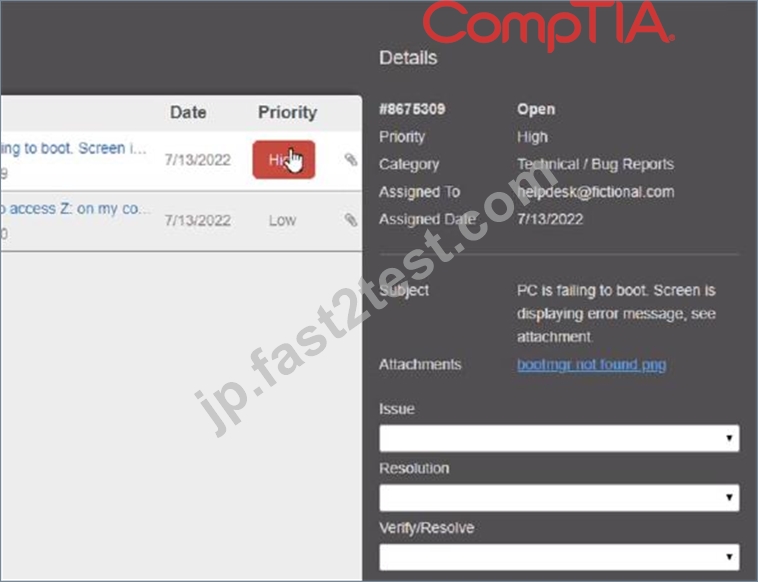

正解:
解説:
質問 # 112
......
無料セールまもなく終了!100%有効な220-1102試験:https://jp.fast2test.com/220-1102-premium-file.html
検証済み220-1102試験解答合格確定させる:https://drive.google.com/open?id=1nQ-MduwMaKl1N9BBL68HATSvKvhlBB9m