

220-1102トレーニング最新認定問題をゲットA+合格目指せ2024年11月22日
認定トレーニング220-1102試験問題集テストエンジン
CompTIA 220-1102試験は、複数選択問題から構成されるコンピュータベースのテストです。試験は90分間で、90問が含まれます。この試験の合格点は、900点満点の700点です。この試験は、英語、ドイツ語、日本語、ポルトガル語、スペイン語など、複数の言語で利用可能です。この試験は、既にCompTIA 220-1001試験に合格した候補者を対象としています。
CompTIA A+ 認定試験: Core 2 (220-1102) は、ハードウェアおよびソフトウェアシステムのインストール、設定、およびメンテナンスに必要な知識とスキルを測定する認定試験です。この試験は、すでに CompTIA A+ Core 1 (220-1001) 試験に合格した IT プロフェッショナルが、IT 分野での知識とスキルをさらに深めたい場合に設計されています。この試験には、トラブルシューティング、セキュリティ、ネットワークに関する高度なトピックが含まれています。また、クラウドコンピューティング、仮想化、およびモバイルデバイスに焦点を当てています。
Comptia 220-1102試験は、Comptia A+認定試験としても知られています。この認定は、IT業界で広く認識されており、エントリーレベルのITプロフェッショナルのベンチマークと見なされています。 220-1102の試験では、コンピューターハードウェア、ソフトウェア、ネットワーキング、セキュリティに関連する高度なトピックをカバーしています。
質問 # 130
A user's computer unexpectedly shut down immediately after the user plugged in a USB headset. Once the user turned the computer back on, everything was functioning properly, including the headset. Which of the following Microsoft tools would most likely be used to determine the root cause?
- A. Event Viewer
- B. System Configuration
- C. Performance Monitor
- D. Device Manager
正解:A
解説:
Event Viewer is a Microsoft tool that records and displays system events, errors, warnings, and information.
Event Viewer can help troubleshoot and diagnose problems, such as unexpected shutdowns, by showing the details of what happened before, during, and after the incident. Event Viewer can also show the source of the event, such as an application, a service, a driver, or a hardware device. By using Event Viewer, a technician can identify the root cause of the unexpected shutdown, such as a power failure, a thermal event, a driver conflict, or a malware infection.
質問 # 131
A technician is troubleshooting application crashes on a Windows workstation. Each time the workstation user tries to open a website in a browser, the following message is displayed:
crypt32.d11 is missing not found
Which of the following should the technician attempt FIRST?
- A. Perform a system file check
- B. Rebuild Windows profiles.
- C. Roll back updates
- D. Reimage the workstation
正解:A
解説:
If this file is missing or corrupted, it can cause application crashes or errors when trying to open websites in a browser. To fix this, the technician can perform a system file check, which is a utility that scans and repairs corrupted or missing system files1. To perform a system file check, the technician can follow these steps:
Open the Command Prompt as an administrator. To do this, type cmd in the search box on the taskbar, right-click on Command Prompt, and select Run as administrator.
In the Command Prompt window, type sfc /scannow and hit Enter. This will start the scanning and repairing process, which may take some time.
Wait for the process to complete. If any problems are found and fixed, you will see a message saying Windows Resource Protection found corrupt files and successfully repaired them. If no problems are found, you will see a message saying Windows Resource Protection did not find any integrity violations.
Restart your computer and check if the issue is resolved.
質問 # 132
A user receives an error message from an online banking site that states the following:
Your connection is not private. Authority invalid.
Which of the following actions should the user take NEXT?
- A. Report the error to the bank.
- B. Reinstall the browser.
- C. Proceed to the site.
- D. Use a different browser.
正解:A
解説:
Explanation
The error message "Your connection is not private. Authority invalid." means that the web browser cannot verify the identity or security of the website's SSL certificate. This could indicate that the website has been compromised, has a configuration error, or has an expired or invalid certificate. The user should not proceed to the site or use a different browser, as this could expose their sensitive information to potential attackers. The user should also not reinstall the browser, as this is unlikely to fix the error and could cause data loss. The best action for the user to take is to report the error to the bank and wait for them to resolve it.
References: : How to Fix "Your Connection Is Not Private" Errors
(https://www.howtogeek.com/874436/how-to-fix-your-connection-is-not-private-errors/) : Fix connection errors (https://support.google.com/chrome/answer/6098869?hl=en)
質問 # 133
Which of the following physical security controls can prevent laptops from being stolen?
- A. LoJack
- B. Bollards
- C. Encryption
- D. Equipment lock
- E. Multifactor authentication
正解:D
解説:
Explanation
An equipment lock is a physical security device that attaches a laptop to a fixed object, such as a desk or a table, with a cable and a lock. This can prevent the laptop from being stolen by unauthorized persons.
Encryption, LoJack, multifactor authentication and bollards are other security measures, but they do not physically prevent theft. Verified References: https://www.comptia.org/blog/physical-security
https://www.comptia.org/certifications/a
質問 # 134
As a corporate technician, you are asked to evaluate several suspect email messages on a client's computer. Corporate policy requires he following:
. All phishing attempts must be reported.
. Future spam emails to users must be prevented.
INSTRUCTIONS
Review each email and perform the
following within the email:
. Classify the emails
. Identify suspicious items, if applicable, in each email
. Select the appropriate resolution
正解:
解説:
See the Full solution in Explanation below.
Explanation:
Classification: a) Phishing
This email is a phishing attempt, as it tries to trick the user into clicking on a malicious link that could compromise their account or personal information. Some suspicious items in this email are:
* The email has a generic greeting and does not address the user by name.
* The email has spelling errors, such as "unusal" and "Locaked".
* The email uses a sense of urgency and fear to pressure the user into clicking on the link.
* The email does not match the official format or domain of the IT Help Desk at CompTIA.
* The email has two black bat icons, which are not related to CompTIA or IT support.
The appropriate resolution for this email is A. Report email to Information Security. The user should not click on the link, reply to the email, or provide any personal or account information. The user should forward the email to the Information Security team or use a professional email form to report the phishing attempt. The user should also delete the email from their inbox and trash folder.
The suspicious items to select are:
* b) From address
* d) Hyperlinks
These items indicate that the email is not from a legitimate source and that the link is potentially malicious.
The other items are not suspicious in this case, as the to address is the user's own email and there are no attachments.
Classification: b) Spam
This email is a spam email, as it is an unsolicited and unwanted message that tries to persuade the user to participate in a survey and claim a reward. Some suspicious items in this email are:
* The email offers a free wireless headphone as an incentive, which is too good to be true.
* The email does not provide any details about the survey company, such as its name, address, or contact information.
* The email contains an external survey link, which may lead to a malicious or fraudulent website.
* The email does not have an unsubscribe option, which is required by law for commercial emails.
The appropriate resolution for this email is C. Unsubscribe. The user should look for an unsubscribe link or button at the bottom of the email and follow the instructions to opt out of receiving future emails from the sender. The user should also mark the email as spam or junk in their email client, which will help filter out similar emails in the future. The user should not click on the survey link, reply to the email, or provide any personal or financial information.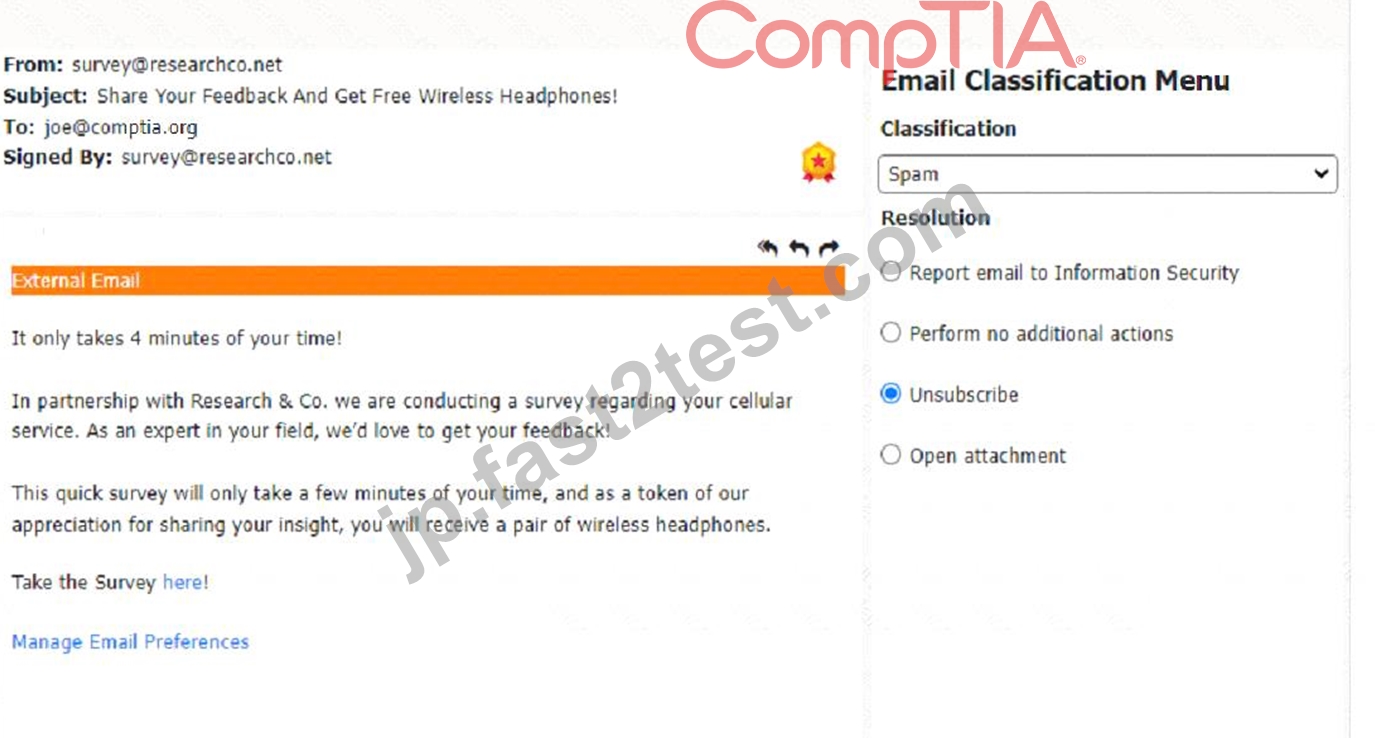
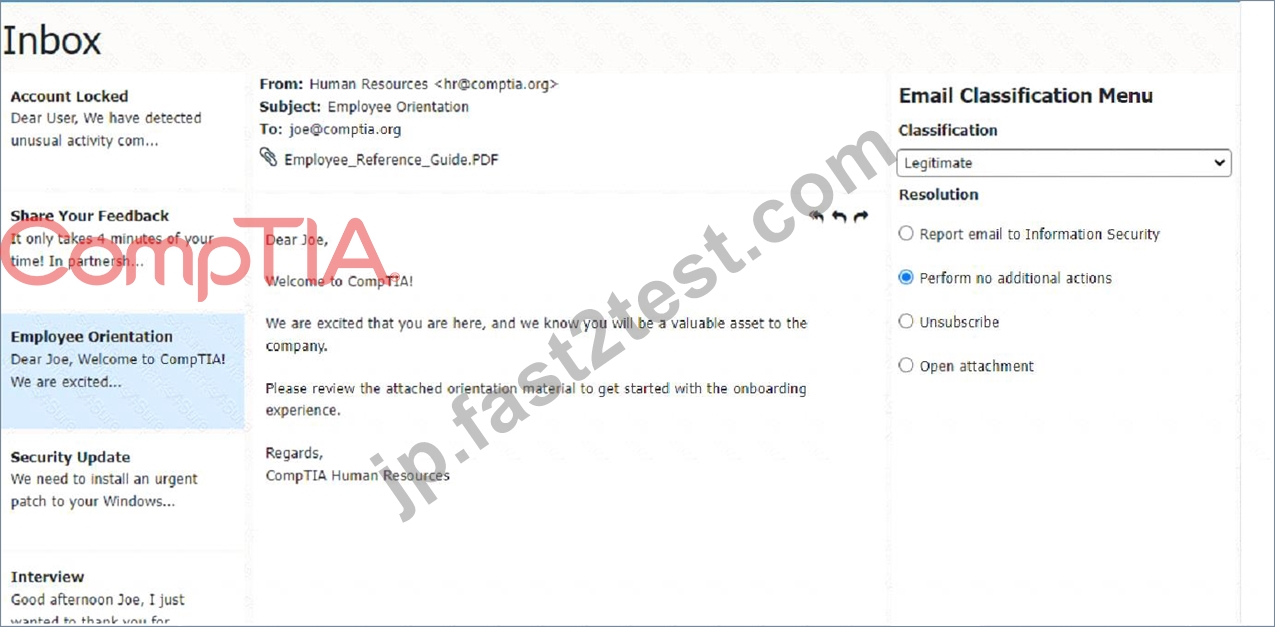
Classification: c) Legitimate
This email is a legitimate email, as it is from a trusted source and has a valid purpose. There are no suspicious items in this email, as the from address, the to address, the attachment, and the email body are all consistent and relevant. The appropriate resolution for this email is B. Perform no additional actions. The user can open the attachment and review the orientation material as instructed. The user does not need to report, unsubscribe, or delete this email.
A screenshot of a computer Description automatically generated
Classification: a) Phishing
This email is a phishing attempt, as it tries to deceive the user into downloading and running a malicious attachment that could compromise their system or data. Some suspicious items in this email are:
* The email has a generic greeting and does not address the user by name or username.
* The email has an urgent tone and claims that a security patch needs to be installed immediately.
* The email has an attachment named "patch1.exe", which is an executable file that could contain malware or ransomware.
* The email does not match the official format or domain of CompTIA Information Security.
The appropriate resolution for this email is A. Report email to Information Security. The user should not open the attachment, reply to the email, or provide any personal or account information. The user should forward the email to the Information Security team or use a professional email form to report the phishing attempt. The user should also delete the email from their inbox and trash folder.
A screenshot of a computer Description automatically generated
Classification: c) Legitimate
This email is a legitimate email, as it is from a trusted source and has a valid purpose. There are no suspicious items in this email, as the from address, the to address, and the email body are all consistent and relevant. The appropriate resolution for this email is B. Perform no additional actions. The user can reply to the email and thank the sender for the interview opportunity. The user does not need to report, unsubscribe, or delete this email.
A screenshot of a computer Description automatically generated
質問 # 135
A user requires local administrative access to a workstation. Which of the following Control Panel utilities allows the technician to grant access to the user?
- A. Security and Maintenance
- B. System
- C. Network and Sharing Center
- D. User Accounts
正解:D
解説:
User Accounts is a Control Panel utility that allows the technician to manage user accounts and groups on a workstation1. The technician can use User Accounts to grant local administrative access to a user by adding the user to the Administrators group1. The Administrators group has full control over the workstation and can perform tasks such as installing software, changing system settings, and accessing all files.
質問 # 136
Which of the following is the most likely reason a filtration system is critical for data centers?
- A. Plastics degrade over time.
- B. High humidity levels can rust metal.
- C. Insects can invade the data center.
- D. Dust particles can clog the machines.
正解:B
解説:
A filtration system is critical for data centers because it can control the humidity and temperature levels in the environment. High humidity levels can cause condensation and corrosion on the metal components of the servers and other equipment, leading to malfunction and damage. A filtration system can also prevent dust, dirt, and other contaminants from entering the data center and clogging the machines or causing overheating.
質問 # 137
A user reports that after a recent software deployment to upgrade applications, the user can no longer use the Testing program.
However, other employees can successfully use the Testing program.
INSTRUCTIONS
Review the information in each tab to verify the results of the deployment and resolve any issues discovered by selecting the:
Index number of the Event Viewer issue
First command to resolve the issue
Second command to resolve the issue
BSOD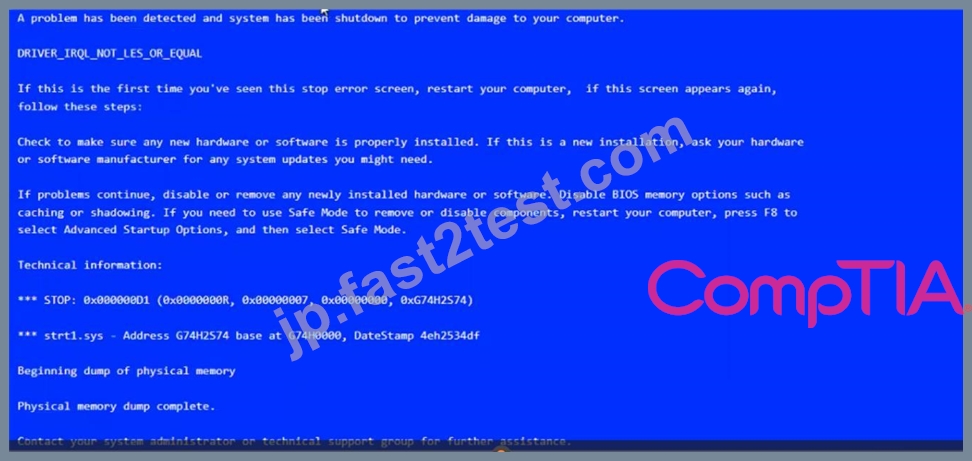
Commands:
Event Viewer: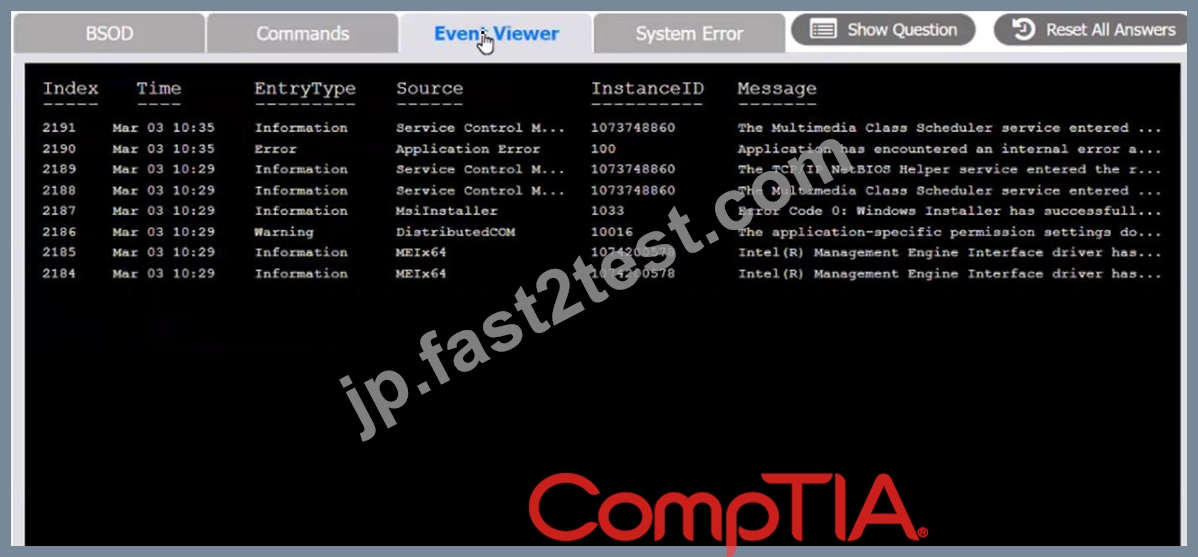
System Error:


正解:
解説:
see the answer below in explanation.
Explanation
The user is experiencing a system error that prevents them from using the Testing program. The error message indicates that the file MSVCP100.dll is missing from the computer. This file is part of the Microsoft Visual C++ 2010 Redistributable Package, which is required by some applications to run properly. The error may have occurred due to a corrupted or incomplete software deployment.
To resolve this issue, the user needs to restore the missing file and register it in the system. One possible way to do this is to copy the file from another computer that has the Testing program installed and working, and then use the regsvr32 command to register it. The steps are as follows:
On another computer (User-PC02) that has the Testing program installed and working, locate the file MSVCP100.dll in the folder C:\Program Files\Testing.
Share the folder C:\Windows\System32 on User-PC02 by right-clicking on it, selecting Properties, then Sharing, then Advanced Sharing, then checking Share this folder, then clicking OK.
On the user's computer (User-PC01), open a command prompt as an administrator by clicking Start, typing cmd, right-clicking on Command Prompt, and selecting Run as administrator.
In the command prompt, type the following command to copy the file MSVCP100.dll from User-PC02 to User-PC01: copy "C:\Program Files\Testing\msvcp100.dll" "\\User-PC02\C$\Windows\System32" After the file is copied, type the following command to register it in the system: regsvr32 msvcp100.dll Restart the user's computer and try to run the Testing program again.
Therefore, based on the instructions given by the user, the correct answers are:
Select Event Viewer Issue: 2187
Select First Command: copy "C:\Program Files\Testing\msvcp100.dll" "\\User-PC02\C$\Windows\System32" Select Second Command: regsvr32 msvcp100.dll
質問 # 138
A systems administrator is experiencing Issues connecting from a laptop to the corporate network using PKI.
Which to the following tools can the systems administrator use to help remediate the issue?
- A. certmgr.msc
- B. lusrmgr.msc
- C. msconfig.exe
- D. perfmon.msc
正解:A
解説:
Explanation
certmgr.msc is a tool that can be used to troubleshoot issues with PKI (public key infrastructure) on a Windows machine. It allows a system administrator to view, manage and import certificates, as well as check their validity, expiration and revocation status. msconfig.exe, lusrmgr.msc and perfmon.msc are other tools that can be used for different purposes on a Windows machine, but they are not related to PKI. Verified References: https://www.comptia.org/blog/what-is-certmgr-msc https://www.comptia.org/certifications/a
質問 # 139
A user tries to access commonly used web pages but is redirected to unexpected websites. Clearing the web browser cache does not resolve the issue. Which of the following should a technician investigate NEXT to resolve the issue?
- A. Update the antivirus definitions.
- B. Verify the routing tables.
- C. Enable firewall ACLs.
- D. Examine the localhost file entries.
正解:D
解説:
A possible cause of the user being redirected to unexpected websites is that the localhost file entries have been modified by malware or hackers to point to malicious or unwanted websites. The localhost file is a text file that maps hostnames to IP addresses and can override DNS settings. By examining the localhost file entries, a technician can identify and remove any suspicious or unauthorized entries that may cause the redirection issue. Enabling firewall ACLs may not resolve the issue if the firewall rules do not block the malicious or unwanted websites. Verifying the routing tables may not resolve the issue if the routing configuration is correct and does not affect the web traffic. Updating the antivirus definitions may help prevent future infections but may not remove the existing malware or changes to the localhost file. Reference: CompTIA A+ Core 2 (220-1002) Certification Exam Objectives Version 4.0, Domain 1.3
質問 # 140
A user has a computer with Windows 10 Home installed and purchased a Windows 10 Pro license. The user is not sure how to upgrade the OS. Which of the following should the technician do to apply this license?
- A. Redeem the included activation key card for a product key.
- B. Insert a Windows USB hardware dongle and initiate activation.
- C. Copy the c:\Wlndows\wlndows.lie file over to the machine and restart.
- D. Activate with the digital license included with the device hardware.
正解:A
解説:
Redeeming the included activation key card for a product key is the correct way to apply a Windows 10 Pro license to a computer that has Windows 10 Home installed. The activation key card is a physical or digital card that contains a 25-digit code that can be used to activate Windows 10 Pro online or by phone. Copying the windows.lie file, inserting a Windows USB hardware dongle and activating with the digital license are not valid methods of applying a Windows 10 Pro license. Verified References:
https://www.comptia.org/blog/how-to-upgrade-windows-10-home-to-pro
https://www.comptia.org/certifications/a
質問 # 141
A user requires local administrative access to a workstation. Which of the following Control Panel utilities allows the technician to grant access to the user?
- A. Security and Maintenance
- B. System
- C. Network and Sharing Center
- D. User Accounts
正解:D
解説:
User Accounts is a Control Panel utility that allows the technician to manage user accounts and groups on a local computer. The technician can use this utility to add a user to the local administrators group, which grants the user local administrative access to the workstation. The other options are not relevant for this task. Reference: : https://docs.microsoft.com/en-us/windows-server/identity/ad-fs/operations/manage-user-accounts-and-groups
質問 # 142
A user notices a small USB drive is attached to the user's computer after a new vendor visited the office. The technician notices two files named grabber.exe and output.txt. Which of the following attacks is MOST likely occurring?
- A. Rootkit
- B. Trojan
- C. Keylogger
- D. Cryptominer
正解:C
解説:
Explanation
A keylogger is a type of malware that records the keystrokes of a user and sends them to a remote attacker. A keylogger can be used to steal passwords, credit card numbers, personal information, and other sensitive data.
A keylogger can be delivered through a USB drive that contains a malicious executable file, such as grabber.exe, and an output file that stores the captured keystrokes, such as output.txt. The other options are not likely to use this method of attack. References: :
https://www.comptia.org/training/resources/exam-objectives/comptia-a-core-2-exam-objectives :
https://www.kaspersky.com/resource-center/definitions/keylogger
質問 # 143
A technician is working with a company to determine the best way to transfer sensitive personal information between offices when conducting business. The company currently uses USB drives and is resistant to change. The company's compliance officer states that all media at rest must be encrypted. Which of the following would be the BEST way to secure the current workflow?
- A. Deploy a secondary hard drive with encryption on the appropriate workstation
- B. Require files to be individually password protected with unique passwords
- C. Configure a hardened SFTP portal for file transfers between file servers
- D. Enable BitLocker To Go with a password that meets corporate requirements
正解:D
質問 # 144
A customer recently experienced a power outage at a SOHO. The customer does not think the components are connected properly. A print job continued running for several minutes after the power failed, but the customer was not able to interact with the computer. Once the UPS stopped beeping, all functioning devices also turned off. In case of a future power failure, the customer wants to have the most time available to save cloud documents and shut down the computer without losing any data.
正解:
解説:
質問 # 145
A technician is investigating a workstation that has not received the latest policy changes. Which of the following commands should the technician use to apply the latest domain policy changes?
- A. xcopy Zp
- B. chkdsk /y
- C. gpupdare /force
- D. sfc /scannow
正解:C
解説:
When a workstation has not received the latest policy changes, the gpupdate command is used to manually apply the latest group policies from the domain controller.
* Option A: sfc /scannowThis command is used to scan and repair corrupted system files, not to update group policies.
* Option B: gpupdate /forceThis command forces the workstation to reapply all group policies, ensuring that the latest policies are applied immediately.
* Option C: chkdsk /yThis command checks the integrity of the file system and fixes logical file system errors, not to update group policies.
* Option D: xcopy /ZpThis command is used for copying files and directories, not for updating group policies.
References:
* CompTIA A+ 220-1102 Objective 1.6 (Configure Microsoft Windows networking features on a client
/desktop), particularly managing and applying group policies.
質問 # 146
A call center handles inquiries into billing issues for multiple medical facilities. A security analyst notices that call center agents often walk away from their workstations, leaving patient data visible for anyone to see.
Which of the following should a network administrator do to BEST prevent data theft within the call center?
- A. Lock the workstations after five minutes of inactivity.
- B. Install privacy screens.
- C. Encrypt the workstation hard drives.
- D. Log off the users when their workstations are not in use.
正解:A
解説:
Explanation
The BEST solution for preventing data theft within the call center in this scenario would be to lock the workstations after a period of inactivity. This would prevent unauthorized individuals from accessing patient data if call center agents were to step away from their workstations without logging out.
質問 # 147
A user notices a small USB drive is attached to the user's computer after a new vendor visited the office. The technician notices two files named grabber.exe and output.txt. Which of the following attacks is MOST likely occurring?
- A. Rootkit
- B. Trojan
- C. Keylogger
- D. Cryptominer
正解:C
解説:
A keylogger is a type of malware that records the keystrokes of a user and sends them to a remote attacker. A keylogger can be used to steal passwords, credit card numbers, personal information, and other sensitive data.
A keylogger can be delivered through a USB drive that contains a malicious executable file, such as grabber.exe, and an output file that stores the captured keystrokes, such as output.txt. The other options are not likely to use this method of attack. References: :
https://www.comptia.org/training/resources/exam-objectives/comptia-a-core-2-exam-objectives :
https://www.kaspersky.com/resource-center/definitions/keylogger
質問 # 148
Maintaining the chain of custody is an important part of the incident response process. Which of the following reasons explains why this is important?
- A. To control evidence and maintain integrity
- B. To properly identify the issue
- C. To gather as much information as possible
- D. To maintain an information security policy
正解:A
解説:
Explanation
Maintaining the chain of custody is important to control evidence and maintain integrity. The chain of custody is a process that documents who handled, accessed, or modified a piece of evidence, when, where, how, and why. The chain of custody ensures that the evidence is preserved, protected, and authenticated throughout the incident response process. Maintaining the chain of custody can help prevent tampering, alteration, or loss of evidence, as well as establish its reliability and validity in legal proceedings. Maintaining an information security policy, properly identifying the issue, and gathering as much information as possible are not reasons why maintaining the chain of custody is important. Maintaining an information security policy is a general practice that defines the rules and guidelines for securing an organization's information assets and resources.
Properly identifying the issue is a step in the incident response process that involves analyzing and classifying the incident based on its severity, impact, and scope. Gathering as much information as possible is a step in the incident response process that involves collecting and documenting relevant data and evidence from various sources, such as logs, alerts, or witnesses. References:
Official CompTIA learning resources CompTIA A+ Core 1 and Core 2, page 26
質問 # 149
Which of the following editions of Windows 10 requires reactivation every 180 days?
- A. Pro
- B. Enterprise
- C. Pro for Workstation
- D. Home
正解:B
解説:
Windows 10 Enterprise is an edition of Windows 10 that is designed for large organizations that need advanced security and management features. Windows 10 Enterprise can be activated using different methods, such as Multiple Activation Key (MAK), Active Directory-based Activation (ADBA), or Key Management Service (KMS)1. KMS is a method of activation that uses a local server to activate multiple devices on a network. KMS activations are valid for 180 days and need to be renewed periodically by connecting to the KMS server2. If a device does not renew its activation within 180 days, it will enter a grace period of 30 days, after which it will display a warning message and lose some functionality until it is reactivated3. The other editions of Windows 10 do not require reactivation every 180 days. Windows 10 Pro for Workstation is an edition of Windows 10 that is designed for high-performance devices that need advanced features such as ReFS file system, persistent memory, and faster file sharing. Windows 10 Pro for Workstation can be activated using a digital license or a product key. Windows 10 Home is an edition of Windows 10 that is designed for personal or home use. Windows 10 Home can be activated using a digital license or a product key. Windows
10 Pro is an edition of Windows 10 that is designed for business or professional use. Windows 10 Pro can be activated using a digital license or a product key. None of these editions require reactivation every 180 days unless there are significant hardware changes or other issues that affect the activation status.
質問 # 150
A user contacts a technician about an issue with a laptop. The user states applications open without being launched and the browser redirects when trying to go to certain websites. Which of the following is MOST likely the cause of the user's issue?
- A. Virus
- B. Cryptominers
- C. Malware
- D. Keylogger
正解:C
解説:
Explanation
The most likely cause of the user's issue of applications opening without being launched and browser redirects when trying to go to certain websites is malware. Malware is a general term that refers to any software or code that is malicious or harmful to a computer or system. Malware can perform various unwanted or unauthorized actions on a computer or system, such as opening applications, redirecting browsers, displaying ads, stealing data, encrypting files or damaging hardware. Malware can infect a computer or system through various means, such as email attachments, web downloads, removable media or network connections. Keylogger is a type of malware that records and transmits the keystrokes made by a user on a keyboard. Keylogger can be used to steal personal or sensitive information, such as passwords, credit card numbers or chat messages. Keylogger does not typically open applications or redirect browsers but only captures user inputs. Cryptominers are a type of malware that use the computing resources of a computer or system to mine cryptocurrency, such as Bitcoin or Ethereum. Cryptominers can degrade the performance and increase the power consumption of a computer or system. Cryptominers do not typically open applications or redirect browsers but only consume CPU or GPU cycles. Virus is a type of malware that infects and replicates itself on other files or programs on a computer or system.
質問 # 151
After clicking on a link in an email a Chief Financial Officer (CFO) received the following error:
The CFO then reported the incident to a technician. The link is purportedly to the organization's bank. Which of the following should the technician perform FIRST?
- A. Contact the ISP to report the CFCs concern
- B. Instruct the CFO to exit the browser
- C. File a trouble ticket with the bank.
- D. Update the browser's CRLs
正解:D
解説:
The technician should update the browser's CRLs first. The error message indicates that the certificate revocation list (CRL) is not up to date. Updating the CRLs will ensure that the browser can verify the authenticity of the bank's website.
質問 # 152
A user contacted the help desk to report pop-ups on a company workstation indicating the computer has been infected with 137 viruses and payment is needed to remove them. The user thought the company-provided antivirus software would prevent this issue. The help desk ticket states that the user only receives these messages when first opening the web browser. Which of the following steps would MOST likely resolve the issue? (Select TWO)
- A. Uninstall the company-provided antivirus software
- B. Click the link in the messages to pay for virus removal
- C. Install a new hard drive and clone the user's drive to it
- D. Scan the computer with the company-provided antivirus software
- E. Perform a reset on the user's web browser
- F. Deploy an ad-blocking extension to the browser.
正解:E、F
解説:
"The user thought the company-provided antivirus software would prevent this issue."
質問 # 153
A technician is partitioning a hard disk. The five primary partitions should contain 4TB of free space. Which of the following partition styles should the technician use to partition the device?
- A. GPT
- B. FAT32
- C. EFS
- D. MBR
正解:A
解説:
GPT is the correct answer for this question. GPT stands for GUID Partition Table, and it is a partition style that supports up to 128 primary partitions and up to 18 exabytes of disk size per partition. GPT also uses a unique identifier for each partition and provides better data protection and recovery. GPT is suitable for partitioning a hard disk that has five primary partitions with 4TB of free space each. EFS, MBR, and FAT32 are not correct answers for this question. EFS stands for Encrypting File System, and it is a feature that allows encrypting files and folders on NTFS volumes. EFS is not a partition style, but rather a file system attribute.
MBR stands for Master Boot Record, and it is an older partition style that supports up to four primary partitions and up to 2TB of disk size per partition. MBR cannot handle five primary partitions with 4TB of free space each. FAT32 stands for File Allocation Table 32, and it is a file system that supports up to 32GB of disk size per partition and up to 4GB of file size. FAT32 is not a partition style, but rather a file system type. References:
Official CompTIA learning resources CompTIA A+ Core 1 and Core 2, page 14 CompTIA A+ Complete Study Guide: Core 1 Exam 220-1101 and Core 2 Exam ..., page 105
質問 # 154
A technician needs to establish a remote access session with a user who has a Windows workstation. The session must allow for simultaneous viewing of the workstation by both the user and technician. Which of the following remote access technologies should be used?
- A. MSRA
- B. SSH
- C. VPN
- D. RDP
正解:A
解説:
MSRA (Microsoft Remote Assistance) is a remote access technology that allows a technician to establish a session with a user who has a Windows workstation. The session allows for simultaneous viewing of the workstation by both the user and technician, as well as remote control and file transfer capabilities. RDP (remote desktop protocol) is another remote access technology, but it does not allow simultaneous viewing by default. VPN (virtual private network) and SSH (secure shell) are protocols that create secure tunnels between two devices over the internet, but they do not allow remote access sessions. Verified References:
https://www.comptia.org/blog/what-is-msra https://www.comptia.org/certifications/a
質問 # 155
......
合格確定、ガイドで準備220-1102試験:https://jp.fast2test.com/220-1102-premium-file.html
A+ 220-1102無料最新のリアル試験問題と回答:https://drive.google.com/open?id=1nLl5qxm1niQq-pQz2EvSDZDvkjcUGbR2