

[2024年07月21日] 最新220-1102のPDF問題集リアル無料テスト本日更新です
220-1102問題集には100%厳密検証された問題と解答で合格保証もしくは全額返金
CompTIA A+認定試験:Core 2(220-1102)は、90分間の試験で、90の多肢選択問題およびパフォーマンスベースの問題から構成されています。試験の合格スコアは、100〜900のスケールで700です。この試験は、英語、ドイツ語、日本語、ポルトガル語、およびスペイン語で利用可能で、世界中のPearson VUEテストセンターで受験することができます。試験に合格することで、ITプロフェッショナルは、IT業界でのキャリアアップに必要な知識とスキルを証明できます。この認定は、グローバルに認められ、IT業界の雇用主から高く評価されています。
Comptia 220-1102試験では、オペレーティングシステムのインストールと構成、ネットワーク接続の構成、仮想化とクラウドコンピューティングの実装、ソフトウェアとハードウェアの問題のトラブルシューティングなど、幅広いトピックをカバーしています。この試験は、上記の領域で候補者の知識とスキルをテストするように設計された90の複数選択質問で構成されています。
質問 # 164
As a corporate technician, you are asked to evaluate several suspect email messages on a client's computer. Corporate policy requires he following:
All phishing attempts must be reported.
Future spam emails to users must be prevented.
INSTRUCTIONS
Review each email and perform the
following within the email:
* Classify the emails
*Identify suspicious items, if applicable, in each email
*Select the appropriate resolution
正解:
解説:
See the Full solution in Explanation below.
Explanation:
Classification: a) Phishing
This email is a phishing attempt, as it tries to trick the user into clicking on a malicious link that could compromise their account or personal information. Some suspicious items in this email are:
* The email has a generic greeting and does not address the user by name.
* The email has spelling errors, such as "unusal" and "Locaked".
* The email uses a sense of urgency and fear to pressure the user into clicking on the link.
* The email does not match the official format or domain of the IT Help Desk at CompTIA.
* The email has two black bat icons, which are not related to CompTIA or IT support.
The appropriate resolution for this email is A. Report email to Information Security. The user should not click on the link, reply to the email, or provide any personal or account information. The user should forward the email to the Information Security team or use a professional email form to report the phishing attempt. The user should also delete the email from their inbox and trash folder.
The suspicious items to select are:
* b) From address
* d) Hyperlinks
These items indicate that the email is not from a legitimate source and that the link is potentially malicious.
The other items are not suspicious in this case, as the to address is the user's own email and there are no attachments.
Classification: b) Spam
This email is a spam email, as it is an unsolicited and unwanted message that tries to persuade the user to participate in a survey and claim a reward. Some suspicious items in this email are:
* The email offers a free wireless headphone as an incentive, which is too good to be true.
* The email does not provide any details about the survey company, such as its name, address, or contact information.
* The email contains an external survey link, which may lead to a malicious or fraudulent website.
* The email does not have an unsubscribe option, which is required by law for commercial emails.
The appropriate resolution for this email is C. Unsubscribe. The user should look for an unsubscribe link or button at the bottom of the email and follow the instructions to opt out of receiving future emails from the sender. The user should also mark the email as spam or junk in their email client, which will help filter out similar emails in the future. The user should not click on the survey link, reply to the email, or provide any personal or financial information.
Classification: c) Legitimate
This email is a legitimate email, as it is from a trusted source and has a valid purpose. There are no suspicious items in this email, as the from address, the to address, the attachment, and the email body are all consistent and relevant. The appropriate resolution for this email is B. Perform no additional actions. The user can open the attachment and review the orientation material as instructed. The user does not need to report, unsubscribe, or delete this email.
A screenshot of a computer Description automatically generated
Classification: a) Phishing
This email is a phishing attempt, as it tries to deceive the user into downloading and running a malicious attachment that could compromise their system or data. Some suspicious items in this email are:
* The email has a generic greeting and does not address the user by name or username.
* The email has an urgent tone and claims that a security patch needs to be installed immediately.
* The email has an attachment named "patch1.exe", which is an executable file that could contain malware or ransomware.
* The email does not match the official format or domain of CompTIA Information Security.
The appropriate resolution for this email is A. Report email to Information Security. The user should not open the attachment, reply to the email, or provide any personal or account information. The user should forward the email to the Information Security team or use a professional email form to report the phishing attempt. The user should also delete the email from their inbox and trash folder.
A screenshot of a computer Description automatically generated

Classification: c) Legitimate
This email is a legitimate email, as it is from a trusted source and has a valid purpose. There are no suspicious items in this email, as the from address, the to address, and the email body are all consistent and relevant. The appropriate resolution for this email is B. Perform no additional actions. The user can reply to the email and thank the sender for the interview opportunity. The user does not need to report, unsubscribe, or delete this email.
A screenshot of a computer Description automatically generated
質問 # 165
Which of the following is a data security standard for protecting credit cards?
- A. NIST
- B. PHI
- C. PCI
- D. GDPR
正解:C
解説:
Explanation
The Payment Card Industry Data Security Standard (PCI DSS) is a set of security standards designed to ensure that ALL companies that accept, process, store or transmit credit card information maintain a secure environment.
質問 # 166
Welcome to your first day as a Fictional Company. LLC helpdesk employee. Please work the tickets in your helpdesk ticket queue.
Click on individual tickers to see the ticket details. View attachments to determine the problem.
Select the appropriate issue from the 'issue' drop-down menu. Then, select the MOST efficient resolution from the 'Resolution' drop-down menu. Finally, select the proper command or verification to remediate or confirm your fix of the issue from the Verify Resolve drop-down menu.

正解:
解説:
質問 # 167
Upon downloading a new ISO, an administrator is presented with the following string:
59d15a16ce90cBcc97fa7c211b767aB
Which of the following BEST describes the purpose of this string?
- A. Digital signature verification
- B. AES-256 verification
- C. Hash verification
- D. XSS verification
正解:C
解説:
Explanation
Hash verification is a process that verifies the integrity of a file by comparing the hash value of the downloaded file to the hash value provided by the source1
質問 # 168
Which of the following should be used to secure a device from known exploits?
- A. Operating system updates
- B. Cross-site scripting
- C. Remote wipe
- D. Encryption
正解:A
解説:
Operating system updates are used to secure a device from known exploits. Operating system updates are patches or fixes that are released by the vendor to address security vulnerabilities, bugs, or performance issues. Operating system updates can also provide new features or enhancements to the device. It is important to keep the operating system updated to prevent attackers from exploiting known flaws or weaknesses.
質問 # 169
Which of the following wireless security features can be enabled lo allow a user to use login credentials to attach lo available corporate SSIDs?
- A. TACACS+
- B. Preshared key
- C. WPA2/AES
- D. Kerberos
正解:C
解説:
WPA2/AES (Wi-Fi Protected Access 2/Advanced Encryption Standard) is a wireless security standard that supports enterprise mode, which allows a user to use login credentials (username and password) to authenticate to available corporate SSIDs (service set identifiers). TACACS+ (Terminal Access Controller Access-Control System Plus) and Kerberos are network authentication protocols, but they are not wireless security features. Preshared key is another wireless security feature, but it does not use login credentials.
Verified References: https://www.comptia.org/blog/wireless-security-standards
https://www.comptia.org/certifications/a
質問 # 170
A user called the help desk lo report an Issue with the internet connection speed on a laptop. The technician thinks that background services may be using extra bandwidth. Which of the following tools should the technician use to investigate connections on the laptop?
- A. netstat
- B. nslookup
- C. net use
- D. net user
正解:A
解説:
netstat is a tool that can be used to investigate connections on a Windows machine. It displays information about the active TCP connections, listening ports, routing tables, network statistics, etc. nslookup is a tool that can be used to query DNS servers and resolve domain names to IP addresses. net use is a tool that can be used to connect or disconnect network drives or printers. net user is a tool that can be used to create or modify user accounts on a Windows machine. Verified References: https://www.comptia.org/blog/what-is-netstat
https://www.comptia.org/certifications/a
質問 # 171
Ann, a CEO, has purchased a new consumer-class tablet for personal use, but she is unable to connect it to the company's wireless network. All the corporate laptops are connecting without issue. She has asked you to assist with getting the device online.
INSTRUCTIONS
Review the network diagrams and device configurations to determine the cause of the problem and resolve any discovered issues.
If at any time you would like to bring back the initial state of the simulation, please click the Reset All button.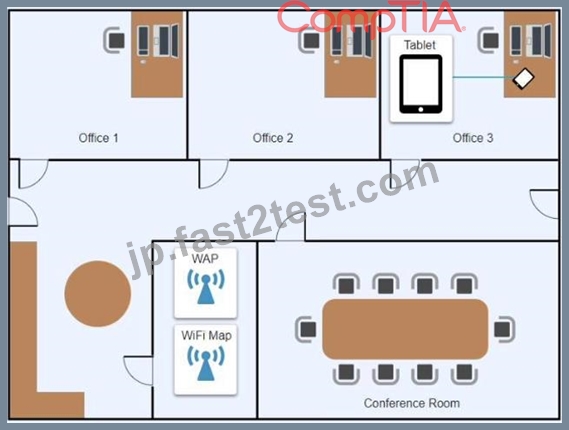


- A. See the Explanation below
正解:A
解説:
Click on 802.11 and Select ac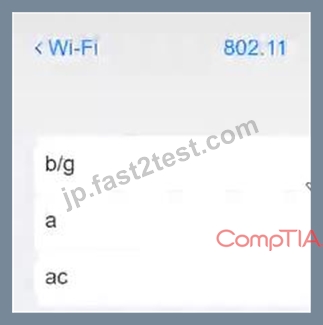
Click on SSID and select CORP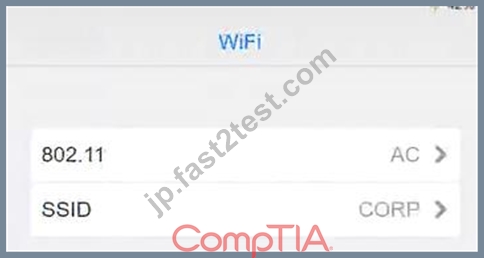
Click on Frequency and select 5GHz
At Wireless Security Mode, Click on Security Mode
Select the WPA2
Ann needs to connect to the BYOD SSID, using 2.4GHZ. The selected security method chose should be WPA PSK, and the password should be set to TotallySecret.
質問 # 172
A user is trying to use proprietary software, but it crashes intermittently. The user notices that the desktop is displaying a "low memory" warning message. Upon restarting the desktop, the issue persists. Which of the following should a technician do next to troubleshoot the issue?
- A. Reinstall and update the failing software.
- B. Decrease the page file size.
- C. Replace the system RAM.
- D. Reimage the computer.
正解:A
解説:
The most likely cause of the intermittent crashes is that the proprietary software is incompatible, outdated, or corrupted. Reinstalling and updating the software can fix these issues and ensure the software runs smoothly. Reimaging the computer or replacing the system RAM are too drastic and unnecessary steps. Decreasing the page file size can worsen the low memory problem and affect the performance of other applications.
質問 # 173
A technician has verified that a user's computer has a virus, and the antivirus software is out Of date. Which of the following steps should the technician take NEXT?
- A. Educate the end user about viruses
- B. Download the latest virus definitions
- C. use a previous restore point,
- D. Quarantine the computer.
正解:B
解説:
Explanation
This will ensure that the antivirus software is up-to-date, and can detect any new viruses that may have been released since the last virus definition update.
The CompTIA A+ Core 2 220-1002 exam covers this topic in the following domains: 1.3 Explain the importance of security awareness and 2.2 Given a scenario, use secure data management and disaster recovery principles.
質問 # 174
A technician is troubleshooting boot times for a user. The technician attempts to use MSConfig to see which programs are starting with the OS but receives a message that it can no longer be used to view startup items.
Which of the following programs can the technician use to view startup items?
- A. perfmon
- B. taskmgr
- C. msinfo32
- D. regedit
正解:B
解説:
Explanation
When troubleshooting boot times for a user, a technician may want to check which programs are starting with the operating system to identify any that may be slowing down the boot process. MSConfig is a tool that can be used to view startup items on a Windows system, but it may not always be available or functional.
In this scenario, the technician receives a message that MSConfig cannot be used to view startup items. As an alternative, the technician can use Task Manager (taskmgr), which can also display the programs that run at startup. To access the list of startup items in Task Manager, the technician can follow these steps:
Open Task Manager by pressing Ctrl+Shift+Esc.
Click the "Startup" tab.
The list of programs that run at startup will be displayed.
質問 # 175
Which of the following script types is used with the Python language by default?
- A. .vbs
- B. .bat
- C. .py
- D. .ps1
正解:C
解説:
Explanation
The script type that is used with the Python language by default is .py. .py is a file extension that indicates a Python script file that contains Python code that can be executed by a Python interpreter or compiler. Python is a high-level, general-purpose and interpreted programming language that can be used for various applications, such as web development, data analysis, machine learning and automation. .ps1 is a file extension that indicates a PowerShell script file that contains PowerShell code that can be executed by a PowerShell interpreter or compiler. PowerShell is a task-based, command-line and scripting language that can be used for system administration and automation on Windows systems. .vbs is a file extension that indicates a VBScript file that contains VBScript code that can be executed by a VBScript interpreter or compiler. VBScript is an Active Scripting language that can be used for web development and automation on Windows systems. .bat is a file extension that indicates a batch file that contains a series of commands that can be executed by a command-line interpreter or shell on Windows systems. Batch files can be used for system administration and automation on Windows systems. References: CompTIA A+ Core 2 (220-1002) Certification Exam Objectives Version 4.0, Domain 4.3
質問 # 176
A large university wants to equip all classrooms with high-definition IP videoconferencing equipment. Which of the following would most likely be impacted in this situation?
- A. SAN
- B. PAN
- C. LAN
- D. GPU
正解:C
解説:
LAN is the most likely option to be impacted in this situation. LAN stands for Local Area Network, and it is a network that connects devices within a limited area, such as a building or a campus. Installing high-definition IP videoconferencing equipment in all classrooms would require a high bandwidth and reliable LAN infrastructure to support the video and audio transmission. The LAN would also need to be configured with proper security, quality of service, and multicast protocols to ensure the optimal performance of the videoconferencing system. SAN, GPU, and PAN are not directly related to this scenario. SAN stands for Storage Area Network, and it is a network that provides access to consolidated storage devices. GPU stands for Graphics Processing Unit, and it is a hardware component that handles graphics rendering and computation. PAN stands for Personal Area Network, and it is a network that connects devices within a short range, such as Bluetooth or infrared. References:
* Official CompTIA learning resources CompTIA A+ Core 1 and Core 2, page 20
* CompTIA A+ Complete Study Guide: Core 1 Exam 220-1101 and Core 2 Exam ..., page 104
質問 # 177
A network administrator is deploying a client certificate to be used for Wi-Fi access for all devices in an organization. The certificate will be used in conjunction with the user's existing username and password.
Which of the following BEST describes the security benefits realized after this deployment?
- A. All Wi-Fi traffic will be encrypted in transit.
- B. Rogue access points will not connect.
- C. Multifactor authentication will be forced for Wi-Fi.
- D. Eavesdropping attempts will be prevented.
正解:A
解説:
The security benefits realized after deploying a client certificate to be used for Wi-Fi access for all devices in an organization are that all Wi-Fi traffic will be encrypted in transit. This means that any data transmitted over the Wi-Fi network will be protected from eavesdropping attempts. Rogue access points will not connect to the network because they will not have the client certificate. However, multifactor authentication will not be forced for Wi-Fi because the client certificate is being used in conjunction with the user's existing username and password12
質問 # 178
A large organization is researching proprietary software with vendor support for a multiuser environment.
Which of the following EULA types should be selected?
- A. Personal
- B. Corporate
- C. Perpetual
- D. Open-source
正解:B
解説:
A corporate EULA is a type of end-user license agreement that is designed for a large organization that needs to use proprietary software with vendor support for a multiuser environment. A corporate EULA typically grants the organization a volume license that allows it to install and use the software on multiple devices or servers, and to distribute the software to its employees or affiliates. A corporate EULA also usually provides the organization with technical support, maintenance, updates, and warranty from the software vendor, as well as some customization options and discounts. A corporate EULA may also include terms and conditions that specify the rights and obligations of both parties, such as confidentiality, liability, indemnification, termination, and dispute resolution12.
A corporate EULA is a better option than the other choices because:
* A perpetual EULA (B) is a type of end-user license agreement that grants the user a permanent and irrevocable license to use the software, without any time limit or expiration date. However, a perpetual EULA does not necessarily include vendor support, updates, or warranty, and it may not allow the user
* to install the software on multiple devices or servers, or to distribute the software to other users. A perpetual EULA may also be more expensive than a corporate EULA, as it requires a one-time payment upfront, rather than a recurring subscription fee34.
* An open-source EULA is a type of end-user license agreement that grants the user a license to use, modify, and redistribute the software, which is publicly available and free of charge. However, an open-source EULA does not provide any vendor support, maintenance, updates, or warranty, and it may impose some restrictions or obligations on the user, such as disclosing the source code, attributing the original author, or using a compatible license for derivative works. An open-source EULA may not be suitable for a large organization that needs proprietary software with vendor support for a multiuser environment56.
* A personal EULA (D) is a type of end-user license agreement that grants the user a license to use the software for personal, non-commercial purposes only. A personal EULA may limit the number of devices or servers that the user can install the software on, and prohibit the user from distributing, copying, or reselling the software to other users. A personal EULA may also provide limited or no vendor support, maintenance, updates, or warranty, and it may have a fixed or renewable term. A personal EULA may not meet the needs of a large organization that needs proprietary software with vendor support for a multiuser environment7 .
References:
1: What is a Corporate License Agreement? - Definition from Techopedia1 2: Corporate License Agreement - Template - Word & PDF2 3: What is a Perpetual License? - Definition from Techopedia3 4: Perpetual vs. Subscription Software Licensing: Which Is Best for You?4 5: What is an Open Source License? - Definition from Techopedia5 6: Open Source Licenses: Which One Should You Use?6 7: What is a Personal License Agreement? - Definition from Techopedia7 : Personal License Agreement - Template - Word & PDF
質問 # 179
A large university wants to equip all classrooms with high-definition IP videoconferencing equipment. Which of the following would most likely be impacted in this situation?
- A. SAN
- B. PAN
- C. LAN
- D. GPU
正解:C
解説:
LAN is the most likely option to be impacted in this situation. LAN stands for Local Area Network, and it is a network that connects devices within a limited area, such as a building or a campus. Installing high-definition IP videoconferencing equipment in all classrooms would require a high bandwidth and reliable LAN infrastructure to support the video and audio transmission. The LAN would also need to be configured with proper security, quality of service, and multicast protocols to ensure the optimal performance of the videoconferencing system. SAN, GPU, and PAN are not directly related to this scenario. SAN stands for Storage Area Network, and it is a network that provides access to consolidated storage devices. GPU stands for Graphics Processing Unit, and it is a hardware component that handles graphics rendering and computation. PAN stands for Personal Area Network, and it is a network that connects devices within a short range, such as Bluetooth or infrared. Reference:
Official CompTIA learning resources CompTIA A+ Core 1 and Core 2, page 20 CompTIA A+ Complete Study Guide: Core 1 Exam 220-1101 and Core 2 Exam ..., page 104
質問 # 180
A user accidentally installed the incorrect word processing application on an iMac. Which of the following would allow the user to uninstall the incorrect application?
- A. Move the application to the desktop and press delete
- B. Identify the application in Finder and drag it to the trash can.
- C. Use Time Machine to go back to the date before the installation.
- D. Use Spotlight to search for the application, and then run the application.
正解:B
解説:
On macOS, uninstalling an application typically involves locating the app in Finder and dragging it to the Trash. This method is straightforward and commonly used for removing unwanted applications. The other options do not directly relate to the standard process of uninstalling applications on a Mac.
質問 # 181
A branch office suspects a machine contains ransomware. Which of the following mitigation steps should a technician take first?
- A. Remediate the system.
- B. Educate the system user.
- C. Quarantine the system.
- D. Disable System Restore.
正解:C
解説:
The first mitigation step that a technician should take when a machine is suspected to contain ransomware is to quarantine the system. This means isolating the infected machine from the network and other devices, to prevent the ransomware from spreading and encrypting more data. The technician can quarantine the system by disconnecting the network cable, turning off the wireless adapter, or using firewall rules to block the traffic from and to the machine12.
This step is more important than the other options because:
* Disabling System Restore (A) is not a priority, as it will not stop the ransomware from running or spreading. System Restore is a feature that allows users to restore their system to a previous state, but it may not work if the ransomware has encrypted or deleted the restore points. Moreover, disabling System Restore may prevent the user from recovering some data or settings in the future13.
* Remediating the system (B) is the ultimate goal, but it cannot be done before quarantining the system.
Remediating the system means removing the ransomware, restoring the data, and fixing the vulnerabilities that allowed the attack. However, this process requires careful analysis, planning, and execution, and it may not be possible if the ransomware is still active and communicating with the attackers. Therefore, the technician should first isolate the system and then proceed with the remediation steps12.
* Educating the system user is a preventive measure, but it is not a mitigation step. Educating the system user means raising awareness and providing training on how to avoid ransomware attacks, such as by recognizing phishing emails, avoiding suspicious links or attachments, and updating and patching the system regularly. However, this step will not help if the system is already infected, and it may not be
* effective if the user is not willing or able to follow the best practices. Therefore, the technician should focus on resolving the current incident and then educate the user as part of the recovery plan14.
References:
1: How to Mitigate Ransomware Attacks in 10 Steps - Heimdal Security1 2: 3 steps to prevent and recover from ransomware | Microsoft Security Blog3 3: How to use System Restore on Windows 10 | Windows Central5 4: Ransomware Mitigation | Prevention and Mitigation Strategies - Delinea4
質問 # 182
A network technician is deploying a new machine in a small branch office that does not have a DHCP server.
The new machine automatically receives the IP address of 169.254.0.2 and is unable to communicate with the rest of the network. Which of the following would restore communication?
- A. ARP table
- B. NTP specification
- C. Static entry
- D. APIPA address
正解:C
解説:
A static entry is the best option to restore communication for the new machine in a small branch office that does not have a DHCP server. A static entry means manually configuring the IP address, subnet mask, default gateway, and DNS server for the network adapter of the machine. A static entry ensures that the machine has a valid and unique IP address that matches the network configuration and can communicate with the rest of the network.
The new machine automatically receives the IP address of 169.254.0.2 because it uses APIPA (Automatic Private IP Addressing), which is a feature that enables computers to self-assign an IP address when a DHCP server is not available. However, APIPA only works for local communication within the same subnet, and does not provide a default gateway or a DNS server. Therefore, the new machine is unable to communicate with the rest of the network, which may be on a different subnet or require a gateway or a DNS server to access.
The other options are not related to restoring communication for the new machine. ARP table is a cache that stores the mapping between IP addresses and MAC addresses for the devices on the network. NTP specification is a protocol that synchronizes the clocks of the devices on the network.
References:
* CompTIA A+ Certification Exam Core 2 Objectives1
* CompTIA A+ Core 2 (220-1102) Certification Study Guide2
* What is APIPA (Automatic Private IP Addressing)? - Study-CCNA3
* How to Configure a Static IP Address in Windows and OS X4
質問 # 183
A user reports that a workstation is operating sluggishly Several other users operate on the same workstation and have reported that the workstation is operating normally. The systems administrator has validated that the workstation functions normally. Which of the following steps should the systems administrator most likely attempt NEXT?
- A. Defragment the hard drive.
- B. Rebuild the user's profile
- C. Increase the paging file size
- D. Add more system memory.
- E. Run the chkdsk command
正解:B
質問 # 184
Which of the following security methods supports the majority of current WI-Fl-capable devices Without sacrificing security?
- A. MAC filtenng
- B. TACACS+
- C. WPA3
- D. RADIUS
正解:C
質問 # 185
Which of the following operating systems is considered closed source?
- A. OSX
- B. Ubuntu
- C. CentOS
- D. Android
正解:A
解説:
Explanation
OSX (now macOS) is an operating system that is considered closed source, meaning that its source code is not publicly available or modifiable by anyone except its developers. It is owned and maintained by Apple Inc.
Ubuntu, Android and CentOS are operating systems that are considered open source, meaning that their source code is publicly available and modifiable by anyone who wants to contribute or customize them. Verified References: https://www.comptia.org/blog/open-source-vs-closed-source-software
https://www.comptia.org/certifications/a
質問 # 186
A user reports that after a recent software deployment to upgrade applications, the user can no longer use the Testing program.
However, other employees can successfully use the Testing program.
INSTRUCTIONS
Review the information in each tab to verify the results of the deployment and resolve any issues discovered by selecting the:
Index number of the Event Viewer issue
First command to resolve the issue
Second command to resolve the issue
BSOD
Commands:
Event Viewer:
System Error: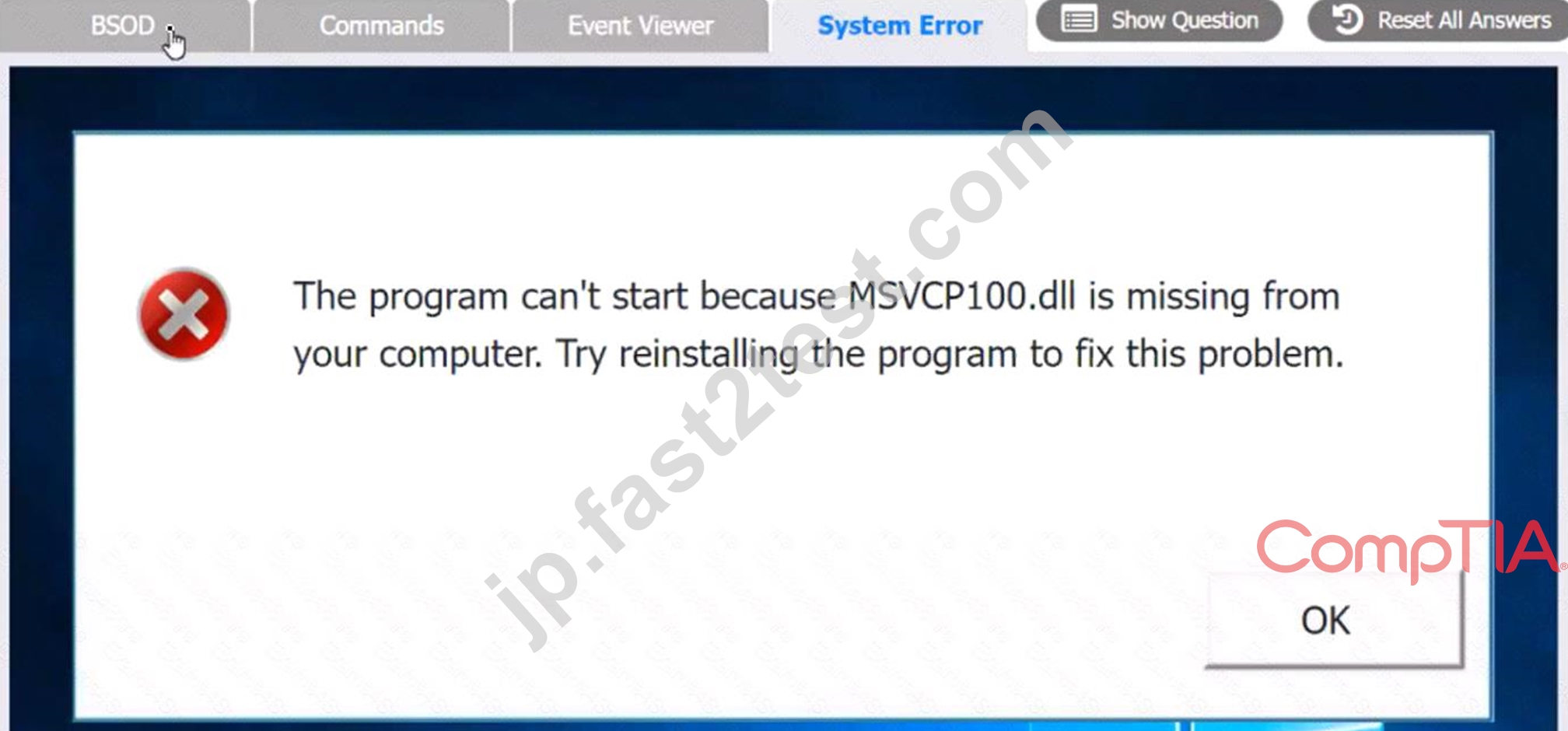


正解:
解説:
see the answer below in explanation.
Explanation:
The user is experiencing a system error that prevents them from using the Testing program. The error message indicates that the file MSVCP100.dll is missing from the computer. This file is part of the Microsoft Visual C++ 2010 Redistributable Package, which is required by some applications to run properly. The error may have occurred due to a corrupted or incomplete software deployment.
To resolve this issue, the user needs to restore the missing file and register it in the system. One possible way to do this is to copy the file from another computer that has the Testing program installed and working, and then use the regsvr32 command to register it. The steps are as follows:
On another computer (User-PC02) that has the Testing program installed and working, locate the file MSVCP100.dll in the folder C:\Program Files\Testing.
Share the folder C:\Windows\System32 on User-PC02 by right-clicking on it, selecting Properties, then Sharing, then Advanced Sharing, then checking Share this folder, then clicking OK.
On the user's computer (User-PC01), open a command prompt as an administrator by clicking Start, typing cmd, right-clicking on Command Prompt, and selecting Run as administrator.
In the command prompt, type the following command to copy the file MSVCP100.dll from User-PC02 to User-PC01: copy "C:\Program Files\Testing\msvcp100.dll" "\\User-PC02\C$\Windows\System32" After the file is copied, type the following command to register it in the system: regsvr32 msvcp100.dll Restart the user's computer and try to run the Testing program again.
Therefore, based on the instructions given by the user, the correct answers are:
Select Event Viewer Issue: 2187
Select First Command: copy "C:\Program Files\Testing\msvcp100.dll" "\\User-PC02\C$\Windows\System32" Select Second Command: regsvr32 msvcp100.dll
質問 # 187
A technician needs to format a USB drive to transfer 20GB of data from a Linux computer to a Windows computer. Which of the following filesystems will the technician MOST likely use?
- A. ext4
- B. NTFS
- C. FAT32
- D. exFAT
正解:D
解説:
Explanation
exFAT is a file system that is supported by both Linux and Windows and can handle large files1.
質問 # 188
......
2024年最新の有効な220-1102テスト解答CompTIA試験PDF:https://jp.fast2test.com/220-1102-premium-file.html
合格させるCompTIA 220-1102試験には練習テスト問題集豪華お試しセット:https://drive.google.com/open?id=1nLl5qxm1niQq-pQz2EvSDZDvkjcUGbR2