

UiPath-ADPv1問題集206問でUiPath Certified Professional - Developer Trackを確実実践
リアル最新UiPath-ADPv1試験問題UiPath-ADPv1問題集
UiPath UiPath-ADPv1 認定試験の出題範囲:
| トピック | 出題範囲 |
|---|---|
| トピック 1 |
|
| トピック 2 |
|
| トピック 3 |
|
| トピック 4 |
|
質問 # 119
When configuring the Max # of retries for the queue in Orchestrator to "1" for your process, and the queue has
5 transaction items. At runtime, the first transaction item throws a Business Rule Exception.
How does the process proceed?
- A. Transaction is not retried and the process stops.
- B. Transaction is retried multiple times until processed successfully.
- C. Transaction is retried only one time.
- D. Transaction is not retried but remaining transactions continue processing.
正解:D
解説:
A Business Rule Exception is a type of exception that indicates that the data or the input required for the automation process is incomplete or invalid1. For example, a Business Rule Exception can occur when a phone number is missing a digit, or when a mandatory field is left blank1. A Business Rule Exception is usually thrown by the developer using the Throw activity, and it is handled by the Set Transaction Status activity, which sets the status of the transaction item to Failed and adds the exception details to the queue item2. By default, Orchestrator does not retry transactions that are failed due to Business Rule Exceptions, regardless of the Max # of retries setting for the queue3. This is because retrying the transaction does not solve the issue, and there are other better courses of action, such as notifying the human user of the error1.
Therefore, if the first transaction item throws a Business Rule Exception, the transaction is not retried, but the remaining transactions continue processing, as long as they do not encounter any other exceptions.
質問 # 120
What is the primary role of the UiPath Remote Runtime component in automation projects involving virtual environments?
- A. It allows automation projects to be executed in virtual environments without installing any dedicated UiPath extension.
- B. It facilitates communication between remote applications and the dedicated UiPath extension, enabling native selector generation in UlExplorer.
- C. It replaces the need for OCR and image recognition activities in all automation projects involving web browsers.
- D. It provides a neural network server for analyzing the Ul of applications when working with the Computer Vision activities package.
正解:B
解説:
The UiPath Remote Runtime component is a component that enables the automation of remote applications or desktops, such as Citrix Virtual Apps, Windows Remote Desktop, or VMware Horizon, by using native selectors. Native selectors are expressions that identify UI elements reliably and accurately, without relying on OCR or image recognition activities1. The UiPath Remote Runtime component works as follows:
It is installed on the remote server where the applications or desktops are hosted.
It communicates with the dedicated UiPath extension that is installed on the client machine where Studio or Robot is installed.
It gathers information about the targeted UI elements of the remote applications and sends them to the corresponding extension.
It allows the extension to generate native selectors for the remote UI elements in UIExplorer, a tool that helps you create and edit selectors2.
The UiPath Remote Runtime component is required for automating in virtual environments, as it provides a bridge between the remote server and the client machine, and enables the use of native selectors, which are more reliable and efficient than OCR or image recognition activities3.
References:
1: Studio - About Selectors - UiPath Documentation Portal 2: Studio - About UiPath Remote Runtime - UiPath Documentation Portal 3: Automating in Virtual Environments with the UiPath Computer Vision AI - YouTube
質問 # 121
How should the computation of the signature be done for client apps that receive Orchestrator requests and need to check their authenticity?
Instructions: Drag the Description found on the left and drop on the correct Step Sequence found on the right.
正解:
解説:
Explanation:
質問 # 122
A developer has created a variable of type String called "MyNumbers" and assigned to it the following value:
"1. 2, 3.4, 5. 6". What is the resulting data type for the expression MyNumbers.Split("."c)(1)?
- A. Double
- B. Array of String
- C. String
- D. lnt32
正解:C
解説:
When the Split method is used on a String variable, the result is an array of substrings. However, accessing a specific element of this array (e.g., MyNumbers.Split("."c)(1)) returns a single substring, which is a String.
質問 # 123
What is the correct execution order of the State activity sections?
instructions: Drag the Description found on the "Left" and drop on the correct Execution Order found on the
"Right"
正解:
解説:

質問 # 124
While troubleshooting a process developed using the Robotic Enterprise (RE) Framework, you have placed a breakpoint at the "Invoke InitAllSettings" workflow activity.
Given the current state of the Executor, what will occur when you click on the Step Over button?
- A. Executor directs to the first InitAllSettings workflow activity
- B. Executor directs to the "If in_OrchestratorQ ... " activity
- C. Executor directs to the first activity outside "If first run, read local configuration"
- D. Executor directs to the "First Run" sequence
正解:B
解説:
When a breakpoint is placed at a particular activity within the workflow and the Step Over function is used, the Executor will move to the next activity in the sequence.
Given the context of the REFramework, after stepping over the "Invoke InitAllSettings" workflow, the next activity that would execute is the "If in_OrchestratorQueueName ..." activity, assuming there are no activities in between within the "InitAllSettings" workflow itself.
Step Over will not go into the invoked workflow but will move to the next activity at the same level of the workflow where the breakpoint was placed.
References:
UiPath Studio Guide: Debugging
質問 # 125
What is the recommended approach for handling tabular data when building a REFramework transactional project in UiPath?
- A. Use separate variables to store each column of the tabular data.
- B. Utilize a DataTable variable to store and process the tabular data.
- C. Save the tabular data in multiple CSV files for easier manipulation.
正解:B
解説:
D Implement custom activities to handle the tabular data
質問 # 126
A developer is building an automation which types text into a text file. The Activity Project Settings tor UI Automation Modern activities are set as follows:
The developer has configured the properties of a Type Into activity as follows:
What is the behavior of the Type Into activity when executing the workflow?
- A. The activity will remove a Single Line in Run mode and Multi Line in Debug mode.
- B. The activity will use only properties set in Activity Project Settings.
- C. The activity will remove a Single Line in Run mode and in Debug mode.
- D. The activity will remove Multi Line in Run mode and a Single Line in Debug mode.
正解:A
解説:
The behavior of the Type Into activity when executing the workflow is that the activity will remove a Single Line in Run mode and Multi Line in Debug mode. This is because the activity has the Empty field property set to NEmptyFieldMode.SingleLine, which means that the activity will delete the existing content in the field by sending Ctrl+A and Delete keystrokes before typing the text. However, the activity also has the Debug mode property set to NEmptyFieldMode.MultiLine, which means that the activity will delete the existing content in the field by sending Ctrl+A, Shift+Home, and Delete keystrokes before typing the text. The Debug mode property overrides the Empty field property when the workflow is executed in Debug mode. Therefore, the activity will use different keystrokes to empty the field depending on the mode of execution. References:
[Type Into], [Empty Field], [Debug Mode]
質問 # 127
The following table is stored in a variable called "dt".
Which query can be used to extract the table column names and store them in a list?
- A. dt.Columns.Cast(Of Datacolumn).Select(function(x) x.ColumnName).ToList()
- B. dt.Columns.Cast(Of Datacolumn).Select(function(col) col).ToList()
- C. dt.AsEnumerable.Select(function(x) x.ColumnName).ToList()
- D. dt.Columns.Select(function(x) x.ColumnName).ToList()
正解:A
解説:
The DataTable object in UiPath is a representation of a table with rows and columns that can store data of various types. It has a Columns property that returns a collection of DataColumn objects that describe the schema of the table1. To extract the column names from a DataTable and store them in a list, you can use the following query:
dt.Columns.Cast(Of Datacolumn).Select(function(x) x.ColumnName).ToList() This query does the following:
It casts the Columns collection to a generic IEnumerable(Of DataColumn) using the Cast(Of T) extension method2. This is necessary because the Columns collection is a non-generic IEnumerable that cannot be used with LINQ methods directly3.
It selects the ColumnName property of each DataColumn object using the Select extension method and a lambda expression4. The ColumnName property returns the name of the column as a string5.
It converts the resulting IEnumerable(Of String) to a List(Of String) using the ToList extension method6.
The other options are incorrect because:
Option B does not cast the Columns collection to a generic IEnumerable(Of DataColumn), which will cause a runtime error.
Option C uses the AsEnumerable extension method, which returns a collection of DataRow objects, not DataColumn objects7. Therefore, the ColumnName property will not be available.
Option D selects the whole DataColumn object instead of its ColumnName property, which will result in a list of DataColumn objects, not strings.
References:
DataTable Class (System.Data) | Microsoft Docs
Enumerable.Cast(Of TResult) Method (System.Linq) | Microsoft Docs
DataColumnCollection Class (System.Data) | Microsoft Docs
Enumerable.Select(Of TSource, TResult) Method (System.Linq) | Microsoft Docs DataColumn.ColumnName Property (System.Data) | Microsoft Docs Enumerable.ToList(Of TSource) Method (System.Linq) | Microsoft Docs DataTableExtensions.AsEnumerable Method (System.Data) | Microsoft Docs
質問 # 128
Under what conditions will a trigger be automatically disabled upon failure in Integration Service?
- A. When the job is not able to start after 3 attempts for a single event or the job does not start for the last
25 events. - B. When the job is not able to start after 5 attempts for a single event or the job does not start for the last
50 events. - C. When the job is not able to start after 11 attempts for a single event or the job does not start for the last
100 events. - D. When the job is not able to start after 20 attempts for a single event or the job does not start for the last
200 events.
正解:A
解説:
In UiPath Integration Service, a trigger will be automatically disabled upon failure under specific conditions to prevent continuous failure and unnecessary resource consumption. This typically happens when the job associated with the trigger fails to start after a predefined number of attempts for a single event, or when it consistently fails to start across a series of events. The condition of failing to start after 3 attempts for a single event or not starting for the last 25 events is designed to safeguard against persistent issues that could disrupt the automation flow or lead to resource wastage.References:
* UiPath Integration Service Documentation: Triggers and Events
質問 # 129
What is the default priority value for the Job Priority field in UiPath Orchestrator when starting a job manually?
- A. Inherited
- B. High
- C. Low
- D. Medium
正解:A
解説:
When starting a job manually in UiPath Orchestrator, the default priority value for the Job Priority field is Inherited. This means that the job inherits the priority value that was set at the process level when the package was deployed. The possible priority values are High, Normal, and Low. The priority value determines the order in which the jobs are executed by the robots, with higher priority jobs being executed first. The priority value can be changed manually when starting a job, or it can be set dynamically using the Start Job activity in a workflow. References: [Starting a Job], [Job Priority]
質問 # 130
In a UiPath project that uses State Machines, under what circumstances should the Final State activity be used in the project?
- A. When initiating the first state of a state machine.
- B. When a particular state contains complex conditional logic.
- C. When an intermediary state has multiple possible transitions.
- D. When marking the successful completion or termination of a state machine's execution.
正解:D
解説:
A state machine is a type of automation that uses a finite number of states in its execution. It can go into a state when it is triggered by an activity, and it exits that state when another activity is triggered. Another important aspect of state machines are transitions, as they also enable you to add conditions based on which to jump from one state to another. These are represented by arrows or branches between states.
The Final State activity is a state machine specific activity that ends a state machine cycle. This activity contains an Entry area which holds the activities that are to be performed when the state is entered. A state machine must have one initial state and one or more final states.
The Final State activity should be used in the project when marking the successful completion or termination of a state machine's execution. This means that the automation has reached its desired outcome or encountered an unrecoverable error, and no further actions are required. The Final State activity can also be used to perform some cleanup or logging activities before ending the state machine.
The other options are not circumstances when the Final State activity should be used in the project. Option A is incorrect, because an intermediary state can have multiple possible transitions, but it does not end the state machine cycle. Option B is incorrect, because a particular state can contain complex conditional logic, but it does not end the state machine cycle. Option C is incorrect, because the initial state is the first state of a state machine, not the final state.
References: Activities - Final State - UiPath Documentation Portal, Studio - State Machines - UiPath Documentation Portal, [State Machine Activity Designer - Microsoft Docs]
質問 # 131
What are the five severity levels of Orchestrator alerts?
- A. Info, Success, Warn, Error, Fatal.
- B. Information, Complete. Warning, Error, Failure.
- C. Info. Success. Warning. Error. Critical.
- D. Info, Completed. Warning, Error. Fatal.
正解:A
解説:
Orchestrator alerts are real-time notifications related to robots, queue items, triggers, and more. Alerts can have one of the following severity levels, which indicate the importance and impact of the events1:
Info - notifies you about low importance events, that do not interrupt the process execution, such as robots becoming available, users being assigned as reviewers, etc.
Success - notifies you about a successful status, such as a job being completed, a queue item being processed, etc.
Warn - notifies you about possible risky events that may interrupt your process execution, but any interruption can be recovered, such as queue items failing with business exceptions, triggers not being able to create new jobs, etc.
Error - notifies you about imminent risky events that prevent the process from executing successfully, such as jobs failing, robots not responding, queue items failing with application exceptions, etc.
Fatal - notifies you about events that force-stop the process execution, such as robots going offline or being disconnected, etc.
Option A is the correct answer, as it lists the five severity levels of Orchestrator alerts as defined in the documentation1. Option B is incorrect, because there is no Critical severity level, but rather Fatal. Option C is incorrect, because there are no Information, Complete, or Failure severity levels, but rather Info, Success, and Fatal. Option D is incorrect, because there are no Completed or Fatal severity levels, but rather Success and Fatal.
References: 1: Alerts Overview
質問 # 132
How should the computation of the signature be done for client apps that receive Orchestrator requests and need to check their authenticity?
Instructions: Drag the Description found on the left and drop on the correct Step Sequence found on the right.
正解:
解説:

質問 # 133
A developer is using the REFramework template to automate a process. In "SetTransactionStatus" file, there is the following sequence of activities, where the last Log Message activity was added by the developer:
The configuration for Add Log Fields and Remove Log Fields activities are shown below:
Add transaction log fields (Success)

The developer runs the process and notices the argument values for the first transaction are:
in_TransactionID = "07/18/2023 10:27:29"
io_TransactionNumber = 1
in_TransactionField1 = "UI235-80"
in_TransactionField2 = "Update Request"
Which of the following Log Message Details will be displayed when executing the activity Log Message Completed for the first transaction, considering it is successful?
- A. {"message": "Transaction Completed","level": "Information","logType": "User","timeStamp": "10:30:
19","fileName": "SetTransactionStatus","processVersion": "1.0.0","jobId": "f8a36a46-8ebc-40df-8f71-
26b39087ebee","robotName": "test.robot","machineId": 0,"logF_BusinessProcessName":
"Framework"} - B. {"message": "Transaction Completed","level": "Information","logType": "User","timeStamp": "10:30:
19","fileName": "SetTransactionStatus","processVersion": "1.0.0","jobId": "cb865477-35f8-4c0a-93e9- e4f4246223f2","robotName": "test.robot","machineId": 0,"logF_TransactionField2": "Update Request","logF_TransactionID": "07/18/2023 10:27:29","logF_BusinessProcessName": "Framework"," logF_TransactionNumber": "1","logF_TransactionField1": "UI235-80","logF_TransactionStatus":
"Success"} - C. {"message": "Transaction Completed","level": "Information","logType": "User","timeStamp": "10:30:
19","fileName": "SetTransactionStatus","processVersion": "1.0.0","jobId": "59325301-680a-4d55-a81b-
56ca1f369c12","robotName": "test.robot","machineId": 0,"logF_TransactionField2": ""," logF_TransactionStatus": "","logF_TransactionID":"logF_BusinessProcessName": "Framework"," logF_TransactionNumber": "","logF_TransactionField1": ""} - D. {"message": "Transaction Completed","level": "Information","logType": "User","timeStamp": "10:30:
19","fileName": "SetTransactionStatus","processVersion": "1.0.0","jobId": "59325301-680a-4d55-a81b-
56ca1f369c12","robotName": "test.robot","machineId": 0,"logF_TransactionField2": empty," logF_TransactionStatus": empty,"logF_TransactionID": empty,"logF_BusinessProcessName":
"Framework","logF_TransactionNumber": empty,"logF_TransactionField1": empty}
正解:A
解説:
In the REFramework, the Add Log Fields activity is used to append additional information to the log messages. This information is stored in the form of custom fields. In this scenario, Add Log Fields (Success) activity is adding several fields with the transaction details whenever a transaction is successful.
The Remove Log Fields activity is then used to delete these custom fields to prevent them from appearing in subsequent log messages. This is important to ensure that only relevant information is logged for each transaction and to avoid cluttering the logs with outdated information.
When the Log Message Completed activity is executed after the Remove Log Fields activity, it should log the message without the additional fields that were added by the Add Log Fields activity since they have been removed. This means that the log message should only include the standard fields like message, level, logType, timeStamp, fileName, processVersion, jobId, robotName, and machineId, without the custom fields like logF_TransactionStatus, logF_TransactionNumber, etc.
Based on the options provided and the understanding of the REFramework's logging mechanism, the correct answer should be:
D: { "message": "Transaction Completed", "level": "Information", "logType": "User", "timeStamp": "10:30:
19", "fileName": "SetTransactionStatus", "processVersion": "1.0.0", "jobId": "f8a36a46-8ebc-40df-8f71-
26b39087ebee", "robotName": "test.robot", "machineId": 0, "logF_BusinessProcessName": "Framework" } This option is correct because it shows a log message after the removal of custom fields, retaining only the logF_BusinessProcessName field, which wasn't specified to be removed according to the provided information.
質問 # 134
Which of the following is an outcome of converting a personal workspace into a folder in UiPath Orchestrator?
- A. The owner of the initial workspace and the admin user are added by default to the newly created folder and assigned the Personal Workspace Administrator role.
- B. The owner of the initial workspace is added by default to the newly created folder and assigned the Folder Administrator role.
- C. The owner of the initial workspace loses access to the newly created folder and the existing admin users are added by default.
- D. The admin user is added by default to the newly created folder with the User Administrator role.
正解:B
解説:
The outcome of converting a personal workspace into a folder in UiPath Orchestrator is that the owner of the initial workspace is added by default to the newly created folder and assigned the Folder Administrator role.
A personal workspace is a special type of folder that is created automatically for each user in Orchestrator and allows them to work on their own automation projects without affecting other users or folders. A personal workspace can be converted into a regular folder if the user wants to share their work with other users or move it to another folder. When a personal workspace is converted into a folder, the owner of the workspace becomes the owner of the folder and gets the Folder Administrator role, which gives them full permissions to manage the folder and its contents. The folder also inherits the permissions and settings of the parent folder, which is the Default folder by default. The admin user is not added to the folder by default, but they can access the folder as a Tenant Administrator if they have that role. References: [Personal Workspaces],
[Convert Personal Workspace to Folder]
質問 # 135
When developing a new project using REf ramework. logging in to multiple applications Is required. What is the recommended location to accomplish this task?
- A. Process.xaml
- B. InitAIIApplicatlons.xaml
- C. FirstRun.xaml
- D. InitAIISettings.xaml
正解:B
解説:
In the REFramework (Robotic Enterprise Framework), the initialization of all required applications should ideally be done in the 'InitAllApplications.xaml' file. This helps in keeping the project organized and maintains a standard structure.
質問 # 136
What is the recommended approach for handling tabular data when building a REFramework transactional project in UiPath?
- A. Use separate variables to store each column of the tabular data.
D Implement custom activities to handle the tabular data - B. Utilize a DataTable variable to store and process the tabular data.
- C. Save the tabular data in multiple CSV files for easier manipulation.
正解:B
解説:
The recommended approach for handling tabular data when building a REFramework transactional project in UiPath is to utilize a DataTable variable to store and process the tabular data. A DataTable variable can hold data in a tabular format, with rows and columns, and can be easily manipulated using built-in activities such as Read Range, Write Range, Filter Data Table, For Each Row, etc. A DataTable variable can also be used as the input for the Get Transaction Data state in the REFramework, which retrieves each row of data as a transaction item for processing. References: [UiPath Studio Guide - Data Tables], [UiPath Studio Guide - The REFramework]
質問 # 137
The following table is stored in a variable called "dt".
What will the value of the qty variable be after executing the Assign activity?
- A. null
- B. 0
- C. 1
- D. 2
正解:D
解説:
The value of the qty variable will be 80 after executing the Assign activity. This is because the expression in the Assign activity is using the LINQ methods AsEnumerable, SkipWhile, and Item to access the data in the dt variable. The dt variable is a DataTable that contains the following data:
Item
Quantity
apple
5
banana
10
mango
20
orange
80
grape
40
The AsEnumerable method converts the DataTable into an Enumerable collection of DataRow objects. The SkipWhile method skips the elements of the collection until the condition is false. The condition is a lambda expression that checks if the value of the Item column is equal to "mango". The (0) indexer returns the first element of the collection after skipping. The Item method accesses the value of the Quantity column of the DataRow. The ToString method converts the value into a string. Therefore, the expression will skip the first three rows of the DataTable and return the value of the Quantity column of the fourth row, which is 80.
References: [DataTable.AsEnumerable Method], [Enumerable.SkipWhile Method], [DataRow.Item Property]
質問 # 138
What do the percentages from the Test Explorer panel represent?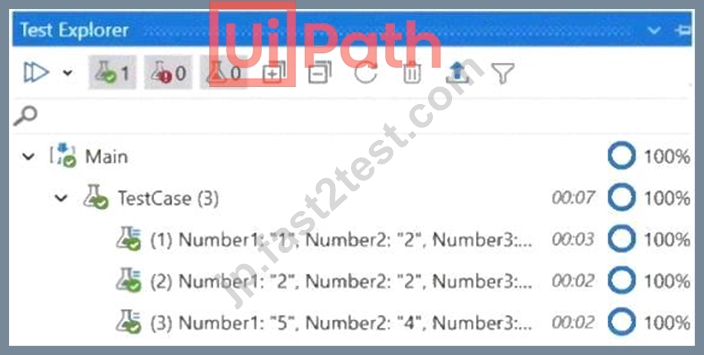
- A. Correctness of the code percent.
- B. Passing percent.
- C. Coverage percent.
- D. Percent of test data run.
正解:B
解説:
The percentages from the Test Explorer panel represent the passing percent of the test cases that are executed.
The Test Explorer panel shows the status of each test case, the total number of test cases, the number of passed test cases, the number of failed test cases, and the passing percent. The passing percent is calculated by dividing the number of passed test cases by the total number of test cases and multiplying by 100. For example, if there are 10 test cases and 8 of them pass, the passing percent is 80%. References: Test Explorer
質問 # 139
A developer intends to enter text into an input field using a combination of a string and a hotkey. The input action should take place within a hidden or minimized window.
Which input method(s) can be used individually for the Type Into activity?
- A. Simulate only.
- B. Simulate and Window Messages.
- C. Same as App/Browser and Simulate.
- D. Window Messages only.
正解:B
解説:
The Type Into activity has three input methods: Default, Simulate, and Window Messages. The Default method uses hardware drivers to send keystrokes to the target application, which means it requires the window to be active and visible. The Simulate and Window Messages methods use software drivers to send keystrokes to the target application, which means they can work in the background, even if the window is hidden or minimized. However, the Simulate method cannot send hotkeys, while the Window Messages method can.
Therefore, the only input methods that can be used individually for the Type Into activity to enter text and hotkeys in a hidden or minimized window are Simulate and Window Messages. References:
*Type Into
*Input Methods
質問 # 140
......
UiPath-ADPv1別格な問題集で最上級の成績にさせるUiPath-ADPv1問題:https://jp.fast2test.com/UiPath-ADPv1-premium-file.html
手に入れよう!最新UiPath-ADPv1認定の有効な試験問題集解答:https://drive.google.com/open?id=1ufn9oy3wuSni5eyTblpY0yRQkJBDqnWX