

[2025年06月] 最新のUiPath Certified Professional - Developer Track UiPath-ADPv1試験解答豪華セット問題集
UiPathコンテンツをマスターしてUiPath-ADPv1試験合格保証つき問題集!
質問 # 20
What do the percentages from the Test Explorer panel represent?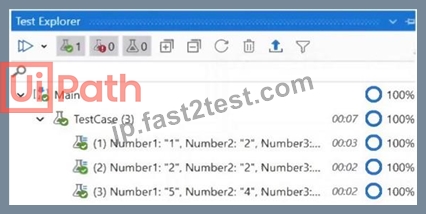
- A. Percent of test data run.
- B. Passing percent.
- C. Correctness of the code percent.
- D. Coverage percent.
正解:B
解説:
The percentages from the Test Explorer panel represent the passing percent of the test cases that are executed.
The Test Explorer panel shows the status of each test case, the total number of test cases, the number of passed test cases, the number of failed test cases, and the passing percent. The passing percent is calculated by dividing the number of passed test cases by the total number of test cases and multiplying by 100. For example, if there are 10 test cases and 8 of them pass, the passing percent is 80%. References: Test Explorer
質問 # 21
Once "Library A" has been imported as a dependency in the current project, how can the UI Object Repository defined in "Library A" be accessed?
- A. The Object Repository cannot be passed between a Process and a Library.
- B. The Object Repository needs to be exported as a UI Library and imported in the Process for it to become available.
- C. The Object Repository will automatically be available in the Process.
- D. The Object Repository is only available in a Library.
正解:C
解説:
The Object Repository is a feature of UiPath Studio that allows you to store and manage UI elements in a structured way, similar to a DOM (Document Object Model)1. The Object Repository can be created and used in both libraries and processes2. When you import a library as a dependency in a process, the Object Repository defined in the library will automatically be available in the process3. You can access the UI elements from the library by using the UI Activities tab in the Object Repository panel3. You can also drag and drop the UI elements from the library to the Designer panel3.
質問 # 22
A developer wants to add items to a list of strings using the Invoke Method activity. The list is declared as follows:
The Invoke Method activity has the following properties:
The Parameters property is as follows:
Based on the information shown in the exhibits what is the outcome of the Invoke Method activity?
- A. Colors will contain an item with an empty value.
- B. An exception will be thrown.
- C. Colors will contain an item with the value "Colors: Yellow".
- D. Colors will contain an item with the value "Yellow".
正解:D
解説:
The Invoke Method activity is used to invoke a method of a class or an object. In this case, the developer wants to add items to a list of strings using the Invoke Method activity. The list is declared as follows:
Dim Colors As New List(Of String)
This means that the list is named Colors and it can store strings. The Invoke Method activity has the following properties:
TargetType: System.Collections.Generic.List`1[System.String]. This means that the target type is a generic list of strings.
TargetObject: Colors. This means that the target object is the list named Colors.
MethodName: Add. This means that the method name is Add, which is a method of the list class that adds an item to the end of the list.
Parameters: In, String, Yellow. This means that the parameter direction is In, which means that the value is passed to the method. The parameter type is String, which means that the value is a string. The parameter value is Yellow, which means that the value is the string "Yellow".
Based on the information shown in the exhibits, the outcome of the Invoke Method activity is that Colors will contain an item with the value "Yellow". This is because the Invoke Method activity will add "Yellow" to the list of strings declared as Colors.
質問 # 23
Which of the following is an accurate example of using LINQ for querying data in a UiPath process?
- A. Applying LINQ to find duplicates in a list of integers by writing:
listOflntegers.FindDuplicates().ToList() - B. Executing LINQ to merge two DataTables by writing:
dataTable1.Merge(dataTable2).CopyToDataTable() - C. Utilizing LINQ to sort DataTable rows based on a specific column by writing:
dataTable.OrderBy(Function(x) x.ToString).CopyToDataTable() - D. Using LINQ to filter a list of strings containing only "UiPath" by writing: listOfStrings.Where(Function(x) x = "UiPath").ToList()
正解:D
解説:
LINQ stands for Language-Integrated Query, which is a set of features that allows you to query data from different sources using a common syntax1. In UiPath, you can use LINQ to query data from collections, such as lists, arrays, or dictionaries, or from data tables, such as Excel or CSV files2.
Option D is an accurate example of using LINQ for querying data in a UiPath process, because it uses the Where method to filter a list of strings based on a condition, and returns the result as a new list. The condition is that the string must be equal to "UiPath", which is specified by the lambda expression Function(x) x = "UiPath". The ToList method converts the query result into a list type3.
The other options are not accurate examples of using LINQ for querying data in a UiPath process, because they either use methods that are not part of LINQ, or use LINQ for purposes other than querying data. For example:
Option A uses a custom method FindDuplicates, which is not a standard LINQ method, and does not specify a lambda expression to define the query criteria4.
Option B uses LINQ to sort data table rows, which is not a querying operation, and does not use the Field method to access the column values5.
Option C uses the Merge method, which is a data table method, not a LINQ method, and does not use any query expression at all.
References:
1: What is LINQ? - C# | Microsoft Docs 2: LINQ - UiPath Activities 3: Enumerable.Where Method (System.Linq) | Microsoft Docs 4: How to find duplicates in a list using LINQ - Stack Overflow 5: How to use LINQ on a DataTable in Uipath - Stack Overflow : DataTable.Merge Method (System.Data) | Microsoft Docs
質問 # 24
In a UiPath State Machine workflow, which section of State activity is used to specify conditional/triggers logic and multiple outgoing transitions in a state machine?
- A. Exit
- B. Triggers
- C. Transitions
- D. Entry
正解:C
解説:
In a UiPath State Machine workflow, the Transitions section of the State activity is used to specify conditional
/triggers logic and multiple outgoing transitions in a state machine. Transitions are expanded when you double-click them, just like the State activity. They contain three sections: Trigger, Condition and Action, that enable you to add a trigger for the next state, or add a condition under which an activity or sequence is to be executed. Transitions are represented by arrows or branches between states. They define the flow of the state machine and the rules for moving from one state to another. You can add multiple transitions from a state, but only one transition can be taken at a time, based on the trigger or condition that is met first
質問 # 25
You have to create a testcase for an attended RPA process. At some point, the attended process asks the user to input a specific token for the execution to continue, as shown in the screenshot below.
What testing concept (included in UiPath.Testing.Activities) can be used to isolate and replace the input part, without modifying the original workflow?
- A. RPA Testing
- B. Application Testing
- C. Mock Testing
- D. Data-Driven Testing
正解:C
解説:
Mock Testing is a concept that allows you to isolate and replace the input part of an attended RPA process, without modifying the original workflow. Mock Testing enables you to create a mock file of your workflow by selecting Mock workflow under test in the Create Test Case window. This creates a copy of your workflow with the name workflowName_mock and stores it in Project > Mocks. This folder mirrors the source workflow file tree structure. In the mock file, you can use the Surround with mock option to insert a mock activity that replaces the original input activity. For example, instead of asking the user to input a specific token, you can use a mock activity that assigns a predefined token value to a variable. This way, you can test the specific function of the process without having to enter the token manually every time. Mock Testing is useful for tests that have permanent effects in production or require special resources1.
The other options are incorrect because:
Option A is incorrect because Application Testing is not a concept that can be used to isolate and replace the input part of an attended RPA process, without modifying the original workflow. Application Testing is a type of testing that focuses on verifying the functionality, usability, performance, and security of an application2.
Option B is incorrect because Data-Driven Testing is not a concept that can be used to isolate and replace the input part of an attended RPA process, without modifying the original workflow. Data-Driven Testing is a type of testing that uses external data sources, such as Excel files or databases, to provide input values and expected results for the test cases3.
Option D is incorrect because RPA Testing is not a concept that can be used to isolate and replace the input part of an attended RPA process, without modifying the original workflow. RPA Testing is a type of testing that involves using robots to automate the testing of other robots or applications.
References:
Studio - Mock Testing - UiPath Documentation Portal
Application Testing - UiPath Documentation Portal
Data-Driven Testing - UiPath Documentation Portal
[RPA Testing - UiPath Documentation Portal]
質問 # 26
Based on the following exhibit, which output is displayed in the Output panel rt Step Out is clicked on the Debug ribbon tab of UlPath Studio?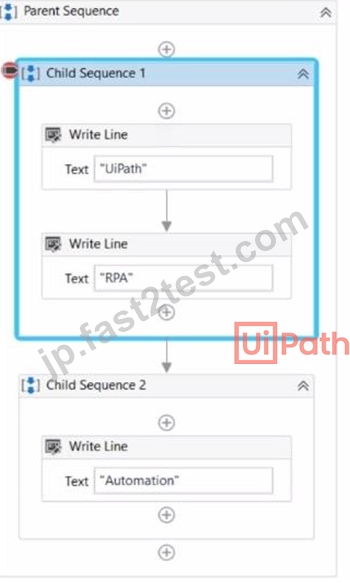
- A. Automation
- B. UiPath RPAAutomatlon
- C. UiPath RPA
- D. Automation RPAUiPath RPA
正解:B
質問 # 27
Considering that the attached table is stored in a variable called "dt":
Which LINQ query can be used to return the maximum total Quantity?
- A. dt.AsEnumerable. Max(Function(x) Convert.ToInt32(x("Quantity").ToString))
- B. dt.AsEnumerable. GroupBy(Function(x) x("Item").ToString). Max(Function(x) x.Sum(Function(y) Convert.ToInt32(y("Quantity").ToString)))
- C. dt.AsEnumerable. Max(Function(x) Convert.ToInt32(x("Quantity").ToString))("Item")
- D. dt.AsEnumerable. OrderByDescending(Function(x) Convert.ToInt32(x("Quantity").ToString)).First.Item("Quantity")
正解:B
解説:
The LINQ query that can be used to return the maximum total Quantity from the attached table is dt.AsEnumerable. GroupBy(Function(x) x("Item").ToString). Max(Function(x) x.Sum(Function(y) Convert.ToInt32(y("Quantity").ToString))). This query uses the LINQ methods AsEnumerable, GroupBy, Max, and Sum to manipulate the data in the dt variable. The dt variable is a DataTable that contains the following data:
No.
Item
Quantity
1
apple
10
2
orange
20
3
mango
50
4
kiwi
80
5
pear
1
6
apple
5
7
mango
15
The AsEnumerable method converts the DataTable into an Enumerable collection of DataRow objects. The GroupBy method groups the elements of the collection by the value of the Item column, creating a collection of groups. Each group has a key, which is the Item name, and a list of elements, which are the DataRows that have the same Item value. The Max method returns the maximum value of the collection, based on a selector function. The selector function is a lambda expression that calculates the sum of the Quantity column for each group. The Sum method returns the sum of the elements in a collection, based on a selector function. The selector function is a lambda expression that converts the value of the Quantity column into an integer.
Therefore, the query will group the DataRows by the Item name, calculate the total Quantity for each group, and return the maximum total Quantity among the groups. The maximum total Quantity is 80, which corresponds to the group with the key "kiwi". References: [DataTable.AsEnumerable Method],
[Enumerable.GroupBy Method], [Enumerable.Max Method], [Enumerable.Sum Method]
質問 # 28
A developer has created a variable of type List of Strings named "Users_List", and initialized it with an empty list: "Users_List = new List(Of String)".
What is printed in the log message after the following Invoke Code is executed?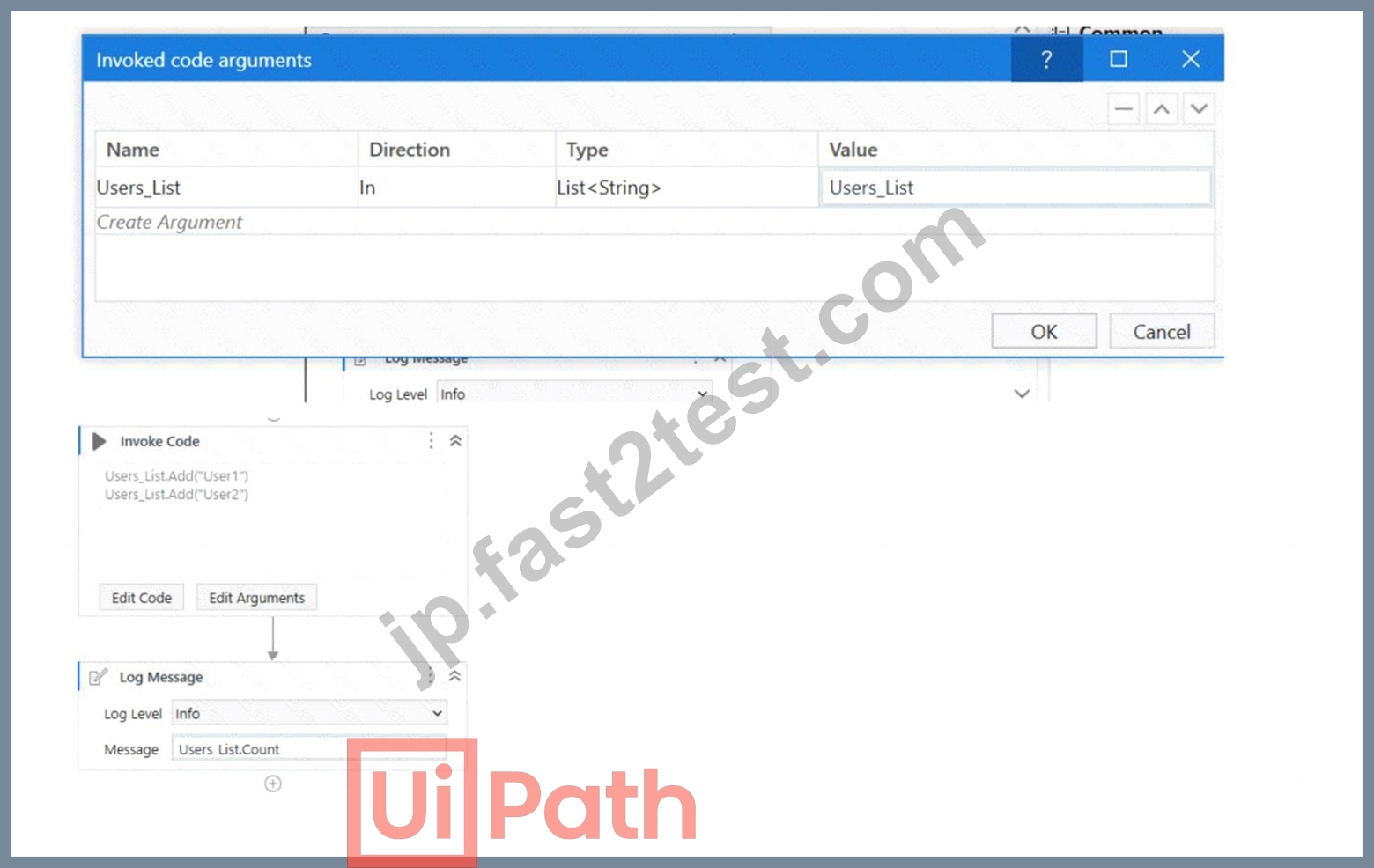
- A. 0
- B. System Argument Exception is thrown
- C. Object reference not set to an instance exception is thrown
- D. 1
正解:D
解説:
The screenshot shows an "Invoke Code" activity in UiPath with the following VB.NET code:
Users_List.Add("User1")
Users_List.Add("User2")
According to the given information, the "Users_List" variable is a List of Strings that has been initialized with an empty list before the Invoke Code activity is run. The code within the Invoke Code activity is adding two strings: "User1" and "User2" to the "Users_List".
The Log Message activity following the Invoke Code is attempting to log the count of items in "Users_List", which would be the number of elements contained in the list at that time.
Given the steps that have been described, after the Invoke Code activity has run, the "Users_List" will contain two elements ("User1" and "User2"). Therefore, the log message will print the count of items in the list, which is:
B: 2
So the correct answer is B, as the "Users_List" will have two elements and Users_List.Count will return the number 2.
The Invoke Code activity is used to execute VB.NET or C# code within a UiPath workflow1. The activity has the following properties:
Code: The code that is to be executed. This field supports only strings and String variables1.
Language: The language that the code is written in. The available options are VBNet and CSharp1.
Arguments: The parameters that can be passed to and from the code1.
In this question, the developer has created a variable of type List of Strings named "Users_List", and initialized it with an empty list: "Users_List = new List(Of String)". Then, the developer has used the Invoke Code activity to execute the following code:
Users_List.Add("User1") Users_List.Add("User2")
This code adds two items ("User1" and "User2") to the "Users_List" variable. After the Invoke Code activity, the developer has used the Log Message activity to print the count of items in the "Users_List" variable, using the expression "Users_List.Count.ToString". This expression returns the number of items in the list as a string2. Therefore, the log message will print "2", as there are two items in the list
質問 # 29
The following table is stored in a variable called "dt".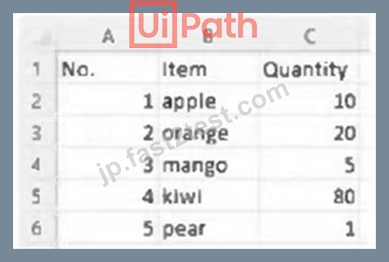
What will the value of the qty variable be after executing the Assign activity?
- A. null
- B. 0
- C. 1
- D. 2
正解:B
質問 # 30
Starting with UiPath Studio version 2022.10, what happens to dependencies that lack Windows compatibility when they are converted in a project?
- A. They are replaced with compatible alternatives.
- B. They are automatically resolved.
- C. They are marked as unresolved.
- D. They are removed from the project.
正解:C
解説:
Starting with UiPath Studio version 2022.10, dependencies that lack Windows compatibility are marked as unresolved when they are converted in a project. This means that the project cannot be executed until the unresolved dependencies are manually resolved by the developer. This is done to ensure that the project can run on both Windows and Linux platforms without compatibility issues. References: [UiPath Studio Guide - Converting Projects to Linux Compatibility]
質問 # 31
Which of the following examples accurately demonstrates using LINQ to perform data operations in a UiPath process?
- A. Utilizing LINQ to split a DataTable into multiple smaller DataTables based on a specific condition by writing dataTable.Splitf'ColumnName = 'Condition'").CopyToData Tablet).
- B. Applying LINQ to convert a list of integers to a JSON format by writing listOflntegers.ToJSON().
ToList(). - C. Employing LINQ to concatenate two strings in a list by writing listOfStrings.Concatenate("String_1",
"String_2").ToList(). - D. Using LINQ to filter DataTable rows based on a specific condition by writing dataTable.
AsEnumerable().Where(Function(row) row("ColumnName").ToString.Contains("Value")).
CopyToDataTable().
正解:D
解説:
LINQ (Language-Integrated Query) is a feature of .NET that allows you to write queries to manipulate data from various sources, such as arrays, collections, databases, XML, etc. LINQ can be used in UiPath Studio to perform complex data operations on variables of different types, such as DataTable, List, Array, etc. LINQ has two syntax forms: query syntax and method syntax. Both forms can achieve the same results, but they have different styles and preferences.
Option B is the correct answer because it demonstrates using LINQ method syntax to filter DataTable rows based on a specific condition. The expression dataTable.AsEnumerable().Where(Function(row) row ("ColumnName").ToString.Contains("Value")).CopyToDataTable() does the following:
* It converts the DataTable variable dataTable to an IEnumerable(Of DataRow) object using the AsEnumerable extension method1. This allows the use of LINQ methods on the DataTable.
* It filters the rows of the DataTable based on a lambda expression using the Where extension method2.
The lambda expression Function(row) row("ColumnName").ToString.Contains("Value") returns true for the rows that have the value "Value" in the column named "ColumnName".
* It converts the filtered IEnumerable(Of DataRow) object back to a DataTable using the CopyToDataTable extension method3. This returns a new DataTable that contains only the rows that match the condition.
The other options are incorrect because:
* Option A is incorrect because it uses an invalid LINQ method Concatenate. The correct method to concatenate two strings in a list is Concat4, which takes two IEnumerable(Of T) objects as arguments and returns a new IEnumerable(Of T) that contains the elements from both sources. For example, listOfStrings.Concat(new List(Of String) {"String_1", "String_2"}).ToList().
* Option C is incorrect because it uses an invalid LINQ method ToJSON. There is no such method in the LINQ library that can convert a list of integers to a JSON format. To achieve this, you need to use a JSON serializer, such as Newtonsoft.Json5, which provides methods to convert .NET objects to JSON and vice versa. For example, JsonConvert.SerializeObject(listOfIntegers).
* Option D is incorrect because it uses an invalid LINQ method Split. There is no such method in the LINQ library that can split a DataTable into multiple smaller DataTables based on a specific condition. To achieve this, you need to use a group by clause in LINQ query syntax or a GroupBy extension method in LINQ method syntax6, which groups the rows of a DataTable by a key value and returns an IEnumerable(Of IGrouping(Of TKey, TElement)) object. Then, you can use a Select extension method to project each group into a new DataTable using the CopyToDataTable extension method. For example, dataTable.AsEnumerable().GroupBy(Function(row) row("ColumnName")).Select (Function(group) group.CopyToDataTable()).ToList().
References:
* DataTableExtensions.AsEnumerable Method (System.Data) | Microsoft Docs
* Enumerable.Where(Of TSource) Method (System.Linq) | Microsoft Docs
* DataTableExtensions.CopyToDataTable(Of T) Method (System.Data) | Microsoft Docs
* Enumerable.Concat(Of TSource) Method (System.Linq) | Microsoft Docs
* Json.NET - Newtonsoft
* Grouping Data - C# | Microsoft Docs
質問 # 32
Which of the following options is correct regarding the below Object Repository tree structure?
- A. One Screen
Two Applications
Five UI Elements - B. One Screen
Two Applications
Two UI Elements - C. One Application
Two Screens
Five UI Elements - D. One Application
Two UI Elements
Five Screens
正解:C
解説:
Based on the provided screenshot of the Object Repository tree structure in UiPath, the correct hierarchy and count of elements are as follows:
There is one Application, which is "ACME 1.0.0".
Within this application, there are two Screens: "Dashboard" and "Login".
Under the "Dashboard" screen, there are three UI Elements: "User Options", "Users Data".
Under the "Login" screen, there are two UI Elements: "LoginButton", "Password", "Username".
Therefore, the correct option regarding the tree structure displayed would be:
C: One Application Two Screens Five UI Elements
This option correctly identifies one application (ACME 1.0.0), two screens (Dashboard, Login), and five UI elements (User Options, Users Data, LoginButton, Password, Username).
質問 # 33
Given a dataiable "dt" with the following header:
"Surname. Address. Zip Code, Given Name, Phone Number.
What is the correct configuration of the Invoke Method activity so that the resulting header will be:
"Surname. Given Name. Address. Zip Code. Phone Number".
- A.

- B.

- C.

- D.

正解:C
質問 # 34
While working in an RPA testing project, you encountered the following activity in one of the workflows included in the project.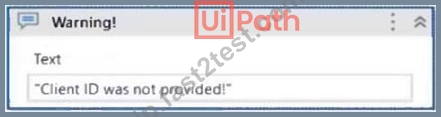
What action can you perform in your mocked file to replace the functionality of the MessageBox with a LogMessage during mock testing?
- A. Remove mock activity.
- B. Surround activity with mock.
- C. Create mock workflow.
- D. Synchronize mock.
正解:B
質問 # 35
The provided exhibit displays the representation of the "Deadline" field using the yyyy-mm-dd format.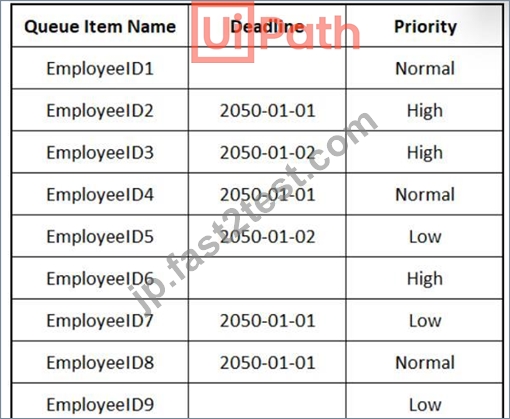
In what order should the Queue Items be processed by a single robot executing a Performer workflow?
正解:
解説:
Explanation: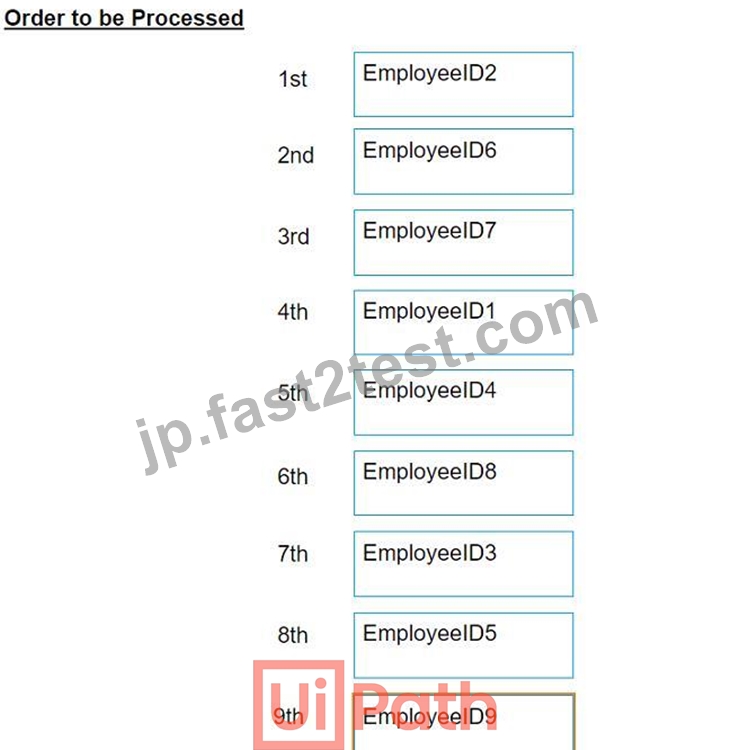
質問 # 36
A developer creates a process that uses data from multiple sources and uploads it to an Orchestrator queue.
The data originates from emails in different email inboxes and needs to be processed in the same order in which the email was received. To ensure the Queue Items are processed in the correct order, which property of the Add Queue Item activity should be used?
- A. Postpone
- B. Itemlnformation
- C. Deadline
- D. Reference
正解:A
解説:
To ensure the Queue Items are processed in the correct order, the Postpone property of the Add Queue Item activity should be used. The Postpone property allows you to specify the date and time after which the queue item can be processed. This property can be used to prioritize the queue items based on the order of the emails received. For example, if the email was received at 10:00 AM, the Postpone property can be set to 10:00 AM or later, so that the queue item will not be processed before that time. The Postpone property can be set to a DateTime value, a variable, or an expression that returns a DateTime value. For example, the following expression sets the Postpone property to the current date and time plus one hour:
VB DateTime.Now.AddHours(1)
質問 # 37
Where is the TransactionNumber incremented in the REFramework?
- A. In the RetryCurrentTransaction.xaml workflow and in the SetTransactionStatus.xaml workflow.
- B. In the New Transaction transition.
- C. Only in the RetryCurrentTransaction.xaml workflow.
- D. Only in the SetTransactionStatus.xaml workflow.
正解:D
解説:
The TransactionNumber is incremented only in the SetTransactionStatus.xaml workflow, which is invoked at the end of each transaction. This workflow updates the status of the current transaction item in Orchestrator and increments the TransactionNumber by one. The TransactionNumber is used to keep track of the number of transactions processed by the robot and to get the next transaction item from the queue. References:
[SetTransactionStatus.xaml]
質問 # 38
A developer is building an automation which types text into a text file. The Activity Project Settings tor UI Automation Modern activities are set as follows:
The developer has configured the properties of a Type Into activity as follows:
What is the behavior of the Type Into activity when executing the workflow?
- A. The activity will remove Multi Line in Run mode and a Single Line in Debug mode.
- B. The activity will remove a Single Line in Run mode and in Debug mode.
- C. The activity will use only properties set in Activity Project Settings.
- D. The activity will remove a Single Line in Run mode and Multi Line in Debug mode.
正解:D
解説:
The behavior of the Type Into activity when executing the workflow is that the activity will remove a Single Line in Run mode and Multi Line in Debug mode. This is because the activity has the Empty field property set to NEmptyFieldMode.SingleLine, which means that the activity will delete the existing content in the field by sending Ctrl+A and Delete keystrokes before typing the text. However, the activity also has the Debug mode property set to NEmptyFieldMode.MultiLine, which means that the activity will delete the existing content in the field by sending Ctrl+A, Shift+Home, and Delete keystrokes before typing the text. The Debug mode property overrides the Empty field property when the workflow is executed in Debug mode. Therefore, the activity will use different keystrokes to empty the field depending on the mode of execution. References:
[Type Into], [Empty Field], [Debug Mode]
質問 # 39
......
UiPath UiPath-ADPv1 認定試験の出題範囲:
| トピック | 出題範囲 |
|---|---|
| トピック 1 |
|
| トピック 2 |
|
| トピック 3 |
|
| トピック 4 |
|
あなたを合格させるUiPath UiPath-ADPv1試験専門問題集はここにある:https://jp.fast2test.com/UiPath-ADPv1-premium-file.html
最新UiPath Certified Professional - Developer Track UiPath-ADPv1練習テストに最速準備問題をゲットせよ:https://drive.google.com/open?id=1ufn9oy3wuSni5eyTblpY0yRQkJBDqnWX