

Fast2test CKA問題集でリアル試験問題でテストエンジン問題集でトレーニング
Linux Foundation CKAテスト問題集とオンライン試験エンジン
質問 18
Check to see how many worker nodes are ready (not including nodes tainted NoSchedule) and write the number to /opt/KUCC00104/kucc00104.txt.
正解:
解説:
See the solution below.
Explanation
solution
F:\Work\Data Entry Work\Data Entry\20200827\CKA\15 B.JPG
F:\Work\Data Entry Work\Data Entry\20200827\CKA\15 C.JPG
質問 19
List all the events sorted by timestamp and put them into file.log and verify
- A. kubectl get events --sort-by=.metadata.creationTimestamp
// putting them into file.log
kubectl get events --sort-by=.metadata.creationTimestamp >
cat test-file.log - B. kubectl get events --sort-by=.metadata.creationTimestamp
kubectl get events --sort-by=.metadata.creationTimestamp >
test-file.log
cat test-file.log - C. kubectl get events --sort-by=.metadata.creationTimestamp
// putting them into file.log
kubectl get events --sort-by=.metadata.creationTimestamp >
test-file.log
cat test-file.log
正解: C
質問 20
Create the deployment redis with image=redis and expose it with "NodePort" service redis-service
- A. kubectl create deploy redis --image=redis --dry-run -o yaml >
redis-deploy.yaml
Edit redis-deploy.yaml file
name: redis
spec:
replicas: 1
selector:
matchLabels:
app: redis
template:
metadata:
labels:
app: redis
spec:
containers:
- image: redis
name: redis
//Creating Service
kubectl expose deploy redis --type=NodePort --port=6379 --
target-port=6379 --name redis-service
// Verify
kubectl get deploy,svc - B. kubectl create deploy redis --image=redis --dry-run -o yaml >
redis-deploy.yaml
Edit redis-deploy.yaml file
vim redis-deploy.yaml
apiVersion: apps/v1
kind: Deployment
metadata:
labels:
app: redis
name: redis
spec:
replicas: 1
selector:
matchLabels:
app: redis
template:
metadata:
labels:
app: redis
spec:
containers:
- image: redis
name: redis
//Creating Service
kubectl expose deploy redis --type=NodePort --port=6379 --
target-port=6379 --name redis-service
// Verify
kubectl get deploy,svc
正解: B
質問 21
List all the pods sorted by name
正解:
解説:
See the solution below.
Explanation
kubectl get pods --sort-by=.metadata.name
質問 22
Check the history of the specific revision of that deployment
正解:
解説:
kubectl rollout history deploy webapp --revision=3
質問 23
Create a namespace called 'development' and a pod with image nginx called nginx on this namespace.
正解:
解説:
kubectl create namespace development kubectl run nginx --image=nginx --restart=Never -n development
質問 24
Which one is the correct configuration?
- A. #Panorama
- B. &Panorama
- C. @Panorama
- D. $Panorama
正解: D
質問 25
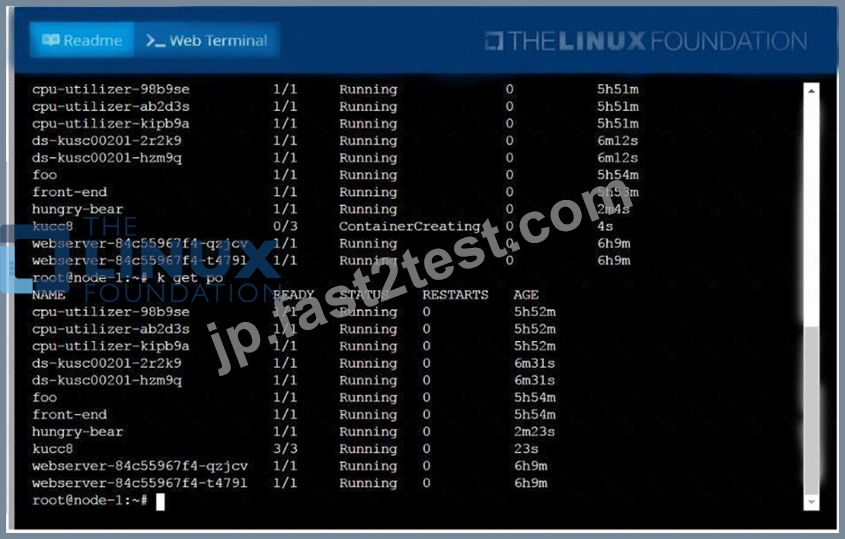
Create a pod named kucc8 with a single app container for each of the
following images running inside (there may be between 1 and 4 images specified):
nginx + redis + memcached.
正解:
解説:
See the solution below.
Explanation
solution

質問 26
Check the Image version of nginx-dev pod using jsonpath
正解:
解説:
kubect1 get po nginx-dev -o jsonpath='{.spec.containers[].image}{"\n"}'
質問 27
Delete the pod without any delay (force delete)
正解:
解説:
Kubect1 delete po "POD-NAME" --grace-period=0 --force
質問 28
Get IP address of the pod - "nginx-dev"
- A. Kubect1 get po -o wide
Using JsonPath
kubect1 get pods
.items[*]}{.metadata.name}{"\t"}{.status.podIP}{"\n"}{end}' - B. Kubect1 get po -o wide
Using JsonPath
kubect1 get pods -o=jsonpath='{range
.items[*]}{.metadata.name}{"\t"}{.status.podIP}{"\n"}{end}'
正解: B
質問 29
Check to see how many worker nodes are ready (not including nodes tainted NoSchedule) and write the number to /opt/KUCC00104/kucc00104.txt.
正解:
解説:
See the solution below.
Explanation
solution

質問 30
Create a deployment as follows:
* Name:nginx-app
* Using containernginxwithversion 1.11.10-alpine
* The deployment should contain3replicas
Next, deploy the application with newversion1.11.13-alpine, byperforming a rolling update.
Finally, rollback that update to theprevious version1.11.10-alpine.
正解:
解説:
See the solution below.
Explanation
solution


質問 31
Schedule a pod as follows:
* Name: nginx-kusc00101
* Image: nginx
* Node selector: disk=ssd
正解:
解説:
See the solution below.
Explanation
solution


質問 32
Undo the deployment with the previous version and verify
everything is Ok
正解:
解説:
kubectl rollout undo deploy webapp kubectl rollout status deploy webapp kubectl get pods
質問 33
For this item, you will have to ssh to the nodes ik8s-master-0 and ik8s-node-0 and complete all tasks on these nodes. Ensure that you return to the base node (hostname: node-1) when you have completed this item.
Context
As an administrator of a small development team, you have been asked to set up a Kubernetes cluster to test the viability of a new application.
Task
You must use kubeadm to perform this task. Any kubeadm invocations will require the use of the
--ignore-preflight-errors=all option.
* Configure the node ik8s-master-O as a master node. .
* Join the node ik8s-node-o to the cluster.
正解:
解説:
See the solution below.
Explanation
solution
You must use the kubeadm configuration file located at /etc/kubeadm.conf when initializingyour cluster.
You may use any CNI plugin to complete this task, but if you don't have your favourite CNI plugin's manifest URL at hand, Calico is one popular option: https://docs.projectcalico.org/v3.14/manifests/calico.yaml Docker is already installed on both nodes and has been configured so that you can install the required tools.
質問 34
Score: 7%
Task
Reconfigure the existing deployment front-end and add a port specification named http exposing port 80/tcp of the existing container nginx.
Create a new service named front-end-svc exposing the container port http.
Configure the new service to also expose the individual Pods via a NodePort on the nodes on which they are scheduled.
正解:
解説:
See the solution below.
Explanation
Solution:
kubectl get deploy front-end
kubectl edit deploy front-end -o yaml
#port specification named http
#service.yaml
apiVersion: v1
kind: Service
metadata:
name: front-end-svc
labels:
app: nginx
spec:
ports:
- port: 80
protocol: tcp
name: http
selector:
app: nginx
type: NodePort
# kubectl create -f service.yaml
# kubectl get svc
# port specification named http
kubectl expose deployment front-end --name=front-end-svc --port=80 --tarport=80 --type=NodePort
質問 35
Create a pod with image nginx called nginx and allow traffic on port 80
正解:
解説:
kubectl run nginx --image=nginx --restart=Never --port=80
質問 36
List all persistent volumes sorted by capacity, saving the full kubectl output to
/opt/KUCC00102/volume_list. Use kubectl 's own functionality for sorting the output, and do not manipulate it any further.
正解:
解説:
See the solution below.
Explanation
solution
質問 37
......
Linux Foundation CKA 認定試験の出題範囲:
| トピック | 出題範囲 |
|---|---|
| トピック 1 |
|
| トピック 2 |
|
| トピック 3 |
|
| トピック 4 |
|
| トピック 5 |
|
| トピック 6 |
|
| トピック 7 |
|
| トピック 8 |
|
| トピック 9 |
|
| トピック 10 |
|
| トピック 11 |
|
Linux Foundation CKA問題を提供していますKubernetes Administrator問題集と完璧な解答付き:https://jp.fast2test.com/CKA-premium-file.html
信頼され続けるCKA試験のコツとPDF試験材料:https://drive.google.com/open?id=1M1XIQ0tgHZA8nIM5OjEF8T7R6gdm1bln