

[2025年12月]更新のAssociate-Cloud-Engineer問題集で時間限定!無料アクセスせよ!
Associate-Cloud-Engineer問題集で2025年最新のGoogle Associate-Cloud-Engineer試験問題
質問 # 142
You have designed a solution on Google Cloud Platform (GCP) that uses multiple GCP products.
Your company has asked you to estimate the costs of the solution.
You need to provide estimates for the monthly total cost. What should you do?
- A. For each GCP product in the solution, review the pricing details on the products pricing page.
Use the pricing calculator to total the monthly costs for each GCP product. - B. Provision the solution on GCP. Leave the solution provisioned for 1 week.
Navigate to the Billing Report page in the Google Cloud Platform Console.
Multiply the 1 week cost to determine the monthly costs. - C. For each GCP product in the solution, review the pricing details on the products pricing page.
Create a Google Sheet that summarizes the expected monthly costs for each product. - D. Provision the solution on GCP. Leave the solution provisioned for 1 week.
Use Stackdriver to determine the provisioned and used resource amounts.
Multiply the 1 week cost to determine the monthly costs.
正解:A
質問 # 143
You are building a pipeline to process time-series data. Which Google Cloud Platform services should you put in boxes 1,2,3, and 4?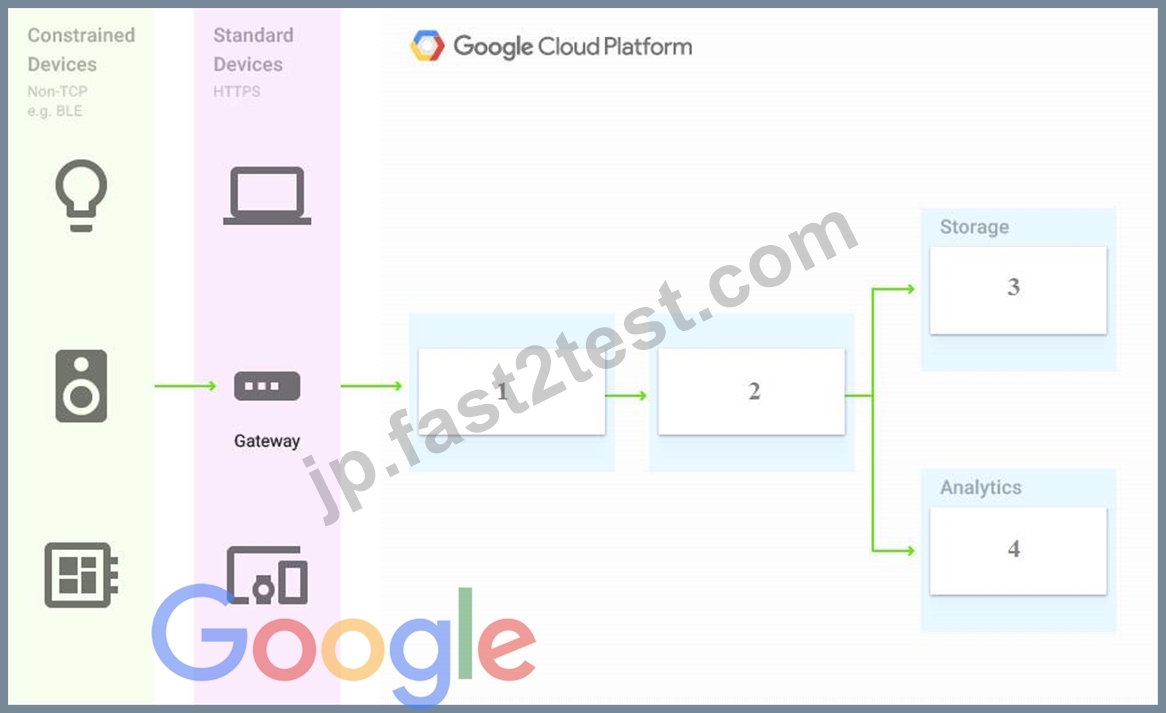
- A. Firebase Messages, Cloud Pub/Sub, Cloud Spanner, BigQuery
- B. Cloud Pub/Sub, Cloud Dataflow, Cloud Datastore, BigQuery
- C. Cloud Pub/Sub, Cloud Dataflow, Cloud Bigtable, BigQuery
- D. Cloud Pub/Sub, Cloud Storage, BigQuery, Cloud Bigtable
正解:C
解説:
Reference:
https://cloud.google.com/solutions/correlating-time-series-dataflow
質問 # 144
You need to reduce GCP service costs for a division of your company using the fewest possible steps. You need to turn off all configured services in an existing GCP project. What should you do?
- A. 1. Verify that you are assigned the Project Owners IAM role for this project.
2. Switch to the project in the GCP console, locate the resources and delete them. - B. 1. Verify that you are assigned the Organizational Administrator IAM role for this project.
2. Locate the project in the GCP console, enter the project ID and then click Shut down. - C. 1. Verify that you are assigned the Organizational Administrators IAM role for this project.
2. Switch to the project in the GCP console, locate the resources and delete them. - D. 1. Verify that you are assigned the Project Owners IAM role for this project.
2. Locate the project in the GCP console, click Shut down and then enter the project ID.
正解:D
解説:
https://cloud.google.com/run/docs/tutorials/gcloud
https://cloud.google.com/resource-manager/docs/creating-managing-projects
https://cloud.google.com/iam/docs/understanding-roles#primitive_roles
You can shut down projects using the Cloud Console. When you shut down a project, this immediately happens: All billing and traffic serving stops, You lose access to the project, The owners of the project will be notified and can stop the deletion within 30 days, The project will be scheduled to be deleted after 30 days. However, some resources may be deleted much earlier.
質問 # 145
You create a Deployment with 2 replicas in a Google Kubernetes Engine cluster that has a single preemptible node pool. After a few minutes, you use kubectl to examine the status of your Pod and observe that one of them is still in Pending status:
What is the most likely cause?
- A. The pending Pod's resource requests are too large to fit on a single node of the cluster.
- B. The node pool is configured with a service account that does not have permission to pull the container image used by the pending Pod.
- C. The pending Pod was originally scheduled on a node that has been preempted between the creation of the Deployment and your verification of the Pods' status. It is currently being rescheduled on a new node.
- D. Too many Pods are already running in the cluster, and there are not enough resources left to schedule the pending Pod.
正解:D
解説:
* The pending Pods resource requests are too large to fit on a single node of the cluster. Too many Pods are already running in the cluster, and there are not enough resources left to schedule the pending Pod. is the right answer.
* When you have a deployment with some pods in running and other pods in the pending state, more often than not it is a problem with resources on the nodes. Heres a sample output of this use case. We see that the problem is with insufficient CPU on the Kubernetes nodes so we have to either enable auto-scaling or manually scale up the nodes.
質問 # 146
You are deploying a web application using Compute Engine. You created a managed instance group (MIG) to host the application. You want to follow Google-recommended practices to implement a secure and highly available solution. What should you do?
- A. Use HTTP(S) load balancing for the MIG and an A record in your DNS public zone with the load balancer's IP address.
- B. Use SSL proxy load balancing for the MIG and an A record in your DNS private zone with the load balancer's IP address.
- C. Use HTTP(S) load balancing for the MIG and a CNAME record in your DNS private zone with the load balancer's IP address.
- D. Use SSL proxy load balancing for the MIG and a CNAME record in your DNS public zone with the load balancer's IP address.
正解:A
解説:
HTTP(S) load balancing is a Google-recommended practice for distributing web traffic across multiple regions and zones, and providing high availability, scalability, and security for web applications. It supports both IPv4 and IPv6 addresses, and can handle SSL/TLS termination and encryption. It also integrates with Cloud CDN, Cloud Armor, and Cloud Identity-Aware Proxy for enhanced performance and protection. A MIG can be used as a backend service for HTTP(S) load balancing, and can automatically scale and heal the VM instances that host the web application.
To configure DNS for HTTP(S) load balancing, you need to create an A record in your DNS public zone with the load balancer's IP address. This will map your domain name to the load balancer's IP address, and allow users to access your web application using the domain name. A CNAME record is not recommended, as it can cause latency and DNS resolution issues. A private zone is not suitable, as it is only visible within your VPC network, and not to the public internet.
Reference:
HTTP(S) Load Balancing documentation
Setting up DNS records for HTTP(S) load balancing
Choosing a load balancer
質問 # 147
You are building a pipeline to process time-series data. Which Google Cloud Platform services should you put in boxes 1,2,3, and 4?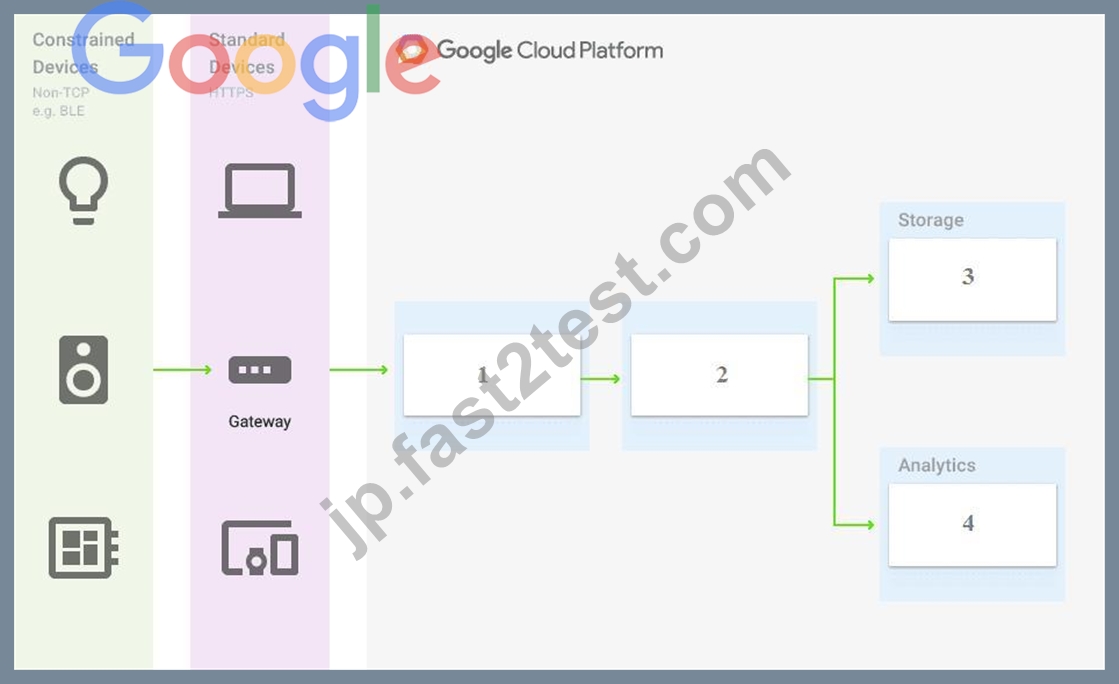
- A. Firebase Messages, Cloud Pub/Sub, Cloud Spanner, BigQuery
- B. Cloud Pub/Sub, Cloud Dataflow, Cloud Datastore, BigQuery
- C. Cloud Pub/Sub, Cloud Dataflow, Cloud Bigtable, BigQuery
- D. Cloud Pub/Sub, Cloud Storage, BigQuery, Cloud Bigtable
正解:C
解説:
Reference: https://cloud.google.com/solutions/correlating-time-series-dataflow
https://cloud.google.com/blog/products/data-analytics/handling-duplicate-data-in-streaming-pipeline-using- pubsub-dataflow
https://cloud.google.com/bigtable/docs/schema-design-time-series
質問 # 148
You have an application that uses Cloud Spanner as a database backend to keep current state information about users. Cloud Bigtable logs all events triggered by users. You export Cloud Spanner data to Cloud Storage during daily backups. One of your analysts asks you to join data from Cloud Spanner and Cloud Bigtable for specific users. You want to complete this ad hoc request as efficiently as possible. What should you do?
- A. Create a dataflow job that copies data from Cloud Bigtable and Cloud Spanner for specific users.
- B. Create two separate BigQuery external tables on Cloud Storage and Cloud Bigtable. Use the BigQuery console to join these tables through user fields, and apply appropriate filters.
- C. Create a dataflow job that copies data from Cloud Bigtable and Cloud Storage for specific users.
- D. Create a Cloud Dataproc cluster that runs a Spark job to extract data from Cloud Bigtable and Cloud Storage for specific users.
正解:A
質問 # 149
You just installed the Google Cloud CLI on your new corporate laptop. You need to list the existing instances of your company on Google Cloud. What must you do before you run the gcloud compute instances list command?
Choose 2 answers
- A. Download your Cloud Identity user account key. Place the key file in a folder on your machine where gcloud CLI can find it.
- B. Run gcloud config set project $my_project to set the default project for gcloud CLI.
- C. Run gcloud auth login, enter your login credentials in the dialog window, and paste the received login token to gcloud CLI.
- D. Run gcloud config set compute/zone $my_zone to set the default zone for gcloud CLI.
- E. Create a Google Cloud service account, and download the service account key. Place the key file in a folder on your machine where gcloud CLI can find it.
正解:B、C
解説:
Before you run the gcloud compute instances list command, you need to do two things: authenticate with your user account and set the default project for gcloud CLI.
To authenticate with your user account, you need to run gcloud auth login, enter your login credentials in the dialog window, and paste the received login token to gcloud CLI. This will authorize the gcloud CLI to access Google Cloud resources on your behalf1.
To set the default project for gcloud CLI, you need to run gcloud config set project $my_project, where
$my_project is the ID of the project that contains the instances you want to list. This will save you from having to specify the project flag for every gcloud command2.
Option B is not recommended, because using a service account key increases the risk of credential leakage and misuse. It is also not necessary, because you can use your user account to authenticate to the gcloud CLI3.
Option C is not correct, because there is no such thing as a Cloud Identity user account key. Cloud Identity is a service that provides identity and access management for Google Cloud users and groups4. Option D is not required, because the gcloud compute instances list command does not depend on the default zone. You can list instances from all zones or filter by a specific zone using the --filter flag.
1: https://cloud.google.com/sdk/docs/authorizing
2: https://cloud.google.com/sdk/gcloud/reference/config/set
3: https://cloud.google.com/iam/docs/best-practices-for-managing-service-account-keys
4: https://cloud.google.com/identity/docs/overview
5: https://cloud.google.com/sdk/gcloud/reference/compute/instances/list
質問 # 150
You have a development project with appropriate IAM roles defined. You are creating a production project and want to have the same IAM roles on the new project, using the fewest possible steps. What should you do?
- A. Use gcloud iam roles copy and specify your organization as the destination organization.
- B. In the Google Cloud Platform Console, use the `create role' functionality and select all applicable permissions.
- C. In the Google Cloud Platform Console, use the `create role from role' functionality.
- D. Use gcloud iam roles copy and specify the production project as the destination project.
正解:D
解説:
Cloud SDK gcloud iam roles copy can be used to copy the roles to different organization or project.Refer GCP documentation - Cloud SDK IAM Copy Rolegcloud iam roles copy - create a role from an existing role--dest-organization=DEST_ORGANIZATION (The organization of the destination role)--dest-project=DEST_PROJECT (The project of the destination role).
質問 # 151
Your company has a 3-tier solution running on Compute Engine. The configuration of the current infrastructure is shown below.
Each tier has a service account that is associated with all instances within it. You need to enable communication on TCP port 8080 between tiers as follows:
* Instances in tier #1 must communicate with tier #2.
* Instances in tier #2 must communicate with tier #3.
What should you do?
- A. 1. Create an ingress firewall rule with the following settings:* Targets: all instances with tier #2 service account* Source filter: all instances with tier #1 service account* Protocols: allow all2. Create an ingress firewall rule with the following settings:* Targets: all instances with tier #3 service account* Source filter: all instances with tier #2 service account* Protocols: allow all
- B. 1. Create an ingress firewall rule with the following settings:* Targets: all instances* Source filter: IP ranges (with the range set to 10.0.2.0/24)* Protocols: allow all2. Create an ingress firewall rule with the following settings:* Targets: all instances* Source filter: IP ranges (with the range set to 10.0.1.0/24)* Protocols: allow all
- C. 1. Create an ingress firewall rule with the following settings:* Targets: all instances with tier #2 service account* Source filter: all instances with tier #1 service account* Protocols: allow TCP:80802. Create an ingress firewall rule with the following settings:* Targets: all instances with tier #3 service account* Source filter: all instances with tier #2 service account* Protocols: allow TCP: 8080
- D. 1. Create an egress firewall rule with the following settings:* Targets: all instances* Source filter: IP ranges (with the range set to 10.0.2.0/24)* Protocols: allow TCP: 80802. Create an egress firewall rule with the following settings:* Targets: all instances* Source filter: IP ranges (with the range set to
10.0.1.0/24)* Protocols: allow TCP: 8080
正解:C
解説:
Explanation
1. Create an ingress firewall rule with the following settings: "¢ Targets: all instances with tier #2 service account "¢ Source filter: all instances with tier #1 service account "¢ Protocols: allow TCP:8080 2. Create an ingress firewall rule with the following settings: "¢ Targets: all instances with tier #3 service account "¢ Source filter: all instances with tier #2 service account "¢ Protocols: allow TCP: 8080
質問 # 152
You host a static website on Cloud Storage. Recently, you began to include links to PDF files on this site. Currently, when users click on the links to these PDF files, their browsers prompt them to save the file onto their local system. Instead, you want the clicked PDF files to be displayed within the browser window directly, without prompting the user to save the file locally. What should you do?
- A. Set Content-Type metadata to application/pdf on the PDF file objects.
- B. Enable `Share publicly' on the PDF file objects.
- C. Enable Cloud CDN on the website frontend.
- D. Add a label to the storage bucket with a key of Content-Type and value of application/pdf.
正解:A
解説:
https://cloud.google.com/storage/docs/metadata#content-type
質問 # 153
You are the team lead of a group of 10 developers. You provided each developer with an individual Google Cloud Project that they can use as their personal sandbox to experiment with different Google Cloud solutions.
You want to be notified if any of the developers are spending above $500 per month on their sandbox environment. What should you do?
- A. Create a budget per project and configure budget alerts on all of these budgets.
- B. Create a single budget for all projects and configure budget alerts on this budget.
- C. Create a separate billing account per sandbox project and enable BigQuery billing exports. Create a Data Studio dashboard to plot the spending per billing account.
- D. Create a single billing account for all sandbox projects and enable BigQuery billing exports. Create a Data Studio dashboard to plot the spending per project.
正解:A
解説:
Explanation/Reference: https://cloud.google.com/billing/docs/how-to/budgets
質問 # 154
During a recent audit of your existing Google Cloud resources, you discovered several users with email addresses outside of your Google Workspace domain.
You want to ensure that your resources are only shared with users whose email addresses match your domain.
You need to remove any mismatched users, and you want to avoid having to audit your resources to identify mismatched users. What should you do?
- A. Create a Cloud Scheduler task to regularly scan your resources and delete mismatched users.
- B. Set an organizational policy constraint to limit identities by domain to automatically remove mismatched users.
- C. Set an organizational policy constraint to limit identities by domain, and then retroactively remove the existing mismatched users.
- D. Create a Cloud Scheduler task to regularly scan your projects and delete mismatched users.
正解:C
解説:
https://cloud.google.com/resource-manager/docs/organization-policy/org-policy-constraints This list constraint defines the set of domains that email addresses added to Essential Contacts can have. By default, email addresses with any domain can be added to Essential Contacts. Theallowed/denied list must specify one or more domains of the form @example.com. If this constraint is active and configured with allowed values, only email addresses with a suffix matching one of the entries from the list of allowed domains can be added in Essential Contacts. This constraint has no effect on updating or removing existing contacts. constraints
/essentialcontacts.allowedContactDomains
質問 # 155
Your developers have created an application that needs to be able to make calls to Cloud Storage and BigQuery. The code is going to run inside a container and will run on Kubernetes Engine and on-premises.
What's the best way for them to authenticate to the Google Cloud services?
- A. Create a service account, grant it the least viable privileges to the required services, generate and download a key. Use the key to authenticate inside the application.
- B. Use the default service account for Compute Engine which already has the required permissions.
- C. Use the default service account for App Engine which already has the required permissions.
- D. Create a service account, with editor permissions, generate and download a key. Use the key to authenticate inside the application.
正解:A
質問 # 156
You are hosting an application on bare-metal servers in your own data center. The application needs access to Cloud Storage. However, security policies prevent the servers hosting the application from having public IP addresses or access to the internet. You want to follow Google-recommended practices to provide the application with access to Cloud Storage. What should you do?
- A. 1. Using Cloud VPN, create a VPN tunnel to a Virtual Private Cloud (VPC) in Google Cloud Platform (GCP).
2. In this VPC, create a Compute Engine instance and install the Squid proxy server on this instance.
3. Configure your servers to use that instance as a proxy to access Cloud Storage. - B. 1. Use nslookupto get the IP address for storage.googleapis.com.
2. Negotiate with the security team to be able to give a public IP address to the servers.
3. Only allow egress traffic from those servers to the IP addresses for storage.googleapis.com. - C. 1. Using Cloud VPN or Interconnect, create a tunnel to a VPC in GCP.
2. Use Cloud Router to create a custom route advertisement for 199.36.153.4/30. Announce that network to your on-premises network through the VPN tunnel.
3. In your on-premises network, configure your DNS server to resolve *.googleapis.com as a CNAME to restricted.googleapis.com. - D. 1. Use Migrate for Compute Engine (formerly known as Velostrata) to migrate those servers to Compute Engine.
2. Create an internal load balancer (ILB) that uses storage.googleapis.com as backend.
3. Configure your new instances to use this ILB as proxy.
正解:D
質問 # 157
You need to migrate invoice documents stored on-premises to Cloud Storage. The documents have the following storage requirements:
* Documents must be kept for five years.
* Up to five revisions of the same invoice document must be stored, to allow for corrections.
* Documents older than 365 days should be moved to lower cost storage tiers.
You want to follow Google-recommended practices to minimize your operational and development costs.
What should you do?
- A. Enable retention policies on the bucket, use lifecycle rules to change the storage classes of the objects, set the number of versions, and delete old files.
- B. Enable retention policies on the bucket, and use Cloud Scheduler to invoke a Cloud Function to move or delete your documents based on their metadata.
- C. Enable object versioning on the bucket, use lifecycle conditions to change the storage class of the objects, set the number of versions, and delete old files.
- D. Enable object versioning on the bucket, and use Cloud Scheduler to invoke a Cloud Functions instance to move or delete your documents based on their metadata.
正解:A
質問 # 158
Your company is moving from an on-premises environment to Google Cloud Platform (GCP). You have multiple development teams that use Cassandra environments as backend databases. They all need a development environment that is isolated from other Cassandra instances. You want to move to GCP quickly and with minimal support effort. What should you do?
- A. 1. Build a Cassandra Compute Engine instance and take a snapshot of it.
2. Use the snapshot to create instances for your developers. - B. 1. Build a Cassandra Compute Engine instance and take a snapshot of it.
2. Upload the snapshot to Cloud Storage and make it accessible to your developers.
3. Build instructions to create a Compute Engine instance from the snapshot so that developers can do it themselves. - C. 1. Advise your developers to go to Cloud Marketplace.
2. Ask the developers to launch a Cassandra image for their development work. - D. 1. Build an instruction guide to install Cassandra on GCP.
2. Make the instruction guide accessible to your developers.
正解:B
解説:
Explanation/Reference:
質問 # 159
You have a Google Cloud Platform account with access to both production and development projects. You need to create an automated process to list all compute instances in development and production projects on a daily basis. What should you do?
- A. Go to GCP Console and export this information to Cloud SQL on a daily basis.
- B. Create two configurations using gsutil config. Write a script that sets configurations as active, individually. For each configuration, use gsutil compute instances list to get a list of compute resources.
- C. Go to Cloud Shell and export this information to Cloud Storage on a daily basis.
- D. Create two configurations using gcloud config. Write a script that sets configurations as active, individually. For each configuration, use gcloud compute instances list to get a list of compute resources.
正解:D
解説:
You can create two configurations - one for the development project and another for the production project.
And you do that by running "gcloud config configurations create" command.https://cloud.google.com/sdk
/gcloud/reference/config/configurations/createIn your custom script, you can load these configurations one at a time and execute gcloud compute instances list to list Google Compute Engine instances in the project that is active in the gcloud configuration.Ref: https://cloud.google.com/sdk/gcloud/reference/compute/instances
/listOnce you have this information, you can export it in a suitable format to a suitable target e.g. export as CSV or export to Cloud Storage/BigQuery/SQL, etc
質問 # 160
You have one GCP account running in your default region and zone and another account running in a non-default region and zone. You want to start a new Compute Engine instance in these two Google Cloud Platform accounts using the command line interface. What should you do?
- A. Activate two configurations using gcloud configurations activate [NAME]. Run gcloud config list to start the Compute Engine instances.
- B. Create two configurations using gcloud config configurations create [NAME]. Run gcloud configurations list to start the Compute Engine instances.
- C. Activate two configurations using gcloud configurations activate [NAME]. Run gcloud configurations list to start the Compute Engine instances.
- D. Create two configurations using gcloud config configurations create [NAME]. Run gcloud config configurations activate [NAME] to switch between accounts when running the commands to start the Compute Engine instances.
正解:A
質問 # 161
You have a Compute Engine instance hosting a production application. You want to receive an email if the instance consumes more than 90% of its CPU resources for more than 15 minutes. You want to use Google services. What should you do?
- A. 1. Create a consumer Gmail account.
2.Write a script that monitors the CPU usage.
3.When the CPU usage exceeds the threshold, have that script send an email using the Gmail account and smtp.gmail.com on port 25 as SMTP server. - B. 1. Create a Stackdriver Workspace, and associate your Google Cloud Platform (GCP) project with it.
2.Create an Alerting Policy in Stackdriver that uses the threshold as a trigger condition.
3.Configure your email address in the notification channel. - C. 1. Create a Stackdriver Workspace, and associate your GCP project with it.
2.Write a script that monitors the CPU usage and sends it as a custom metric to Stackdriver.
3.Create an uptime check for the instance in Stackdriver. - D. 1. In Stackdriver Logging, create a logs-based metric to extract the CPU usage by using this regular expression: CPU Usage: ([0-9] {1,3}) %
2.In Stackdriver Monitoring, create an Alerting Policy based on this metric.
3.Configure your email address in the notification channel.
正解:B
解説:
Specifying conditions for alerting policies This page describes how to specify conditions for alerting policies.
The conditions for an alerting policy define what is monitored and when to trigger an alert. For example, suppose you want to define an alerting policy that emails you if the CPU utilization of a Compute Engine VM instance is above 80% for more than 3 minutes. You use the conditions dialog to specify that you want to monitor the CPU utilization of a Compute Engine VM instance, and that you want an alerting policy to trigger when that utilization is above 80% for 3 minutes. https://cloud.google.com/monitoring/alerts/ui-conditions-ga
https://cloud.google.com/monitoring/alerts/using-alerting-ui https://cloud.google.com/monitoring/support
/notification-options
質問 # 162
You have just created a new project which will be used to deploy a globally distributed application. You will use Cloud Spanner for data storage. You want to create a Cloud Spanner instance. You want to perform the first step in preparation of creating the instance. What should you do?
- A. Enable the Cloud Spanner API
- B. Grant yourself the IAM role of Cloud Spanner Admin
- C. Create a new VPC network with subnetworks in all desired regions
- D. Configure your Cloud Spanner instance to be multi-regional
正解:B
解説:
Explanation
https://cloud.google.com/spanner/docs/getting-started/set-up
質問 # 163
Your company uses a large number of Google Cloud services centralized in a single project. All teams have specific projects for testing and development. The DevOps team needs access to all of the production services in order to perform their job. You want to prevent Google Cloud product changes from broadening their permissions in the future. You want to follow Google-recommended practices. What should you do?
- A. Create a custom role that combines the required permissions. Grant the DevOps team the custom role on the production project.
- B. Create a custom role that combines the required permissions. Grant the DevOps team the custom role on the organization level.
- C. Grant all members of the DevOps team the role of Project Editor on the organization level.
- D. Grant all members of the DevOps team the role of Project Editor on the production project.
正解:A
解説:
Understanding IAM custom roles
Key Point: Custom roles enable you to enforce the principle of least privilege, ensuring that the user and service accounts in your organization have only the permissions essential to performing their intended functions.
Basic concepts
Custom roles are user-defined, and allow you to bundle one or more supported permissions to meet your specific needs. Custom roles are not maintained by Google; when new permissions, features, or services are added to Google Cloud, your custom roles will not be updated automatically.
When you create a custom role, you must choose an organization or project to create it in. You can then grant the custom role on the organization or project, as well as any resources within that organization or project.
https://cloud.google.com/iam/docs/understanding-custom-roles#basic_concepts
質問 # 164
You have files in a Cloud Storage bucket that you need to share with your suppliers. You want to restrict the time that the files are available to your suppliers to 1 hour. You want to follow Google recommended practices. What should you do?
- A. Create a service account with just the permissions to access files in the bucket. Create a JSON key for the service account. Execute the command gsutil signurl -p 60m gs:///.
- B. Create a service account with just the permissions to access files in the bucket. Create a JSON key for the service account. Execute the command gsutil signurl -m 1h gs:///*.
- C. Create a service account with just the permissions to access files in the bucket. Create a JSON key for the service account. Execute the command gsutil signurl -d 1h gs:///**.
- D. Create a JSON key for the Default Compute Engine Service Account. Execute the command gsutil signurl -t 60m gs:///***
正解:C
解説:
This command correctly specifies the duration that the signed url should be valid for by using the -d flag. The default is 1 hour so omitting the -d flag would have also resulted in the same outcome. Times may be specified with no suffix (default hours), or with s = seconds, m = minutes, h = hours, d = days. The max duration allowed is 7d.
Ref: https://cloud.google.com/storage/docs/gsutil/commands/signurl
質問 # 165
You manage an App Engine Service that aggregates and visualizes data from BigQuery. The application is deployed with the default App Engine Service account. The data that needs to be visualized resides in a different project managed by another team. You do not have access to this project, but you want your application to be able to read data from the BigQuery dataset. What should you do?
- A. Ask the other team to grant your default App Engine Service account the role of BigQuery Data Viewer.
- B. In Cloud IAM of your project, grant a newly created service account from the other team the role of BigQuery Job User in your project.
:
The Owner, Editor, and Viewer primitive roles include the BigQuery Admin (roles/bigquery.dataOwner), BigQuery Data Editor (roles/bigquery.dataEditor), and BigQuery Data Viewer (roles/bigquery.dataViewer) roles, respectively. This means the Owner, Editor, and Viewer primitive roles have BigQuery access as defined for the respective BigQuery roles. - C. Ask the other team to grant your default App Engine Service account the role of BigQuery Job User.
- D. In Cloud IAM of your project, ensure that the default App Engine service account has the role of BigQuery Data Viewer.
正解:D
解説:
Reference:
https://cloud.google.com/bigquery/docs/access-control
質問 # 166
......
Google Associate Cloud Engineer 認定試験は、Google Cloud Platform サービス、クラウドコンピューティングの概念、インフラストラクチャとアプリケーションの展開、モニタリングとログ記録、セキュリティ、コンプライアンスなど、幅広いトピックをカバーしています。この試験は、Google Cloud Platform での少なくとも 6 ヶ月の経験とクラウドコンピューティングの基本的な理解を持つ個人を対象としています。
Google Associate-Cloud-Engineer認定試験の準備をするには、候補者はクラウドコンピューティングの概念と原則を十分に理解し、GCPテクノロジーの操作経験を理解する必要があります。この試験では、アプリケーションの展開と管理、Googleクラウドプラットフォームサービスの構成、GCPソリューションの監視とトラブルシューティングなど、さまざまなトピックについて説明します。また、クラウドSDK、クラウドシェル、クラウドコンソールなどのGCPツールを使用する能力も評価します。
Google Associate-Cloud-Engineer認定は、個人がクラウドコンピューティングの習熟度を示し、雇用市場で競争力を獲得するための優れた方法です。クラウドコンピューティングの専門家に対する需要が高いため、この認定を取得することで、多くのキャリアの機会が開かれ、個人がクラウドコンピューティング業界でキャリアを前進させることができます。
Google Associate-Cloud-Engineer試験実践テスト問題:https://jp.fast2test.com/Associate-Cloud-Engineer-premium-file.html
最新の無料Associate-Cloud-Engineer別格問題集をダウンロード:https://drive.google.com/open?id=19YvprlWXXSPkFpKrvxzkgfqPBs6xYLv9