

2025年最新の100%試験高合格率Associate-Cloud-Engineer問題集PDF
合格させる試験完全版Associate-Cloud-Engineer問題集317解答
質問 # 165
Your projects incurred more costs than you expected last month. Your research reveals that a development GKE container emitted a huge number of logs, which resulted in higher costs. You want to disable the logs quickly using the minimum number of steps. What should you do?
- A. 1. Go to the Logs ingestion window in Stackdriver Logging, and disable the log source for the GKE Cluster Operations resource.
- B. 1. Go to the GKE console, and delete existing clusters.2. Recreate a new cluster.3. Clear the option to enable legacy Stackdriver Monitoring.
- C. 1. Go to the Logs ingestion window in Stackdriver Logging, and disable the log source for the GKE container resource.
- D. 1. Go to the GKE console, and delete existing clusters.2. Recreate a new cluster.3. Clear the option to enable legacy Stackdriver Logging.
正解:C
質問 # 166
You deployed an App Engine application using gcloud app deploy, but it did not deploy to the intended project. You want to find out why this happened and where the application deployed.
What should you do?
- A. Go to Deployment Manager and review settings for deployment of applications.
- B. Check the app.yaml file for your application and check project settings.
- C. Check the web-application.xml file for your application and check project settings.
- D. Go the Cloud Shell and run gcloud config list to review the Google Cloud configuration used for deployment.
正解:B
質問 # 167
(Your company's developers use an automation that you recently built to provision Linux VMs in Compute Engine within a Google Cloud project to perform various tasks. You need to manage the Linux account lifecycle and access for these users. You want to follow Google-recommended practices to simplify access management while minimizing operational costs. What should you do?)
- A. Enable OS Login for all VMs. Use IAM roles to grant user permissions.
- B. Require your developers to create public SSH keys. Make the owner of the public key the root user.
- C. Require your developers to create public SSH keys. Write custom startup scripts to update user permissions.
- D. Enable OS Login for all VMs. Write custom startup scripts to update user permissions.
正解:A
解説:
OS Login is a Google-recommended practice for managing access to Linux VMs in Compute Engine. It centralizes user account management by linking the Linux user accounts on the VMs to Google Cloud identities. You then use IAM roles to grant users the necessary permissions to access the VMs (e.g., roles
/compute.osLogin or roles/compute.osAdminLogin). This simplifies management as you control access through IAM policies rather than managing individual SSH keys on each VM, thus minimizing operational costs.
Option B: While enabling OS Login is a good first step, writing custom startup scripts to manage user permissions adds complexity and operational overhead, contradicting the goal of simplification and minimizing costs.
Option C: Requiring developers to manage their own SSH keys and making the owner root is a significant security risk and not a recommended practice. It also doesn't centralize management.
Option D: This approach also involves managing individual SSH keys and custom scripts, which increases operational overhead and doesn't leverage the centralized management benefits of OS Login.
Reference to Google Cloud Certified - Associate Cloud Engineer Documents:
OS Login and its benefits for simplified and secure Linux VM access management are detailed in the Compute Engine documentation, which is a key area for the Associate Cloud Engineer certification. The integration with IAM for permission control is a central aspect of this service.
質問 # 168
You want to run a single caching HTTP reverse proxy on GCP for a latency-sensitive website.
This specific reverse proxy consumes almost no CPU. You want to have a 30-GB in-memory cache, and need an additional 2 GB of memory for the rest of the processes. You want to minimize cost. How should you run this reverse proxy?
- A. Run it on Compute Engine, choose the instance type n1-standard-1, and add an SSD persistent disk of 32 GB.
- B. Run it on Compute Engine, and choose a custom instance type with 6 vCPUs and 32 GB of memory.
- C. Package it in a container image, and run it on Kubernetes Engine, using n1-standard-32 instances as nodes.
- D. Create a Cloud Memorystore for Redis instance with 32-GB capacity.
正解:D
解説:
It will be all most the same price, but if you choose option B you are loosing 6 VCPU that doesn't do nothing.
質問 # 169
You are given a project with a single virtual private cloud (VPC) and a single subnetwork in the us-central1 region. There is a Compute Engine instance hosting an application in this subnetwork. You need to deploy a new instance in the same project in the europe-west1 region. This new instance needs access to the application.
You want to follow Google-recommended practices. What should you do?
- A. 1. Create a VPC and a subnetwork in europe-west1.2. Expose the application with an internal load balancer.3. Create the new instance in the new subnetwork and use the load balancer's address as the endpoint.
- B. 1. Create a VPC and a subnetwork in europe-west1.2. Peer the 2 VPCs.3. Create the new instance in the new subnetwork and use the first instance's private address as the endpoint.
- C. 1. Create a subnetwork in the same VPC, in europe-west1.2. Create the new instance in the new subnetwork and use the first instance's private address as the endpoint.
- D. 1. Create a subnetwork in the same VPC, in europe-west1.2. Use Cloud VPN to connect the two subnetworks.3. Create the new instance in the new subnetwork and use the first instance's private address as the endpoint.
正解:D
解説:
Explanation
Given that the new instance wants to access the application on the existing compute engine instance, these applications seem to be related so they should be within the same VPC. It is possible to have them in different VPCs and peer the VPCs but this is a lot of additional work and we can simplify this by choosing the option below (which is the answer)
1. Create a subnet in the same VPC, in europe-west1.
2. Create the new instance in the new subnet and use the first instance subnets private address as the endpoint.
is the right answer.
We can create another subnet in the same VPC and this subnet is located in europe-west1. We can then spin up a new instance in this subnet. We also have to set up a firewall rule to allow communication between the two subnets. All instances in the two subnets with the same VPC can communicate through the internal IP Address Ref: https://cloud.google.com/vpc
質問 # 170
You are running a web application on Cloud Run for a few hundred users. Some of your users complain that the initial web page of the application takes much longer to load than the following pages. You want to follow Google's recommendations to mitigate the issue. What should you do?
- A. Set the concurrency number to 1 for your Cloud Run service.
- B. Set the minimum number of instances for your Cloud Run service to 3.
- C. Set the maximum number of instances for your Cloud Run service to 100.
- D. Update your web application to use the protocol HTTP/2 instead of HTTP/1.1
正解:B
質問 # 171
You have been asked to set up the billing configuration for a new Google Cloud customer. Your customer wants to group resources that share common IAM policies. What should you do?
- A. Use folders to group resources that share common IAM policies
- B. Use labels to group resources that share common IAM policies
- C. Set up a proper project naming structure to group IAM policies
- D. Set up a proper billing account structure to group IAM policies
正解:A
解説:
Folders are nodes in the Cloud Platform Resource Hierarchy. A folder can contain projects, other folders, or a combination of both. Organizations can use folders to group projects under the organization node in a hierarchy. For example, your organization might contain multiple departments, each with its own set of Google Cloud resources. Folders allow you to group these resources on a per-department basis. Folders are used to group resources that share common IAM policies. While a folder can contain multiple folders or resources, a given folder or resource can have exactly one parent. https://cloud.google.com/resource-manager/docs/creating-managing-folders
質問 # 172
You need to create a new Kubernetes Cluster on Google Cloud Platform that can autoscale the number of worker nodes. What should you do?
- A. Create a cluster on Kubernetes Engine and enable autoscaling on Kubernetes Engine.
- B. Create Compute Engine instances for the workers and the master, and install Kubernetes. Rely on Kubernetes to create additional Compute Engine instances when needed.
- C. Configure a Compute Engine instance as a worker and add it to an unmanaged instance group.
Add a load balancer to the instance group and rely on the load balancer to create additional Compute Engine instances when needed. - D. Create a cluster on Kubernetes Engine and enable autoscaling on the instance group of the cluster.
正解:A
解説:
A is correct because this is the way to set up an autoscaling Kubernetes cluster.
B is not correct because you should not manage the scaling of Kubernetes through the MIG.
C is not correct because an UMIG cannot scale based on a load balancer and this is not the correct way to set up Kubernetes.
D is not correct because Kubernetes will not create additional instances when deployed on Compute Engine.
https://cloud.google.com/kubernetes-engine/docs/concepts/cluster-autoscaler
質問 # 173
Your company has a 3-tier solution running on Compute Engine. The configuration of the current infrastructure is shown below.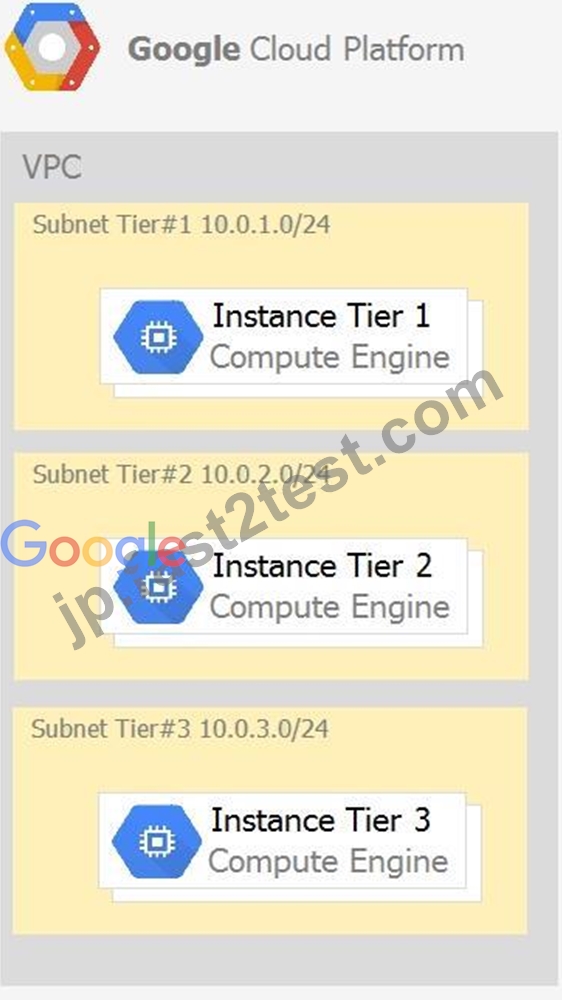
Each tier has a service account that is associated with all instances within it. You need to enable communication on TCP port 8080 between tiers as follows:
- Instances in tier #1 must communicate with tier #2.
- Instances in tier #2 must communicate with tier #3.
What should you do?
- A. 1. Create an egress firewall rule with the following settings:
Targets: all instances
Source filter: IP ranges (with the range set to 10.0.2.0/24)
Protocols: allow TCP: 8080
2. Create an egress firewall rule with the following settings:
Targets: all instances
Source filter: IP ranges (with the range set to 10.0.1.0/24)
Protocols: allow TCP: 8080 - B. 1. Create an ingress firewall rule with the following settings:
Targets: all instances
Source filter: IP ranges (with the range set to 10.0.2.0/24)
Protocols: allow all
2. Create an ingress firewall rule with the following settings:
Targets: all instances
Source filter: IP ranges (with the range set to 10.0.1.0/24)
Protocols: allow all - C. 1. Create an ingress firewall rule with the following settings:
Targets: all instances with tier #2 service account
Source filter: all instances with tier #1 service account
Protocols: allow TCP:8080
2. Create an ingress firewall rule with the following settings:
Targets: all instances with tier #3 service account
Source filter: all instances with tier #2 service account
Protocols: allow TCP: 8080 - D. 1. Create an ingress firewall rule with the following settings:
Targets: all instances with tier #2 service account
Source filter: all instances with tier #1 service account
Protocols: allow all
2. Create an ingress firewall rule with the following settings:
Targets: all instances with tier #3 service account
Source filter: all instances with tier #2 service account
Protocols: allow all
正解:C
質問 # 174
You are designing an application that lets users upload and share photos. You expect your application to grow really fast and you are targeting a worldwide audience. You want to delete uploaded photos after 30 days.
You want to minimize costs while ensuring your application is highly available. Which GCP storage solution should you choose?
- A. Persistent SSD on VM instances.
- B. Cloud Datastore database.
- C. Multiregional Cloud Storage bucket.
- D. Cloud Filestore.
正解:C
解説:
Cloud Storage allows world-wide storage and retrieval of any amount of data at any time. We dont need to set up auto-scaling ourselves. Cloud Storage autoscaling is managed by GCP. Cloud Storage is an object store so it is suitable for storing photos. Cloud Storage allows world-wide storage and retrieval so cater well to our worldwide audience. Cloud storage provides us lifecycle rules that can be configured to automatically delete objects older than 30 days. This also fits our requirements. Finally, Google Cloud Storage offers several storage classes such as Nearline Storage ($0.01 per GB per Month) Coldline Storage ($0.007 per GB per Month) and Archive Storage ($0.004 per GB per month) which are significantly cheaper than any of the options above.
Ref: https://cloud.google.com/storage/docs
Ref: https://cloud.google.com/storage/pricing
質問 # 175
You're about to deploy your team's App Engine application. They're using the Go runtime with a Standard Environment. Which command should you use to deploy the application?
- A. gcloud app apply app.yaml
- B. gcloud app-engine apply app.yaml
- C. gcloud app-engine deploy app.yaml
- D. gcloud app deploy app.yaml
正解:D
質問 # 176
You have a Google Cloud Platform account with access to both production and development projects. You need to create an automated process to list all compute instances in development and production projects on a daily basis. What should you do?
- A. Create two configurations using gsutil config. Write a script that sets configurations as active, individually. For each configuration, use gsutil compute instances list to get a list of compute resources.
- B. Go to GCP Console and export this information to Cloud SQL on a daily basis.
- C. Create two configurations using gcloud config. Write a script that sets configurations as active, individually. For each configuration, use gcloud compute instances list to get a list of compute resources.
- D. Go to Cloud Shell and export this information to Cloud Storage on a daily basis.
正解:C
解説:
You can create two configurations - one for the development project and another for the production project.
And you do that by running "gcloud config configurations create" command.https://cloud.google.com/sdk
/gcloud/reference/config/configurations/createIn your custom script, you can load these configurations one at a time and execute gcloud compute instances list to list Google Compute Engine instances in the project that is active in the gcloud configuration.Ref: https://cloud.google.com/sdk/gcloud/reference/compute/instances
/listOnce you have this information, you can export it in a suitable format to a suitable target e.g. export as CSV or export to Cloud Storage/BigQuery/SQL, etc
質問 # 177
You are the organization and billing administrator for your company. The engineering team has the Project Creator role on the organization. You do not want the engineering team to be able to link projects to the billing account. Only the finance team should be able to link a project to a billing account, but they should not be able to make any other changes to projects. What should you do?
- A. Assign the finance team the Billing Account User role on the billing account and the Project Billing Manager role on the organization.
- B. Assign the engineering team only the Billing Account User role on the billing account.
- C. Assign the engineering team the Billing Account User role on the billing account and the Project Billing Manager role on the organization.
- D. Assign the finance team only the Billing Account User role on the billing account.
正解:A
解説:
From this source:
https://cloud.google.com/billing/docs/how-to/custom-roles#permission_association_and_inheritance
"For example, associating a project with a billing account requires the billing.resourceAssociations.create permission on the billing account and also the resourcemanager.projects.createBillingAssignment permission on the project. This is because project permissions are required for actions where project owners control access, while billing account permissions are required for actions where billing account administrators control access. When both should be involved, both permissions are necessary."
質問 # 178
You are migrating a production-critical on-premises application that requires 96 vCPUs to perform its task. You want to make sure the application runs in a similar environment on GCP. What should you do?
- A. When creating the VM, use Intel Skylake as the CPU platform.
- B. Create the VM using Compute Engine default settings. Use gcloud to modify the running instance to have 96 vCPUs.
- C. Start the VM using Compute Engine default settings, and adjust as you go based on Rightsizing Recommendations.
- D. When creating the VM, use machine type n1-standard-96.
正解:D
解説:
Ref: https://cloud.google.com/compute/docs/machine-types#n1_machine_type
質問 # 179
You will have several applications running on different Compute Engine instances in the same project. You want to specify at a more granular level the service account each instance uses when calling Google Cloud APIs. What should you do?
- A. When creating the instances, assign the name of each Service Account as instance metadata
- B. When creating the instances, specify a Service Account for each instance
- C. After starting the instances, use gcloud compute instances update to assign the name of the relevant Service Account as instance metadata
- D. After starting the instances, use gcloud compute instances update to specify a Service Account for each instance
正解:B
解説:
https://cloud.google.com/compute/docs/access/service-accounts#associating_a_service_account_to_an_instance
質問 # 180
Your VMs are running in a subnet that has a subnet mask of 255.255.255.240. The current subnet has no more free IP addresses and you require an additional 10 IP addresses for new VMs. The existing and new VMs should all be able to reach each other without additional routes.
What should you do?
- A. Use gcloud to expand the IP range of the current subnet.
- B. Create a new project. Use Shared VPC to share the current network with the new project.
- C. Create a new subnet with the same starting IP but a wider range to overwrite the current subnet.
- D. Delete the subnet, and recreate it using a wider range of IP addresses.
正解:A
解説:
https://cloud.google.com/sdk/gcloud/reference/compute/networks/subnets/expand-ip-range
質問 # 181
You've deployed a microservice called myapp1 to a Google Kubernetes Engine cluster using the YAML file specified below:
You need to refactor this configuration so that the database password is not stored in plain text. You want to follow Google-recommended practices. What should you do?
- A. Store the database password inside the Docker image of the container, not in the YAML file.
- B. Store the database password inside a Secret object. Modify the YAML file to populate the DB_PASSWORD environment variable from the Secret.
- C. Store the database password in a file inside a Kubernetes persistent volume, and use a persistent volume claim to mount the volume to the container.
- D. Store the database password inside a ConfigMap object. Modify the YAML file to populate the DB_PASSWORD environment variable from the ConfigMap.
正解:B
解説:
Explanation
https://cloud.google.com/config-connector/docs/how-to/secrets#gcloud
質問 # 182
You are building an archival solution for your data warehouse and have selected Cloud Storage to archive your data. Your users need to be able to access this archived data once a quarter for some regulatory requirements. You want to select a cost-efficient option. Which storage option should you use?
- A. Nearline Storage
- B. Cold Storage
- C. Multi-Regional Storage
- D. Regional Storage
正解:A
解説:
Nearline, Coldline, and Archive offer ultra low-cost, highly-durable, highly available archival storage. For data accessed less than once a year, Archive is a cost-effective storage option for long-term preservation of data.
Coldline is also ideal for cold storage-data your business expects to touch less than once a quarter. For warmer storage, choose Nearline: data you expect to access less than once a month, but possibly multiple times throughout the year. All storage classes are available across all GCP regions and provide unparalleled sub-second access speeds with a consistent API.
Reference:
https://cloud.google.com/storage/archival
質問 # 183
You are configuring service accounts for an application that spans multiple projects. Virtual machines (VMs) running in the web-applications project need access to BigQuery datasets in crm-databases-proj. You want to follow Google-recommended practices to give access to the service account in the web-applications project. What should you do?
- A. Give "project owner" role to crm-databases-proj and the web-applications project.
- B. Give "project owner" for web-applications appropriate roles to crm-databases- proj
- C. Give bigquery.dataViewer role to crm-databases-proj and appropriate roles to web-applications.
- D. Give "project owner" role to crm-databases-proj and bigquery.dataViewer role to web-applications.
正解:C
解説:
Reference:
https://cloud.google.com/blog/products/gcp/best-practices-for-working-with-google-cloud-audit- logging
質問 # 184
You want to send and consume Cloud Pub/Sub messages from your App Engine application. The Cloud Pub/Sub API is currently disabled. You will use a service account to authenticate your application to the API. You want to make sure your application can use Cloud Pub/Sub. What should you do?
- A. Rely on the automatic enablement of the Cloud Pub/Sub API when the Service Account accesses it.
- B. Enable the Cloud Pub/Sub API in the API Library on the GCP Console.
- C. Use Deployment Manager to deploy your application.
Rely on the automatic enablement of all APIs used by the application being deployed. - D. Grant the App Engine Default service account the role of Cloud Pub/Sub Admin.
Have your application enable the API on the first connection to Cloud Pub/Sub.
正解:B
解説:
Note: If you are new to Pub/Sub, we recommend that you start with the interactive tutorial.
Before you begin
Set up a Cloud Console project.
Set up a project
Click to:
Create or select a project.
Enable the Pub/Sub API for that project.
You can view and manage these resources at any time in the Cloud Console.
Install and initialize the Cloud SDK.
Note: You can run the gcloud tool in the Cloud Console without installing the Cloud SDK. To run the gcloud tool in the Cloud Console, use Cloud Shell .
https://cloud.google.com/pubsub/docs/quickstart-console
質問 # 185
......
この試験は、Google Cloud Platformの操作で実践的な経験を持ち、クラウドコンピューティングの基本的な概念に精通している個人を対象としています。この認定は、システム管理者、クラウドアーキテクト、Googleクラウドプラットフォームで専門知識を実証したい開発者などの専門家に最適です。この試験はオンラインで実施され、Google Cloud Platformサービスに関する候補者の知識をテストするように設計された複数の選択の質問で構成されています。
検証済みAssociate-Cloud-Engineer問題集で問題と解答100%合格Fast2test:https://jp.fast2test.com/Associate-Cloud-Engineer-premium-file.html
合格させるAssociate-Cloud-Engineer試験一発合格保証2025問題集:https://drive.google.com/open?id=1RTB0i5g9G2rBvqb5tW8qGoO3aGfGGA46