

[2025年03月26日] 完全版最新のDP-420問題集で100%カバー率問題と解答があなたをリアル試験で合格させる
最新DP-420試験問題集で有効最新の問題集
Azure Cosmos DBは、Microsoftが提供するグローバルに分散したマルチモデルデータベースサービスです。大量のデータをグローバルスケールで処理するために設計されており、ドキュメント、キー値、グラフ、カラムファミリーなど、複数のデータモデルをサポートしています。Azure Cosmos DBは、スケーラビリティ、高可用性、グローバル分散能力に優れたクラウドネイティブアプリケーションを構築するための人気のある選択肢です。
試験DP-420は、COSMOS DBソリューションの設計と実装の経験がある専門家を対象としています。この試験は、Microsoft Azure Cosmos DBを活用することにより、クラウドネイティブアプリケーション開発における知識とスキルを向上させようとしている人を対象としています。この試験では、データモデリング、パーティション化、インデックス作成、クエリ、パフォーマンスチューニングなど、COSMOS DBに関連するさまざまなトピックをカバーしています。
DP-420認定試験の準備をするには、候補者は、アーキテクチャ、データモデル、さまざまなAPIなどのAzure Cosmos DBの基礎を確実に理解する必要があります。また、Azure Functions、Azure App Service、Azure Event GridなどのAzure Servicesを使用して、Cloud-Native Solutionsの設計と実装の経験も必要です。さらに、候補者は、C#、Java、Python、JavaScriptなどのプログラミング言語、およびASP.NETやnode.jsなどのWeb開発フレームワークに精通している必要があります。 DP-420試験に合格することにより、専門家はAzure Cosmos DBを使用して、スケーラブルでパフォーマンスが高く、非常に利用可能なクラウドネイティブアプリケーションを設計および構築する専門知識を実証できます。
質問 # 14
You have a container named container1 in an Azure Cosmos DB Core (SQL) API account. The container1 container has 120 GB of data.
The following is a sample of a document in container1.
The orderId property is used as the partition key.
For each of the following statements, select Yes if the statement is true. Otherwise, select No.
NOTE: Each correct selection is worth one point.
正解:
解説: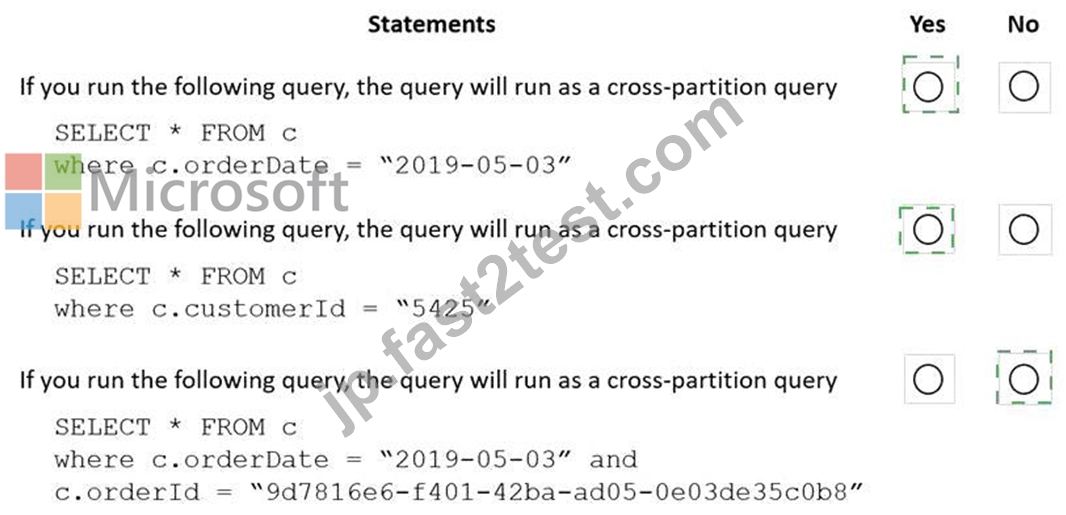
Explanation
Box 1: Yes
Records with different OrderIDs will match.
Box 2: Yes
Records with different OrderIDs will match.
Box 3: No
Only records with one specific OrderId will match
質問 # 15
You have an Azure Cosmos DB database named databaset contains a container named container1. The container1 container store product data and has the following indexing policy.
Which path will be indexed?
- A. /product/brand
- B. /product/[ ]/category
- C. /product/brand/tailspin
- D. /product/category
正解:A
解説:
The indexing policy has an includedPaths array that contains only one path: /product/brand/? . This means that only the properties under /product/brand will be indexed. The ? symbol indicates that only scalar values will be indexed, not arrays or objects1.
The excludedPaths array contains a single path: /* . This means that all other properties will be excluded from indexing. The * symbol indicates a wildcard that matches any property name1.
Therefore, the paths /product/category , /product/[ ]/category , and /product/brand/tailspin will not be indexed.
質問 # 16
You have a database in an Azure Cosmos DB SQL API Core (SQL) account that is used for development.
The database is modified once per day in a batch process.
You need to ensure that you can restore the database if the last batch process fails. The solution must minimize costs.
How should you configure the backup settings? To answer, select the appropriate options in the answer area.
NOTE: Each correct selection is worth one point.
正解:
解説:
質問 # 17
You have a container named container1 in an Azure Cosmos DB for NoSQL account named account1 that is set to the session default consistency level. The average size of an item in container1 is 20 KB.
You have an application named App1 that uses the Azure Cosmos DB SDK and performs a point read on the same set of items in container1 every minute.
You need to minimize the consumption of the request units (RUs) associated to the reads by App1. What should you do?
- A. In App1, change the consistency level of read requests to consistent prefix.
- B. In account1, change the default consistency level to bounded staleness.
- C. In account1, provision a dedicated gateway and integrated cache
- D. In App1, modify the connection policy settings.
正解:A
解説:
Explanation
The cost of a point read for a 1 KB item is 1 RU. The cost of other operations depends on factors such as item size, indexing policy, consistency level, and query complexity . To minimize the consumption of RUs, you can optimize these factors according to your application needs.
For your scenario, one possible way to minimize the consumption of RUs associated to the reads by App1 is to change the consistency level of read requests to consistent prefix. Consistent prefix is a lower consistency level than session, which is the default consistency level for Azure Cosmos DB. Lower consistency levels consume fewer RUs than higher consistency levels2. Consistent prefix guarantees that reads never see out-of-order writes and that monotonic reads are preserved1. This may be suitable for your application if you can tolerate some eventual consistency.
質問 # 18
You have a container named container1 in an Azure Cosmos DB Core (SQL) API account.
The following is a sample of a document in container1.
{
"studentId": "631282",
"firstName": "James",
"lastName": "Smith",
"enrollmentYear": 1990,
"isActivelyEnrolled": true,
"address": {
"street": "",
"city": "",
"stateProvince": "",
"postal": "",
}
}
The container1 container has the following indexing policy.
{
"indexingMode": "consistent",
"includePaths": [
{
"path": "/*"
},
{
"path": "/address/city/?"
}
],
"excludePaths": [
{
"path": "/address/*"
},
{
"path": "/firstName/?"
}
]
}
For each of the following statements, select Yes if the statement is true. Otherwise, select No.
NOTE: Each correct selection is worth one point.
正解:
解説:
質問 # 19
Note: This question is part of a series of questions that present the same scenario. Each question in the series contains a unique solution that might meet the stated goals. Some question sets might have more than one correct solution, while others might not have a correct solution.
After you answer a question in this section, you will NOT be able to return to it. As a result, these questions will not appear in the review screen.
You have an Azure Cosmos DB Core (SQL) API account named account 1 that uses autoscale throughput.
You need to run an Azure function when the normalized request units per second for a container in account1 exceeds a specific value.
Solution: You configure an application to use the change feed processor to read the change feed and you configure the application to trigger the function.
Does this meet the goal?
- A. Yes
- B. No
正解:B
解説:
Explanation
Instead configure an Azure Monitor alert to trigger the function.
You can set up alerts from the Azure Cosmos DB pane or the Azure Monitor service in the Azure portal.
Reference: https://docs.microsoft.com/en-us/azure/cosmos-db/create-alerts
質問 # 20
You have an Azure Cosmos DB for NoSQL account that frequently receives the same three queries.
You need to configure indexing to minimize RUs consumed by the queries.
Which type of index should you use for each query? To answer, select the appropriate options in the answer area.
NOTE: Each correct selection is worth one point.
正解:
解説:
Explanation
Box 1 = Range Azure Cosmos DB supports three types of indexes: range, spatial and composite. For the query you provided, which is an equality query on a single property, the best type of index to use is range. Range index is based on an ordered tree-like structure and it is used for equality queries, range queries and checking for the presence of a property1. Range index also supports any string or number2.
Box 2 = Composite
Azure Cosmos DB supports three types of indexes: range, spatial and composite. For the query you provided, which is an order by query on two properties, the best type of index to use is composite. Composite index is used for optimizing order by queries on multiple properties1. Composite index allows you to specify a list of property paths and sort orders that are used for ordering items2.
Box 3 = spatial
Azure Cosmos DB supports three types of indexes: range, spatial and composite. For the query you provided, which is a spatial query on a point property, the best type of index to use is spatial. Spatial index is used for querying items based on their location or proximity to a given point1. Spatial index supports point, polygon and linestring data types2.
質問 # 21
You are developing an application that will use an Azure Cosmos DB Core (SQL) API account as a data source.
You need to create a report that displays the top five most ordered fruits as shown in the following table.
A collection that contains aggregated data already exists. The following is a sample document:
{
"name": "apple",
"type": ["fruit", "exotic"],
"orders": 10000
}
Which two queries can you use to retrieve data for the report? Each correct answer presents a complete solution.
NOTE: Each correct selection is worth one point.
- A.

- B.

- C.

- D.

正解:C、D
解説:
ARRAY_CONTAINS returns a Boolean indicating whether the array contains the specified value. You can check for a partial or full match of an object by using a boolean expression within the command.
Reference: https://docs.microsoft.com/en-us/azure/cosmos-db/sql/sql-query-array-contains
質問 # 22
You have an Azure Cosmos DB Core (SQL) API account named account1.
You have the Azure virtual networks and subnets shown in the following table.
The vnet1 and vnet2 networks are connected by using a virtual network peer.
The Firewall and virtual network settings for account1 are configured as shown in the exhibit.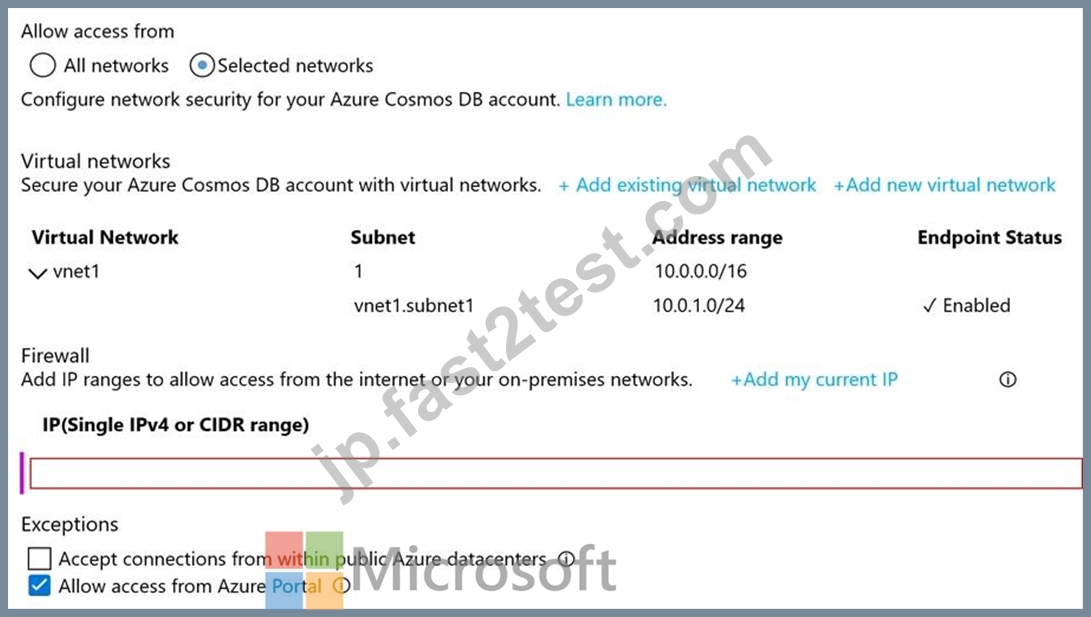
For each of the following statements, select Yes if the statement is true. Otherwise, select No.
NOTE: Each correct selection is worth one point.
正解:
解説: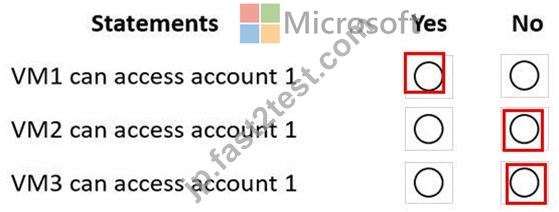
質問 # 23
You have an Azure Cosmos DB for NoSQL container named Contacts that is configured as shown in the following exhibit.
Contacts contains the items shown in the following table.
To Contacts, you plan to insert the items shown in the following table.
For each of the following statements select Yes if the statement is true. Otherwise, select No.
NOTE: Each correct selection is worth one point.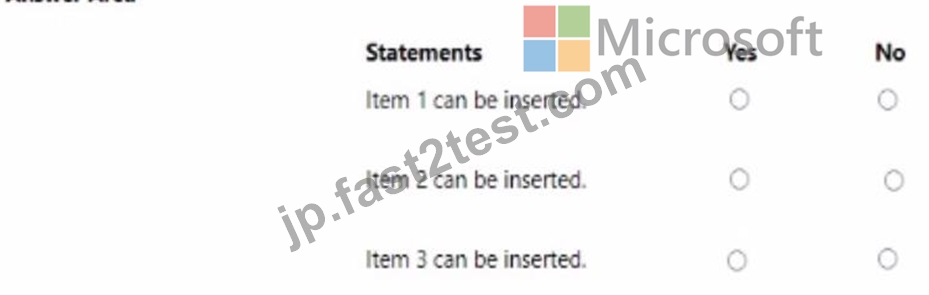
正解:
解説:
質問 # 24
You have an Azure Cosmos DB Core (SQL) API account that is configured for multi-region writes. The account contains a database that has two containers named container1 and container2.
The following is a sample of a document in container1:
{
"customerId": 1234,
"firstName": "John",
"lastName": "Smith",
"policyYear": 2021
}
The following is a sample of a document in container2:
{
"gpsId": 1234,
"latitude": 38.8951,
"longitude": -77.0364
}
You need to configure conflict resolution to meet the following requirements:
For container1 you must resolve conflicts by using the highest value for policyYear.
For container2 you must resolve conflicts by accepting the distance closest to latitude: 40.730610 and longitude: -73.935242.
Administrative effort must be minimized to implement the solution.
What should you configure for each container? To answer, drag the appropriate configurations to the correct containers. Each configuration may be used once, more than once, or not at all. You may need to drag the split bar between panes or scroll to view content.
NOTE: Each correct selection is worth one point.
正解:
解説:
Reference:
https://docs.microsoft.com/en-us/azure/cosmos-db/conflict-resolution-policies
https://docs.microsoft.com/en-us/azure/cosmos-db/sql/how-to-manage-conflicts
質問 # 25
You have a container named contained in an Azure Cosmos DB for NoSQL account.
The following is a sample of a document in container1.
For each of the following statements, select Yes if the statement is true. Otherwise, select No.
NOTE: Each correct selection is worth one point.
正解:
解説:
Explanation:
質問 # 26
You need to recommend indexes for con-product and con-productVendor. The solution must meet the product catalog requirements and the business requirements.
Which type of index should you recommend for each container? To answer, select the appropriate options in the answer area.
NOTE: Each correct selection is worth one point.
正解:
解説:
Explanation
質問 # 27
You have an Azure Cosmos DB for NoSQL container. The container contains items that have the following properties.
You need to protect the data stored in the container by using Always Encrypted. For each property, you must use the strongest type of encryption and ensure that queries execute properly.
What is the strongest type of encryption that you can apply to each property? To answer, select the appropriate options in the answer area.
NOTE: Each correct selection is worth one point.
正解:
解説:
Explanation
Box 1 = Randomized
Box 2 = Deterministic
Always Encrypted for Azure Cosmos DB supports two types of encryption: deterministic and randomized1.
Deterministic encryption always produces the same encrypted value for any given plain text value.
Randomized encryption produces a different encrypted value for the same plain text value.
For dateOfBirth, randomized encryption is the strongest type of encryption because it provides better protection against statistical analysis and brute-force attacks. Deterministic encryption would not be suitable for dateOfBirth because it could reveal patterns or allow equality comparisons1.
For healthStatus, deterministic encryption is the strongest type of encryption because it allows queries to perform equality comparisons and filters on the encrypted property. Randomized encryption would not be suitable for healthStatus because it would prevent any queries on the encrypted property1.
質問 # 28
You have the indexing policy shown in the following exhibit.
Use the drop-down menus to select the answer choice that answers each question based on the information presented in the graphic.
NOTE: Each correct selection is worth one point.
正解:
解説:
質問 # 29
You have a database named telemetry in an Azure Cosmos DB Core (SQL) API account that stores IoT data.
The database contains two containers named readings and devices.
Documents in readings have the following structure.
id
deviceid
timestamp
ownerid
measures (array)
- type
- value
- metricid
Documents in devices have the following structure.
id
deviceid
owner
- ownerid
- emailaddress
- name
brand
model
For each of the following statements, select Yes if the statement is true. Otherwise, select No.
NOTE: Each correct selection is worth one point.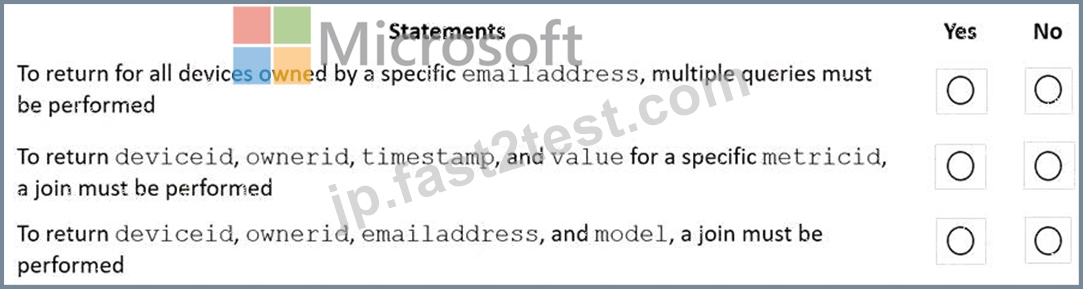
正解:
解説:
Explanation:
Box 1: Yes
Need to join readings and devices.
Box 2: No
Only readings is required. All required fields are in readings.
Box 3: No
Only devices is required. All required fields are in devices.
質問 # 30
You have a database named telemetry in an Azure Cosmos DB Core (SQL) API account that stores IoT dat a. The database contains two containers named readings and devices.
Documents in readings have the following structure.
id
deviceid
timestamp
ownerid
measures (array)
- type
- value
- metricid
Documents in devices have the following structure.
id
deviceid
owner
- ownerid
- emailaddress
- name
brand
model
For each of the following statements, select Yes if the statement is true. Otherwise, select No.
NOTE: Each correct selection is worth one point.
正解:
解説:
質問 # 31
You have a container named container1 in an Azure Cosmos DB Core (SQL) API account. The container1 container has 120 GB of data.
The following is a sample of a document in container1.
The orderId property is used as the partition key.
For each of the following statements, select Yes if the statement is true. Otherwise, select No.
NOTE: Each correct selection is worth one point.
正解:
解説:
Explanation
Box 1: Yes
Records with different OrderIDs will match.
Box 2: Yes
Records with different OrderIDs will match.
Box 3: No
Only records with one specific OrderId will match
質問 # 32
You have an Azure Cosmos DB Core (SQL) API account that is configured for multi-region writes. The account contains a database that has two containers named container1 and container2.
The following is a sample of a document in container1:
{
"customerId": 1234,
"firstName": "John",
"lastName": "Smith",
"policyYear": 2021
}
The following is a sample of a document in container2:
{
"gpsId": 1234,
"latitude": 38.8951,
"longitude": -77.0364
}
You need to configure conflict resolution to meet the following requirements:
For container1 you must resolve conflicts by using the highest value for policyYear.
For container2 you must resolve conflicts by accepting the distance closest to latitude: 40.730610 and longitude: -73.935242.
Administrative effort must be minimized to implement the solution.
What should you configure for each container? To answer, drag the appropriate configurations to the correct containers. Each configuration may be used once, more than once, or not at all. You may need to drag the split bar between panes or scroll to view content.
NOTE: Each correct selection is worth one point.
正解:
解説:
Explanation:
Box 1: Last Write Wins (LWW) (default) mode
Last Write Wins (LWW): This resolution policy, by default, uses a system-defined timestamp property. It's based on the time-synchronization clock protocol.
Box 2: Merge Procedures (custom) mode
Custom: This resolution policy is designed for application-defined semantics for reconciliation of conflicts.
When you set this policy on your Azure Cosmos container, you also need to register a merge stored procedure.
This procedure is automatically invoked when conflicts are detected under a database transaction on the server. The system provides exactly once guarantee for the execution of a merge procedure as part of the commitment protocol.
Reference:
https://docs.microsoft.com/en-us/azure/cosmos-db/conflict-resolution-policies
https://docs.microsoft.com/en-us/azure/cosmos-db/sql/how-to-manage-conflicts
質問 # 33
You configure Azure Cognitive Search to index a container in an Azure Cosmos DB Core (SQL) API account as shown in the following exhibit.
Use the drop-down menus to select the answer choice that completes each statement based on the information presented in the graphic.
NOTE: Each correct selection is worth one point.
正解:
解説: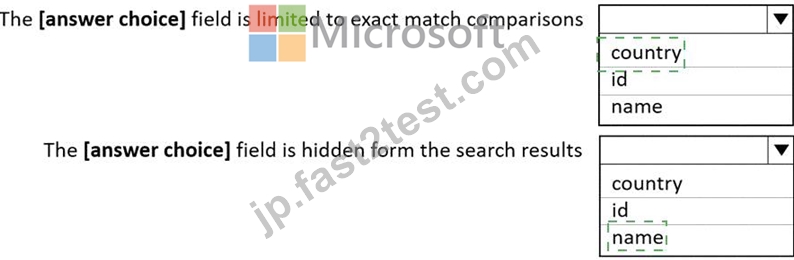
Explanation:
Box 1: country
The country field is filterable.
Note: filterable: Indicates whether to enable the field to be referenced in $filter queries. Filterable differs from searchable in how strings are handled. Fields of type Edm.String or Collection(Edm.String) that are filterable do not undergo lexical analysis, so comparisons are for exact matches only.
Box 2: name
The name field is not Retrievable.
Retrievable: Indicates whether the field can be returned in a search result. Set this attribute to false if you want to use a field (for example, margin) as a filter, sorting, or scoring mechanism but do not want the field to be visible to the end user.
Note: searchable: Indicates whether the field is full-text searchable and can be referenced in search queries.
Reference: https://docs.microsoft.com/en-us/rest/api/searchservice/create-index
質問 # 34
You have an Azure Cosmos DB for NoSQL account named account1 that supports an application named App1. App1 uses the consistent prefix consistency level.
You configure account1 to use a dedicated gateway and integrated cache.
You need to ensure that App1 can use the integrated cache.
Which two actions should you perform for APP1? Each correct answer presents part of the solution.
NOTE: Each correct selection is worth one point.
- A. Change the connection mode to direct
- B. Change the consistency level of requests to session.
- C. Change the account endpoint to https://account1.sqlx.cosmos.azure.com.
- D. Change the account endpoint to https://account1.documents.azure.com
- E. Change the consistency level of requests to strong.
正解:B、C
解説:
the Azure Cosmos DB integrated cache is an in-memory cache that is built-in to the Azure Cosmos DB dedicated gateway. The dedicated gateway is a front-end compute that stores cached data and routes requests to the backend database. You can choose from a variety of dedicated gateway sizes based on the number of cores and memory needed for your workload1. The integrated cache can reduce the RU consumption and latency of read operations by serving them from the cache instead of the backend containers2.
For your scenario, to ensure that App1 can use the integrated cache, you should perform these two actions:
Change the account endpoint to https://account1.sqlx.cosmos.azure.com. This is the dedicated gateway endpoint that you need to use to connect to your Azure Cosmos DB account and leverage the integrated cache. The standard gateway endpoint (https://account1.documents.azure.com) will not use the integrated cache2.
Change the consistency level of requests to session. This is the highest consistency level that is supported by the integrated cache. If you use a higher consistency level (such as strong or bounded staleness), your requests will bypass the integrated cache and go directly to the backend containers
質問 # 35
You configure a backup for an Azure Cosmos DB for NoSQL account as shown in the following exhibit.
Use the drop-down menus to select the answer choice that completes each statement based on the information presented in the graphic.
NOTE: Each correct selection is worth one point.
正解:
解説:
Explanation:
Box 1 = The current backup policy provides protection for: 2 Hours Azure Cosmos DB automatically takes backups of your data at regular intervals. The backup interval and the retention period can be configured from the Azure portal. You can also choose between two backup modes: periodic backup mode and continuous backup mode. Periodic backup mode is the default mode for all existing accounts and it takes a full backup of your database every 4 hours by default. Continuous backup mode is a new mode that allows you to restore to any point of time within either 7 or 30 days1.
For your scenario, based on the exhibit, you have configured a backup for an Azure Cosmos DB for NoSQL account using the periodic backup mode with a backup interval of 1 hour and a retention period of 2 hours.
This means that Azure Cosmos DB will take a full backup of your database every hour and keep only the latest two backups. Therefore, the current backup policy provides protection for 2 hours.
Box 2: In case of emergency, you must (answer choice) to restore the backup = create a support ticket Azure Cosmos DB automatically takes backups of your data at regular intervals. You can configure the backup interval and the retention period from the Azure portal. You can also choose between two backup modes:
periodic backup mode and continuous backup mode. Periodic backup mode is the default mode for all existing accounts and it takes a full backup of your database every 4 hours by default. Continuous backup mode is a new mode that allows you to restore to any point of time within either 7 or 30 days1.
For your scenario, based on the exhibit, you have configured a backup for an Azure Cosmos DB for NoSQL account using the periodic backup mode with a backup interval of 1 hour and a retention period of 2 hours.
This means that Azure Cosmos DB will take a full backup of your database every hour and keep only the latest two backups. In case of emergency, you must create a support ticket to restore the backup. This is the answer to your question.
To restore data from a periodic backup, you need to create a support request with Azure Cosmos DB team and provide the following information:
* The name of your Azure Cosmos DB account
* The name of the database or container that you want to restore
* The date and time (in UTC) that you want to restore from
* The name of the target Azure Cosmos DB account where you want to restore the data
* The name of the target resource group where you want to restore the data The Azure Cosmos DB team will then initiate the restore process and notify you when it is completed2.
質問 # 36
......
無料セールまもなく終了!100%有効なDP-420試験:https://jp.fast2test.com/DP-420-premium-file.html
検証済みDP-420試験解答合格確定させる:https://drive.google.com/open?id=1ISd9_QKFSlU5dIBrGjdMy3ML1oXPBO7m