

2024年最新の検証済みAZ-140問題集と解答であなたを合格確定させるMicrosoft Certified試験解答!
AZ-140試験問題集で100%合格率AZ-140試験!
AZ-140試験は、Microsoft Azure Virtual Desktopの構成と操作を担当するITプロフェッショナルを対象としています。この認定試験では、AVDアーキテクチャ、計画、展開、移行、セキュリティ、および管理の分野における候補者の知識とスキルを測定します。これは高度なレベルの試験であり、Azure Technologiesとサービスを十分に理解する必要があります。
質問 # 46
You have a Windows Virtual Desktop host pool named Pool1 and an Azure Automation account named account1. Pool1 is integrated with an Azure Active Directory Domain Services (Azure AD DS) managed domain named contoso.com.
You plan to configure scaling for Pool1 by using Azure Automation runbooks.
You need to authorize the runbooks to manage the scaling of Pool1. The solution must minimize administrative effort.
What should you configure?
- A. a Connections shared resource in Azure Automation
- B. a group Managed Service Account (gMSA) in Azure AD DS
- C. a managed identity in Azure Active Directory (Azure AD)
- D. a Run As account in Azure Automation
正解:D
解説:
Reference:
https://docs.microsoft.com/en-us/azure/virtual-desktop/set-up-scaling-script
Topic 1, Litware, Inc
Existing Environment
Identity Environment
The network contains an on-premises Active Directory domain named litware.com that syncs to an Azure Active Directory (Azure AD) tenant named litware.com.
The Azure AD tenant contains the users shown in the following table.
All users are registered for Azure Multi-Factor Authentication (MFA).
Existing Environment. Cloud Services
Litware has a Microsoft 365 E5 subscription associated to the Azure AD tenant. All users are assigned Microsoft 365 Enterprise E5 licenses.
Litware has an Azure subscription associated to the Azure AD tenant. The subscription contains the resources shown in the following table.
Litware uses custom virtual machine images and custom scripts to automatically provision Azure virtual machines and join the virtual machines to the on-premises Active Directory domain.
Network and DNS
The offices connect to each other by using a WAN link. Each office connects directly to the internet.
All DNS queries for internet hosts are resolved by using DNS servers in the Boston office, which point to root servers on the internet. The Chennai office has caching-only DNS servers that forward queries to the DNS servers in the Boston office.
Requirements. Planned Changes
Litware plans to implement the following changes:
Deploy Windows Virtual Desktop environments to the East US Azure region for the users in the Boston office and to the South India Azure region for the users in the Chennai office.
Implement FSLogix profile containers.
Optimize the custom virtual machine images for the Windows Virtual Desktop session hosts.
Use PowerShell to automate the addition of virtual machines to the Windows Virtual Desktop host pools.
Requirements. Performance Requirements
Litware identifies the following performance requirements:
Minimize network latency of the Windows Virtual Desktop connections from the Boston and Chennai offices.
Minimize latency of the Windows Virtual Desktop host authentication in each Azure region.
Minimize how long it takes to sign in to the Windows Virtual Desktop session hosts.
Requirements. Authentication Requirements
Litware identifies the following authentication requirements:
Enforce Azure MFA when accessing Windows Virtual Desktop apps.
Force users to reauthenticate if their Windows Virtual Desktop session lasts more than eight hours.
Requirements. Security Requirements
Litware identifies the following security requirements:
Explicitly allow traffic between the Windows Virtual Desktop session hosts and Microsoft 365.
Explicitly allow traffic between the Windows Virtual Desktop session hosts and the Windows Virtual Desktop infrastructure.
Use built-in groups for delegation.
Delegate the management of app groups to CloudAdmin1, including the ability to publish app groups to users and user groups.
Grant Admin1 permissions to manage workspaces, including listing which apps are assigned to the app groups.
Minimize administrative effort to manage network security.
Use the principle of least privilege.
Requirements. Deployment Requirements
Litware identifies the following deployment requirements:
Use PowerShell to generate the token used to add the virtual machines as session hosts to a Windows Virtual Desktop host pool.
Minimize how long it takes to provision the Windows Virtual Desktop session hosts based on the custom virtual machine images.
Whenever possible, preinstall agents and apps in the custom virtual machine images.
質問 # 47
You have an Azure Active Directory (Azure AD) tenant named contoso.com and an Azure virtual network named VNET1.
To VNET1, you deploy an Azure Active Directory Domain Services (Azure AD DS) managed domain named litwareinc.com.
To VNET1, you plan to deploy a Windows Virtual Desktop host pool named Pool1.
You need to ensure that you can deploy Windows 10 Enterprise host pools to Pool1.
What should you do first?
- A. Implement Azure AD Connect cloud sync.
- B. Modify the settings of the litwareinc.com DNS zone.
- C. Add a custom domain name to contoso.com.
- D. Modify the DNS settings of VNET1.
正解:D
解説:
Reference:
https://docs.microsoft.com/en-us/azure/active-directory-domain-services/tutorial-create-instance
"Update DNS settings for the Azure virtual network With Azure AD DS successfully deployed, now configure the virtual network to allow other connected VMs and applications to use the managed domain. To provide this connectivity, update the DNS server settings for your virtual network to point to the two IP addresses where the managed domain is deployed."
質問 # 48
You need to recommend a DNS infrastructure that meet the performance requirements. What should you recommend? To answer, select the appropriate options in the answer area. NOTE: Each correct selection is worth one point.
正解:
解説:
Explanation
質問 # 49
-
You have an Azure Virtual Desktop deployment that contains the session hosts shown in the following table.
You have the users shows in the following table.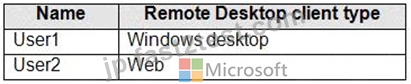
Users connect to Azure from the locations shown in the following table.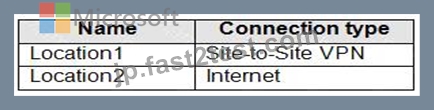
For each of the following statements, select Yes if the statement is true. Otherwise, select No.
NOTE: Each correct selection is worth one point.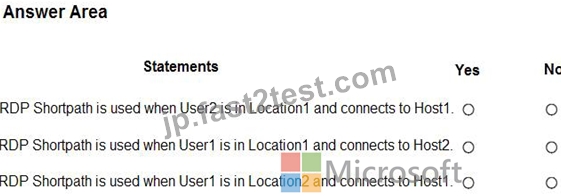
正解:
解説: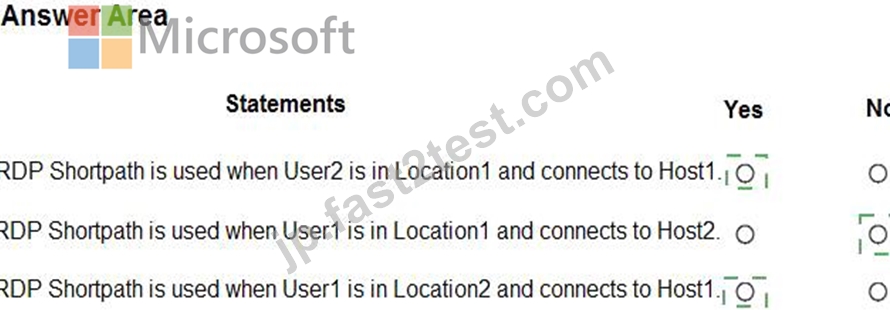
Explanation
Text, letter Description automatically generated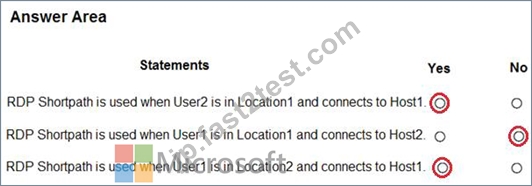
質問 # 50
You are automating the deployment of an Azure Virtual Desktop host pool.
You deploy the Azure Resource Manager (ARM) template shown in the following exhibit.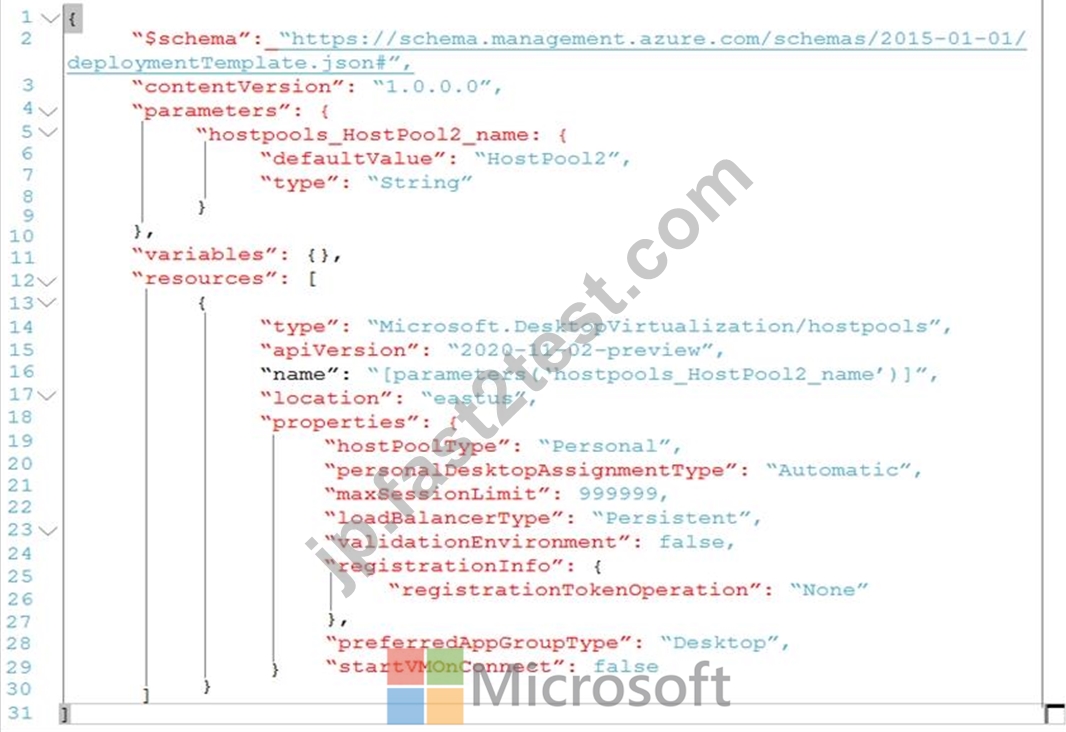
Use the drop-down menus to select the answer choice that completes each statement based on the information presented in the Dockerfile.
NOTE: Each correct selection is worth one point.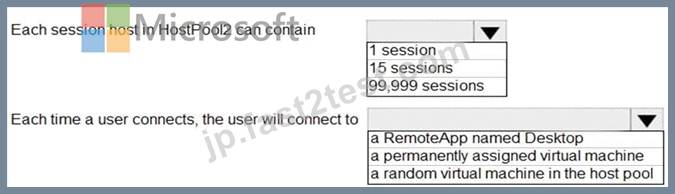
正解:
解説: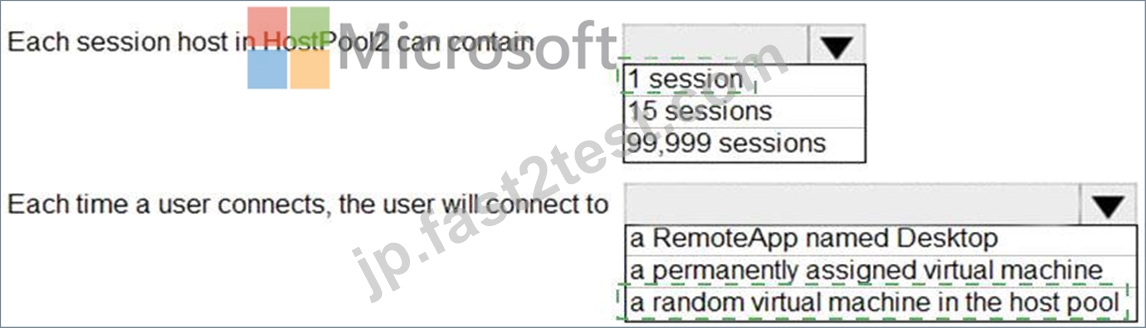
Explanation
Graphical user interface, text, application Description automatically generated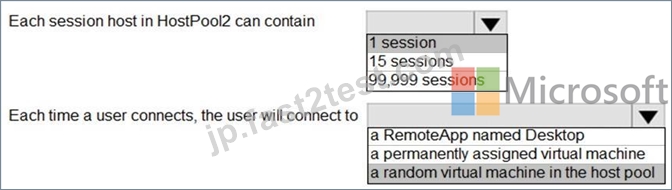
Reference:
https://docs.microsoft.com/en-us/azure/virtual-desktop/virtual-desktop-fall-2019/configure-host-pool-personal-de
質問 # 51
You have an Azure Virtual Desktop host pool named Pool1.
You need to ensure that you can create an Azure NetApp Files volume that will host user profiles for Pool1.
Which four actions should you perform in sequence? To answer, move the appropriate actions from the list of actions to the answer area and arrange them in the correct order.
NOTE: More than one order of answer choices is correct. You will receive credit for any of the correct orders you select.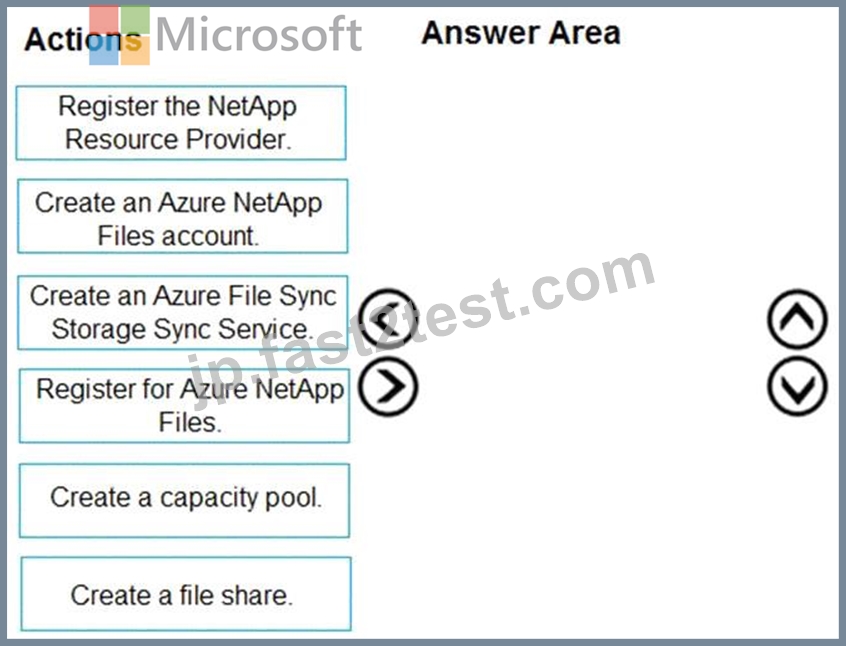
正解:
解説: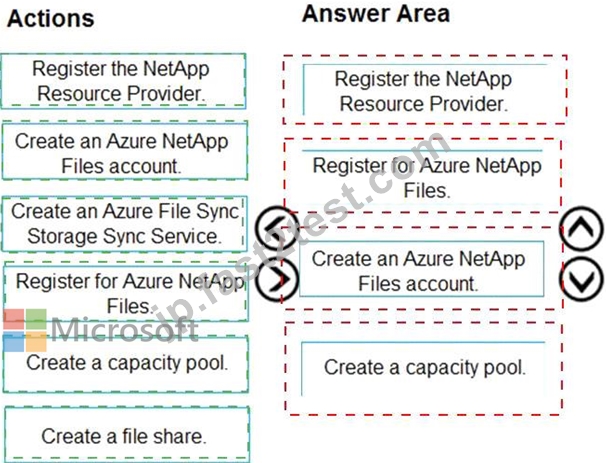
Explanation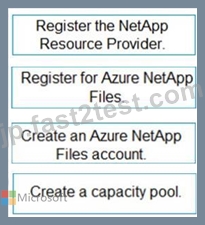
Table Description automatically generated
Reference:
https://docs.microsoft.com/en-us/azure/azure-netapp-files/azure-netapp-files-quickstart-set-up-account-create-vo
質問 # 52
You have a Windows Virtual Desktop host pool that has a max session limit of 15. Disconnected sessions are signed out immediately.
The session hosts for the host pool are shown in the following exhibit.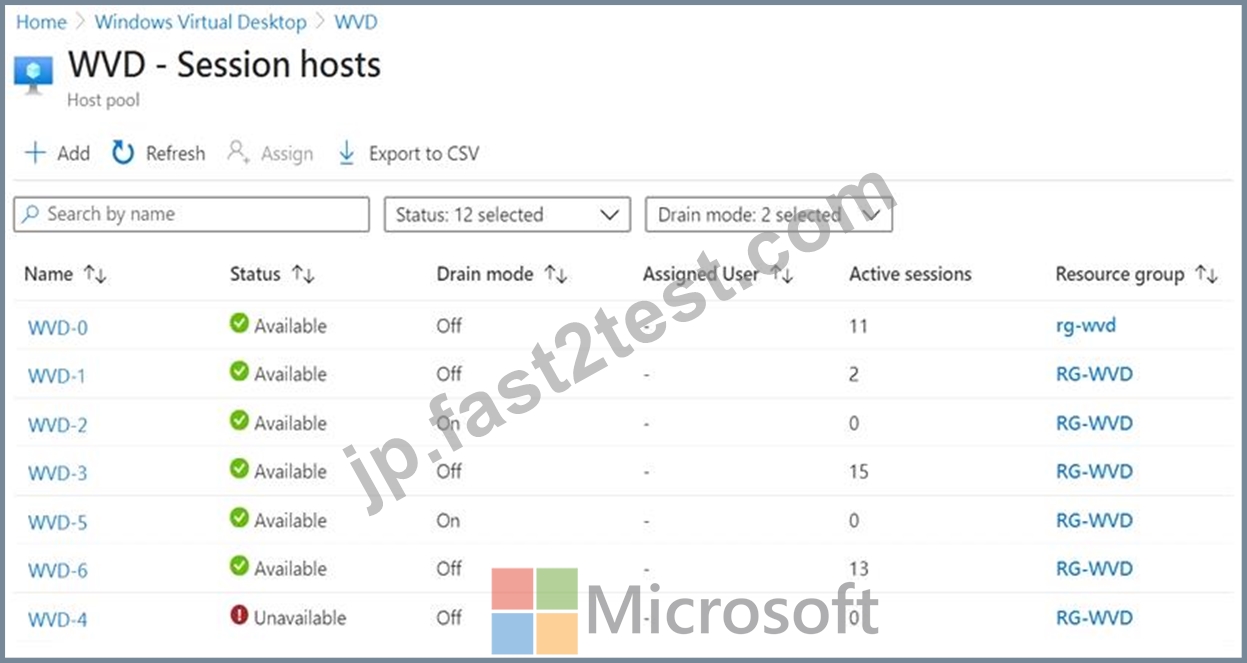
Use the drop-down menus to select the answer choice that completes each statement based on the information presented in the graphic.
NOTE: Each correct selection is worth one point.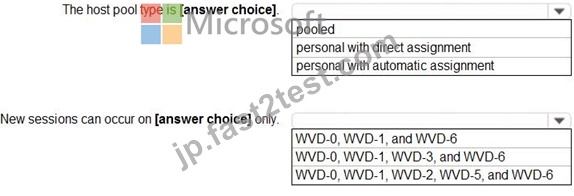
正解:
解説: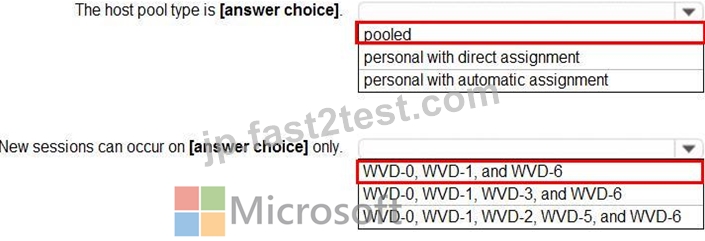
Reference:
https://docs.microsoft.com/en-us/azure/virtual-desktop/set-up-scaling-script
質問 # 53
Which users can create Pool4, and which users can join session hosts to the domain? To answer, select the appropriate options in the answer area.
NOTE: Each correct selection is worth one point.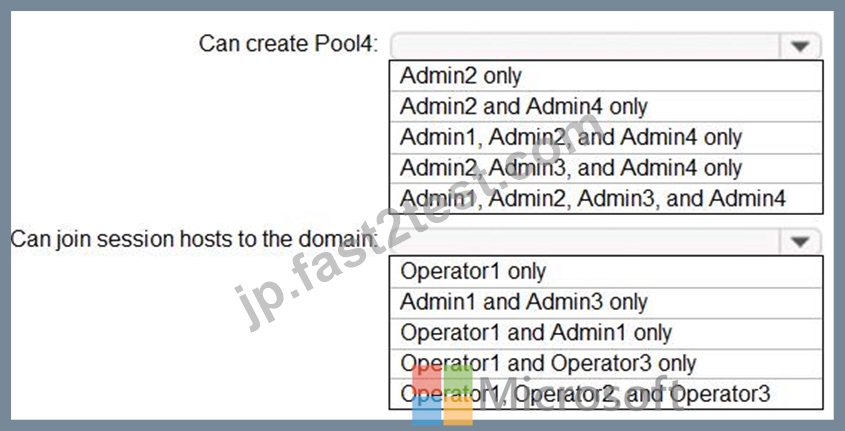
正解:
解説: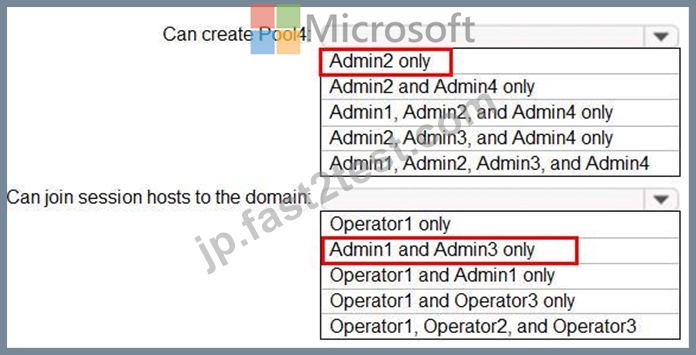
質問 # 54
You have a Azure Virtual Desktop host pool that contains live session hosts. The session hosts run Windows
10 Enterprise multi-session.
You need to prevent users from accessing the internet from Azure Virtual Desktop sessions. The session hosts must be allowed to access all the required Microsoft services.
Solution: You configure the RDP Properties of the host pool.
Does This meet the goal?
- A. No
- B. Yes
正解:A
質問 # 55
HOTSPOT
-
You plan to deploy two Azure file shares named Share1 and Share2 that will be used with Azure Virtual Desktop. Share1 will contain at least 100 GB of data and must be stored on SSDs. Share2 must be able to switch between Transaction optimized and Cool storage tiers and must be stored on HDDs.
You need to recommend which type of storage accounts to use for the shares. The solution must minimize costs.
What should you recommend for each share? To answer, select the appropriate options in the answer area.
NOTE: Each correct selection is worth one point.
正解:
解説: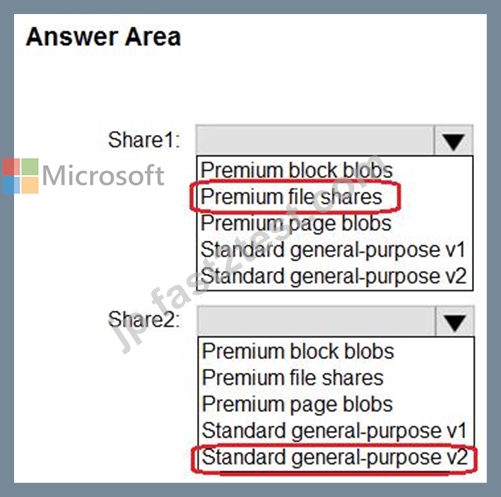
質問 # 56
You have an Azure Virtual Desktop deployment.
You are configuring the outbound firewall settings for the host pool.
Which outbound URL and outbound port should you configure to ensure that the host machines maintain Windows activation? To answer, select the appropriate options In the answer area.
NOTE: Each correct selection is worth one point.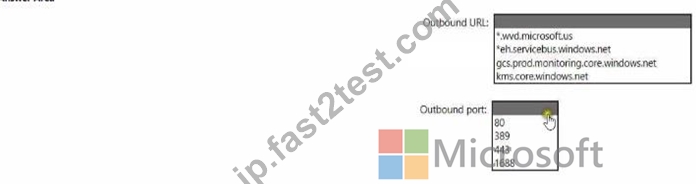
正解:
解説: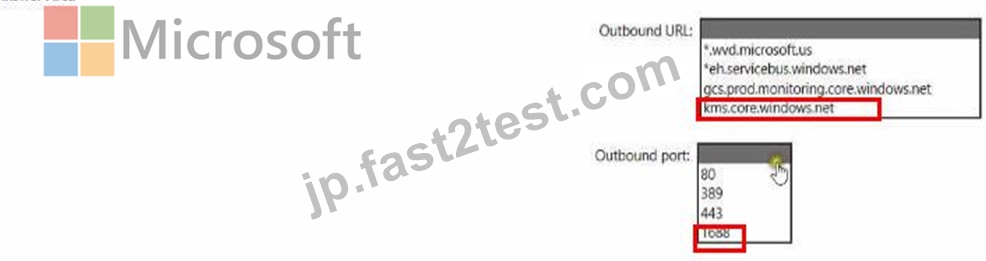
Reference:
https://docs.microsoft.com/en-us/azure/virtual-desktop/safe-url-list
質問 # 57
You have an Azure Virtual Desktop Deployment that contains a workspace named Workspace1 and a user named User1. Workspace1 contains a Desktop application group named Pool1Desktop.
At 09:00, you create a conditional access policy that has the following settings:
Assignments:
- Users and groups: User1
- Cloud apps or actions: Azure Virtual Desktop
- Conditions: 0 conditions selected
Access controls
- Grant: Grant access, Require multi-factor authentication
- Sessions: Sign-in frequency 1 hour
User1 performs the actions shown in the following table.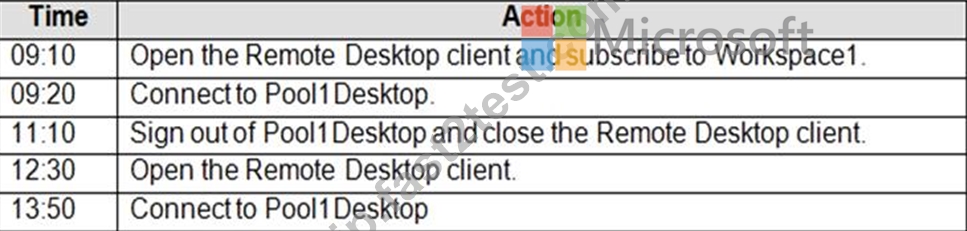
For each of the following statements, select Yes if the statement is true. Otherwise, select No.
NOTE: Each correct selection is worth one point.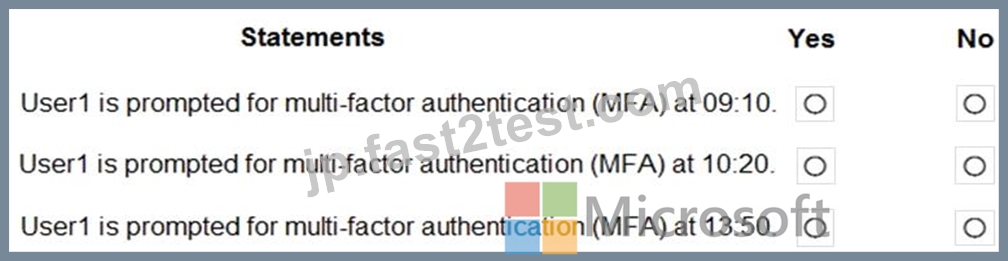
正解:
解説: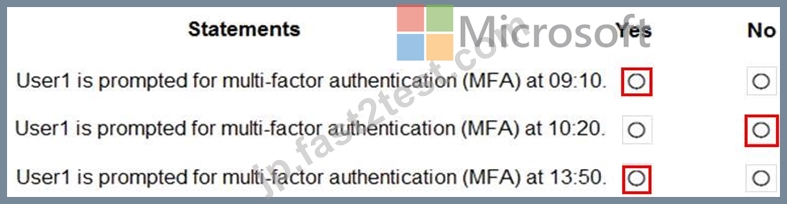
Reference:
https://docs.microsoft.com/en-us/azure/virtual-desktop/set-up-mfa
質問 # 58 
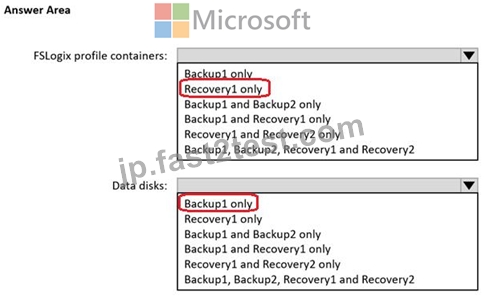
正解:
解説: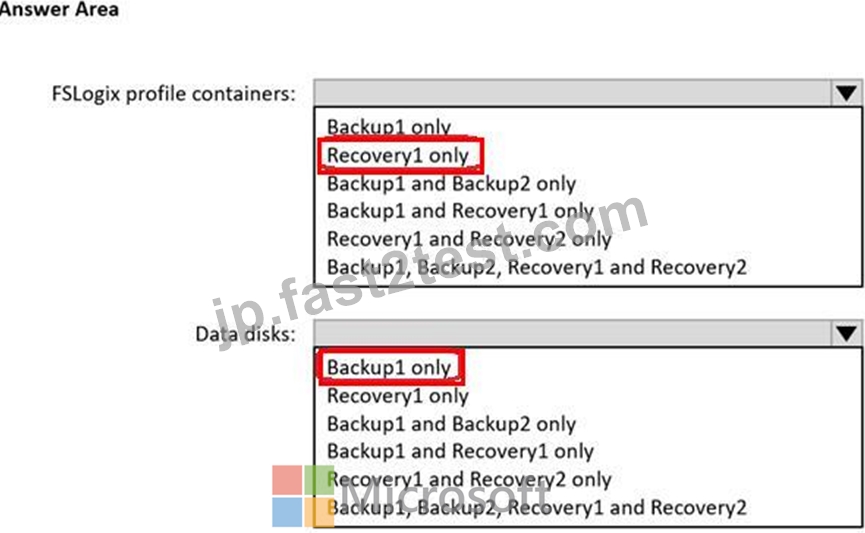
質問 # 59
You have a hybrid Azure Active Directory (Azure AD) tenant named contoso.com that contains the users shown in the following table.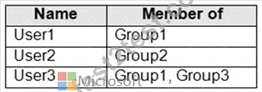
You have an Azure Virtual Desktop host pool. All the session hosts have a folder named C:\Folder1.
You create an FSLogix Application Masking rule as shown in the following exhibit.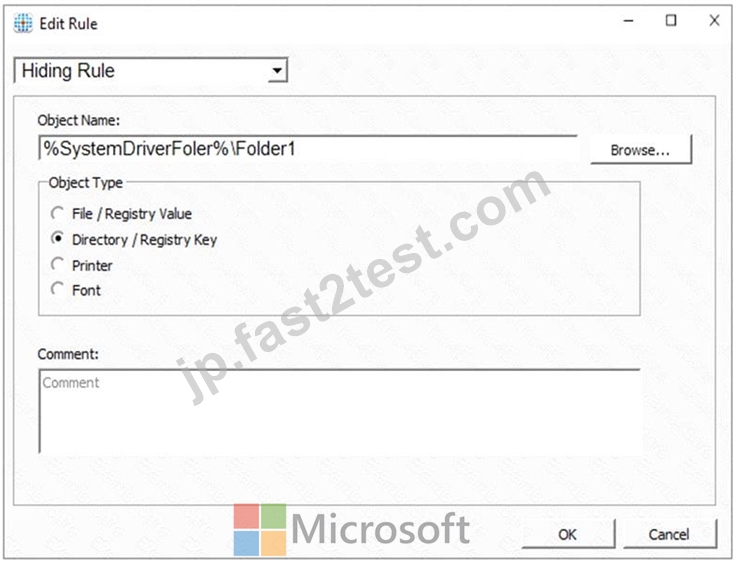
You create assignments for the Application Masking rule as shown in the following exhibit.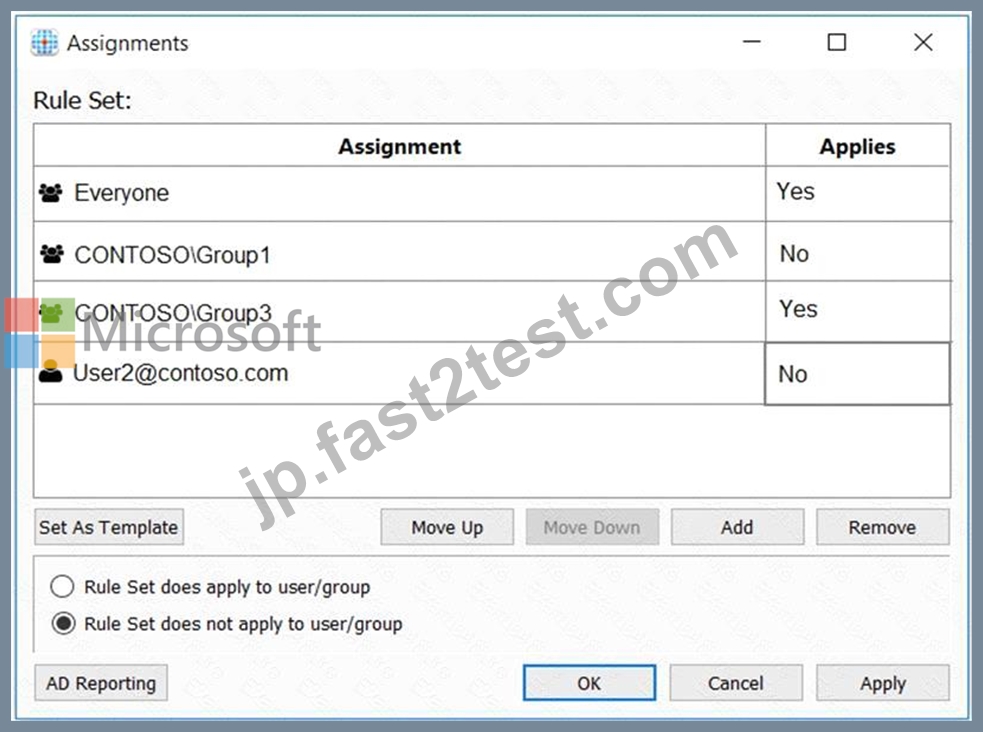
For each of the following statements, select Yes if the statement is true. Otherwise, select No.
NOTE: Each correct selection is worth one point.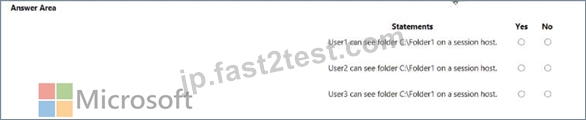
正解:
解説: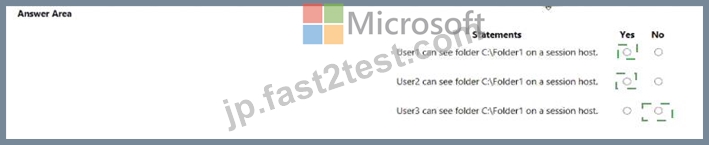
Explanation
Graphical user interface, text Description automatically generated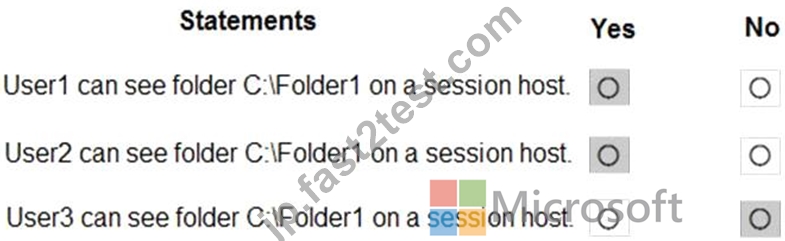
References:
https://docs.microsoft.com/en-us/fslogix/application-masking-rules-ht
https://docs.microsoft.com/en-us/fslogix/application-masking-users-groups-ht
質問 # 60
Which users can create Pool4, and which users can join session hosts to the domain? To answer, select the appropriate options in the answer area.
NOTE: Each correct selection is worth one point.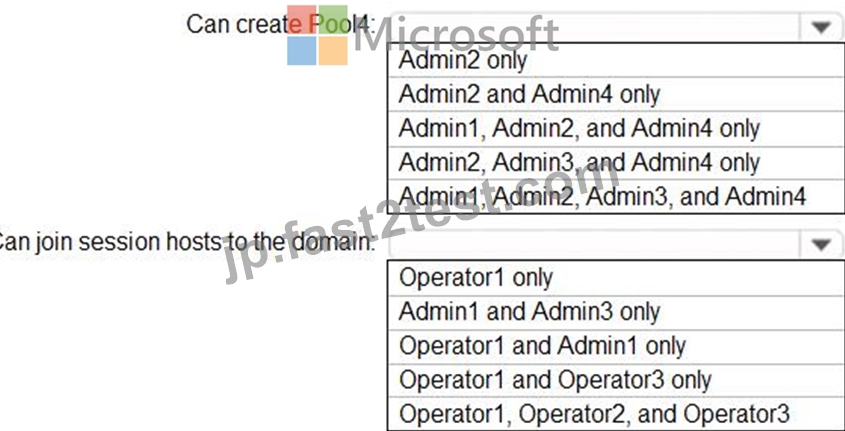
正解:
解説: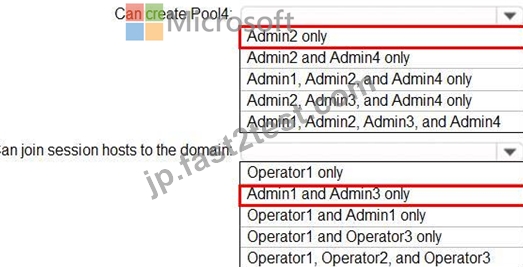
Topic 2, Litware, Inc
Existing Environment
Identity Environment
The network contains an on-premises Active Directory domain named litware.com that syncs to an Azure Active Directory (Azure AD) tenant named litware.com.
The Azure AD tenant contains the users shown in the following table.
All users are registered for Azure Multi-Factor Authentication (MFA).
Existing Environment. Cloud Services
Litware has a Microsoft 365 E5 subscription associated to the Azure AD tenant. All users are assigned Microsoft 365 Enterprise E5 licenses.
Litware has an Azure subscription associated to the Azure AD tenant. The subscription contains the resources shown in the following table.
Litware uses custom virtual machine images and custom scripts to automatically provision Azure virtual machines and join the virtual machines to the on-premises Active Directory domain.
Network and DNS
The offices connect to each other by using a WAN link. Each office connects directly to the internet.
All DNS queries for internet hosts are resolved by using DNS servers in the Boston office, which point to root servers on the internet. The Chennai office has caching-only DNS servers that forward queries to the DNS servers in the Boston office.
Requirements. Planned Changes
Litware plans to implement the following changes:
Deploy Windows Virtual Desktop environments to the East US Azure region for the users in the Boston office and to the South India Azure region for the users in the Chennai office.
Implement FSLogix profile containers.
Optimize the custom virtual machine images for the Windows Virtual Desktop session hosts.
Use PowerShell to automate the addition of virtual machines to the Windows Virtual Desktop host pools.
Requirements. Performance Requirements
Litware identifies the following performance requirements:
Minimize network latency of the Windows Virtual Desktop connections from the Boston and Chennai offices.
Minimize latency of the Windows Virtual Desktop host authentication in each Azure region.
Minimize how long it takes to sign in to the Windows Virtual Desktop session hosts.
Requirements. Authentication Requirements
Litware identifies the following authentication requirements:
Enforce Azure MFA when accessing Windows Virtual Desktop apps.
Force users to reauthenticate if their Windows Virtual Desktop session lasts more than eight hours.
Requirements. Security Requirements
Litware identifies the following security requirements:
Explicitly allow traffic between the Windows Virtual Desktop session hosts and Microsoft 365.
Explicitly allow traffic between the Windows Virtual Desktop session hosts and the Windows Virtual Desktop infrastructure.
Use built-in groups for delegation.
Delegate the management of app groups to CloudAdmin1, including the ability to publish app groups to users and user groups.
Grant Admin1 permissions to manage workspaces, including listing which apps are assigned to the app groups.
Minimize administrative effort to manage network security.
Use the principle of least privilege.
Requirements. Deployment Requirements
Litware identifies the following deployment requirements:
Use PowerShell to generate the token used to add the virtual machines as session hosts to a Windows Virtual Desktop host pool.
Minimize how long it takes to provision the Windows Virtual Desktop session hosts based on the custom virtual machine images.
Whenever possible, preinstall agents and apps in the custom virtual machine images.
質問 # 61
You have an Azure virtual machine named VM1 that runs Windows 10 Enterprise multi-session.
You plan to add language packs to VM1 and create a custom image of VM1 for a Windows Virtual Desktop host pool.
You need to ensure that modern apps can use the additional language packs when you deploy session hosts by using the custom image.
Which command should you run first? To answer, select the appropriate options in the answer area.
NOTE: Each correct selection is worth one point.
正解:
解説:
Explanation
Reference:
https://docs.microsoft.com/en-us/troubleshoot/windows-server/deployment/issues-appx-cleanup-maintenance-tas
https://docs.microsoft.com/en-us/powershell/module/scheduledtasks/disable-scheduledtask?view=windowsserve
質問 # 62
You have an Azure Virtual Desktop deployment that uses Azure Active Directory Domain Services (Azure AD DS). You have the following host pool:
* Name: Pool1
* Type: Personal
* Number of session hosts: 5
You plan to deploy two new session hosts to Pool1. What should you do before you deploy the session hosts?
- A. Increase the maximum session limit.
- B. Create a scaling plan.
- C. Create a registration key.
- D. Precreate a computer account in Azure AD DS.
正解:D
解説:
Explanation
This is done by using the Add-AzDomainComputer cmdlet in PowerShell. After the computer accounts have been created, the new session hosts can be deployed. For more information, please refer to the following Microsoft documentation: https://docs.microsoft.com/en-us/azure/virtual-desktop/create-session-host-pools#precreate-comp
質問 # 63
-
You have an Azure subscription that contains a user named User1.
The subscription uses the Azure Virtual Desktop host pools shown in the following table.
You need to ensure that User1 can create RemoteApp app groups that will be used to stream a suite of custom apps from the host pools. The solution must meet the following requirements:
* The apps must be available to the users in all the pools.
* The principle of least privilege must be followed.
* Administrative effort must be minimized.
Which role should you assign to User1, and what is the minimum number of app groups that User1 should create? To answer, select the appropriate options in the answer area.
NOTE: Each correct selection is worth one point.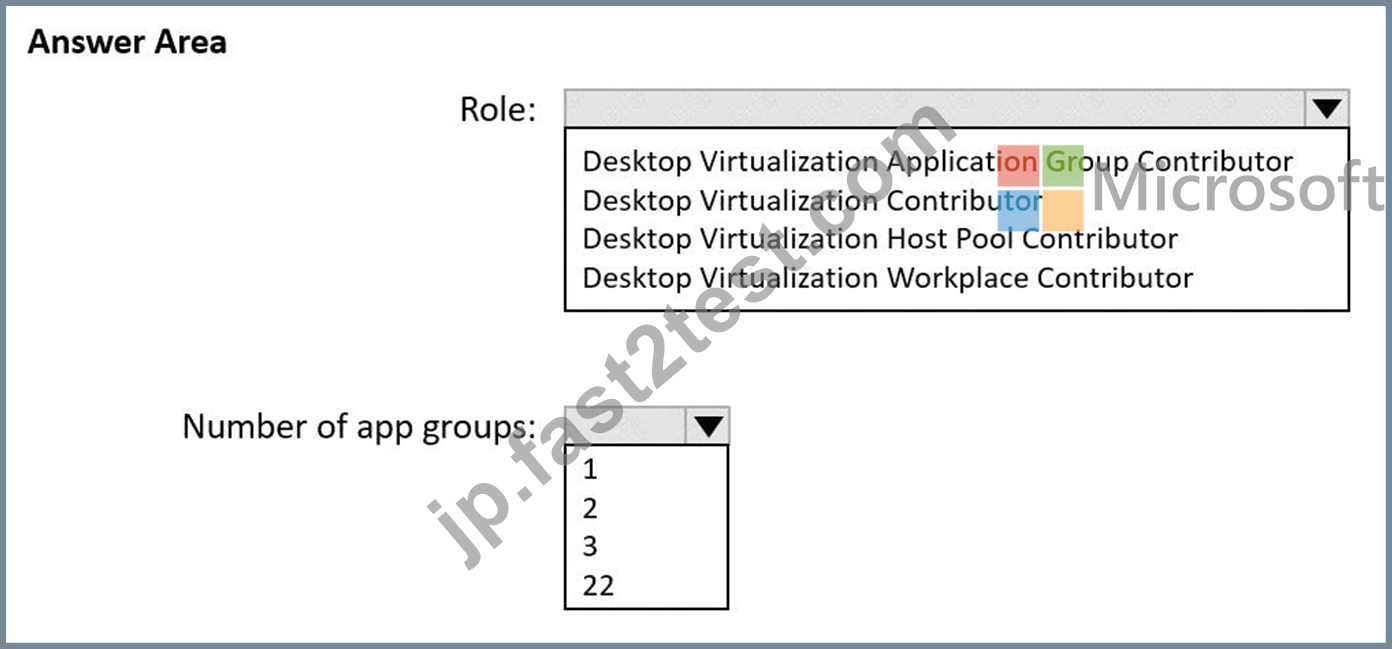
正解:
解説: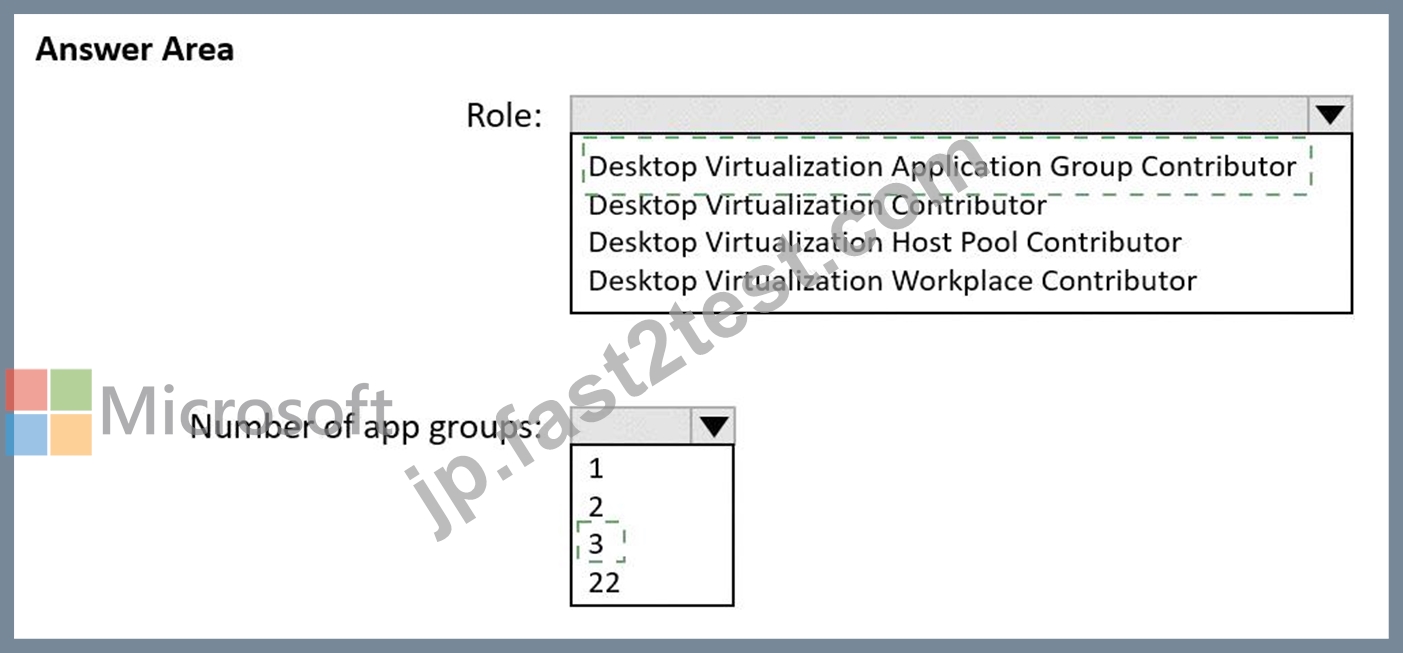
Explanation
Desktop Virtualization Group
3
質問 # 64
You network contains an on-premises Active Directory domain. The domain contains a universal security group named WVDusers.
You have a hybrid Azure Active Directory (Azure AD) tenant. WVDusers syncs to Azure AD.
You have a Windows Virtual Desktop host pool that contains four Windows 10 Enterprise multi-session hosts.
You need to ensure that only the members of WVDusers can establish Windows Virtual Desktop sessions to the host pool.
What should you do?
- A. Assign WVDusers to an Azure role scoped to the session hosts.
- B. Assign WVDusers to an Azure role scoped to each host pool.
- C. On each session host, add WVDusers to the local Remote Desktop Users group.
- D. Assign WVDusers to an application group.
正解:D
解説:
Explanation/Reference:
https://docs.microsoft.com/en-us/azure/virtual-desktop/manage-app-groups
質問 # 65
Your network contains an on-premises Active Directory domain named contoso.com that syncs to an Azure Active Directory (Azure AD) tenant.
You have an Azure subscription that contains an Azure Virtual Desktop host pool.
You create an Azure Storage account named storage1.
You need to use FSLogix profile containers in storage1 to store user profiles for a group named Group1. The solution must use the principle of least privilege.
What should you include in the solution? To answer, select the appropriate options in the answer area.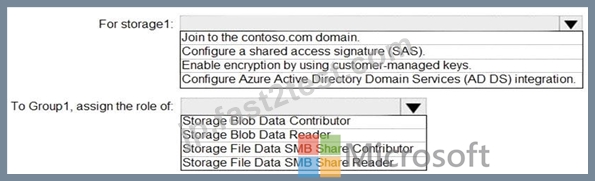
正解:
解説: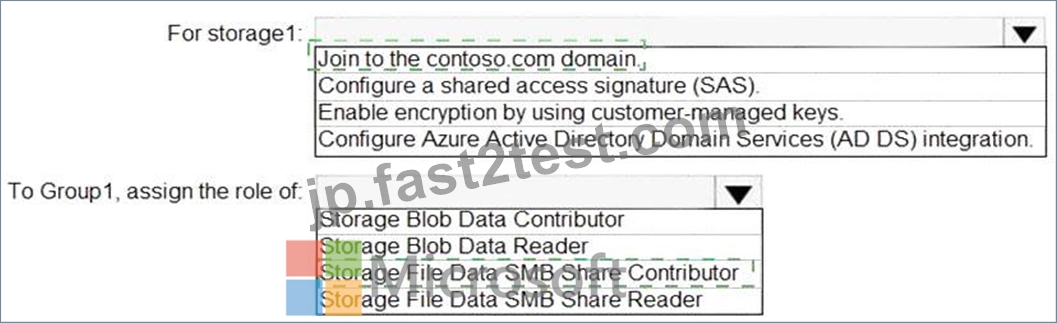
Explanation
Text Description automatically generated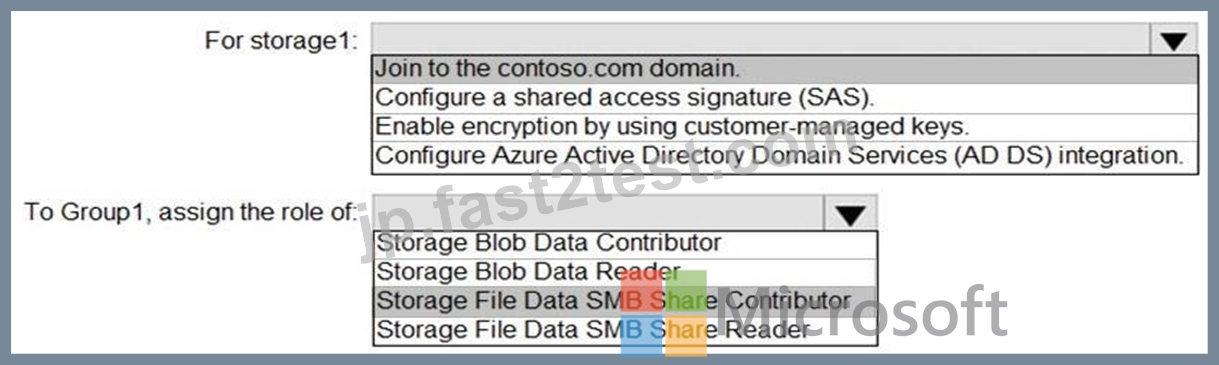
Reference:
https://docs.microsoft.com/en-us/azure/storage/files/storage-files-identity-ad-ds-enable
https://docs.microsoft.com/en-us/azure/virtual-desktop/create-file-share
質問 # 66
-
Your on-premises network contains an Active Directory domain that syncs with an Azure AD tenant.
You have an Azure Virtual Desktop host pool that contains Windows 11 session hosts joined to the domain.
You need to configure Azure NetApp Files to store user profile containers.
Which four actions should you perform in sequence? To answer, move the appropriate actions from the list of actions to the answer area and arrange them in the correct order.
NOTE: More than one order of answer choices is correct. You will receive credit for any of the correct orders you select.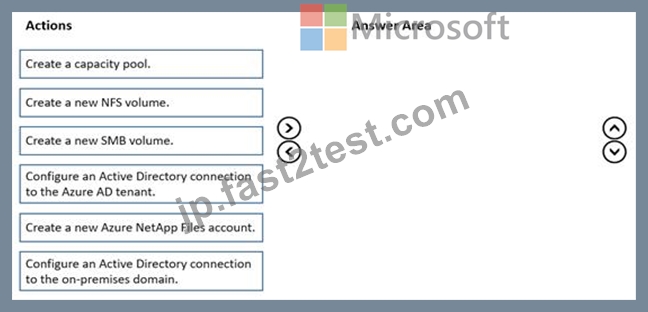
正解:
解説: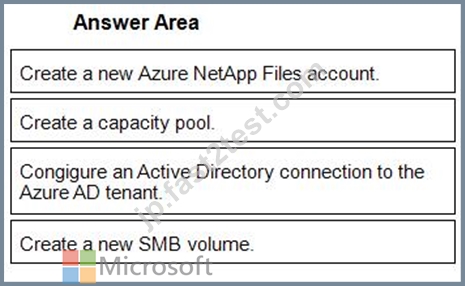
1 - Create a new Azure NetApp Files account.
2 - Create a capacity pool.
3 - Congigure an Active Directory connection to the Azure AD tenant.
4 - Create a new SMB volume.
質問 # 67
You have a Windows Virtual Desktop deployment.
You need to ensure that all the connections to the managed resources in the host pool require multi-factor authentication (MFA).
Which two settings should you modify in a conditional access policy? To answer, select the appropriate options in the answer area.
NOTE: Each correct selection is worth one point.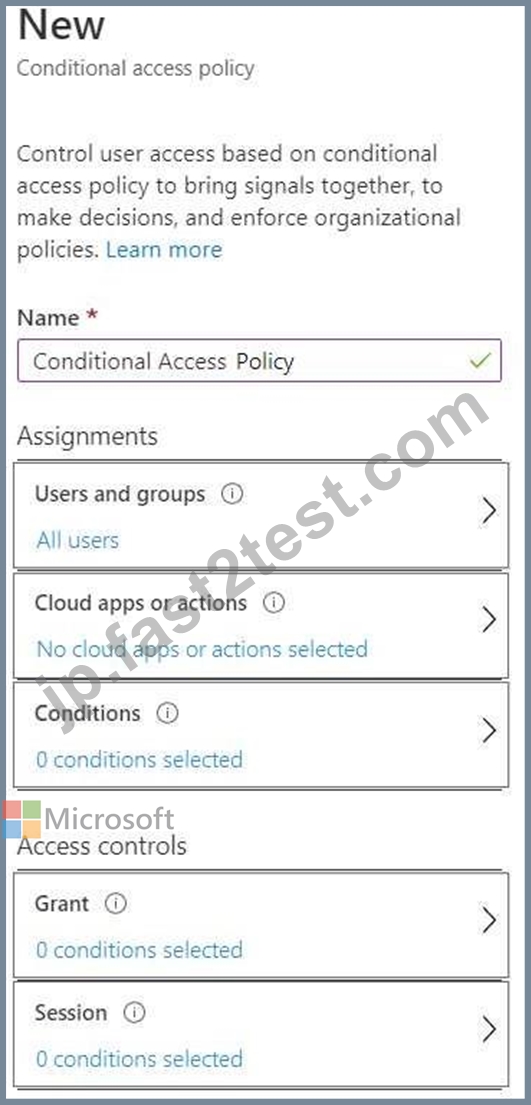
正解:
解説: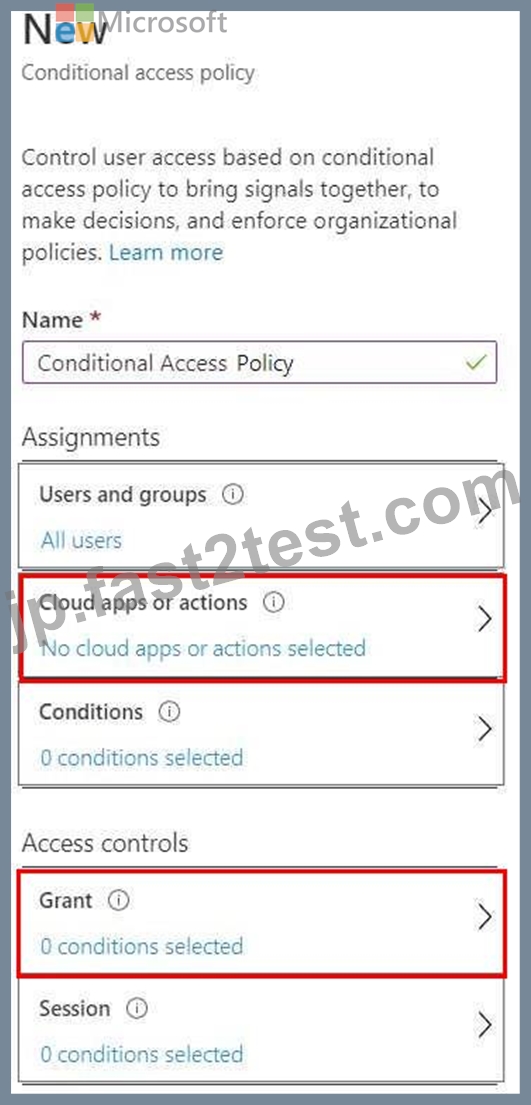
Reference:
https://docs.microsoft.com/en-us/azure/active-directory/authentication/tutorial-enable-azure-mfa
質問 # 68
......
Microsoftは、今日のデジタル世界で仮想デスクトップインフラストラクチャ(VDI)の需要の増加に伴い、Azure Virtual Desktop(AVD)サービスを導入しました。 Microsoft Azure Virtual Desktopは、スケーラブルで安全な仮想化Windowsデスクトップとアプリケーションエクスペリエンスを提供します。このサービスの効果的な構成と操作を確保するために、MicrosoftはAZ-140認定試験を導入しました。この試験は、Microsoft Azure Virtual Desktopを構成および操作する個人の能力をテストするように設計されています。
Microsoft AZ-140(Microsoft Azure Virtual Desktopの構成と操作)認定試験は、Microsoft Azure Virtual Desktopの構成と操作に関する専門知識を実証したいITプロフェッショナル向けに設計されています。この認定は、デスクトップ仮想化テクノロジーを扱い、仮想デスクトップ環境の展開と管理を担当する専門家に最適です。
あなたを余裕でAZ-140試験合格させます!100%高合格率保証:https://jp.fast2test.com/AZ-140-premium-file.html
試験問題集リアルMicrosoft Certified問題集で178解答を使おう:https://drive.google.com/open?id=1epIGnvE8ySXcuqUbtz3CxGenSnJaH4Cn