

2024年最新の更新のFortinet Certificationが有効なNSE7_NST-7.2問題集を無料提供しています
最新のFast2test NSE7_NST-7.2PDF問題集をダウンロードしちゃおう:https://jp.fast2test.com/NSE7_NST-7.2-premium-file.html(40問題と解答)
質問 # 14
Refer to the exhibit, which shows a session table entry.
Which statement about FortiGate behavior relating to this session is true?
- A. FortiGate applied only IPS inspection to this session.
- B. FortiGate forwarded this session without any inspection.
- C. FortiGate is performing a security profile inspection using the CPU.
- D. FortiGate redirected the client to the captive portal to authenticate, so that a correct policy match could be made.
正解:C
解説:
The session table entry provided shows detailed information about a specific network session passing through the FortiGate device. From the session details, we can see that the session has various attributes such as state, protocol, policy, and inspection details.
* The session state (proto_state=11) indicates that the session is being actively processed and inspected.
* Thenpd_state=00000000suggests that the session is being handled by the CPU rather than offloaded to a Network Processor (NP).
* The session is marked for security profile inspection, evident from the detailed byte/packet counts and other session parameters.
From these indicators, it's clear that FortiGate is using its CPU to perform security profile inspection on this session rather than simply forwarding the traffic without inspection or relying solely on IPS inspection.
References
* Fortinet Documentation on Session Table
* Fortinet Community Discussion on Session Table
質問 # 15
Exhibit.
Refer to the exhibit, which shows the output of diagnose syssessionlist.
If the HA ID for the primary device is0. what happens if the primary failsand the secondary becomes the primary?
- A. Traffic for this session continues to be permitted on the new primary device after failover. without requiring the client to restart the session with the server.
- B. The session state is preserved but the kernel will need to re-evaluate the session because NAT was applied.
- C. The secondary device has this session synchronized; however, because application control is applied, the session is marked dirty and has to be re-evaluated after failover.
- D. The session will be removed from the session table of the secondary device because of the presence of allowed errorpackets, which will force the client to restart the session with the server.
正解:A
解説:
* Session Synchronization:
* FortiGate HA (High Availability) ensures that active sessions are synchronized between the primary and secondary devices. This synchronization allows for seamless failover and continuity of sessions.
* Handling NAT Sessions:
* The session in the exhibit has NAT applied, as indicated by thehook=post dir=org act=snatentry.
FortiGate's HA setup is designed to handle such sessions, ensuring that traffic continues without interruption during failover.
* Session Preservation:
* Even with the presence of NAT, the session state is preserved across the HA devices. This means that ongoing sessions do not require re-establishment by the client, thus providing a seamless experience.
References:
* Fortinet Documentation: HA session synchronization and failover
* Fortinet Community: Understanding session synchronization in FortiGate HA
質問 # 16
Which of the following regarding protocol states is true?
- A. proto state=01 indicates one-way ICMP traffic.
- B. proto_state=10 indicates an established TCP session.
- C. proto_state-01 indicates an established TCP session.
- D. proto_state=00 indicates that UDP traffic flows in both directions.
正解:B
解説:
* Understanding protocol states:
* proto_state=00: Indicates no traffic or a closed session.
* proto_state=01: Typically indicates one-way ICMP traffic or a partially established TCP session.
* proto_state=10: Indicates an established TCP session, where the session has completed the three-way handshake and both sides can send and receive data.
* proto_state=11: Often indicates a fully established and active bidirectional session.
* Explanation of correct answer:
* proto_state=10is the correct indication for an established TCP session as it signifies that the session is fully established and active.
References
* Fortinet Network Security 7.2 Support Engineer Documentation
* Fortinet Firewall Protocol State Documentation
質問 # 17
Which exchange lakes care of DoS protection in IKEv2?
- A. IKE_Auth
- B. IKE_SA_INIT
- C. Create_CHILD_SA
- D. IKE_Req_INIT
正解:B
解説:
* IKE_SA_INIT Exchange:
* The IKE_SA_INIT exchange is the first step in the IKEv2 negotiation process. It is responsible for setting up the initial security association (SA) and performing Diffie-Hellman key exchange.
* During this exchange, the responder may employ various measures to protect against Denial of Service (DoS) attacks, such as rate limiting and the use of puzzles to increase the computational cost for an attacker.
* DoS Protection Mechanisms:
* One key method involves limiting the number of half-open SAs from any single IP address or subnet.
* The IKE_SA_INIT exchange can also incorporate the use of stateless cookies, which help to verify the initiator's legitimacy without requiring extensive resource allocation by the responder until the initiator is verified.
References:
* RFC 5996: Internet Key Exchange Protocol Version 2 (IKEv2)(RFC Editor).
* RFC 8019: Protecting Internet Key Exchange Protocol Version 2 (IKEv2) Implementations from Distributed Denial-of-Service Attacks(IETF Datatracker).
質問 # 18
Refer to the exhibit.
FortiGate has already been configured with a firewall policy that allows all ICMP traffic to flow from port1 to port3.
Which changes must the administrator perform to ensure the server at 10.4.0.1/24 receives the echo reply from the laptop at 10.1.0.1/24?
- A. Change the configuration from strict RPF check mode to feasible RPF check mode
- B. Modify the default gateway on thelaptop from 10.1.0.2 to 10.2.0.2
- C. A firewall policy that allows all ICMP traffic from port3 to port1.
- D. Enable asymmetric routing under config system settings.
正解:C
解説:
* Current Configuration Analysis:
* The firewall policy currently allows ICMP traffic from port1 to port3, enabling the ICMP echo request to reach the server.
* However, for the server to send an ICMP echo reply back to the laptop, the traffic must be allowed from port3 to port1.
* Required Configuration:
* To ensure the server at10.4.0.1/24can send the ICMP echo reply back to the laptop at10.1.0.1/24, the administrator needs to configure a new firewall policy.
* The policy must explicitly allow ICMP traffic from port3 to port1.
* Steps to Configure:
* Access the FortiGate configuration interface.
* Navigate to the Firewall Policy section.
* Create a new policy allowing ICMP traffic from port3 to port1.
* Save and apply the new policy to ensure bidirectional ICMP traffic is permitted.
References
* Fortinet Network Security 7.2 Support Engineer Documentation
* FortiGate Firewall Policy Configuration Guides
質問 # 19
Which statement about IKE and IKE NAT-T is true?
- A. They each use their own IP protocol number.
- B. IKE is used to encapsulate ESP traffic in some situations, and IKE NAT-T is used only when the local FortiGate is using NAT on the IPsec interface.
- C. They both use UDP as their transport protocol and the port number is configurable.
- D. IKE is the standard implementation for IKEv1and IKE NAT-T is an extension added in IKEv2.
正解:C
解説:
* IKE (Internet Key Exchange):IKE is a protocol used to set up a security association (SA) in the IPsec protocol suite. It is utilized to negotiate, create, and manage SAs.
* NAT-T (Network Address Translation-Traversal):NAT-T is used to enable IPsec VPN traffic to pass through NAT devices. It encapsulates IPsec ESP packets into UDP packets.
* Transport Protocol:Both IKE and IKE NAT-T use UDP as their transport protocol.
* Port Numbers:By default, IKE uses UDP port 500. NAT-T typically uses UDP port 4500. However, these port numbers can be configured as needed.
References:
* Fortinet Network Security Support Engineer Study Guide for FortiOS 7.2(Fortinet Docs)(ebin.pub).
* Fortinet Documentation on IPsec VPN Configuration(Fortinet Docs).
質問 # 20
Refer to the exhibit, which shows a truncated output of a real-time LDAP debug.
What two conclusions can you draw from the output? (Choose two.)
- A. FortiOS is able to locate the user in step 3 (Bind Request) of the LDAP authentication process.
- B. The name of the configured LDAP server is Lab.
- C. The user is authenticating using CN=John Smith.
- D. FortiOS is performing the second step (Search Request) in the LDAP authentication process.
正解:A、D
解説:
* LDAP Authentication Process:
* LDAP (Lightweight Directory Access Protocol) authentication involves several steps: Bind Request, Search Request, and Bind Response.
* The Bind Request is used to authenticate the client to the LDAP server.
* The Search Request is used to find the directory entry that matches the provided criteria.
* Analyzing the Exhibit:
* The exhibit shows a real-time LDAP debug output.
* The debug log includes a successful resolution of the LDAP FQDN, indicating that the LDAP server was reached.
* The debug log also shows the start of a search using the distinguished name (DN) base and a filter to locate the userjsmith.
* Conclusion:
* Since FortiOS successfully resolved the LDAP server and initiated a search for the userjsmith, it indicates that the LDAP server was located, and the search request was performed.
References:
* Fortinet Community: Understanding LDAP authentication steps and troubleshooting(Fortinet Docs).
* Fortinet Documentation: LDAP integration and debugging in FortiOS(Welcome to the Fortinet Community!).
質問 # 21
Exhibit.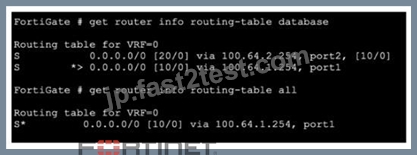
Refer to the exhibit, which shows partial outputs from two routing debug commands.
Why is the port 2 default route not in the second command output?
- A. The port2 interlace is disabled in the FortiGate configuration.
- B. The port1default route has a lower priority value than the default route using port2.
- C. The port1 default route has a higher priority value than the default route using port2.
- D. The port1 default route has a lower distance than the default route using port2-
正解:D
解説:
* Routing Table Analysis:
* The first command output (get router info routing-table database) shows two default routes:
* One viaport1with a distance of10.
* One viaport2with a distance of20.
* The second command output (get router info routing-table all) only shows the route viaport1.
* Administrative Distance:
* The administrative distance (AD) is a measure used by routers to select the best path when there are multiple routes to the same destination. The lower the distance, the more preferred the route.
* In this scenario, the route viaport1has a lower distance (10) compared to the route viaport2(20), making it the preferred route.
* Route Selection:
* Since the route viaport1has a lower distance, it is the only one installed in the active routing table, which is why it appears in the second command output, and theport2route does not.
References:
* Fortinet Community: Routing behavior depending on distance and priority(Welcome to the Fortinet Community!)(Welcome to the Fortinet Community!).
* Fortinet GURU: Route priority and administrative distance explanations(Fortinet GURU).
質問 # 22 
Refer to the exhibit, which shows the modified output of the routing kernel.
Which statement is true?
- A. The default static route through port2 is in the forwarding information base.
- B. The default static route through 10.200.1.254 is not in the forwarding information base.
- C. The egress interface associated with static route 8.8.8.8/32 is administratively up.
- D. The BGP route to 10.0.4.0/24 is not in the forwarding information base.
正解:A
解説:
The routing table shown in the exhibit lists all the routes known to the FortiGate device. It includes routes learned through different protocols such as BGP, OSPF, and static routes.
* The entryS * 0.0.0.0/0 [20/0] via 10.200.2.254, port2, [5/0]indicates that there is a static route to the default gateway (0.0.0.0/0) throughport2with a gateway IP of10.200.2.254.
* The asterisk*next to the route signifies that this route is selected and currently active in the forwarding information base (FIB). This means the FortiGate uses this route to forward packets destined for addresses not otherwise specified in the routing table.
References
* Fortinet Documentation on Routing Table
* Fortinet Community Discussion on Routing
質問 # 23
Refer to the exhibit, which shows the omitted output of FortiOS kernel slabs.
Which statement is true?
- A. The total slab size of the sctp_session slab is 0 kB and is associated with the user space
- B. The total slab size of the tcp_sessior. slab Is 7500 kB and is associated with the kernel.
- C. The total slab size of the ip_session slab is 3600 kB and is associated with the user space.
- D. The total slab size of the ip6_session slab is 1300 kB and is associated with the kernel.
正解:D
解説:
* Kernel Slabs Overview:
* The slab allocator in the Linux kernel is used for efficient memory management. It groups objects of the same type into caches, which are divided into slabs.
* Each slab contains multiple objects and helps to minimize fragmentation and enhance memory allocation efficiency.
* Interpreting the Exhibit:
* The exhibit shows output related to various kernel slab caches.
* The line forip6_sessionindicates that there are 1300 kB allocated for this slab, which means the total memory size allocated for IPv6 session objects in the kernel is 1300 kB.
References:
* Fortinet Community: Explanation of kernel slab allocation and usage(Welcome to the Fortinet Community!)(Hammertux).
* Linux Kernel Documentation: Slab Allocator details(Hammertux).
質問 # 24
Refer to the exhibit, which shows the output of diagnose syssessionstat. Which statement about the output shown in the exhibit is correct?
- A. AII the sessions in the session table are TCP sessions.
- B. 162 sessions have been deleted because of memory page exhaustion.
- C. There are two sessions that have not been removed in case of any out-of-order packets that arrive.
- D. There are 166 TCP sessions waiting to complete the three-way handshake.
正解:D
解説:
* Session Table Overview:
* The session table in FortiOS tracks all active and pending sessions. It includes details like the type of session (TCP, UDP, etc.), status, and statistics.
* Interpreting the Exhibit:
* The exhibit from thediagnose sys session statcommand shows detailed session statistics.
* The specific value indicating "166 TCP sessions waiting to complete the three-way handshake" reflects the number of sessions that have initiatedbut not yet completed the TCP three-way handshake process (SYN, SYN-ACK, ACK).
References:
* Fortinet Documentation: Understanding and troubleshooting session tables(Hammertux).
* Fortinet Community: Explanation of session states and statistics(Welcome to the Fortinet Community!)(Hammertux).
質問 # 25
What is the diagnosetest applicationipsmonitor 5 command used for?
- A. To disable the IPS engine
- B. To enable IPS bypass mode
- C. To restart all IPS engines and monitors
- D. To provide information regarding IPS sessions
正解:C
解説:
The commanddiagnose test application ipsmonitor 5is used to restart all IPS (Intrusion Prevention System) engines and monitors on the FortiGate device. This command is part of the diagnostic tools available for troubleshooting and maintaining the IPS functionality on the FortiGate.
* Running this command forces the IPS system to reset and reinitialize, which can be useful in situations where the IPS functionality appears to be malfunctioning or not responding correctly.
* This action helps in clearing any issues that might have arisen due to internal errors or misconfigurations, ensuring that the IPS engines operate correctly after the restart.
質問 # 26
Refer to the exhibit, which shows the output of a BGP debug command.
Which statement explains why the state of the 10.200.3.1 peer is Connect?
- A. The local router is receiving BGP keepalives from the remote peer, but the local peer has not received the OpenConf inn yet.
- B. The local router has a different AS number than the remote peer.
- C. The local router initiated the BGP session to 10.200.3.1 but did not receive a response.
- D. The router 10.200.3.1 has authentication configured for BGP and the local router does not.
正解:C
解説:
The BGP summary output shows the state of the 10.200.3.1 peer as "Connect." This state indicates that the local router has attempted to initiate a BGP session with the peer, but the peer has not yet responded to the initial connection request.
* State Explanation: The "Connect" state in BGP indicates that the TCP connection has been initiated but
* is waiting for a response. If the peer does not respond within the configured timers, the session will transition to the "Active" state and retry the connection.
* Possible Causes: This can occur due to network issues preventing the peer from responding, a misconfiguration on the peer device, or issues like access control lists (ACLs) blocking the BGP traffic.
To troubleshoot, check the connectivity between the routers, ensure that the BGP configurations on both sides match, and verify that there are no firewalls or ACLs blocking the BGP packets.
References
* Fortinet Documentation on BGP Troubleshooting
* Fortinet Community Discussion on BGP State Issues
質問 # 27 
Refer to the exhibit, which shows the output of a diagnose command.
What can you conclude from the RTT value?
- A. Its value is incremented with each packet lost.
- B. lts initial value is statically set to 10.
- C. It determines which FortiGuard server is used for license validation.
- D. Its value represents the time it takes to receive a response after a rating request is sent to a particular server.
正解:D
解説:
* RTT (Round Trip Time):
* RTT in the context of the FortiGuard server list indicates the time it takes for a request to be sent to a FortiGuard server and for a response to be received.
* This metric helps determine the latency between the FortiGate device and the FortiGuard servers, which is crucial for ensuring efficient and quick updates and responses for services like web
* filtering and antivirus updates.
* Server Selection:
* The FortiGate device uses RTT values to prioritize servers. Servers with lower RTT values are preferred as they respond faster, ensuring minimal delay in processing requests.
* This improves the overall performance of FortiGuard services by reducing the time it takes to communicate with the servers.
References:
* Fortinet Community: Troubleshooting FortiGuard server connections and RTT values(Welcome to the Fortinet Community!)(Fortinet Docs).
* Fortinet Documentation: FortiGuard server settings and RTT explanation(Welcome to the Fortinet Community!)(Fortinet Docs).
質問 # 28
Refer to the exhibit, which shows the output of get router info ospf neighbor.
What can you conclude from the command output?
- A. The local FortiGate is the BDR.
- B. The local FortiGate Is not a DROther.
- C. The network type connectingthe local Fortigate and OSPF neighbor 0.0.0.10 is point-to-point.
- D. All neighbors are in area 0.0.0.0.
正解:B
解説:
* Understanding OSPF Roles:
* In OSPF (Open Shortest Path First), routers can have different roles: Designated Router (DR), Backup Designated Router (BDR), and DROther. These roles help manage and optimize the OSPF network traffic.
* DR and BDR are elected to minimize the number of adjacencies and reduce the amount of routing information exchange.
* DROther routers are neither DR nor BDR but can still participate in the OSPF network by maintaining adjacencies with DR and BDR.
* Analyzing the Exhibit:
* The exhibit shows the OSPF neighbor states for the local FortiGate.
* Neighbor ID 0.0.0.1 is in the state Full/DR (Designated Router).
* Neighbor ID 0.0.0.3 is in the state Full/DROther (DROther).
* Neighbor ID 0.0.0.10 has no specific designation, implying it is neither DR nor BDR.
* Conclusion:
* Since the local FortiGate shows neighbors in Full/DR and Full/DROther states and itself does not have a state of DROther, it can be concluded that the local FortiGate is not a DROther.
References:
* Fortinet Community: Understanding OSPF roles and states(Welcome to the Fortinet Community!)(cyruslab).
* Fortinet Documentation: OSPF neighbor states and elections(Fortinet Docs).
質問 # 29 
If the default settings are in place, what can you conclude about the conserve mode shown in the exhibit?
- A. FortiGate is currently allowing new sessions that require flow-based or proxy-based content inspection but is not performing inspection on those sessions.
- B. FortiGate is currently allowing new sessions that require flow-based content inspection and blocking sessions that require proxy-based content inspection.
- C. FortiGate is currently blocking new sessions that require flow-based or proxy-based content inspection.
- D. FortiGate is currently blocking all new sessions regardless of the content inspection requirements or configuration settings because of high memory use.
正解:C
解説:
* Conserve Mode Overview:Conserve mode is a state that FortiGate enters to protect itself from running out of memory. It is triggered when the memory usage reaches certain thresholds.
* Thresholds:The default settings for conserve mode thresholds are:
* Red Threshold:88% memory usage.
* Extreme Threshold:95% memory usage.
* Green Threshold:82% memory usage.
* Impact on Sessions:When in conserve mode:
* New sessions requiring flow-based content inspection are blocked.
* New sessions requiring proxy-based content inspection are also blocked to free up memory resources.
* Current Memory State in Exhibit:The exhibit shows:
* Total RAM: 3040 MB.
* Memory used: 2706 MB (89% of total RAM).
* Memory usage exceeds the red threshold (88%), thus triggering conserve mode.
Given that the memory usage is above the red threshold and conserve mode is active, the FortiGate will block new sessions requiring both flow-based and proxy-based content inspection to conserve memory.
References:
* Fortinet Community: Explanation of Conserve Mode and Its Impact(Welcome to the Fortinet Community!)(Welcome to the Fortinet Community!).
* Fortinet Documentation: Conserve Mode Settings and Management(Fortinet Docs).
質問 # 30
......
実験された試験材料はNSE7_NST-7.2:https://jp.fast2test.com/NSE7_NST-7.2-premium-file.html