

100%合格率保証付きで最高のPL-100日本語試験でリアル問題PDFがある[2024年05月]
PL-100日本語問題集で2024年最新のMicrosoft PL-100日本語試験問題
質問 # 31
キャンバスアプリを作成します。
ユーザーは、現在どのフィールドにフォーカスがあるかを判別できません。アプリチェッカーを実行してエラーを特定します。
フォーカスされた境界線の太さがゼロより大きい値に設定されていることを確認する必要があります。
アプリチェッカーの結果のどのセクションを確認する必要がありますか?
- A. ルール
- B. ランタイム
- C. アクセシビリティ
- D. パフォーマンス
正解:C
解説:
The Accessibility checker classifies each issue as an error, a warning, or a tip based the issue's severity.
Issues include:
Focus isn't showing
When the FocusBorderThickness of a control is set to 0. It is good practice to ensure a proper color-contrast ratio between the focus border and the control itself so it's clearly visible.
Reference:
https://docs.microsoft.com/en-us/powerapps/maker/canvas-apps/accessibility-checker
質問 # 32
注:この質問は、同じシナリオを提示する一連の質問の一部です。シリーズの各質問には、述べられた目標を達成する可能性のある独自の解決策が含まれています。一部の質問セットには複数の正しい解決策がある場合がありますが、他の質問セットには正しい解決策がない場合があります。
このセクションの質問に回答した後は、その質問に戻ることはできません。その結果、これらの質問はレビュー画面に表示されません。
ある会社は、求職者のスクリーニングプロセスを合理化するために、Microsoft PowerPlatformコンポーネントを展開しています。
会社の人材(HR)担当者は、学校の就職説明会に出席する予定です。 HR担当者は、資格を取得し、潜在的な求職者をPowerAppsアプリに入力する必要があります。 HR担当者は、候補者ごとに次の情報を入力する必要があります。
候補者が現在職務に就く資格がないが、最終的にフォローアップ基準に基づいて資格を得る場合は、システムでフォローアップチェックボックスをすぐに選択またはオフにする必要があります。
同社は、同じビジネスユースケースを含むが、社内の従業員と昇進のための同様のPowerAppsアプリを作成することを計画しています。
フォローアップの候補を自動的にマークするには、PowerAppsアプリソリューションを作成する必要があります。
提案されたソリューション:エンティティのスコープを持つ適切なデータエンティティにビジネスルールを作成します。
ソリューションは目標を達成していますか?
- A. はい
- B. いいえ
正解:B
解説:
Instead use Common Data Service workflow with a PowerQuery on the data entity.
Note: Process (Workflow) table/entity reference is a set of logical rules that define the steps necessary to automate a specific business process, task, or set of actions to be performed.
Common Data Service workflow support: Filter triggers based on which attributes change - You can control which field changes trigger your automated flows. For example, trigger your flow only when the status field changes while ignoring all other fields that may change.
Reference:
https://docs.microsoft.com/en-us/business-applications-release-notes/april19/microsoft-flow/automated-parity-cl
質問 # 33
キャンバスアプリを作成しています。画面にスコープされた変数を使用して値を格納することを計画しています。
変数の値を作成して更新する必要があります。
どの3つの機能を使用できますか?それぞれの正解は完全な解決策を提示します。
注:正しい選択はそれぞれ1ポイントの価値があります。
- A. UpdateContext
- B. ナビゲート
- C. 収集
- D. セット
- E. パッチ
正解:A、B、E
解説:
B: Use the Patch function to modify records in complex situations. Such as, when you do updates that require no user interaction or use forms that span multiple screens.
CE: Context variables are scoped for Screen. They are great for passing values to a screen, much like parameters to a procedure in other languages. Can be referenced from only one screen.
Functions available for context variables:
UpdateContext
Navigate
Note:
Use the UpdateContext function to create a context variable, which temporarily holds a piece of information, such as the number of times the user has selected a button or the result of a data operation.
Context variables are also preserved when a user navigates between screens. You can use Navigate to set one or more context variables for the screen that the formula will display, which is the only way to set a context variable from outside the screen.
Reference:
https://docs.microsoft.com/en-us/powerapps/maker/canvas-apps/functions/function-patch
https://docs.microsoft.com/en-us/powerapps/maker/canvas-apps/functions/function-navigate
https://docs.microsoft.com/en-us/powerapps/maker/canvas-apps/functions/function-updatecontext
質問 # 34
会社向けのアプリを作成する予定です。
必要なPowerPlatformツールを特定する必要があります。
何を使うべきですか?答えるには、適切なツールを正しい要件にドラッグします。各ツールは、1回使用することも、複数回使用することも、まったく使用しないこともできます。コンテンツを表示するには、ペイン間で分割バーをドラッグするか、スクロールする必要がある場合があります。
注:正しい選択はそれぞれ1ポイントの価値があります。
正解:
解説:
Explanation
Box 1: Canvas App
Box 2: Model-driven app
Model-driven app design is a component-focused approach to app development. Model-driven app design doesn't require code and the apps you make can be simple or very complex. Unlike canvas app development where the designer has complete control over app layout, with model-driven apps much of the layout is determined for you and largely designated by the components you add to the app.
Box 3: Power Automate
Power Automate is a service that helps you create automated workflows between your favorite apps and services to synchronize files, get notifications, collect data, and more.
Box 4: Power Virtual Agents bot
When you create bots with Power Virtual Agents, you author and edit topics.
Topics are discrete conversation paths that, when used together within a single bot, allow for users to have a conversation with a bot that feels natural and flows appropriately.
Creating a bot with Power Virtual Agents is easy to do with the no-code authoring canvas, and there are a number of ways you can manage how topics interact, how you want the conversation to flow, and what it should feel like.
Reference:
https://docs.microsoft.com/en-us/power-virtual-agents/authoring-fundamentals
https://docs.microsoft.com/en-us/power-automate
質問 # 35
組織の人材(HR)部門向けのアプリを作成しています。管理されていないCommonDataServiceソリューションでEmployeeエンティティを作成します。
別のユーザーが、ソリューションとは別に次のPowerAutomateフローを作成します。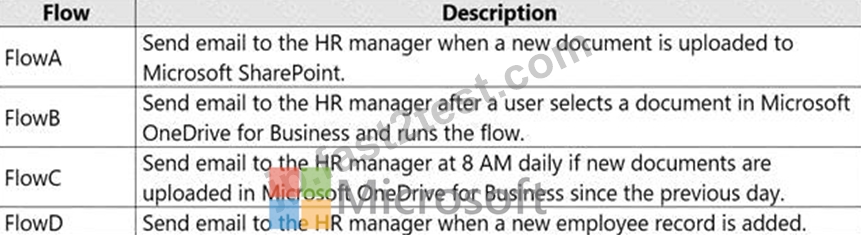
ソリューションに追加できるフローを組み込む必要があります。
どの2つのフローを含めることができますか?それぞれの正しい選択は完全な解決策を提示します。
注:正しい選択はそれぞれ1ポイントの価値があります。
- A. FlowD
- B. FlowC
- C. FlowA
- D. FlowB
正解:A、C
解説:
You can add any of these conditions to determine precisely when your flow is triggered.
Reference:
https://docs.microsoft.com/en-us/power-automate/connection-cds-native
質問 # 36
注:この質問は、同じシナリオを提示する一連の質問の一部です。シリーズの各質問には、述べられた目標を達成する可能性のある独自の解決策が含まれています。一部の質問セットには複数の正しい解決策がある場合がありますが、他の質問セットには正しい解決策がない場合があります。
このセクションの質問に回答した後は、その質問に戻ることはできません。その結果、これらの質問はレビュー画面に表示されません。
ある会社は、求職者のスクリーニングプロセスを合理化するために、Microsoft PowerPlatformコンポーネントを展開しています。
会社の人材(HR)担当者は、学校の就職説明会に出席する予定です。 HR担当者は、資格を取得し、潜在的な求職者をPowerAppsアプリに入力する必要があります。 HR担当者は、候補者ごとに次の情報を入力する必要があります。
候補者が現在職務に就く資格がないが、最終的にフォローアップ基準に基づいて資格を得る場合は、システムでフォローアップチェックボックスをすぐに選択またはオフにする必要があります。
同社は、同じビジネスユースケースを含むが、社内の従業員と昇進のための同様のPowerAppsアプリを作成することを計画しています。
フォローアップの候補を自動的にマークするには、PowerAppsアプリソリューションを作成する必要があります。
提案されたソリューション:データエンティティでPowerQueryを使用してCommon DataServiceワークフローを使用します。
ソリューションは目標を達成していますか?
- A. いいえ
- B. はい
正解:B
解説:
Explanation
Process (Workflow) table/entity reference is a set of logical rules that define the steps necessary to automate a specific business process, task, or set of actions to be performed.
Common Data Service workflow support: Filter triggers based on which attributes change - You can control which field changes trigger your automated flows. For example, trigger your flow only when the status field changes while ignoring all other fields that may change.
Reference:
https://docs.microsoft.com/en-us/business-applications-release-notes/april19/microsoft-flow/automated-parity-cl
質問 # 37
会社は Power Automate を使用しています。A と B という名前の 2 つのクラウド フローを管理します。ユーザーは次のアクティビティを実行する必要があります。
* クラウド フロー A のプロパティを管理します。
* クラウド フロー B を手動でトリガーする
最小権限の原則を使用して、ビジネス ユーザーの権限を設定する必要があります。各アクティビティにどの権限タイプを付与する必要がありますか? 答えるには、適切な権限タイプを正しいアクティビティにドラッグします。各特権タイプは、1 回または複数回使用することも、まったく使用しないこともできます。ペイン間の分割バーをドラッグするか、コンテンツを表示するためにスクロールする必要がある場合があります。
注: 正しい選択ごとに 1 ポイントの価値があります。
正解:
解説:
Explanation:
質問 # 38
組織のマネージャーは、モデル駆動型アプリを使用します。アプリには、CorporateDataという名前のダッシュボードが1つだけ表示されます。
管理者は、いくつかのダッシュボードが表示されていることを確認します。
ドロップダウンメニューを使用して、図に示されている情報に基づいて各質問に回答する回答の選択肢を選択します。
注:正しい選択はそれぞれ1ポイントの価値があります。
正解:
解説:
Reference:
https://docs.microsoft.com/en-us/powerapps/maker/model-driven-apps/add-edit-app-components
質問 # 39
ユーザーがMicrosoftExcelテンプレートを使用してデータを分析できるようにセキュリティを構成しています。
TemplateAdministratorという名前のセキュリティロールを作成し、以下に示すようにロールを構成して、User1という名前のユーザーにロールを割り当てます。
ドロップダウンメニューを使用して、図に示されている情報に基づいて各質問に回答する回答の選択肢を選択します。
注:正しい選択はそれぞれ1ポイントの価値があります。
正解:
解説:
質問 # 40
Power Automateフロー、環境変数、およびモデル駆動型アプリを含むソリューションがあります。
どの3つのステップを順番に実行する必要がありますか?回答するには、適切なアクションをアクションのリストから回答領域に移動し、正しい順序で配置します。
正解:
解説:
Reference:
https://powerusers.microsoft.com/t5/Power-Apps-Pro-Dev-ISV/Managed-vs-Unmanaged/td-p/495685
質問 # 41
あなたは宅配会社向けのアプリを開発しています。配信チームのメンバーは、自分の携帯電話でアプリを使用します。配布センターのチームメンバーは、タブレットデバイスで実行されるアプリのWebベースのバージョンを使用します。
配達員がその場所に到着し、荷物の受取人がいる場合、アプリは受取人の署名を取得する必要があります。受信者が不在の場合、アプリはドロップオフ場所またはパッケージを受け取った人の写真をキャプチャする必要があります。
アプリの電話ベースとウェブベースのバージョンを設計する必要があります。
どのアプリタイプとメディアコントロールを使用する必要がありますか?回答するには、回答領域で適切なオプションを設定します。
注:正しい選択はそれぞれ1ポイントの価値があります。
正解:
解説:
Reference:
https://docs.microsoft.com/en-us/powerapps/maker/canvas-apps/controls/control-camera
質問 # 42
国立公園のレンジャーは、パトロール中に遭遇した野生生物を報告します。レンジャーは、パトロール中に観察結果をノートに記録します。レンジャーは、オフィスにいるときに手動で観測データを入力します。あなたは、レンジャーがパトロール中に観察結果を記録できるようにするアプリを設計しています。
野生生物は、Wildlifeという名前のカスタムテーブルとしてモデル化されています。モデルには、注釈エンティティおよびWildlifeDetailsという名前のカスタムエンティティとの関係があります。 Wildlife Detailsエンティティでは、レンジャーは動物の生息地を観察するときに、より多くの情報を取得します。野生生物を観察するとき、レンジャーは動物が治療を必要とするかどうかを示さなければなりません。接続が利用可能な場合、アプリはデータを同期してCommon DataServiceに保存する必要があります。
アプリを設計する必要があります。
あなたは何をするべきか?回答するには、回答領域で適切なオプションを選択します。
注:正しい選択はそれぞれ1ポイントの価値があります。
正解:
解説:
Reference:
https://powerapps.microsoft.com/en-us/blog/mobile-offline-for-power-apps/
https://docs.microsoft.com/en-us/powerapps/maker/model-driven-apps/guide-staff-through-common-tasks-processes
質問 # 43
ユーザーがMicrosoftExcelテンプレートを使用してデータを分析できるようにセキュリティを構成しています。
TemplateAdministratorという名前のセキュリティロールを作成し、以下に示すようにロールを構成して、User1という名前のユーザーにロールを割り当てます。
ドロップダウンメニューを使用して、図に示されている情報に基づいて各質問に回答する回答の選択肢を選択します。
注:正しい選択はそれぞれ1ポイントの価値があります。
正解:
解説:
Explanation
質問 # 44
PowerBIデスクトップを使用して容量計画ダッシュボードを作成しています。
ダッシュボードは、モデル駆動型の製造計画アプリ内で使用できるだけでなく、MicrosoftTeamsチャネル内に組み込むことができる必要があります。
データソースは次のとおりです。
各タスクを実行するための適切な方法を決定する必要があります。
どの方法を使用する必要がありますか?回答するには、回答領域で適切なオプションを選択します。
注:正しい選択はそれぞれ1ポイントの価値があります。
正解:
解説:
Explanation
A picture containing graphical user interface Description automatically generated
Box 1: Use a Date Gateway
You can install an on-premises data gateway on the same local computer as SQL Server (in production, it would typically be a different computer).
Box 2: Create an entity relationship in CDS Solution Explorer
You can create relationships with CDS Solution Explorer.
Box 3: Create an aggregate table
Rollup columns help users obtain insights into data by monitoring key business metrics. A rollup column contains an aggregate value computed over the rows related to a specified row. This includes regular tables and activity tables such as emails and appointments.
Reference:
https://docs.microsoft.com/en-us/power-bi/connect-data/service-gateway-sql-tutorial
https://docs.microsoft.com/en-us/powerapps/maker/data-platform/create-edit-entity-relationships
https://docs.microsoft.com/en-us/powerapps/maker/data-platform/define-rollup-fields
質問 # 45
ある会社が、モバイルセールスチームをサポートするために複数のPowerAppsアプリを構築しています。
アプリはすべて、カスタムプロパティを持つ共通のコントロールを共有する必要があります。
アプリのソリューションを作成する必要があります。
どのオブジェクトを使用する必要がありますか?答えるには、適切なオブジェクトを正しい要件にドラッグします。各オブジェクトは、1回使用することも、複数回使用することも、まったく使用しないこともできます。コンテンツを表示するには、ペイン間で分割バーをドラッグするか、スクロールする必要がある場合があります。
注:正しい選択はそれぞれ1ポイントの価値があります。
正解:
解説:
Reference:
https://docs.microsoft.com/en-us/powerapps/maker/canvas-apps/component-library
https://docs.microsoft.com/en-us/powerapps/maker/canvas-apps/create-component
質問 # 46
必要なメールを地域マネージャーに送信するためのフローを作成する必要があります。
どのようにフローを作成する必要がありますか?回答するには、回答領域で適切なオプションを選択します。
注:正しい選択はそれぞれ1ポイントの価値があります。
正解:
解説:
Explanation
Graphical user interface, text, application, email Description automatically generated
Box 1: Business Process
Scenario: If a sales representative submits a status report and assigns the At Risk status to a process, the app must prompt the sales representative to enter a detailed description for the risk. This information must be emailed to the regional manager.
Business process flows provide a guide for people to get work done. They provide a streamlined user experience that leads people through the processes their organization has defined for interactions that need to be advanced to a conclusion of some kind. This user experience can be tailored so that people with different security roles can have an experience that best suits the work they do.
Box 2: Common Data Service when a record is created
The Microsoft Dataverse (Common Data Service) connector provides the following triggers to help you define when your flows start:
When a row is created, updated, or deleted
When an action is performed
When a flow step is run from a business process flow
Reference:
https://docs.microsoft.com/en-us/power-automate/flow-types
https://docs.microsoft.com/en-us/power-automate/dataverse/overview
質問 # 47
Accountエンティティにカスタムフィールドを作成します。
TeamAのメンバーは、フィールドへのフルアクセス権を持っている必要があります。 TeamBのメンバーは、フィールドにアクセスできないようにする必要があります。
セキュリティを設定する必要があります。
どの3つのアクションを順番に実行する必要がありますか?回答するには、適切なアクションをアクションのリストから回答領域に移動し、正しい順序で配置します。
正解:
解説:
Explanation
Step 1: Enable field security for the field
Step 2: Create a field security profile and set all the permissions for the custom attribute to Yes.
Step 3: Add TeamA to the field security profile.
Note: Field-level security is available for the default fields on most out-of-box entities, custom fields, and custom fields on custom entities. Field-level security is managed by the security profiles. To implement field-level security, a system administrator performs the following tasks.
* Enable field security on one or more fields for a given entity.
* Associate one more existing security profiles, or create one or more new security profiles to grant the appropriate access to specific users or teams.
質問 # 48
あなたは診療所のアプリビルダーです。診療所は、活動を使用して予約を予約し、ビジネスプロセスフローを使用して患者の状態を追跡します。清掃スタッフは、アプリがMicrosoft Excelブックに直接接続して、清掃タスクを追跡することを望んでいます。オフィスは、PowerBIを含むレポートツールにアクセスできません。
次のユーザーグループ用のアプリを作成する必要があります。アプリは、カスタマイズや追加の製品の使用を必要としてはなりません。
グループごとにどのタイプのアプリを作成する必要がありますか?回答するには、適切なアプリの種類を正しいグループにドラッグします。各アプリタイプは、1回使用することも、複数回使用することも、まったく使用しないこともできます。コンテンツを表示するには、ペイン間で分割バーをドラッグするか、スクロールする必要がある場合があります。
注:正しい選択はそれぞれ1ポイントの価値があります。
正解:
解説:
Explanation
Reference:
https://docs.microsoft.com/en-us/powerapps/maker/model-driven-apps/embedded-canvas-app-guidelines
https://global.hitachi-solutions.com/blog/canvas-vs-model-driven-apps
質問 # 49
ある会社が、技術者が使用する新しいアプリを作成しています。
以前のバージョンのアプリは、タブレットや携帯電話では正しくレンダリングされません。
新しいアプリがすべてのデバイスで正しくレンダリングされることを確認する必要があります。
どのデザイン要素を使用する必要がありますか?回答するには、回答領域で適切なオプションを選択します。
注:正しい選択はそれぞれ1ポイントの価値があります。
正解:
解説:
Explanation
Graphical user interface, text, application Description automatically generated
Box 1: Tablet form factor
Box 2: Aspect version
Customize a canvas app by changing its screen size.
Sign in to Power Apps.
Open the app to edit.
Select Settings.
Select Display.
(Tablet apps only) Under Aspect ratio, perform either of these steps:
Select the ratio that matches the target device for this app.
Select Custom to set your own size, and then specify a width between 50 - 3840 and a height between 50
- 2160.
Reference:
https://docs.microsoft.com/en-us/powerapps/maker/canvas-apps/set-aspect-ratio-portrait-landscape
質問 # 50
ある会社には500の製品があります。各製品は製品IDによって参照されます。各製品は、8つの製品カテゴリのいずれかに属します。
新製品のリクエストを管理するためのアプリを作成しています。
製品カテゴリは変更されません。カテゴリは、個別のテーブルではなく、列自体で定義されます。データは、スペルミスを許容しない方法で構造化する必要があります。
MicrosoftDataverseでは2つの新しいテーブルのみを作成する必要があります。
製品:要求できる製品を保持します。
リクエスト:製品IDと数量のリクエストを保持します。製品は製品カテゴリでフィルタリングされます。
Dataverseでテーブル列を作成するときに使用するデータ型を特定する必要があります。
どのデータ型を使用する必要がありますか?答えるには、適切なデータ型を正しい要件にドラッグします。各データ型は、1回使用することも、複数回使用することも、まったく使用しないこともできます。コンテンツを表示するには、ペイン間で分割バーをドラッグするか、スクロールする必要がある場合があります。
注:正しい選択はそれぞれ1ポイントの価値があります。
正解:
解説:
Reference:
https://docs.microsoft.com/en-us/powerapps/maker/data-platform/types-of-fields
質問 # 51
会社は Power Apps を使用しています。
同社は、次のソースに接続するキャンバス アプリを必要としています。
* SharePoint リスト
* Microsoft 365 メールボックス
* SOAP API
コネクタ タイプを選択する必要があります。
どのコネクタ タイプを使用する必要がありますか? 答えるには、適切なコネクタ タイプを正しいソースにドラッグします。
各コネクタ タイプは、1 回、複数回、またはまったく使用されない場合があります。コンテンツを表示するには、ペイン間の分割バーをドラッグするか、スクロールする必要がある場合があります。
正解:
解説:
Explanation
質問 # 52
......
無料PL-100日本語別格な問題集をダウンロード:https://jp.fast2test.com/PL-100J-premium-file.html