

初心者向けのPL-100日本語試験 [2022] 問題集でMicrosoftのPDF問題
PL-100日本語プレミアム試験エンジンPDFをダウンロード
質問 80
ある会社が、モバイルセールスチームをサポートするために複数のPowerAppsアプリを構築しています。
アプリはすべて、カスタムプロパティを持つ共通のコントロールを共有する必要があります。
アプリのソリューションを作成する必要があります。
どのオブジェクトを使用する必要がありますか?答えるには、適切なオブジェクトを正しい要件にドラッグします。各オブジェクトは、1回使用することも、複数回使用することも、まったく使用しないこともできます。コンテンツを表示するには、ペイン間で分割バーをドラッグするか、スクロールする必要がある場合があります。
注:正しい選択はそれぞれ1ポイントの価値があります。
正解:
解説:
Reference:
https://docs.microsoft.com/en-us/powerapps/maker/canvas-apps/component-library
https://docs.microsoft.com/en-us/powerapps/maker/canvas-apps/create-component
質問 81
会社には、卸売と小売の部門があります。
製造元は、ユーザーがMicrosoft SQLServerデータベースのデータを表示できるように単一のPowerBIレポートを作成したいと考えています。
各ユーザーに、ユーザーが割り当てられているチームのデータのみが表示されるようにする必要があります。
レポートをどのように保護する必要がありますか?
答えるには、適切なオプションを正しいアクションにドラッグします。各オプションは、1回使用することも、複数回使用することも、まったく使用しないこともできます。コンテンツを表示するには、ペイン間で分割バーをドラッグするか、スクロールする必要がある場合があります。
注:正しい選択はそれぞれ1ポイントの価値があります。
正解:
解説:
Reference:
https://docs.microsoft.com/en-us/power-bi/create-reports/desktop-rls
質問 82
注:この質問は、同じシナリオを提示する一連の質問の一部です。シリーズの各質問には、述べられた目標を達成する可能性のある独自の解決策が含まれています。一部の質問セットには複数の正しい解決策がある場合がありますが、他の質問セットには正しい解決策がない場合があります。
このセクションの質問に回答した後は、その質問に戻ることはできません。その結果、これらの質問はレビュー画面に表示されません。
製造会社向けのキャンバスアプリを作成します。同社は多くのベンダーから部品や材料を受け取っています。梱包票から情報を収集するためのフォームを作成します。
受信者は、アプリに手動でデータを入力する代わりに、資料を受け取るために梱包票の写真を撮ることができなければなりません。
ユーザーが梱包票情報をスキャンしてフォームに入れることができるようにする必要があります。
提案された解決策:エンティティ抽出モデルを使用します。
ソリューションは目標を達成していますか?
- A. はい
- B. いいえ
正解: A
解説:
AI Builder entity extraction models recognize specific data in the text that you target based on your business needs.
The model identifies key elements in the text and then classifies them into predefined categories. This can help you transform unstructured data into structured data that's machine-readable. You can then apply processing to retrieve information, extract facts, and answer questions.
Note: Create a canvas app and add the text recognizer AI Builder component to your screen. This component takes a photo or loads an image from the local device, and then processes it to detect and extract text based on the text recognition prebuilt model. If it detects text in the image, the component outputs the text and identifies the instances by showing a rectangle for each instance in the image.
Reference:
https://knowledgefrommanish.com/powerplatform/ai-builder-entity-extraction-ai-model/
https://docs.microsoft.com/en-us/ai-builder/prebuilt-text-recognizer-component-in-powerapps
質問 83
Microsoft SharePointリストを使用して、顧客に関する情報を記録します。
新しいアイテムがSharePointリストに追加された場合にのみ、一連のアクションを実行する必要があります。
PowerAutomateフローを構成する必要があります。
どのトリガーを使用する必要がありますか?
- A. アイテムが作成されたとき
- B. アイテムが作成または変更されたとき
- C. 選択したアイテムの場合
- D. ファイルが作成されたとき(プロパティのみ)
正解: A
解説:
Trigger - When an item is created
Triggers when an item is created.
MS Flow will trigger when an item is created in the list. It will return all list item properties which can be used in the Flow.
Reference:
https://www.c-sharpcorner.com/article/sharepoint-based-triggers-in-ms-flow-part-2/
質問 84
国立公園のレンジャーは、パトロール中に遭遇した野生生物を報告します。レンジャーは、パトロール中に観察結果をノートに記録します。レンジャーは、オフィスにいるときに手動で観測データを入力します。あなたは、レンジャーがパトロール中に観察結果を記録できるようにするアプリを設計しています。
野生生物は、Wildlifeという名前のカスタムテーブルとしてモデル化されています。モデルには、注釈エンティティおよびWildlifeDetailsという名前のカスタムエンティティとの関係があります。 Wildlife Detailsエンティティでは、レンジャーは動物の生息地を観察するときに、より多くの情報を取得します。野生生物を観察するとき、レンジャーは動物が治療を必要とするかどうかを示さなければなりません。接続が利用可能な場合、アプリはデータを同期してCommon DataServiceに保存する必要があります。
アプリを設計する必要があります。
あなたは何をするべきか?回答するには、回答領域で適切なオプションを選択します。
注:正しい選択はそれぞれ1ポイントの価値があります。
正解:
解説:
Reference:
https://powerapps.microsoft.com/en-us/blog/mobile-offline-for-power-apps/
https://docs.microsoft.com/en-us/powerapps/maker/model-driven-apps/guide-staff-through-common-tasks-processes
質問 85
製造会社の生産ラインアプリメーカーは、SQLデータベースで利用可能な在庫を探すキャンバスアプリを作成します。生産ラインの作業員は、すべての作業区で在庫アプリを使用します。
生産ラインの作業員は、製造現場から次のアプリの問題を報告します。
アプリは委任警告を報告します。
音声コマンド機能は信頼できません。
あなたは問題について最小限の情報を持っています。生産施設への立ち入りは禁止されています。
問題のトラブルシューティングを行う必要があります。
問題をどのようにトラブルシューティングする必要がありますか?回答するには、回答領域で適切なオプションを選択します。
正解:
解説:
Reference:
https://docs.microsoft.com/en-us/powerapps/maker/canvas-apps/delegation-overview
https://docs.microsoft.com/en-us/powerapps/maker/monitor-canvasapps
質問 86
企業は、PowerAutomateとPowerAppsを使用してビジネスプロセスを合理化します。
AI Builderを使用して、会社の製品の顧客レビューを分析する必要があります。
どの順序でアクションを実行する必要がありますか?回答するには、すべてのアクションをアクションのリストから回答領域に移動し、正しい順序で配置します。
正解:
解説:
Reference:
https://powerapps.microsoft.com/en-us/blog/introducing-simplified-ai-builder-experience-in-power-automate/
質問 87
キャンバスアプリを作成します。
ユーザーは、現在どのフィールドにフォーカスがあるかを判別できません。アプリチェッカーを実行してエラーを特定します。
フォーカスされた境界線の太さがゼロより大きい値に設定されていることを確認する必要があります。
アプリチェッカーの結果のどのセクションを確認する必要がありますか?
- A. ルール
- B. ランタイム
- C. パフォーマンス
- D. アクセシビリティ
正解: D
解説:
The Accessibility checker classifies each issue as an error, a warning, or a tip based the issue's severity.
Issues include:
Focus isn't showing
When the FocusBorderThickness of a control is set to 0. It is good practice to ensure a proper color-contrast ratio between the focus border and the control itself so it's clearly visible.
Reference:
https://docs.microsoft.com/en-us/powerapps/maker/canvas-apps/accessibility-checker
質問 88
あなたは診療所のアプリビルダーです。診療所は、活動を使用して予約を予約し、ビジネスプロセスフローを使用して患者の状態を追跡します。清掃スタッフは、アプリがMicrosoft Excelブックに直接接続して、清掃タスクを追跡することを望んでいます。オフィスは、PowerBIを含むレポートツールにアクセスできません。
次のユーザーグループ用のアプリを作成する必要があります。アプリは、カスタマイズや追加の製品の使用を必要としてはなりません。
グループごとにどのタイプのアプリを作成する必要がありますか?回答するには、適切なアプリの種類を正しいグループにドラッグします。各アプリタイプは、1回使用することも、複数回使用することも、まったく使用しないこともできます。コンテンツを表示するには、ペイン間で分割バーをドラッグするか、スクロールする必要がある場合があります。
注:正しい選択はそれぞれ1ポイントの価値があります。
正解:
解説:
Reference:
https://docs.microsoft.com/en-us/powerapps/maker/model-driven-apps/embedded-canvas-app-guidelines
https://global.hitachi-solutions.com/blog/canvas-vs-model-driven-apps
質問 89
User1の問題を解決する必要があります。
何を使うべきですか?回答するには、回答領域で適切なオプションを選択します。
注:正しい選択はそれぞれ1ポイントの価値があります。
正解:
解説:
Reference:
https://powerapps.microsoft.com/en-us/blog/implementing-offline-capability-in-your-app/
質問 90
会社向けのアプリを作成する予定です。
必要なPowerPlatformツールを特定する必要があります。
何を使うべきですか?答えるには、適切なツールを正しい要件にドラッグします。各ツールは、1回使用することも、複数回使用することも、まったく使用しないこともできます。コンテンツを表示するには、ペイン間で分割バーをドラッグするか、スクロールする必要がある場合があります。
注:正しい選択はそれぞれ1ポイントの価値があります。
正解:
解説:
Reference:
https://docs.microsoft.com/en-us/power-virtual-agents/authoring-fundamentals
https://docs.microsoft.com/en-us/power-automate
質問 91
JobSetupアプリのデータソースに接続する必要があります。
あなたは何をするべきか?
- A. オンプレミスデータゲートウェイを構成します
- B. 特定の従業員の時間レコードを取得するストアドプロシージャを作成します
- C. Common DataServiceデータベースとのスケジュールされた同期を構成します
- D. SQLServerデータベースのアクセス許可を構成します
正解: A
解説:
Scenario: The Job Setup entity must store its data in the existing on-premises SQL Server instance.
The on-premises data gateway acts as a bridge to provide quick and secure data transfer between onpremises data (data that isn't in the cloud) and several Microsoft cloud services. These cloud services include Power BI, Power Apps, Power Automate, Azure Analysis Services, and Azure Logic Apps. By using a gateway, organizations can keep databases and other data sources on their on-premises networks, yet securely use that on-premises data in cloud services.
Reference:
https://docs.microsoft.com/en-us/powerapps/maker/canvas-apps/gateway-reference
質問 92
注:この質問は、同じシナリオを提示する一連の質問の一部です。シリーズの各質問には、述べられた目標を達成する可能性のある独自の解決策が含まれています。一部の質問セットには複数の正しい解決策がある場合がありますが、他の質問セットには正しい解決策がない場合があります。
このセクションの質問に回答した後は、その質問に戻ることはできません。その結果、これらの質問はレビュー画面に表示されません。
ある会社は、4つの大陸にまたがる複数の国と地域に拠点を置いています。
会社は、各注文の合計金額を、顧客が所在する国/地域の現地通貨で保管します。会社は、該当する為替レートをカスタム米ドル(USD)の為替レートテーブルに保存します。
国/地域ごとの注文の合計金額を米ドルで表示するビジュアライゼーションを作成する必要があります。
提案された解決策:
注文の合計をUSDに変換し、Power BIチャートに地域ごとの合計金額を表示する、注文テーブルに通貨タイプのカスタム計算フィールドを作成します。
ソリューションは目標を達成していますか?
- A. はい
- B. いいえ
正解: A
解説:
Instead use a calculated field.
Need to calculate the exchange rate in USD.
Calculated columns are calculated in real-time when they are retrieved.
Reference:
https://docs.microsoft.com/en-us/powerapps/developer/data-platform/calculated-rollup-attributes
質問 93
アプリがUser2とUser3のニーズをサポートし、本番環境のデプロイ要件を満たしていることを確認する必要があります。
どのツールを使用する必要がありますか?回答するには、回答領域で適切なツールを選択します。
注:正しい選択はそれぞれ1ポイントの価値があります。
正解:
解説:
Reference:
https://docs.microsoft.com/en-us/powerapps/maker/canvas-apps/accessibility-checker
https://docs.microsoft.com/en-us/powerapps/maker/common-data-service/use-powerapps-checker
質問 94
新入社員をオンボーディングするためのモデル駆動型アプリを作成しています。
アプリのビジネスロジックを実装する必要があります。
どのツールを使用する必要がありますか?答えるには、適切なツールを正しい要件にドラッグします。各ツールは、1回使用することも、複数回使用することも、まったく使用しないこともできます。コンテンツを表示するには、ペイン間で分割バーをドラッグするか、スクロールする必要がある場合があります。
注:正しい選択はそれぞれ1ポイントの価値があります。
正解:
解説:
Reference:
https://docs.microsoft.com/en-us/learn/modules/intro-business-process-flows/2-differences
質問 95
SalesLogからJobSetupエンティティにデータを移動するためのフローを作成する必要があります。
どのタイプのフローを使用する必要がありますか?
- A. 販売ログのインスタント(ボタン)フロー
- B. JobSetupエンティティのスケジュールされたフロー
- C. JobSetupエンティティのビジネスプロセスフロー
- D. 販売ログの自動フロー
正解: D
解説:
Scenario: Automatically perform the following actions immediately when a sale is won:
Generate a sequential job number.
Copy key sales information to the Job Setup entity used by manufacturing.
Topic 2, Wide World Importers
Current environment
Sales representatives submit weekly status reports to regional managers. There is no standardized format for these status reports. The process for managing status reports is challenging.
Wide World Importers has decided to use Microsoft 365, Microsoft Azure, and Power Platform for future app development. Both Wide World Importers and Tailwind Traders have identical Microsoft SharePoint and Azure configurations. Both companies use separate tenants.
Requirements
Application
You must create a mobile app to streamline the creation of status reports by sales representatives. You must make the same app available to Tailwind Traders. The mobile app must meet the following requirements:
Minimize the use of code.
Use formulas and expressions when necessary.
Support a variety of visual layouts.
Use a SharePoint list to store information about regional managers and sales representatives.
Use Azure SQL Database to store other data.
Status reports
If a sales representative submits a status report and assigns the At Risk status to a process, the app must prompt the sales representative to enter a detailed description for the risk. This information must be emailed to the regional manager. If the category is Work/life balance, the information must be carbon copied to the human resources department.
If a sales representative does not submit a weekly status report by an agreed upon deadline, the system must send an email to remind the sales representative.
The app must be able to run both online and offline. If the mobile device on which the app runs is connected to the internet, the app must immediately submit the status report.
You must display a visual indicator in the app so that sales representatives know whether the app is offline before submitting reports.
When data is submitted offline, the data must be stored in the app until the app is back online.
Technical
Regardless of the UI layouts, the data recorded must be standardized in the Azure DB tables. You must use global variables in the app.
Deployment
Before deploying the app to production, you must ensure that the app conforms to Microsoft accessibility and performance guidelines.
The completed app and all supporting components must be provided to Tailwind Traders.
Tailwind Traders must not be able to make changes to any of the components.
You must use the following version control numbering scheme:
Major: The last two digits of the year the app is packaged
Minor: Two digits that represent the month when the app is packaged
Build: A number that is incremented to represent significant changes to the app Revision: The incremented revision for a package New versions of the application must completely replace previous versions of the app.
When identifying versions of the app solution, all dependencies, entities, and user interfaces components must be identified to avoid any unintentional issues caused by reverting individual components to a previous version.
Previous versions of the mobile app must be available for roll back purposes.
All versions of software that have been used in production must be retained for five years.
Issues
The mobile app has been live for several months. Eight versions of the app have been released since the initial version of the app was deployed to sales representatives. You must revert the app to an earlier version and redesign some features.
User1 often works in a warehouse that does not have internet connectivity. User1 needs to edit an existing status report and submit a new status report.
Several sales representatives have accessibility restrictions. User2 is visually impaired and cannot see images. User3 is unable to use a mouse.
質問 96
ステータスレポートを送信するための機能を構成する必要があります。
あなたは何をするべきか?
- A. ユーザーが送信ボタンを選択してSec()関数を呼び出したときに、アプリケーションがオフラインであるかどうかを判別します。
- B. ユーザーが送信ボタンを選択してSaveDaca()関数を呼び出したときに、アプリケーションがオフラインであるかどうかを判別します。
- C. アプリの読み込み時にアプリケーションがオフラインかどうかを確認します。 OnSelectプロパティでSaveDaca()関数を使用します。
- D. アプリの読み込み時にアプリケーションがオフラインかどうかを確認します。 [送信]ボタンのLoadDaca()関数を使用します。
正解: B
解説:
Scenario: The app must be able to run both online and offline. If the mobile device on which the app runs is connected to the internet, the app must immediately submit the status report.
When data is submitted offline, the data must be stored in the app until the app is back online.
Mobile users often need to be productive even when they have limited or no connectivity.
LoadData and SaveData combine to form a simple mechanism to store small amounts of data on a local device. By using these functions, you can add simple offline capabilities to your app.
The SaveData function stores a collection for later use under a name.
The LoadData function reloads a collection by name that was previously saved with SaveData. You can't use this function to load a collection from another source.
Reference:
https://docs.microsoft.com/en-us/powerapps/maker/canvas-apps/functions/function-savedata-loaddata This is a case study. Case studies are not timed separately. You can use as much exam time as you would like to complete each case. However, there may be additional case studies and sections on this exam. You must manage your time to ensure that you are able to complete all questions included on this exam in the time provided.
To answer the questions included in a case study, you will need to reference information that is provided in the case study. Case studies might contain exhibits and other resources that provide more information about the scenario that is described in the case study. Each question is independent of the other questions in this case study.
At the end of this case study, a review screen will appear. This screen allows you to review your answers and to make changes before you move to the next section of the exam. After you begin a new section, you cannot return to this section.
To start the case study
To display the first question in this case study, click the Next button. Use the buttons in the left pane to explore the content of the case study before you answer the questions. Clicking these buttons displays information such as business requirements, existing environment, and problem statements. When you are ready to answer a question, click the Question button to return to the question.
Background
Current environment
Overview
Operations for the company are managed very informally. Only a small number of long-term employees are aware of all manufacturing processes.
質問 97
ある会社が、主要なプロジェクトタスクを追跡するためのPowerAppsアプリを構築しています。
ユーザーは、アプリでRiskStatusという名前のスライダー入力コントロールを使用して、0〜100のスケールでタスクにリスクステータスを割り当てます。最も高いリスクは、100のリスクステータス値を使用します。
ユーザーは、タスクごとに、RiskLevelという名前のボタンを選択して、タスクの名前とRiskStatus番号を主要なプロジェクトの利害関係者に送信します。ボタンの色は、RiskStatusコントロールの値に基づいて、次の表にリストされている色に変更する必要があります。ボタンのデフォルトの色は緑です。
RiskLevelボタンの色を変更するようにソリューションを構成する必要があります。
アプリをどのように構成する必要がありますか?回答するには、回答領域で適切なオプションを選択します。
注:正しい選択はそれぞれ1ポイントの価値があります。
正解:
解説:
Reference:
https://wonderlaura.com/2020/07/23/power-apps-gallery-conditional-formatting/
質問 98
製造会社の生産ラインアプリメーカーは、SQLデータベースで利用可能な在庫を探すキャンバスアプリを作成します。生産ラインの作業員は、すべての作業区で在庫アプリを使用します。
生産ラインの作業員は、製造現場から次のアプリの問題を報告します。
アプリは委任警告を報告します。
音声コマンド機能は信頼できません。
あなたは問題について最小限の情報を持っています。生産施設への立ち入りは禁止されています。
問題のトラブルシューティングを行う必要があります。
問題をどのようにトラブルシューティングする必要がありますか?回答するには、回答領域で適切なオプションを選択します。
正解:
解説:
Reference:
https://docs.microsoft.com/en-us/powerapps/maker/canvas-apps/delegation-overview
https://docs.microsoft.com/en-us/powerapps/maker/monitor-canvasapps
質問 99
製品とその色のリストを保存する必要があります。次の要素を含むPowerAppsアプリがあります。
製品名のテキストボックス
製品の色のドロップダウンリスト
リストに製品を追加するためのボタン
リストへの製品の追加が成功したかどうかを示すステータスメッセージボタンは次の式を使用します。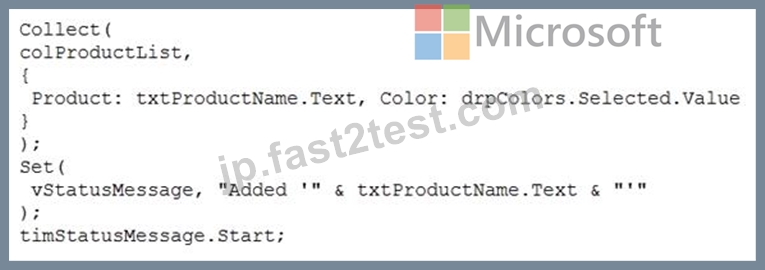
次の各ステートメントについて、ステートメントがtrueの場合は、[はい]を選択します。それ以外の場合は、[いいえ]を選択します。
注:正しい選択はそれぞれ1ポイントの価値があります。
正解:
解説:
Reference:
https://docs.microsoft.com/en-us/powerapps/maker/canvas-apps/functions/function-clear-collect-clearcollect
https://docs.microsoft.com/en-us/powerapps/maker/canvas-apps/functions/function-set
質問 100
......
あなたを合格させるMicrosoft試験にはPL-100日本語試験問題集:https://jp.fast2test.com/PL-100J-premium-file.html