

N10-009事前に試験練習テストで使おう(最新426問題)
有効なN10-009試験解答PDF一年無料更新
CompTIA N10-009 認定試験の出題範囲:
| トピック | 出題範囲 |
|---|---|
| トピック 1 |
|
| トピック 2 |
|
| トピック 3 |
|
| トピック 4 |
|
| トピック 5 |
|
| トピック 6 |
|
質問 # 129
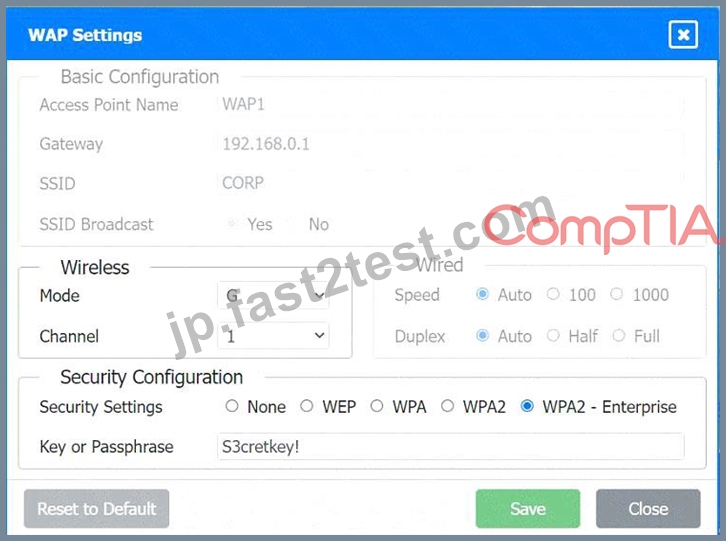
A network administrator has been tasked with configuring a network for a new corporate office. The office consists of two buildings, separated by 50 feet with no physical connectivity. The configuration must meet the following requirements:
. Devices in both buildings should be
able to access the Internet.
. Security insists that all Internet traffic
be inspected before entering the
network.
. Desktops should not see traffic
destined for other devices.
INSTRUCTIONS
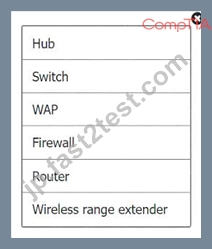
Select the appropriate network device for each location. If applicable, click on the magnifying glass next to any device which may require configuration updates and make any necessary changes.
Not all devices will be used, but all locations should be filled.
If at any time you would like to bring back the initial state of the simulation, please click the Reset All button.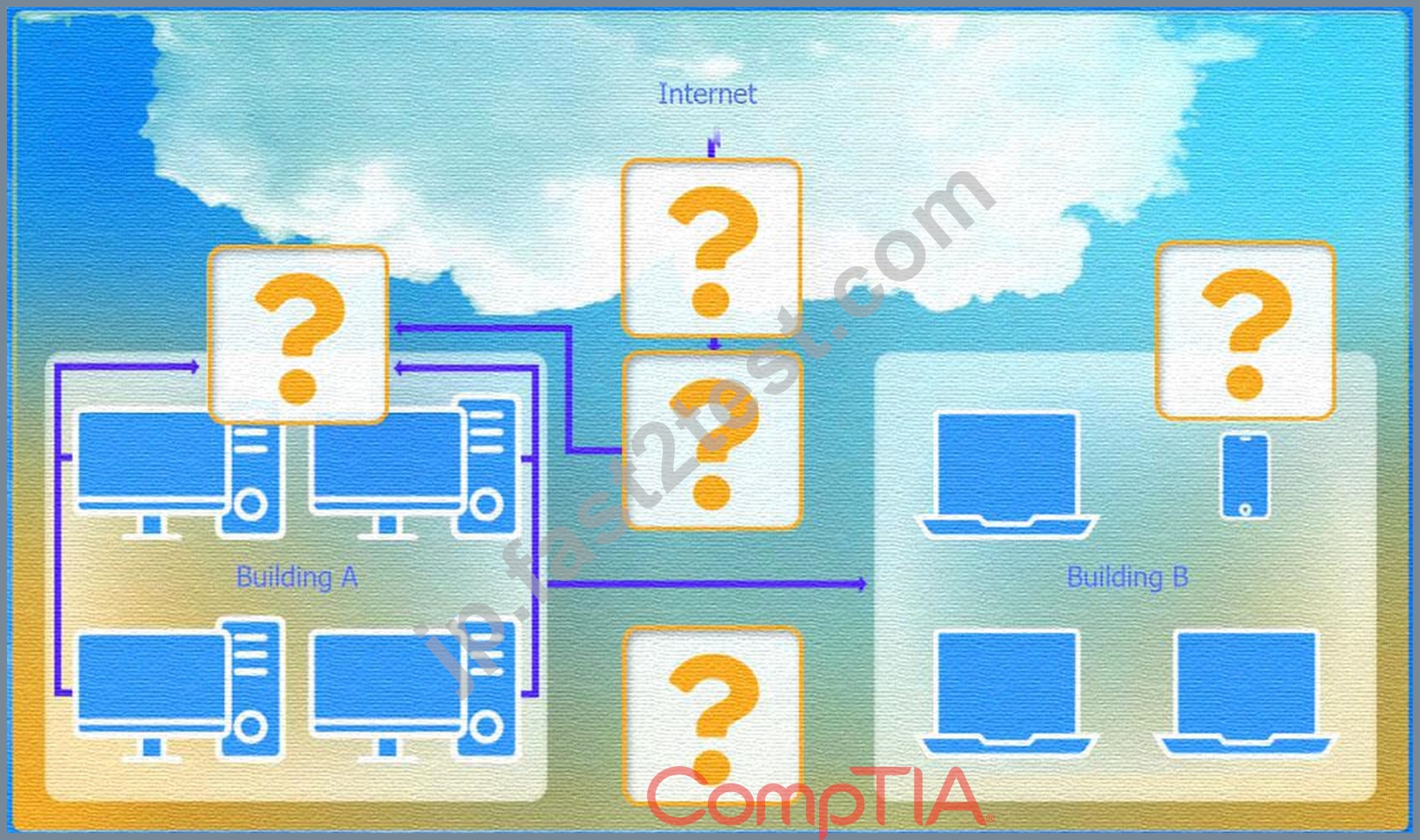
正解:
解説:
See the step by step complete solution below.
Explanation:
* Devices in both buildings should be able to access the Internet.
* Security insists that all Internet traffic be inspected before entering the network.
* Desktops should not see traffic destined for other devices.
Here is the corrected layout with explanation:
* Building A:
* Switch: Correctly placed to connect all desktops.
* Firewall: Correctly placed to inspect all incoming and outgoing traffic.
* Building B:
* Switch: Not needed. Instead, place a Wireless Access Point (WAP) to provide wireless connectivity for laptops and mobile devices.
* Between Buildings:
* Wireless Range Extender: Correctly placed to provide connectivity between the buildings wirelessly.
* Connection to the Internet:
* Router: Correctly placed to connect to the Internet and route traffic between the buildings and the Internet.
* Firewall: The firewall should be placed between the router and the internal network to inspect all traffic before it enters the network.
Corrected Setup:
* Top-left (Building A): Switch
* Bottom-left (Building A): Firewall (inspect traffic before it enters the network)
* Top-middle (Internet connection): Router
* Bottom-middle (between buildings): Wireless Range Extender
* Top-right (Building B): Wireless Access Point (WAP)
In this corrected setup, the WAP in Building B will connect wirelessly to the Wireless Range Extender, which is connected to the Router. The Router is connected to the Firewall to ensure all traffic is inspected before it enters the network.
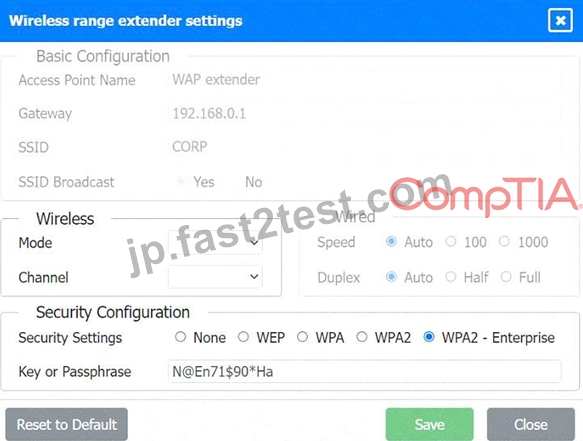
Configuration for Wireless Range Extender:
* SSID: CORP
* Security Settings: WPA2 or WPA2 - Enterprise
* Key or Passphrase: [Enter a strong passphrase]
* Mode: [Set based on your network plan]
* Channel: [Set based on your network plan]
* Speed: Auto
* Duplex: Auto
With these settings, both buildings will have secure access to the Internet, and all traffic will be inspected by the firewall before entering the network. Desktops and other devices will not see traffic intended for others, maintaining the required security and privacy.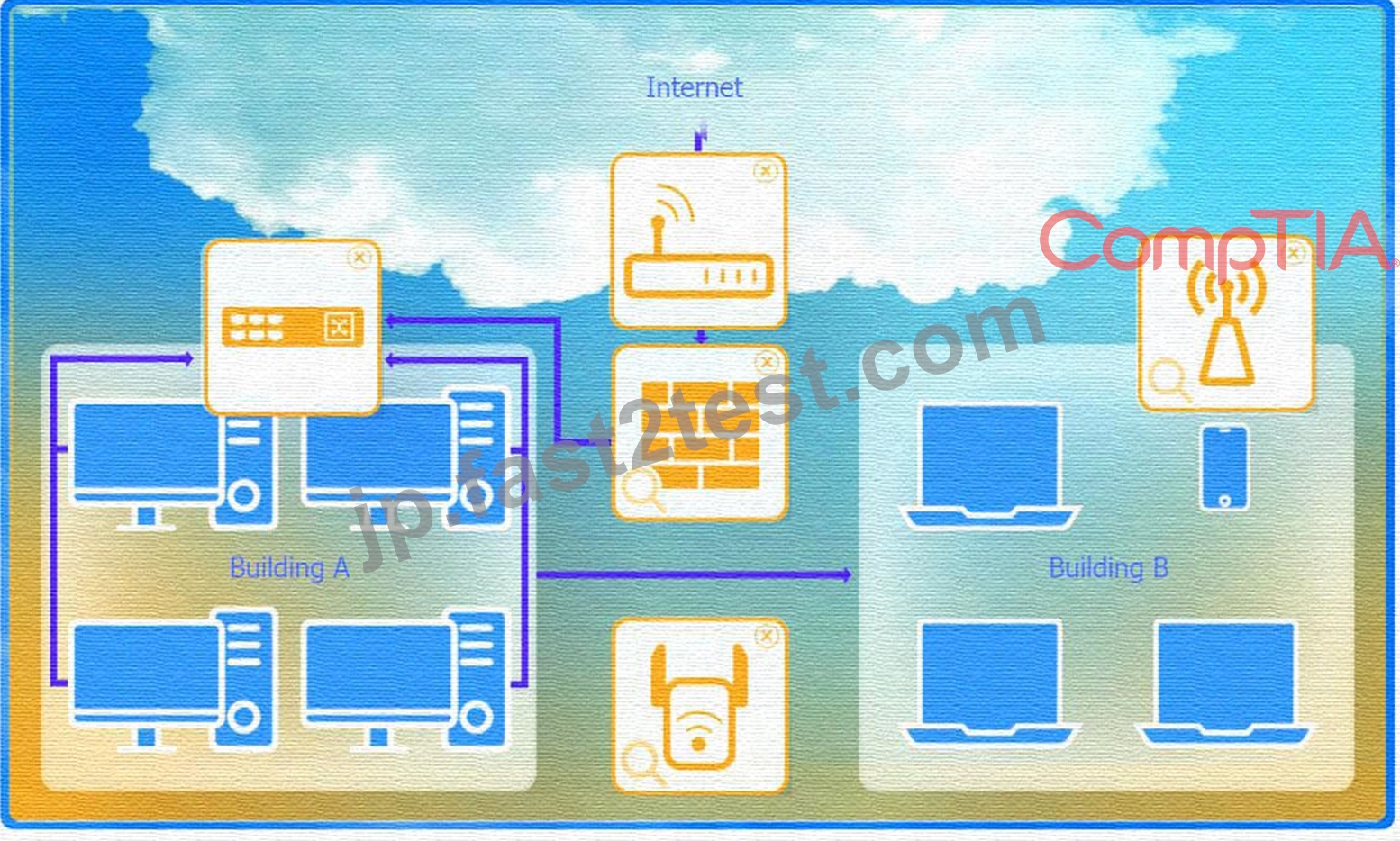
To configure the wireless range extender for security, follow these steps:
* SSID (Service Set Identifier):
* Ensure the SSID is set to "CORP" as shown in the exhibit.
* Security Settings:
* WPA2 or WPA2 - Enterprise: Choose one of these options for stronger security. WPA2- Enterprise provides more robust security with centralized authentication, which is ideal for a corporate environment.
* Key or Passphrase:
* If you select WPA2, enter a strong passphrase in the "Key or Passphrase" field.
* If you select WPA2 - Enterprise, you will need to configure additional settings for authentication servers, such as RADIUS, which is not shown in the exhibit.
* Wireless Mode and Channel:
* Set the appropriate mode and channel based on your network design and the environment to avoid interference. These settings are not specified in the exhibit, so set them according to your network plan.
* Wired Speed and Duplex:
* Set the speed to "Auto" unless you have specific requirements for 100 or 1000 Mbps.
* Set the duplex to "Auto" unless you need to specify half or full duplex based on your network equipment.
* Save Configuration:
* After making the necessary changes, click the "Save" button to apply the settings.
Here is how the configuration should look after adjustments:
* SSID: CORP
* Security Settings: WPA2 or WPA2 - Enterprise
* Key or Passphrase: [Enter a strong passphrase]
* Mode: [Set based on your network plan]
* Channel: [Set based on your network plan]
* Speed: Auto
* Duplex: Auto
Once these settings are configured, your wireless range extender will provide secure connectivity for devices in both buildings.
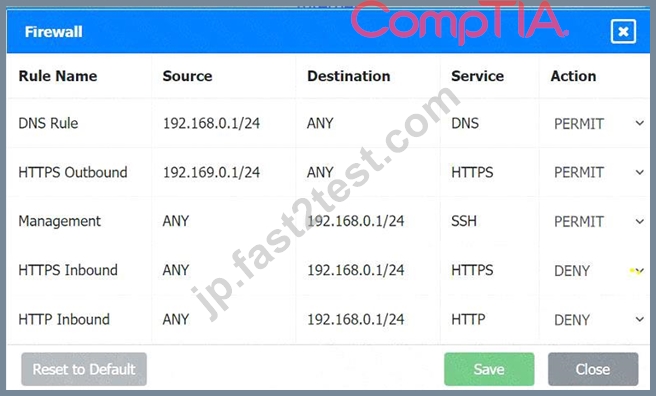
Firewall setting to to ensure complete compliance with the requirements and best security practices, consider the following adjustments and additions:
* DNS Rule: This rule allows DNS traffic from the internal network to any destination, which is fine.
* HTTPS Outbound: This rule allows HTTPS traffic from the internal network (assuming 192.169.0.1
/24 is a typo and should be 192.168.0.1/24) to any destination, which is also good for secure web browsing.
* Management: This rule allows SSH access to the firewall for management purposes, which is necessary for administrative tasks.
* HTTPS Inbound: This rule denies inbound HTTPS traffic to the internal network, which is good unless you have a web server that needs to be accessible from the internet.
* HTTP Inbound: This rule denies inbound HTTP traffic to the internal network, which is correct for security purposes.
Suggested Additional Settings:
* Permit General Outbound Traffic: Allow general outbound traffic for web access, email, etc.
* Block All Other Traffic: Ensure that all other traffic is blocked to prevent unauthorized access.
Firewall Configuration Adjustments:
* Correct the Network Typo:
* Ensure that the subnet 192.169.0.1/24 is corrected to 192.168.0.1/24.
* Permit General Outbound Traffic:
* Rule Name: General Outbound
* Source: 192.168.0.1/24
* Destination: ANY
* Service: ANY
* Action: PERMIT
* Deny All Other Traffic:
* Rule Name: Block All
* Source: ANY
* Destination: ANY
* Service: ANY
* Action: DENY
Here is how your updated firewall settings should look:
Rule Name
Source
Destination
Service
Action
DNS Rule
192.168.0.1/24
ANY
DNS
PERMIT
HTTPS Outbound
192.168.0.1/24
ANY
HTTPS
PERMIT
Management
ANY
192.168.0.1/24
SSH
PERMIT
HTTPS Inbound
ANY
192.168.0.1/24
HTTPS
DENY
HTTP Inbound
ANY
192.168.0.1/24
HTTP
DENY
General Outbound
192.168.0.1/24
ANY
ANY
PERMIT
Block All
ANY
ANY
ANY
DENY
These settings ensure that:
* Internal devices can access DNS and HTTPS services externally.
* Management access via SSH is permitted.
* Inbound HTTP and HTTPS traffic is denied unless otherwise specified.
* General outbound traffic is allowed.
* All other traffic is blocked by default, ensuring a secure environment.
Make sure to save the settings after making these adjustments.
質問 # 130
SIMULATION
You are tasked with verifying the following requirements are met in order to ensure network security.
Requirements:
Datacenter
Ensure network is subnetted to allow all devices to communicate properly while minimizing address space usage Provide a dedicated server to resolve IP addresses and hostnames correctly and handle port 53 traffic Building A Ensure network is subnetted to allow all devices to communicate properly while minimizing address space usage Provide devices to support 5 additional different office users Add an additional mobile user Replace the Telnet server with a more secure solution Screened subnet Ensure network is subnetted to allow all devices to communicate properly while minimizing address space usage Provide a server to handle external 80/443 traffic Provide a server to handle port 20/21 traffic INSTRUCTIONS Drag and drop objects onto the appropriate locations. Objects can be used multiple times and not all placeholders need to be filled.
Available objects are located in both the Servers and Devices tabs of the Drag & Drop menu.
If at any time you would like to bring back the initial state of the simulation, please click the Reset All button.
正解:
解説:
See explanation below
Explanation:
Screened Subnet devices - Web server, FTP server
Building A devices - SSH server top left, workstations on all 5 on the right, laptop on bottom left DataCenter devices - DNS server.
質問 # 131
A support agent receives a report that a remote user's wired devices are constantly disconnecting and have slow speeds. Upon inspection, the support agent sees that the user's coaxial modern has a signal power of -97dB.
- A. Removing any spliters connecte to the line
- B. Moving the devices closer to the modern
- C. Switching the devices to wireless
- D. Lowering the network speed
正解:A
解説:
A signal power of -97dB indicates a very weak signal, which can cause connectivity issues and slow speeds. Splitters on a coaxial line can degrade the signal quality further, so removing them can help improve the signal strength and overall connection quality.
Signal Quality: Splitters can reduce the signal strength by dividing the signal among multiple lines, which can be detrimental when the signal is already weak.
Direct Connection: Ensuring a direct connection from the modem to the incoming line can maximize signal quality and reduce potential points of failure.
Network Reference:
CompTIA Network+ N10-007 Official Certification Guide: Discusses troubleshooting connectivity issues and the impact of signal strength on network performance.
Cisco Networking Academy: Provides insights on maintaining optimal signal quality in network setups.
Network+ Certification All-in-One Exam Guide: Covers common network issues, including those related to signal degradation and ways to mitigate them.
質問 # 132
A network technician is troubleshooting a web application's poor performance. The office has two internet links that share the traffic load. Which of the following tools should the technician use to determine which link is being used for the web application?
- A. ping
- B. tracert
- C. nslookup
- D. netstat
正解:B
解説:
Understanding Tracert:
Traceroute Tool: tracert (Windows) or traceroute (Linux) is a network diagnostic tool used to trace the path that packets take from a source to a destination. It lists all the intermediate routers the packets traverse.
Determining Traffic Path:
Path Identification: By running tracert to the web application's destination IP address, the technician can identify which route the traffic is taking and thereby determine which internet link is being used.
Load Balancing Insight: If the office uses load balancing for its internet links, tracert can help verify which link is currently handling the traffic for the web application.
質問 # 133
Which of the following can be implemented to add an additional layer of security between a corporate network and network management interfaces?
- A. In-band management
- B. Jump box
- C. API interface
- D. Console server
正解:B
解説:
A jump box is a hardened, isolated system that provides secure access to critical infrastructure devices like routers and firewalls.
Reference:
CompTIA Network+ (N10-009) Official Study Guide - Domain 4.3: Explain network security techniques.
質問 # 134
A help desk technician receives a report that users cannot access internet URLs. The technician performs ping tests and finds that sites fail when a URL is used but succeed when an IP is used. Which of the following tools should the technician utilize next?
- A. nmap
- B. tcpdump
- C. dig
- D. tracert
正解:C
解説:
Other tools are less relevant here:
A). tcpdump is a packet analyzer and is more advanced for deeper traffic analysis.
B). tracert is used to trace the route to a destination, not ideal for DNS issues.
C). nmap is a port scanner and network mapper, not for resolving DNS problems.
D). dig (Domain Information Groper) is a DNS lookup tool used to troubleshoot DNS problems by querying name servers directly.
Reference:
CompTIA Network+ N10-009 Official Objectives: 5.1 - Given a scenario, use the appropriate network troubleshooting tools.
Explanation:
The issue is clearly related to DNS resolution, as IP-based connections succeed but domain name-based ones fail.
質問 # 135
Which of the following indicates a computer has reached end-of-support?
- A. No more patches or bug fixes are available indefinitely.
- B. The computer does not have any users.
- C. The antivirus protection is expired.
- D. The operating system license is expired.
正解:A
解説:
A system has reachedend-of-supportwhen thevendor no longer provides patches, updates, or bug fixes.
This significantly increases the risk of security vulnerabilities and is a major operational concern.
Reference:Section 3.3 - Disaster Recovery Concepts - "End-of-Support Considerations"
質問 # 136
A Chief Executive Officer (CEO) of a company purchases a new phone that will be used while traveling to different countries. The CEO needs to be able to place outgoing calls and receive incoming calls on the phone using a SIM card. Which of the following cellular technologies does the CEO's phone need?
- A. GSM
- B. SLA
- C. CDMA
- D. WDMA
正解:A
解説:
GSM (Global System for Mobile communications) is the international standard that uses SIM cards to authenticate and connect phones to the cellular network. GSM allows users to place and receive calls while traveling globally, provided they have a SIM card. CDMA, on the other hand, does not use SIM cards in the same way and is primarily used in the United States.
質問 # 137
Which of the following explains what happens if a packet is lost in transit when using UDP?
- A. IP uses the TTL field to track packet hops and will resend the packet if necessary.
- B. The data link layer will recognize the error and resend the packet.
- C. If the sender does not receive a UDP acknowledgement, the packet will be resent.
- D. Some applications will recognize the loss and initiate a resend of the packet if necessary.
正解:D
解説:
UDP (User Datagram Protocol) is a connectionless protocol that does not provide built-in mechanisms for error detection, retransmission, or acknowledgments. If a UDP packet is lost in transit, the protocol itself does not handle retransmission. However, some applications using UDP (e.g., TFTP or custom streaming protocols) may implement their own mechanisms to detect packet loss and request retransmission if needed.
Why not A? The data link layer (Layer 2) handles frame-level errors within a single network segment, not end-to-end packet loss across networks.
Why not B? The IP TTL (Time to Live) field prevents routing loops by decrementing with each hop, but IP does not handle retransmission.
Why not C? UDP does not use acknowledgments, so the sender does not expect or receive them.
質問 # 138
Which of the following is used to describe the average duration of an outage for a specific service?
- A. MTTR
- B. RTO
- C. MTBF
- D. RPO
正解:A
解説:
MTTR (Mean Time to Repair) is the average time it takes to repair a system or service after a failure. It helps in measuring the downtime and planning recovery processes.
質問 # 139
Which of the following network topologies contains a direct connection between every node in the network?
- A. Mesh
- B. Point-to-point
- C. Star
- D. Hub-and-spoke
正解:A
解説:
In a mesh topology, every node is directly connected to every other node. This provides high redundancy and reliability, as there are multiple paths for data to travel between nodes. This topology is often used in networks where high availability is crucial.
質問 # 140
A network engineer receives a vendor alert regarding a vulnerability in a router CPU. Which of the following should the engineer do to resolve the issue?
- A. Replace the system board.
- B. Isolate the system.
- C. Patch the OS.
- D. Update the firmware.
正解:D
解説:
* Understanding the Vulnerability:
* Vulnerabilities in the router CPU can be exploited to cause performance degradation, unauthorized access, or other security issues.
* Firmware Update:
* Firmware Role:The firmware is low-level software that controls the hardware of a device.
Updating the firmware can address vulnerabilities by providing patches and enhancements from the manufacturer.
* Procedure:Download the latest firmware from the vendor's website, follow the manufacturer's instructions to apply the update, and verify that the update resolves the vulnerability.
* Comparison with Other Options:
* Replace the System Board:This is a costly and often unnecessary step if the issue can be resolved with a firmware update.
* Patch the OS:Patching the OS is relevant for devices with a full operating system but not directly applicable to addressing a CPU vulnerability on a router.
* Isolate the System:Temporarily isolating the system can mitigate immediate risk but does not resolve the underlying vulnerability.
* Best Practice:
* Regularly check for and apply firmware updates to ensure that network devices are protected against known vulnerabilities.
References:
* CompTIA Network+ study materials on network security and device management.
質問 # 141
A junior network administrator gets a text message from a number posing as the domain registrar of the firm.
The administrator is tricked into providing global administrator credentials. Which of the following attacks is taking place?
- A. ARP spoofing
- B. Smishing
- C. DNS poisoning
- D. Vishing
正解:B
解説:
Smishing (SMS phishing) occurs when attackers send fraudulent text messages pretending to be a trusted source, tricking the victim into giving up sensitive credentials. Since this came via text message, it qualifies as smishing.
A). DNS poisoning corrupts name resolution.
B). ARP spoofing manipulates MAC-to-IP mappings.
C). Vishing is phishing via voice calls, not text.
References (CompTIA Network+ N10-009):
Domain: Network Security - Social engineering, phishing types (smishing, vishing, spear phishing).
質問 # 142
A network administrator is developing a method of device monitoring with the following requirements:
Allows for explicit, by user, privilege management
Includes centralized logging of changes
Offers widely accessible remote management
Provides support of service accounts
Which of the following will most closely meet these requirements?
- A. SIEM
- B. SSO
- C. API
- D. SNMP
正解:C
解説:
Comprehensive and Detailed Step-by-Step
API (Application Programming Interface) enables secure and granular access control, remote management, and logging, making it ideal for network monitoring.
SNMP (A) is mainly used for device monitoring but lacks centralized logging and user-based privilege control.
SIEM (C) is a security monitoring tool focused on log collection, not device management.
SSO (D) is related to authentication, not monitoring.
Reference: CompTIA Network+ N10-009 Official Documentation - Network Monitoring & Management Technologies.
質問 # 143
A network administrator for a small office is adding a passive IDS to its network switch for the purpose of inspecting network traffic. Which of the following should the administrator use?
- A. Syslog collection
- B. Port mirroring
- C. SNMP trap
- D. API integration
正解:B
解説:
Port mirroring, also known as SPAN (Switched Port Analyzer), is used to send a copy of network packets seen on one switch port (or an entire VLAN) to another port where the IDS is connected.
This allows the IDS to passively inspect network traffic without interfering with the actual traffic flow. Port mirroring is an essential feature for implementing IDS in a network for traffic analysis and security monitoring.
質問 # 144
Which of the following would be violated if an employee accidentally deleted a customer's data?
- A. Integrity
- B. Vulnerability
- C. Confidentiality
- D. Availability
正解:D
解説:
Availability refers to ensuring that data is accessible when needed. If a customer's data is accidentally deleted, it impacts availability, as the data can no longer be accessed.
=
質問 # 145
A network administrator is unable to ping a remote server from a newly connected workstation that has been added to the network. Ping to 127.0.0.1 on the workstation is failing. Which of the following should the administrator perform to diagnose the problem?
- A. Verify the NIC interface status.
- B. Verify the router is not dropping packets.
- C. Verify that DNS is resolving correctly.
- D. Verify the network is not congested.
正解:A
解説:
Comprehensive and Detailed Explanation From Exact Extract:
The failure of a ping to 127.0.0.1 (the loopback address) indicates a problem with the workstation's TCP/IP stack or network interface card (NIC). Since 127.0.0.1 is a local address, the issue is not related to the network, router, or DNS. The first step in diagnosing this issue is to verify the NIC interface status to ensure the network adapter is functioning and properly configured.
Why not Verify the network is not congested? Network congestion affects external connectivity, not the loopback address.
Why not Verify the router is not dropping packets? Router issues are irrelevant since the loopback ping fails locally.
Why not Verify that DNS is resolving correctly? DNS resolution is not involved in pinging 127.0.0.1, which uses a direct IP address.
Reference:CompTIA Network+ N10-009 Objective 5.2: Explain the troubleshooting methodology. The CompTIA Network+ Study Guide (e.g., Chapter 13: Network Troubleshooting) emphasizes that a failed loopback ping indicates a local TCP/IP stack or NIC issue, and checking the NIC status is the first diagnostic step.
質問 # 146
A network administrator is planning to host a company application in the cloud, making the application available for all internal and third-party users. Which of the following concepts describes this arrangement?
- A. SaaS
- B. Multitenancy
- C. VPC
- D. NFV
正解:B
解説:
Multitenancy is a cloud computing architecture where a single instance of software serves multiple customers or tenants. Each tenant's data is isolated and remains invisible to other tenants. Hosting a company application in the cloud to be available for both internal and third- party users fits this concept, as it allows shared resources and infrastructure while maintaining data separation and security.
質問 # 147
A technician is implementing a new SD-WAN device with a default configuration. The technician receives a URL via email and connects the new device to the internet to complete the installation. Which of the following is this an example of?
- A. Zero-touch provisioning
- B. Infrastructure as code
- C. SASE device installation
- D. Configuration management
正解:A
解説:
This process describes Zero-touch provisioning (ZTP), where a device automatically pulls its configuration from a cloud controller or URL once connected to the internet. It's common in SD-WAN and modern network appliances.
A: SASE (Secure Access Service Edge) refers to cloud-delivered network security, not a provisioning method.
C: Infrastructure as code automates infrastructure deployment using code, but this scenario specifically fits ZTP.
D: Configuration management tracks and maintains system configurations but doesn't describe the installation process.
# Reference:
CompTIA Network+ N10-009 Official Objectives: 4.3 - Explain remote access methods and automation.
質問 # 148
A network manager wants to implement a SIEM system to correlate system events. Which of the following protocols should the network manager verify?
- A. DNS
- B. LDAP
- C. NTP
- D. DHCP
正解:C
解説:
Role of NTP (Network Time Protocol):
NTP is used to synchronize the clocks of network devices to a reference time source. Accurate time synchronization is critical for correlating events and logs from different systems.
Importance for SIEM Systems:
Event Correlation: SIEM (Security Information and Event Management) systems collect and analyze log data from various sources. Accurate timestamps are essential for correlating events across multiple systems.
Time Consistency: Without synchronized time, it is challenging to piece together the sequence of events during an incident, making forensic analysis difficult.
質問 # 149
SIMULATION
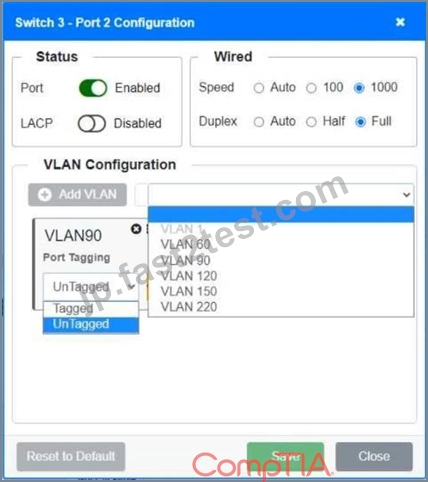
A network technician replaced a switch and needs to reconfigure it to allow the connected devices to connect to the correct networks.
INSTRUCTIONS
Click on the appropriate port(s) on Switch 1 and Switch 3 to verify or reconfigure the correct settings:
- Ensure each device accesses only its correctly associated network
- Disable all unused switch ports
- Require fault-tolerant connections between the switches
- Only make necessary changes to complete the above requirements
If at any time you would like to bring back the initial state of the simulation, please click the Reset All button.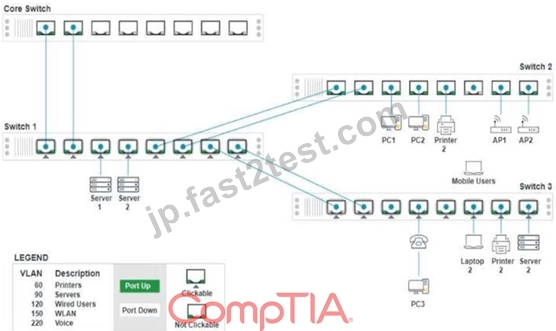
正解:
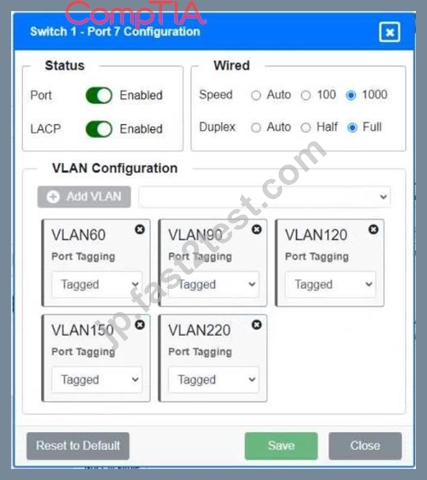
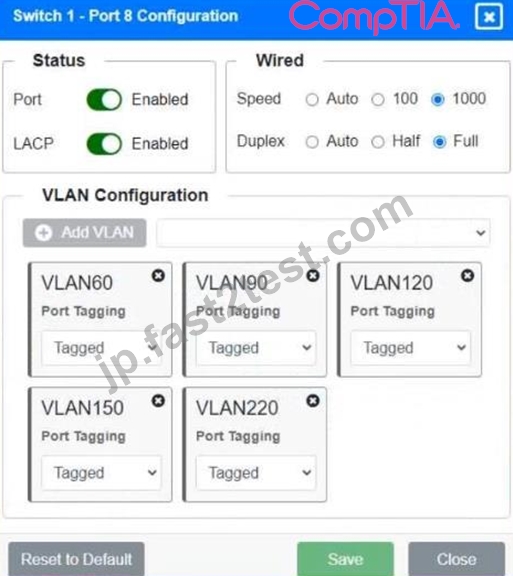
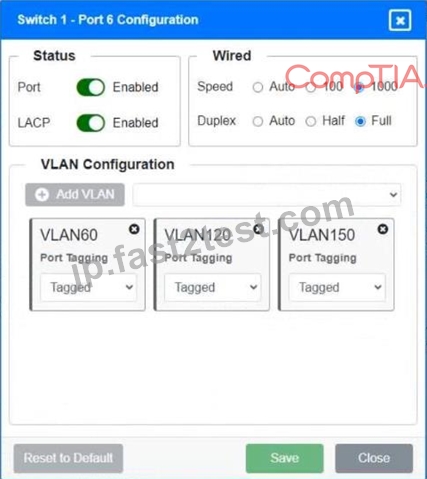
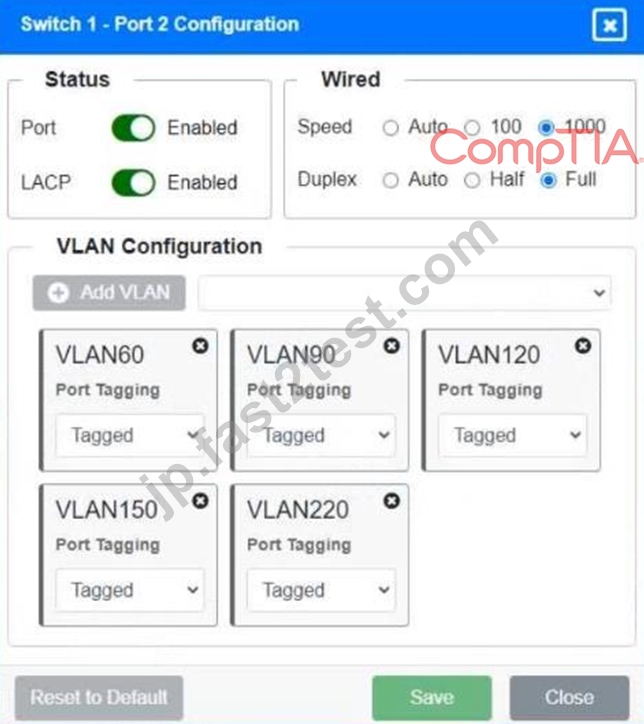
解説:
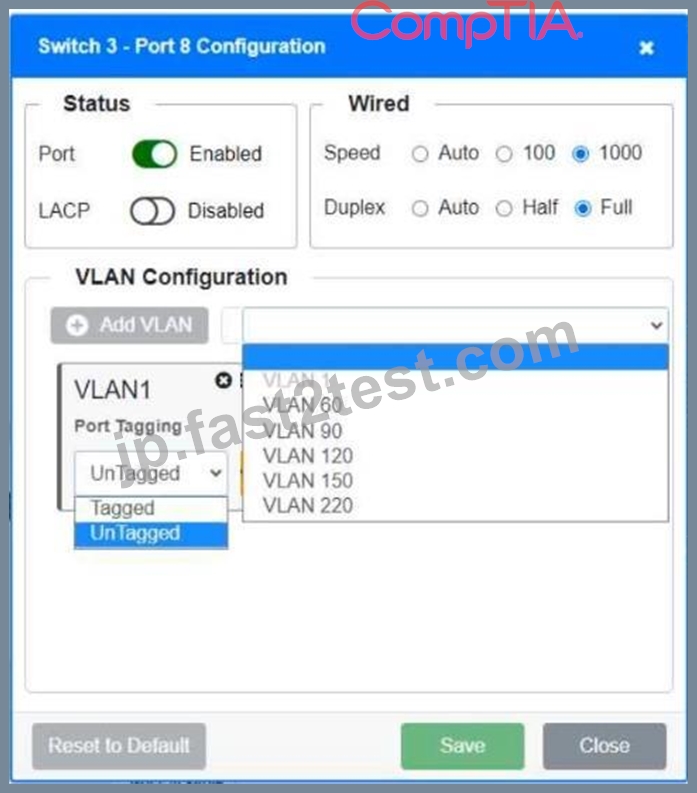
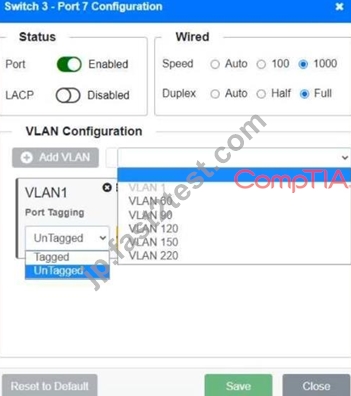
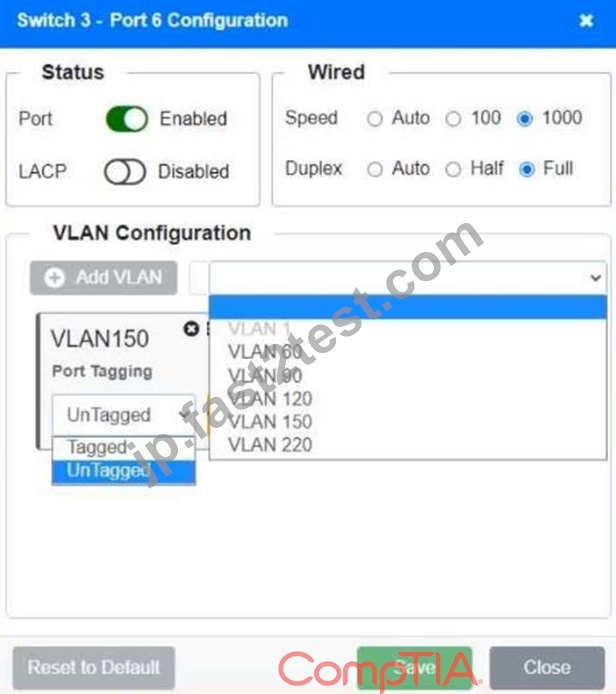
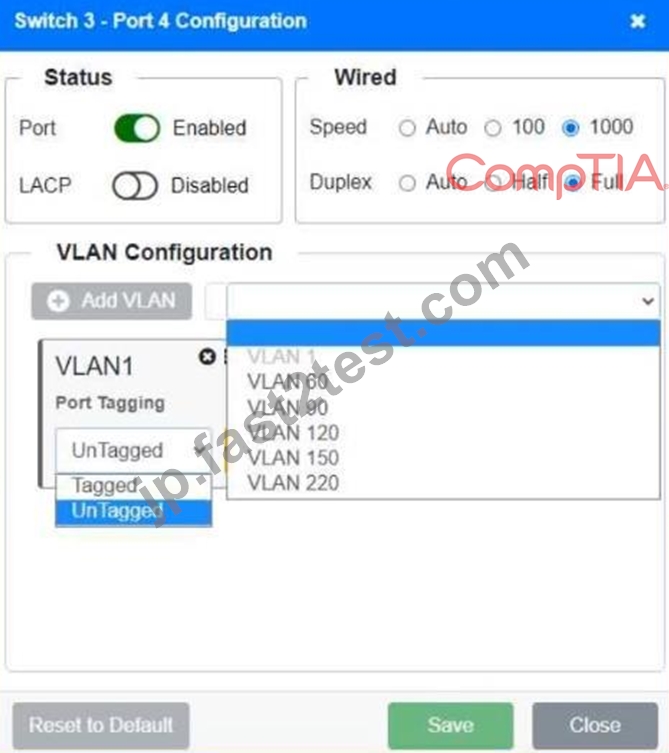
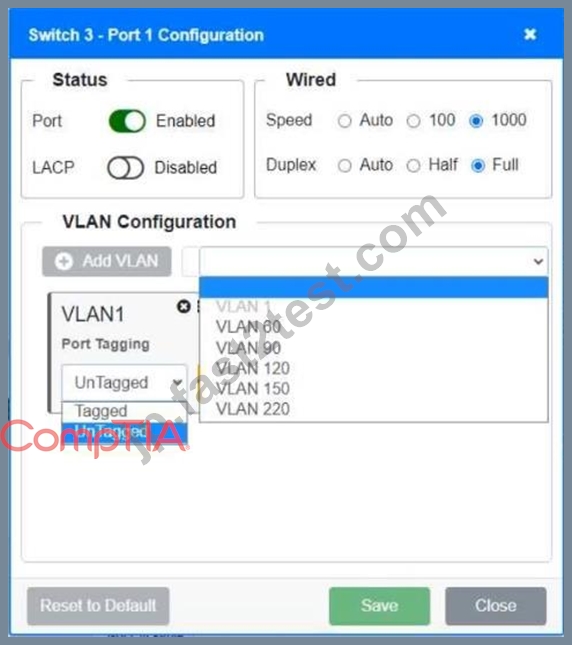
To reconfigure the switch, the technician needs to click on the appropriate port(s) on Switch 1 and Switch 3. The technician should ensure that each device only has access to its correctly associated network. The technician should also disable all unused switch ports. Finally, the technician should require fault-tolerant connections between the switches. If at any time the technician wants to bring back the initial state of the simulation, they can click on the Reset All button.
Tagged = Switch to Switch connections.
Untagged = Devices(WLAN, Servers, Printers, VoIP)
Port Enabled = if there is a device connected
Port Disabled = if there is nothing connection on the port.
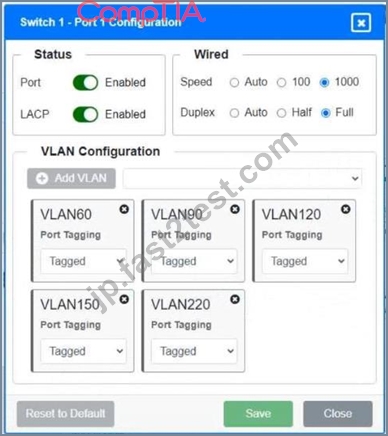
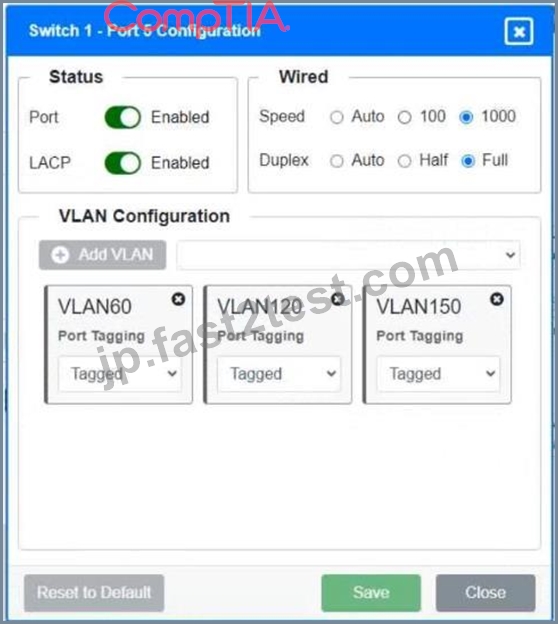
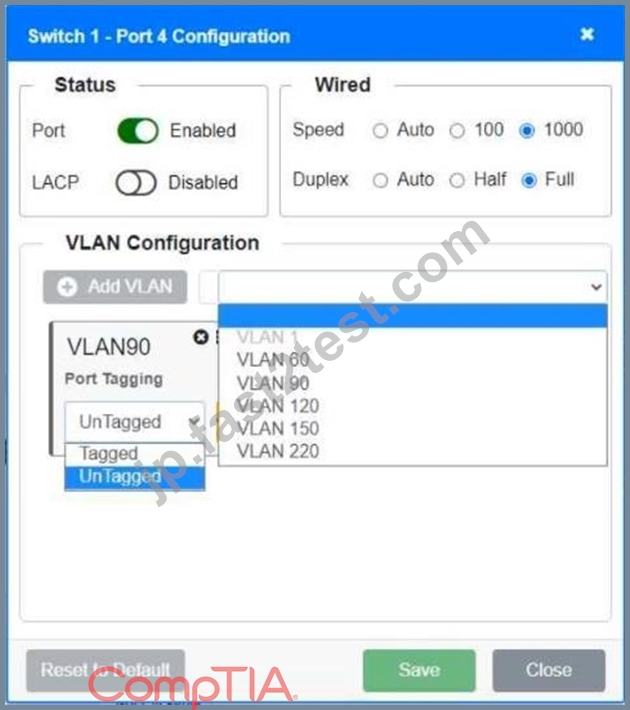
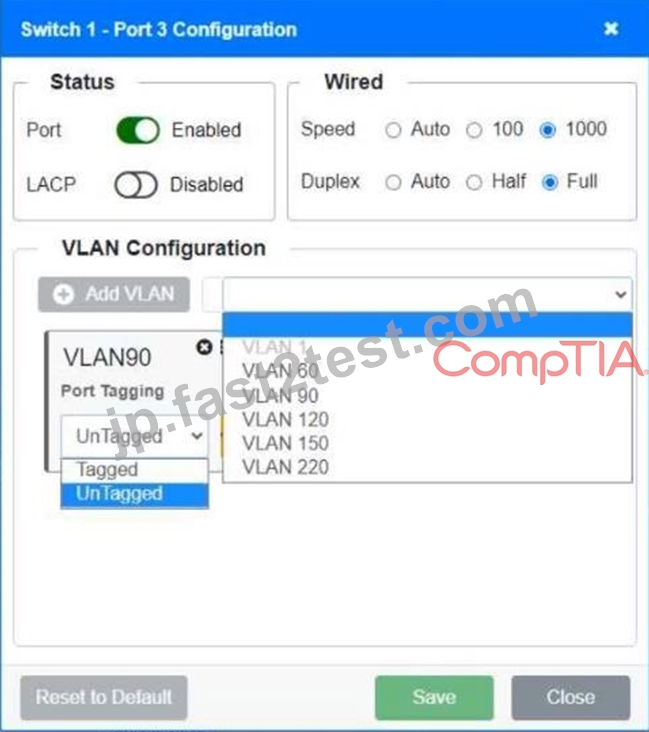
Switch 1-Ports 1 & 2 >Port Enabled >LACP Enabled >VLAN60/90/120/150/220 Tagged Switch 1-Ports 3 & 4 >Port Enabled >LACP Disabled >VLAN90 Untagged Switch 1-Ports 5 & 6 >Port Enabled >LACP Enabled >VLAN60/120/150 Tagged Switch 1-Ports 7 & 8 >Port Enabled >LACP Enabled >VLAN60/90/120/220 Tagged Switch 3-Ports 1 & 2 >Port Enabled >LACP Enabled >VLAN60/90/120/220 Tagged Switch 3-Ports 3 & 5 >Port Disabled Switch 3-Port 4 >Port Enabled >LACP Disabled >VLAN120/220 Untagged Switch 3-Port 6 >Port Enabled >LACP Disabled >VLAN120 Untagged Switch 3-Port 7 >Port Enabled >LACP Disabled >VLAN60 Untagged Switch 3-Port 8 >Port Enabled >LACP Disabled >VLAN90 Untagged
質問 # 150
......
CompTIA Network+ Certification Exam無料更新認定サンプル問題:https://jp.fast2test.com/N10-009-premium-file.html
試験本場前にトレンドなCompTIA N10-009のPDF問題集を試そう:https://drive.google.com/open?id=1gOomrMBloOEED8mq1IrUTJi5Gkhh5t3y