

220-1201ブレーン問題集PDF、CompTIA 220-1201試験問題豪華お試しセット
2026年最新された220-1201サンプル問題は信頼され続ける220-1201テストエンジン
質問 # 335
An IP address is automatically assigned to a single workstation in an office, but the technician confirms the IP address is not in the lease pool. This workstation is having issues accessing the internet and internal file shares. Which of the following address types has been automatically assigned?
- A. APIPA
- B. Static
- C. Public IP
- D. DHCP
正解:A
解説:
When a workstation automatically assigns itself an IP address that is not part of the DHCP lease pool, the system has most likely configured an APIPA (Automatic Private IP Addressing) address. According to CompTIA Core 1 (220-1201) networking fundamentals, APIPA addresses fall within the range 169.254.0.0
/16 and are assigned when a device cannot communicate with a DHCP server.
APIPA allows limited local network communication but does not provide access to the internet or network resources such as internal file shares that require routing or proper IP configuration. This explains why the workstation experiences connectivity issues.
A static IP address is manually configured and would not be automatically assigned. A DHCP address would come from the defined lease pool, which the technician has confirmed is not the case. A public IP address is assigned by an ISP and is not used directly on internal workstations.
CompTIA highlights APIPA as a key troubleshooting indicator of DHCP failure or network connectivity issues, making it the correct answer.
References:CompTIA A+ Core 1 (220-1201) Official Study Guide - IP Addressing, DHCP, and Troubleshooting
質問 # 336
A small ISP has hired a new technician Joe, the new technician, is being trained to configure customers* home networks The trailing instructor gives me technician a starter kit with cables, cable ends, and other network equipment and asks mm to build a working network.
The computer should be connected to have internet connectivity and the phone should be connected to have a dial tone.
INSTRUCTIONS
Use the appropriate cables. cable ends, tools and equipment to configure the network ana connect an components accordingly There are 3 steps and the simulation starts on step 1.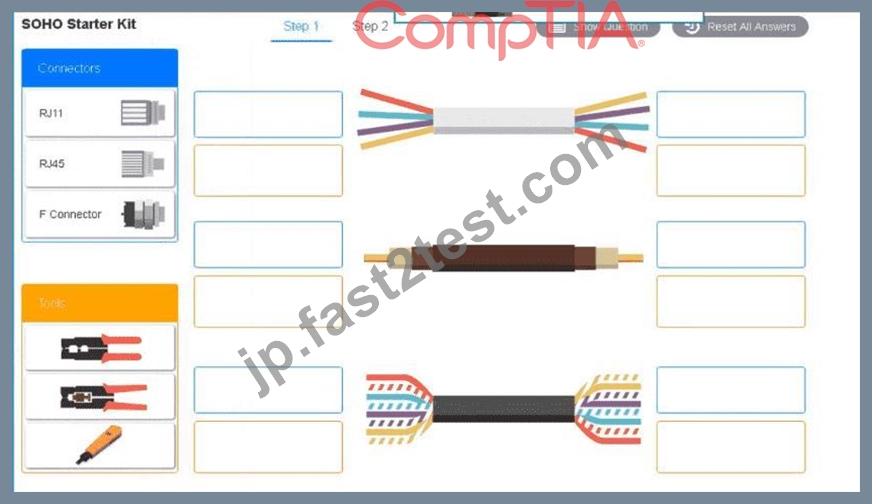

正解:
解説:
See the answer below in explanation part.
Explanation:
Answer of both steps below.
A group of wires with different colors AI-generated content may be incorrect.
A screenshot of a computer AI-generated content may be incorrect.
質問 # 337
Which of the following devices has ACL capabilities?
- A. DSL
- B. Firewall
- C. PoE injector
- D. Unmanaged switch
正解:B
解説:
Firewalls are specifically designed to monitor, filter, and control network traffic using Access Control Lists (ACLs). ACLs define which traffic is allowed or denied based on parameters like IP address, protocol, or port.
From CompTIA A+ 220-1101 Official Study Guide, Objective 2.2 - Networking hardware and security:
"Firewalls use access control lists (ACLs) to allow or deny traffic based on rules. Unmanaged switches and PoE injectors do not support ACLs." Verified Source:
* CompTIA A+ Core 1 (220-1101) Official Study Guide, Chapter 2: Networking Security Devices
* CompTIA Exam Objectives 220-1101, Domain 2.2
質問 # 338
Users report that they cannot print to a hardwired network printer. A technician checks the print server, and everything appears correct. The technician reboots the printer, but users still cannot print. The printer has an IP address of 169.254.0.101, although it has a DHCP reservation of 10.0.6.112. Which of the following would most likely cause the issue?
- A. The print driver was corrupted.
- B. The printer was switched to a Wi-Fi connection.
- C. The Cat 6 cable was unplugged.
- D. The firmware was upgraded.
正解:C
解説:
The unplugged Cat 6 cable is the most likely cause. An address in the 169.254.0.0/16 range is an APIPA address, which a device assigns to itself when it cannot communicate with a DHCP server. The printer should receive the reserved address 10.0.6.112, but it cannot obtain that lease because its wired network connection is unavailable. An unplugged Ethernet cable directly explains the loss of DHCP communication and the resulting self-assigned address. A firmware update or corrupted print driver would not normally cause the printer to generate an APIPA address. Those issues could affect printing while the printer remained correctly connected to the network. Switching to Wi-Fi might also change connectivity, but the scenario identifies the printer as hardwired, and the disconnected Cat 6 cable is the most direct explanation for its failure to reach DHCP.
質問 # 339
A customer's laptop is no longer charging when plugged in to the docking station. A technician observes that none of the devices plugged in to the dock appear to be functioning. The technician verifies that the dock has power, the laptop ports are not damaged, and the BIOS updates are current, but the issue persists. Which of the following should the technician do next?
- A. Switch the power supply.
- B. Replace the dock with a new one.
- C. Roll back the BIOS updates.
- D. Reinstall the OS on the laptop.
正解:B
解説:
Since the dock has power but none of its connected devices function, and other potential causes have been ruled out, the docking station itself is likely faulty. Replacing the dock resolves the hardware failure.
質問 # 340
A computer with two redundant drives is displaying an error:
SMART failure predicted: Drive 1
A technician notes that a spare drive is not available and the computer is currently functioning normally. Which of the following should the technician do next?
- A. Restore the computer base image.
- B. Rebuild the array.
- C. Request a replacement unit.
- D. Immediately remove the drive.
正解:C
解説:
A SMART failure prediction indicates the drive is likely to fail soon. The appropriate next step is to obtain a replacement drive so it can be swapped before an actual failure occurs, maintaining redundancy and preventing data loss.
質問 # 341
A technician is installing a new speaker and microphone in a conference room. The technician makes the connections and installs the manufacturer's application for the devices. However, when the technician uses corporate collaboration tools, the input and output devices have not switched to the new speaker and microphone. Which of the following should the technician do to ensure that the new conference devices are working properly?
- A. Disable the speaker and microphone in the computer's BIOS.
- B. Configure the default devices in the meeting software sound settings.
- C. Power cycle the devices and the laptop.
- D. Install the proper drivers for the devices.
正解:B
解説:
Collaboration applications use their own audio device settings. Configuring the correct speaker and microphone as the default within the meeting software ensures the application uses the newly installed devices.
質問 # 342
A company is installing a new shared printer for all employees. Some managers need to print sensitive HR material, and the company does not want to purchase separate printers. Which of the following should the company implement?
- A. Secure printing
- B. Wired connectivity
- C. Duplex settings
- D. Audit logging
正解:A
解説:
Comprehensive and Detailed Explanation (100-150+ words):
Secure printing ensures that print jobs are not immediately output to the tray but instead held in a secure queue. The user must enter a PIN, password, or badge authentication directly at the printer to release the job.
CompTIA A+ emphasizes secure printing as the correct method for environments where sensitive information such as HR files, performance reviews, or confidential reports must not be viewed by unauthorized individuals.
Audit logging tracks usage but does not protect documents from being seen on the printer tray. Wired connectivity has no relation to security or confidentiality. Duplex is simply a printing mode.
Secure printing is widely used in corporate environments so shared devices can remain shared without compromising sensitive data. The A+ curriculum describes this as a security control that ensures confidentiality in shared-print environments, making Secure Printing the proper solution.
質問 # 343
SIMULATION
A user reports poor performance on the application server.
INSTRUCTIONS
Click on Server 1 and Server 2 and review the information presented in each chart to determine which drives need to be replaced.
Select the appropriate replacement drive that should be used, for the least performance degradation to the server.
If at any time you would like to bring back the initial state of the simulation, please click the Reset All button.
正解:
解説:
See the detailed solution in explanation below
Explanation:
The degraded status on Server 2 indicates a RAID-5 issue, typically due to a failed or failing drive. In RAID-5 configurations, when one drive fails, the system can still operate but with reduced performance as parity data is used to rebuild missing data on-the-fly.
Recommended Replacement Drive:
To minimize performance degradation, the replacement drive should be:
SAS HDD with the same specifications (64KB stripe size, no read-ahead, and write-back policy).
Matching the configuration exactly ensures seamless integration and optimizes recovery speed in the RAID-5 array.
In RAID-5, degraded performance is expected when one drive fails, as parity data needs to rebuild missing information during each read/write process. Replacing the failed drive restores the RAID array to optimal status, reducing the load on existing drives and returning the system to normal read/write performance. The write-back policy and disabled disk cache settings are designed to reduce latency and increase efficiency, essential for handling real-time applications.
A user reports poor performance on the
application server.
INSTRUCTIONS
Click on Server 1 and Server 2 and review
the information presented in each chart to
determine which drives need to be replaced.
Select the appropriate replacement drive
that should be used, for the least
performance degradation to the server.


質問 # 344
An office manager reports that a printer is experiencing performance issues. Printouts are smudging when they are handled, and, recently, whenever the manager tries to print oversized documents, the paper jams before anything is printed on it.
INSTRUCTIONS
Using the available printer parts, replace only the faulty components on the office printer to resolve the stated issues.
If at any time you would like to bring back the initial state of the simulation, please click the Reset All button.
正解:
解説: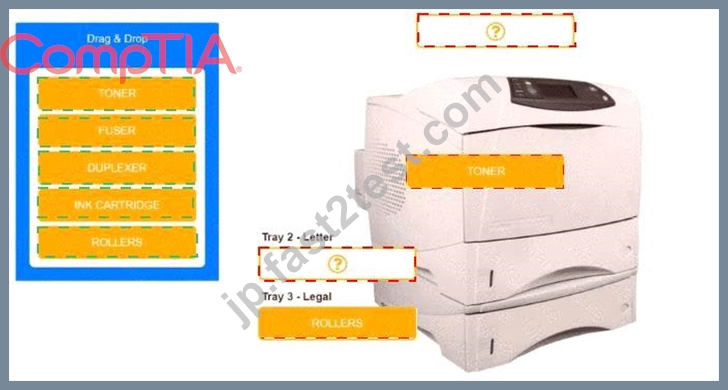
Explanation:
質問 # 345
A customer has bare-metal servers running Windows, Linux, and Unix. They want consolidation while maintaining isolation and compatibility. What should the technician recommend?
- A. Containers
- B. VDI
- C. IaaS
- D. Type 2 hypervisor
正解:C
解説:
The customer wants to consolidate multiple physical servers running different operating systems, including Windows, Linux, and Unix, while maintaining strong isolation between systems. CompTIA A+ identifies Infrastructure as a Service (IaaS) as the best model for hosting fully isolated virtual machines in a cloud environment, allowing each OS to run independently on its own virtual hardware.
IaaS provides virtualized computing resources-CPU, RAM, networking, and storage-while allowing the customer full control over the OS and application layer. This means Windows, Linux, and Unix VMs can coexist without compatibility concerns because each VM runs its native OS without modification.
Containers (B) are unsuitable because they share the host OS kernel, meaning they cannot run different OS families. A Type 2 hypervisor (C) is workstation-based and not designed for enterprise server consolidation. VDI (D) provides user desktops, not server workload consolidation.
Thus, IaaS is the correct solution for compatibility, isolation, and consolidation across multiple OS types.
質問 # 346
An office manager reports that a printer is experiencing performance issues. Printouts are smudging when they are handled, and, recently whenever they need to print legal sized documents, the paper jams before anything is printed on it.
The following paper sizes are used:
Letter (8.5x11in/21.59x27.94cm)
Legal (8.5x14in/21.59x35.56cm)
Oversized (11x17in/27.94x43.18cm)

INSTRUCTIONS
Using the dropdown menus, select from the available printer parts to replace only the faulty components on the office printer to resolve the stated issues.
If at any time you would like to bring back the initial state of the simulation, please click the Reset All button.
正解:
解説:
Explanation:
A printer with text boxes AI-generated content may be incorrect.
質問 # 347
Several storms cause mission-critical servers to go offline unexpectedly A server also goes offline suddenly due to haroNvare failure Upon assessment the company purchases new UPSs to condition power and allow the OSs to shut down gracefully in the event of a power failure However, the UPSs are delayed due to supply chain issues. Which of the following can balance a cost-effective solution with uptime requirements?
- A. Increasing input voltage
- B. Activating a hot site
- C. Installing redundant PSUs
- D. Purchasing backup generators
正解:C
解説:
Redundant PSUs provide fault tolerance by ensuring that if one power supply fails, another will take over seamlessly.
This is a cost-effective way to increase uptime while waiting for the UPSs to arrive.
質問 # 348
A technician must install a printer at a corporate office for all employees to use. Which of the following is the best option?
- A. Print server
- B. Cloud printing
- C. Bluetooth printing
- D. Wi-Fi Direct
正解:A
解説:
In a corporate office environment where multiple employees must share a single printer, the most efficient and manageable solution is a print server. A print server centralizes print management, queues print jobs, handles driver distribution, and provides access control. CompTIA A+ highlights print servers as the enterprise-standard method for managing shared printing resources because they ensure reliability, scalability, and better network performance.
Bluetooth printing and Wi-Fi Direct are short-range, peer-to-peer technologies meant for one-to-one or small- scale printing. They lack user authentication management, enterprise security controls, and cannot efficiently support dozens or hundreds of print requests simultaneously. Cloud printing requires internet reliance and external service routing, which introduces latency, potential downtime, and privacy concerns-often unsuitable for corporate networks, especially those with sensitive internal documents.
A print server allows users to connect to the printer through a standard network infrastructure (wired or wireless), and technicians can configure permissions, monitor print loads, and troubleshoot from a central location. It integrates seamlessly with enterprise directory services such as Active Directory, enabling controlled access and auditing. Because of these capabilities, the print server is the best professional-grade solution for corporate-wide printing needs.
質問 # 349
A salesperson is unable to use a personal device to access emails and calendar features at a client site but was able to use the device while at the office. Which of the following policies has been enforced on the salesperson's mobile device?
- A. MFA
- B. MAN
- C. MOW
- D. MAM
正解:D
解説:
Mobile Application Management (MAM) enforces policies restricting access to apps and services based on location, ensuring security at external sites.
Why Not A (MOW): "Mobile Only Workplace" (MOW) is not a recognized term in this context.
Why Not B (MAN): Metropolitan Area Network (MAN) is unrelated to mobile device policies.
Why Not C (MFA): Multi-Factor Authentication secures user accounts but does not enforce app restrictions.
CompTIA A+ Exam Reference: Core 2 (220-1102), Section 2.7, mobile device security policies.
質問 # 350
A company rolls out a mandatory OS update to all PCs. A legacy application that one department uses does not function on the new OS and is EOL. Which of the following should a technician suggest to solve the issue with minimal data loss, expense, and disruption to the users?
- A. Uploading the database to a private cloud
- B. Upgrading to an alternative product and importing the data
- C. Setting up a bare-metal hypervisor to isolate the outdated OS
- D. Moving to a supported system under a Type 2 hypervisor
正解:D
解説:
The correct answer is B. Moving to a supported system under a Type 2 hypervisor.
In the CompTIA A+ Core 1 (220-1201) objectives, virtualization is a key concept for maintaining compatibility with legacy systems. A Type 2 hypervisor (hosted hypervisor) runs on top of an existing operating system and allows users to run a virtual machine (VM) with an older OS.
This solution is ideal because:
It allows the legacy application to run in its required OS environment.
It avoids replacing the application (which could cause data loss or compatibility issues).
It is cost-effective, as it uses existing hardware.
It minimizes user disruption, since users can continue using the application within a VM.
Why the other options are incorrect:
A). Setting up a bare-metal hypervisor
A Type 1 (bare-metal) hypervisor is more complex, costly, and disruptive. It typically requires dedicating hardware and is not ideal for a single department use case.
C). Upgrading to an alternative product and importing the data
Although this may be a long-term solution, it involves higher cost, potential data loss, retraining, and disruption.
D). Uploading the database to a private cloud
This does not solve the compatibility issue of the legacy application with the new OS.
Final answer: B. Moving to a supported system under a Type 2 hypervisor
質問 # 351
Which of the following connector types is associated with coaxial terminations serving cable internet deployments?
- A. DB9
- B. RJ45
- C. F-type
- D. ST
正解:C
解説:
F-type connectors are commonly used to terminate coaxial cables in cable internet, cable TV, and satellite connections.
From CompTIA A+ 220-1101 Official Study Guide, Objective 3.1 - Network cables and connectors:
"F-type connectors are used for coaxial cable terminations in cable modem and TV installations." Verified Source:
* CompTIA A+ Core 1 (220-1101) Official Study Guide, Chapter 3: Networking Cables and Connectors
* CompTIA Exam Objectives 220-1101, Domain 3.1
質問 # 352
Which of the following devices is designed specifically to allow multiple network devices to communicate across a single platform?
- A. NIC
- B. Firewall
- C. Switch
- D. Routers
正解:C
解説:
A switch is designed to connect multiple devices within the same local network so they can communicate efficiently. In a typical LAN, a switch provides multiple Ethernet ports and forwards traffic between connected devices by using MAC addresses. When a frame enters a switch port, the switch learns the source MAC address and associates it with that port in a MAC address table. When the destination MAC is known, the switch sends the frame only out the correct port, which reduces unnecessary traffic and improves performance compared to older hub-based networks. This is exactly what is meant by allowing multiple network devices to communicate "across a single platform" (the switching fabric).
A NIC is an adapter in an endpoint device that provides network connectivity, but it does not interconnect multiple devices by itself. A firewall focuses on filtering and controlling traffic based on security rules, not primarily on providing multi-device LAN connectivity. Routers connect different networks and forward traffic based on IP addresses (Layer 3), which is not the primary device for multi-device communication within the same network segment. Therefore, the correct answer is Switch.
質問 # 353
A user is trying to print diagrams on 11in × 17in (28cm × 43cm) paper. The correct paper is in the printer, but the printer prompts the user to insert paper. A technician assisting the user successfully prints the diagram to a different printer that is the same model. Which of the following is the most likely cause of this issue on the user ' s printer?
- A. Connectivity issues
- B. Insufficient permissions
- C. Tray settings
- D. Incorrect driver
正解:C
解説:
The most likely cause of this issue is incorrect tray settings on the user's printer. According to CompTIA Core
1 (220-1201) printer configuration and troubleshooting concepts, printers rely on tray configuration settings to determine the paper size and paper type loaded in each tray. If the tray is not configured for 11 × 17 (Tabloid
/Ledger) paper, the printer will assume the required paper is unavailable-even if the paper is physically present.
When a print job specifies a paper size that does not match the tray's configured settings, the printer commonly displays a message prompting the user to insert the correct paper. The fact that the same document prints successfully on another printer of the same model confirms that the driver, permissions, and connectivity are functioning correctly, further isolating the issue to the local printer's tray configuration.
An incorrect driver would cause consistent problems across printers, not just one. Connectivity issues would prevent communication with the printer entirely, and insufficient permissions would generate access or authorization errors rather than a paper prompt.
CompTIA emphasizes verifying tray assignments and paper size configuration as a primary troubleshooting step when printers incorrectly request paper that is already loaded.
References:CompTIA A+ Core 1 (220-1201) Official Study Guide - Printer Configuration, Paper Handling, and Troubleshooting
質問 # 354
A user joins a conference call with a Bluetooth headset. Which of the following has the user created?
- A. SAN
- B. WAN
- C. PAN
- D. MAN
正解:C
解説:
B . PAN (Personal Area Network):
A PAN is a network established between devices in close proximity, such as between a smartphone and a Bluetooth headset.
Bluetooth technology is specifically designed for short-range communication, making it a type of PAN.
Incorrect Options:
A . MAN (Metropolitan Area Network): A MAN covers a city or metropolitan area and is not relevant to Bluetooth connections.
C . SAN (Storage Area Network): A SAN is used for large-scale data storage, unrelated to Bluetooth connections.
D . WAN (Wide Area Network): A WAN spans large geographical areas (e.g., the internet) and is not relevant to this scenario.
Key Takeaway: Bluetooth connections, such as those between a headset and a device, create a Personal Area Network (PAN).
質問 # 355
A user is trying to present a video in a conference room. The video appears when the user connects the computer to the TV display with an HDMI cable. However, there is no sound coming through. The computer and TV volumes are at 50%. Which of the following should the user perform next?
- A. Verify the audio output assignment
- B. Swap the HDMI cable
- C. Reinsert the HDMI cable
- D. Adjust the volume settings
正解:A
解説:
* The correct answer is D. Verify the audio output assignment.
According to CompTIA A+ Core 1 220-1201 objectives under Hardware and Troubleshooting:
* HDMI carries both video and audio signals. If video displays correctly but audio is not heard, it is often because the computer is still outputting sound to its internal speakers rather than the HDMI-connected device.
* The user should check the audio output settings in the operating system and ensure the HDMI device (TV or projector) is selected as the audio output device.
Why the other options are incorrect:
* A. Adjust the volume settings: Volumes are already at 50%, so adjusting them will not solve the problem if the audio output is assigned incorrectly.
* B. Swap the HDMI cable: The video is working fine, so the cable is likely functional.
* C. Reinsert the HDMI cable: Unlikely to resolve audio assignment issues if the connection is already working for video.
References:
CompTIA A+ Core 1 (220-1201) Exam Objectives - Hardware: "Given a scenario, troubleshoot video and audio issues including external display and HDMI audio output." Mike Meyers' CompTIA A+ Certification Guide, 13th Edition, Chapter on Video and Audio Troubleshooting.
質問 # 356
......
無料お試しCompTIA 220-1201問題集PDFは必ずベストの問題集オプションを使おう:https://jp.fast2test.com/220-1201-premium-file.html
220-1201試験資料CompTIA学習ガイド:https://drive.google.com/open?id=14dcFRuQrf7RoB2bKIcLdGR21uFEEGnoQ