

[2025年12月] 無料220-1201試験問題集試験点数を伸ばそう
2025年最新の220-1201実際問題集には試験のコツがあるPDF試験材料
質問 # 83
Which of the following ports should a technician disable to increase the security of remote connectivity?
- A. 0
- B. 1
- C. 2
- D. 3
正解:B
解説:
Port 23 is used by Telnet, an unencrypted remote connection protocol that poses significant security risks.
Disabling Telnet and using secure alternatives like SSH (port 22) is best practice.
From CompTIA A+ 220-1101 Official Study Guide, Objective 2.1 - Common ports and protocols:
"Port 23 (Telnet) provides unencrypted remote access and should be disabled to increase security. Use SSH (port 22) for secure remote connections." Verified Source:
* CompTIA A+ Core 1 (220-1101) Official Study Guide, Chapter 2: Ports and Protocols
* CompTIA Exam Objectives 220-1101, Domain 2.1
質問 # 84
A technician is having issues replacing a laptop's wireless card because the cover seems to be stuck Which of the following should the technician do next to troubleshoot this issued
- A. Insert the wireless card into the M.2 slot
- B. Use a pry tool to force the cover open
- C. Check the product manual for the procedure
- D. Try to move the cover by sliding it in all directions.
正解:C
解説:
A:Check the product manual for the procedure:
When hardware is not easily accessible, always consult the product manual for proper disassembly procedures. Forcing the cover can damage the laptop or void the warranty.
Product manuals often provide step-by-step instructions for safely accessing internal components.
Incorrect Options:
B: Use a pry tool to force the cover open: Forcing the cover can cause physical damage to the device.
C: Insert the wireless card into the M.2 slot: This step cannot be performed until the cover is properly removed.
D: Try to move the cover by sliding it in all directions: Randomly sliding the cover can cause damage if the correct removal method is not followed.
Key Takeaway: Always refer to the product manual to ensure safe and proper disassembly of laptop components.
Reference: CompTIA A+ Core 1 Exam Objectives (220-1201), Domain 4.1 - Best practices for laptop hardware installation.
質問 # 85
A user reports that the printouts from a laser printer have lines and smudges on them. The printer is also intermittently misfeeding the paper. Which of the following components should a technician replace to address this issue?
- A. Fuser
- B. Corona wire
- C. Toner cartridge
- D. Maintenance kit
正解:D
解説:
Comprehensive and Detailed In-Depth Explanation:
Amaintenance kitfor a laser printer often includesrollers, fuser, and other partsthat wear out over time. If the printer issmudging and misfeeding, it's a sign thatmultiple components are failing, which a maintenance kit is designed to resolve.
* Option A (Fuser):May cause smudging if it's not heating correctly, but it won't resolve paper misfeeds alone.
* Option C (Corona wire):Can cause poor image quality if dirty but doesn't affect paper feeding.
* Option D (Toner cartridge):Can cause streaks if defective, but not paper feed issues.
CompTIA A+ Core 1 Exam Objective Reference:
* Objective 3.4: Given a scenario, install and configure printers.
質問 # 86
A multifunction printer in a small office recently had issues with scan-to-email functionality. The manufacturer has an update ready to fix the printer issues. Which of the following would a technician most likely deploy to remediate the issue?
- A. HSM
- B. Driver
- C. OS update
- D. Firmware
正解:D
解説:
Firmware is the embedded software on a device such as a printer. Manufacturers often release firmware updates to resolve hardware-specific functionality issues, such as scan-to-email or security vulnerabilities.
From CompTIA A+ 220-1101 Official Study Guide, Objective 3.4 - Printer installation and maintenance:
"Firmware updates provide bug fixes and add new features for multifunction printers. Apply firmware updates to resolve device-specific issues." Verified Source:
* CompTIA A+ Core 1 (220-1101) Official Study Guide, Chapter 3: Printer Maintenance
* CompTIA Exam Objectives 220-1101, Domain 3.4
質問 # 87
A customer recently lost data due to several unexpected shutdowns. Data integrity is important to the customer. Which of the following features should the technician choose to prevent data loss?
- A. Redundant power supply
- B. Uninterruptible power supply
- C. Modular power supply
- D. High-efficiency power supply
正解:B
解説:
An uninterruptible power supply (UPS) protects systems against power outages by providing temporary backup power, giving users time to save data and safely shut down.
From CompTIA A+ 220-1101 Official Study Guide, Objective 3.3 - Power protection:
"A UPS supplies backup power to prevent data loss and hardware damage during outages or surges, ensuring system integrity." Verified Source:
* CompTIA A+ Core 1 (220-1101) Official Study Guide, Chapter 3: Power Protection
* CompTIA Exam Objectives 220-1101, Domain 3.3
質問 # 88
A help desk technician inspects a laptop keyboard because a single key has stopped working. The technician checks the keyboard for debris. Which of the following actions should the technician do next to troubleshoot the issue cost-effectively?
- A. Replace the keycap
- B. Replace the circuit board.
- C. Replace the keyboard.
- D. Replace the key switch
正解:A
解説:
If only one key is not functioning and debris has been checked, replacing the individual keycap is the most cost-effective next step. It's a simple, low-cost option before considering more extensive repairs like replacing the entire keyboard.
Reference: "CompTIA A+ Complete Practice Tests" by Jeff T. Parker - Chapter 1, Question 10, page 8.
質問 # 89
Which of the following allows for a beam of light to transmit data through a flexible cable?
- A. Coaxial
- B. Thunderbolt
- C. Single-mode fiber
- D. HDMI
正解:C
解説:
Single-mode fiber (as well as multi-mode fiber) transmits data using beams of light, allowing for high-speed data transfer over flexible fiber-optic cables.
From CompTIA A+ 220-1101 Official Study Guide, Objective 2.1 - Networking media:
"Fiber optic cables transmit data using light. Single-mode fiber is used for long-distance, high-speed communication." Verified Source:
* CompTIA A+ Core 1 (220-1101) Official Study Guide, Chapter 2: Networking Media
* CompTIA Exam Objectives 220-1101, Domain 2.1
質問 # 90
A user reports that a software application functioned as expected the previous day, but this morning, the user is unable to launch the application. Which of the following describe what the technician should do next?
- A. Check the vendor's website for guidance.
- B. Determine which steps need to be performed.
- C. Research the symptoms
- D. Identify any changes the user has made
正解:D
解説:
Identifying changes made to the system is the next step to troubleshoot why an application no longer launches, as recent changes often cause such issues.
Why Not A (Research the symptoms): Research is broader and should come after identifying changes.
Why Not C (Determine which steps need to be performed): This comes after identifying the issue.
Why Not D (Check the vendor's website): This is a later step if further guidance is needed.
CompTIA A+ Exam Reference: Core 2 (220-1102), Section 3.1, troubleshooting methodology.
質問 # 91
A help desk technician inspects a laptop keyboard because a single key has stopped working. The technician checks the keyboard for debris. Which of the following actions should the technician do next to troubleshoot the issue cost-effectively?
- A. Replace the keycap
- B. Replace the key switch
- C. Replace the circuit board.
- D. Replace the keyboard.
正解:B
解説:
If only one key is not functioning and debris has been checked, replacing the individual keycap is the most cost-effective next step. It's a simple, low-cost option before considering more extensive repairs like replacing the entire keyboard.
Reference: "CompTIA A+ Complete Practice Tests" by Jeff T. Parker - Chapter 1, Question 10, page 8.
質問 # 92
A user is having issues when charging a device with a Lightning cable. The cable is not recognized when it is plugged into the device. This issue is usually resolved by flipping the cable over. This issue does not occur with other devices of the same type. Which of the following would most likely cause the issue?
- A. The cable is failing and needs to be replaced
- B. The charging port is dirty or damaged
- C. The device needs to be restarted.
- D. The battery may be swelling and needs inspection.
正解:B
解説:
When a Lightning cable works only when flipped a certain way or doesn't function consistently, it is typically due to debris or damage in the charging port. Cleaning the port or inspecting it for wear resolves the issue.
Reference: "CompTIA A+ Complete Practice Tests" by Jeff T. Parker - Chapter 1, Question 7, page 7.
質問 # 93
A network administrator must ensure that a printer will still be assigned a specific IP address even if all addresses are depleted. Which of the following network configuration concepts is this describing?
- A. VLAN
- B. Lease
- C. Exclusion
- D. Reservation
正解:D
解説:
A DHCP reservation binds a specific MAC address to an IP address so the device always receives the same IP from the DHCP server. This ensures network devices like printers maintain consistent connectivity and availability even when the IP pool is low.
Reference: "CompTIA A+ Complete Study Guide" by Quentin Docter - Chapter 18, page 1252.
質問 # 94
A technician is troubleshooting a desktop PC that is plugged into a UPS. The PC loses the system date/time after every power outage. Which of the following should the technician do to resolve the issue? (Select two).
- A. Run a BIOS update.
- B. Install a surge protector.
- C. Replace the CMOS battery
- D. Repair the backup power source.
- E. Disable NTP in the OS.
- F. Swap out the RAM.
正解:C、D
解説:
The system date/time is maintained by the CMOS battery when the PC is powered off. If this battery fails, time resets will occur. Additionally, since the system is connected to a UPS, ensuring the UPS is functioning correctly (i.e., the backup power source) is essential.
Reference: "CompTIA A+ Complete Study Guide" by Quentin Docter - Chapter 1, page 40.
質問 # 95
A technician wants to upgrade a computer to a new Windows version. The Windows Upgrade Advisor states that the computer is not compatible with the new Windows version due to a lack of TPM 2.0 support. Which of the following should the technician do next?
- A. Install an HSM in the computer.
- B. Enable the module in the UEFI BIOS.
- C. Perform a clean Install of the new Windows version.
- D. Implement BitLocker on the computer.
正解:B
解説:
TPM 2.0 (Trusted Platform Module) is often disabled by default in the UEFI BIOS. Enabling it is necessary to meet the requirements for certain Windows installations, including Windows 11.
Why Not B (Install an HSM): A Hardware Security Module (HSM) is a separate device used for cryptographic functions and is not related to TPM on the motherboard.
Why Not C (Perform a clean install): A clean installation will not bypass the TPM 2.0 requirement.
Why Not D (Implement BitLocker): BitLocker requires TPM but does not resolve its absence or lack of activation.
CompTIA A+ Exam Reference: Core 1 (220-1201), Section 3.4, BIOS/UEFI configuration.
質問 # 96
An employee's screen keeps flashing. Sometimes the picture goes out and comes back. The employee checks the power cord and confirms the device is plugged in fully. Which of the following should a technician check for first?
- A. Conflicting drivers
- B. Failing graphics card
- C. Loose video cable
- D. Swollen motherboard capacitor
正解:C
解説:
Intermittent display issues, such as a screen flashing on and off, are most commonly caused by a loose or faulty video cable connection. If the power cable is confirmed secure, the next logical step is to check the video (data) cable between the monitor and the computer.
From the CompTIA A+ 220-1101 Official Study Guide, Objective 4.1 - Troubleshoot common hardware problems:
"Common video issues include intermittent display or loss of picture. The most likely causes are a loose or faulty video cable or connector. Check all cable connections before troubleshooting internal components." Verified Source:
* CompTIA A+ Core 1 (220-1101) Official Study Guide, Chapter 4: Troubleshooting Hardware Problems
* CompTIA Exam Objectives 220-1101, Domain 4.1
質問 # 97
A technician is setting up a new SOHO wireless router. According to security best practices, which of the following should the technician do first?
- A. Enable encryption.
- B. Reset the router.
- C. Change the default password.
- D. Assign a static IP.
正解:C
解説:
The first security step after deploying a new router is to change the default administrative password.
Default credentials are well known and pose a security risk if left unchanged.
From CompTIA A+ 220-1101 Official Study Guide, Objective 2.3 - Secure a wireless network:
"Always change default administrative credentials before further configuration to prevent unauthorized access." Verified Source:
* CompTIA A+ Core 1 (220-1101) Official Study Guide, Chapter 2: Wireless Security
* CompTIA Exam Objectives 220-1101, Domain 2.3
質問 # 98
A user reports that the printouts from a laser printer have lines and smudges on them. The printer is also intermittently misfeeding the paper. Which of the following components should a technician replace to address this issue?
- A. Fuser
- B. Corona wire
- C. Toner cartridge
- D. Maintenance kit
正解:D
解説:
Amaintenance kitfor a laser printer often includesrollers, fuser, and other partsthat wear out over time. If the printer issmudging and misfeeding, it's a sign thatmultiple components are failing, which a maintenance kit is designed to resolve.
Option A (Fuser):May cause smudging if it's not heating correctly, but it won't resolve paper misfeeds alone.
Option C (Corona wire):Can cause poor image quality if dirty but doesn't affect paper feeding.
Option D (Toner cartridge):Can cause streaks if defective, but not paper feed issues.
CompTIA A+ Core 1 Exam Objective Reference:
Objective 3.4: Given a scenario, install and configure printers.
質問 # 99
Which of the following types of RAM is typically used in servers?
- A. ECC
- B. Rambus
- C. DDR3
- D. SODIMM
正解:A
解説:
ECC (Error-Correcting Code) RAM is commonly used in servers to provide error detection and correction, improving reliability in critical systems. It is designed to detect and correct single-bit errors, ensuring data integrity in environments where stability is paramount.
Option A (SODIMM): Incorrect. SODIMM is typically used in laptops, not servers.
Option B (Rambus): Incorrect. Rambus is an outdated RAM type and not commonly used today.
Option C (DDR3): Incorrect. While DDR3 is a type of RAM, it is not specific to servers and does not provide error correction.
References:
CompTIA A+ Core 1 Objectives: 3.2 (RAM types and their uses)
質問 # 100
A user's wireless headset shows a "connected" status when turned on, but the Bluetooth list on the user's phone shows that the headset is "not connected." Which of the following should the technician do?
- A. Enter the PIN.
- B. Re-pair the devices.
- C. Turn off Wi-Fi.
- D. Enable Bluetooth.
正解:B
解説:
When a device shows asnot connectedeven though it previously paired, the most effective action is tore-pair the devices. This resets the Bluetooth connection, clears any corruption in pairing profiles, and re-establishes communication.
Option A:Entering a PIN is only relevant during initial pairing and may not be prompted again.
Option B:Turning off Wi-Fi doesn't typically affect Bluetooth; they operate on similar frequencies but don't conflict this way in normal use.
Option D:If Bluetooth were disabled, the device wouldn't appear at all, not just show as "not connected." CompTIA A+ Core 1 Exam Objective Reference:
Objective 1.5: Given a scenario, connect and configure accessories and ports of mobile devices.
質問 # 101
A customer reports their tablet was recently dropped on the ground. The tablet has a small crack in one corner of the display, and it does not charge when plugged in. Which of the following should a technician do first?
- A. Run diagnostics on the digitizer
- B. Perform a hard restart.
- C. Inspect the USB-C port for damage
- D. Replace the battery
正解:C
解説:
Comprehensive and Detailed Explanation From Exact Extract:
Physical damage from dropping a tablet may often affect ports or connectors. Before taking deeper diagnostic or replacement steps, it's important to visually inspect the USB-C charging port for damage or debris. If the port is damaged, charging issues can occur regardless of battery health.
#Reference: "CompTIA A+ All-in-One Exam Guide, 11th Edition" by Mike Meyers - Chapter 25,
"Maintaining and Securing Mobile Devices", page 879.
質問 # 102
Which of the following technologies best allows a phone to connect to a point-of-sale terminal for wireless payments?
- A. Cellular
- B. NFC
- C. Bluetooth
- D. Wi-Fi
正解:B
解説:
Near-field communication (NFC) is a short-distance wireless communication method widely used in mobile payment systems like Apple Pay and Google Pay. Simply placing the device near a compatible terminal initiates the payment process.
Reference: "Mike Meyers' CompTIA A+ Certification All-in-One Exam Guide" - Chapter 24, page 1022.
質問 # 103
A technician is troubleshooting a PoE phone that will not turn on. When a laptop is plugged directly into the switchport for the phone the technician sees a data link LED and activity. Which of the following tools should the technician use to verify PoE availability to the phone?
- A. Cable tester
- B. Toner probe
- C. Network tap
- D. Loopback plug
正解:A
解説:
Reasoning: A cable tester capable of testing Power over Ethernet (PoE) functionality can verify whether the switchport is providing the required power to the phone. This tool measures both the presence of data and the voltage or wattage being provided through the Ethernet cable.
This is the most effective way to confirm that PoE is available on the port.
Why the Other Options Are Incorrect:
A: Network tap:
A network tap is primarily used to monitor network traffic, not to test for PoE availability. It cannot verify if power is being supplied through the Ethernet cable.
C: Loopback plug:
A loopback plug is used to test the functionality of a network port by creating a loop for transmitted and received signals. It does not measure or verify PoE availability.
D: Toner probe:
A toner probe is used for tracing and identifying network cables. It cannot test for PoE functionality.
Practical Example:
A PoE phone might not turn on due to a misconfigured or faulty switchport. Using a cable tester capable of measuring PoE would help the technician determine if the switchport is supplying sufficient power to the phone.
CompTIA A+ Exam Objective Alignment:
Objective 2.1: Identify common networking hardware and tools, including PoE-enabled devices and cable testers.
質問 # 104
An office manager reports that a printer is experiencing performance issues. Printouts are smudging when they are handled, and, recently whenever they need to print legal sized documents, the paper jams before anything is printed on it.
The following paper sizes are used:
Letter (8.5x11in/21.59x27.94cm)
Legal (8.5x14in/21.59x35.56cm)
Oversized (11x17in/27.94x43.18cm)

INSTRUCTIONS
Using the dropdown menus, select from the
available printer parts to replace only the
faulty components on the office printer to
resolve the stated issues.
If at any time you would like to bring back
the initial state of the simulation, please click
the Reset All button.
正解:
解説:
Explanation:
A printer with text boxes AI-generated content may be incorrect.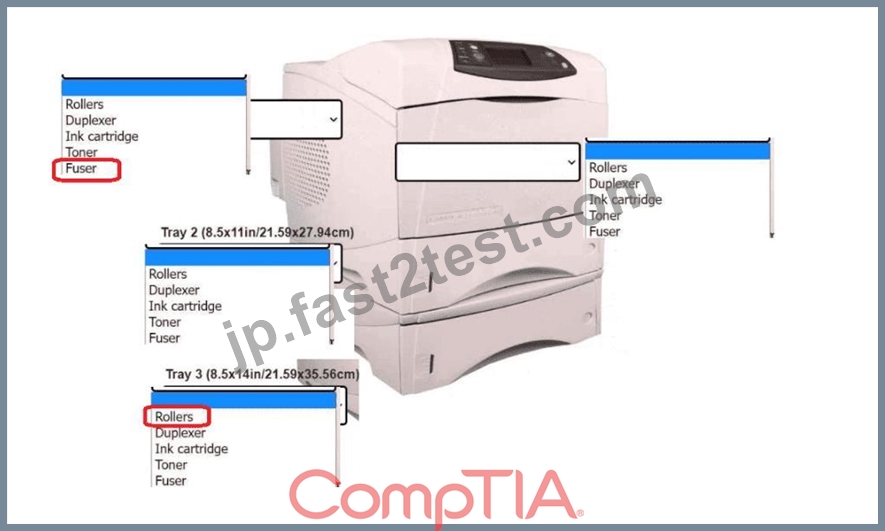
質問 # 105
A technician receives a tablet that looks like it has a bulge inside. The bulge is pushing the screen away from the backplate. The tablet still turns on when it is plugged in, but the screen looks damaged and turns off when unplugged. Which of the following is the most likely cause of this issue?
- A. Damaged charge port
- B. Deprecated battery
- C. Broken screen
- D. Malfunctioning power supply
正解:B
解説:
Comprehensive and Detailed In-Depth Explanation:
Abulging tablet casingis a classic sign of aswollen lithium-ion battery, often caused by age, overheating, or overcharging. This is adangerous condition, as swollen batteries can rupture or catch fire. It also explains why the tablet only works when plugged in - the battery is no longer holding a charge.
* Option A:Power supply issues wouldn't cause physical bulging.
* Option B:A bad charge port wouldn't cause screen damage or physical distortion.
* Option D:A broken screen could cause display issues, but not the bulging chassis.
CompTIA A+ Core 1 Exam Objective Reference:
* Objective 1.4: Given a scenario, configure settings and use cases for laptops and mobile devices.
質問 # 106
A technician is troubleshooting a workstation that repeatedly shuts down within ten minutes of being turned on. The technician notices a loud clicking sound coming from inside the case. Which of the following components should the technician check first?
- A. Exhaust fan
- B. Capacitors
- C. CPU fan
- D. Intake fan
正解:C
解説:
A failing CPU fan may make unusual noises (including clicking) and, if it is not cooling the CPU, the system will quickly overheat and shut down to prevent damage.
From CompTIA A+ 220-1101 Official Study Guide, Objective 4.1 - Troubleshooting hardware problems:
"Overheating due to a failed or obstructed CPU fan can cause frequent shutdowns. Loud noises are a sign the fan should be checked first." Verified Source:
* CompTIA A+ Core 1 (220-1101) Official Study Guide, Chapter 4: PC Hardware Troubleshooting
* CompTIA Exam Objectives 220-1101, Domain 4.1
質問 # 107
......
心強い220-1201のPDF問題集は220-1201問題:https://jp.fast2test.com/220-1201-premium-file.html
正真正銘の220-1201問題集で無料PDF問題で合格させる:https://drive.google.com/open?id=1JkIzH8x8JBPAvWmC1t4GlMuzQQHOc286