

2025年最新のMD-102実際問題集には試験のコツがあるPDF試験材料
心強いMD-102のPDF問題集問題
Microsoft MD-102 認定試験の出題範囲:
| トピック | 出題範囲 |
|---|---|
| トピック 1 |
|
| トピック 2 |
|
| トピック 3 |
|
| トピック 4 |
|
質問 # 241
You have an Azure Active Directory (Azure AD) tenant that contains a user named User1. User1 has the device shown in the following table.
Enterprise State Roaming is configured for User1.
User1 signs in to Device4 and changes the desktop.
You need to identify on which devices User1 will have a changed desktop.
Which devices should you identify?
- A. Device4 only
- B. Device2, Device3, and Device4 only
- C. Device1, Device2, Device3, and Device4
- D. Device3 and Device4 only
- E. Device2 and Device4 only
正解:D
解説:
Microsoft state in the key capabilities of Azure AD joined devices: "Enterprise State Roaming across devices" Microsoft do not state this in the key capabilities of Azure AD registered Devices. I have provided links to both pages below to support this. Check the "Key Capabilites" in the table in the references provided.
Sources:
Azure AD Joined: https://docs.microsoft.com/en-us/azure/active-directory/devices/concept-azure- ad-join Azure AD Registered: https://docs.microsoft.com/en-us/azure/active-directory/devices/concept- azure-ad-register
質問 # 242
Drag and Drop Question
You have a Microsoft Deployment Toolkit (MDT) deployment share that has a path of D:\MDTShare.
You need to add a feature pack to the boot image.
Which three actions should you perform in sequence? To answer, move the appropriate actions from the list of actions to the answer area and arrange them in the correct order.
正解:
解説:
Explanation:
Step 1: Copy the feature pack to D:\MDTShare\Tools\x86
Add a feature pack, DaRT 10 (part of MDOP 2015), to the boot images.
1. Copy the CAB files to the deployment share: MDTShare\Tools\x86
2. In the Deployment Workbench, right-click the MDTShare deployment share and select Properties.
Step 2: Modify the Windows PE properties of the deployment share
3. On the Windows PE tab, in the Platform drop-down list, make sure x86 is selected.
4. On the Features sub tab, select the Microsoft Diagnostics and Recovery Toolkit (DaRT) checkbox.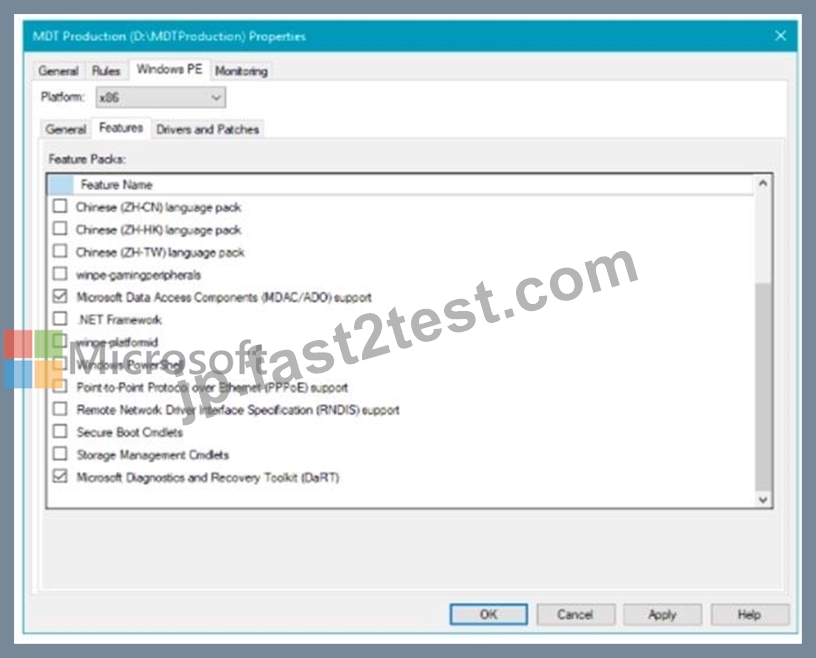
Etc.
Step 3: Update the deployment share
Like the MDT Build Lab deployment share, the MDT Production deployment share needs to be updated after it has been configured. This is the process during which the Windows PE boot images are created.
Reference:
https://docs.microsoft.com/en-us/windows/deployment/deploy-windows-mdt/deploy-a-windows-
10-image-using-mdt
質問 # 243
You have a Microsoft 365 E5 subscription that contains the devices shown in the following table.
All devices have Microsoft Edge installed.
From the Microsoft Intune admin center, you create a Microsoft
You need to apply Edge1 to all the supported devices.
To which devices should you apply Edge1?
- A. Device1 only
- B. Device1 and Device2 only
- C. Device1, Device2, and Device4 only
- D. Device1, Device2, and Device3 only
- E. Device1, Device2, Device3, and Device4
正解:B
解説:
This feature applies to:
* Windows 10 version 1809 and later
* Windows 11
https://learn.microsoft.com/en-us/mem/intune/protect/security-baselines-configure
質問 # 244
You have a Microsoft 365 subscription that includes Microsoft Intune.
You have computers that run Windows 11 as shown in the following table.
You have the groups shown in the following table.
You create and assign the compliance policies shown in the following table.
The next day, you review the compliance status of the computers.
For each of the following statements, select Yes if the statement is true. Otherwise, select No.
NOTE: Each correct selection is worth one point.
正解:
解説:
Explanation:
質問 # 245
Your network contains an Active Directory domain. Active Directory is synced with Microsoft Azure Active Directory (Azure AD).
There are 500 Active Directory domain-joined computers that run Windows 10 and are enrolled in Microsoft Intune.
You plan to implement Microsoft Defender Exploit Guard.
You need to create a custom Microsoft Defender Exploit Guard policy, and then distribute the policy to all the computers.
What should you do? To answer, select the appropriate options in the answer area.
NOTE: Each correct selection is worth one point.
正解:
解説:
Reference:
https://docs.microsoft.com/en-us/windows/security/threat-protection/microsoft-defender-atp/import-export-exploit-protection-emet-xml#manage-or-deploy-a-configuration
https://docs.microsoft.com/en-us/intune/endpoint-protection-windows-10
https://docs.microsoft.com/en-us/windows/security/threat-protection/microsoft-defender-atp/enable-exploit-protection
質問 # 246
You have a Microsoft 365 subscription that uses Microsoft Intune.
You plan to manage Windows updates by using Intune.
You create an update ring for Windows 10 and later and configure the User experience settings for the ring as shown in the following exhibit.
Use the drop-down menus to select the answer choice that completes each statement based on the information presented in the graphic.
NOTE: Each correct selection is worth one point.
正解:
解説:
Explanation:
質問 # 247
You have a Microsoft 365 subscription.
All computers are enrolled in Microsoft Intune.
You have business requirements for securing your Windows 11 environment as shown in the following table.
What should you implement to meet each requirement? To answer, select the appropriate options in the answer area. NOTE: Each correct selection is worth one point.
正解:
解説:
Explanation
質問 # 248
You have a Microsoft 365 subscription that contains the devices shown in the following table.
You plan to enroll the devices in Microsoft Intune.
How often will the compliance policy check-ins run after each device is enrolled in Intune? To answer, select the appropriate options in the answer area.
NOTE: Each correct selection is worth one point.
正解:
解説:
Explanation:
Box 1: Every three minutes for 15 minutes, then every 15 minutes for two hours, and then around every eight hours If devices recently enroll, then the compliance, non-compliance, and configuration check-in runs more frequently. The check-ins are estimated at:
Windows 10: Every 3 minutes for 15 minutes, then every 15 minutes for 2 hours, and then around every 8 hours
Box 2: Every 15 minutes for one hour, and then every eight hours
iOS/iPadOS: Every 15 minutes for 1 hour, and then around every 8 hours
Reference: https://docs.microsoft.com/en-us/mem/intune/configuration/device-profile-troubleshoot
質問 # 249
You have a Microsoft 365 E5 subscription that contains a user named User1.
You need to perform the following tasks for User1:
Set the Usage location to Canada.
Configure the Phone and Email authentication contact info for self-service password reset (SSPR).
Which two settings should you configure in the Azure Active Directory admin center? To answer, select the appropriate settings in the answer area.
NOTE: Each correct selection is worth one point.
正解:
解説:
Explanation
Graphical user interface, application Description automatically generated
質問 # 250
You install a feature update on a computer that runs Windows 10.
How many days do you have to roll back the update?
- A. 0
- B. 1
- C. 2
- D. 3
正解:D
質問 # 251
You have a Microsoft 365 E5 subscription that contains 100 iOS devices enrolled in Microsoft Intune.
You need to ensure that notifications of iOS updates are deferred for 30 days after the updates are released.
What should you create?
- A. an update policy for iOS/iPadOS
- B. a device configuration profile based on the Device restrictions template
- C. a device configuration profile based on the Device features template
- D. an iOS app provisioning profile
正解:A
解説:
Explanation
Manage iOS/iPadOS software update policies in Intune, delay visibility of software updates.
When you use update policies for iOS, you might have need to delay visibility of an iOS software update.
Reasons to delay visibility include:
Prevent users from updating the OS manually
To deploy an older update while preventing users from installing a more recent one To delay visibility, deploy a device restriction template that configures the following settings:
Defer software updates = Yes
This doesn't affect any scheduled updates. It represents days before software updates are visible to end users after release.
Delay default visibility of software updates = 1 to 90
90 days is the maximum delay that Apple supports.
Reference: https://docs.microsoft.com/en-us/mem/intune/protect/software-updates-ios
質問 # 252
You have an Azure Active Directory (Azure AD) tenant that contains the users shown in the following table.
You have devices enrolled in Microsoft Intune as shown in the following table.
From Intune, you create and send a custom notification named Notification1 to Group1.
For each of the following statements, select Yes if the statement is true. Otherwise, select No.
NOTE:Each correct selection is worth one point.
正解:
解説:
Explanation:
A screenshot of a computer Description automatically generated with medium confidence
Reference:
https://docs.microsoft.com/en-us/mem/intune/remote-actions/custom-notifications
質問 # 253
Your network contains an on-premises Active Directory domain and an Azure Active Directory (Azure AD) tenant.
The Default Domain Policy Group Policy Object (GPO) contains the settings shown in the following table.
You need to migrate the existing Default Domain Policy GPO settings to a device configuration profile.
Which type of device configuration profile should you create?
- A. Endpoint protection
- B. Custom
- C. Device restrictions
- D. Administrative Templates
正解:C
解説:
https://learn.microsoft.com/en-us/mem/intune/configuration/device-restrictions-windows-
10#password
質問 # 254
You have an Azure AD tenant that contains the devices shown in the following table.
You purchase Windows 11 Enterprise E5 licenses.
Which devices can use Subscription Activation to upgrade to Windows 11 Enterprise?
- A. Device1 only
- B. Device1 and Device3 only
- C. Device1 and Device2 only
- D. Device1, Device2, Device3, and Device4
正解:B
質問 # 255
You have a Microsoft 365 subscription.
You have 25 Microsoft Surface Hub devices that you plan to manage by using Microsoft Intune.
You need to configure the devices to meet the following requirements:
* Enable Windows Hello for Business.
* Configure Microsoft Defender SmartScreen to block users from running unverified files.
Which profile type template should you use for each requirement? To answer, select the appropriate options in the answer are a. NOTE: Each correct selection is worth one point.
正解:
解説:
質問 # 256
What should you use to meet the technical requirements for Azure DevOps?
- A. A device configuration profile
- B. An app protection policy
- C. Conditional access
- D. Windows Information Protection (WIP)
正解:C
解説:
Explanation
References:
https://docs.microsoft.com/en-us/azure/devops/organizations/accounts/manage-conditional-access?
view=azure-devops
質問 # 257
Your network contains an Active Directory domain. The domain contains 1.000 computers that run Windows
11.
You need to configure the Remote Desktop settings of all the computers. The solution must meet the following requirements:
* Prevent the sharing of clipboard contents.
* Ensure that users authenticate by using Network Level Authentication (NLA).
Which two nodes of the Group Policy Management Editor should you use? To answer, select the appropriate nodes in the answer area. NOTE: Each correct selection is worth one point.
正解:
解説:
Explanation:
Device and Resource Re-direct
Security
質問 # 258
You have computer that run Windows 10 and connect to an Azure Log Analytics workspace. The workspace is configured to collect all available events from Windows event logs.
The computers have the logged events shown in the following table.
Which events are collected in the Log Analytics workspace?
- A. 1 only
- B. 2 and 3 only
- C. 1 and 3 only
- D. 1, 2, and 4 on
- E. 1, 2, 3, and 4
正解:E
解説:
All events from Windows event logs are collected in the Log Analytics workspace, regardless of the event level or source. Therefore, events 1, 2, 3, and 4 are all collected in the workspace.
References:https://docs.microsoft.com/en-us/azure/azure-monitor/agents/data-sources-windows-events
質問 # 259
You implement Boundary1 based on the planned changes.
Which devices have a network boundary of 192.168.1.0/24 applied?
- A. Device2 only
- B. Device3 only
- C. Device 1, Device2, Device3, and Device4 only
- D. Device 1. Device2. and Device5 only
正解:C
解説:
Reference:
https://docs.microsoft.com/en-us/mem/intune/configuration/network-boundary-windows
Topic 3, Contoso Ltd, Case 2
Existing Environment
The network contains an Active Directory domain named contoso.com that is synced to Microsoft Azure Active Directory (Azure AD).
All member servers run Windows Server 2016. All laptops and desktop computers run Windows 10 Enterprise.
The computers are managed by using Microsoft System Center Configuration Manager. The mobile devices are managed by using Microsoft Intune.
The naming convention for the computers is the department acronym, followed by a hyphen, and then four numbers, for example, FIN-6785. All the computers are joined to the on-premises Active Directory domain.
Each department has an organization unit (OU) that contains a child OU named Computers. Each computer account is in the Computers OU of its respective department.
Intune Configuration
Requirements
Planned Changes
Contoso plans to implement the following changes:
Provide new computers to the Phoenix office users. The new computers have Windows 10 Pro preinstalled and were purchased already.
Start using a free Microsoft Store for Business app named App1.
Implement co-management for the computers.
Technical Requirements
Contoso must meet the following technical Requirements
Ensure that the users in a group named Group4 can only access Microsoft Exchange Online from devices that are enrolled in Intune.
Deploy Windows 10 Enterprise to the computers of the Phoenix office users by using Windows Autopilot.
Monitor the computers in the LEG department by using Windows Analytics.
Create a provisioning package for new computers in the HR department.
Block iOS devices from sending diagnostic and usage telemetry data.
Use the principle of least privilege whenever possible.
Enable the users in the MKG department to use App1.
Pilot co-management for the IT department.
質問 # 260
You have a Microsoft Intune subscription.
You have devices enrolled in intune as shown in the following table.
An app named App1 is installed on each device.
What is the minimum number of app configuration policies required to manage Appl ?
- A. 0
- B. 1
- C. 2
- D. 3
- E. 4
正解:C
解説:
Explanation
The correct answer is B because you need to create two app configuration policies for managed devices, one for iOS/iPadOS devices and one for Android devices . App configuration policies let you customize the settings of apps for iOS/iPadOS or Android devices . The settings are assigned to user groups and applied when the app runs1. The app developer or supplier provides the configuration settings (keys and values) that are exposed to Intune1. You can't use a single app configuration policy for both iOS/iPadOS and Android devices because they have different configuration settings : App configuration policies for Microsoft Intune | Microsoft Learn
https://learn.microsoft.com/en-us/mem/intune/apps/app-configuration-policies-overview 2: Add app configuration policies for managed iOS/iPadOS devices | Microsoft Learn
https://learn.microsoft.com/en-us/mem/intune/apps/app-configuration-policies-use-ios
質問 # 261
You have a Microsoft 365 subscription.
All computers are enrolled in Microsoft Intune.
You have business requirements for securing your Windows 11 environment as shown in the following table.
What should you implement to meet each requirement? To answer, select the appropriate options in the answer area. NOTE: Each correct selection is worth one point.
正解:
解説:
Explanation:
質問 # 262
You have a Microsoft 365 subscription that contains 1,000 iOS devices. The devices are enrolled in Microsoft Intune as follows:
* Two hundred devices are enrolled by using the Intune Company Portal.
* Eight hundred devices are enrolled by using Apple Automated Device Enrollment (ADE).
You create an iOS/iPadOS software updates policy named Policy 1 that is configured to install iOS/iPadOS 15.5.
How many iOS devices will Policy1 update, and what should you configure to ensure that only iOS/iPadOS 15.5 is installed? To answer, select the appropriate options in the answer area.
NOTE: Each correct selection is worth one point.
正解:
解説:
質問 # 263
Hotspot Question
Your network contains an on-premises Active Directory Domain Services (AD DS) domain that syncs with an Azure AD tenant by using Azure AD Connect.
You use Microsoft Intune and Configuration Manager to manage devices.
You need to recommend a deployment plan for new Windows 11 devices. The solution must meet the following requirements:
- Devices for the marketing department must be joined to the AD DS
domain only. The IT department will install complex applications on the devices at build time, before giving the devices to the marketing department users.
- Devices for The sales department must be Azure AD joined. The devices will be shipped directly from the manufacturer to The homes of the sales department users.
- Administrative effort must be minimized.
Which deployment method should you recommend for each department? To answer, select the appropriate options in the answer area.
NOTE: Each correct selection is worth one point.
正解:
解説:
Explanation:
Configuration manager doesn't require AAD connectivity and Autopilot with OEM registration means you can send the devices direct to user.
質問 # 264
You have the Microsoft Deployment Toolkit (MDT) installed in three sites as shown in the following table.
You use Distributed File System (DFS) Replication to replicate images in a share named Production.
You configure the following settings in the Bootstrap.ini file.

正解:
解説:
質問 # 265
......
結果を保証するには2025年02月最新の無料版提供しています:https://jp.fast2test.com/MD-102-premium-file.html
正真正銘のMD-102問題集で無料PDF問題で合格させる:https://drive.google.com/open?id=1Ncc2bX64hp1AB3bu2C9fLAMIb1DTFLk_