

[2024年06月18日]DP-420日本語試験問題集でリアル試験と100%同じ問題と解答
DP-420日本語テストエンジン問題集トレーニングには123問あります
質問 # 44
コンテナー 1 という名前のコンテナーを含む Azure Cosmos DB データベースがあります。コンテナー 1 コンテナーは最大 20,000 RU/秒で構成されており、現在 240 GB のデータが含まれています。
現在の使用状況に基づいて、container1 のコストを見積もる必要があります。
何 RU/秒が請求されますか?
- A. 0
- B. 20,000
- C. 4.000
- D. 1
正解:C
質問 # 45
account1 に対してマルチリージョン書き込みを構成します。
App1 が account1 の新しい構成をサポートしていることを確認する必要があります。ソリューションは、ビジネス要件と製品カタログの要件を満たしている必要があります。
あなたは何をするべきか?
- A. accountl のデフォルトの整合性レベルを限界のある古い状態に設定します。
- B. con-product コンテナーと con-productVendor コンテナーに割り当てられる 1 秒あたりの要求ユニット数 (RU/秒) を増やします。
- C. App1 の接続ポリシーを変更します。
- D. プライベート エンドポイント接続を作成します。
正解:B
解説:
App1 queries the con-product and con-productVendor containers.
Note: Request unit is a performance currency abstracting the system resources such as CPU, IOPS, and memory that are required to perform the database operations supported by Azure Cosmos DB.
Scenario:
Develop an app named App1 that will run from all locations and query the data in account1.
Once multi-region writes are configured, maximize the performance of App1 queries against the data in account1.
Whenever there are multiple solutions for a requirement, select the solution that provides the best performance, as long as there are no additional costs associated.
Reference:
https://docs.microsoft.com/en-us/azure/cosmos-db/consistency-levels
質問 # 46
App1 という名前のアプリケーションをサポートする、account1 という名前の Azure Cosmos DB for NoSQL アカウントがあります。 App1 は一貫したプレフィックス整合性レベルを使用します。
専用ゲートウェイと統合キャッシュを使用するように account1 を構成します。
App1 が統合キャッシュを使用できることを確認する必要があります。
APP1 に対して実行する必要がある 2 つのアクションはどれですか?それぞれの正解は、解決策の一部を示しています。
注: 正しく選択するたびに 1 ポイントの価値があります。
- A. 接続モードをダイレクトに変更します。
- B. リクエストの整合性レベルを強力に変更します。
- C. アカウント エンドポイントを https://account1.sqlx.cosmos.azure.com に変更します。
- D. セッションへのリクエストの整合性レベルを変更します。
- E. アカウント エンドポイントを https://account1.documents.azure.com に変更します。
正解:C、D
解説:
the Azure Cosmos DB integrated cache is an in-memory cache that is built-in to the Azure Cosmos DB dedicated gateway. The dedicated gateway is a front-end compute that stores cached data and routes requests to the backend database. You can choose from a variety of dedicated gateway sizes based on the number of cores and memory needed for your workload1. The integrated cache can reduce the RU consumption and latency of read operations by serving them from the cache instead of the backend containers2.
For your scenario, to ensure that App1 can use the integrated cache, you should perform these two actions:
* Change the account endpoint to https://account1.sqlx.cosmos.azure.com. This is the dedicated gateway endpoint that you need to use to connect to your Azure Cosmos DB account and leverage the integrated cache. The standard gateway endpoint (https://account1.documents.azure.com) will not use the integrated cache2.
* Change the consistency level of requests to session. This is the highest consistency level that is supported by the integrated cache. If you use a higher consistency level (such as strong or bounded staleness), your requests will bypass the integrated cache and go directly to the backend containers
質問 # 47
disableKeyBasedMetadataWriteAccess プロパティが有効になっている account1 という名前の Azure Cosmos DB Core (SQL) API アカウントがあります。
DevUser1 という名前のユーザーが account1 にコンテナーを作成するために使用する App1 という名前のアプリを開発しています。 DevUser1 は、Azure Active Directory (Azure AD) テナントに特権のないユーザー アカウントを持っています。
DevUser1 が App1 を使用して account1 にコンテナーを作成できることを確認する必要があります。
あなたは何をするべきか?回答するには、回答領域で適切なオプションを選択してください。
注: 正しく選択するたびに 1 ポイントの価値があります。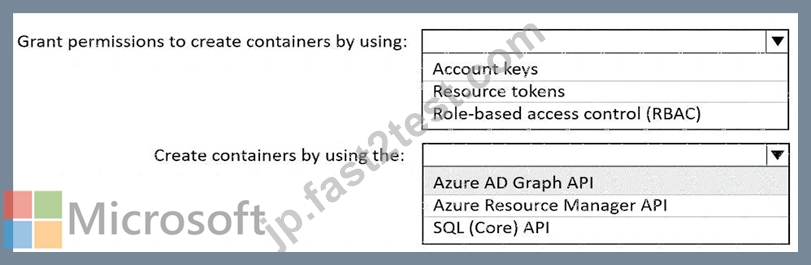
正解:
解説: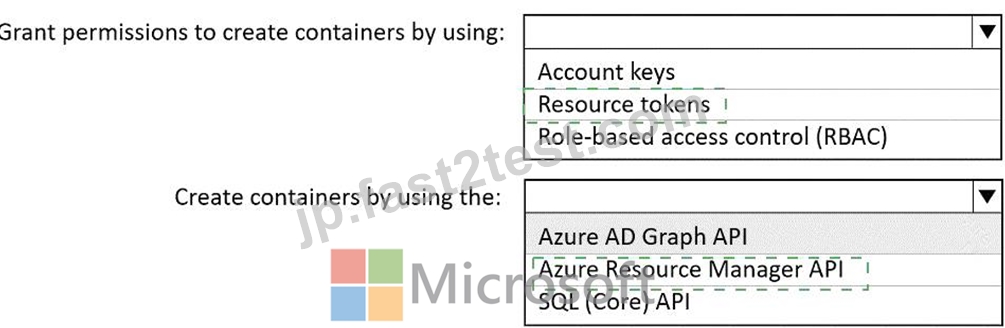
Explanation: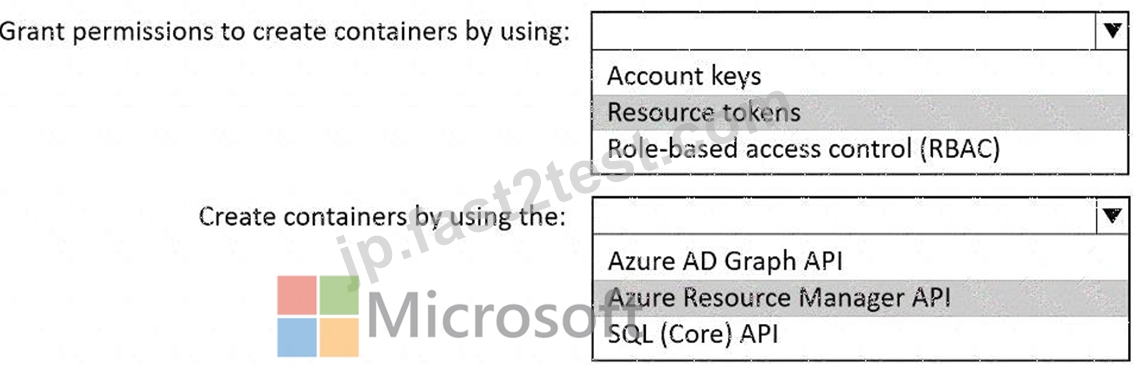
Box 1: Resource tokens
Resource tokens provide access to the application resources within a database. Resource tokens:
Provide access to specific containers, partition keys, documents, attachments, stored procedures, triggers, and UDFs.
Box 2: Azure Resource Manager API
You can use Azure Resource Manager to help deploy and manage your Azure Cosmos DB accounts, databases, and containers.
Reference:
https://docs.microsoft.com/en-us/azure/cosmos-db/secure-access-to-data
https://docs.microsoft.com/en-us/rest/api/resources/
質問 # 48
アカウント 1 という名前の Azure Cosmos DB for NoSQL アカウントに db1 という名前のデータベースがあります。
Azure Stream Analytics を使用して、JSON データを db1 に書き込む必要があります。ソリューションではコストを最小限に抑える必要があります。
db1 を Stream Analytics の出力として使用する前に、何を行う必要がありますか?
- A. db1 で、自動インデックス作成ポリシーと分析ストアが有効になっているコンテナーを作成します。
- B. アカウントで、専用ゲートウェイを有効にします。
- C. db1 で、カスタム インデックス作成ポリシーと分析ストアが無効になっているコンテナーを作成します。
- D. アカウントで、プライベート エンドポイントを追加します。
正解:D
質問 # 49
注: この質問は、同じシナリオを示す一連の質問の一部です。このシリーズの各質問には、指定された目標を達成できる可能性のある独自の解決策が含まれています。一部の質問セットには複数の正しい解決策が含まれる場合がありますが、他の質問セットには正しい解決策がない場合があります。
このセクションの質問に回答すると、その質問に戻ることはできません。そのため、これらの質問はレビュー画面には表示されません。
自動スケール スループットを使用する、アカウント 1 という名前の Azure Cosmos DB Core (SQL) API アカウントがあります。
account1 のコンテナーの 1 秒あたりの正規化された要求ユニットが特定の値を超えた場合は、Azure 関数を実行する必要があります。
解決策: 変更フィード プロセッサを使用して変更フィードを読み取るようにアプリケーションを構成し、関数をトリガーするようにアプリケーションを構成します。
これは目標を達成していますか?
- A. はい
- B. いいえ
正解:B
解説:
Instead configure an Azure Monitor alert to trigger the function.
You can set up alerts from the Azure Cosmos DB pane or the Azure Monitor service in the Azure portal.
Reference: https://docs.microsoft.com/en-us/azure/cosmos-db/create-alerts
質問 # 50
サーバーレス SQL プールを含む workspace1 という名前の Azure Synapse Analytics ワークスペースがあります。
運用データを保存する Azure Table Storage アカウントがある。
Table Storage アカウントを Azure Cosmos DB for NoSQL に置き換える必要があります。ソリューションは次の要件を満たす必要があります。
* サーバーレス SQL プールからのクエリをサポートします。
* クエリを実行するときの分析コンピューティングに対してのみ料金が発生します。
* 分析プロセスが確実に行われるようにする
注: 運用プロセスに影響します。
どの 3 つのアクションを順番に実行する必要がありますか?回答するには、アクションのリストから適切なアクションを回答領域に移動し、正しい順序で並べます。
正解:
解説:
Explanation:
質問 # 51
注: この質問は、同じシナリオを示す一連の質問の一部です。このシリーズの各質問には、指定された目標を達成できる可能性のある独自の解決策が含まれています。一部の質問セットには複数の正しい解決策がある場合もありますが、他の質問セットには正しい解決策がない場合があります。
このセクションの質問に回答すると、その質問に戻ることはできません。そのため、これらの質問はレビュー画面には表示されません。
Azure Cosmos DB for NoSQL アカウントに conlainer1 という名前のコンテナーがあります。
Container1 の内容を Azure Stream Analytics ジョブの参照データとして利用できるようにする必要があります。
解決策: データを別の Azure Cosmos DB for NoSQL コンテナーにコピーする Azure 関数を作成します。
これは目標を達成していますか?
- A. はい
- B. いいえ
正解:B
質問 # 52
Azure Cosmos DB Core (SQL) API アカウントにデータベースがあります。
accountnumber という名前の変数に基づいてデータベースにアクセスしてレコードを取得する Azure 関数を作成する必要があります。ソリューションは SQL インジェクション攻撃から保護する必要があります。
関数内でコマンド文をどのように定義すればよいでしょうか?
- A. cmd = "SELECT * FROM Persons p
WHERE p.accountnumber = @accountnumber" - B. cmd = "SELECT * FROM Persons p
WHERE p.accountnumber = LIKE @accountnumber" - C. cmd = "SELECT * FROM Persons p
WHERE p.accountnumber = 'accountnumber'" - D. cmd = "SELECT * FROM Persons p
WHERE p.accountnumber = '" + accountnumber + "'"
正解:A
解説:
Azure Cosmos DB supports queries with parameters expressed by the familiar @ notation. Parameterized SQL provides robust handling and escaping of user input, and prevents accidental exposure of data through SQL injection.
For example, you can write a query that takes lastName and address.state as parameters, and execute it for various values of lastName and address.state based on user input.
SELECT *
FROM Families f
WHERE f.lastName = @lastName AND f.address.state = @addressState
Reference: https://docs.microsoft.com/en-us/azure/cosmos-db/sql/sql-query-parameterized-queries
質問 # 53
次の図に示すように、NoSQL アカウント用の Azure Cosmos DB のバックアップを構成します。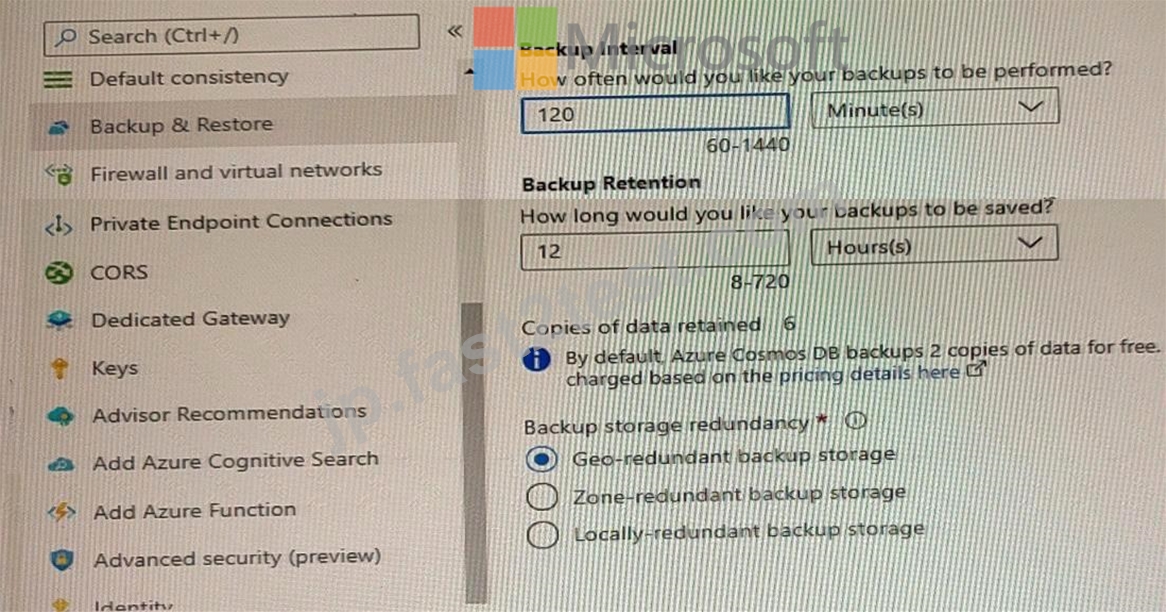
ドロップダウン メニューを使用して、図に示されている情報に基づいて各ステートメントを完成させる回答の選択肢を選択します。
注: 正しく選択するたびに 1 ポイントの価値があります。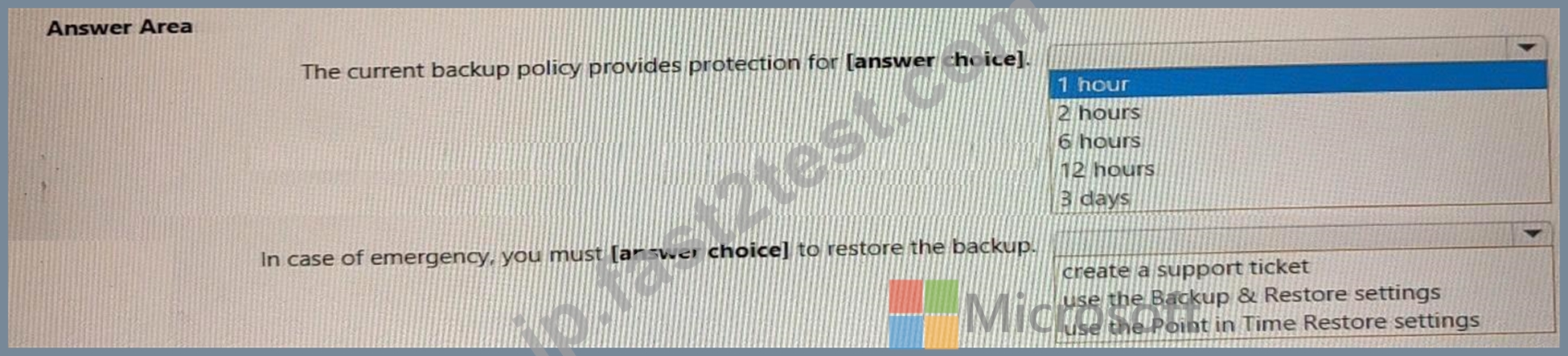
正解:
解説: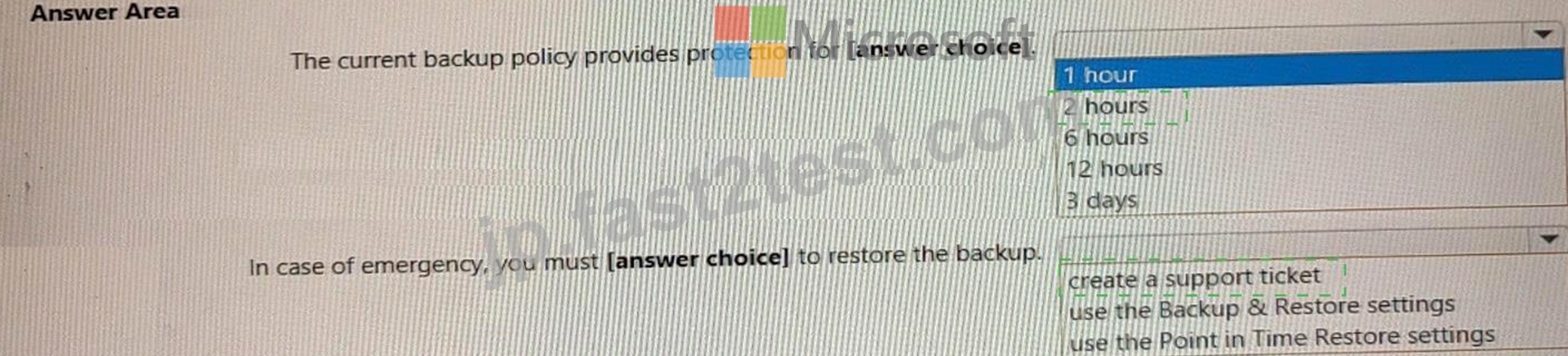
Explanation:
Box 1 = The current backup policy provides protection for: 2 Hours Azure Cosmos DB automatically takes backups of your data at regular intervals. The backup interval and the retention period can be configured from the Azure portal. You can also choose between two backup modes: periodic backup mode and continuous backup mode. Periodic backup mode is the default mode for all existing accounts and it takes a full backup of your database every 4 hours by default. Continuous backup mode is a new mode that allows you to restore to any point of time within either 7 or 30 days1.
For your scenario, based on the exhibit, you have configured a backup for an Azure Cosmos DB for NoSQL account using the periodic backup mode with a backup interval of 1 hour and a retention period of 2 hours.
This means that Azure Cosmos DB will take a full backup of your database every hour and keep only the latest two backups. Therefore, the current backup policy provides protection for 2 hours.
Box 2: In case of emergency, you must (answer choice) to restore the backup = create a support ticket Azure Cosmos DB automatically takes backups of your data at regular intervals. You can configure the backup interval and the retention period from the Azure portal. You can also choose between two backup modes:
periodic backup mode and continuous backup mode. Periodic backup mode is the default mode for all existing accounts and it takes a full backup of your database every 4 hours by default. Continuous backup mode is a new mode that allows you to restore to any point of time within either 7 or 30 days1.
For your scenario, based on the exhibit, you have configured a backup for an Azure Cosmos DB for NoSQL account using the periodic backup mode with a backup interval of 1 hour and a retention period of 2 hours.
This means that Azure Cosmos DB will take a full backup of your database every hour and keep only the latest two backups. In case of emergency, you must create a support ticket to restore the backup. This is the answer to your question.
To restore data from a periodic backup, you need to create a support request with Azure Cosmos DB team and provide the following information:
* The name of your Azure Cosmos DB account
* The name of the database or container that you want to restore
* The date and time (in UTC) that you want to restore from
* The name of the target Azure Cosmos DB account where you want to restore the data
* The name of the target resource group where you want to restore the data The Azure Cosmos DB team will then initiate the restore process and notify you when it is completed2.
質問 # 54
カスタム競合解決ポリシーを使用する Azure Cosmos DB for NoSQL アカウントがある。アカウントには、実行時例外をスローするマージ プロシージャが登録されています。実行時例外により、競合の解決が妨げられます。
競合を解決するには、Azure 関数を使用する必要があります。何を使えばいいのでしょうか?
- A. 変更フィードからプッシュされた項目を受け取り、Azure Cosmos DB トリガーによってトリガーされる関数
- B. 競合フィードから項目を取得し、タイマー トリガーによってトリガーされる関数
- C. 競合フィードからプッシュされたアイテムを受け取り、Azure Cosmos DB トリガーによってトリガーされる関数
- D. 変更フィードから項目を取得し、タイマー トリガーによってトリガーされる関数
正解:C
質問 # 55
西ヨーロッパに単一の書き込みリージョンを持つ Azure Cosmos DB Core (SQL) アカウントがあります。
dbという名前のデータベース
次の各ステートメントについて、そのステートメントが true の場合は [はい] を選択します。それ以外の場合は、「いいえ」を選択します。
注: 正しく選択するたびに 1 ポイントの価値があります。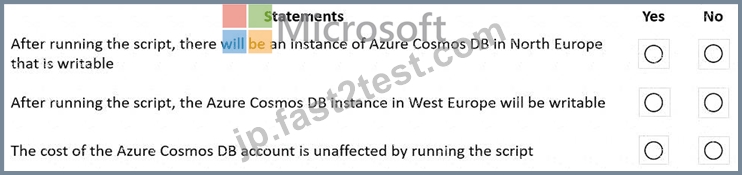
正解:
解説: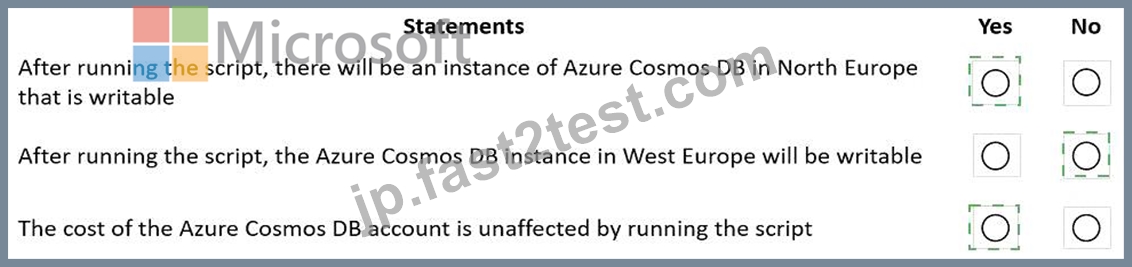
Explanation: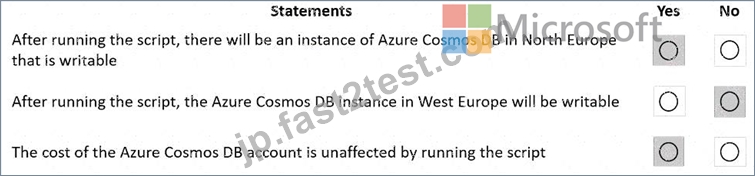
Box 1: Yes
The Automatic failover option allows Azure Cosmos DB to failover to the region with the highest failover priority with no user action should a region become unavailable.
Box 2: No
West Europe is used for failover. Only North Europe is writable.
To Configure multi-region set UseMultipleWriteLocations to true.
Box 3: Yes
Provisioned throughput with single write region costs $0.008/hour per 100 RU/s and provisioned throughput with multiple writable regions costs $0.016/per hour per 100 RU/s.
Reference:
https://docs.microsoft.com/en-us/azure/cosmos-db/sql/how-to-multi-master
https://docs.microsoft.com/en-us/azure/cosmos-db/optimize-cost-regions
質問 # 56
あなたは書籍出版社のリレーショナル データベースを管理しています。データベースには次のテーブルが含まれています。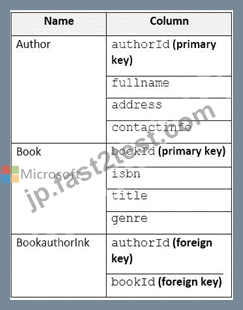
最も一般的なクエリは、指定された authorId の書籍をリストします。
リレーショナル データベースを置き換える Azure Cosmos DB Core (SQL) API の非リレーショナル データ モデルを開発する必要があります。ソリューションでは、待ち時間と読み取り操作コストを最小限に抑える必要があります。
ソリューションには何を含めるべきでしょうか?
- A. 各著者のドキュメントと各ブックのドキュメントを含むコンテナを作成します。各 Book ドキュメントに authorId を埋め込みます。
- B. 著者用のコンテナと書籍用のコンテナを作成します。各著者ドキュメントに、著者による各書籍の予約を埋め込みます。各 Book ドキュメントには、各著者の著者が埋め込まれます。
- C. 著者用のコンテナと書籍用のコンテナを作成します。各 Author ドキュメントと Book ドキュメントに、Bookauthorlnk からのデータを埋め込みます。
- D. 同じコンテナ内に Author、Book、および Bookauthorlnk ドキュメントを作成します。
正解:B
解説:
Store multiple entity types in the same container.
質問 # 57
Azure Cosmos DB Core (SQL) API アカウントにコンテナーがあります。コンテナーには、IoT デバイスからのテレメトリ データが保存されます。コンテナーはパーティション キーとして telemetryId を使用し、1 秒あたり 1,000 要求ユニット (RU/秒) のスループットを備えています。約 5,000 台の IoT デバイスが、同じ telemetryId 値を使用して 5 分ごとにデータを送信します。
データの分析を実行し、単一の IoT デバイスのテレメトリ データを頻繁に読み取って傾向分析を実行するアプリケーションがあります。
以下は、コンテナ内のドキュメントのサンプルです。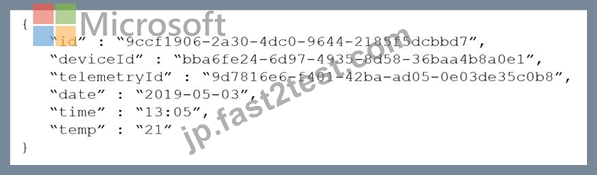
分析アプリケーションによって消費される要求ユニット (RU) の量を減らす必要があります。
あなたは何をするべきか?
- A. deviceId のパーティション キーを持つ新しいコンテナにデータを移動します。
- B. コンテナーの OfferThroughput 値を減らします。
- C. コンテナーの OfferThroughput 値を増やします。
- D. 日付のパーティション キーを使用する新しいコンテナにデータを移動します。
正解:A
解説:
The partition key is what will determine how data is routed in the various partitions by Cosmos DB and needs to make sense in the context of your specific scenario. The IoT Device ID is generally the "natural" partition key for IoT applications.
Reference: https://docs.microsoft.com/en-us/azure/architecture/solution-ideas/articles/iot-using-cosmos-db
質問 # 58
家族に関するデータを保存するコンテナがあります。以下はサンプルドキュメントです。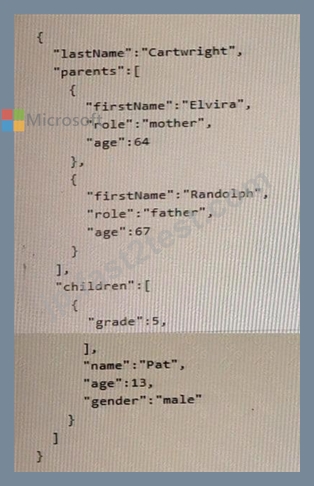
次の各ステートメントについて、そのステートメントが true の場合は [はい] を選択します。それ以外の場合は、「いいえ」を選択します。
注: 正しく選択するたびに 1 ポイントの価値があります。
正解:
解説:
Explanation:
Children who do no have parents defined will appear on the list = NO
Children who do not have parents defined will not appear on the list. This is because the document schema defines the children property as an array of objects that contain the firstName and gender properties of each child, as well as a parents property that references the id values of the parents. If a child does not have parents defined, it means that the parents property is either missing or empty for that child. Therefore, such a child will not be included in the list of children who have parents defined.
Children who have more than one pet will appear on the list multiple times. = Yes Children who have more than one pet will appear on the list multiple times. This is because the document schema defines the pets property as an array of objects that contain the givenName and type properties of each pet, as well as a children property that references the id values of the children who own the pet. If a child has more than one pet, it means that the child's id value will appear in the children property of multiple pet objects. Therefore, such a child will be included in the list of children who have pets multiple times.
Children who do no have pets defined will appear on the list = No
Children who do not have pets defined will not appear on the list. This is because the document schema defines the pets property as an array of objects that contain the givenName and type properties of each pet, as well as a children property that references the id values of the children who own the pet. If a child does not have pets defined, it means that the child's id value does not appear in the children property of any pet object.
Therefore, such a child will not be included in the list of children who have pets defined.
質問 # 59
......
DP-420日本語練習テストPDF試験材料:https://jp.fast2test.com/DP-420J-premium-file.html