

2024年最新のNutanix NCP-CI-AWS試験問題には77問があります
無料で使えるNCP-CI-AWS別格な問題集をダウンロード2024年12月24日に更新された77問があります
Nutanix NCP-CI-AWS 認定試験の出題範囲:
| トピック | 出題範囲 |
|---|---|
| トピック 1 |
|
| トピック 2 |
|
| トピック 3 |
|
| トピック 4 |
|
質問 # 37
An organization plans to use the Cluster Protect feature to protect the cluster data.
Which license will satisfy this requirement?
- A. AOS Pro or NCI Pro
- B. NCI Pro or AOS Ultimate
- C. AOS Ultimate or NCI Ultimate
- D. AOS Pro or AOS Ultimate
正解:C
解説:
The Cluster Protect feature, which provides data protection and disaster recovery capabilities for Nutanix clusters, requires either the AOS Ultimate or NCI Ultimate license. These licenses include the necessary features to leverage Cluster Protect for ensuring data resilience and recovery.
Reference:
Nutanix Documentation - Cluster Protection Features
Nutanix AOS 6.7 New Features
質問 # 38
Which address must AWS Directory Service be able to resolve when deploying a new NC2 cluster?
- A. dovvnloads.cloud.nutanix.com
- B. gateway-internal-api.cloud.nutanix.com
- C. apikeys.nutanix.com
- D. gateway-external-api. cloud, nutanix.com
正解:D
解説:
When deploying a new NC2 cluster, the AWS Directory Service must be able to resolve the address gateway-external-api.cloud.nutanix.com.
This external API gateway is critical for the NC2 cluster to communicate with Nutanix services for operations such as management, updates, and licensing.
Ensuring that this address can be resolved allows the cluster to interact properly with the Nutanix cloud infrastructure and services.
Reference:
Refer to the Nutanix documentation on network and DNS requirements for NC2 deployments, specifically the addresses that need to be resolvable for proper functionality.
質問 # 39
A company has purchased Nutanix AOS Pro licensing.
Which add-on products are available with this license tier in the AWS cluster deployment wizard?
- A. Files, Advanced Replication, and DARE
- B. Self-Service and Cost Governance
- C. Nus
- D. EUC
正解:A
解説:
With the Nutanix AOS Pro licensing, several advanced features and add-on products become available. Specifically, in the AWS cluster deployment wizard, the following add-ons are available:
Files:
Nutanix Files provides a software-defined, scale-out file storage solution that simplifies the management and scaling of unstructured data.
Advanced Replication:
Advanced Replication features in Nutanix include synchronous and asynchronous replication capabilities, allowing for robust disaster recovery and data protection solutions.
DARE (Data-At-Rest Encryption):
DARE ensures that all data stored on Nutanix clusters is encrypted, providing a higher level of security for sensitive information.
These features are included in the AOS Pro licensing tier, offering enhanced data management, protection, and security capabilities.
Reference:
Nutanix Licensing Guide
Nutanix Cloud Clusters on AWS Administration Guide
Nutanix Best Practices for Advanced Features
質問 # 40
Which two options are prerequisites for deploying an NC2 on AWS cluster? (Choose two.)
- A. AWS Direct Connect
- B. A valid CIDR range
- C. An on-premises Prism Central environment
- D. A my.nutanix.com account
正解:B、D
解説:
A valid CIDR range: A CIDR (Classless Inter-Domain Routing) range is necessary for creating the subnets within the VPC. This range defines the IP address space for the cluster and its components.
A my.nutanix.com account: This account is required to access Nutanix services, including the NC2 console, manage licenses, and perform other administrative tasks.
AWS Direct Connect and an on-premises Prism Central environment are not prerequisites for deploying an NC2 on AWS cluster. While Direct Connect can be used for enhanced network performance and connectivity, it is not a requirement for deployment. Similarly, having an on-premises Prism Central environment is not mandatory for NC2 deployment on AWS.
Reference:
Refer to the Nutanix documentation on NC2 prerequisites and setup guides, and AWS documentation on VPC and subnet creation.
質問 # 41
An administrator has been tasked with deploying a new production NC2 cluster on AWS and is studying the deployment..
AWS supports EC2 bare-metal instances in regions with at least how many partitions?
- A. 0
- B. 1
- C. 2
- D. 3
正解:B
解説:
AWS supports EC2 bare-metal instances in regions with at least 3 partitions. Partitions in AWS provide high availability and fault tolerance by distributing instances across different hardware to minimize the impact of hardware failures.
Reference:
AWS EC2 Bare Metal Instances Documentation
AWS Regions and Availability Zones
質問 # 42
An administrator seeks to ensure that the newly created NC2 organization named Finance can only deploy clusters into certain cloud regions.
What action should the administrator take to do this?
- A. Specify allowed regions when configuring a cloud account for the Finance NC2 organization.
- B. Configure RBAC roles on the Finance NC2 organization to allow access to regions.
- C. Open a support ticket with Nutanix to whitelist the allowed regions for the Finance NC2 organization.
- D. Configure IAM permission in cloud accounts to restrict access to certain regions.
正解:A
解説:
To ensure that the newly created NC2 organization named Finance can only deploy clusters into certain cloud regions, the administrator should specify the allowed regions during the cloud account configuration.
This action restricts the regions available for cluster deployment, ensuring compliance with organizational policies or regulatory requirements.
The allowed regions can be set in the cloud account settings associated with the Finance NC2 organization, defining the geographical scope of operations.
Reference:
Refer to the Nutanix documentation on NC2 cloud account configuration and region restrictions.
質問 # 43
When selecting the NC2 subscription plan from the Nutanix Billing portal, which options are available.
- A. Reserved Instances, Cloud Provider Credits, Bring your own License (BYOL)
- B. Reserved Instances, Bring your own License (BYOL)
- C. Pay-as-you-Go (PayG), Bring your own License (BYOL)
- D. Pay-as-you-Go (PayG), Cloud Provider Credits, Bring your own License (BYOL)
正解:C
解説:
When selecting the NC2 subscription plan from the Nutanix Billing portal, the available options include:
Pay-as-you-Go (PayG): A flexible payment option where users are billed based on their actual usage, providing cost efficiency for variable workloads.
Bring your own License (BYOL): Allows users to utilize existing Nutanix licenses they have purchased, offering a cost-effective way to leverage existing investments in Nutanix software.
Reference:
Refer to the Nutanix billing and subscription documentation for detailed descriptions of subscription plans and their benefits.
質問 # 44
An administrator has deployed an NC2 on AWS cluster and doesn't have connectivity back to the on-premises environment yet. The administrator wants to SSH into a CVM to edit a security setting and has deployed a Jump Host into an existing public subnet.
What action must the administrator still take to gain access to the CVM?
- A. Edit the CVM iptables to allow SSH.
- B. Edit the UVM security group to allow SSH from the Jump Host IP and remove Cluster Lockdown.
- C. Edit the User Management Network Security Group to allow SSH from the Jump Host IP.
- D. Create Custom Network Security Group at the subnet level and add the IP address of the Jump Host
正解:C
解説:
To SSH into a Controller VM (CVM) in an NC2 on AWS cluster without on-premises connectivity, the administrator needs to ensure that the security settings allow SSH access from the Jump Host. This involves editing the User Management Network Security Group to permit SSH traffic from the Jump Host IP.
Deploy Jump Host:
Ensure the Jump Host is deployed in a public subnet with an Elastic IP (EIP) assigned for external access.
Edit User Management Network Security Group:
Locate the security group associated with the user management network.
Modify the inbound rules to allow SSH (port 22) from the Jump Host's IP address. This ensures that the Jump Host can establish an SSH connection to the CVM.
Steps to Edit Security Group:
Navigate to the EC2 dashboard in the AWS Management Console.
Select "Security Groups" under the "Network & Security" section.
Find and select the appropriate security group.
Edit the inbound rules to add a new rule:
Type: SSH
Protocol: TCP
Port Range: 22
Source: Custom IP (enter the Jump Host's public IP address)
Additional Configuration:
Ensure that the CVM itself allows SSH connections and that no internal firewall rules block the traffic.
Reference:
Nutanix Cloud Clusters on AWS Administration Guide
AWS Security Group Documentation
Nutanix Best Practices for Secure Access
質問 # 45
Exhibit.
What does the exhibit indicate?
- A. Replication in paused state
- B. No ongoing replication
- C. Replication in error state
- D. Ongoing replication
正解:B
解説:
The exhibit indicates a replication operation with specific details about the protection domain, remote site, and snapshot. Key points to note are:
Bytes Completed: 0 bytes completed.
Complete Percent: 0.0%
Paused: false
Aborted: false
Given these details:
No ongoing replication: The operation has started, but there is no progress in terms of bytes completed or percentage completed. Since the status shows 0 bytes and 0 percent completed, it indicates that no data has been replicated yet.
Reference:
Nutanix Protection Domain and Replication Documentation
Nutanix Best Practices for Monitoring Replication
質問 # 46
An administrator has created an NC2 cluster on AWS, but the NC2 console has issued this alert:
Which two scenarios could have resulted in the cluster creation failure? (Choose two.)
- A. No available AWS credits
- B. Bad Terraform (TF) state in provisioning
- C. AWS Quota exceeded/instance limit exceeded
- D. Insufficient permissions
正解:C、D
解説:
The error message in the image indicates that the cluster creation failed due to reaching the maximum retries for provisioning cluster nodes. Here are two possible scenarios that could lead to this issue:
Insufficient Permissions (Answer B):
If the AWS user or role used to create the cluster does not have sufficient permissions, it can result in failures during the provisioning process. Proper IAM policies must be attached to ensure that the necessary actions can be performed, such as launching instances, creating VPCs, or managing networking components.
AWS Quota Exceeded/Instance Limit Exceeded (Answer D):
AWS imposes quotas and limits on the number of instances and other resources that can be created within an account. If these quotas are exceeded, new instances cannot be provisioned, causing the cluster creation to fail. This can be resolved by requesting a quota increase from AWS.
Reference:
Nutanix Knowledge Base Article 9774
AWS Service Quotas
Nutanix NC2 on AWS Documentation
質問 # 47
To deploy NC2 in AWS using an existing VPC, which two AWS resources should be configured beforehand? (Choose two.)
- A. Bare-metal EC2 Instance
- B. NAT Gateway
- C. Placement Group
- D. Public and Private Subnets
正解:B
解説:
To deploy NC2 in AWS using an existing VPC, the following AWS resources should be configured beforehand:
NAT Gateway: This allows instances in the private subnet to connect to the internet or other AWS services, while preventing the internet from initiating connections with those instances.
Public and Private Subnets: These are necessary to segregate the network traffic. Public subnets provide a direct route to the internet gateway, while private subnets are used for internal resources that do not need direct access to the internet.
Reference:
Nutanix Cloud Clusters on AWS Deployment Guide
Nutanix Support & Insights
質問 # 48
How many Amazon Elastic Block Store(EBS) volumes are attached to each node within an AWS NC2 cluster upon creation.
- A. 0
- B. 1
- C. 2
- D. 3
正解:B
解説:
Upon creation, each node within an AWS NC2 cluster has 3 Amazon Elastic Block Store (EBS) volumes attached.
These volumes are used for different purposes, such as operating system storage, Nutanix services, and user data storage.
The number of EBS volumes is designed to ensure adequate storage performance and capacity for the NC2 cluster's operations and workload demands.
Reference:
Refer to the Nutanix documentation on NC2 cluster setup and AWS EBS volume configurations to confirm the details on the number and purpose of EBS volumes attached to each node.
質問 # 49
preparing the landing zone networking resources for a Nutanix cluster on AWS. The administrator has created a VPC with two private subnets: one for cluster management and one for user VMs.
What additional subnet must the administrator create?
- A. Public subnet for Internet access
- B. Private subnet for Prism Central
- C. Public subnet for S3 access
- D. Private subnet for VPN gateway
正解:A
解説:
When setting up a landing zone for Nutanix clusters on AWS, having only private subnets for cluster management and user VMs is not sufficient for full cluster functionality. Nutanix clusters often need to communicate with the internet for updates, patches, and other cloud services.
VPC Configuration:
The VPC already has two private subnets (one for cluster management and one for user VMs).
Additional Requirements:
To access public services like S3 or for the cluster nodes to reach Nutanix services for updates, a public subnet is essential.
Why Public Subnet for Internet Access?:
A public subnet allows resources within it to communicate directly with the internet, which is necessary for accessing Nutanix's update servers, applying patches, and other maintenance tasks.
This subnet typically includes an internet gateway, enabling instances in the public subnet to receive and send traffic directly to the internet.
Reference:
Nutanix Cloud Clusters on AWS Administration Guide
AWS Networking Best Practices
Nutanix Networking and Subnet Configuration Guidelines
質問 # 50
An administrator has deployed an NC2 on AWS cluster that is running mixed workloads. Multiple SQL database are running on the NC2 cluster using a native subnet of 10.78.1.0/24.
The administrator wants to ensure only application servers from source subnet 10.79.1.0/24 that reside outside of the NC2 cluster can access the databases.
Which two actions will help the administrator most securely achieve this? (Choose two.)
- A.
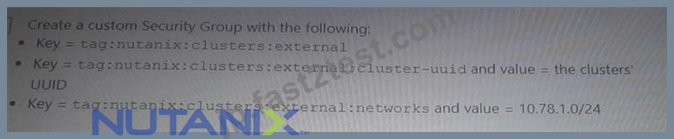
- B.

- C.

- D.

正解:A、C
解説:
To ensure that only application servers from the source subnet 10.79.1.0/24 can access the SQL databases running on the NC2 cluster in the subnet 10.78.1.0/24, the administrator can take the following actions:
Option A: Create a custom Security Group with the following rules:
Key = tag:nutanix:clusters
Key = tag:nutanix:clusters:external
and value = the clusters' UUID
Key = tag:nutanix:clusters:external
and value = 10.78.1.0/24
Option D: Create a custom Security Group with the following:
Key = nutanix:clusters
Key = nutanix:clusters:external
and value = the clusters' UUID
Key = nutanix:clusters:external
and value = 10.79.1.0/24
These actions help create security rules that restrict access to the databases only from the specified source subnet, ensuring secure and controlled access.
Reference:
Nutanix Cloud Clusters on AWS Administration
AWS Security Groups Documentation
質問 # 51
An administrator is deploying an NC2 cluster into an existing AWS VPC.
The cluster deployment fails, with the following error message:
Why has the deployment failed?
- A. Shared subnets are not supported for Nutanix clusters.
- B. The administrator has not configured the Security Group to manage the shared subnet.
- C. Outbound Internet access is not configured on the VPC.
- D. The administrator has not created the necessary Security Group.
正解:D
解説:
The administrator has not created the necessary Security Group:
The error message indicates that the creation of network interfaces in a shared subnet requires specifying a security group. This means that the necessary security group has not been created or assigned to the network interfaces.
Creating the appropriate security group and ensuring it is associated with the network interfaces during cluster deployment should resolve this issue.
Reference:
Refer to AWS documentation on security groups and network interface configuration and Nutanix documentation on prerequisites for deploying NC2 clusters in an existing AWS VPC.
質問 # 52
An administrator has been asked to create a cluster to support new workloads.
What are the maximum number of nodes supported in AWS?
- A. 28 nodes
- B. 14 nodes
- C. 24 nodes
- D. 18 nodes
正解:C
解説:
The maximum number of nodes supported in an NC2 cluster on AWS is 24 nodes. This limit ensures optimal performance and manageability within the AWS infrastructure while leveraging the benefits of the Nutanix architecture.
Reference:
Nutanix Clusters on AWS Deployment Guide
Nutanix Support & Insights
質問 # 53
A company has a large scale AWS deployment and has just finished installing their first NC2 on AWS cluster. The new cluster is now running workloads in production.
The cluster is configured with:
* 16 Nodes
* 8 Subnets
* 200 User VMs per subnet
* Nutanix Files
An administrator has been tasked with installing an EC2 instance on one of the subnets that is also used by the Nutanix, When the EC2 instance is powered on, an IP conflict occurs.
What action should the administrator take to resolve this issue?
- A. The IP address used by the EC2 instance should be blocked / excluded from IPAM.
- B. The IP address used by the NC2 VM should be blocked /excluded from EC2.
- C. Assign an elastic IP to the EC2 instance and reboot.
- D. The Instance Metadata of the NC2 instance needs to have the address reserved.
正解:B
解説:
To resolve the IP conflict issue when an EC2 instance is powered on in a subnet also used by Nutanix NC2, the administrator should block or exclude the IP address used by the NC2 VM from being assigned to EC2 instances. This can be done by configuring the IP address management (IPAM) settings to ensure that the specific IP addresses allocated to the NC2 VMs are not used by EC2 instances, preventing IP conflicts and ensuring smooth operation of both environments.
Reference:
Nutanix Cloud Clusters on AWS Deployment Guide
Nutanix Support & Insights
質問 # 54
......
Nutanix NCP-CI-AWS試験実践テスト問題:https://jp.fast2test.com/NCP-CI-AWS-premium-file.html
最新の認定試験NCP-CI-AWS問題集-実践テスト問題:https://drive.google.com/open?id=1rDiu2La_Q187YRhjpMrXYu2bwlKtq85o