

2024年最新の本日更新された最新のMS-500のPDFにはMS-500テスト限定無料!
完全版最新の問題集PDFで最新MS-500試験問題と解答
Microsoft MS-500試験に合格することは、Microsoft 365 Securityを専門としたいIT専門家にとって貴重な成果です。この認定は、Microsoft 365環境のセキュリティソリューションの実装と管理に関するスキルと知識を検証します。また、彼らが競争の激しい雇用市場で際立っているのを助け、サイバーセキュリティの分野で新しいキャリアの機会を開きます。
質問 # 64
You have an Azure Active Directory (Azure AD) tenant named contoso.com that contains the users shown in the following table.
You assign an enterprise application named App1 to Group1 and User2.
You configure an Azure AD access review of App1. The review has the following settings:
Review name: Review1
Start date: 01-15-2020
Frequency: One time
End date: 02-14-2020
Users to review: Assigned to an application
Scope: Everyone
Applications: App1
Reviewers: Members (self)
Auto apply results to resource: Enable
Should reviewer not respond: Take recommendations
On February 15, 2020, you review the access review report and see the entries shown in the following table:
For each of the following statements, select Yes if the statement is true. Otherwise, select No.
NOTE: Each correct selection is worth one point.
正解:
解説: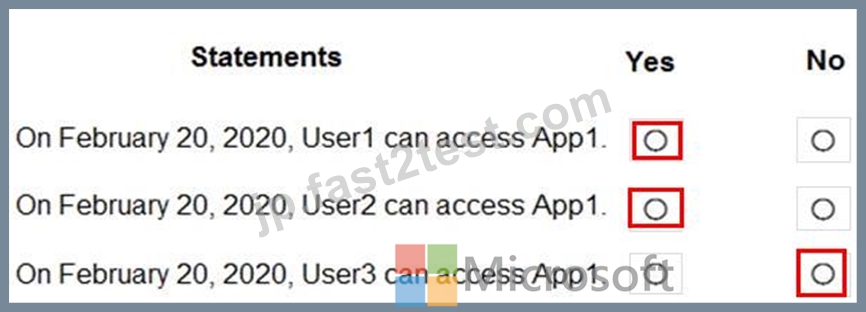
質問 # 65
Note: This question is part of a series of questions that present the same scenario. Each question in the series contains a unique solution that might meet the stated goals. Some questions sets might have more than one correct solution, while others might not have a correct solution.
After you answer a question in this section, you will NOT be able to return to it. As a result, these questions will not appear in the review screen.
You have a Microsoft 365 subscription that contains 1,000 user mailboxes.
An administrator named Admin1 must be able to search for the name of a competing company in the mailbox of a user named User5.
You need to ensure that Admin1 can search the mailbox of User5 successfully. The solution must prevent Admin1 from sending email messages as User5.
Solution: You modify the permissions of the mailbox of User5, and then create an eDiscovery case.
Does this meet the goal?
- A. Yes
- B. No
正解:B
解説:
Explanation
References:
https://docs.microsoft.com/en-us/exchange/policy-and-compliance/ediscovery/ediscovery?view=exchserver-2019
質問 # 66
You have a Microsoft 365 E5 subscription.
All computers run Windows 10 and are onboarded to Windows Defender Advanced Threat Protection (Windows Defender ATP).
You create a Windows Defender machine group named MachineGroupl.
You need to enable delegation for the security settings of the computers in MachineGroupl.
Which three actions should you perform in sequence? To answer, move the appropriate actions from the list of actions to the answer area and arrange them in the correct order.
正解:
解説:
1 - From the Microsoft Azure portal, create an Azure Active Directory (Azure AD) group.
2 - From Windows Defender Security Center, create a role.
3 - From Windows Defender Security Center,configure the permissions for MachineGroup1.
質問 # 67
You have a Microsoft 365 subscription.
All computers run Windows 10 Enterprise and are managed by using Microsoft Intune.
You plan to view only security-related Windows telemetry data.
You need to ensure that only Windows security data is sent to Microsoft.
What should you create from the Intune admin center?
- A. a device compliance policy that has the System Security settings configured
- B. a device compliance policy that has the Device Health settings configured
- C. a device configuration profile that has the Endpoint Protection settings configured
- D. a device configuration profile that has device restrictions configured
正解:D
解説:
Explanation/Reference:
https://docs.microsoft.com/en-us/intune/device-restrictions-windows-10#reporting-and-telemetry
質問 # 68
You have a Microsoft Defender Advanced Threat Protection (Microsoft Defender ATP) deployment that has the custom network indicators turned on. Microsoft Defender ATP protects two computers that run Windows
10 as shown in the following table.
Microsoft Defender ATP has the machine groups shown in the following table.
From Microsoft Defender Security Center, you create the URLs/Domains indicators shown in the following table.
For each of the following statements, select Yes if the statement is true. Otherwise, select No.
NOTE: Each correct selection is worth one point.
正解:
解説:
Explanation
質問 # 69
You have a Microsoft 365 subscription that contains the users shown in the following table.
Group1 is member of a group named Group3.
The Azure Active Directory (Azure AD) tenant contains the Windows 10 devices shown in the following table.
Microsoft Endpoint Manager has the devices shown in the following table.
Microsoft Endpoint Manager contains the compliance policies shown in the following table.
For each of the following statements, select Yes if the statement is true. Otherwise, select No.
NOTE: Each correct selection is worth one point.
正解:
解説:
質問 # 70
Note: This question is part of a series of questions that present the same scenario. Each question in the series contains a unique solution that might meet the stated goals. Some questions sets might have more than one correct solution, while others might not have a correct solution.
After you answer a question in this section, you will NOT be able to return to it. As a result, these questions will not appear in the review screen.
You have a Microsoft 365 subscription.
You have a user named User1. Several users have full access to the mailbox of User1.
Some email messages sent to User1 appear to have been read and deleted before the user viewed them.
When you search the audit log in Security & Compliance to identify who signed in to the mailbox of User1, the results are blank.
You need to ensure that you can view future sign-ins to the mailbox of User1.
You run the Set-AdminAuditLogConfig -AdminAuditLogEnabled $true
-AdminAuditLogCmdlets *Mailbox* command.
Does that meet the goal?
- A. Yes
- B. No
正解:B
解説:
Explanation
References:
https://docs.microsoft.com/en-us/powershell/module/exchange/policy-and-compliance-audit/setadminauditlogco
質問 # 71
You have an Azure Active Directory (Azure AD) tenant named contoso.com and a Microsoft 365 subscription. Contoso.com contains the groups shown in the following table.
You plan to create a supervision policy named Policy1.
You need to identify which groups can be supervised by using Policy1.
Which groups should you identify?
- A. Group1, Group3, and Group4 only
- B. Group1 only
- C. Group1, Group2, and Group3 only
- D. Group2 and Group3 only
- E. Group1 and Group4 only
正解:C
解説:
Reference:
https://docs.microsoft.com/en-us/microsoft-365/compliance/configure-supervision-policies?view=o365-worldwide
質問 # 72
You have a Microsoft 365 subscription.
You are creating a retention policy named Retention1 as shown in the following exhibit.
You apply Retention1 to SharePoint sites and OneDrive accounts.
Use the drop-down menus to select the answer choice that completes each statement based on the information presented in the graphic.
NOTE: Each correct selection is worth one point.
正解:
解説:
Explanation
質問 # 73
You haw a Microsoft 365 subscription that contains the users shown in the following table.
You need to ensure that User1, User2 , and User3 can use self-service password reset (SSPR). The solution must not affect User 4.
Solution: You enable SSPR for Group1.
Does this meet the goal?
- A. Yes
- B. No
正解:B
解説:
Explanation
By default, self-service password reset is enabled for Directory writers and Security administrator but not for Azure Information Protection administrators and Cloud application administrators. Thus, we must enable SSPR for User3 by applying it to Group2.
Reference:
https://docs.microsoft.com/en-us/azure/active-directory/authentication/concept-sspr-policy#administrator-reset-p
質問 # 74
Note: This question is part of series of questions that present the same scenario. Each question in the series contains a unique solution that might meet the stated goals. Some question sets might have more than one correct solution, while others might not have a correct solution.
After you answer a question in this section, you will NOT be able to return to it. As a result, these questions will not appear in the review screen.
You have a Microsoft 365 E5 subscription that is associated to a Microsoft Azure Active Directory (Azure AD) tenant named contoso.com.
You use Active Directory Federation Services (AD FS) to federate on-premises Active Directory and the tenant. Azure AD Connect has the following settings:
* Source Anchor: objectGUID
* Password Hash Synchronization: Disabled
* Password writeback: Disabled
* Directory extension attribute sync: Disabled
* Azure AD app and attribute filtering: Disabled
* Exchange hybrid deployment: Disabled
* User writeback: Disabled
You need to ensure that you can use leaked credentials detection in Azure AD Identity Protection.
Solution: You modify the Azure AD app and attribute filtering settings.
Does that meet the goal?
- A. Yes
- B. No
正解:B
質問 # 75
You have a Microsoft SharePoint Online site named Site! that has the users shown in the following table.
You create the retention labels shown In the following table.

正解:
解説:
Explanation
質問 # 76
Which policies apply to which devices? To answer, select the appropriate options in the answer area.
NOTE: Each correct selection is worth one point.
正解:
解説:
Explanation
質問 # 77
You have a Microsoft 365 subscription that contains an Azure Active Directory (Azure AD) tenant named contoso.com.
You need to recommend an Azure AD Privileged Identity Management (PIM) solution that meets the following requirements:
Administrators must be notified when the Security administrator role is activated.
Users assigned the Security administrator role must be removed from the role automatically if they do not sign in for 30 days.
Which Azure AD PIM setting should you recommend configuring for each requirement? To answer, select the appropriate options in the answer area.
NOTE: Each correct selection is worth one point.
正解:
解説:
Reference:
https://docs.microsoft.com/bs-latn-ba/azure/active-directory/privileged-identity-management/pim-how-to-configure-security-alerts?tabs=new
https://docs.microsoft.com/bs-latn-ba/azure/active-directory/privileged-identity-management/pim-how-to-change-default-settings?tabs=new
質問 # 78
You have a Microsoft 365 subscription that contains an Azure Active Directory (Azure AD) tenant named contoso.com.
You need to recommend an Azure AD Privileged Identity Management (PIM) solution that meets the following requirements:
* Administrators must be notified when the Security administrator role is activated.
* Users assigned the Security administrator role must be removed from the role automatically if they do not sign in for 30 days.
Which Azure AD PIM setting should you recommend configuring for each requirement? To answer, select the appropriate options in the answer area.
NOTE: Each correct selection is worth one point.
正解:
解説:
Explanation
Reference:
https://docs.microsoft.com/bs-latn-ba/azure/active-directory/privileged-identity-management/pim-how-to-config
https://docs.microsoft.com/bs-latn-ba/azure/active-directory/privileged-identity-management/pim-how-to-change
質問 # 79
You have a Microsoft 365 tenant.
User attributes are synced from your company's human resources (HR) system to Azure Active Directory (Azure AD).
The company has four departments that each has its own Microsoft SharePoint Online site. Each site must be accessed only by the users from its respective department.
You are designing an access management solution that has the following requirements:
Users must be added automatically to the security group of their department.
All security group owners must verify once quarterly that only the users in their department belong to their group.
Which components should you recommend to meet the requirements? To answer, drag the appropriate components to the correct requirements. Each component may only be used once, more than once, or not at all. You may need to drag the split bar between panes or scroll to view content.
NOTE: Each correct selection is worth one point.
正解:
解説:
Reference:
https://cloudbuild.co.uk/tag/create-a-dynamic-security-group-in-azure-ad/
https://docs.microsoft.com/en-us/azure/active-directory/governance/access-reviews-overview
質問 # 80
You have a Microsoft 365 subscription. You need to ensure that users can apply retention labels to individual documents in their Microsoft SharePoint libraries.
Which two actions should you perform? Each correct answer presents part of the solution.
NOTE: Each correct selection is worth one point.
- A. From the SharePoint admin center, modify the records management settings.
- B. From the Compliance admin center, create a label.
- C. From the Cloud App Security admin center, create a file policy.
- D. From the SharePoint admin center, modify the Site Settings.
- E. From the Compliance admin center, publish a label.
正解:B、E
解説:
Explanation
Explanation/Reference:
https://docs.microsoft.com/en-us/office365/securitycompliance/protect-sharepoint-online-files-with-office-365- labels-and-dlp
質問 # 81
You have a Microsoft Azure Active Directory (Azure AD) tenant named contoso.com that contains the users shown in the following table.
You create and enforce an Azure AD Identity Protection sign-in risk policy that has the following settings:
* Assignments: Include Group1, Exclude Group2
* Conditions: Sign in risk of Low and above
* Access: Allow access, Require password multi-factor authentication
You need to identify how the policy affects User1 and User2.
What occurs when each user signs in from an anonymous IP address? To answer, select the appropriate options in the answer area.
NOTE: Each correct selection is worth one point.
正解:
解説:
質問 # 82
You need to configure threat detection for Active Directory. The solution must meet the security requirements.
Which three actions should you perform in sequence? To answer, move the appropriate actions from the list of actions to the answer area and arrange them in the correct order.
正解:
解説:
Explanation
Topic 2, Fabrikam inc.
Overview
Fabrikam, Inc. is manufacturing company that sells products through partner retail stores. Fabrikam has 5,000 employees located in offices throughout Europe.
Existing Environment
Network Infrastructure
The network contains an Active Directory forest named fabrikam.com. Fabrikam has a hybrid Microsoft Azure Active Directory (Azure AD) environment.
The company maintains some on-premises servers for specific applications, but most end-user applications are provided by a Microsoft 365 E5 subscription.
Problem Statements
Fabrikam identifies the following issues:
* Since last Friday, the IT team has been receiving automated email messages that contain "Unhealthy Identity Synchronization Notification" in the subject line.
* Several users recently opened email attachments that contained malware. The process to remove the malware was time consuming.
Requirements
Planned Changes
Fabrikam plans to implement the following changes:
* Fabrikam plans to monitor and investigate suspicious sign-ins to Active Directory
* Fabrikam plans to provide partners with access to some of the data stored in Microsoft 365 Application Administration Fabrikam identifies the following application requirements for managing workload applications:
* User administrators will work from different countries
* User administrators will use the Azure Active Directory admin center
* Two new administrators named Admin1 and Admin2 will be responsible for managing Microsoft Exchange Online only Security Requirements Fabrikam identifies the following security requirements:
* Access to the Azure Active Directory admin center by the user administrators must be reviewed every seven days. If an administrator fails to respond to an access request within three days, access must be removed
* Users who manage Microsoft 365 workloads must only be allowed to perform administrative tasks for up to three hours at a time. Global administrators must be exempt from this requirement
* Users must be prevented from inviting external users to view company data. Only global administrators and a user named User1 must be able to send invitations
* Azure Advanced Threat Protection (ATP) must capture security group modifications for sensitive groups, such as Domain Admins in Active Directory
* Workload administrators must use multi-factor authentication (MFA) when signing in from an anonymous or an unfamiliar location
* The location of the user administrators must be audited when the administrators authenticate to Azure AD
* Email messages that include attachments containing malware must be delivered without the attachment
* The principle of least privilege must be used whenever possible
質問 # 83
You have a Microsoft 365 E5 subscription.
From Microsoft Azure Active Directory (Azure AD), you create a security group named Group1. You add 10 users to Group1.
You need to apply app enforced restrictions to the members of Group1 when they connect to Microsoft Exchange Online from non-compliant devices, regardless of their location.
What should you do? To answer, select the appropriate options in the answer area.
NOTE: Each correct selection is worth one point.
正解:
解説:
Explanation
質問 # 84
You have a Microsoft 365 E5 subscription that contains the users shown in the following table.
You enable Customer Lockbox.
Which users will be notified when a Microsoft support engineer requests access to the organization?
- A. Admin1 and Admin2 only
- B. Admin1, Admin2. and Admin3
- C. Admin2only
- D. Admin2 and Admin3 only
正解:A
質問 # 85
Note: This question is part of a series of questions that present the same scenario. Each question in the series contains a unique solution that might meet the stated goals. Some questions sets might have more than one correct solution, while others might not have a correct solution.
After you answer a question in this section, you will NOT be able to return to it. As a result, these questions will not appear in the review screen.
You have an on-premises Active Directory domain named contoso.com.
You install and run Azure AD Connect on a server named Server1 that runs Windows Server.
You need to view Azure AD Connect events.
You use the Directory Service event log on Server1.
Does that meet the goal?
- A. Yes
- B. No
正解:B
解説:
Explanation
References:
https://support.pingidentity.com/s/article/PingOne-How-to-troubleshoot-an-AD-Connect-Instance
質問 # 86
You need to ensure that a user named Grady Archie can monitor the service health of your Microsoft 365 tenant. The solution must use the principle of least privilege.
To complete this task, sign in to the Microsoft 365 portal.
正解:
解説:
See explanation below.
Explanation
You need to assign the Service Administrator role to Grady Archie.
* In the Microsoft 365 Admin Center, type Grady Archie into the Search for users, groups, settings or tasks search box.
* Select the Grady Archie user account from the search results.
* In the Roles section of the user account properties, click the Edit link.
* Select the Customized Administrator option. This will display a list of admin roles.
* Select the Service admin role.
* Click Save to save the changes.
質問 # 87
......
Microsoft MS-500試験に合格することは、クラウドベースのセキュリティおよびコンプライアンス管理の分野でキャリアを進めたいITプロフェッショナルにとって重要なステップです。この認定は世界的に認められており、個人がMicrosoft 365環境を管理し、保護する能力を証明します。MS-500の認定を取得することで、個人のスキルと知識が向上するだけでなく、収入のポテンシャルが高まり、ITセキュリティおよびコンプライアンス管理の分野で新しいキャリア機会が開かれます。
無料MS-500試験問題MS-500実際の無料試験問題:https://jp.fast2test.com/MS-500-premium-file.html
無料MS-500試験を簡単に100%合格できる試験問題集:https://drive.google.com/open?id=1Dd0BQJD6TY7yKtagANZgqTGQhCmYsrAs