

試験準備には欠かさないトップクラスのAdobe AD0-E720試験学習ガイド練習問題最新版
今すぐAD0-E720問題を使おうAD0-E720問題集PDFで合格しよう
Adobe AD0-E720 認定試験の出題範囲:
| トピック | 出題範囲 |
|---|---|
| トピック 1 |
|
| トピック 2 |
|
| トピック 3 |
|
| トピック 4 |
|
| トピック 5 |
|
| トピック 6 |
|
質問 # 15
An Adobe Commerce developer has been asked to implement a custom font specifically for emails. The Adobe Commerce developer has already added their font into the file system.
Keeping best practice in mind, which two files would need to be implemented to show the custom font in the email?
- A. Add in a lib-font-face mixin with the custom font name into the newly created file.
- B. Add the font-family into the <head></head> of the email within the email template.
- C. /Vendor/Theme/web/css/source/_extend.less
Use the ^import font function with the url of the custom font from the theme.
/Vendor/Theme/web/css/source/_email.less file - D. Add in the styles to target the elements that require being changed.
/vendor/Theme/web/css/source/_typography.less
正解:C、D
解説:
Explanation
To implement a custom font specifically for emails, the developer needs to do the following steps:
Add the custom font file to the web/fonts directory of the custom theme.
Use the @import font function with the url of the custom font from the theme in the
/Vendor/Theme/web/css/source/_extend.less file. This will import the custom font and make it available for use in other LESS files. For example:
@import font('custom-font', '@{baseDir}fonts/custom-font.ttf', 'truetype'); Add in the styles to target the elements that require being changed in the
/Vendor/Theme/web/css/source/_email.less file. This file is used to define the styles for email templates.
The developer can use the .lib-font-face() mixin to apply the custom font to specific selectors. For example:
lib-font-face( @family-name: @custom-font, @font-path: '@{baseDir}fonts/custom-font', @font-weight:
normal, @font-style: normal );
h1 { .lib-font-face( @family-name: @custom-font, @font-path: '@{baseDir}fonts/custom-font',
@font-weight: normal, @font-style: normal ); }
The /vendor/Theme/web/css/source/_typography.less file is not suitable for implementing a custom font for emails, as it is used for defining global typography styles for web pages. The <head></head> tag is not used for adding fonts in email templates, as it is not supported by most email clients. References: [Custom fonts],
[Email templates overview]
質問 # 16
An Adobe Commerce developer has been asked to add text to an email template that supports translations.
Which two options would they use during their implementation? (Choose two.)
- A. {{trans "%items items" items="numltems"}}
- B. {{translations "Lorem Ipsum is simply dummy text of the printing"}}
- C. {{translations "%items items" items="numltems"}}
- D. {{trans "Lorem Ipsum is simply dummy text of the printing"}}
正解:A、C
解説:
Explanation
To add text to an email template that supports translations, the developer should use the {{trans}} directive with the text enclosed in double quotes. For example:
{{trans "Lorem Ipsum is simply dummy text of the printing"}}
This will render the text as it is, or translate it if a translation file is available for the current locale. If the text contains a variable, the developer should use a placeholder with a percent sign and pass the variable name as an argument. For example:
{{trans "%items items" items="numItems"}}
This will render the text with the value of numItems replacing the %items placeholder, or translate it if a translation file is available for the current locale. The {{translations}}directive is not valid and will not work.
References: [Translate email templates], [Email template syntax]
質問 # 17
In which folder can a custom theme favicon be added?
- A. <your_theme_dir>/Magento_Theme/web/
- B. <your_theme_dir>/web/
- C. <your_theme_dir>/assets/images
正解:A
解説:
Explanation
The favicon can be added to the <your_theme_dir>/Magento_Theme/web/ directory of a custom theme. The favicon should have the name favicon.ico and replace the default one from the Magento_Theme module. The
<your_theme_dir>/web/ directory is used for storing web assets that are not specific to any module. The
<your_theme_dir>/assets/images directory does not exist by default and is not used for storing favicons.
References: [Add a favicon], [Theme structure]
質問 # 18
An Adobe Commerce developer needs to pass JSON data to a JavaScript component while keeping XSS prevention strategies in mind.
Which two options would the developer use? (Choose two.)
- A.

- B.

- C.

- D.

正解:B、D
解説:
Explanation
To pass JSON data to a JavaScript component while keeping XSS prevention strategies in mind, the developer should use the following options:
Option A: Use the x-magento-init script tag with the data-mage-init attribute and the JSON.parse function to initialize the component with the JSON data. This option is secure because it does not use any HTML tags or attributes that can be exploited by XSS attacks.
Option C: Use the text/x-magento-init script tag with the type attribute and the JSON.parse function to initialize the component with the JSON data. This option is secure because it does not use any HTML tags or attributes that can be exploited by XSS attacks.
The following options are not secure and should not be used:
Option B: Use the script tag with the type attribute and the escapeHtmlAttr function to initialize the component with the JSON data. This option is not secure because it uses the escapeHtmlAttr function, which is meant for escaping HTML attributes, not JSON data. This function can introduce double quotes in the JSON data, which can break the JSON syntax and cause errors.
Option D: Use the script tag with the type attribute and the escapeJsQuote function to initialize the component with the JSON data. This option is not secure because it uses the escapeJsQuote function, which is meant for escaping JavaScript strings, not JSON data. This function can introduce backslashes in the JSON data, which can break the JSON syntax and cause errors.
質問 # 19
An Adobe Commerce developer needs to improve the time of first render of the pages. How would the developer achieve this?
- A. Enable CSS file merging
- B. Use the quick static files deployment strategy
- C. Enable JavaScript minification
- D. Enable CSS critical path
正解:D
解説:
Explanation
CSS critical path is a feature that improves the time of first render of the pages by inlining the CSS rules that are required to render the above-the-fold content of the page. This reduces the number of requests and bytes that need to be downloaded before the page is rendered. CSS critical path can be enabled in the Admin Panel by navigating to Stores > Configuration > Advanced > Developer > CSS Settings and setting Enable CSS Critical Path to Yes. References: Adobe Commerce Developer Documentation, Adobe Inc.
質問 # 20
An Adobe Commerce developer needs to debug an issue, where the path of the block template was invalid and the warning was added to a log file. Which mode are errors only written to a log file and not displayed?
- A. developer only
- B. developer and default
- C. default and production
正解:C
解説:
Explanation
The default and production modes are the modes where errors are only written to a log file and not displayed on the screen. This is done to prevent exposing sensitive information to users and attackers. The default mode is the mode that Adobe Commerce runs in by default if no other mode is specified. The production mode is the mode that Adobe Commerce runs in when it is deployed to a live site. The developer can use the following command to check the current mode:
bin/magento deploy:mode:show
The other two options are incorrect because they display errors on the screen as well as writing them to a log file. The developer mode is the mode that Adobe Commerce runs in when it is under development or testing.
The developer mode enables enhanced debugging and error reporting features. References: Adobe Commerce Developer Documentation, Adobe Inc.
質問 # 21
An Adobe Commerce developer wants to add a custom widget that extends the default Calendar Widget. What would the contents of this file look like?
- A.
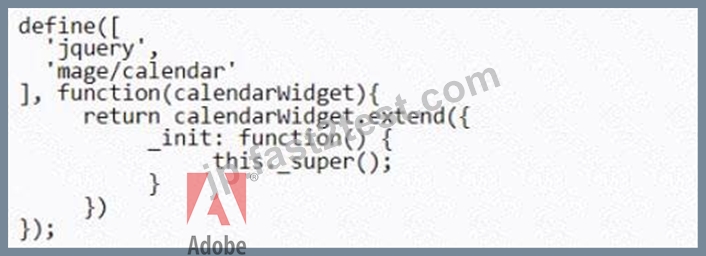
- B.

- C.

正解:C
解説:
Explanation
To add a custom widget that extends the default Calendar Widget, the contents of the file would look like option B. This is because option B follows the correct syntax and structure for defining a jQuery widget in Magento. The code does the following steps:
Defines a module with the name "Vendor_Module/js/calendar-widget" that depends on the "jquery/ui" and "Magento_Ui/js/lib/knockout/bindings/datepicker" modules.
Returns a function that creates a new widget with the name "vendor.calendarWidget" that extends the base calendar widget class.
Overrides the init function of the base calendar widget class to add custom logic or functionality to the widget.
Option A is not correct because it does not use the correct syntax for defining a jQuery widget. It uses a script tag instead of a define function, which is not valid for creating a module. It also uses an incorrect name for the widget, which should use a dot instead of a slash. Option C is not correct because it does not use the correct syntax for extending a widget. It uses an extend function instead of a widget function, which is not valid for creating a new widget. It also does not return anything from the module, which will cause an error.
References: [jQuery widgets], [Calendar Widget]
質問 # 22
An Adobe Commerce developer is building a theme Vendor/Orange and needs to customize the header of email templates. Where in the theme does the developer need to place the new template for this customization?
- A. /Magento_Email/templates/override/html/header.html
- B. /Magento_Email/email/header.html
- C. /Magento_Theme/html/header.html
正解:B
解説:
Explanation
To customize the header of email templates, the developer needs to place the new template in the
/Magento_Email/email/header.html path of the theme. This will override the default header template from the Magento_Email module. The /Magento_Email/templates/override/html/header.html path is not valid and will not work. The /Magento_Theme/html/header.html path is used for customizing the header of web pages, not emails. References: [Customize email templates], [Email templates overview]
質問 # 23
Which Ul component property is used for cross tracking property changes?
- A. links
- B. listens
- C. exports
正解:B
解説:
Explanation
The listens property is used for cross tracking property changes in the UI component. The listens property defines the dependencies between the properties of different UI components. It allows one UI component to listen to the changes of another UI component's property and react accordingly. For example, the listens property can be used to update the value of a text field based on the selection of a dropdown menu
質問 # 24
An Adobe Commerce developer needs to create translations for the Orange/custom theme. Which directory would the developer place the translations?
- A. Orange/custom/etc
- B. Orange/custom/il8n
- C. Orange/custom/translations
正解:B
解説:
Explanation
To create translations for a theme, the developer needs to place the translation files in the il8n directory of the theme. The translation files should have the format <language code>_<country code>.csv, such as en_US.csv or fr_FR.csv. The etc and translations directories are not used for storing translation files. References:
[Translations overview], [Translate theme strings]
質問 # 25
An Adobe Commerce developer needs to apply a Knockout binding to show content under certain conditions.
Which two syntaxes would achieve this? (Choose two.)
- A.

- B.

- C.

- D.

正解:C、D
解説:
Explanation
Option A and Option C are both valid ways to apply a Knockout binding to show content under certain conditions. Option A uses the visible binding, which sets the display style of the element to none if the value is false. Option C uses the if binding, which removes or inserts the element from the DOM based on the value.
Option B and Option D are incorrect because they use invalid syntax for Knockout bindings. Option B uses a colon instead of an equal sign to assign the value, and Option D uses a single quote instead of a double quote to enclose the value.
https://knockoutjs.com/documentation/binding-syntax.html
https://knockoutjs.com/documentation/binding-context.html
質問 # 26
An Adobe Commerce Developer is adding a new page layout to the theme directory within a custom theme.
Which file needs to be created to register the new page layout?
- A. app/design/frontend/<VendorName>/<ThemeName>/Magento_Theme/layout/layouts.xml
- B. app/design/frontend/<VendorName>/<ThemeName>/layouts. xml
- C. app/design/frontend/<VendorName>/<ThemeName>/Magento_Theme/layouts.xnil
正解:A
解説:
Explanation
To register a new page layout in a custom theme, the developer needs to create a layouts.xml file in the app/design/frontend/<VendorName>/<ThemeName>/Magento_Theme/layout directory. The layouts.xml file should contain the <layout> element with the id, label, and file attributes. The id attribute is used to reference the layout in other layout files, the label attribute is used to display the layout name in the admin panel, and the file attribute is used to specify the path to the layout file relative to the web directory of the theme. The app/design/frontend/<VendorName>/<ThemeName>/layouts.xml and app/design/frontend/<VendorName>/<ThemeName>/Magento_Theme/layouts.xml files are not valid and will not work. References: [Create a new page layout], [layouts.xml]
質問 # 27
An Adobe Commerce developer wants to determine which template is rendering a specific element on the storefront. Which two methods can they use to turn on template hints? (Choose two.)
- A. On the command line, run the command; php bin/magento setup:enable-template-hints
- B. In the Admin, navigate to Stores > Configuration > Advanced > Developer > Debug.
Set Enabled Template Path Hints for Storefront to Yes - C. In the Admin, navigate to system > Advanced > Template > Developer > Debug.
Set Enabled Template Path Hints for Storefront to Yes - D. On the command line, run the command; php bin/magento dev:template-hints:enable
正解:B、D
解説:
Explanation
Template hints are a useful tool for frontend developers to determine which template is rendering a specific element on the storefront. Template hints can be turned on using either of these two methods:
In the Admin Panel, navigate to Stores > Configuration > Advanced > Developer > Debug. Set Enabled Template Path Hints for Storefront to Yes On the command line, run the command; php bin/magento dev:template-hints:enable The other two options are incorrect because they do not exist as valid methods to turn on template hints.
References: Adobe Commerce Developer Documentation, Adobe Inc.
質問 # 28
An Adobe Commerce developer wants to create a new theme Vendor_Orange which extends from MagentoMuma. Which file is responsible for specifying the parent theme?
- A. registration.php
- B. view.xml
- C. theme.xml
正解:C
解説:
Explanation
The theme.xml file is responsible for specifying the parent theme of a custom theme. The file should contain the <parent> element with the value of the parent theme's directory, such as
<parent>MagentoMuma</parent>. The view.xml file is used to configure the theme's images, fonts, and layout. The registration.php file is used to register the theme in the system. References: [Create a theme],
[theme.xml]
質問 # 29
An Adobe Commerce developer wants to create a sticky widget.
How would the widget be initialized using the data-mage-init attribute?
- A.

- B.

- C.

正解:A
解説:
Explanation
Option B is the correct way to initialize a widget using the data-mage-init attribute. The attribute value should be a JSON object with the widget name as the key and the widget options as the value. Option A is incorrect because it uses a string instead of an object for the attribute value. Option C is incorrect because it uses a colon instead of a comma to separate the widget name and the options.
質問 # 30
An Adobe Commerce developer wants to create symlinks for the frontend theme named Vendor/Orange using a CSS file: <magento_root>/pub/static/frontend/Vendor/Orange/en_US/css/styles-l.css during development.
Which CLI command would the developer use to create symlinks for the en_US locale?
- A. bin/magento deploy:mode:set theme --locale="en_US" --area="frontend" css/styles-1
- B. bin/magento dev:theme:deploy --locale="en__US" --theme="Vendor/Orange" css/styles-1
- C. bin/magento dev:source-theme:deploy --type=Mless" --locale="en_US" --theme="Vendor/Orange" css/styles-1
正解:C
解説:
Explanation
The bin/magento dev:source-theme:deploy command is used to create symlinks for frontend theme files during development. This command allows the developer to modify source files without running static content deployment every time. The developer can use parameters to specify the type, locale, theme, and file names for creating symlinks. For example, to create symlinks for a CSS file named styles-l.css for the Vendor/Orange theme and the en_US locale, the developer can use:
bin/magento dev:source-theme:deploy --type=less --locale=en_US --theme=Vendor/Orange css/styles-l The other two options are incorrect because they do not create symlinks for frontend theme files. The bin/magento dev:theme:deploy command is used to register themes with Magento and clear caches. The bin/magento deploy:mode:set command is used to change the application mode. References: Adobe Commerce Developer Documentation, Adobe Inc.
質問 # 31
Where are the Magento Ul library LESS files located?
- A. lib/web/css/source/lib
- B. Magento_Lib/web/css/source
- C. Magento_Ui/web/css/source/
正解:B
解説:
Explanation
This directory contains various LESS files that define variables, mixins, functions, and styles for common UI elements and components. The Magento_Ui/web/css/source and lib/web/css/source/lib directories are not valid and do not contain the Magento UI library LESS files. References: [Magento UI library], [Magento UI library source files]
質問 # 32
An Adobe Commerce developer has created a system configuration field:
Using Layout XML, how can the visibility of a block be controlled by a system configuration?
- A. <block name="block.name" template="Vendor_Module::template.phtml"
ifconfig="general/module/enable" /> - B. <block name="block.name" template=''Vendor_Module:
:template.phtml"ifconfig="module/general/enable" /> - C. <block name="block.name" template="Vendor_Module::template.phtml="
ifconfig="vendor/general/enable" />
正解:C
解説:
Explanation
To control the visibility of a block using a system configuration, the developer should use the ifconfig attribute in the <block> tag. The ifconfig attribute should specify the path to the system configuration field that determines whether the block is visible or not. For example:
<block name="block.name" template="Vendor_Module::template.phtml" ifconfig="vendor/general/enable" /> This will render the block only if the vendor/general/enable system configuration field is set to true. The module/general/enable and general/module/enable paths are not valid and will not work, as they do not match the system configuration field defined in the image. References: [Layout instructions], [System configuration]
質問 # 33
An Adobe Commerce developer has been asked to move a block called country from the container sidebar to the container content, the block has to be the last child on the content container.
Which layout instruction would be used to move the block?
- A. <move element="country-element"destination="content-element"/>
- B. <move element="country" destination="content" after="last-child"/>
- C. <moveelement = "country"destination="content" after="-"/>
正解:C
解説:
Explanation
To move a block from one container to another, the developer needs to use the <move> layout instruction with the element attribute specifying the name of the block and the destination attribute specifying the name of the container. The after attribute can be used to position the block relative to other blocks in the same container.
The value "-" means that the block will be placed after all other blocks, i.e., as the last child. The value
"last-child" is not valid for the after attribute and will not work. The element and destination attributes should use the names of the blocks and containers, not their aliases or classes. References: [Layout instructions],
[Move an element]
質問 # 34
An Adobe Commerce developer needs to add CMS content above products on a specific category page via the Admin Panel. Where would the developer need to put the content in order to use Display Modes functionality and display it on the category?
- A. Widget
- B. CMS Block
- C. CMS Page
正解:B
解説:
Explanation
CMS Blocks are the best option to add CMS content above products on a specific category page via the Admin Panel. CMS Blocks are reusable pieces of content that can be inserted into any page or layout using widgets or layout XML. CMS Blocks can be assigned to specific categories using the Display Settings tab in the category edit page. The developer can choose the Display Mode for the category, which determines how the CMS Block and the products are displayed on the category page. For example, the developer can choose Static block and products to show both the CMS Block and the products, or Static block only to show only the CMS Block and no products. References: Adobe Commerce Developer Documentation, Adobe Inc.
質問 # 35
......
無料Adobe Commerce AD0-E720試験問題:https://jp.fast2test.com/AD0-E720-premium-file.html