

検証済みPL-200問題集と解答100%合格はここにFast2test
合格させるPL-200試験一発合格保証2024問題集!
質問 # 79
You create a new Power Virtual Agents chatbot for an organization.
Testing and production deployment of the chatbot are not complete.
You need to ensure that appropriate users can access the chatbot.
Which methods should you use? To answer, select the appropriate options in the answer area.
NOTE:Each correct selection is worth one point.
正解:
解説:
Explanation:
Graphical user interface, application Description automatically generated
Box 1: Use the demo website
When publishing the bot to the web, you can publish to a prebuilt demo website (which you can use to share the bot with your teammates and stakeholders) and to your own live website.
Box 2: Share the chatbot to a security group containing all users.
A license for each user, also known as a "per user license" (or "Power Virtual Agent User License" as referred to on the Microsoft 365 admin center), should be assigned to individual users who need access to create and manage chatbots.
To simplify user license management, you can assign licenses to an Azure Active Directory (Azure AD) security group.
Box 3: Embed the chatbot code in an IFRame on your copany's public website You can add your bot to a live website as an IFrame. Your live website can be a customer-facing external website or an internal site, like a SharePoint or Yammer site.
Reference:
https://docs.microsoft.com/en-us/power-virtual-agents/publication-connect-bot-to-web-channels
https://docs.microsoft.com/en-us/power-virtual-agents/requirements-licensing
質問 # 80
You are a Dynamics 365 Customer Service system administrator.
Your organization does not permit the use of custom code for solutions.
You need to create a view that can be viewed by all users in an organization.
Where should you create the view?
- A. Microsoft Excel template
- B. Templates area
- C. Entities component of a solution
- D. Microsoft Virtual Studio
正解:C
解説:
Entity: Refers to a table in Dataverse. Table and entity are often used interchangeably for data access.
Edit public views through tables
* In the solution create a new table or find an existing table that where the public views need to be edited.
* Expand Data, select Tables, select the table you want, and then select the Views area.
* On the toolbar, select Add view. Add view to table
* On the Create a view dialog, enter a name and, optionally, a description, and then select Create.
Reference:https://docs.microsoft.com/en-us/power-apps/maker/model-driven-apps/create-edit-views-app-designe
質問 # 81
You are designing a Power Virtual Agents chatbot for a store.
You need to teach the chatbot to acknowledge the store's product categories and the variations within specific categories.
You need to create custom entities to provide the chatbot with the knowledge of the product categories.
Which features should you use? To answer, select the appropriate options in the answer area.
NOTE: Each correct selection is worth one point.
正解:
解説:
Explanation
Smart match
Synonyms
Topic
https://docs.microsoft.com/en-us/power-virtual-agents/advanced-entities-slot-filling
質問 # 82
A guest asks about the start time of a specific scheduled event and wants to know what the snow conditions will be like during their stay.
You need to determine how to design the chat solution to answer those questions.
What should you do? To answer, select the appropriate options in the answer area.
NOTE: Each correct selection is worth one point.
正解:
解説:
Explanation
Graphical user interface Description automatically generated
Box 1: Load the extracted topic into a variable
Power Virtual Agents uses entities to understand and identify a specific type of information from a user's responses. When saving the identified information to a variable, a variable type will be associated with it. The variable type is analogous with the entity.
In Power Virtual Agents, a topic defines a how a bot conversation plays out.
A topic has trigger phrases - these are phrases, keywords, or questions that a user is likely to type that is related to a specific issue - and conversation nodes - these are what you use to define how a bot should respond and what it should do.
Box 2: Create a custom entity
The prebuilt entities cover commonly used information types, but on some occasions, such as when building a bot that serves a specific purpose, you'll need to teach the bot's language understanding model some domain-specific knowledge.
Reference:
https://docs.microsoft.com/en-us/power-virtual-agents/advanced-entities-slot-filling
質問 # 83
A guest asks about the start time of a specific scheduled event and wants to know what the snow conditions will be like during their stay.
You need to determine how to design the chat solution to answer those questions.
What should you do? To answer, select the appropriate options in the answer area.
NOTE: Each correct selection is worth one point.
正解:
解説:
Reference:
https://docs.microsoft.com/en-us/power-virtual-agents/advanced-entities-slot-filling
質問 # 84
You create a Power Platform help Desk solution.
You need to create a dashboard that displays information on help desk cases that are handled each week.
Which dashboard components should you use? To answer, select the appropriate options in the answer area.
NOTE: Each correct selection is worth one point.
正解:
解説:
Reference:
https://docs.microsoft.com/en-us/powerapps/user/add-powerbi-dashboards
https://docs.microsoft.com/en-us/powerapps/maker/model-driven-apps/create-edit-system-chart
質問 # 85
You need to embed the check-in solution into the communication solution. To answer, select the appropriate options in the answer area.
NOTE: Each correct selection is worth one point.
正解:
解説:
質問 # 86
You set up a new instance of Dynamics 365 for Customer Service.
Users report a variety of issues working with cases on mobile devices.
You need to configure the mobile app to be able to view cases.
NOTE: Each correct selection is worth one point.
正解:
解説:
Explanation
1. User is able to login but can't see Case Records --> "Configure Mobile Settings on Case Entity Level"
2. Users can open cases but cannot see the subject of the case - "configure mobile settings at the field level within the case form
3. User reports that they cannot access the system from Dynamics 365 mobile app --> Configure a security role in the mobile permission set of the appropriate user
https://docs.microsoft.com/en-us/dynamics365/customer-engagement/mobile-app/set-up-dynamics-365-for-phon
質問 # 87
You are designing a Power Virtual Agents chatbot.
You observe that the environment you plan to use does not appear as an option in the Power Virtual Agents user interface.
You need to ensure that you can create the chatbot in the environment that you want to use.
What should you do?
- A. Change the region for the environment.
- B. Create an environment in a supported region.
- C. Convert the environment to a sandbox environment.
正解:B
解説:
Explanation
The environment doesn't show up in the drop-down menu of Power Virtual Agents Your environment might not show up in the drop-down menu due to one of the following:
The environment doesn't have a database created. To resolve this issue, go to admin.powerplatform.com to create a database in your environment.
The environment is created in an unsupported region.
Reference: https://docs.microsoft.com/en-us/power-virtual-agents/environments-first-run-experience
質問 # 88
You implement an editable grid for the Account entity.
The business team provides the following list of features that they would like you to implement:
Group by or sort columns in the current view.
Configure a business rule to show an error message.
Edit values in calculated fields.
Edit the Address composite field.
Use the editable grid on mobile phones.
Which actions can you perform? To answer, select the appropriate options in the answer area.
NOTE: Each correct selection is worth one point.
正解:
解説:
Explanation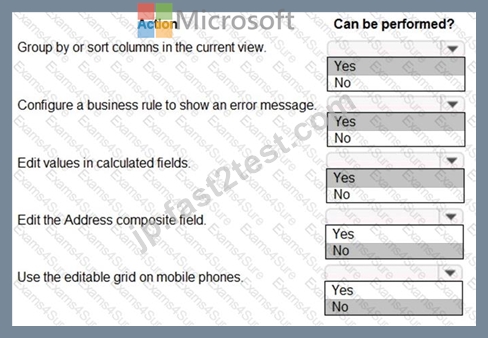
質問 # 89
A company uses Power Apps and Power Automate.
There is an issue with the existing flow in the test environment. Development changes are allowed in the test environment.
You need to troubleshoot the issue with the flow.
Which command should you use? To answer, select the appropriate options in the answer area.
NOTE: Each correct selection is worth one point.
正解:
解説:
Explanation
Graphical user interface, text, application Description automatically generated
質問 # 90
You have a Power Apps portal app that supports a sales community and a service community in the same environment. The only language configured in the environment is English. The company wants to add support for two more languages.
The solution must meet the following requirements:
* Languages must be for both sales and service functions.
* The company logo and colors must be used and apply to all screens.
* Communities must be separate with different URLs and access lists.
You need to configure the solution.
What should you configure? To answer, select the appropriate options in the answer area.
NOTE:Each correct selection is worth one point.
正解:
解説:
Explanation:
Box 1: Create two portals, one for each community
Power Apps portal app languages
Box 2: Add themes
You can create a custom look and feel (a theme), for your app by making changes to the default colors and visual elements provided in the uncustomized system. For example, you can create your personal product branding by adding a company logo and providing table-specific coloring. A theme can be created by using the Themes area, without requiring a developer to write code. You can create, clone, change, or delete themes that are used in your environment.
Reference:https://docs.microsoft.com/en-us/power-apps/maker/model-driven-apps/create-themes-organization-br
質問 # 91
You are designing a desktop user interface (Ul) flow.
The Ul flow automates legacy software.
You need to prepare data for transfer to a Microsoft SharePoint list.
Which four actions should you perform in sequence? To answer, move the appropriate actions from the list of actions to the answer area and arrange them in the correct order.
正解:
解説:
Explanation
Reference:
https://docs.microsoft.com/en-us/power-automate/ui-flows/inputs-outputs-desktop#use-outputs-to-extract-inform
質問 # 92
You need to design the resort portal's email registration process.
Which solutions should you use? To answer, select the appropriate options in the answer area.
NOTE: Each correct selection is worth one point.
正解:
解説:
質問 # 93
You are designing a Power Virtual Agents chatbot.
The chatbot must be able to maintain customer information if the conversation topic changes during a dialog.
You need to configure variables to store customer name and email address.
Which type of variable should you create?
- A. bot
- B. slot
- C. topic
- D. session
正解:A
解説:
Explanation
By default, a variable's value can only be used in the topic where this variable gets created. However, you might want the bot to use the same value across topics. This means the bot can remember the necessary context when a conversation spans multiple topics. In some systems, these types of variables are known as global variables. In Power Virtual Agents, these variables are called bot variables, because they apply across the entire bot.
Reference:
https://docs.microsoft.com/en-us/power-virtual-agents/authoring-variables-bot
質問 # 94
You plan to create a canvas app.
The app must meet the following requirements:
* Send an email after a record is saved.
* Display the expiration column on a form if the creation date of the record is older than 90 days.
You need to configure the app.
Which features should you use? To answer, select the appropriate options in the answer area.
正解:
解説:
質問 # 95
You are a Dynamics 365 Customer Service administrator.
A user must be able to view system posts and activities in a dashboard.
You need to create the dashboard for the user.
Which components should you use? To answer, select the appropriate options in the answer area.
NOTE: Each correct selection is worth one point.
正解:
解説:
Explanation
Graphical user interface, text, application Description automatically generated
Box 1: Timeline
The timeline helps agents see all customer interaction history across channels, personnel, and the support lifecycle. The timeline is used across Dynamics 365 applications to capture activities like notes, appointments, emails, tasks, and more, to ensure that all interactions with the customer are tracked and visible over time.
Agents use the timeline to quickly catch up on all of the latest activity details with the customer to provide the most personalized support experience.
Box 2: Lists
Reference:
https://docs.microsoft.com/en-us/dynamics365/customer-service/customer-service-hub-user-guide-timeline-admi
質問 # 96
You have a Power Apps portal app that supports a sales community and a service community in the same environment. The only language configured in the environment is English. The company wants to add support for two more languages.
The solution must meet the following requirements:
* Languages must be for both sales and service functions.
* The company logo and colors must be used and apply to all screens.
* Communities must be separate with different URLs and access lists.
You need to configure the solution.
What should you configure? To answer, select the appropriate options in the answer area.
NOTE: Each correct selection is worth one point.
正解:
解説:
Explanation:
Box 1: Create two portals, one for each community
Power Apps portal app languages
Box 2: Add themes
You can create a custom look and feel (a theme), for your app by making changes to the default colors and visual elements provided in the uncustomized system. For example, you can create your personal product branding by adding a company logo and providing table-specific coloring. A theme can be created by using the Themes area, without requiring a developer to write code. You can create, clone, change, or delete themes that are used in your environment.
Reference:
https://docs.microsoft.com/en-us/power-apps/maker/model-driven-apps/create-themes-organization-branding
質問 # 97
The business team provides the following list of features that they would like you to implement:
* Group by or sort columns in the current view.
* Configure a business rule to show an error message.
* Edit values in calculated fields.
* Edit the Address composite field.
* Use the editable grid on mobile phones.
Which actions can you perform? To answer, select the appropriate options in the answer area.
NOTE: Each correct selection is worth one point.
正解:
解説:
Explanation
質問 # 98
You create a canvas app that uses data from a Microsoft SQL Server database.
You use a dataflow to move some of the data from the database to Microsoft Dataverse. Users will filter the data by using the app.
You need to filter data in the dataflow and in the canvas app.
Which tools should you use? To answer, drag the appropriate tools to the correct requirements. Each tool may be used once, more than once, or not at all. You may need to drag the split bar between panes or scroll to view content.
正解:
解説:
Explanation
質問 # 99
You are customizing a model-driven app for a company. You create a Theme template to ensure the company logo and colors are properly used within these apps.
The theme must meet the following requirements:
* Updated to add the logo
* Downloaded by the makers to create the app
You need to configure the assets. To answer, drag the appropriate configurations to the correct requirements.
Each configuration may be used once, more than once, or not at all. You may need to drag the split bar between panes or scroll to view content.
NOTE:Each correct selection is worth one point.
正解:
解説:
Explanation:
Box 1: Upload the theme elements as new web resources.
Each type of icon is stored as a web resource. Create a web resource first and then set the icons to use them.
Alternatively, you can add the icon by creating a new web resource when you define the table properties.
Box 2: Replace an existing UI item's hexadecimal number.
Copy and alter the existing theme
The easiest and quickest way to create a new theme is to clone and alter an existing theme. Then save, preview, and publish it.
* Sign in to Power Apps, select Settings icon (upper right), and then select Advanced settings.
* Select Customizations, and then select Themes.
* Under All themes, select the theme you want to clone, such as the CRM Default Theme. Select Clone on the command bar.
* Replace an existing UI item's hexadecimal number, such as the Title Text Color, with the hexadecimal value that represents the color you want.
For example, the CRM Default Theme was cloned and changed using mostly varying shades of green color.
The following screenshots show the new colors for navigation and highlighting. A custom logo was also added that will appear in the upper left corner of an app.

Reference:https://docs.microsoft.com/en-us/power-apps/maker/model-driven-apps/create-themes-organization-br
質問 # 100
......
この試験は、データモデリング、ユーザーインターフェースデザイン、自動化、統合、およびセキュリティなど、幅広いトピックをカバーしています。候補者の Power Platform コンポーネントを使用したソリューションの設計と実装能力、問題のトラブルシューティング、およびパフォーマンスに最適化する能力をテストします。この試験はまた、ベストプラクティスと業界標準の知識をテストします。
Microsoft PL-200試験は、Microsoft Power Platformソリューションを実装、構成、および管理するスキルを証明したいプロフェッショナル向けに設計されています。この試験は、Power Apps、Power Automate、Power BI、およびPower Virtual Agentsとの作業経験がある個人に最適です。この試験に合格すると、世界中の雇用主に認められるMicrosoft Certified: Power Platform Functional Consultant Associate認定を取得できます。
PL-200問題集完全版解答試験学習ガイド:https://jp.fast2test.com/PL-200-premium-file.html
リアルPL-200は100%カバー率でリアル試験解答を試そう:https://drive.google.com/open?id=17bHfrlDEjwc93YHqaDXz-iiQK2cm6FJe