

最新の2025年最新の実際に出ると確認されたPL-200問題集で100%無料PL-200試験問題集
無料提供中で2025年最新のに更新されたMicrosoft PL-200試験問題と解答
質問 # 83
A company creates a canvas app.
The app requires near real-time data from an accounting system that resides in a customers data center.
You need to implement a solution for the app.
What should you create?
- A. On-premises data gateway
- B. Data integration project
- C. Power Pages
- D. Azure DevOps pipeline
正解:A
解説:
When a company creates a canvas app that requires near real-time data from an accounting system that resides in a customer's data center, one solution that can be implemented is to create an On-premises data gateway.
An On-premises data gateway is a service that allows Power Apps to connect to and access data sources that are located on-premises, such as the accounting system in the customer's data center. The gateway acts as a bridge between the cloud-based Power Apps and the on-premises data sources, enabling real-time data transfer and integration.
References:
* https://docs.microsoft.com/en-us/power-platform/admin/gateway-reference
* https://docs.microsoft.com/en-us/power-platform/admin/gateway-onprem
* https://docs.microsoft.com/en-us/power-platform/admin/real-time-data-integration
質問 # 84
You are designing a chatbot for a sports outlet.
You need to complete the chatbot.
Which features should you use? To answer, drag the appropriate features to the correct requirements. Each feature may be used once, more than once, or not at all. You may need to drag the split bar between panes or scroll to view content.
NOTE Each correct selection is worth one point.
正解:
解説:
Explanation:
Graphical user interface, text, application, email Description automatically generated
Box 1: Entities
Out of the box, Power Virtual Agents comes with a set of prebuilt entities, which represent the most commonly used stereotype information in real-world dialogs, such as age, colors, numbers, and names.
With the knowledge granted by entities, a bot can smartly recognize the relevant information from a user input and save it for later use.
Box 2: Topics
In Power Virtual Agents, a topic defines a how a bot conversation plays out.
You can author topics by customizing provided templates, create new topics from scratch, or get suggestions from existing help sites.
A topic has trigger phrases - these are phrases, keywords, or questions that a user is likely to type that is related to a specific issue - and conversation nodes - these are what you use to define how a bot should respond and what it should do.
Box 3: Variables
Variables let you save responses from your customers in a conversation with your bot so that you can reuse them later in the conversation.
For example, you can save a customer's name in a variable called UserName. The bot can then address the customer by name as the conversation continues.
You can use variables to create logical expressions that dynamically route the customer down different conversation paths.
Reference:
https://docs.microsoft.com/en-us/power-virtual-agents/advanced-entities-slot-filling
https://docs.microsoft.com/en-us/power-virtual-agents/authoring-create-edit-topics
https://docs.microsoft.com/en-us/power-virtual-agents/advanced-flow
https://docs.microsoft.com/en-us/power-virtual-agents/authoring-variables
質問 # 85
A company uses Power Apps.
The company plans to create a canvas app that uses a responsive design.
You need to configure the app.
Which two actions should you perform? Each correct answer presents part of the solution.
NOTE: Each correct selection is worth one point.
- A. Enable the lock orientation setting.
- B. Configure the height and width properties by using drag handles.
- C. Configure the height and width properties by using a formula.
- D. Disable the Scale to fit setting.
正解:C、D
解説:
To create a canvas app that uses a responsive design in Power Apps, you should perform the following actions:
B) Configure the height and width properties by using a formula: By using a formula to set the height and width properties, you can ensure that the app will respond to changes in screen size and orientation. For example, you can use the Width() and Height() functions to set the width and height properties based on the size of the screen.
C) Disable the Scale to fit setting: The Scale to fit setting, when enabled, makes the app's content fit on the screen by scaling it down. To create a responsive app, this setting must be disabled.
Reference:
https://docs.microsoft.com/en-us/powerapps/maker/canvas-apps/responsive-design
https://docs.microsoft.com/en-us/powerapps/maker/canvas-apps/functions/function-width
質問 # 86
You are using power Automate to create a list of customers from a Microsoft Excel file, The list must contain customers who meet one of the following criteria:
* Sales of less than $500,000.
* Customers who are on credit hold.
You need to create a condition to filter the list Of customers.
How should you complete the filter condition? To answer, select the appropriate options in the answer area.
NOTE: Each correct selection is worth one point
正解:
解説:
Explanation
Graphical user interface, application, Word Description automatically generated
Box 1: or
Or: Takes two arguments and returns true if either argument is true.
Box 2: equals(item()?['credithold'],'true')
Equals: Returns true if two values are equal.
For example, if parameter1 is someValue, this expression returns true:
equals(parameters('parameter1'), 'someValue')
Reference:
https://docs.microsoft.com/en-us/power-automate/use-expressions-in-conditions
質問 # 87
Note: This question is part of a series of questions that present the same scenario. Each question in the series contains a unique solution that might meet the stated goals. Some question sets might have more than one correct solution, while others might not have a correct solution.
After you answer a question in this section, you will NOT be able to return to it. As a result, these questions will not appear in the review screen.
You are creating Power Virtual Agents chatbot that captures demographic information about customers.
The chatbot must determine the group a customer belongs to based on their age. The age groups are:
* 0 - 17
* 18 - 25
* 26 - 35
* 36 - 55
* 55 - 100
You need to configure the chatbot to ask a question that can be used to determine the correct age group.
Solution: Create a custom Age group entity and synonyms for each individual age in the corresponding item.
Use Age group for Identify in the question.
Does this meet the goal?
- A. No
- B. Yes
正解:B
質問 # 88
You need to be able to move a Power Automate desktop flow used in the verification process to the testing environment.
What should you do?
- A. Send a copy of the desktop flow to a member of internal IT.
- B. Create the desktop flow in a solution and provide it to internal IT.
- C. Share a copy of the desktop flow with a member of internal IT.
- D. Use the Export option in the flow to get the flow identifier and provide it to internal IT.
正解:B
解説:
Explanation
Internal IT reports that the solution import to the test environment failed because of missing dependencies related to the flow for completing service requests.
Flows with PowerApps steps
Flows that were created via Power Automate in the PowerApps menu or flows that have PowerApps steps added have a different issue then other Power Automate flows. As of the writing of this blog these flows are not able to be imported into another environment. This means that if you create flows with Power Apps steps within them you will need to recreate them in your destination environment.
Reference: https://www.spyglassmtg.com/blog/power-platform-solution-export-and-import-issues
質問 # 89
A company has a portal. Users sign into the portal by using a social media account.
The company wants to replace the existing portal with a Power Apps portal. users must sign up for access to the portal by using a Microsoft account and a unique invitation code that will be provided to the users.
You need to configure authentication for the home page.
Which values should you use? To answer, drag the appropriate values to the appropriate authentication settings. Each value may be used once, more than once, or not at all. You may need to drag the split bar between panes or scroll to view content.
NOTE: Each correct selection is worth one point.
正解:
解説:
Explanation
NO
NO
質問 # 90
You ate a Dynamics 365 Customer Engagement administrator. You create workflows to automate business processes. You need to configure a workflow to meet the following requirements:
* Be triggered when a condition is met.
* Run immediately.
* Perform an action when a condition is met.
How should you configure the workflow? To answer, select the appropriate configuration in the answer area.
NOTE: Each correct selection is worth one point.
正解:
解説: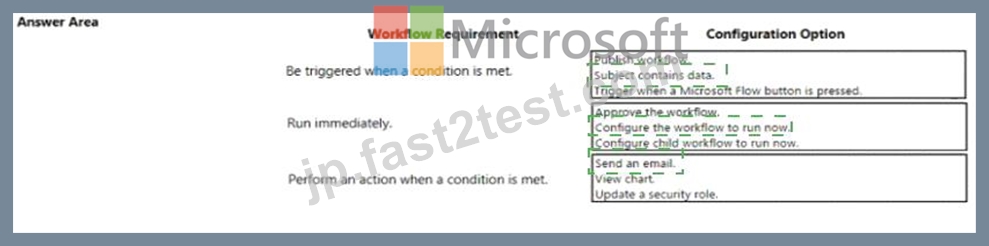
Explanation
1) Be triggered when a condition is met - Subject contains data
2) Run Immediately - Configure the workflow to run now
3) Perform an action when a condition is met - send an email
質問 # 91
A company deploys several model-driven apps. The company uses shared devices in their warehouse. The devices are always powered on. Users log on to the devices and then launch the apps to perform actions.
Unauthorized users recently uploaded several files after another user failed to log out of a device. The company needs to prevent these incidents from occurring in the future.
You need to configure the solution to prevent the reported security incidents.
What should you do? To answer, select the appropriate options in the answer area.
NOTE: Each correct selection is worth one point.
正解:
解説:
Explanation
Graphical user interface, text, application Description automatically generated
Box 1: Set a timeout in the Power Platform admin center.
To enforce users to reauthenticate after a pre-determined period of time, admins can set a session timeout for their individual environments. Users can only remain signed in the application for the duration of session. The application signs out the user when the session expires. Users need to sign in with their credentials to return to customer engagement apps.
Note: Configure session timeout
* In the Power Platform admin center, select an environment.
* Select Settings > Product > Privacy + Security.
* Set Session Expiration and Inactivity timeout. These settings apply to all users.
Incorrect:
Configure inactivity timeout
* In the Power Platform admin center, select an environment.
* Select Settings > Product > Privacy + Security.
* Set Session Expiration and Inactivity timeout. These settings apply to all users.
Box 2: Enter the restricted file types in the SharePoint admin center.
To block uploading of specific file types
* Go to the Settings page of the new SharePoint admin center,
* Select Sync.
Graphical user interface, text, application Description automatically generated
* Select the Block upload of specific file types check box.
* Enter the file name extensions you want to block, for example: exe or mp3.
* Select Save.
Reference:
https://docs.microsoft.com/en-us/power-platform/admin/user-session-management
https://docs.microsoft.com/en-us/onedrive/block-file-types
質問 # 92
The app needs to store temporary data
* Each screen must maintain a separate copy of data and pass the data to another screen.
* The app must be able to update separate rows of a table independently.
You need to configure variables for the data.
Which variable types should you use? To answer, drag the appropriate variable types to the correct requirements. Each variable type may be used once, more than once, or not at all. You may need to drag the split bar between panes or scroll to view content.
NOTE: Each correct selection is worth one point.
正解:
解説:
Explanation:
Graphical user interface, text, application Description automatically generated with medium confidence
質問 # 93
You have a business process flow (BPF) that interacts with the Account entity.
You configure a new version for the BPF and add a new stage at the beginning.
You need to identify the impact of the new version on the existing account records.
What is the outcome in each scenario? To answer, select the appropriate options in the answer area.
NOTE: Each correct selection is worth one point.
正解:
解説:
Explanation:
Graphical user interface, text Description automatically generated
Box 1: Existing accounts show the new BPF.
When an entity record is being created and if there are multiple BPFs defined on that entity. The system would do the following:
If the ProcessId field is set to Guid.Empty. The system will skip defaulting the BPF on that instance.
If the ProcessId field is set to specific BPF entity reference. The system will default to the specified BPF.
If the ProcessId field on the record is not set. The system will default the BPF.
Box 2: No BPF is linked to a new account.
Note: A business process flow definition is represented as a custom entity and an instance of a process is stored as a record within that entity. Each record is associated with a data record (such as an Account, Contact, Lead, or Opportunity) and in case of cross-entity processes, with a data record for each participating entity.
Reference:
https://docs.microsoft.com/en-us/dynamics365/customerengagement/on-premises/customize/business-process-flo
質問 # 94
A Company plans to send escalation emails to all customers with overdue invoices. You are creating a Microsoft Power Automate flow to determine whether to send an escalation email.
The system must send an alert for all invoices that are seven days or more overdue.
You need to configure the flow.
Which expression should you use?
- A. Option C
- B. Option B
- C. Option A
正解:A
解説:
Example: equals(triggerOutputs()?['body/PDFStatus/Value'],'Ready to Generate') Reference:
https://evolvous.com/microsoft-power-automate-trigger-condition/
質問 # 95
You are a Dynamics 365 Customer Service system administrator.
Your organization does not permit the use of custom code for solutions.
You need to create a view that can be viewed by all users in an organization.
Where should you create the view?
- A. Microsoft Virtual Studio
- B. Entities component of a solution
- C. Templates area
- D. Microsoft Excel template
正解:B
解説:
Explanation/Reference:
Create apps by using Power Apps
Testlet 2
Case Study
This is a case study. Case studies are not timed separately. You can use as much exam time as you would like to complete each case. However, there may be additional case studies and sections on this exam. You must manage your time to ensure that you are able to complete all questions included on this exam in the time provided.
To answer the questions included in a case study, you will need to reference information that is provided in the case study. Case studies might contain exhibits and other resources that provide more information about the scenario that is described in the case study. Each question is independent of the other questions in this case study.
At the end of this case study, a review screen will appear. This screen allows you to review your answers and to make changes before you move to the next section of the exam. After you begin a new section, you cannot return to this section.
To start the case study
To display the first question in this case study, click the Next button. Use the buttons in the left pane to explore the content of the case study before you answer the questions. Clicking these buttons displays information such as business requirements, existing environment, and problem statements. If the case study has an All Information tab, note that the information displayed is identical to the information displayed on the subsequent tabs. When you are ready to answer a question, click the Question button to return to the question.
Current environment. General
Bookings at the resort have decreased. The company has decided to focus on creating a tailored, first- class experience for guests. The company also plans to target corporate meetings and events.
The company recently purchased a chatbot named FAQbot from AppSource. The chatbot uses the resort's existing FAQs.
Current environment. Communication
* Communication between staff members is primarily conducted through email and SMS text messages.
* Conversations between staff members and guests are often lost.
* Conference calls are used for all group meetings.
Current environment. Event registration
* Corporate customers can reserve a meeting room at the resort to host meetings. The meetings will include lunch and choice of either an inside-spa experience or a seasonally appropriate outdoor activity.
* Event registration is conducted three weeks prior to start of the event. It is assumed that all event attendees will attend the meeting.
Current environment. Check-in progress
* Guests wait in lines to check in and obtain name badges. At this time, guests can specify any dietary restrictions and select their activity preference. This can result in long wait times and crowding at the front desk.
* For health and compliance reasons, guests must answer a series of questions with a yes or no answer during check-in. The front desk will ask and record these answers for the resort's records.
Current environment. Marketing
At the check-in counter, the guests can drop their business cards into a bowl for a chance to win an all- inclusive weekend stay at the resort. The resort uses the business card information to send announcements about promotions and upcoming events.
Current environment. Resort policies and event inquiries
* A guest can call or send an email to the event coordinator at the resort to get information about hotel policies, snow conditions, or to pre-select their after-meeting event.
* Guests can also go to the website to view the extensive list of frequently asked questions (FAQ) compiled over the years. Many of the answers to the FAQ's are out of date.
Requirements. General
Alpine Ski House does not employ technical staff and does not have the budget to hire an external firm to develop solutions. There are two team members who are proficient at Microsoft Excel formulas. Any solution created must use the capabilities of current team members.
All solutions must be simple to use, easy to maintain, and represent the brand of the resort.
You must implement the following solutions:
* a centrally managed communication solution
* a customer service solution
* a resort portal
* a chat solution
* a check-in solution
Requirements. Communication
* Communication between team members must be centrally managed and unified in Microsoft Teams.
* When the company confirms an event, they must provide a list of guest's names and email addresses.
* You must send guests a welcome email that includes a unique registration number for authentication with the resort's portal.
* Guests must receive a separate email to verify proof of ownership for their registration.
Requirements. Event attendance
* Guests must create an account and sign into a resort portal to confirm their attendance to an event and pre-select an after-meeting event.
* Prior to the event, guests must be able to identify any personal dietary restrictions.
Requirements. Check-in processes
* Check-in processes must be self-service. Each screen must ask for specific data from the guest. The check-in solution will use some data that is stored in Microsoft Excel.
* The check-in solution must continue to function if there are internet issues. If the self-service kiosks are not available, staff must be able to use the check-in solution from within their communication solution.
* The check-in solution must have a screen where the guest will select either yes or no to health and wellness questions. Guests must physically interact with each answer before proceeding to the next screen.
* Guests must be able to confirm any dietary restrictions they may have entered from the portal or add new ones at this time.
* Data must be entered in each screen before users move on to the next screen.
Requirements. Marketing
* To eliminate the handling of business cards, the check-in solution must be able to translate the contents of the business cards into Alpine Ski House's marketing system.
* The solution must not require any effort or manual entry from the guest to prevent any mistyped information and to make it more appealing to the guest to participate.
Requirements. Hotel policies and event inquiries
The portal must allow the guests to ask questions about hotel policies, event information, weather reports, and current weather conditions at the resort.
Requirements. Chat solution
The chat solution must specifically address the following key words. No additional key words will be added until a later implementation phase:
* Snow reports
* Weather conditions
* Start time
* End time
* Event date
* Outdoor activities
* Indoor activities
* Most popular
The chat solution must be available always and not require staff to answer all of the questions. If a question does require a staff member's attention, the solution must determine which staff member is best to assist the customer with the question.
The information in the FAQ on the legacy website must be used in the chat solution but retyping all the data from the website should not be required. If guests ask about topics that are not listed in the FAQ the chat solution must identify the issue and escalate to a staff member.
Team members must be able to ask their own questions through a centrally managed communication solution instead of using the guest portal. Team members must be able to access the same FAQ across multiple solutions.
Issue
Guest1 inquires about snow conditions several times during each day of their stay.
質問 # 96
You need to coordinate updates and deployment for managed solutions containing completed work without disrupting the system.
What should you do? To answer, select the appropriate options in the answer area.
NOTE: Each correct selection is worth one point.
正解:
解説:
Explanation
Box 1: Deploy a patch with the changes made from the current solution.
Scenario:
The Onsite Visit managed solution has a table that is not in the Verification Process Automation managed solution. This table must be upgraded prior to the go-live date without the other shared components.
Box 2: Deploy a full copy of the original solution using the upgrade option. Then, deploy the new solution by using the update option.
Scenario: All components required for the verification process must be included in a new solution.
Corporate security requires that deployments to non-development environments must be automated using service accounts.
Managed solutions are used to move customizations from the development environment to other higher-level environments. These solutions are created and maintained by the power users and provided to internal IT for deployment when they are ready.
Note:
Upgrade This is the default option and upgrades your solution to the latest version and rolls up all previous patches in one step. Any components associated to the previous solution version that are not in the newer solution version will be deleted. This is the recommended option as it will ensure that your resulting configuration state is consistent with the importing solution including removal of components that are no longer part of the solution.
Update This option replaces your solution with this version. Components that are not in the newer solution won't be deleted and will remain in the system. This option is not recommended as your destination environment will differ in configuration from your source environment and could cause issues that are difficult to reproduce and diagnose.
ce: https://docs.microsoft.com/en-us/power-apps/maker/data-platform/update-solutions
質問 # 97
You have a canvas app.
The canvas app must store data in a variable that is available only to the current screen.
You need to create the variable.
Which two functions should you use? Each correct answer presents a complete solution.
NOTE: Each correct selection is worth one point.
- A. Collect
- B. SaveData
- C. Navigate
- D. Set
- E. UpdateContext
正解:D、E
解説:
B) UpdateContext function can be used to create a variable that is only available to the current screen. This function takes in an object that defines the variable and its initial value, and updates the context of the current screen with that variable. Reference: https://docs.microsoft.com/en-us/powerapps/maker/canvas-apps/functions/function-updatecontext
質問 # 98
A company has a model-driven app.
The app must meet the following requirements:
* Prevent users from saving a record if validation from a custom action fails.
* Query and update a list of records.
You need to configure processes for the app without using code.
Which processes should you use? To answer, drag the appropriate processes to the correct requirements. Each process may be used once, more than once, or not at all. You may need to drag the split bar between panes or scroll to view content.
NOTE: Each correct selection is worth one point.
正解:
解説:
Explanation
質問 # 99
A company deploys a chatbot that is embedded in a Power Pages website. The company has the following requirements for the chatbot:
* Azure AD users only must be able to use the chatbot when accessing sensitive data.
* The chatbot must be accessible only from the Power Pages website.
You need to recommend a solution that meets the requirements.
Which two options should you recommend? Each correct answer presents part of the solution.
NOTE: Each correct selection is worth one point.
- A. Set up a new channel for the chatbot.
- B. Configure a data loss prevention policy.
- C. Enable web channel security.
- D. Enable Only for Teams authentication.
- E. Enable Manual authentication.
正解:B、C
質問 # 100
You create a new Power Virtual Agents chatbot for an organization.
Testing and production deployment of the chatbot are not complete.
You need to ensure that appropriate users can access the chatbot. Which methods should you use? To answer, select the appropriate options in the answer are a. NOTE: Each correct selection is worth one point.
正解:
解説:
質問 # 101
......
PL-200問題集PDFとテストエンジン試験問題:https://jp.fast2test.com/PL-200-premium-file.html
無料提供中で最新のPL-200認定有効な試験問題集はこれ:https://drive.google.com/open?id=1sRQFEqM6kJifXjytOFFItvpxTf_tb3AA