

完全版PAM-DEF練習テスト240特別な問題と解答が待ってます!
CyberArk Defender問題集でPAM-DEF試験完全版問題で試験学習ガイド
サイバーアーク・ディフェンダー - PAM認定試験は、アイデンティティとアクセス管理、認証と認可、監査とログ記録、セキュリティポリシーとコンプライアンスなど、PAMに関連する様々なトピックをカバーした包括的なテストです。この試験は、様々な環境でサイバーアークのPAMソリューションを展開、設定、管理する能力をテストするように設計されています。
Cyberark PAM-DEF認定試験は、特権アクセス管理に関連する幅広いトピックをカバーする包括的な認定プログラムです。この試験では、特権アカウントの管理、特権アカウントへのアクセスの確保、特権アクティビティの監視、特権アカウントへのサイバー攻撃の防止などのトピックをカバーしています。この認証は、CyberarkのPAMソリューションを他のセキュリティソリューションと統合したり、クラウド環境での特権アクセスを管理するなどの高度なトピックもカバーしています。 Cyberark PAM-DEF認定試験は、特権アカウントの確保とサイバー攻撃の防止を担当するサイバーセキュリティの専門家にとって不可欠な認定です。
質問 # 114
The vault supports Role Based Access Control.
- A. FALSE
- B. TRUE
正解:B
解説:
Explanation
The vault supports Role Based Access Control (RBAC), which is a method of granting access to resources based on the roles of users or groups. RBAC enables the administrator to define roles that represent different functions or responsibilities in the organization, and assign permissions to those roles according to the principle of least privilege. Users or groups can then be assigned to one or more roles, and inherit the permissions of those roles. RBAC simplifies the management of access control by reducing the complexity and redundancy of assigning permissions to individual users or groups. RBAC also enhances security and compliance by ensuring that users or groups only have the minimum level of access required to perform their tasks1.
References:
* 1: Role Based Access Control
質問 # 115
When managing SSH keys, the CPM stored the Private Key
- A. Nowhere because the private key can always be generated from the public key.
- B. In the Vault
- C. A & B
- D. On the target server
正解:B
質問 # 116
Which is the primary purpose of exclusive accounts?
- A. More frequent password changes
- B. Reduced risk of credential theft
- C. Non-repudiation (individual accountability)
- D. To force a 'collusion to commit' fraud ensuring no single actor may use a password without authorization
正解:D
解説:
Explanation
According to the web search results, exclusive accounts are a feature of CyberArk Defender PAM that enables organizations to permit users to check out a 'one-time' password and lock it so that no other users can retrieve it at the same time1. After the user has used the password, the user checks the password back into the Vault.
This ensures exclusive usage of the privileged account, enabling full control and tracking for the password. The duration of the check-out period can be configured in the platform settings for each account1.
The primary purpose of exclusive accounts is to prevent a single user from accessing a sensitive account without authorization, which could lead to fraud or misuse of privileges. By requiring a check-out and check-in process, exclusive accounts ensure that there is a 'collusion to commit' fraud, meaning that at least two users are involved in the malicious activity and are accountable for it. One user must check out the password and use it, while another user must approve the check-in and verify the password change. This way, exclusive accounts add an additional measure of protection and accountability for accessing sensitive accounts.
質問 # 117
In the screenshot displayed, you just configured the usage in CyberArk and want to update its password.
What is the least intrusive way to accomplish this?
- A. Use the "sync" button on the usage's details page.
- B. Use the "change" button on the usage's details page.
- C. Use the "reconcile" button on the parent account's details page.
- D. Use the "change" button on the parent account's details page.
正解:D
質問 # 118
When a DR Vault Server becomes an active vault, it will automatically revert back to DR mode once the Primary Vault comes back online.
- A. True; this is the default behavior
- B. True, if the AllowFailback setting is set to "yes" in the padr.ini file
- C. False, the Vault administrator must manually set the DR Vault to DR mode by setting "FailoverMode=no" in the dbparm.ini file
- D. False, the Vault administrator must manually set the DR Vault to DR mode by setting "FailoverMode=no" in the padr.ini file
正解:D
質問 # 119
Vault admins must manually add the auditors group to newly created safes so auditors will have sufficient access to run reports.
- A. TRUE
- B. FALSE
正解:B
質問 # 120
Time of day or day of week restrictions on when password verifications can occur configured in
____________________.
- A. The Safe settings
- B. The Account Details
- C. The Platform settings
- D. The Master Policy
正解:C
質問 # 121
Which methods can you use to add a user directly to the Vault Admin Group? (Choose three.)
- A. PACLI
- B. PVWA
- C. PrivateArk Client
- D. REST API
- E. Active Directory
- F. Sailpoint
正解:A、C、D
解説:
Explanation
To add a user directly to the Vault Admin Group in CyberArk, you can use the following methods:
* REST API: The REST API allows for programmatic management of users and groups within the Vault, including adding users to the Vault Admin Group1.
* PrivateArk Client: The PrivateArk Client provides a graphical interface for managing users and groups, and it can be used to add users directly to the Vault Admin Group2.
* PACLI: The PACLI (Privileged Access Command Line Interface) is a command-line tool that enables administrators to manage the Vault, including adding users to groups2.
These methods provide different ways to manage users and their group memberships within the CyberArk Vault, offering flexibility for administrators to choose the most suitable approach for their needs.
References:
* CyberArk's official documentation on using the REST API to manage users and groups1.
* Information on managing users and groups through the PrivateArk Client and PACLI2.
質問 # 122
A new HTML5 Gateway has been deployed in your organization.
From the PVWA, arrange the steps to configure a PSM host to use the HTML5 Gateway in the correct sequence.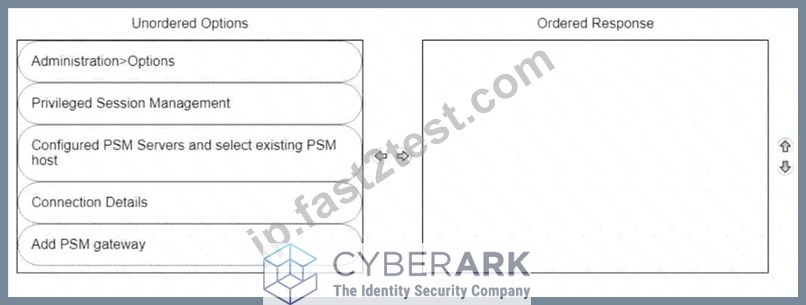
正解:
解説:
Explanation
To configure a PSM host to use the HTML5 Gateway from the PVWA, you would typically follow these steps:
* Log into the PVWA with an administrative user.
* Navigate to Administration > Options.
* Right-click on Privileged Session Management and select Add Configured PSM Gateway Servers.
* Right-click Configured PSM Gateway Servers, then Add PSM Gateway Server.
* Select the newly added gateway server and enter a unique ID for the PSM HTML5 Gateway.
* Expand the newly created gateway server and enter the necessary configuration details.
Please note that these steps are based on general procedures for configuring a PSM host with an HTML5 Gateway and should be verified against the official CyberArk documentation or by a qualified CyberArk professional. For detailed instructions and best practices, refer to the CyberArk documentation123.
質問 # 123
Which Automatic Remediation is configurable for a PTA detection of a "Suspected Credential Theft"?
- A. Rotate Credentials
- B. Disable Account
- C. Reconcile Credentials
- D. Add to Pending
正解:A
質問 # 124
Arrange the steps to restore a Vault using PARestore for a Backup in the correct sequence.
正解:
解説:
Explanation
BackupFilesDeletion=No
PARestore vault.ini operator /FullVaultRestore
CAVaultManager RecoverBackupFiles
CAVaultManager RestoreDB
BackupFilesDeletion=Yes,24,1,5,7d
https://docs.cyberark.com/Product-Doc/OnlineHelp/PAS/Latest/en/Content/PASIMP/Restoring-Safes-or-the-Vau
質問 # 125
You need to enable the PSM for all platforms.
Where do you perform this task?
- A. Administration > Options > Connection Components
- B. Platform Management > (Platform) > UI & Workflows
- C. Master Policy > Privileged Access Workflows
- D. Master Policy > Session Management
正解:B
質問 # 126
Which Vault authorization does a user need to have assigned to able to generate the "Entitlement Report" from the reports page in PVWA? (Choose two.)
- A. View Entitlements
- B. Audit Users
- C. Manage Users
- D. Read Activity
- E. List Accounts
正解:A、B
解説:
Explanation
D). View Entitlements: This authorization allows the user to view the entitlements, which is essential for generating reports that include access control and authorization levels on accounts.
B). Audit Users: Having 'Audit Users' permission is crucial as it enables the user to perform audit-related activities, which are typically part of generating entitlement reports12.
These authorizations ensure that the user has the necessary permissions to access and compile the data required for the Entitlement Report within the CyberArk PVWA.
質問 # 127
A Vault administrator have associated a logon account to one of their Unix root accounts in the vault.
When attempting to verify the root account's password the Central Policy Manager (CPM) will:
- A. none of these
- B. ignore the logon account and attempt to log in as root
- C. log in first with the logon account, then run the SU command to log in as root using the password in the Vault
- D. prompt the end user with a dialog box asking for the login account to use
正解:D
質問 # 128
Which of the following statements are NOT true when enabling PSM recording for a target Windows server? (Choose all that apply)
- A. RDP must be enabled on the target server
- B. PSMConnect must be added as a local user on the target server
- C. PSM must be enabled in the Master Policy (either directly, or through exception)
- D. The PSM software must be instated on the target server
正解:C、D
質問 # 129
What is the purpose of the Interval setting in a CPM policy?
- A. To control how often the CPM looks for System Initiated CPM work.
- B. To control the maximum amount of time the CPM will wait for a password change to complete.
- C. To control how often the CPM looks for User Initiated CPM work.
- D. To control how long the CPM rests between password changes.
正解:A
解説:
Explanation
The Interval setting in a CPM policy is used to control how often the CPM looks for System Initiated CPM work, such as password changes, verifications, and reconciliations. The Interval setting defines the frequency, in minutes, that the CPM will check the accounts that are associated with the policy and perform the required actions. For example, if the Interval is set to 60, the CPM will check the accounts every hour and change, verify, or reconcile the passwords according to the policy settings. The Interval setting does not affect User Initiated CPM work, such as manual password changes or retrievals, which are performed immediately upon request. The Interval setting also does not control how long the CPM rests between password changes or the maximum amount of time the CPM will wait for a password change to complete. These parameters are configured in the CPM.ini file, which is stored in the root folder of the <CPM username> Safe. References:
* [Defender PAM eLearning Course], Module 5: Password Management, Lesson 5.1: CPM Policies, Slide
9: CPM Policy Settings
* [Defender PAM Sample Items Study Guide], Question 4: CPM Policy Settings
* [CyberArk Documentation Portal], CyberArk Privileged Access Security Implementation Guide, Chapter 5: Managing Passwords, Section: CPM Policy Settings, Subsection: Interval
質問 # 130
An auditor needs to login to the PSM in order to live monitor an active session. Which user ID is used to establish the RDP connection to the PSM server?
- A. PSMMaster
- B. PSMGwUser
- C. PSMAdminConnect
- D. PSMConnect
正解:D
解説:
Explanation
The PSMConnect user is a local user on the PSM server that is used to establish RDP connections to the PSM server. The PSMConnect user has the following permissions: Log on locally, Log on as a batch job, and Allow log on through Remote Desktop Services. The PSMConnect user is also a member of the local group PSMUsers, which has access to the PSM web console. The other user IDs are not used for RDP connections to the PSM server. The PSMMaster user is a local user on the PSM server that is used to run the PSM services.
The PSMGwUser user is a local user on the PSM server that is used to run the PSM Gateway service. The PSMAdminConnect user is a local user on the PSM server that is used to connect to the PSM web console as an administrator. References: Privileged Session Manager, Defender - PAM, PSM for Web Console, Connect through PSM for SSH
質問 # 131
You are onboarding an account that is not supported out of the box.
What should you do first to obtain a platform to import?
- A. Search common community portals like stackoverflow, reddit, github for an existing platform.
- B. From the platforms page, uncheck the "Hide non-supported platforms" checkbox and see if a platform meeting your needs appears.
- C. Visit the CyberArk marketplace and search for a platform that meets your needs.
- D. Create a service ticket in the customer portal explaining the requirements of the custom platform.
正解:D
質問 # 132
Secure Connect provides the following. Choose all that apply.
- A. PSM connections to target devices that are not managed by CyberArk.
- B. Session Recording
- C. Real-time live session monitoring.
- D. PSM connections from a terminal without the need to login to the PVWA
正解:A、B、C
解説:
Explanation
Secure Connect provides the following features:
* A. PSM connections to target devices that are not managed by CyberArk. This is true, because Secure Connect is a feature that enables users to connect to target systems through PSM without storing the account credentials in the vault. Secure Connect allows users to provide their own credentials at the time of connection, and these credentials are not saved or managed by CyberArk. Secure Connect can be used with any connection component that supports PSM, such as RDP, SSH, WinSCP, etc1.
* B. Session Recording. This is true, because Secure Connect sessions are recorded by PSM and stored in the Vault, just like regular PSM sessions. The recorded sessions can be viewed and audited by authorized users through the PVWA or the PSM web interface2.
* C. Real-time live session monitoring. This is true, because Secure Connect sessions can be monitored in real-time by authorized users through the PSM web interface. The PSM web interface allows users to view the live session screen, send messages to the session user, pause or terminate the session, and take
* control of the session if needed3.
The following feature is not provided by Secure Connect:
* D. PSM connections from a terminal without the need to login to the PVWA. This is false, because Secure Connect requires users to login to the PVWA and initiate the connection from there. The PVWA provides the URL for the Secure Connect session, which contains the target system address and the connection component ID. The user then needs to copy and paste the URL into a browser or a remote connection manager to launch the session1.
References:
* 1: Secure Connect
* 2: Recorded Sessions
* 3: PSM Web Interface
質問 # 133
You created a new safe and need to ensure the user group cannot see the password, but can connect through the PSM.
Which safe permissions must you grant to the group? (Choose two.)
- A. Use Accounts Most Voted
- B. Confirm Request
- C. Retrieve Files
- D. Access Safe without Confirmation
- E. List Accounts Most Voted
正解:A、C
解説:
Explanation
To ensure that a user group can connect through the Privileged Session Manager (PSM) without seeing the password, you must grant the Use Accounts and Retrieve Files permissions to the group for the safe. The Use Accounts permission allows users to initiate sessions using accounts without viewing the account details or passwords. The Retrieve Files permission enables users to retrieve files during PSM sessions without having access to the passwords1.
References:
* CyberArk Docs - Safe Permissions
質問 # 134
An auditor initiates a live monitoring session to PSM server to view an ongoing live session. When the auditor's machine makes an RDP connection the PSM server, which user will be used?
- A. Shadowuser
- B. Credentials stored in the Vault for the target machine
- C. PSMConnect
- D. PSMAdminConnect
正解:D
解説:
Explanation
According to the web search results, when an auditor initiates a live monitoring session to PSM server to view an ongoing live session, the auditor's machine makes an RDP connection to the PSM server using the PSMAdminConnect user. The PSMAdminConnect user is a local or domain user that starts PSM sessions on the PSM machine for authorized users who want to monitor or terminate active sessions1. The PSMAdminConnect user has limited permissions and access rights on the PSM server, and its credentials are managed by the CPM. The PSMAdminConnect user retrieves the credentials of the target account from the vault and uses them to establish a secure connection to the target machine. The auditor can then view the live session through the PSM session, while the PSM server records and audits the session activity.
質問 # 135
Before failing back to the production infrastructure after a DR exercise, what must you do to maintain audit history during the DR event?
- A. Briefly stop and start the Disaster Recovery Instance before attempting to fail components back to the Production Instance.
- B. Ensure that the Production Instance replicates changes that occurred from the Disaster Recovery Instance.
- C. Perform an IIS Reset on all PVWA servers.
- D. Stop the CPM services before starting the production server.
正解:B
解説:
Explanation
Before failing back to the production infrastructure after a Disaster Recovery (DR) exercise, it is crucial to ensure that the Production Instance replicates all changes that occurred from the Disaster Recovery Instance.
This includes all audit history and any other changes made during the DR event. The replication process ensures that no data is lost and that the audit history is maintained consistently across both the DR and Production environments1.
References:
* CyberArk Docs - Reports and Audits1
* CyberArk Docs - Vault Audit Action Codes2
* CyberArk Blog - Failover and Failback Process
質問 # 136
......
PAM-DEF正真正銘のベスト資料、オンライン練習試験:https://jp.fast2test.com/PAM-DEF-premium-file.html
優れもの良質なPAM-DEF問題集が待ってます:https://drive.google.com/open?id=1xTlfwia-URc2uCZOHvHrOHdBFXuFjUs7