

売れ筋トップクラスの220-1102日本語最新試験問題2025年最新のCompTIA試験練習
A+問題集で220-1102日本語試験は完全版問題で試験学習ガイド
質問 # 109
技術者が新しく組み立てたコンピューターをセットアップしています。技術者が Windows 10 をインストールする最も早い方法は次のうちどれですか?
- A. システムの復元
- B. 工場出荷時設定にリセット
- C. インプレースアップグレード
- D. 無人インストール
正解:D
解説:
The correct answer is D. Unattended installation. An unattended installation is a way of installing Windows
10 without requiring any user input or interaction. It uses a configuration file called answer file that contains the settings and preferences for the installation, such as the product key, language, partition, and network settings. An unattended installation can be performed by using a bootable USB flash drive or DVD that contains the Windows 10 installation files and the answer file1. This is the fastest way for the technician to install Windows 10 on a newly built computer, as it automates the whole process and saves time.
A factory reset is a way of restoring a computer to its original state by deleting all the data and applications and reinstalling the operating system. A factory reset can be performed by using the recovery partition or media that came with the computer, or by using the Reset this PC option in Windows 10 settings2. A factory reset is not a way of installing Windows 10 on a newly built computer, as it requires an existing operating system to be present.
A system restore is a way of undoing changes to a computer's system files and settings by using a restore point that was created earlier. A system restore can be performed by using the System Restore option in Windows 10 settings or by using the Advanced Startup Options menu3. A system restore is not a way of installing Windows 10 on a newly built computer, as it requires an existing operating system and restore points to be present.
An in-place upgrade is a way of upgrading an existing operating system to a newer version without losing any data or applications. An in-place upgrade can be performed by using the Windows 10 Media Creation Tool or by running the Setup.exe file from the Windows 10 installation media. An in-place upgrade is not a way of installing Windows 10 on a newly built computer, as it requires an existing operating system to be present.
質問 # 110
次の環境のうち、変更による悪影響を受けるリスクなしに重要なシステムをテストできる環境はどれですか?
- A. 生産
- B. 回帰
- C. サンドボックス
- D. クラウド
正解:C
解説:
Explanation
A sandbox is an isolated environment that allows for the testing of critical systems without the risk of them being negatively impacted by changes. A sandbox can be used to simulate real-world scenarios, experiment with new features, debug errors, or evaluate the performance and security of a system. A sandbox can be created using virtualization, emulation, or containerization technologies. A sandbox prevents any changes made in the testing environment from affecting the production environment, which is the actual system that is used by the end users.
https://www.comptia.org/training/books/a-core-2-220-1102-study-guide
質問 # 111
ユーザーは、Windows 10 コンピューターのデスクトップの壁紙を変更する際にサポートが必要です。ユーザーが Windows 10 設定ツールを使用して壁紙を変更できるようにする方法は、次のうちどれですか?
- A. [設定] を開き、[アカウント] を選択し、[あなたの情報] を選択して [参照] をクリックし、ユーザーが壁紙として使用する画像を見つけて開きます
- B. [設定] を開き、[個人用設定] を選択し、[参照] をクリックして、ユーザーが壁紙として使用したい画像を見つけて開きます
- C. [設定] を開き、[システム] を選択し、[ディスプレイ] を選択して、[参照] をクリックし、ユーザーが壁紙として使用する画像を見つけて開きます。
- D. [設定] を開き、[アプリ] を選択し、[アプリと機能] を選択して [参照] をクリックし、ユーザーが壁紙として使用する画像を見つけて開きます。
正解:B
解説:
The user can change the wallpaper using a Windows 10 Settings tool by following these steps12:
* Open Settings by pressing the Windows key and typing Settings, or by clicking the gear icon in the Start menu.
* Select Personalization from the left navigation menu.
* On the right side of the window, click Background.
* In the Background settings, click the drop-down menu and select Picture as the background type.
* Click Browse and then locate and open the image the user wants to use as the wallpaper.
The other options are incorrect because they do not lead to the Background settings or they do not allow the user to browse for an image. Accounts, System, and Apps are not related to personalization settings. Your info, Display, and Apps & features are not related to wallpaper settings.
References: 1:
https://support.microsoft.com/en-us/windows/change-your-desktop-background-image-175618be-4cf1-c159-278
2: https://www.computerhope.com/issues/ch000592.htm
質問 # 112
架空の会社としての初日へようこそ。LLC ヘルプデスクの従業員。ヘルプデスクのチケット キューでチケットを処理してください。
個々のティッカーをクリックして、チケットの詳細を表示します。添付ファイルを表示して問題を特定します。
[問題] ドロップダウン メニューから適切な問題を選択します。次に、[解像度] ドロップダウン メニューから最も効率的な解像度を選択します。最後に、[Verify Resolve] ドロップダウン メニューから適切なコマンドまたは検証を選択して、問題を修正または確認します。


正解:
解説:
質問 # 113
架空の会社としての初日へようこそ。LLC ヘルプデスクの従業員。ヘルプデスクのチケット キューでチケットを処理してください。
個々のティッカーをクリックして、チケットの詳細を表示します。添付ファイルを表示して問題を特定します。
[問題] ドロップダウン メニューから適切な問題を選択します。次に、[解像度] ドロップダウン メニューから最も効率的な解像度を選択します。最後に、[Verify Resolve] ドロップダウン メニューから適切なコマンドまたは検証を選択して、問題を修正または確認します。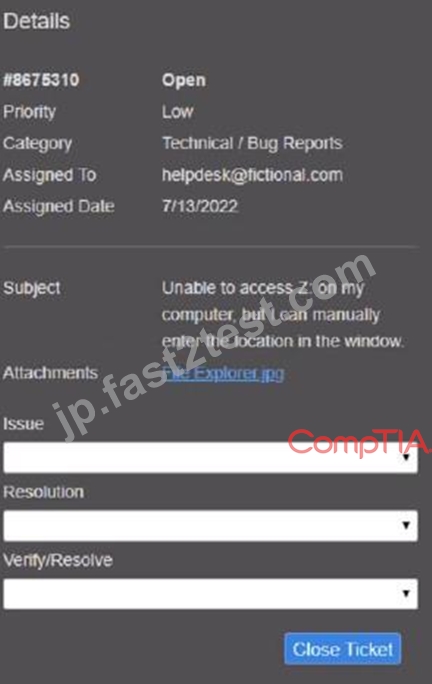

正解:
解説: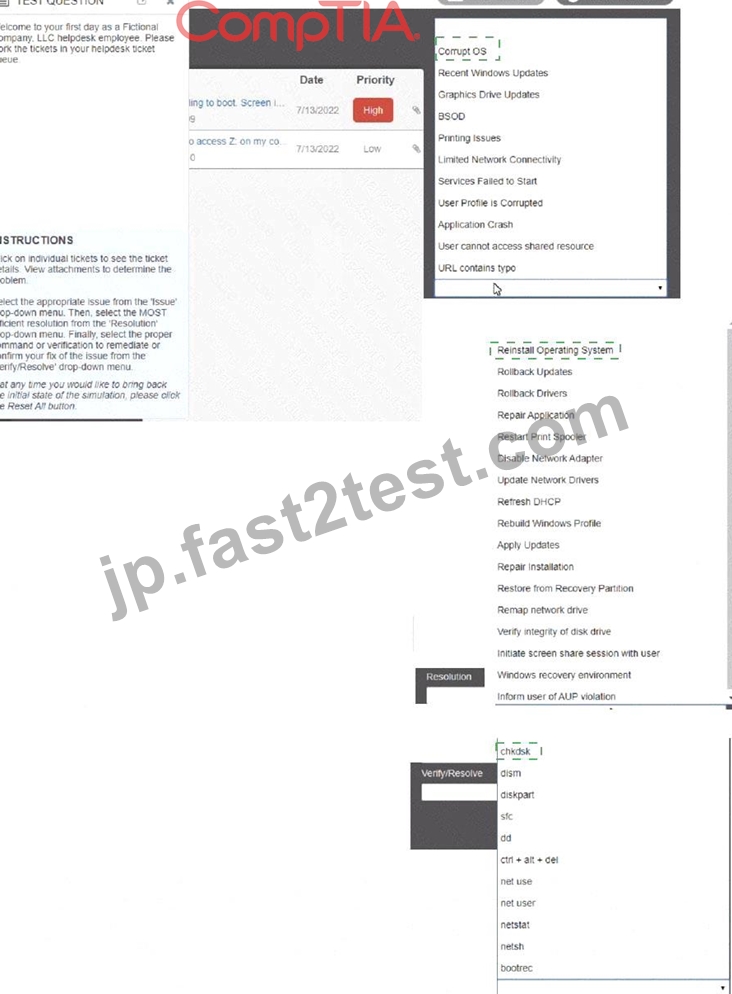
Explanation: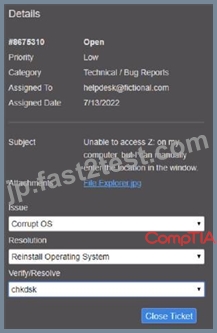
質問 # 114
ユーザーの Android スマートフォンがランダムに再起動しています。技術者が調査したところ、標準のマーケットプレイスでは入手できないアプリケーションがいくつかインストールされていることがわかりました。この問題の原因として最も可能性が高いのは次のどれですか。
- A. 無線キャリアアップデートに失敗しました。
- B. OS の更新に失敗しました。
- C. デバイスは開発者モードです。
- D. ユーザーがマルウェアをダウンロードしました。
正解:D
解説:
Random restarting of an Android phone and the presence of applications not from the standard marketplace strongly suggest the possibility of malware.
* Option A: The OS update failedWhile an OS update failure can cause issues, it is less likely to result in random restarts compared to malware.
* Option B: The user downloaded malwareMalware is a common cause of erratic behavior, including random restarts, especially when applications are installed from unofficial sources.
* Option C: The device is in developer modeDeveloper mode alone does not typically cause random restarts. It may make the device more susceptible to issues if improper apps are installed.
* Option D: The over-the-air carrier update failedSimilar to the OS update, this would more likely cause consistent issues rather than random restarts.
References:
* CompTIA A+ 220-1102 Objective 2.3 (Detect, remove, and prevent malware) and Objective 3.5 (Mobile OS and application security issues).
質問 # 115
会社所有のモバイル デバイスに大量の広告が表示され、データ使用量制限の通知が届き、応答が遅くなっています。技術者がデバイスをチェックしたところ、デバイスがジェイルブレイクされていることに気付きました。技術者は次に次のどれを行うべきでしょうか。
* ウイルス対策を実行し、暗号化を有効にします。
- A. デフォルトを復元し、企業の OS を再イメージ化します。
- B. ファイルをバックアップし、システムを復元します。
- C. ジェイルブレイクを元に戻し、ウイルス対策を有効にします。
正解:B
解説:
Jailbreaking a device exposes it to various security risks, such as malware, data theft, network attacks, and service disruption1234. Running an antivirus and enabling encryption may not be enough to remove the threats and restore the device's functionality. Undoing the jailbreak may not be possible or effective, depending on the method used. Backing up the files and doing a system restore may preserve the jailbreak and the associated problems. The best option is to erase the device and reinstall the original operating system that is compatible with the corporate policies and standards. This will ensure that the device is clean, secure, and compliant25.
References: 1 What is Jailbreaking & Is it safe? -
Kaspersky(https://www.kaspersky.com/resource-center/definitions/what-is-jailbreaking). 2 Jailbreak Detection: Why is jailbreaking a potential security risk? - Cybersecurity ASEE(https://cybersecurity.asee.co/blog/what-is-jailbreaking/). 3 Jailbreaking Information for iOS Devices | University IT(https://uit.stanford.edu/service/mydevices/jailbreak)4 What does it mean to jailbreak your phone-and is it legal? - Microsoft(https://www.microsoft.com/en-us/microsoft-365-life-hacks/privacy-and-safety/what-is-jailbreaking-a- a corporate laptop back to a personal laptop... Enterprise vs Pro - Windows
10(https://community.spiceworks.com/topic/2196812-resetting-a-corporate-laptop-back-to-a-personal-laptop-ent
質問 # 116
次のシナリオのうち、リモート ワイプ機能が使用される可能性が最も高いのはどれですか? (2 つ選択してください)。
- A. ユーザーが劇場で観劇した後、電話機を見つけることができません。
- B. ユーザーは海外におり、対応する海外 SIM カードを使用したいと考えています。
- C. ユーザーが誤って携帯電話会社のアップグレードのために会社の電話を下取りに出しました。
- D. 新しい IT ポリシーでは、ユーザーにロック画面の PIN を設定することが求められています。
- E. ユーザーがタクシーの中に携帯電話を忘れたため、運転手が会社に電話してデバイスを返してもらいました。
- F. ユーザーが電話機を家に置き忘れたため、子供が電話機にアクセスできないようにしたいと考えています。
正解:A、E
解説:
Explanation
Remote wipe capabilities are used to erase all data on a mobile device remotely. This can be useful in situations where a device is lost or stolen, or when sensitive data needs to be removed from a device. Remote wipe capabilities are most likely to be used in the following scenarios:
E: A user cannot locate the phone after attending a play at a theater. F. A user forgot the phone in a taxi, and the driver called the company to return the device In scenario E, remote wipe capabilities would be used to prevent unauthorized access to the device and to protect sensitive data. In scenario F, remote wipe capabilities would be used to erase all data on the device before it is returned to the user.
質問 # 117
ある企業は、事業の環境への悪影響を軽減したいと考えており、機器の廃棄のために電子廃棄物処理会社を雇うことにしました。電子廃棄物処理会社は、次のどれを企業に提供すべきでしょうか。
- A. 破棄の証明
- B. 破砕/掘削
- C. 低レベルのフォーマット
- D. 秘密保持契約
正解:A
解説:
When disposing of e-waste, it is important to ensure that the data on the equipment is securely destroyed and that the disposal process complies with environmental regulations.
* Non-disclosure agreement: Relates to confidentiality, not disposal.
* Certification of destruction: The correct document verifying that the equipment has been disposed of in accordance with regulations and standards, ensuring data is irretrievably destroyed.
* Low-level formatting: A method to wipe data but does not guarantee compliance with e-waste disposal regulations.
* Shredding/drilling: Physical destruction methods that might be used, but certification of destruction is the documentation needed.
Reference: CompTIA A+ Exam Objectives [220-1102] - 3.7: Explain the importance of physical security measures.
質問 # 118
iPhone ユーザーのデバイスのカメラとマイクが、ユーザーの入力がなくても起動します。ユーザーの友人が最近、通常の App Store 以外でアプリケーションをインストールできるようにデバイスを改造しました。問題は次のどれですか。
- A. iPhone のオペレーティング システムは古くなっています。
- B. デバイスはモバイル デバイス管理から登録解除されています。
- C. デバイスはジェイルブレイクされ、内部のセキュリティ保護が削除されました。
- D. ユーザーは偽造の Lightning ケーブルを iPhone に接続しました。
正解:C
解説:
The camera and microphone on an iPhone activating without user input, especially after allowing applications to be installed outside the normal App Store, is a classic sign of the device being jailbroken. Jailbreaking an iPhone removes many of the built-in security features and restrictions, allowing the installation of apps from third-party sources. These third-party apps can be malicious and can gain unauthorized access to system resources like the camera and microphone.
A . The user connected a counterfeit Lightning cable to the iPhone. While counterfeit cables can be harmful, they typically cause charging or connectivity issues rather than security vulnerabilities that would enable camera and microphone activation without user input.
B . The device is unenrolled from Mobile Device Management. Unenrolling from MDM removes organizational controls but does not directly cause unauthorized camera and microphone activation.
D . The iPhone has an out-of-date operating system. An outdated OS can have vulnerabilities, but the scenario specifically mentions modifications to allow third-party app installations, pointing to jailbreaking as the primary cause.
Reference:
CompTIA A+ Core 2 (220-1102) Exam Objectives, Section 2.3: Security measures and their purposes including mobile device security.
質問 # 119
技術者が、GUI を起動できない Windows 10 PC のトラブルシューティングを行っています。最近、新しい SSD と新しい Windows のコピーが PC にインストールされました。この問題を解決するために使用する最も適切なコマンドは次のどれですか。
- A. チェックディスク
- B. msconfig
- C. sfc
- D. ムスト
- E. ディスクパーツ
正解:C
解説:
The sfc command is a tool for scanning and repairing system files that are corrupted or missing on Windows operating systems12. System files are essential files that are required for the proper functioning of the operating system, such as the GUI, drivers, services, and applications. If system files are damaged or deleted, the operating system may fail to start or run properly, causing errors, crashes, or blue screens.
The sfc command can be used to fix the issue of the PC that is unable to start the GUI, assuming that the problem is caused by corrupted or missing system files. The sfc command can be run from the command prompt, which can be accessed by booting the PC from the installation media, choosing the repair option, and selecting the command prompt option3. The sfc command can be used with different switches, such as /scannow, /verifyonly, /scanfile, or /offbootdir, depending on the situation and the desired action4. The most common switch is /scannow, which scans all the system files and repairs any problems that are found5. The syntax of the sfc command with the /scannow switch is:
sfc /scannow
The sfc command will then scan and repair the system files, and display the results on the screen. If the sfc command is able to fix the system files, the PC should be able to start the GUI normally after rebooting. If the sfc command is unable to fix the system files, the PC may need further troubleshooting or a clean installation of Windows.
Reference:
1: CompTIA A+ Certification Exam Core 2 Objectives, page 10 2: CompTIA A+ Core 2 (220-1102) Complete Video Course, Lesson 26 Documentation 3: How to use SFC Scannow to repair Windows system files 4: SFC Command (System File Checker) 5: How to Repair Windows 10 using Command Prompt
質問 # 120
モバイル デバイスの問題について、ヘルプ デスクのチャット サポートを通じてエグゼクティブから連絡がありました。
エグゼクティブが問題を解決するのを手伝ってください。

次に行うべきことは次のうちどれですか?
- A. 実行した解決策についてユーザーを教育します。
- B. Telecom に電子メールを送信して問題を通知し、再発を防止します。
- C. 次回は時間をかけて自分で修正するようユーザーに伝えます。
- D. チケットを閉じます。
正解:A
質問 # 121
ユーザーから、USB ドライブからファイルを転送した後、エアギャップのあるコンピュータがウイルスに感染した可能性があると報告されました。技術者は Windows Defender を使用してコンピューターのスキャンを実行しましたが、感染は見つかりませんでした。技術者が次に取るべきアクションは次のうちどれですか? (2 つ選択してください)。
- A. 定義を更新します。
- B. ネットワークに接続します。
- C. コンピューターを再イメージ化します。
- D. 調査結果を文書化します。
- E. イベント ログを調べます。
- F. ファイアウォールを有効にします。
正解:A、E
解説:
When dealing with a suspected virus infection on an air-gapped computer, after an initial scan with Windows Defender shows no infection, the next steps should include examining the event logs to look for suspicious activity and updating the virus definitions for a more thorough scan. Event logs can provide insights into system changes and potential malicious activities, while updated definitions ensure the antivirus software can detect the latest threats. Connecting to the network or enabling the firewall might not be appropriate due to the risk of spreading the infection, and re-imaging the computer or documenting the findings would be subsequent steps if the initial actions don't resolve the issue.
Reference: Official CompTIA A+ Core 1 and Core 2 Student Guide.
質問 # 122
管理者は、単一のワークステーションの次のコンポーネントをバックアップする必要があります。
※オペレーティングシステムのインストール
*アプリケーション
*ユーザープロファイル
*システム設定
ワークステーションが適切にバックアップされていることを確認するために、管理者は次のバックアップ方法のうちどれを使用できますか?
- A. 画像
- B. 差動
- C. アーカイブ
- D. 合成
正解:A
解説:
An image backup captures a complete snapshot of the entire system at a specific point in time, including the operating system, installed applications, user profiles, and system settings. This method is most suitable for backing up the components listed in the question because it ensures that every aspect of the workstation, from the core OS to individual user settings, is preserved and can be restored in its entirety. This is crucial for quickly recovering a system to a fully operational state after a failure or when migrating to new hardware.
Other methods like differential, synthetic, and archive backups do not provide the comprehensive one-step restoration capability that an image backup offers for the complete system recovery.
質問 # 123
次のオペレーティング システムのうち、組み込みシステムで最も一般的に使用されているのはどれですか?
- A. Windows
- B. Chrome OS
- C. Linux
- D. macOS
正解:C
解説:
Explanation
Linux is the most commonly used operating system in embedded systems because it is open source, free, customizable, and supports a wide range of architectures and devices. Linux also offers many advantages for embedded development, such as real-time capabilities, modularity, security, scalability, and reliability. Linux can run on embedded systems with limited resources, such as memory, storage, or power, and can be tailored to the specific needs of the application. Linux also has a large and active community of developers and users who contribute to its improvement and innovation. Some examples of embedded systems that use Linux are smart TVs, routers, drones, robots, smart watches, and IoT devices
質問 # 124
ユーザーが共有ドライブにファイルを作成し、そのデータが他のユーザーによって誤って削除されないようにしたいと考えています。ユーザーがファイルを非表示にするのを支援するために技術者が使用する必要があるアプリケーションは次のうちどれですか?
- A. デバイス マネージャー
- B. ファイル エクスプローラー
- C. インデックス作成オプション
- D. 管理ツール
正解:B
解説:
Explanation
The technician should use the File Explorer application to assist the user with hiding the file 1. The user can right-click the file and select Properties. In the Properties dialog box, select the Hidden check box, and then click OK 1.
質問 # 125
技術者は午後 10 時から時間外サービスを実行する必要があります。技術者は現在 20 分遅れています。お客様も遅刻してしまいます。適切なコミュニケーション技術と専門性を考慮して、技術者が行うべきことは次のうちどれですか?
- A. お客様より先に到着した場合はお客様にご連絡しません。
- B. ソーシャルメディアを通じて体験を公開します。
- C. 技術者の到着が遅れる場合はお客様にご連絡ください。
- D. 顧客を解雇し、時間外の作業を続行します。
正解:C
解説:
The best option for the technician to demonstrate proper communication techniques and professionalism is to contact the customer if the technician is arriving late. This shows respect for the customer's time and expectations, and allows the customer to adjust their schedule accordingly. It also helps to maintain a positive relationship and trust between the technician and the customer. The technician should apologize for the delay and provide a realistic estimate of their arrival time. The technician should also thank the customer for their patience and understanding.
The other options are not appropriate or professional. Do not notify the customer if arriving before the customer is not a good practice, as it may cause confusion or frustration for the customer. The customer may have made other plans or arrangements based on the technician's original schedule, and may not be available or prepared for the service. Dismiss the customer and proceed with the after-hours work is rude and disrespectful, as it ignores the customer's needs and preferences. The customer may have questions or concerns about the service, or may want to supervise or verify the work. The technician should always communicate with the customer before, during, and after the service. Disclose the experience via social media is unethical and unprofessional, as it may violate the customer's privacy and the company's policies. The technician should not share any confidential or sensitive information about the customer or the service on social media, or make any negative or inappropriate comments about the customer or the situation.
Reference:
CompTIA A+ Certification Exam Core 2 Objectives1
CompTIA A+ Core 2 (220-1102) Certification Study Guide2
8 Ways You Can Improve Your Communication Skills3
Professionalism in Communication | How To Do It And How It Pays4
質問 # 126
技術者にヘルプデスク チケットが割り当てられ、問題が解決されました。他の技術者が同様の問題を解決できるようにするために、技術者は次のどれを更新する必要がありますか?
* エンドユーザートレーニング
- A. 進捗メモ
- B. 利用規定文書
- C. ナレッジベース
正解:B
解説:
A knowledge base is a centralized repository of information that can be used by technicians to find solutions to common problems, best practices, troubleshooting guides, and other useful resources12. Updating the knowledge base with the details of the issue and the resolution can help other technicians who encounter similar issues in the future. It can also reduce the number of tickets and improve customer satisfaction3.
References1: The Official CompTIA A+ Core 2 Student Guide (Exam 220-1102), page 10-11 2: CompTIA A+ Certification Exam Core 2 Objectives, page 13 3: CompTIA A+ Core 2 (220-1102) Certification Study Guide, page 10-12
質問 # 127
ユーザーが企業管理のモバイル デバイスに関するチケットをオープンしました。割り当てられた技術者は、OS のいくつかのバージョンが古いことに気づきました。自動更新がオンになっているため、ユーザーは OS のバージョンが最新ではないことに気づきません。問題の原因として最も考えられるのは次のうちどれですか?
- A. デバイスをメジャー リリースに更新するには、ドメイン管理者の確認が必要です。
- B. デバイスには、OS アップデートをダウンロードするための十分な空き容量がありません。
- C. 企業のセキュリティ ポリシーにより、デバイスのアップデートが制限されています。
- D. 最新バージョンのOSに対応していません。
正解:C
解説:
Explanation
A corporate security policy can restrict a corporate-managed mobile device from updating its OS automatically, even if the auto-update feature is turned on. This can be done to prevent compatibility issues, security risks or performance problems caused by untested or unwanted updates. The device administrator can control when and how the updates are applied to the device. The device not having enough free space, needing domain administrator confirmation or being incompatible with the newest version of the OS are not likely causes of the issue, since the user would receive an error message or a notification in those cases. Verified References: https://www.comptia.org/blog/mobile-device-management
https://www.comptia.org/certifications/a
質問 # 128
......
最善な方法で問題集を使おう!練習テストならこれCompTIA 220-1102日本語:https://jp.fast2test.com/220-1102J-premium-file.html