

XK0-005のPDFで合格させるスゴ問題集でXK0-005最新のリアル試験問題
有効なXK0-005テスト解答XK0-005試験PDF問題を試そう
質問 # 77
A new Linux systems administrator just generated a pair of SSH keys that should allow connection to the servers. Which of the following commands can be used to copy a key file to remote servers? (Choose two.)
- A. ssh-keyscan
- B. ftpd
- C. scp
- D. wget
- E. ssh-copy-id
- F. ssh-keygen
正解:C、E
解説:
Explanation
The commands ssh-copy-id and scp can be used to copy a key file to remote servers. The command ssh-copy-id copies the public key to the authorized_keys file on the remote server, which allows the user to log in without a password. The command scp copies files securely over SSH, which can be used to transfer the key file to any location on the remote server. The other options are incorrect because they are not related to copying key files. The command wget downloads files from the web, the command ssh-keygen generates key pairs, the command ssh-keyscan collects public keys from remote hosts, and the command ftpd is a FTP server daemon. References: CompTIA Linux+ (XK0-005) Certification Study Guide, Chapter 13: Managing Network Services, pages 408-410.
質問 # 78
A systems administrator has been tasked with disabling the nginx service from the environment to prevent it from being automatically and manually started. Which of the following commands will accomplish this task?
- A. systemctl stop nginx
- B. systemctl cancel nginx
- C. systemctl mask nginx
- D. systemctl disable nginx
正解:C
質問 # 79
A systems administrator is tasked with mounting a USB drive on a system. The USB drive has a single partition, and it has been mapped by the system to the device /dev/sdb. Which of the following commands will mount the USB to /media/usb?
- A. mount -t usb /dev/sdb1 /media/usb
- B. mount /dev/sdb0 /media/usb
- C. mount /dev/sdb /media/usb
- D. mount /dev/sdb1 /media/usb
正解:D
質問 # 80
Based on an organization's new cybersecurity policies, an administrator has been instructed to ensure that, by default, all new users and groups that are created fall within the specified values below.
To which of the following configuration files will the required changes need to be made?
- A. /etc/security/limits.conf
- B. /etc/profile
- C. /etc/login.defs
- D. /etc/default/useradd
正解:C
解説:
The required changes need to be made to the /etc/login.defs configuration file. The /etc/login.defs file defines the default values for user and group IDs, passwords, shells, and other parameters for user and group creation. The file contains the directives UID_MIN, UID_MAX, GID_MIN, and GID_MAX, which set the minimum and maximum values for automatic user and group ID selection. The administrator can edit this file and change the values to match the organization's new cybersecurity policies. This is the correct file to modify to accomplish the task. The other options are incorrect because they either do not affect the user and group IDs (/etc/security/limits.conf or /etc/profile) or do not set the default values (/etc/default/useradd). Reference: CompTIA Linux+ (XK0-005) Certification Study Guide, Chapter 15: Managing Users and Groups, page 463.
質問 # 81
A Linux system is getting an error indicating the root filesystem is full. Which of the following commands should be used by the systems administrator to resolve this issue? (Choose three.)
- A. vgextend /dev/rootvg /dev/sdb
- B. fdisk -1 /dev/sdb
- C. lvresize -L +10G -r /dev/mapper/rootvg-rootlv
- D. parted -l /dev/mapper/rootvg-rootlv
- E. pvcreate /dev/sdb
- F. lsblk /dev/sda
- G. growpart /dev/mapper/rootvg-rootlv
- H. df -h /
正解:C、G、H
解説:
Explanation
The administrator should use the following three commands to resolve the issue of the root filesystem being full:
* df -h /. This command will show the disk usage of the root filesystem in a human-readable format.
The df command is a tool for reporting file system disk space usage. The -h option displays the sizes in powers of 1024 (e.g., 1K, 234M, 2G). The / specifies the root filesystem. The command df -h / will
* show the total size, used space, available space, and percentage of the root filesystem. This command will help the administrator identify the problem and plan the solution.
* growpart /dev/mapper/rootvg-rootlv. This command will grow the partition that contains the root filesystem to the maximum size available. The growpart command is a tool for resizing partitions on Linux systems. The /dev/mapper/rootvg-rootlv is the device name of the partition, which is a logical volume managed by the Logical Volume Manager (LVM). The command growpart
/dev/mapper/rootvg-rootlv will extend the partition to fill the disk space and increase the size of the root filesystem. This command will help the administrator solve the problem and free up space.
* lvresize -L +10G -r /dev/mapper/rootvg-rootlv. This command will resize the logical volume that contains the root filesystem and add 10 GB of space. The lvresize command is a tool for resizing logical volumes on Linux systems. The -L option specifies the new size of the logical volume, in this case
+10G, which means 10 GB more than the current size. The -r option resizes the underlying file system as well. The /dev/mapper/rootvg-rootlv is the device name of the logical volume, which is the same as the partition name. The command lvresize -L +10G -r /dev/mapper/rootvg-rootlv will increase the size of the logical volume and the root filesystem by 10 GB and free up space. This command will help the administrator solve the problem and free up space.
The other options are incorrect because they either do not affect the root filesystem (fdisk -1 /dev/sdb, pvcreate
/dev/sdb, lsblk /dev/sda, or vgextend /dev/rootvg /dev/sdb) or do not use the correct syntax (fdisk -1
/dev/sdb instead of fdisk -l /dev/sdb or parted -l /dev/mapper/rootvg-rootlv instead of parted
/dev/mapper/rootvg-rootlv print). References: CompTIA Linux+ (XK0-005) Certification Study Guide, Chapter 10: Managing Storage, pages 318-319, 331-332.
質問 # 82
An administrator needs to make some changes in the IaC declaration templates. Which of the following commands would maintain version control?
- A. git clone https://github.com/comptia/linux+-.git
git push origin - B. git clone https://qithub.com/comptia/linux+-.git
git fetch New-Branch - C. git clone https://github.com/comptia/linuxt+-.git
git checkout -b <new-branch> - D. git clone https://github.com/comptia/linux+-.git
git status
正解:C
質問 # 83
A Linux systems administrator is setting up a new web server and getting 404 - NOT FOUND errors while trying to access the web server pages from the browser. While working on the diagnosis of this issue, the Linux systems administrator executes the following commands:
Which of the following commands will BEST resolve this issue?
- A. setsebool -P httpd_can_network_connect_db on
- B. sed -i 's/SELINUX=enforcing/SELINUX=disabled/' /etc/selinux/config
- C. restorecon -R -v /var/www/html
- D. setenforce 0
正解:C
質問 # 84
A Linux administrator reviews a set of log output files and needs to identify files that contain any occurrence of the word denied. All log files containing entries in uppercase or lowercase letters should be included in the list. Which of the following commands should the administrator use to accomplish this task?
- A. find . -type f -print | xrags grep -nv denied
- B. find . -type f -print | xrags grep -li denied
- C. find . -type f -print | xrags grep -ln denied
- D. find . -type f -print | xrags grep -wL denied
正解:B
解説:
Explanation
The command find . -type f -print | xargs grep -li denied will accomplish the task of identifying files that contain any occurrence of the word denied. The find command is a tool for searching for files and directories on Linux systems. The . is the starting point of the search, which means the current directory. The -type f option specifies the type of the file, which means regular file. The -print option prints the full file name on the standard output. The | is a pipe symbol that redirects the output of one command to the input of another command. The xargs command is a tool for building and executing commands from standard input.
The grep command is a tool for searching for patterns in files or input. The -li option specifies the flags that the grep command should apply. The -l flag shows only the file names that match the pattern, instead of the matching lines. The -i flag ignores the case of the pattern, which means it matches both uppercase and lowercase letters. The denied is the pattern that the grep command should search for. The command find .
-type f -print | xargs grep -li denied will find all the regular files in the current directory and its subdirectories, and then search for any occurrence of the word denied in those files, ignoring the case, and print only the file names that match the pattern. This will allow the administrator to identify files that contain any occurrence of the word denied. This is the correct command to use to accomplish the task. The other options are incorrect because they either do not ignore the case of the pattern (find . -type f -print | xargs grep -ln denied or find .
-type f -print | xargs grep -wL denied) or do not show the file names that match the pattern (find . -type f -print
| xargs grep -nv denied). References: CompTIA Linux+ (XK0-005) Certification Study Guide, Chapter 16:
Managing Logging and Monitoring, page 489.
質問 # 85
A Linux administrator needs to analyze a failing application that is running inside a container. Which of the following commands allows the Linux administrator to enter the running container and analyze the logs that are stored inside?
- A. podman exec -ti app /bin/sh
- B. docker exec -d app /bin/bash
- C. docker run -ti app /bin/sh
- D. podman run -d app /bin/bash
正解:A
解説:
Podman exec -ti app /bin/sh allows the Linux administrator to enter the running container and analyze the logs that are stored inside. This command uses the podman tool, which is a daemonless container engine that can run and manage containers on Linux systems. The exec option executes a command inside an existing container, in this case app, which is the name of the container that runs the failing application. The -ti option allocates a pseudo-TTY and keeps STDIN open, allowing for interactive shell access to the container. The /bin/sh argument specifies the shell command to run inside the container, which can be used to view and manipulate the log files.
The other options are not correct commands for entering a running container and analyzing the logs. Docker run -ti app /bin/sh creates a new container from the app image and runs the /bin/sh command inside it, but does not enter the existing container that runs the failing application. Podman run -d app /bin/bash also creates a new container from the app image and runs the /bin/bash command inside it, but does so in detached mode, meaning that it runs in the background without interactive shell access. Docker exec -d app /bin/bash executes the /bin/bash command inside the existing app container, but also does so in detached mode, without interactive shell access.
質問 # 86
Which of the following directories is the mount point in a UEFI system?
- A. /efi
- B. /sys/efi
- C. /etc/efi
- D. /boot/efi
正解:D
解説:
The /boot/efi directory is the mount point in a UEFI system. This directory contains the EFI System Partition (ESP), which stores boot loaders and other files required by UEFI firmware. The /sys/efi directory does not exist by default in Linux systems. The /efi directory does not exist by default in Linux systems. The /etc/efi directory does not exist by default in Linux systems. Reference: CompTIA Linux+ (XK0-005) Certification Study Guide, Chapter 11: Managing the Linux Boot Process, page 398.
質問 # 87
An administrator attempts to rename a file on a server but receives the following error.
The administrator then runs a few commands and obtains the following output: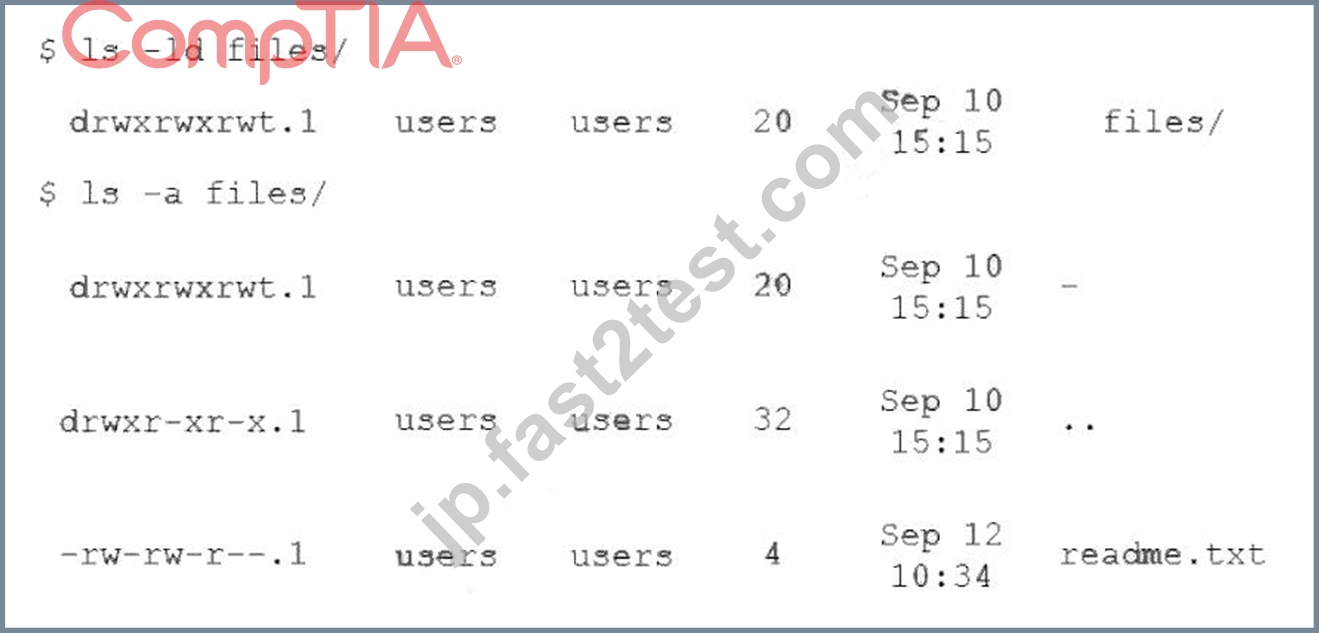
Which of the following commands should the administrator run NEXT to allow the file to be renamed by any user?
- A. chmod -t files
- B. chgrp reet files
- C. chacl -R 644 files
- D. chown users files
正解:A
解説:
The command that the administrator should run NEXT to allow the file to be renamed by any user is chmod -t files. This command uses the chmod tool, which is used to change file permissions and access modes. The -t option removes (or sets) the sticky bit on a directory, which restricts deletion or renaming of files within that directory to only their owners or root. In this case, since files is a directory with sticky bit set (indicated by t in drwxrwxrwt), removing it will allow any user to rename or delete files within that directory.
The other options are not correct commands for allowing any user to rename files within files directory. The chgrp reet files command will change the group ownership of files directory to reet, but it will not affect its permissions or access modes. The chacl -R 644 files command is invalid, as chacl is used to change file access control lists (ACLs), not permissions or access modes. The chown users files command will change the user ownership of files directory to users, but it will not affect its permissions or access modes. Reference: CompTIA Linux+ (XK0-005) Certification Study Guide, Chapter 8: Managing Users and Groups; chmod(1) - Linux manual page
質問 # 88
After installing a new version of a package, a systems administrator notices a new version of the corresponding, service file was Installed In order to use the new version of the, service file, which of the following commands must be Issued FIRST?
- A. systemctl status
- B. systemctl daemon-reload
- C. systemctl stop
- D. systemctl reinstall
正解:B
質問 # 89
A DevOps engineer needs to allow incoming traffic to ports in the range of 4000 to 5000 on a Linux server. Which of the following commands will enforce this rule?
- A. iptables -f filter -I INPUT -p tcp --dport 4000:5000 -A ACCEPT
- B. iptables -t filter -A INPUT -p tcp --dport 4000:5000 -j ACCEPT
- C. iptables filter -S INPUT -p tcp --dport 4000:5000 -A ACCEPT
- D. iptables filter -A INPUT -p tcp --dport 4000:5000 -D ACCEPT
正解:B
解説:
The command iptables -t filter -A INPUT -p tcp --dport 4000:5000 -j ACCEPT will enforce the rule of allowing incoming traffic to ports in the range of 4000 to 5000 on a Linux server. The iptables command is a tool for managing firewall rules on Linux systems. The -t option specifies the table to operate on, in this case filter, which is the default table that contains the rules for filtering packets. The -A option appends a new rule to the end of a chain, in this case INPUT, which is the chain that processes the packets that are destined for the local system. The -p option specifies the protocol to match, in this case tcp, which is the transmission control protocol. The --dport option specifies the destination port or port range to match, in this case 4000:5000, which is the range of ports from 4000 to 5000. The -j option specifies the target to jump to if the rule matches, in this case ACCEPT, which is the target that allows the packet to pass through. The command iptables -t filter -A INPUT -p tcp --dport 4000:5000 -j ACCEPT will add a new rule to the end of the INPUT chain that will accept the incoming TCP packets that have a destination port between 4000 and 5000. This command will enforce the rule and allow the traffic to the specified ports. This is the correct command to use to accomplish the task. The other options are incorrect because they either use the wrong options (-f instead of -t or -D instead of -A) or do not exist (iptables filter -A INPUT -p tcp --dport 4000:5000 -D ACCEPT or iptables filter -S INPUT -p tcp --dport 4000:5000 -A ACCEPT). Reference: CompTIA Linux+ (XK0-005) Certification Study Guide, Chapter 18: Securing Linux Systems, page 543.
質問 # 90
Which of the following can be used as a secure way to access a remote terminal?
- A. SSH
- B. SFTP
- C. TFTP
- D. SCP
正解:A
解説:
Explanation
SSH, or Secure Shell, is a protocol that allows you to access a remote terminal or virtual machine securely over an encrypted connection. You can use SSH to run commands, transfer files, or tunnel network traffic on a remote system. To use SSH, you need an SSH client program on your local system and an SSH server program on the remote system. You also need to authenticate yourself using a username and password or a public/private key pair. SSH is widely used by system administrators, developers, and engineers to remotely manage Linux servers and other devices.
The other options are not correct answers. TFTP, or Trivial File Transfer Protocol, is a simple protocol that allows you to transfer files between systems, but it does not provide any security or encryption features. SCP, or Secure Copy Protocol, is a protocol that uses SSH to securely copy files between systems, but it does not provide a remote terminal access. FTP, or File Transfer Protocol, is another protocol that allows you to transfer files between systems, but it also does not provide any security or encryption features.
質問 # 91
A Linux administrator booted up the server and was presented with a non-GUI terminal. The administrator ran the command systemctl isolate graphical.target and rebooted the system by running systemctl reboot, which fixed the issue. However, the next day the administrator was presented again with a non-GUI terminal. Which of the following is the issue?
- A. The administrator did not set the default target to basic.target.
- B. The administrator did not set the default target to graphical.target.
- C. The administrator did not reboot the server properly.
- D. The administrator did not shut down the server properly.
正解:B
解説:
Explanation
The issue is that the administrator did not set the default target to graphical.target. A target is a unit of systemd that groups together other units by a common purpose or state. The graphical.target is a target that starts the graphical user interface (GUI) along with other services. The administrator used the command systemctl isolate graphical.target to switch to this target temporarily, but this does not change the default target that is activated at boot time. To make this change permanent, the administrator should have used the command systemctl set-default graphical.target, which creates a symbolic link from /etc/systemd/system/default.target to
/usr/lib/systemd/system/graphical.target.
The other options are not correct explanations for the issue. The administrator did reboot the server properly by using systemctl reboot, which shuts down and restarts the system cleanly. The administrator did not need to set the default target to basic.target, which is a minimal target that only starts essential services. The administrator did not shut down the server improperly, which could have caused file system corruption or data loss, but not affect the default target. References: systemctl(1) - Linux manual page; How to Change Runlevels (targets) in SystemD
質問 # 92
A Linux administrator has been tasked with installing the most recent versions of packages on a RPM-based OS. Which of the following commands will accomplish this task?
- A. yum check-update
- B. rpm -a
- C. dnf update
- D. yum updateinfo
- E. apt-get upgrade
正解:C
解説:
The dnf update command will accomplish the task of installing the most recent versions of packages on a RPM-based OS. This command will check for available updates from the enabled repositories and apply them to the system. The apt-get upgrade command is used to install updates on a Debian-based OS, not a RPM-based OS. The rpm -a command is invalid, as -a is not a valid option for rpm. The yum updateinfo command will display information about available updates, but it will not install them. The yum check-update command will check for available updates, but it will not install them. Reference: CompTIA Linux+ (XK0-005) Certification Study Guide, Chapter 19: Managing Packages and Software, page 559.
質問 # 93
......
XK0-005問題集はあなたの合格を必ず保証します:https://jp.fast2test.com/XK0-005-premium-file.html
XK0-005テスト問題集とオンライン試験エンジン:https://drive.google.com/open?id=1CJFhw9eFno5knE-pVSRBlbd4qQj1afhS