

UiPath-ARDv1日本語試験問題集合格させるのは2023年最新の認証済み試験問題
UiPath-ARDv1日本語試験問題でリアルに更新された問題PDF
質問 # 115
開発者は、Read Range および Write Range アクティビティを使用して、あるワークシートから別のワークシートにデータをコピーします。次のシーケンスを実行すると、「Sheet2」ワークシートの「A1」セルの値はどうなりますか?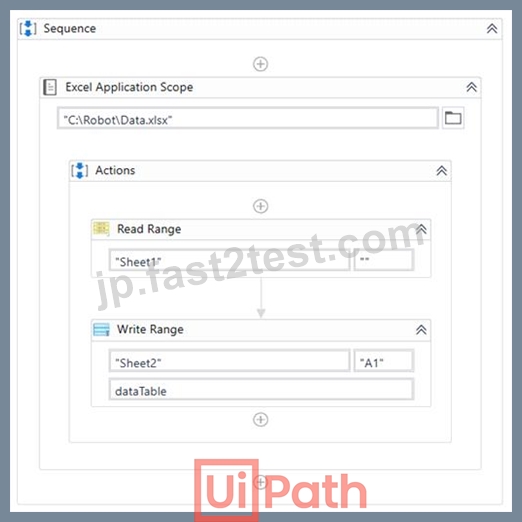
以下の Read Range アクティビティのプロパティを見つけてください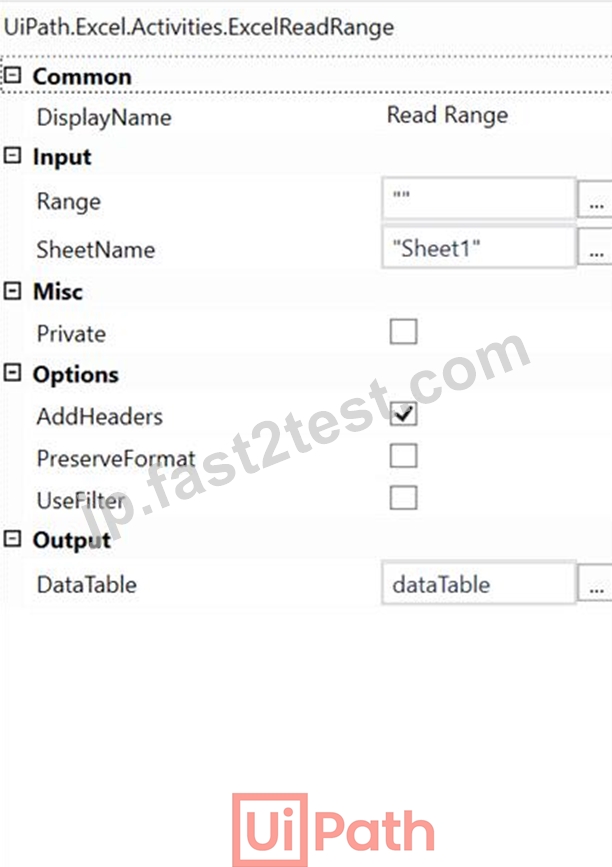
Write Range アクティビティのプロパティを以下に示します。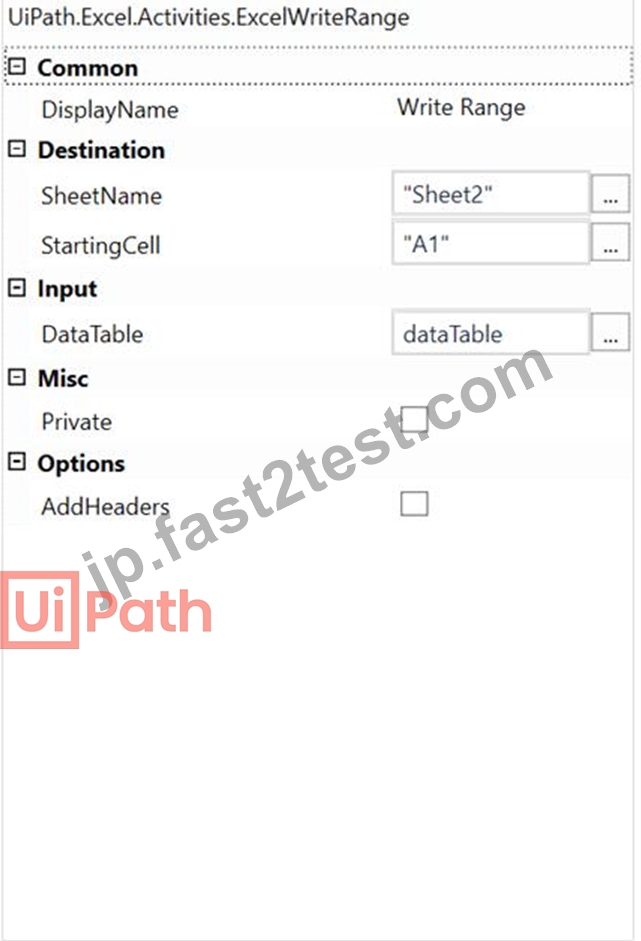
「Sheet1」のデータの下を見つけてください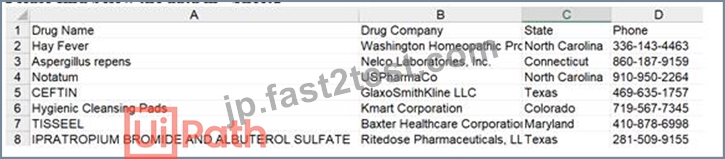
- A. 薬剤名
- B. 列 1
- C. 花粉症
- D. 列 0
正解:C
解説:
In the Read Range activity, when AddHeaders is selected, the column headers from the specified spreadsheet range are also extracted and set as the column names for the output datatable.
In the Write Range activity, when AddHeaders is selected, column headers are also written to the specified range. Otherwise, everything starting from the first row of the datatable is written to the worksheet (headers are not written).
In this case, robot first sets Drug Name, Drug Company, State and Phone as column names for the output datatable, however doesn't write them in Sheet2, as AddHeaders is not selected in the Write Range activity.
UiPath Documentation Read Range
UiPath Documentation Write Range
Exam Topic: Identify and describe how activities are used to automate actions in Excel, e-mail, and .pdfs
質問 # 116
Orchestratorに接続されているRoboticEnterprise(RE)Frameworkプロジェクトで、プロセストランザクション状態のキューアイテムでアプリケーション例外が発生した場合の正しい手順は何ですか?
注:「左」にある説明をドラッグし、「右」にある正しいステップシーケンスにドロップします。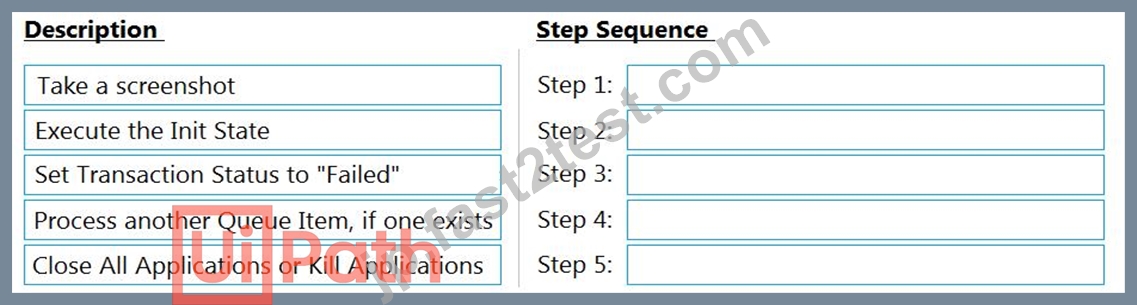
正解:
解説: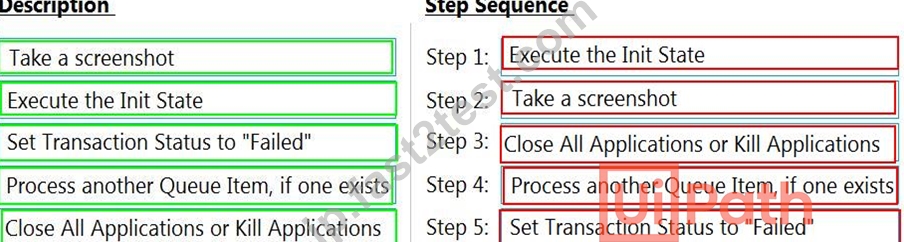
質問 # 117
開発者は、For Each Row in Data Table アクティビティを使用して、製品の現在の価格と割引価格を格納する sampleDataTable を反復処理します。開発者は、いくつかの行を削除して (If アクティビティの条件を参照してください)、データテーブルに残っている行数を表示したいと考えています。処理の結果はどうなりますか?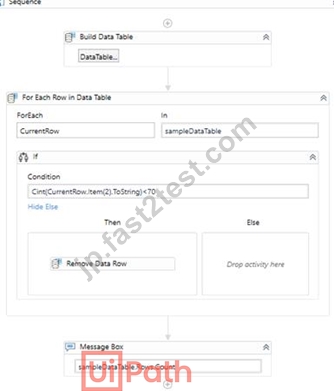
以下の BuildDataTable ウィザードを見つけてください。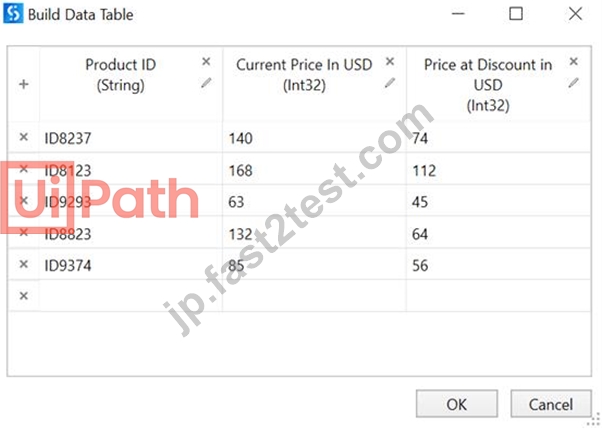
- A. メッセージ ボックス アクティビティは、値「3」を表示します。
- B. For Each Row In Data Table アクティビティはエラーをスローします。
- C. メッセージ ボックス アクティビティは、値「1」を表示します。
- D. メッセージ ボックス アクティビティはエラーをスローします。
正解:B
解説:
When you try to delete a row inside a For Each Row in Data Table activity, "Collection was modified; enumeration operation might not execute" error will be displayed, as it is not allowed to modify the structure of the datatable (e.g. change positions of datarows, remove them etc.) during iteration.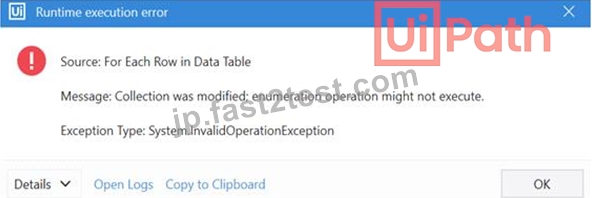
UiPath Forum
UiPath Documentation
Exam Topic: Describe how to work with complex data structures and data manipulation; for example, datatables and collections.
質問 # 118
開発者は、プロセス自動化プロジェクトにステート マシンを使用します。開発者は、自動化プロジェクトがある状態から別の状態に移行できる条件を定義したいと考えています。そうするための可能な方法は何ですか?
- A. アクティビティ パネルから遷移アクティビティをドラッグして、条件を定義します。
- B. アクティビティ パネルから If アクティビティをドラッグして、条件を定義します。
- C. アクティビティ パネルからフローチャート決定アクティビティをドラッグして、条件を定義します。
- D. 状態を接続して遷移を生成し、その中で条件を定義します。
正解:D
解説:
The Transition activity cannot be dragged from the Activities Panel, like a conventional activity. It is generated when you link a State to another State or to a Final State, within a State Machine container. This activity helps you input conditions under which the automation project can pass from one State to another.
UiPath Documentation
Exam Topic: Describe how to use state machines versus flowcharts and sequences Bottom of Form Top of Form
質問 # 119
開発者は、次のコードを使用して、"Test.xls" ファイルの "Sheet1" からデータを抽出したいと考えています。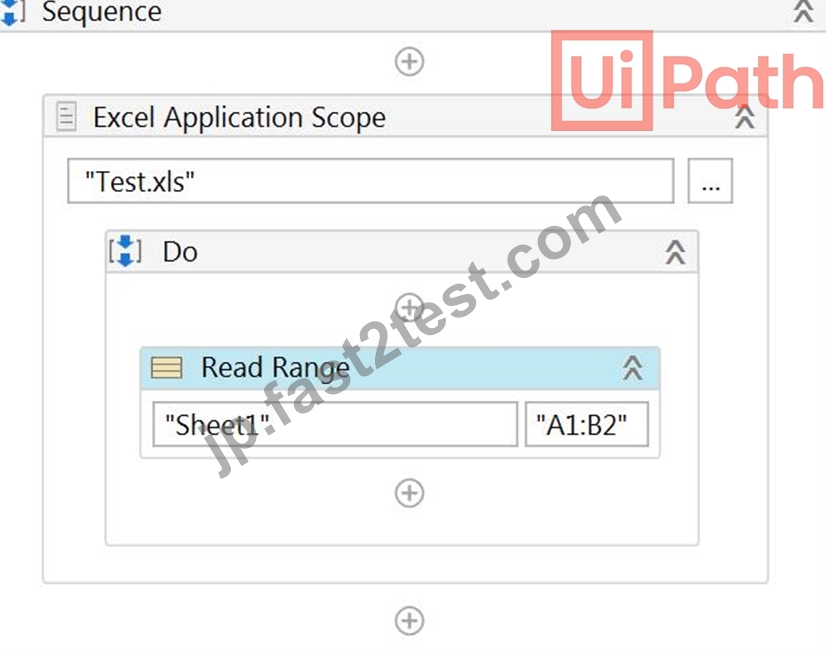
さらに、開発者は Read Range アクティビティの次のプロパティを構成しました。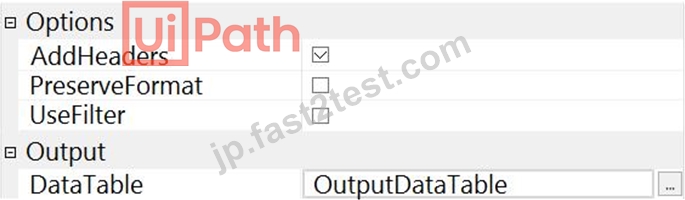
展示に基づいて、式 OutputDataTable.Rows.Count の出力と、OutputDataTable に含まれる値は何ですか?
- A. OutputDataTable.Rows.Count = 10,000
セル「A2」と「B2」の値が含まれています - B. OutputDataTable.Rows.Count = 2
セル「A1」と「B1」の値が含まれています - C. OutputDataTable.Rows.Count = 2
セル「A2」と「B2」の値が含まれています - D. OutputDataTable.Rows.Count = 1
セル「A2」と「B2」の値が含まれています
正解:C
質問 # 120
開発者は、UiPath_Raport2021.xlsm ファイルに保存されているマクロを実行したいと考えています。次のシーケンスが実行されると、結果変数の値はどうなりますか?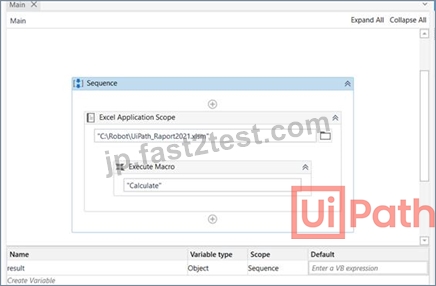
以下のマクロ実行アクティビティのプロパティを見つけてください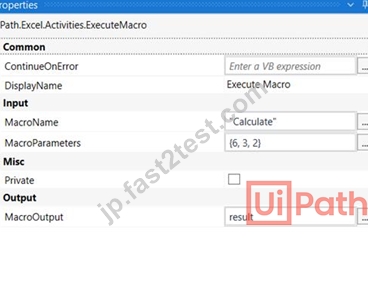
以下のマクロ「計算」を見つけてください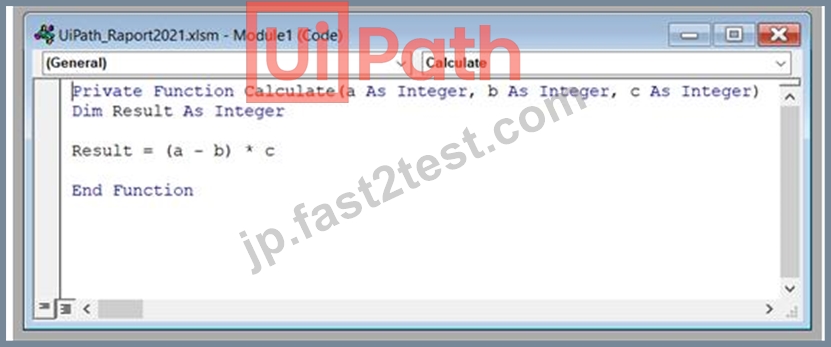
- A. 0
- B. 1
- C. ヌル
- D. エラーがスローされます
正解:C
解説:
This macro will not return any value to UiPath, so result variable will be a null. To return a value to UiPath, the developer needs to add Calculate = Result at the end of the macro. In this way, result variable will be be returned the value of th calculation - 6.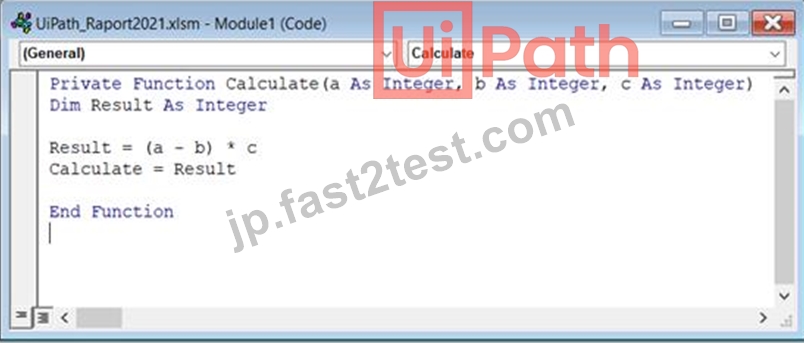
Exam Topic: Identify and describe how activities are used to automate actions in Excel, e-mail, and .pdfs
質問 # 121
Webページの複数のフィールドと対話するための.xamlファイルを開発しています。入力が必要なフィールドを自動で空にします。
どの入力方法がターゲット入力フィールドを自動的に空にしますか?
- A. 「SimulateType」のみ
- B. 「SendWindowMessages」のみ
- C. 「デフォルト」と「SimulateType」
- D. 「SimulateType」と「SendWindowMessages」
正解:A
質問 # 122
開発者は、UiPath_Raport2021.xlsm ファイルに保存されているマクロを実行したいと考えています。次のシーケンスが実行されると、結果変数の値はどうなりますか?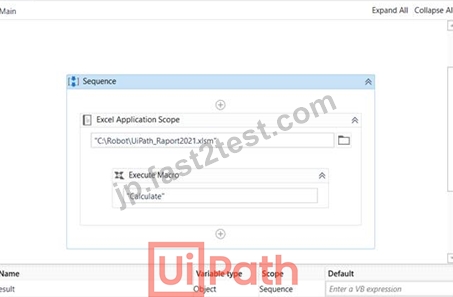
以下のマクロ実行アクティビティのプロパティを見つけてください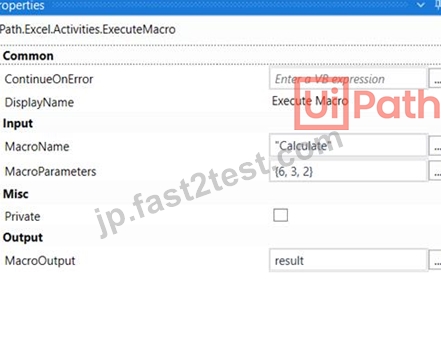
以下のマクロ「計算」を見つけてください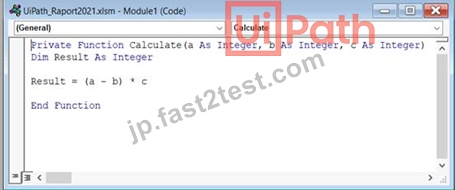
- A. 0
- B. 1
- C. ヌル
- D. エラーがスローされます
正解:C
解説:
This macro will not return any value to UiPath, so result variable will be a null. To return a value to UiPath, the developer needs to add Calculate = Result at the end of the macro. In this way, result variable will be be returned the value of th calculation - 6.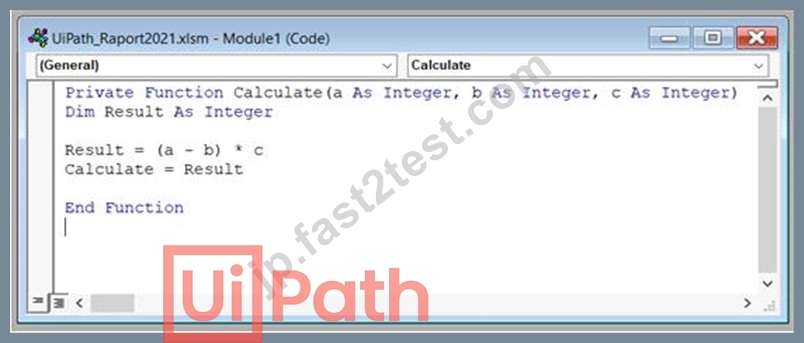
Exam Topic: Identify and describe how activities are used to automate actions in Excel, e-mail, and .pdfs
質問 # 123
ワークフローのデバッグに何を使用できますか?
オプションは次のとおりです。
- A. ハイライト活動。
- B. スローステップオプション。
- C. ブレークポイント
正解:B、C
質問 # 124
信頼できるセレクターで「idx」を使用できるのはどのような状況ですか?
- A. 静的UIリストの正確なn番目の要素がプロセスで必要な場合
- B. ダイナミックセレクターが必要な場合
- C. アプリケーションの要素のセレクターがめったに変更されない場合
- D. 「idx」値が1または2の場合
正解:B
質問 # 125
次の規則のうち、命名規則のカテゴリに属するものはどれですか?
- A. ST-SEC-008 - SecureString 変数の使用法
- B. ST-NMG-002 - 引数の命名規則
- C. ST-MRD-007 - ネストされた If 句
- D. ST-DBP-020 - 未定義の出力プロパティ
正解:B
解説:
NMG - shows that the rule is part of the Naming Rules category. Rules part of Project Anatomy Rules category have the ANA abbreviation, those part of Design Best Practices the DBP, and so on.
UiPath Documentation
Exam Topic: Describe the functionality of the Workflow Analyzer and how to create new rules
質問 # 126
クレデンシャルはどこに保存する必要がありますか?
オプションは次のとおりです。
- A. オーケストラでアセットとして
- B. Windowsクレデンシャルストア内
- C. 変数としてワークフロー内に直接
正解:A、B
質問 # 127
参照されていない変数を削除する最良の方法はどれですか?
オプションは次のとおりです。
- A. [デザイン] パネル > [変数の管理] > [未参照の削除] から変数を管理できます。
- B. 変数パネルから 1 つずつ削除します。UiPath Studio はワークフローの検証をリアルタイムで実行するため、どの変数が使用されているかを確認できます。
- C. 参照されていない変数はメモリを使用しないため、削除する必要はありません。
正解:A
質問 # 128
展示に示されている構成に基づいて、ターゲット要素が実行時に存在しない場合、これらのアクティビティを実行した結果はどうなりますか?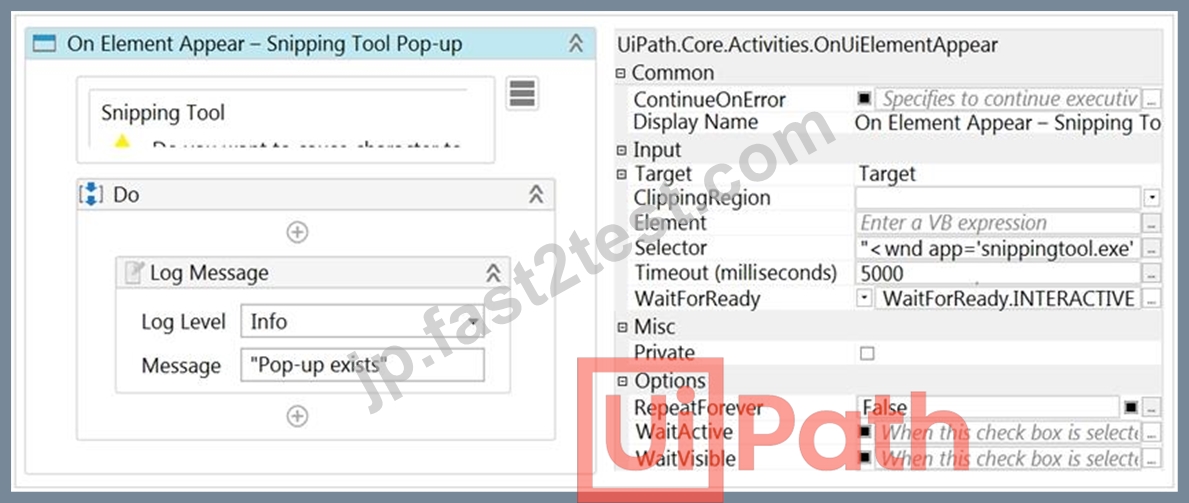
- A. ロボットは、実行が手動で停止されるまで、ターゲット要素を探し続けます
- B. メッセージをログに記録せずに実行が正常に完了しました
- C. アクティビティタイムアウト超過エラーを受信しました
- D. 「ポップアップが存在します」というメッセージがログに記録されます
正解:C
質問 # 129
開発者は、コール センターのユーザーのために、非表示または最小化されたウィンドウで UI オートメーション アクティビティを使用するプロセスを作成したいと考えています。プロセスがユーザーのマシンで実行されている間、ユーザーはマシンを使用してデスクトップ アプリケーションでアイテムを検索する機能も必要とします。
非表示または最小化されたウィンドウと対話できるように構成する必要があるアクティビティはどれですか?
- A. クリック
- B. 全文取得
- C. チェック
- D. テキストを設定
正解:A
質問 # 130
Execute Non Queryというアクティビティを使用して実行できるSQLステートメントは次のうちどれですか?
オプションは次のとおりです。
- A. 削除
- B. 更新
- C. 選択
- D. 挿入
正解:A、B、D
質問 # 131
開発者は、セルの書き込みアクティビティと範囲の読み取りアクティビティを使用して、Excel ファイルを操作したいと考えています。Excel ファイルはパスワードで変更できないように保護されているため、許可されていないユーザーはデータを読み取ることしかできません。ロボットがこのファイルからデータを読み書きできるようにするには、どうすればよいですか?
- A. このファイルへのパスワードは、Excel アプリケーション スコープ アクティビティの [パスワードの編集] プロパティで指定する必要があります。パスワードは文字列形式で指定する必要があります。
- B. このファイルへのパスワードは、Excel Application Scope アクティビティの "Password" プロパティで指定する必要があります。パスワードは文字列形式で指定する必要があります。
- C. このファイルへのパスワードは、Excel Application Scope アクティビティの [パスワードの編集] プロパティと [パスワード] プロパティで指定する必要があります。パスワードは文字列形式で指定する必要があります。
- D. このファイルへのパスワードは、Excel アプリケーション スコープ アクティビティの [パスワードの編集] プロパティで指定する必要があります。パスワードは SecureString 形式で指定する必要があります。
正解:A
解説:
Edit password property stores the password required for editing password-protected Excel workbooks, if necessary. Only String variables and strings are supported.
While the Password property stores the password required for opening and reading password-protected Excel workbooks, if necessary. Only String variables and strings are supported.
In this case, the file is only password-protected for editing, so unauthorized users can read the file, but not write any data. That means that the password for opening and reading is not required, only for editing. For that reason, only the Edit Password property should be filled in.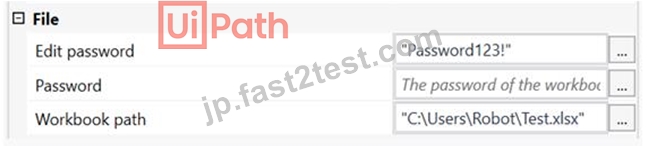
質問 # 132
開発者は、電子メールの件名からサポートチケット番号を取得するプロセスを自動化する必要があります。たとえば、電子メールの件名には「アクションが必要です-XA / 135」が含まれます。ここで、「XA / 135」はチケット番号です。ロボットは、先に進む前にチケット番号のパターンを検証する必要があります。
件名のチケット番号パターンにのみ一致する式はどれですか?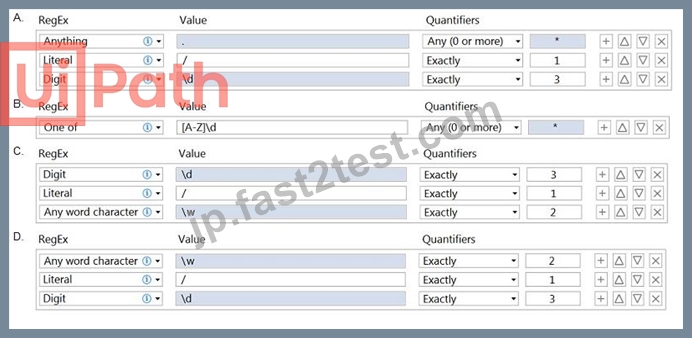
- A. オプションB
- B. オプションA
- C. オプションC
- D. オプションD
正解:A
質問 # 133
実技試験の質問は人によって異なるため、解決策を共有することはできませんが、実技試験で役立つと約束したので、learnautomationr @ gmail.comにメールを送ってください。また、実技試験のクリアもお手伝いします。
オプションは次のとおりです。
- A. 回答:理解しました
- B. わかりました
正解:B
質問 # 134
この演習では、以下の手順を実行する UiPath オートメーションを作成します。
これを実現するには、開始テンプレートとして REFrameWork を使用し、UiPath 開発のベスト プラクティスに従います。
正解:
解説:
Here are the steps performed by the Robot:
1. Log in to https://www.acme-test.com.
2. On the landing page, Dashboard, click on the Work items menu item. Scrape the data in all the pages of the table, page by page, ensuring error handling and recovery.
3. For each page:
- Filter the records where Status is 'Open';
- Filter the records where Description is 'Calculate Client Security Hash';
- Filter the records where WIID is less than 600000;
- Append the resulting datatable into an Excel worksheet, you shouldn't worry about the headers and format of the output file.
Constraints to follow in the development, using the REFrameWork:
1. TransactionItem datatype should be a String. The process should recover and retry in case of errors in navigation between WorkItems page. One transaction is the action of scraping one web page.By navigating to the next page, the next transaction will execute. (Same as ACME Process 4 Dispatcher from the UiPath Academy).
2. Create a separate workflow file for the Login to ACME. File input arguments: URL ; Username ; Password .
3. Create a separate workflow file for closing ACME.
3. Add the ACME_URL and ACME_Credential to the Config file.
4. Populate InitAllApplications.xaml from the Framework folder with Invoking the Login to ACME and navigation to the Work Items.
5. Populate CloseAllApplications.xaml from the Framework folder with Invoking the Close ACME.
6. Populate KillAllProcesses.xaml from the Framework folder with killing the process used.
7. Populate the Process.xaml file with the following actions: Web scraping, Filtering and Appending to Excel.
Important Note: Don't use external file references outside of the project folder (including Orchestrator Assets).
Place all the used files within the project folder, zip that folder and upload it to the UiPath Certification Platform.
Zip ALL the used workflow files AND the output Excel file. Then upload the .zip file to the UiPath Certification Platform.
ALL THE BEST!
質問 # 135
UiPath Robotic Enterprise Frameworkでは、Init状態の遷移は何ですか?
オプションは次のとおりです。
- A. 成功の場合、遷移はプロセストランザクション状態になります。
- B. システムエラーの場合、遷移はプロセス終了状態になります。
- C. システムエラーの場合、遷移は初期化状態になります。
- D. 成功の場合、遷移はGet TransactionData状態になります。
正解:B、D
質問 # 136
アプリケーションのボタンのセレクターを識別したいとします。セレクターは、クリックアクティビティのターゲットとして使用されます。
Clickアクティビティが意図したとおりに実行されるようにするには、実行時にセレクターを有効にする必要がある要素はいくつですか?
- A. 1要素
- B. 5つの要素
- C. 3つの要素
- D. 2つの要素
正解:A
質問 # 137
ある開発者が UiPath で自動化を作成し、求職者の履歴書を処理しました。このプロセスは、人事チームの日常業務を支援することを目的としています。ロボットは毎日、HR チームから Outlook アカウントに送信されたメールを処理する必要があります。人事部からの電子メールに加えて、ロボットは組織の電子メールや他の従業員からの電子メールも受信します。ロボットが人事チーム <[email protected]> からの電子メールのみを抽出するように Outlook メール メッセージの取得アクティビティを設定するには、いくつかの方法があります。
間違った方法を選択してください。
- A. Get Outlook Mail Messages アクティビティの Filter プロパティの "[From] = 'HR Team"。
- B. Get Outlook Mail Messages アクティビティの From プロパティの "HR Team"。
- C. Get Outlook Mail Messages アクティビティの Filter プロパティの "[SenderName] = 'HR Team"。
- D. "[SenderEmailAddress] = '[email protected]'" は、Get Outlook Mail Messages アクティビティの Filter プロパティにあります。
正解:B
解説:
There is no "From" property in the Get Outlook Mail Messages activity, and all filtering needs to be done in the Filter property of the Get Outlook Mail Messages activity. All 3 strings can be used as a filter to get mails only from the HR Team.
UiPath Documentation
Exam Topic: Identify and describe how activities are used to automate actions in Excel, e-mail, and .pdfs.
質問 # 138
フルセレクターの例を表すものは何ですか?
- A. <wnd aaname='Explorer Pane' cls='DirectUIHWND' />
<ctrl automationid='System.ItemNameDisplay' /> - B. <html app='chrome.exe' title='Full versus Partial Selectors' />
<webctrl aaname='About Selectors' parentid='content-container' tag='A' /> - C. <ctrl name='File' role='popup menu' />
<ctrl automationid='6' /> - D. <webctrl href='/studio/docs/about-licensing' parented='hub-sidebar-content' tag='A' />
<webctrl parented='hub-sidebar-content' tag='SPAN' />
正解:A
質問 # 139
3つのGenericValue変数、デフォルト値が「3apples」のvar1、デフォルト値が「5 mangos」のvar2、およびvar1 + var2式を使用したAssignActivityの出力である結果について考えてみます。結果の変数の値は何ですかオプションは次のとおりです。
- A. 0
- B. Null
- C. Error: "Input string was not in a correct format"
- D. "8 fruits"
- E. "3 apples5 mangos"
正解:E
質問 # 140
......
合格させる保証付き無料クイズ2023年最新の実際に出ると確認されたUiPath:https://jp.fast2test.com/UiPath-ARDv1-JPN-premium-file.html