

SAP C_THR81_2505テストエンジン問題集トレーニングには86問あります
C_THR81_2505問題一発合格させる問題集はSAP Certified Associate認定
SAP C_THR81_2505 認定試験の出題範囲:
| トピック | 出題範囲 |
|---|---|
| トピック 1 |
|
| トピック 2 |
|
| トピック 3 |
|
| トピック 4 |
|
質問 # 39
A customer has scheduled an HRIS sync job, which includes mapping of job titles, to run every Friday. On Tuesday, an employee's job title is changed via Manager Self-Service (MSS) to become effective on Thursday.
When will the synchronization happen?
- A. Tuesday, the day the transaction is entered
- B. Saturday, the day after the sync job completes
- C. Thursday, when the change becomes effective
- D. Friday, when the sync job completes
正解:D
解説:
In SAP SuccessFactors Employee Central, the HRIS synchronization (sync) job is responsible for aligning data between different modules and ensuring consistency across the system. When an employee's job title is changed via Manager Self-Service (MSS) with an effective date set to Thursday, and the HRIS sync job is scheduled to run every Friday, the synchronization will occur on Friday, when the sync job completes.
This means that any changes made effective on Thursday will be synchronized during the next scheduled HRIS sync job on Friday. Therefore, the correct answer is C. Friday, when the sync job completes.
質問 # 40
According to SAP guidelines, what can you do in the event picklist when configuring events and event reasons? Note: There are 3 correct answers to this question.
- A. Change the external_code of an event.
- B. Add a new event.
- C. Change the labels.
- D. Add a new language translation.
- E. Change the status.
正解:C、D、E
解説:
When configuring events and event reasons in SAP SuccessFactors, you can perform the following actions:
A . Add a new language translation
New language translations can be added for events and event reasons to support multilingual organizations.
B . Change the status
You can activate or deactivate events based on organizational needs.
D . Change the labels
Labels for events can be modified for better understanding and alignment with organizational terminology.
C . Change the external_code of an event and E. Add a new event are incorrect as external codes are immutable once created, and adding events requires admin-level access beyond event picklist configuration
質問 # 41
Which action in the THEN statement is used for propagation?
- A. Raise
- B. Execute
- C. Set
- D. Create
正解:C
質問 # 42
How do you create country-specific fields for the Legal Entity object?
- A. As a generic object with a Valid When association to the Legal Entity object
- B. As an HRIS element in the Corporate Data Model with a composite association to the Legal Entity object
- C. As an HRIS element in the Country Specific Field for Corporate Data Model with a Valid When association to the Legal Entity object
- D. As a generic object with a composite association to the Legal Entity object
正解:C
解説:
To create country-specific fields for the Legal Entity object in SAP SuccessFactors Employee Central, you should define these fields as an HRIS element within the Country-Specific Field section of the Corporate Data Model. This approach allows the system to manage country-specific attributes effectively. The 'Valid When' association is utilized to ensure that these fields are applicable only when certain conditions, such as the country of registration, are met. This configuration ensures that the Legal Entity object contains fields relevant to specific countries, facilitating accurate data management and compliance with local regulations.
質問 # 43
Which object supports &&NO_OVERWRITE&& in imports? Note: There are 2 correct answers to this question.
- A. Job Relationships
- B. Employment Details
- C. Addresses
- D. Job History
正解:B、D
解説:
The &&NO_OVERWRITE&& operator is supported in imports for:
A . Job History
This ensures that existing job history records are not overwritten during imports.
D . Employment Details
Employment details such as hire dates or termination records can also be preserved using this operator.
Job Relationships and Addresses do not support the &&NO_OVERWRITE&& operator.
質問 # 44
Based on the screenshot below, can you identify any errors on the definition of the business rule to Default Position Attributes? Note: There are 2 correct answers to this question.
- A. The Company field should NOT be included in the business rule.
- B. The workflow configuration should NOT be included in the business rule.
- C. The FTE field should be derived from the business rule to Calculate FTE based on Standard Hours.
- D. The Parent Position field should NOT be included in the business rule.
正解:C、D
解説:
* C. The Parent Position field should NOT be included in the business rule:
* The Parent Position field is typically derived automatically based on position hierarchy and does not require explicit inclusion in a business rule for defaulting position attributes.
* D. The FTE field should be derived from the business rule to Calculate FTE based on Standard Hours:
* The FTE (Full-Time Equivalent) value should be calculated using a dedicated rule that accounts for standard hours, rather than being directly included in a defaulting rule.
Including these fields inappropriately can lead to data inconsistencies or rule execution issues.
質問 # 45
Which condition must be used for the jobinfo_FTE_Comp rule?
- A. Option A
- B. Option B
- C. Option C
- D. Option D
正解:D
解説:
For the Jobinfo_FTE_Comp rule, the correct condition to use is Option D. This ensures that the system evaluates changes in FTE values and event reasons to calculate and adjust compensation data accordingly. The precise conditions are necessary to maintain consistency in how the rule is applied across various HR scenarios.
Scenario 1: HR Transaction Rules
質問 # 46
Which action will trigger a system validation for an in-progress workflow?
- A. Updating Job Information with the same effective date
- B. Terminating an employee
- C. Adding a new employee
- D. Rehiring an inactive employee
正解:B
解説:
Updating Job Information with the same effective date triggers a system validation for an in-progress workflow.
When an in-progress workflow exists, updates to Job Information with the same effective date can cause conflicts, as the system needs to validate if the changes are permissible without interfering with the pending workflow.
This is designed to ensure data consistency and avoid duplicate or conflicting entries.
Other options, such as rehiring, adding a new employee, or terminating an employee, are not related to triggering validations for in-progress workflows.
質問 # 47
How are business rules handled in Employee Central Quick Actions?
- A. The system supports all onSave rules.
- B. The system does NOT support onPostSave rules.
- C. onView rules are supported when the fields are included in the template.
- D. onChange rules are supported when the fields are included in the template.
正解:C、D
質問 # 48
What actions can you initiate from the Position Org chart? Note: There are 3 correct answers to this question.
- A. Run a mass change to update positions
- B. Nominate a successor for a position
- C. Mass copy positions
- D. Add a lower-level position
- E. Create a job requisition for a vacant position
正解:C、D、E
解説:
From the Position Org Chart in SAP SuccessFactors Employee Central, users can initiate the following actions:
A . Add a lower-level position:
Users can create subordinate positions directly within the hierarchy to reflect organizational reporting structures.
C . Create a job requisition for a vacant position:
A job requisition can be initiated for positions marked as vacant, streamlining the hiring process by linking positions to recruiting functionalities.
E . Mass copy positions:
This action allows for the duplication of multiple positions, facilitating quick setup of similar roles across the organization.
These features enhance the efficiency of managing the organizational structure and workforce planning.
質問 # 49
You have updated several position departments using Import and Export data, but the incumbent's data still shows the previous information for the department hris-field.
What are some possible causes for this data inconsistency? Note: There are 2 correct answers to this question.
- A. The business rule to sync data changes sets the Job Information.Department to be equal to Job Information.Position.Department.
- B. The technicalParameters value has NOT been set to SYNC in the position records.
- C. The technicalParameters column with a value of SYNC has NOT been included in the import file.
- D. The business rule to sync data changes sets the Position Department to be equal to Job Information.Department.
正解:C、D
解説:
B . The technicalParameters column with a value of SYNC has NOT been included in the import file:
When importing position data, the technicalParameters column with the value "SYNC" must be included to ensure that changes to position attributes are synchronized to the incumbent's data.
C . The business rule to sync data changes sets the Position Department to be equal to Job Information.Department:
If the rule is incorrectly configured, the department field on the incumbent's job information may not update as expected. The correct configuration should align the position department with the incumbent's job information.
These factors contribute to discrepancies between position and incumbent data.
質問 # 50
Which action will trigger a system validation for an in-progress workflow?
- A. Updating Job Information with the same effective date
- B. Terminating an employee
- C. Adding a new employee
- D. Rehiring an inactive employee
正解:B
質問 # 51
Which of the following API types does SAP recommend to use to achieve clean core integrations? Note: There are 2 correct answers to this question.
- A. SOAP
- B. RFC
- C. Data
- D. IDoc
正解:A、C
解説:
SAP recommends using SOAP APIs and Data APIs for clean core integrations.
SOAP APIs: Provide a structured, standardized method of communication for integrations, especially suitable for real-time and synchronous processes.
Data APIs: Enable smooth data exchange and are preferred for achieving non-intrusive clean core integrations.
Other methods like IDoc and RFC are older technologies that might compromise the clean core principles by requiring deeper system customizations.
質問 # 52
What are some of the position management application-specific rule scenarios? Note: There are 3 correct answers to this question.
- A. Derive Job Requisition Template in Recruiting Integration
- B. Create Right to Return for Incumbent
- C. Trigger Rules to Calculate Full-Time Equivalent
- D. Trigger Rules for Off Cycle Event Batch
- E. Update Rule for Mass Change Run
正解:B、C、E
解説:
Application-specific rule scenarios in Position Management include:
A . Create Right to Return for Incumbent:
This rule supports the creation of a right-to-return record for an incumbent when a position-related action occurs, such as a temporary assignment.
B . Update Rule for Mass Change Run:
This rule automates updates during mass position changes, ensuring consistent application of business logic across multiple positions.
C . Trigger Rules to Calculate Full-Time Equivalent:
This rule calculates the FTE value based on position or job information attributes, ensuring accurate reporting and compliance.
These rules enhance the flexibility and functionality of position management processes.
質問 # 53
An HR admin/Global Mobility person must create a transfer for an employee. The employee will be moving from Position A in Team A to Position B in Team B. Both managers will have to approve the transfer.
How do you configure a two-step workflow so that the approval goes first to the current manager and second to the future manager?
- A. By selecting in Step 1. Role-Manager - Source
* By selecting in Step 2: Role - Manager - Target - B. By selecting in Step 1: Role - Manager - Source
* By selecting in Slep 2. Role-Manager Manager - Target - C. By selecting in Step 1. Position Relationship - Parent Parent Position - Source
* By selecting in Step 2: Position Relationship - Parent Position - Target - D. By selecting in Step 1: Role - Self-Source
* By selecting in Step 2. Role- Manager - Target
正解:A
解説:
Scenario 2: Approvals for Self-Service
To configure a two-step workflow where the approval first goes to the current manager and then to the future manager, you must set the following in the workflow:
Step 1: Role - Manager - Source (current manager of the employee).
Step 2: Role - Manager - Target (future manager of the employee).
This setup ensures that the workflow sequentially routes approval to both the current and future managers.
質問 # 54
You want the Timezone field to be pre-populated when the location record is changed in Job Info. How do you configure this?
- A. Base Object: Location: Assigned to Timezone field as onChange
- B. Base Object: Job Information; Assigned to Location field as onChange
- C. Base Object: Location; Assigned to Timezone field as onSave
- D. Base Object: Job Information; Assigned to Timezone field as onChange
正解:B
解説:
To pre-populate the Timezone field when the location record is changed in Job Information, you need to configure the association as follows:
* Base Object: Job Information
* Trigger Event: Assigned to the Location field with the event set to onChange.This configuration ensures that whenever the Location field is updated in Job Information, the system triggers the logic to update and pre-populate the Timezone field based on the associated Location. The onChange event drives this functionality.
質問 # 55
Your customer would like to autogenerate the Position Code to avoid manual entry. Which of the following are prerequisites to achieve this requirement?
Note: There are 3 correct answers to this question.
- A. Set Position External Code Generation by On Save rule to Yes in Position Management Settings > General tab
- B. Set a Business Rule using the Rules for MDF Based Objects with the event type onSave and assign it in Position > code
- C. Set the Position Code field as read-only in the Position Object Definition
- D. Set a Business Rule using the Rules for MDF Based Objects with the event type onSave and assign it in Position > Save Rules
- E. Set a Business Rule using the Trigger Rules to Generate Assignment ID External with the event type onSave and assign it in Position > Save Rules
正解:A、C、E
解説:
To autogenerate the Position Code in Position Management, the following prerequisites must be fulfilled:
B . Set a Business Rule using the Trigger Rules to Generate Assignment ID External with the event type onSave and assign it in Position > Save Rules:
This rule ensures that the Position Code is automatically generated when a position is saved, based on the predefined logic in the business rule.
C . Set Position External Code Generation by On Save rule to Yes in Position Management Settings > General tab:
Enabling this setting ensures that the system allows automatic code generation based on the onSave rules defined in the Position Management module.
E . Set the Position Code field as read-only in the Position Object Definition:
Making the Position Code field read-only prevents manual entry, ensuring that the code is exclusively autogenerated by the system.
These settings align with best practices in automating Position Code generation and reducing manual input errors.
質問 # 56
Which of the following are possible options when working with SAP SuccessFactors Employee Central employee identifiers? Note: There are 3 correct answers to this question.
- A. A user can have only one person id external.
- B. Once generated, you CANNOT change a person id external.
- C. A user can have only one user id.
- D. Once generated, you CANNOT change a user id.
- E. A user can have multiple user ids.
正解:A、D、E
解説:
In SAP SuccessFactors Employee Central, employee identifiers are managed as follows:
A . Once generated, you CANNOT change a user id.
The User ID serves as a unique identifier for an employee's employment record. Once assigned, it cannot be altered.
D . A user can have multiple user ids.
An employee may possess multiple User IDs, especially in scenarios involving concurrent employment or global assignments. Each employment instance is associated with a distinct User ID.
E . A user can have only one person id external.
The Person ID External uniquely identifies an individual across all employment records within the system. An employee is assigned a single Person ID External, regardless of the number of employments.
Options B and C are incorrect:
B . A user can have only one user id.
This is incorrect because, as mentioned, an employee can have multiple User IDs corresponding to different employment instances.
C . Once generated, you CANNOT change a person id external.
This is incorrect. While the Person ID External is intended to be a stable identifier, it can be changed if necessary, though such changes should be managed carefully to maintain data integrity.
質問 # 57
The HR admin has to change the salary of an employee, which will trigger a workflow for the employee's manager. The employee's manager should be able to edit the transaction if the proposed amount is NOT correct.
Where in the workflow do you need to define this?
Refer to the screenshot to answer the question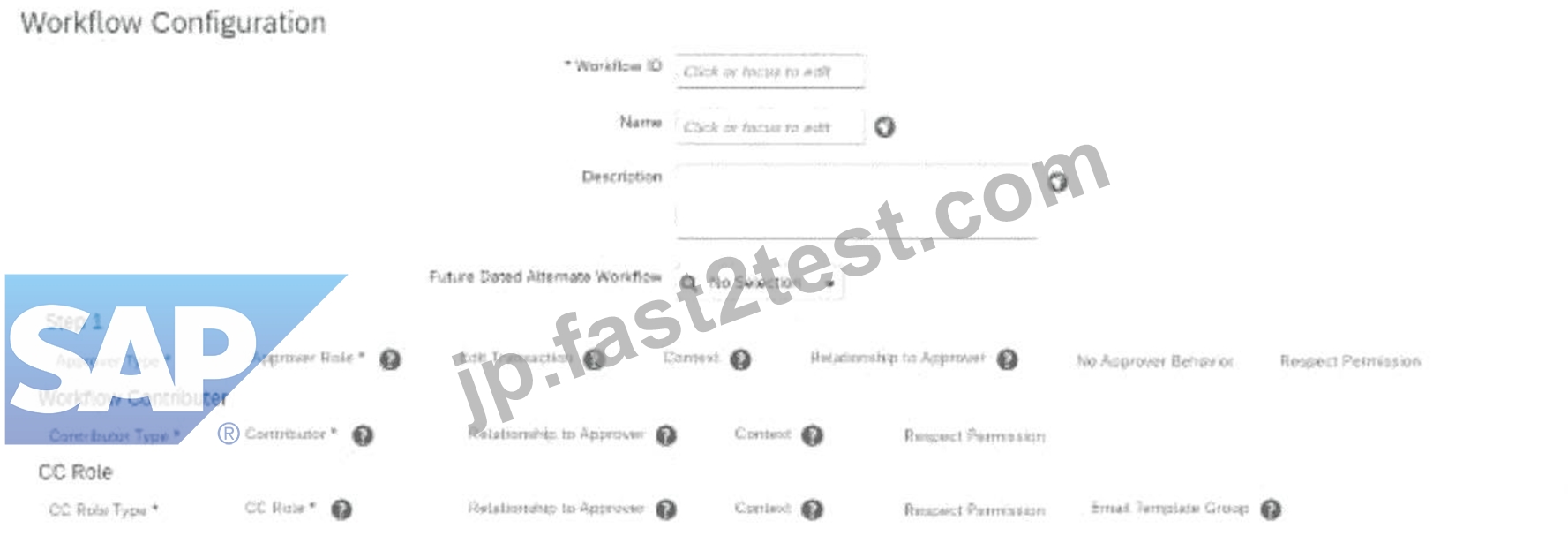
- A. Edit Transaction
- B. Context
- C. Respect Permission
- D. No Approver Behavior
正解:A
解説:
To allow the employee's manager to edit a transaction in a workflow if the proposed salary change is incorrect, you must configure the "Edit Transaction" setting in the workflow.
* The "Edit Transaction" option is part of the workflow configuration in Step 1 (as shown in the screenshot).
* When enabled, it allows the approver (in this case, the manager) to make adjustments to the transaction before approving it.
Scenario 2: Approvals for Self-Service
質問 # 58
How do you enable a cost center in the Succession Data Model to be used as a filter in a permission group?
- A. Go to <hris-element="jobInfo"> then add dg-filter="true"
- B. Go to <hris-field id="cost-center"> then add filter="true"
- C. Go to <custom-filters> then add cost-center
- D. Go to <dg-filters> then add cost-center
正解:D
解説:
To enable a cost center in the Succession Data Model for use as a filter in a permission group, you must:
Navigate to the <dg-filters> section within the Succession Data Model.
Add an entry for the cost-center object within the <dg-filters> section.
This action allows the cost center to be selectable as a filter for Dynamic Groups, which are used to define permission groups in Employee Central.
A: Go to <dg-filters> then add cost-center
質問 # 59
The HR admin has to change the salary of an employee, which will trigger a workflow for the employee's manager. The employee's manager should be able to edit the transaction if the proposed amount is NOT correct.
Where in the workflow do you need to define this?
Refer to the screenshot to answer the question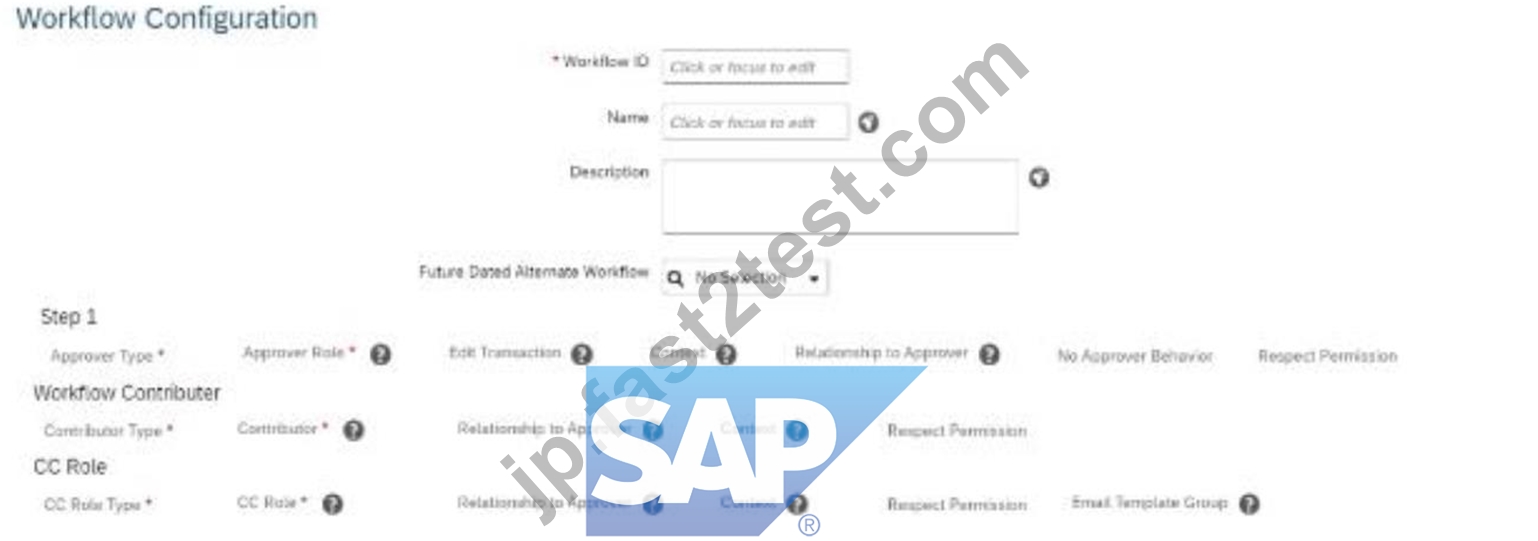
- A. Edit Transaction
- B. Context
- C. Respect Permission
- D. No Approver Behavior
正解:A
解説:
To allow the employee's manager to edit a transaction in a workflow if the proposed salary change is incorrect, you must configure the "Edit Transaction" setting in the workflow.
The "Edit Transaction" option is part of the workflow configuration in Step 1 (as shown in the screenshot).
When enabled, it allows the approver (in this case, the manager) to make adjustments to the transaction before approving it.
Scenario 2: Approvals for Self-Service
質問 # 60
Your client is live with the employee transfer process in the production instance. The workflow shown in the screenshot is triggered when an employee transfer is initiated.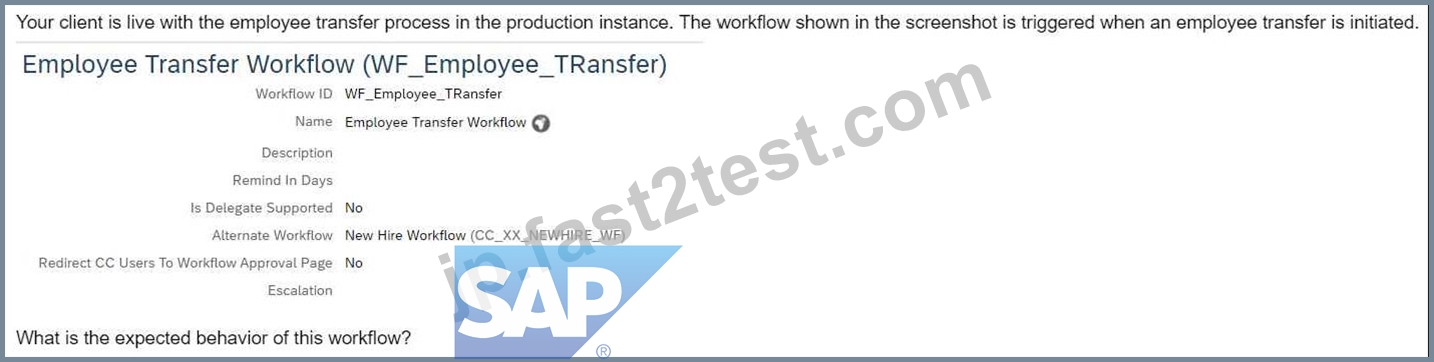
What is the expected behavior of this workflow?
- A. An approver can automatically reroute this request to another employee during vacation.
- B. If an approver does NOT take any action for 3 days, a reminder notification is sent by the system.
- C. The initiator of the employee transfer process is given an option to choose New Hire Workflow as an alternate workflow to WF_Employee_Transfer.
- D. The alternate workflow is used when there is a future-dated record entered for the employee.
正解:D
解説:
In the scenario where an employee transfer process is initiated, and a workflow is triggered, the system behavior is as follows:
Alternate Workflow Usage: If there is a future-dated record entered for the employee, the system utilizes the alternate workflow. This mechanism ensures that the appropriate workflow is applied based on the effective date of the transaction, allowing for accurate processing of future-dated changes.
This functionality is designed to handle scenarios where actions need to be taken in advance, ensuring that the system processes the correct workflow when the future-dated record becomes effective.
質問 # 61
......
C_THR81_2505練習テストPDF試験材料:https://jp.fast2test.com/C_THR81_2505-premium-file.html
C_THR81_2505解答の無料サンプルには全てリアル試験に基づいています:https://drive.google.com/open?id=1OrKCvbXV1Bq9bWq9aKk2DZbnD2TjvWC2