

リアルなMD-100日本語は100%カバー試験問題をゲット [2024年01月]
問題集まとめ概要はMD-100日本語試験問題集はここ
質問 # 204
仮想マシンがロードされるまでお待ちください。ロードしたら、ラボセクションに進むことができます。これには数分かかる場合があり、待機時間は全体のテスト時間から差し引かれません。
[次へ]ボタンが使用可能になったら、それをクリックしてラボセクションにアクセスします。このセクションでは、ライブ環境で一連のタスクを実行します。ほとんどの機能はライブ環境と同じように利用できますが、一部の機能(コピーと貼り付け、外部Webサイトへの移動機能など)は設計上不可能です。
スコアリングは、ラボで説明されているタスクを実行した結果に基づいています。言い換えれば、タスクをどのように達成するかは問題ではありません。タスクを正常に実行すると、そのタスクのクレジットを獲得できます。
ラボの時間は個別に設定されていません。この試験では、複数のラボを完了する必要がある場合があります。各ラボを完了するのに必要なだけの時間を使用できます。ただし、指定された時間内にラボおよび試験の他のすべてのセクションを完了できるように、時間を適切に管理する必要があります。
ラボ内で[次へ]ボタンをクリックして作業を送信すると、ラボに戻ることができないことに注意してください。
ユーザー名とパスワード
必要に応じて、次のログイン資格情報を使用します。
パスワードを入力するには、[パスワードの入力]ボックスにカーソルを置き、下のパスワードをクリックします。
ユーザー名:Contoso / Administrator
パスワード:Passw0rd!
以下の情報は、テクニカルサポートのみを目的としています。
ラボインスタンス:11145882

すでにClient1をリモート管理用に準備しています。
Client1のアプリケーションイベントログからDC1にすべてのイベントを転送する必要があります。
このタスクを完了するには、必要な1つまたは複数のコンピューターにサインインします。
正解:
解説:
See explanation below.
Explanation
Configuring the event source computer
1. Run the following command from an elevated privilege command prompt on the Windows Server domain controller to configure Windows Remote Management:
winrm qc -q
2. Start group policy by running the following command:
%SYSTEMROOT%\System32\gpedit.msc
3. Under the Computer Configuration node, expand the Administrative Templates node, then expand the Windows Components node, then select the
4. Right-click the SubscriptionManager . Enable the SubscriptionManager setting, and click the Show button to add a server address to the setting. Add at least one setting that specifies the event collector computer. The window contains an Explain tab that describes the syntax for the setting.
5. After the SubscriptionManager setting has been added, run the following command to ensure the policy is applied:
gpupdate /force
Configuring the event collector computer
1. Run the following command from an elevated privilege command prompt on the Windows Server domain controller to configure Windows Remote Management:
winrm qc -q
2. Run the following command to configure the Event Collector service:
wecutil qc /q
3. Create a source initiated subscription. This can either be done programmatically, by using the Event Viewer, or by using Wecutil.exe. If you use Wecutil.exe, you must create an event subscription XML file and use the following command:
wecutil cs configurationFile.xml
Reference:
https://docs.microsoft.com/en-us/windows/win32/wec/setting-up-a-source-initiated-subscription#forwarding-the-
質問 # 205
Windows 10 を実行する Computer1 という名前のコンピューターがあります。
高度なスタートアップを使用して Computer1 を再起動し、選択します。
ブート ログ ファイルはどのフォルダに保存されますか?
- A. C:\Windows\Syscem32\LogFiles
- B. C:\Windows
- C. C:\
- D. C:\Windows\debug
正解:B
解説:
Reference:
https://winaero.com/enable-boot-log-windows-10/
質問 # 206
Share1という名前のMicrosoftDeployment Toolkit(MDT)展開共有があります。
次の表に示すように、Windows10イメージをShare1に追加します。
標準クライアントタスクシーケンスで使用できるイメージと、標準クライアントアップグレードタスクシーケンスで使用できるイメージはどれですか。
正解:
解説:
質問 # 207
Computer1の計画された変更を実装します。
次の各ステートメントについて、ステートメントがtrueの場合は、[はい]を選択します。それ以外の場合は、[いいえ]を選択します。
注:正しい選択はそれぞれ1ポイントの価値があります。
正解:
解説:
質問 # 208
あなたの会社には、テスト用に分離されたネットワークがあります。ネットワークには、Windows を実行する 20 台のコンピューターが含まれています
10. コンピューターはワークグループ内にあります。テスト中、コンピュータはワークグループに残っている必要があります。
どのコンピューターもアクティブ化されていないことがわかります。
ネットワークをインターネットに接続せずにコンピュータをアクティブ化するソリューションを推奨する必要があります。
推奨事項には何を含める必要がありますか?
- A. Active Directory ベースのアクティベーション
- B. キー管理サービス (KMS)
- C. ボリューム ライセンス認証管理ツール (VAMT)
- D. Get-WindowsDeveloperLicense コマンドレット
正解:B
解説:
Explanation
https://docs.microsoft.com/en-us/windows/deployment/volume-activation/introduction-vamt
質問 # 209
Windows 10を実行するコンピューターがあります。コンピューターはワークグループに属しています。コンピュータは、訪問者にインターネットへのアクセスを提供するために使用されます。
次の要件を満たすようにコンピューターを構成する必要があります。
*常に自動的にUser1としてサインインします。
*サインイン時にApp1.exeという名前のアプリケーションを起動します。
各要件を満たすために何を使用する必要がありますか?回答するには、回答領域で適切なオプションを選択します。
注:それぞれの正しい選択は1ポイントの価値があります。
正解:
解説:
Explanation
References:
http://www.itexpertmag.com/server/complete-manageability-at-no-extra-cost
質問 # 210
Windows 10を実行するComputer1という名前のコンピューターがあります。
次の図に示すように、Computer1でVPN接続を作成します。

正解:
解説:
質問 # 211
Windows 10を実行するComputer1という名前のコンピューターがあります。
Computer1のグループポリシーオブジェクト(GPO)のトラブルシューティングを行っています。
gpresult / user user1 / vを実行して、次の図に示す出力を受け取ります。
ドロップダウンメニューを使用して、図に示されている情報に基づいて各ステートメントを完了する回答の選択肢を選択します。
注:それぞれの正しい選択は1ポイントの価値があります。
正解:
解説:
Reference:
https://www.windowscentral.com/how-apply-local-group-policy-settings-specific-users-windows-10
質問 # 212
Windows 10を実行するComputer 1という名前のコンピューターがあります。
システム保護をオンにして、Point1という名前の復元ポイントを作成します。
次の変更を行います。
* File1.txt、File2.dll、File3.sys、およびFile4.exeという名前の4つのファイルをデスクトップに追加します。
次の4つのレジストリキーを追加する構成スクリプトを実行します。
-Key1からHKEY_CURRENT_USER
-Key2からHKEY_CLASSES_ROOT
-Key3をHKEY_LOCAL_MACHINE \ SYSTEMに
-Key4からHKEY_CURRENT_CONFIG
Point1を復元します。
削除されるファイルとレジストリキーは?回答するには、回答領域で適切なオプションを選択します。
注:それぞれの正しい選択は1ポイントの価値があります。
正解:
解説:
References:
https://www.maketecheasier.com/what-system-restore-can-and-cannot-do-to-your-windows-system/
https://superuser.com/questions/343112/what-does-windows-system-restore-exactly-back-up-and-restore
質問 # 213
新しいコンピューターにWindows10Enterpriseをインストールします。
コンピューターで強制的にアクティブ化する必要があります。
どのコマンドを実行する必要がありますか?
- A. slmgr / ato
- B. Sec-MsolLicense -AddLicense
- C. Sec-RDLicenseConfiguration -Force
- D. slmgr / upk
正解:A
解説:
Reference:
https://docs.microsoft.com/en-us/windows/deployment/volume-activation/activate-using-key-management-service-vamt
質問 # 214
Windows10を実行するコンピューターがあります。
コンピューターを起動することはできますが、サインインすることはできません。
コンピューターをWindows回復環境(WinRE)で起動する必要があります。
あなたは何をするべきか?
- A. サインイン画面でShiftキーを押しながらクリックします
- B. コンピューターの電源を切ります。コンピューターの電源を入れて、を押します
- C. Alt + Ctrl + Deleteを10秒間押し続けます。
- D. コンピューターの電源を切ります。コンピューターの電源を入れて、を押します
正解:A
解説:
Explanation
References:
https://docs.microsoft.com/en-us/windows-hardware/manufacture/desktop/windows-recovery-environment--win
質問 # 215
ネットワークには、contoso.com という名前の Active Directory ドメインが含まれています。ドメインには、Windows 10 を実行する Computer1 という名前のコンピューターが含まれています。
いくつかのユーザー設定は、既定のドメイン ポリシー グループ ポリシー オブジェクト (GPO) で構成されます。
次の表に示すように、ユーザーは Computer1 にサインインします。
Computer1 で次の GPO を構成します。
ローカル コンピューター
ローカル コンピューター\ユーザー 2
ローカル コンピューター\管理者
ローカル コンピューター\非管理者
各 GPO には、異なるユーザー設定が構成されています。
次の各ステートメントについて、該当する場合は [はい] を選択します。それ以外の場合は、[いいえ] を選択します。
正解:
解説:
質問 # 216
ComputerAの品質更新要件を満たす必要があります。
更新をどのくらい延期する必要がありますか?
- A. 14日
- B. 180日
- C. 10年
- D. 5年
- E. 30日
正解:E
解説:
Explanation
References:
https://www.thewindowsclub.com/delay-defer-feature-updates-365-days-windows-10
Topic 1, Contoso, Ltd
Overview
Contoso, Ltd. is a consulting company that has a main office in Montreal and two branch offices in Seattle and New York.
Contoso has IT, human resources (HR), and finance departments.
Contoso recently opened a new branch office in San Diego. All the users in the San Diego office work from home.
Existing environment
Contoso uses Microsoft 365.
The on-premises network contains an Active Directory domain named contoso.com. The domain is synced to Microsoft Azure Active Directory (Azure AD).
All computers run Windows 10 Enterprise.
You have four computers named Computer1, Computer2, Computer3, and ComputerA. ComputerA is in a workgroup on an isolated network segment and runs the Long Term Servicing Channel version of Windows
10. ComputerA connects to a manufacturing system and is business critical. All the other computers are joined to the domain and run the Semi-Annual Channel version of Windows 10.
In the domain, you create four groups named Group1, Group2, Group3, and Group4.
Computer2 has the local Group Policy settings shown in the following table.
The computers are updated by using Windows Update for Business.
The domain has the users shown in the following table.
Computer1 has the local users shown in the following table.
Requirements
Planned Changes
Contoso plans to purchase computers preinstalled with Windows 10 Pro for all the San Diego office users.
Technical requirements
Contoso identifies the following technical requirements:
* The computers in the San Diego office must be upgraded automatically to Windows 10 Enterprise and must be joined to Azure AD the first time a user starts each new computer. End users must not be required to accept the End User License Agreement (EULA).
* Helpdesk users must be able to troubleshoot Group Policy object (GPO) processing on the Windows 10 computers. The helpdesk users must be able to identify which Group Policies are applied to the computers.
* Users in the HR department must be able to view the list of files in a folder named D:\Reports on Computer3.
* ComputerA must be configured to have an Encrypting File System (EFS) recovery agent.
* Quality update installations must be deferred as long as possible on ComputerA.
* Users in the IT department must use dynamic look on their primary device.
* User6 must be able to connect to Computer2 by using Remote Desktop.
* The principle of least privilege must be used whenever possible.
* Administrative effort must be minimized whenever possible.
* Assigned access must be configured on Computer1.
質問 # 217
人事部門のユーザーの技術要件を満たす必要があります。
D:\ Reportsフォルダーの人事部門ユーザーにどの権限を割り当てる必要がありますか?回答するには、回答領域で適切な権限を選択します。
注:それぞれの正しい選択は1ポイントの価値があります。
正解:
解説:
Reference:
https://www.online-tech-tips.com/computer-tips/set-file-folder-permissions-windows/
質問 # 218
Computer1の計画された変更を実装します。
次の各ステートメントについて、ステートメントがtrueの場合は、[はい]を選択します。それ以外の場合は、[いいえ]を選択します。
注:正しい選択はそれぞれ1ポイントの価値があります。
正解:
解説:
質問 # 219
ネットワークには、adatum.comという名前のActive Directoryドメイン、ワークグループ、およびWindows10を実行するコンピューターが含まれています。コンピューターは次の表に示すように構成されています。
Computer1、Computer2、およびComputer3のローカル管理者アカウントのユーザー名とパスワードは同じです。
Computer1では、Windows DefenderFirewallは次の図に示すように構成されています。
Computer1のサービスには次の状態があります。
次の各ステートメントについて、ステートメントがtrueの場合は、[はい]を選択します。それ以外の場合は、[いいえ]を選択します。
注:正しい選択はそれぞれ1ポイントの価値があります。
正解:
解説: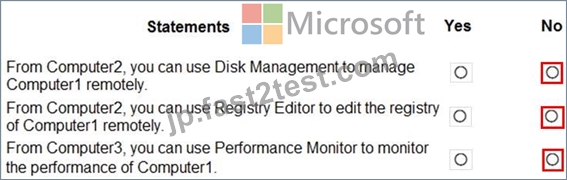
質問 # 220
Windows 10を実行するComputer1という名前のコンピューターでBitLockerドライブ暗号化(BitLocker)を有効にする必要があります。Computer1の構成は次のとおりです。
C:\という名前の200 GBNTFSボリュームが1つだけ含まれています
50GBの未割り当てディスクスペースが含まれています
ワークグループのメンバーです
TPMが有効になっていますか
あなたは最初に何をすべきですか?
- A. VHDを作成します。
- B. Computer1をAzure Active Directory(Azure AD)テナントに参加させます。
- C. TPMを無効にします。
- D. 追加のボリュームを作成します。
正解:D
解説:
Two partitions are required to run BitLocker because pre-startup authentication and system integrity verification must occur on a separate partition from the encrypted operating system drive. This configuration helps protect the operating system and the information in the encrypted drive.
Reference:
https://docs.microsoft.com/en-us/windows/security/information-protection/bitlocker/bitlocker-overview-and-requirements-faq
質問 # 221
ネットワークにActiveDirectoryドメインが含まれています。ドメインには、Windows10を実行する1,000台のコンピューターが含まれています。
ドメインおよびローカルのグループポリシーオブジェクト(GPO)を使用して、MicrosoftEdgeの設定を構成します。
コンピューターに適用されているすべてのMicrosoftEdgeポリシー設定を含むレポートを生成する必要があります。
あなたは何をするべきか?
- A. PowerShellから。 Gec-GPOコマンドレットを実行します。
- B. PowerShellから。 Gec-GPOReporcコマンドレットを実行します。
- C. Microsoft Edgeから、edge:// settingsを開きます。
- D. Microsoft Edgeから、edge:// policyを開きます。
正解:D
解説:
Explanation
The Get-GPOReport cmdlet would generate a report for all domain group policy objects. However, this would not display the settings that are applied by local group policy objects.
To display the settings applied by both domain and local GPOs, you would have to open Microsoft Edge and enter edge://policy in the address bar.
質問 # 222
ワークグループ内でドキュメントを共有するために使用される Windows 10 を実行する Computer5 という名前のコンピューターがあります。
User-a、User-b、User-c という名前の 3 人のユーザーを作成します。ユーザーは、ネットワークからのみ Computer5 にアクセスすることを計画しています。
Dat という名前のフォルダーがあります
a.データ フォルダーの高度なセキュリティ設定は、セキュリティの展示に表示されます。(「セキュリティ展示」タブをクリックします)。
Data フォルダーを共有します。ユーザー a の権限は、ユーザー a の表示に表示されます (「ユーザー a」タブをクリックします)。
ユーザー b の権限は、ユーザー b の展示に示されています。(「ユーザー b」タブをクリックします。)
user-c の権限は、User-c の展示に示されています。(「User-c」タブをクリックします。)
次の各ステートメントについて、ステートメントが true の場合は [はい] を選択します。それ以外の場合は、「いいえ」を選択します。
注: 正しい選択に達すると 1 ポイントの価値があります。
正解:
解説:
質問 # 223
Server1のWindowsAdmin Centerを使用して、Computer2を管理できることを確認する必要があります。
Computer2で何をすべきですか?
- A. winrmquickconfigコマンドを実行します。
- B. リモートサーバー管理ツール(RSAT)のオプション機能をインストールします。
- C. Windows Management Serviceの起動の種類を[自動]に設定して、サービスを開始します。
- D. Sec-Locationコマンドレットを実行します。
正解:A
解説:
Explanation
References:
https://docs.microsoft.com/en-us/windows-server/manage/windows-admin-center/azure/manage-azure-vms
質問 # 224
Windows 10Enterpriseを会社所有のデバイスに展開することを計画しています。
参照デバイスからWindows10イメージファイルをキャプチャします。
展開用のカタログファイルと応答ファイルを生成する必要があります。
各ファイルに何を使用する必要がありますか?回答するには、回答領域で適切なオプションを選択します。
注:正しい選択はそれぞれ1ポイントの価値があります。
正解:
解説:
Reference:
https://docs.microsoft.com/en-us/windows-hardware/customize/desktop/wsim/open-a-windows-image-or-catalog-file
質問 # 225
......
認定トレーニングはMD-100日本語試験問題集テストエンジン:https://jp.fast2test.com/MD-100J-premium-file.html