

MS-100無料試験学習ガイド!(更新された395問あります)
MS-100問題集にはMicrosoft 365認証済み試験問題と解答
質問 185
You work at a company named Contoso, Ltd.
Contoso has a Microsoft 365 subscription that is configured to use the DNS domains shown in the following table.
Contoso purchases a company named Fabrikam, Inc.
Contoso plans to add the following domains to the Microsoft 365 subscription:
fabrikam.com
east.fabrikam.com
west.contoso.com
You need to ensure that the devices in the new domains can register by using Autodiscover.
How many domains should you verify, and what is the minimum number of enterpriseregistration DNS records you should add? To answer, select the appropriate options in the answer area.
NOTE: Each correct selection is worth one point.
正解:
解説:
Reference:
https://docs.microsoft.com/en-us/mem/intune/enrollment/windows-enroll
質問 186
You have a Microsoft 365 subscription that uses a default domain named litwareinc.com. The subscription has a Microsoft SharePoint site collection named Collection1.
From the Azure Active Directory admin center, you configure the External collaboration settings as shown in the External Collaboration Settings exhibit. (Click the External Collaboration Settings tab.)
From the SharePoint admin center, you configure the sharing settings as shown in the SharePoint Sharing exhibit. (Click the SharePoint Sharing tab.)
For each of the following statements, select Yes if the statement is true. Otherwise, select No.
NOTE: Each correct selection is worth one point.
正解:
解説:
Reference:
https://docs.microsoft.com/en-us/sharepoint/turn-external-sharing-on-or-off
質問 187
Your network contains an on-premises Active Directory domain that is synced to Microsoft Azure Active Directory (Azure AD) as shown in the following two exhibits.

You create a user named User1 in Active Directory as shown in the following exhibit.
For each of the following statements, select Yes if the statement is true. Otherwise, select No.
NOTE: Each correct selection is worth one point.
正解:
解説:
Explanation
The Azure AD Attributes page shows which attributes will be synchronized based on the Office 365 services you are using (Exchange, SharePoint etc). We can see that ExtenstionAttribute10 and ExtensionAttribute11 have been deselected.
The Directory Extensions page shows which additional attributes will be synchronized (additional to the list in the Azure AD Attributes page).
ExtensionAttribute1:
Will be synchronized because it is ticked in the Azure AD Attributes page.
ExtensionAttribute10.
Will be synchronized because although it is unticked in the Azure AD Attributes page, it is added again in the Directory Extensions page.
ExtensionAttribute11.
Will not be synchronized because it is unticked in the Azure AD Attributes page and it is not added again in the Directory Extensions page.
ExtensionAttribute12:
Will be synchronized because it is ticked in the Azure AD Attributes page. It is also added again in the Directory Extensions page but this will have no effect as it is already ticked in the Azure AD Attributes page.
Reference:
https://docs.microsoft.com/en-us/azure/active-directory/hybrid/how-to-connect-sync-feature-directory-extensions
https://docs.microsoft.com/en-us/azure/active-directory/hybrid/how-to-connect-install-custom
質問 188
You have a Microsoft 365 E5 subscription that contains an Azure Active Directory (Azure AD) tenant named contoso.com. The tenant contains a Microsoft SharePoint Online site named Site1 and the accounts shown in the following table.
You have an on-premises server named Server1 that contains a folder named Folder1. Folder1 contains the files shown in the following table.
The User1, User2, and Group1 accounts have the security identifiers (SIDs) shown in the following table.
You use the SharePoint Migration Tool to migrate Folder1 to Site1. You preserve the file share permissions and use the following user mapping file.
S-1-5-21-4534338-1127018997-2609994386-1304, [email protected], FALSE
S-1-5-21-4534338-1127018997-2609994386-1228, [email protected], FALSE
S-1-5-21-4534338-1127018997-2609994386-1106, GroupA, TRUE
For each of the following statements, select Yes if the statement is true. Otherwise, select No.
NOTE: Each correct selection is worth one point
正解:
解説:
Explanation
質問 189
You implement Microsoft Azure Advanced Threat Protection (Azure ATP).
You have an Azure ATP sensor configured as shown in the following exhibit.
Updates
How long after the Azure ATP cloud service is updated will the sensor update?
- A. 1 hour
- B. 48 hours
- C. 12 hours
- D. 7 days
- E. 72 hours
正解: E
解説:
Explanation
References:
https://docs.microsoft.com/en-us/azure-advanced-threat-protection/atp-whats-new The exhibit shows that the sensor is configure for Given the rapid speed of ongoing Azure ATP development and release updates, you may decide to define a subset group of your sensors as a delayed update ring, allowing for a gradual sensor update process. Azure ATP enables you to choose how your sensors are updated and set each sensor as a Delayed update candidate.
Sensors not selected for delayed update are updated automatically, each time the Azure ATP service is updated. Sensors set to Delayed update are updated on a delay of 72 hours, following the official release of each service update.
Reference:
https://docs.microsoft.com/en-us/azure-advanced-threat-protection/sensor-update
質問 190
Your company has a hybrid deployment of Microsoft 365.
An on-premises user named User1 is synced to Microsoft Azure Active Directory (Azure AD).
Azure AD Connect is configured as shown in the following exhibit.
Use the drop-down menus to select the answer choice that completes each statement based on the information presented in the graphic.
NOTE: Each correct selection is worth one point.
正解:
解説:
Explanation
User1 cannot change her password from any Microsoft portals because Password Writeback is disabled in the Azure AD Connect configuration.
If the password for User1 is changed in Active Directory, the password will be synchronized to Azure AD because Password Synchronization is enabled in the Azure AD Connect configuration.
Reference:
https://docs.microsoft.com/en-us/azure/active-directory/hybrid/how-to-connect-install-custom
質問 191
You have a Microsoft 365 tenant that contains Microsoft Exchange Online.
You plan to enable calendar sharing with a partner organization named adatum.com. The partner organization also has a Microsoft 365 tenant.
You need to ensure that the calendar of every user is available to the users in adatum.com immediately.
What should you do?
- A. From the Exchange admin center, create a sharing policy.
- B. From the Microsoft 365 admin center, configure external site sharing.
- C. From the Exchange admin center, create a new organization relationship.
- D. From the Microsoft 365 admin center, modify the Organization profile settings.
正解: C
解説:
You need to set up an organization relationship to share calendar information with an external business partner.
Office 365 admins can set up an organization relationship with another Office 365 organization or with an Exchange on-premises organization.
Reference:
https://docs.microsoft.com/en-us/exchange/sharing/organization-relationships/create-an-organization- relationship
質問 192
You company has a Microsoft Azure Active Directory (Azure AD) tenant that contains the users shown in the following table.
The tenant includes a security group named Admin1. Admin1 will be used to manage administrative accounts.
You need to identify which users can perform the following administrative tasks:
* Create guest user accounts.
* Add User3 to Admin1.
Which users should you identify for each task? To answer, select the appropriate options in the answer area.
NOTE: Each correct selection is worth one point.
正解:
解説:
Explanation
References:
A User Administrator is the only role listed that can create user accounts included Guest user accounts. A Global Administrator can also create user accounts.
A User Administrator is also the only role listed that can modify the group membership of users.
Reference:
https://docs.microsoft.com/en-us/azure/active-directory/users-groups-roles/directory-assign-admin-roles
質問 193
Please wait while the virtual machine loads. Once loaded, you may proceed to the lab section. This may take a few minutes, and the wait time will not be deducted from your overall test time.
When the Next button is available, click it to access the lab section. In this section, you will perform a set of tasks in a live environment. While most functionality will be available to you as it would be in a live environment, some functionality (e.g., copy and paste, ability to navigate to external websites) will not be possible by design.
Scoring is based on the outcome of performing the tasks stated in the lab. In other words, it doesn't matter how you accomplish the task, if you successfully perform it, you will earn credit for that task.
Labs are not timed separately, and this exam may have more than one lab that you must complete. You can use as much time as you would like to complete each lab. But, you should manage your time appropriately to ensure that you are able to complete the lab(s) and all other sections of the exam in the time provided.
Please note that once you submit your work by clicking the Next button within a lab, you will NOT be able to return to the lab.
You may now click next to proceed to the lab.
Lab information
Use the following login credentials as needed:
To enter your username, place your cursor in the Sign in box and click on the username below.
To enter your password, place your cursor in the Enter password box and click on the password below.
Microsoft 365 Username:
[email protected]
Microsoft 365 Password: 3&YWyjse-6-d
If the Microsoft 365 portal does not load successfully in the browser, press CTRL-K to reload the portal in a new browser tab.
The following information is for technical support purposes only:
Lab Instance: 10887751
Your organization has an office in Seattle.
You plan to create 100 users who will work in the Seattle office. The city attribute for all the users will be Seattle.
You need to create a group named Group1 that will automatically contain all the Seattle office users.
正解:
解説:
You need to create a Dynamic group. User accounts with the city attribute set to 'Seattle' will automatically be added to the group.
1. Go to the Azure Active Directory admin center.
2. Select Azure Active Directory then select Groups.
3. Click on the New Group link.
4. Give the group a name such as Seattle Users.
5. Select Users as the membership type.
6. Select 'Add dynamic query'.
7. Select 'City' in the Property drop-down box.
8. Select 'Equals' in the Operator drop-down box.
9. Enter Seattle as the Value. You should see the following text in the Expression box: user.city -eq "Seattle"
10. Click Save to create the group.
Reference:
https://docs.microsoft.com/en-us/azure/active-directory/users-groups-roles/groups-dynamic-membership
質問 194
Your network contains an on-premises Active Directory domain that is synced to Microsoft Azure Active Directory (Azure AD) as shown in the following exhibit.
An on-premises Active Directory user account named Allan Yoo is synchronized to Azure AD. You view Allan's account from Microsoft 365 and notice that his username is set to [email protected].
For each of the following statements, select Yes if the statement is true. Otherwise, select No.
NOTE: Each correct selection is worth one point.
正解:
解説:
Reference:
https://docs.microsoft.com/en-us/azure/active-directory/authentication/concept-sspr-writeback
質問 195
You need to meet the application requirement for App1.
Which three actions should you perform? Each correct answer presents part of the solution.
NOTE: Each correct selection is worth one point.
- A. From the Microsoft 365 admin center, configure the Software download settings.
- B. On an on-premises server, download and install the Microsoft AAD Application Proxy connector.
- C. On an on-premises server, install the Hybrid Configuration wizard.
- D. From the Azure Active Directory admin center, add an enterprise application.
- E. From the Azure Active Directory admin center, configure the application URL settings.
正解: B,D,E
解説:
References:
https://docs.microsoft.com/en-us/azure/active-directory/manage-apps/application-proxy#how-application-proxy-works
質問 196
You have a Microsoft 365 Enterprise E5 subscription.
You add a cloud-based app named App1 to the Microsoft Azure Active Directory (Azure AD) enterprise applications list.
You need to ensure that two-step verification is enforced for all user accounts the next time they connect to App1.
Which three settings should you configure from the policy? To answer, select the appropriate settings in the answer area.
正解:
解説:
Explanation:
References:
https://docs.microsoft.com/en-us/azure/active-directory/conditional-access/best-practices
https://techcommunity.microsoft.com/t5/Enterprise-Mobility-Security/Conditional-Access-now-in-the-new-Azure-portal/ba-p/250060
質問 197
From the Microsoft Azure Active Directory (Azure AD) Identity Protection dashboard, you view the risk events shown in the exhibit. (Click the
You need to reduce the likelihood that the sign-ins are identified as risky.
What should you do?
- A. From the Security & Compliance admin center, add the users to the Security Readers role group.
- B. From the Security & Compliance admin center, create a classification label.
- C. From the Conditional access blade in the Azure Active Directory admin center, create named locations.
- D. From the Azure Active Directory admin center, configure the trusted IPs for multi-factor authentication.
正解: C
解説:
Explanation
A named location can be configured as a trusted location. Typically, trusted locations are network areas that are controlled by your IT department. In addition to Conditional Access, trusted named locations are also used by Azure Identity Protection and Azure AD security reports to reduce false positives for risky sign-ins.
Reference:
https://docs.microsoft.com/en-us/azure/active-directory/conditional-access/location-condition
質問 198
You have a Microsoft SharePoint Online site and an on-premises file server.
The site contains the files shown in the following table.
The file server contains the files shown in the following table.
You migrate D:\Folder1 and D:\Folder2 to the Documents library by using the SharePoint Migration Tool as shown in the following exhibit.
For each of the following statements, select Yes if the statement is true. Otherwise, select No.
NOTE: Each correct selection is worth one point.
正解:
解説:
質問 199
You have a Microsoft Azure Active Directory (Azure AD) tenant that contains the users shown in the following table.
You enable self-service password reset for all users. You set Number of methods required to reset to 1, and you set Methods available to users to Security questions only.
What information must be configured for each user before the user can perform a self-service password reset? To answer, select the appropriate options in the answer area.
NOTE: Each correct selection is worth one point.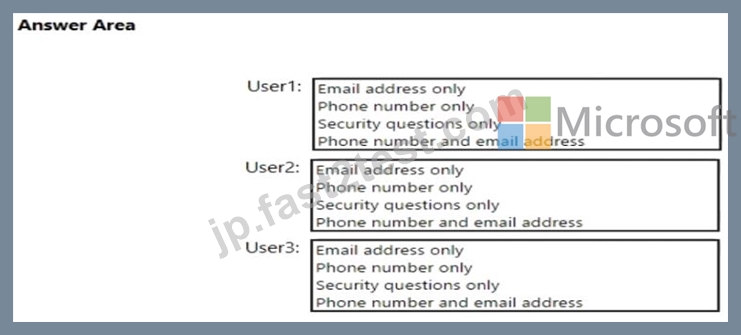
正解:
解説:
Reference:
https://docs.microsoft.com/en-us/azure/active-directory/authentication/concept-sspr-policy#administrator-password-policy-differences
質問 200
You have a Microsoft 365 subscription that contains the users shown in the following table.
You have the named locations shown in the following table.
You create a conditional access policy that has the following configurations:
Users and groups:
* Include: Group1
* Exclude: Group2
Cloud apps: Include all cloud apps
Conditions:
* Include: Any location
* Exclude: Montreal
Access control: Grant access, Require multi-factor authentication
User1 is on the multi-factor authentication (MFA) blocked users list.
For each of the following statements, select Yes if the statement is true. Otherwise, select No.
NOTE: Each correct selection is worth one point.
正解:
解説:
Explanation
質問 201
......
Microsoft MS-100 認定試験の出題範囲:
| トピック | 出題範囲 |
|---|---|
| トピック 1 |
|
| トピック 2 |
|
| トピック 3 |
|
| トピック 4 |
|
| トピック 5 |
|
| トピック 6 |
|
| トピック 7 |
|
実際問題を使ってMS-100問題集で100%無料MS-100試験問題集:https://jp.fast2test.com/MS-100-premium-file.html
実際に出ると確認されたのMS-100試験問題集と解答でMS-100無料更新:https://drive.google.com/open?id=1go1SzB7eTVlB8NejpLp-bx1IMMs-PF3y