

IdentityIQ-Engineer練習試験と学習ガイドは厳密検証されたFast2test最新な124問題
2025年最新のな厳密検証された合格させるIdentityIQ-Engineer学習ガイドベズトお試しセット
質問 # 44
Match the following IdentitylQ console commands To their functions.
Use the drop-down menus to select your answers. Answer options from the drop-down menus may only be used once Some will not be used at all.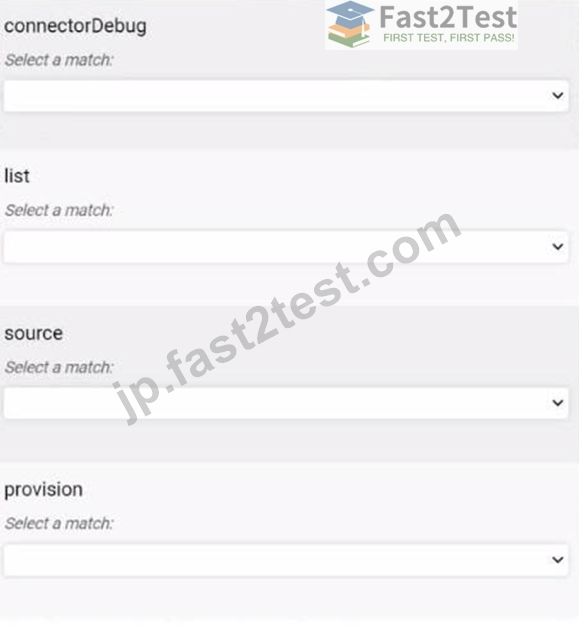

正解:
解説:
質問 # 45
Is this statement correct about writing and executing source mapping rules to populate identity attributes?
Solution: All Identity Mappings must use a rule to set the identity attribute.
- A. No
- B. Yes
正解:A
解説:
The statement "All Identity Mappings must use a rule to set the identity attribute" is incorrect. While source mapping rules can be used to populate identity attributes dynamically, it is not mandatory for all identity mappings to rely on a rule. Identity mappings can also be configured using direct mappings, where attributes from a source are directly mapped to IdentityIQ attributes without any rule-based logic.
Therefore, the correct answer is B. No.
質問 # 46
Is this statement valid regarding the control and usability of the Debug pages in IdentitylQ?
Solution: The current version and patch level of IdentitylQ can be found through the Debug-About page.
- A. Yes
- B. No
正解:A
解説:
Yes, the current version and patch level of IdentityIQ can be found through the Debug-About page. The Debug-About page in SailPoint IdentityIQ provides critical information about the system, including the software version, patch level, and other configuration details. This page is a useful resource for administrators to quickly verify the IdentityIQ version and ensure that the correct patches have been applied.
Therefore, the correct answer is A. Yes.
Reference:
This answer is based on the SailPoint IdentityIQ Administration Guide, which describes the use and features of the Debug-About page, including how it displays version and patch information.
質問 # 47
The engineer is analyzing on a workflow Transition.
The following variable values are known:
Will the workflow continue to this step?
Solution: Approve
- A. No
- B. Yes
正解:A
解説:
The workflow transition condition shown in the image is Transition to="Approve" when="identityName != null". This condition checks whether the identityName variable is not null. In the provided scenario, the identityName variable has a value of "Catherine.Simmons," which is clearly not null. Therefore, the condition for transitioning to the "Approve" step will evaluate as true, meaning the workflow will indeed continue to the "Approve" step.
However, it seems like the question might be worded incorrectly as it asks if the workflow will continue to the "Approve" step when it actually will. If this was an error and the intention was to determine if it should not continue, the answer would have been "No." But based on the logic, the workflow will continue to the "Approve" step.
Reference:
SailPoint IdentityIQ Workflow Documentation
SailPoint IdentityIQ Scripting Guide (Conditions and Transitions in Workflows)
質問 # 48
Is the following true of Identity Provisioning Policies?
Solution: Identity Provisioning Policies can be used to include allowed-values definitions or validation logic on fields so that only valid/authorized values can be specified for those fields when using the Create Identity feature to add an identity.
- A. Yes
- B. No
正解:A
解説:
Yes, Identity Provisioning Policies can indeed be used to include allowed-values definitions or validation logic on fields within SailPoint IdentityIQ. This ensures that only valid or authorized values can be specified for certain fields, such as when using the "Create Identity" feature to add a new identity. This functionality helps enforce data integrity and compliance with organizational policies by restricting the inputs to predefined or validated options.
Reference:
SailPoint IdentityIQ Administration Guide (Sections on Identity Provisioning Policies and Field Validation) SailPoint IdentityIQ Configuration Guide (Policy Enforcement and Validation)
質問 # 49
Is this configuration option required when an engineer sets up a SCIM 2.0 application?
Solution: Comment Character
- A. No
- B. Yes
正解:A
解説:
The configuration option "Comment Character" is not required when setting up a SCIM 2.0 application in SailPoint IdentityIQ. The "Comment Character" option is generally used for handling comment lines in flat files or CSV file-based connectors. Since SCIM 2.0 is a RESTful API-based protocol designed for managing identities in a standardized way, this option does not apply to SCIM 2.0 integrations. Therefore, it is not a necessary configuration when working with SCIM 2.0 applications.
Reference:
SailPoint IdentityIQ SCIM 2.0 Integration Guide
SailPoint IdentityIQ Application Configuration Guide (SCIM and REST API sections)
質問 # 50
Is this statement true about email templates or behavior within them?
Solution: Whole paragraphs cannot be included or omitted based on conditional tests, such as #if (SremindersRemaining > 0). Only individual lines can be omitted in this manner.
- A. No
- B. Yes
正解:A
解説:
This statement is incorrect. In SailPoint IdentityIQ email templates, entire blocks of text, including whole paragraphs, can indeed be conditionally included or omitted using the appropriate templating syntax such as #if, #else, and #end. The templating engine in IdentityIQ, which typically uses Apache Velocity, supports complex conditional logic that can control large sections of the email content, not just individual lines.
Reference:
SailPoint IdentityIQ Email Templates Guide
Apache Velocity Templating Guide for SailPoint IdentityIQ
質問 # 51
Is this a default functionality of the Lifecycle Manager (LCM) module?
Solution: Terminate Identity
- A. Yes
- B. No
正解:A
解説:
Yes, "Terminate Identity" is a default functionality of the Lifecycle Manager (LCM) module. This functionality is associated with the "Leaver" event, which manages the offboarding process for identities that are leaving the organization. The LCM module includes workflows that handle identity termination by deactivating accounts, removing access, and potentially triggering other actions needed to finalize the termination process.
Therefore, the correct answer is A. Yes.
質問 # 52
Can the rule library named Common Rules Library" be included in a Rule by adding this code?
Solution:
- A. Yes
- B. No
正解:A
解説:
Yes, the code provided in the second image is correct for including a rule library named "Common Rules Library" in a Rule. The correct syntax is to use class="sailpoint.object.RuleLibrary" and specify the name of the rule library. This allows the Rule to reference the functions and logic defined in the "Common Rules Library." Correct Syntax (from the second image):
<ReferenceRules>
<Reference class="sailpoint.object.RuleLibrary" name="Common Rules Library"/>
</ReferenceRules>
Reference:
SailPoint IdentityIQ Rule Library Documentation
SailPoint IdentityIQ Configuration Guide (Rule and Rule Library Management)
質問 # 53
A client wants users who belong to an IdentitylQ workgroup named Management to be able to request entitlements and roles, but only for other users whose location attribute is the same as theirs.
Is this a population that will achieve the goal?
Solution: Create a quicklink population, set the membership match list to "All," and set "Who can members request for?'' as share attributes with the requester, with the attribute set to location.'
- A. Yes
- B. No
正解:A
解説:
This solution correctly addresses the client's requirement. By setting the membership match list to "All" and configuring "Who can members request for?" as "share attributes with the requester," with the attribute set to location, the system ensures that users in the "Management" workgroup can only request roles and entitlements for other users who share the same location. This setup effectively filters based on the location attribute, aligning with the client's needs.
Reference:
SailPoint IdentityIQ Quicklink Population Configuration Guide
SailPoint IdentityIQ Attribute-Based Access Control Guide
質問 # 54
IdentitylQ has been installed and set up with the contents of IdentityExtended.hbm.xml as follows:
Is this a correct statement about the installation?
Solution: There is a limitation in this installation: When defining the identity mappings using Global Settings > Identity Attributes, only 12 additional searchable attributes can be defined. Additional identity attributes and mappings can be defined, but they cannot be searchable.
- A. Yes
- B. No
正解:A
解説:
In SailPoint IdentityIQ, the configuration in IdentityExtended.hbm.xml file as shown in the image indeed outlines the use of extended identity attributes. These attributes (extended1, extended2, etc.) are custom attributes that are appended to the standard identity object model to store additional identity-related data.
According to the official SailPoint IdentityIQ documentation, when defining identity mappings under Global Settings > Identity Attributes, only up to 12 additional attributes can be made searchable within the IdentityIQ system. This limitation is crucial because it directly impacts the efficiency of search operations in large environments, where making too many attributes searchable can significantly slow down performance.
Once you define these 12 searchable attributes, any additional attributes can still be added, but they will not be indexed for search operations. This means that while the data in these attributes can be used in workflows, reports, and other operations, they cannot be used in search filters in the IdentityIQ user interface.
This limitation is particularly important when planning the design of the identity schema, as it affects both performance and usability. Therefore, the statement in question is correct and accurately reflects the constraints imposed by SailPoint IdentityIQ in terms of searchable identity attributes.
Reference:
This explanation is derived from the SailPoint IdentityIQ Configuration Guide and official documentation on identity attributes and their limitations. Specifically, this is covered in sections related to extended attributes and searchable properties within the system.
質問 # 55
A bank is two years into an ongoing project to provide all access through roles. The bank is actively using roles and actively adding to their role model. They need to ensure that all roles include the correct entitlements.
Will this certification type achieve the goal?
Solution: Application Owner Certification
- A. No
- B. Yes
正解:A
解説:
An Application Owner Certification is primarily used to certify entitlements and roles associated with specific applications. It involves application owners reviewing access within their applications, which is useful for ensuring that access aligns with the intended security policies for that application.
However, in the context of ensuring that roles include the correct entitlements across the entire role model, a more suitable certification type would be a Role Composition Certification. This type specifically focuses on validating the composition of roles, including the entitlements they aggregate.
Therefore, an Application Owner Certification will not fully achieve the goal of ensuring all roles include the correct entitlements. The correct answer is B. No.
質問 # 56
Is this configuration option required when an engineer sets up a SCIM 2.0 application?
Solution: Name
- A. Yes
- B. No
正解:A
解説:
The "Name" configuration option is required when setting up a SCIM 2.0 application in SailPoint IdentityIQ. The "Name" field is a mandatory identifier for the application within IdentityIQ. This name is used throughout the system to reference the application and is critical for configuration, management, and integration processes. Without specifying a name, IdentityIQ cannot properly identify and interact with the SCIM 2.0 application.
Reference:
SailPoint IdentityIQ SCIM 2.0 Application Configuration Guide
SailPoint IdentityIQ Administration Guide (Application Setup and Naming Conventions)
質問 # 57
The engineer needs to write some ad-hoc BeanShell code to search for GroupDefmition objects owned by Randy.Knight and print their names. Is this BeanShell code correct as written?
Solution:
- A. No
- B. Yes
正解:A
解説:
The provided BeanShell code snippet attempts to filter and print the names of GroupDefinition objects owned by "Randy.Knight." However, the code contains a few issues that prevent it from functioning correctly as written:
Class Import: The GroupDefinition class should be imported explicitly at the beginning of the script, which is missing here.
Query Execution: The use of context.getObjectsByNumber(GroupDefinition.class, i) is incorrect. This method does not exist in this context. The correct approach would be to use context.getObjects() to retrieve the list of objects and iterate over them.
Looping Logic: The loop logic also contains a flaw. Instead of using a counter-based loop with context.getObjectsByNumber(), the recommended approach is to use context.search() to retrieve a list of filtered objects and then iterate through the results.
A corrected version of this code would look something like this:
import sailpoint.object.GroupDefinition;
import sailpoint.object.Filter;
import sailpoint.object.QueryOptions;
Filter filter = Filter.eq("owner.name", "Randy.Knight");
QueryOptions qo = new QueryOptions();
qo.addFilter(filter);
List<GroupDefinition> groupDefinitions = context.getObjects(GroupDefinition.class, qo); for (GroupDefinition group : groupDefinitions) { System.out.println(group.getName());
}
In this corrected version:
We explicitly import GroupDefinition.
We retrieve the filtered objects with context.getObjects(GroupDefinition.class, qo) instead of getObjectsByNumber.
Thus, the original code is not correct as written. The correct answer is B. No.
Reference:
This correction and explanation are based on SailPoint IdentityIQ's API documentation, which provides detailed guidance on the proper methods to retrieve and manipulate objects using Beanshell scripting within the platform.
質問 # 58
Is the following statement true?
Solution: All ManagedAttribute objects associated to an Identity can be viewed on the 'Attributes' tab from 'View Identity' QuickLink.
- A. No
- B. Yes
正解:A
解説:
Not all ManagedAttribute objects associated with an Identity are visible on the 'Attributes' tab within the 'View Identity' QuickLink. The 'Attributes' tab typically displays attributes that are specifically configured to be shown in the identity view, which might include certain managed attributes depending on how the system is configured. ManagedAttributes can represent various aspects like roles, entitlements, or even custom attributes, and their visibility on the UI depends on how the IdentityIQ instance is configured. To manage and configure visibility of attributes, consult the SailPoint IdentityIQ User Interface Customization Guide and Managed Attributes documentation.
Top of Form
Bottom of Form
質問 # 59
Is this a true statement about localization support in IdentitylQ?
Solution: The language displayed in the user interface is always based on the default language selected in the global settings.
- A. No
- B. Yes
正解:A
解説:
The statement is false. In SailPoint IdentityIQ, the language displayed in the user interface is not always based on the default language selected in the global settings. The language displayed in the user interface is typically determined by the user's language preference, which can be set individually for each user. If a user's preferred language is not available, then the system may fall back to the default language specified in the global settings. Thus, while the global default language serves as a fallback, the actual language displayed is often based on user-specific settings.
Reference:
SailPoint IdentityIQ Administration Guide (Localization and Language Settings Sections) SailPoint IdentityIQ User Guide (User Preferences and Language Selection)
質問 # 60
Can the following be achieved via configuration of control variables in the out-of-the-box Lifecycle Manager (LCM) workflows?
Solution: Disable all notifications.
- A. Yes
- B. No
正解:A
解説:
Yes, disabling all notifications can be achieved via configuration of control variables in the out-of-the-box Lifecycle Manager (LCM) workflows. In SailPoint IdentityIQ, most workflows, including those in LCM, use control variables to manage various settings, such as whether notifications should be sent. By setting the appropriate control variable (e.g., disabling email notifications) within the workflow configuration, you can effectively suppress all notifications related to that workflow.
Therefore, the correct answer is A. Yes.
質問 # 61
......
究極のガイドはIdentityIQ-Engineer最新時間限定今すぐダウンロード!:https://jp.fast2test.com/IdentityIQ-Engineer-premium-file.html