

2026年最新のFast2test Databricks Associate-Developer-Apache-Spark-3.5問題集と試験テストエンジン
Databricks Associate-Developer-Apache-Spark-3.5問題集にはリアル試験問題解答
質問 # 80
In the code block below, aggDF contains aggregations on a streaming DataFrame: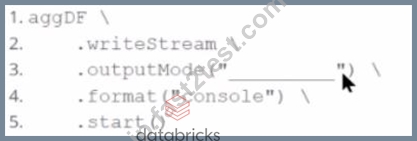
Which output mode at line 3 ensures that the entire result table is written to the console during each trigger execution?
- A. aggregate
- B. complete
- C. append
- D. replace
正解:B
解説:
The correct output mode for streaming aggregations that need to output the full updated results at each trigger is "complete".
From the official documentation:
"complete: The entire updated result table will be output to the sink every time there is a trigger." This is ideal for aggregations, such as counts or averages grouped by a key, where the result table changes incrementally over time.
append: only outputs newly added rows
replace and aggregate: invalid values for output mode
質問 # 81
An engineer has a large ORC file located at /file/test_data.orc and wants to read only specific columns to reduce memory usage.
Which code fragment will select the columns, i.e., col1, col2, during the reading process?
- A. spark.read.orc("/file/test_data.orc").filter("col1 = 'value' ").select("col2")
- B. spark.read.format("orc").select("col1", "col2").load("/file/test_data.orc")
- C. spark.read.orc("/file/test_data.orc").selected("col1", "col2")
- D. spark.read.format("orc").load("/file/test_data.orc").select("col1", "col2")
正解:D
解説:
The correct way to load specific columns from an ORC file is to first load the file using .load() and then apply .select() on the resulting DataFrame. This is valid with .read.format("orc") or the shortcut .read.orc().
df = spark.read.format("orc").load("/file/test_data.orc").select("col1", "col2") Why others are incorrect:
A performs selection after filtering, but doesn't match the intention to minimize memory at load.
B incorrectly tries to use .select() before .load(), which is invalid.
C uses a non-existent .selected() method.
D correctly loads and then selects.
質問 # 82
A data analyst wants to add a column date derived from a timestamp column.
Options:
- A. dates_df.withColumn("date", f.date_format("timestamp", "yyyy-MM-dd")).show()
- B. dates_df.withColumn("date", f.from_unixtime("timestamp")).show()
- C. dates_df.withColumn("date", f.to_date("timestamp")).show()
- D. dates_df.withColumn("date", f.unix_timestamp("timestamp")).show()
正解:C
解説:
f.to_date() converts a timestamp or string to a DateType.
Ideal for extracting the date component (year-month-day) from a full timestamp.
Example:
frompyspark.sql.functionsimportto_date
dates_df.withColumn("date", to_date("timestamp"))
Reference:Spark SQL Date Functions
質問 # 83
26 of 55.
A data scientist at an e-commerce company is working with user data obtained from its subscriber database and has stored the data in a DataFrame df_user.
Before further processing, the data scientist wants to create another DataFrame df_user_non_pii and store only the non-PII columns.
The PII columns in df_user are name, email, and birthdate.
Which code snippet can be used to meet this requirement?
- A. df_user_non_pii = df_user.select("name", "email", "birthdate")
- B. df_user_non_pii = df_user.drop("name", "email", "birthdate")
- C. df_user_non_pii = df_user.remove("name", "email", "birthdate")
- D. df_user_non_pii = df_user.dropFields("name", "email", "birthdate")
正解:B
解説:
To exclude sensitive (PII) columns from a DataFrame, the easiest method is to use the .drop() function with the list of column names to remove.
Correct syntax:
df_user_non_pii = df_user.drop("name", "email", "birthdate")
This creates a new DataFrame containing all remaining columns.
Why the other options are incorrect:
B: .dropFields() is not valid for standard DataFrames - it's used for struct fields only.
C: .select() would keep only PII columns, not remove them.
D: .remove() does not exist in Spark DataFrame API.
Reference:
PySpark DataFrame API - drop() method for removing multiple columns.
Databricks Exam Guide (June 2025): Section "Developing Apache Spark DataFrame/DataSet API Applications" - data manipulation, selecting, and dropping columns.
質問 # 84
A data engineer is building a Structured Streaming pipeline and wants the pipeline to recover from failures or intentional shutdowns by continuing where the pipeline left off.
How can this be achieved?
- A. By configuring the optioncheckpointLocationduringwriteStream
- B. By configuring the optionrecoveryLocationduring the SparkSession initialization
- C. By configuring the optioncheckpointLocationduringreadStream
- D. By configuring the optionrecoveryLocationduringwriteStream
正解:A
解説:
Comprehensive and Detailed Explanation From Exact Extract:
To enable a Structured Streaming query to recover from failures or intentional shutdowns, it is essential to specify thecheckpointLocationoption during thewriteStreamoperation. This checkpoint location stores the progress information of the streaming query, allowing it to resume from where it left off.
According to the Databricks documentation:
"You must specify thecheckpointLocationoption before you run a streaming query, as in the following example:
option("checkpointLocation", "/path/to/checkpoint/dir")
toTable("catalog.schema.table")
- Databricks Documentation: Structured Streaming checkpoints
By setting thecheckpointLocationduringwriteStream, Spark can maintain state information and ensure exactly- once processing semantics, which are crucial for reliable streaming applications.
質問 # 85
A developer wants to test Spark Connect with an existing Spark application.
What are the two alternative ways the developer can start a local Spark Connect server without changing their existing application code? (Choose 2 answers)
- A. Execute their pyspark shell with the option --remote "sc://localhost"
- B. Set the environment variable SPARK_REMOTE="sc://localhost" before starting the pyspark shell
- C. Add .remote("sc://localhost") to their SparkSession.builder calls in their Spark code
- D. Ensure the Spark property spark.connect.grpc.binding.port is set to 15002 in the application code
- E. Execute their pyspark shell with the option --remote "https://localhost"
正解:A、B
解説:
Spark Connect enables decoupling of the client and Spark driver processes, allowing remote access. Spark supports configuring the remote Spark Connect server in multiple ways:
From Databricks and Spark documentation:
Option B (--remote "sc://localhost") is a valid command-line argument for the pyspark shell to connect using Spark Connect.
Option C (setting SPARK_REMOTE environment variable) is also a supported method to configure the remote endpoint.
Option A is incorrect because Spark Connect uses the sc:// protocol, not https://.
Option D requires modifying the code, which the question explicitly avoids.
Option E configures the port on the server side but doesn't start a client connection.
Final Answers: B and C
質問 # 86
54 of 55.
What is the benefit of Adaptive Query Execution (AQE)?
- A. It automatically distributes tasks across nodes in the clusters and does not perform runtime adjustments to the query plan.
- B. It enables the adjustment of the query plan during runtime, handling skewed data, optimizing join strategies, and improving overall query performance.
- C. It optimizes query execution by parallelizing tasks and does not adjust strategies based on runtime metrics like data skew.
- D. It allows Spark to optimize the query plan before execution but does not adapt during runtime.
正解:B
解説:
Adaptive Query Execution (AQE) is a Spark SQL feature introduced to dynamically optimize queries at runtime based on actual data statistics collected during execution.
Key benefits include:
Runtime plan adaptation: Spark adjusts the physical plan after some stages complete.
Skew handling: Automatically splits skewed partitions to balance work distribution.
Join strategy optimization: Dynamically switches between shuffle join and broadcast join depending on partition sizes.
Coalescing shuffle partitions: Reduces the number of small tasks for better performance.
Example configuration:
spark.conf.set("spark.sql.adaptive.enabled", True)
This enables AQE globally in Spark 3.5.
Why the other options are incorrect:
A: AQE adapts during runtime, not only before execution.
B: Task distribution is a base Spark feature, not specific to AQE.
C: AQE specifically addresses runtime skew and join adjustments.
Reference:
Spark SQL Adaptive Query Execution Guide - Runtime optimization, skew handling, and join strategy adjustment.
Databricks Exam Guide (June 2025): Section "Troubleshooting and Tuning Apache Spark DataFrame API Applications" - Adaptive Query Execution benefits and configuration.
質問 # 87
42 of 55.
A developer needs to write the output of a complex chain of Spark transformations to a Parquet table called events.liveLatest.
Consumers of this table query it frequently with filters on both year and month of the event_ts column (a timestamp).
The current code:
from pyspark.sql import functions as F
final = df.withColumn("event_year", F.year("event_ts")) \
.withColumn("event_month", F.month("event_ts")) \
.bucketBy(42, ["event_year", "event_month"]) \
.saveAsTable("events.liveLatest")
However, consumers report poor query performance.
Which change will enable efficient querying by year and month?
- A. Add .sortBy() after .bucketBy()
- B. Change the bucket count (42) to a lower number
- C. Replace .bucketBy() with .partitionBy("event_year") only
- D. Replace .bucketBy() with .partitionBy("event_year", "event_month")
正解:D
解説:
When queries frequently filter on certain columns, partitioning by those columns ensures partition pruning, allowing Spark to scan only relevant directories instead of the entire dataset.
Correct code:
final.write.partitionBy("event_year", "event_month").parquet("events.liveLatest") This improves read performance dramatically for filters like:
SELECT * FROM events.liveLatest WHERE event_year = 2024 AND event_month = 5; bucketBy() helps in clustering and joins, not in partition pruning for file-based tables.
Why the other options are incorrect:
B: Bucket count changes parallelism, not query pruning.
C: sortBy organizes data within files, not across partitions.
D: Partitioning by only one column limits pruning benefits.
Reference:
Spark SQL DataFrameWriter - partitionBy() for partitioned tables.
Databricks Exam Guide (June 2025): Section "Using Spark SQL" - partitioning vs. bucketing and query optimization.
質問 # 88
A Spark DataFrame df is cached using the MEMORY_AND_DISK storage level, but the DataFrame is too large to fit entirely in memory.
What is the likely behavior when Spark runs out of memory to store the DataFrame?
- A. Spark stores the frequently accessed rows in memory and less frequently accessed rows on disk, utilizing both resources to offer balanced performance.
- B. Spark duplicates the DataFrame in both memory and disk. If it doesn't fit in memory, the DataFrame is stored and retrieved from the disk entirely.
- C. Spark splits the DataFrame evenly between memory and disk, ensuring balanced storage utilization.
- D. Spark will store as much data as possible in memory and spill the rest to disk when memory is full, continuing processing with performance overhead.
正解:D
解説:
When using the MEMORY_AND_DISK storage level, Spark attempts to cache as much of the DataFrame in memory as possible. If the DataFrame does not fit entirely in memory, Spark will store the remaining partitions on disk. This allows processing to continue, albeit with a performance overhead due to disk I/O.
As per the Spark documentation:
"MEMORY_AND_DISK: It stores partitions that do not fit in memory on disk and keeps the rest in memory. This can be useful when working with datasets that are larger than the available memory."
- Perficient Blogs: Spark - StorageLevel
This behavior ensures that Spark can handle datasets larger than the available memory by spilling excess data to disk, thus preventing job failures due to memory constraints.
質問 # 89
38 of 55.
A data engineer is working with Spark SQL and has a large JSON file stored at /data/input.json.
The file contains records with varying schemas, and the engineer wants to create an external table in Spark SQL that:
Reads directly from /data/input.json.
Infers the schema automatically.
Merges differing schemas.
Which code snippet should the engineer use?
- A. CREATE EXTERNAL TABLE users
USING json
OPTIONS (path '/data/input.json', inferSchema 'true'); - B. CREATE TABLE users
USING json
OPTIONS (path '/data/input.json'); - C. CREATE EXTERNAL TABLE users
USING json
OPTIONS (path '/data/input.json', mergeSchema 'true'); - D. CREATE EXTERNAL TABLE users
USING json
OPTIONS (path '/data/input.json', mergeAll 'true');
正解:C
解説:
To handle JSON files with evolving or differing schemas, Spark SQL supports the option mergeSchema 'true', which merges all fields across files into a unified schema.
Correct syntax:
CREATE EXTERNAL TABLE users
USING json
OPTIONS (path '/data/input.json', mergeSchema 'true');
This creates an external table directly on the JSON data, inferring schema automatically and merging variations.
Why the other options are incorrect:
B: Missing schema merge configuration - fails with inconsistent files.
C: inferSchema applies to CSV/other file types, not JSON.
D: mergeAll is not a valid Spark SQL option.
Reference:
Spark SQL Data Sources - JSON file options (mergeSchema, path).
Databricks Exam Guide (June 2025): Section "Using Spark SQL" - creating external tables and schema inference for JSON data.
質問 # 90
A data scientist is working on a large dataset in Apache Spark using PySpark. The data scientist has a DataFramedfwith columnsuser_id,product_id, andpurchase_amountand needs to perform some operations on this data efficiently.
Which sequence of operations results in transformations that require a shuffle followed by transformations that do not?
- A. df.groupBy("user_id").agg(sum("purchase_amount").alias("total_purchase")).repartition(10)
- B. df.filter(df.purchase_amount > 100).groupBy("user_id").sum("purchase_amount")
- C. df.withColumn("discount", df.purchase_amount * 0.1).select("discount")
- D. df.withColumn("purchase_date", current_date()).where("total_purchase > 50")
正解:A
解説:
Comprehensive and Detailed Explanation From Exact Extract:
Shuffling occurs in operations likegroupBy,reduceByKey, orjoin-which cause data to be moved across partitions. Therepartition()operation can also cause a shuffle, but in this context, it follows an aggregation.
InOption D, thegroupByfollowed byaggresults in a shuffle due to grouping across nodes.
Therepartition(10)is a partitioning transformation but does not involve a new shuffle since the data is already grouped.
This sequence - shuffle (groupBy) followed by non-shuffling (repartition) - is correct.
Option A does the opposite: thefilterdoes not cause a shuffle, butgroupBydoes - this makes it the wrong order.
質問 # 91
A data engineer is asked to build an ingestion pipeline for a set of Parquet files delivered by an upstream team on a nightly basis. The data is stored in a directory structure with a base path of "/path/events/data". The upstream team drops daily data into the underlying subdirectories following the convention year/month/day.
A few examples of the directory structure are: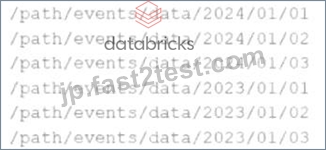
Which of the following code snippets will read all the data within the directory structure?
- A. df = spark.read.option("inferSchema", "true").parquet("/path/events/data/")
- B. df = spark.read.parquet("/path/events/data/*")
- C. df = spark.read.option("recursiveFileLookup", "true").parquet("/path/events/data/")
- D. df = spark.read.parquet("/path/events/data/")
正解:C
解説:
Comprehensive and Detailed Explanation From Exact Extract:
To read all files recursively within a nested directory structure, Spark requires therecursiveFileLookupoption to be explicitly enabled. According to Databricks official documentation, when dealing with deeply nested Parquet files in a directory tree (as shown in this example), you should set:
df = spark.read.option("recursiveFileLookup", "true").parquet("/path/events/data/") This ensures that Spark searches through all subdirectories under/path/events/data/and reads any Parquet files it finds, regardless of the folder depth.
Option A is incorrect because while it includes an option,inferSchemais irrelevant here and does not enable recursive file reading.
Option C is incorrect because wildcards may not reliably match deep nested structures beyond one directory level.
Option D is incorrect because it will only read files directly within/path/events/data/and not subdirectories like
/2023/01/01.
Databricks documentation reference:
"To read files recursively from nested folders, set therecursiveFileLookupoption to true. This is useful when data is organized in hierarchical folder structures" - Databricks documentation on Parquet files ingestion and options.
質問 # 92
Given the schema:
event_ts TIMESTAMP,
sensor_id STRING,
metric_value LONG,
ingest_ts TIMESTAMP,
source_file_path STRING
The goal is to deduplicate based on: event_ts, sensor_id, and metric_value.
Options:
- A. dropDuplicates with no arguments (removes based on all columns)
- B. dropDuplicates on all columns (wrong criteria)
- C. dropDuplicates on the exact matching fields
- D. groupBy without aggregation (invalid use)
正解:C
解説:
dedup_df = iot_bronze_df.dropDuplicates(["event_ts","sensor_id","metric_value"]) dropDuplicates accepts a list of columns to use for deduplication.
This ensures only unique records based on the specified keys are retained.
Reference:DataFrame.dropDuplicates() API
質問 # 93
You have:
DataFrame A: 128 GB of transactions
DataFrame B: 1 GB user lookup table
Which strategy is correct for broadcasting?
- A. DataFrame A should be broadcasted because it is smaller and will eliminate the need for shuffling itself
- B. DataFrame B should be broadcasted because it is smaller and will eliminate the need for shuffling DataFrame A
- C. DataFrame A should be broadcasted because it is larger and will eliminate the need for shuffling DataFrame B
- D. DataFrame B should be broadcasted because it is smaller and will eliminate the need for shuffling itself
正解:B
解説:
Broadcast joins work by sending the smaller DataFrame to all executors, eliminating the shuffle of the larger DataFrame.
From Spark documentation:
"Broadcast joins are efficient when one DataFrame is small enough to fit in memory. Spark avoids shuffling the larger table." DataFrame B (1 GB) fits within the default threshold and should be broadcasted.
It eliminates the need to shuffle the large DataFrame A.
Final answer: B
質問 # 94
A data scientist at a financial services company is working with a Spark DataFrame containing transaction records. The DataFrame has millions of rows and includes columns fortransaction_id,account_number, transaction_amount, andtimestamp. Due to an issue with the source system, some transactions were accidentally recorded multiple times with identical information across all fields. The data scientist needs to remove rows with duplicates across all fields to ensure accurate financial reporting.
Which approach should the data scientist use to deduplicate the orders using PySpark?
- A. df = df.groupBy("transaction_id").agg(F.first("account_number"), F.first("transaction_amount"), F.first ("timestamp"))
- B. df = df.dropDuplicates()
- C. df = df.dropDuplicates(["transaction_amount"])
- D. df = df.filter(F.col("transaction_id").isNotNull())
正解:B
解説:
dropDuplicates() with no column list removes duplicates based on all columns.
It's the most efficient and semantically correct way to deduplicate records that are completely identical across all fields.
From the PySpark documentation:
dropDuplicates(): Return a new DataFrame with duplicate rows removed, considering all columns if none are specified.
- Source:PySpark DataFrame.dropDuplicates() API
質問 # 95
What is the risk associated with this operation when converting a large Pandas API on Spark DataFrame back to a Pandas DataFrame?
- A. The conversion will automatically distribute the data across worker nodes
- B. The operation will fail if the Pandas DataFrame exceeds 1000 rows
- C. Data will be lost during conversion
- D. The operation will load all data into the driver's memory, potentially causing memory overflow
正解:D
解説:
When you convert a large pyspark.pandas (aka Pandas API on Spark) DataFrame to a local Pandas DataFrame using .toPandas(), Spark collects all partitions to the driver.
From the Spark documentation:
"Be careful when converting large datasets to Pandas. The entire dataset will be pulled into the driver's memory." Thus, for large datasets, this can cause memory overflow or out-of-memory errors on the driver.
Final answer: D
質問 # 96
A data engineer is working on the DataFrame: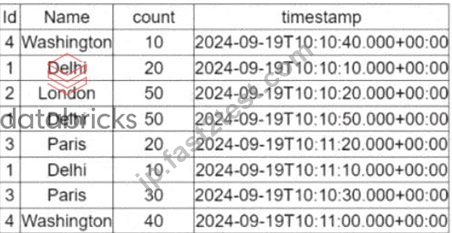
(Referring to the table image: it has columnsId,Name,count, andtimestamp.) Which code fragment should the engineer use to extract the unique values in theNamecolumn into an alphabetically ordered list?
- A. df.select("Name").distinct().orderBy(df["Name"])
- B. df.select("Name").distinct().orderBy(df["Name"].desc())
- C. df.select("Name").distinct()
- D. df.select("Name").orderBy(df["Name"].asc())
正解:A
解説:
Comprehensive and Detailed Explanation From Exact Extract:
To extract unique values from a column and sort them alphabetically:
distinct()is required to remove duplicate values.
orderBy()is needed to sort the results alphabetically (ascending by default).
Correct code:
df.select("Name").distinct().orderBy(df["Name"])
This is directly aligned with standard DataFrame API usage in PySpark, as documented in the official Databricks Spark APIs. Option A is incorrect because it may not remove duplicates. Option C omits sorting.
Option D sorts in descending order, which doesn't meet the requirement for alphabetical (ascending) order.
質問 # 97
A data engineer is working on the DataFrame: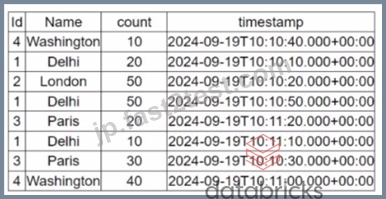
(Referring to the table image: it has columns Id, Name, count, and timestamp.) Which code fragment should the engineer use to extract the unique values in the Name column into an alphabetically ordered list?
- A. df.select("Name").distinct().orderBy(df["Name"])
- B. df.select("Name").distinct().orderBy(df["Name"].desc())
- C. df.select("Name").distinct()
- D. df.select("Name").orderBy(df["Name"].asc())
正解:A
解説:
To extract unique values from a column and sort them alphabetically:
distinct() is required to remove duplicate values.
orderBy() is needed to sort the results alphabetically (ascending by default).
Correct code:
df.select("Name").distinct().orderBy(df["Name"])
This is directly aligned with standard DataFrame API usage in PySpark, as documented in the official Databricks Spark APIs. Option A is incorrect because it may not remove duplicates. Option C omits sorting. Option D sorts in descending order, which doesn't meet the requirement for alphabetical (ascending) order.
質問 # 98
A Spark developer is building an app to monitor task performance. They need to track the maximum task processing time per worker node and consolidate it on the driver for analysis.
Which technique should be used?
- A. Configure the Spark UI to automatically collect maximum times
- B. Use an RDD action like reduce() to compute the maximum time
- C. Use an accumulator to record the maximum time on the driver
- D. Broadcast a variable to share the maximum time among workers
正解:B
解説:
Comprehensive and Detailed Explanation From Exact Extract:
The correct way to aggregate information (e.g., max value) from distributed workers back to the driver is using RDD actions such asreduce()oraggregate().
From the documentation:
"To perform global aggregations on distributed data, actions likereduce()are commonly used to collect summaries such as min/max/avg." Accumulators (Option B) do not support max operations directly and are not intended for such analytics.
Broadcast (Option C) is used to send data to workers, not collect from them.
Spark UI (Option D) is a monitoring tool - not an analytics collection interface.
Final Answer: A
質問 # 99
32 of 55.
A developer is creating a Spark application that performs multiple DataFrame transformations and actions. The developer wants to maintain optimal performance by properly managing the SparkSession.
How should the developer handle the SparkSession throughout the application?
- A. Stop and restart the SparkSession after each action.
- B. Use a single SparkSession instance for the entire application.
- C. Avoid using a SparkSession and rely on SparkContext only.
- D. Create a new SparkSession instance before each transformation.
正解:B
解説:
The SparkSession is the entry point to Spark functionality in modern versions (2.x and later). It unifies the SparkContext, SQLContext, and HiveContext into a single object.
Best Practice:
Use one SparkSession for the entire application.
Create it once at the start using SparkSession.builder.getOrCreate().
Reuse it across all transformations and actions.
Stop it only after all operations are completed.
Example:
from pyspark.sql import SparkSession
spark = SparkSession.builder.appName("MyApp").getOrCreate()
# Perform transformations and actions
spark.stop()
Why the other options are incorrect:
B: SparkSession is the recommended interface; SparkContext alone is deprecated for SQL/DataFrame APIs.
C: Creating multiple sessions increases overhead and wastes resources.
D: Restarting SparkSession breaks lineage and adds unnecessary startup costs.
Reference:
Spark API Reference - SparkSession lifecycle.
Databricks Exam Guide (June 2025): Section "Apache Spark Architecture and Components" - explains SparkSession lifecycle and application management.
質問 # 100
A data engineer wants to process a streaming DataFrame that receives sensor readings every second with columnssensor_id,temperature, andtimestamp. The engineer needs to calculate the average temperature for each sensor over the last 5 minutes while the data is streaming.
Which code implementation achieves the requirement?
Options from the images provided:
- A.

- B.

- C.

- D.

正解:B
解説:
Comprehensive and Detailed Explanation From Exact Extract:
The correct answer isDbecause it uses proper time-based window aggregation along with watermarking, which is the required pattern in Spark Structured Streaming for time-based aggregations over event-time data.
From the Spark 3.5 documentation on structured streaming:
"You can define sliding windows on event-time columns, and usegroupByalong withwindow()to compute aggregates over those windows. To deal with late data, you usewithWatermark()to specify how late data is allowed to arrive." (Source:Structured Streaming Programming Guide) In optionD, the use of:
python
CopyEdit
groupBy("sensor_id", window("timestamp","5 minutes"))
agg(avg("temperature").alias("avg_temp"))
ensures that for eachsensor_id, the average temperature is calculated over 5-minute event-time windows. To complete the logic, it is assumed thatwithWatermark("timestamp", "5 minutes")is used earlier in the pipeline to handle late events.
Explanation of why other options are incorrect:
Option AusesWindow.partitionBywhich applies to static DataFrames or batch queries and is not suitable for streaming aggregations.
Option Bdoes not apply a time window, thus does not compute the rolling average over 5 minutes.
Option Cincorrectly applieswithWatermark()after an aggregation and does not include any time window, thus missing the time-based grouping required.
Therefore,Option Dis the only one that meets all requirements for computing a time-windowed streaming aggregation.
質問 # 101
A data engineer writes the following code to join two DataFrames df1 and df2:
df1 = spark.read.csv("sales_data.csv") # ~10 GB
df2 = spark.read.csv("product_data.csv") # ~8 MB
result = df1.join(df2, df1.product_id == df2.product_id)
Which join strategy will Spark use?
- A. Broadcast join, as df2 is smaller than the default broadcast threshold
- B. Shuffle join, as the size difference between df1 and df2 is too large for a broadcast join to work efficiently
- C. Shuffle join because no broadcast hints were provided
- D. Shuffle join, because AQE is not enabled, and Spark uses a static query plan
正解:A
解説:
The default broadcast join threshold in Spark is:
spark.sql.autoBroadcastJoinThreshold = 10MB
Since df2 is only 8 MB (less than 10 MB), Spark will automatically apply a broadcast join without requiring explicit hints.
From the Spark documentation:
"If one side of the join is smaller than the broadcast threshold, Spark will automatically broadcast it to all executors." A is incorrect because Spark does support auto broadcast even with static plans.
B is correct: Spark will automatically broadcast df2.
C and D are incorrect because Spark's default logic handles this optimization.
Final answer: B
質問 # 102
......
2026年最新のFast2test Associate-Developer-Apache-Spark-3.5のPDFで最近更新された問題です:https://jp.fast2test.com/Associate-Developer-Apache-Spark-3.5-premium-file.html
Associate-Developer-Apache-Spark-3.5試験には保証が付きます。更新されたのは135問があります:https://drive.google.com/open?id=1rvQqX2pDUlOZrqLKrIJmbuVNrAZbPeoR