

[2025年08月最新リリース]CCST-Networking試験問題はあなたをパスさせる
Cisco CCST-Networking試験基本問題とアンサー
質問 # 24
Move each network type from the list on the left to the correct example on the right.
正解:
解説:
Explanation:
* Two home office computers are connected to a switch by Ethernet cables.
* Network Type: LAN (Local Area Network)
* Explanation: A LAN connects devices within a limited area such as a home, office, or building, using Ethernet cables or Wi-Fi.
* Three government buildings in the same city connect to a cable company over coaxial cables.
* Network Type: MAN (Metropolitan Area Network)
* Explanation: A MAN connects networks across a city or campus, often using fiber optic or coaxial cables.
* A cell phone connects to a Bluetooth headset.
* Network Type: PAN (Personal Area Network)
* Explanation: A PAN connects devices within a personal workspace, typically using wireless technologies like Bluetooth.
* A financial institution connects its branches through a telecommunications service provider.
* Network Type: WAN (Wide Area Network)
* Explanation: A WAN connects multiple LANs over long distances, often using leased lines or satellite links provided by telecommunications companies.
* LAN (Local Area Network): Used for connecting devices within a small geographical area such as a
* single building or home.
* MAN (Metropolitan Area Network): Covers a larger geographical area than a LAN, typically a city or campus.
* PAN (Personal Area Network): Connects devices within the range of an individual person, such as connecting a phone to a Bluetooth headset.
* WAN (Wide Area Network): Spans large geographical areas, connecting multiple LANs across cities, countries, or continents.
References:
* Network Types Overview: Cisco Networking Basics
* Understanding Different Network Types: Network Types Guide
質問 # 25
Examine the following output:
Which two conclusions can you make from the output of the tracert command? (Choose 2.) Note: You will receive partial credit for each correct answer.
- A. The IPv6 address associated with the www.cisco.com server is 2600:1408: c400: 38d: : b33.
- B. The device sending the trace has IPv6 address 2600:1408:c400:38d :: b33.
- C. The trace failed after the fourth hop.
- D. The trace successfully reached the www.cisco.com server.
- E. The routers at hops 5 and 6 are offline.
正解:A、D
解説:
*Statement A: "The trace successfully reached the www.cisco.com server." This is true as indicated by the
"Trace complete" message at the end, showing that the trace has reached its destination.
*Statement C: "The IPv6 address associated with the www.cisco.com server is 2600:1408:c400:38d::b33." This is true because the final hop in the trace, which is the destination, has this IPv6 address.
*Statement B: "The trace failed after the fourth hop." This is incorrect as the trace continues beyond the fourth hop, despite some intermediate timeouts.
*Statement D: "The routers at hops 5 and 6 are offline." This is not necessarily true. The routers might be configured to not respond to traceroute requests.
*Statement E: "The device sending the trace has IPv6 address 2600:1408:c400:38d::b33." This is incorrect; this address belongs to the destination server, not the sender.
References:
*Understanding Traceroute: Traceroute Guide
質問 # 26
A host is given the IP address 172.16.100.25 and the subnet mask 255.255.252.0.
What is the CIDR notation for this address?
- A. 172.16.100.25 /23
- B. 172.16.100.25 /21
- C. 172.16.100.25 /20
- D. 172.16.100.25 /22
正解:D
解説:
The CIDR (Classless Inter-Domain Routing) notation for the subnet mask 255.255.252.0 is /22. This notation indicates that the first 22 bits of the IP address are used for network identification, and the remaining bits are used for host addresses within the network1.
References :=
*Subnet Cheat Sheet - 24 Subnet Mask, 30, 26, 27, 29, and other IP Address CIDR Network References
*Subnet Mask to CIDR Notation: The given subnet mask is 255.255.252.0. To convert this to CIDR notation:
*Convert the subnet mask to binary: 11111111.11111111.11111100.00000000
*Count the number of consecutive 1s in the binary form: There are 22 ones.
*Therefore, the CIDR notation is /22.
References:
*Understanding Subnetting and CIDR: Cisco CIDR Guide
質問 # 27
A support technician examines the front panel of a Cisco switch and sees 4 Ethernet cables connected in the first four ports. Ports 1, 2, and 3 have a green LED. Port 4 has a blinking green light.
What is the state of the Port 4?
- A. Link is up with cable malfunctions.
- B. Link is up and there is no activity.
- C. Link is up and active.
- D. Link is up and not stable.
正解:C
質問 # 28
Move each cloud computing service model from the list on the left to the correct example on the right Note: You will receive partial credit for each correct answer.
正解:
解説: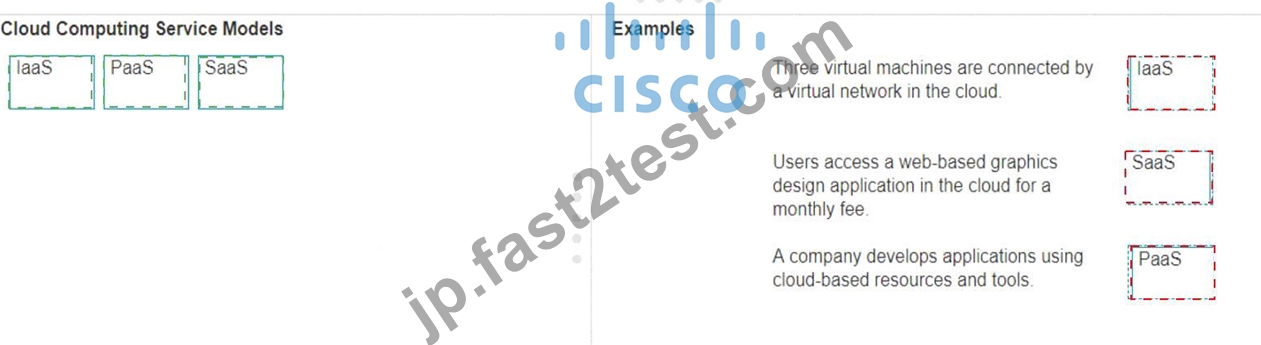
Explanation:
* Three virtual machines are connected by a virtual network in the cloud.
* Model: IaaS (Infrastructure as a Service)
* Explanation: IaaS provides virtualized computing resources over the internet, including virtual machines, storage, and networks.
* Users access a web-based graphics design application in the cloud for a monthly fee.
* Model: SaaS (Software as a Service)
* Explanation: SaaS delivers software applications over the internet, typically on a subscription basis, accessible via a web browser.
* A company develops applications using cloud-based resources and tools.
* Model: PaaS (Platform as a Service)
* Explanation: PaaS provides a platform allowing customers to develop, run, and manage applications without dealing with the infrastructure.
* IaaS (Infrastructure as a Service): Provides virtualized hardware resources that customers can use to build their own computing environments.
* PaaS (Platform as a Service): Offers a platform with tools and services to develop, test, and deploy applications.
* SaaS (Software as a Service): Delivers fully functional applications over the internet that users can access and use without managing the underlying infrastructure.
References:
* Cloud Service Models: Understanding IaaS, PaaS, SaaS
* NIST Definition of Cloud Computing:NIST Cloud Computing
質問 # 29
An app on a user's computer is having problems downloading data. The app uses the following URL to download data:
https://www.companypro.net:7100/api
You need to use Wireshark to capture packets sent to and received from that URL.
Which Wireshark filter options would you use to filter the results? Complete the command by selecting the correct option from each drop-down list.
Note: You will receive partial credit for each correct selection.
正解:
解説: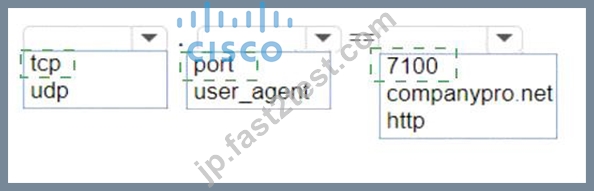
Explanation:
To capture packets sent to and received from the URLhttps://www.companypro.net:7100/apiusing Wireshark, you would use the following filter options:
* Protocol:tcp
* Filter Type:port
* Port Number:7100
This filter setup in Wireshark will display all TCP packets that are sent to or received from port 7100, which is the port specified in the URL for the API service. Since HTTPS typically uses TCP as the transport layer protocol, filtering by TCP and the specific port number will help isolate the relevant packets for troubleshooting the app's data download issues.
* cp: The app is using HTTPS, which relies on the TCP protocol for communication.
* port: The specific port number used by the application, which in this case is 7100.
* 7100: This is the port specified in the URL (https://www.companypro.net:7100/api).
This filter will capture all TCP traffic on port 7100, allowing you to analyze the packets related to the application's data download.
References:
* Wireshark Filters: Wireshark Display Filters
質問 # 30
Move each protocol from the list on the left to its correct example on the right.
正解:
解説:
Explanation:
The correct matching of the protocols to their examples is as follows:
* DHCP: Assign the reserved IP address 10.10.10.200 to a web server at your company.
* DNS: Perform a query to translate companypro.net to an IP address.
* ICMP: Perform a ping to ensure that a server is responding to network connections.
Here's how each protocol corresponds to its example:
* DHCP (Dynamic Host Configuration Protocol)is used to assign IP addresses to devices on a network. In this case, DHCP would be used to assign the reserved IP address 10.10.10.200 to a web server.
* DNS (Domain Name System)is used to translate domain names into IP addresses. Therefore, to translate companypro.net to an IP address, DNS would be utilized.
* ICMP (Internet Control Message Protocol)is used for sending error messages and operational information indicating success or failure when communicating with another IP address. An example of this is using the ping command to check if a server is responding to network connections.
These protocols are essential for the smooth operation of networks and the internet.
* Perform a query to translate companypro.net to an IP address.
* DNS (Domain Name System): DNS is used to resolve domain names to IP addresses.
* Assign the reserved IP address 10.10.10.200 to a web server at your company.
* DHCP (Dynamic Host Configuration Protocol): DHCP is used to assign IP addresses to devices on a network.
* Perform a ping to ensure that a server is responding to network connections.
* ICMP (Internet Control Message Protocol): ICMP is used by network devices to send error messages and operational information, and it is the protocol used by the ping command.
* DNS (Domain Name System): DNS translates human-friendly domain names like "companypro.net" into IP addresses that computers use to identify each other on the network.
* DHCP (Dynamic Host Configuration Protocol): DHCP automatically assigns IP addresses to devices on a network, ensuring that no two devices have the same IP address.
* ICMP (Internet Control Message Protocol): ICMP is used for diagnostic or control purposes, and the ping command uses ICMP to test the reachability of a host on an IP network.
References:
* DNS Basics: What is DNS?
* DHCP Overview: What is DHCP?
* ICMP and Ping: Understanding ICMP
質問 # 31
During the data encapsulation process, which OSI layer adds a header that contains MAC addressing information and a trailer used for error checking?
- A. Transport
- B. Data Link
- C. Network
- D. Session
正解:B
質問 # 32
Move each protocol from the list on the left to the correct TCP/IP model layer on the right.
Note: You will receive partial credit for each correct match.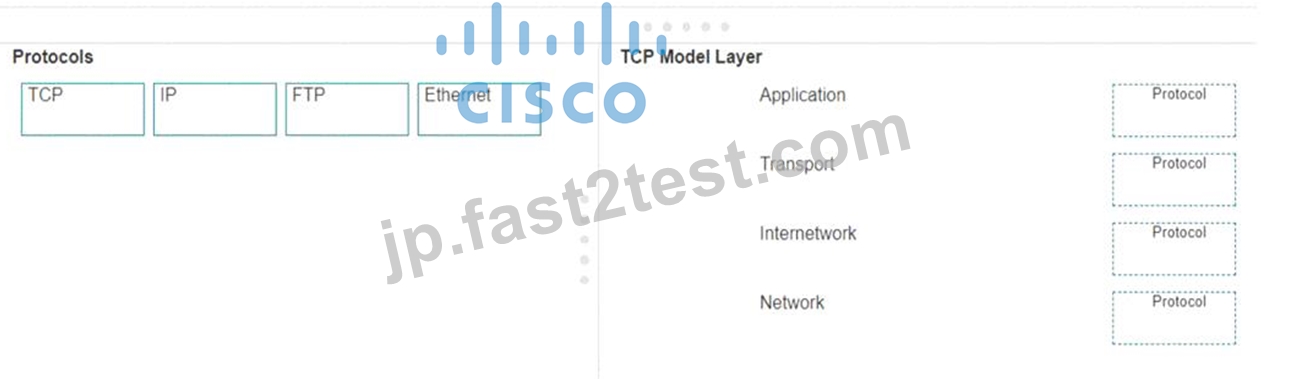
正解:
解説:
Explanation:
Here's how each protocol aligns with the correct TCP/IP model layer:
* TCP (Transmission Control Protocol): This protocol belongs to theTransportlayer, which is responsible for providing communication between applications on different hosts1.
* IP (Internet Protocol): IP is part of theInternetworklayer, which is tasked with routing packets across network boundaries to their destination1.
* FTP (File Transfer Protocol): FTP operates at theApplicationlayer, which supports application and end-user processes.It is used for transferring files over the network1.
* Ethernet: While not a protocol within the TCP/IP stack, Ethernet is associated with theNetwork Interfacelayer, which corresponds to the link layer of the TCP/IP model and is responsible for the physical transmission of data1.
The TCP/IP model layers are designed to work collaboratively to transmit data from one layer to another, with each layer having specific protocols that perform functions necessary for the data transmission process1.
* TCP:
* TCP Model Layer: Transport
* Explanation: The Transport layer is responsible for end-to-end communication and error handling. TCP (Transmission Control Protocol) operates at this layer to provide reliable, ordered, and error-checked delivery of data.
* IP:
* TCP Model Layer: Internetwork
* Explanation: The Internetwork layer, also known as the Internet layer, is responsible for logical addressing and routing. IP (Internet Protocol) operates at this layer to route packets across networks.
* FTP:
* TCP Model Layer: Application
* Explanation: The Application layer provides network services to applications. FTP (File Transfer Protocol) operates at this layer to transfer files between computers over a network.
* Ethernet:
* TCP Model Layer: Network
* Explanation: The Network layer, also known as the Link layer in the TCP/IP model, is responsible for physical addressing and access to the physical medium. Ethernet operates at this layer to provide the physical and data link functions.
* Transport Layer: This layer is responsible for providing communication services directly to the application processes running on different hosts. TCP is a core protocol in this layer.
* Internetwork Layer: This layer is responsible for logical addressing, routing, and packet forwarding.
IP is the primary protocol for this layer.
* Application Layer: This layer interfaces directly with application processes and provides common network services. FTP is an example of a protocol operating in this layer.
* Network Layer: In the TCP/IP model, this layer includes both the data link and physical layers of the OSI model. Ethernet is a protocol used in this layer to define network standards and communication protocols at the data link and physical levels.
References:
* TCP/IP Model Overview: Cisco TCP/IP Model
* Understanding the TCP/IP Model: TCP/IP Layers
質問 # 33
A Cisco switch is not accessible from the network. You need to view its running configuration.
Which out-of-band method can you use to access it?
- A. Telnet
- B. Console
- C. SNMP
- D. SSH
正解:B
解説:
Out-of-band management
When a Cisco switch is not accessible from the network, the recommended out-of-band method to access its running configuration is through theconsole port. Out-of-band management involves accessing the network device through a dedicated management channel that is not part of the data network.The console port provides direct access to the switch's Command Line Interface (CLI) without using the network, which is essential when the switch cannot be accessed remotely via the network12.
References:=
* Out-of-band (OOB) network interface configuration guidelines
* Out of band management configuration
If you have any more questions or need further assistance, feel free to ask!
質問 # 34
Move the security options from the list on the left to its characteristic on the right. You may use each security option once, more than once, or not at all.
Note: You will receive partial credit for each correct answer.
正解:
解説:
Explanation:
The correct matching of the security options to their characteristics is as follows:
* WPA2-Enterprise: Uses a RADIUS server for authentication
* WEP: Uses a minimum of 40 bits for encryption
* WPA2-Personal: Uses AES and a pre-shared key for authentication
Here's why each security option matches the characteristic:
* WPA2-Enterpriseuses a RADIUS server for authentication, which provides centralized Authentication, Authorization, and Accounting (AAA) management for users who connect and use a network service.
* WEP (Wired Equivalent Privacy)is an outdated security protocol that uses a minimum of 40 bits for encryption (and up to 104 bits), which is relatively weak by today's standards.
* WPA2-Personal(Wi-Fi Protected Access 2 - Personal) uses the Advanced Encryption Standard (AES) for encryption and a pre-shared key (PSK) for authentication, which is shared among users to access the network.
These security options are essential for protecting wireless networks from unauthorized access and ensuring data privacy.
質問 # 35
What is the purpose of assigning an IP address to the management VLAN interface on a Layer 2 switch?
- A. To enable the switch to provide DHCP services to other switches in the network
- B. To enable access to the CLI on the switch through Telnet or SSH
- C. To enable the switch to resolve URLs for the attached the devices
- D. To enable the switch to act as a default gateway for the attached devices
正解:B
解説:
The primary purpose of assigning an IP address to the management VLAN interface on a Layer 2 switch is to facilitate remote management of the switch. By configuring an IP address on the management VLAN, network administrators can access the switch's Command Line Interface (CLI) remotely using protocols such as Telnet or Secure Shell (SSH). This allows for convenient configuration changes, monitoring, and troubleshooting without needing physical access to the switch1.
References :=
*Understanding the Management VLAN
*Cisco - VLAN Configuration Guide
*Remote Management of Switches
Assigning an IP address to the management VLAN interface (often the VLAN 1 interface by default) on a Layer 2 switch allows network administrators to remotely manage the switch using protocols such as Telnet or SSH. This IP address does not affect the switch's ability to route traffic between VLANs but provides a means to access and configure the switch through its Command Line Interface (CLI).
*A: The switch does not act as a default gateway; this is typically a function of a Layer 3 device like a router.
*B: The switch does not resolve URLs; this is typically a function of DNS servers.
*C: The switch can relay DHCP requests but does not typically provide DHCP services itself; this is usually done by a dedicated DHCP server or router.
Thus, the correct answer is D. To enable access to the CLI on the switch through Telnet or SSH.
References :=
*Cisco VLAN Management Overview
*Cisco Catalyst Switch Management
質問 # 36
For each statement about bandwidth and throughput, select True or False.
Note: You will receive partial credit for each correct selection.
正解:
解説:
Explanation:
* Statement 1: Low bandwidth can increase network latency.
* True: Low bandwidth can result in increased network latency because the network may become congested, leading to delays in data transmission.
* Statement 2: High levels of network latency decrease network bandwidth.
* False: High levels of network latency do not decrease the available network bandwidth, but they do affect the perceived performance and throughput of the network.
* Statement 3: You can increase throughput by decreasing network latency.
* True: Decreasing network latency can increase throughput because data can be transmitted more quickly and efficiently without delays.
* Bandwidth vs. Latency: Bandwidth refers to the maximum rate at which data can be transferred over a network path. Latency is the time it takes for a data packet to travel from the source to the destination.
* Low bandwidth can cause network congestion, which can increase latency as packets wait to be transmitted.
* High latency does not reduce the actual bandwidth but can affect the overall performance and efficiency of data transmission.
* Reducing latency can lead to higher throughput because the network can handle more data in a given period without delays.
References:
* Network Performance Metrics: Cisco Network Performance
* Understanding Bandwidth and Latency: Bandwidth vs. Latency
質問 # 37
In the network shown in the following graphic, Switch1 is a Layer 2 switch.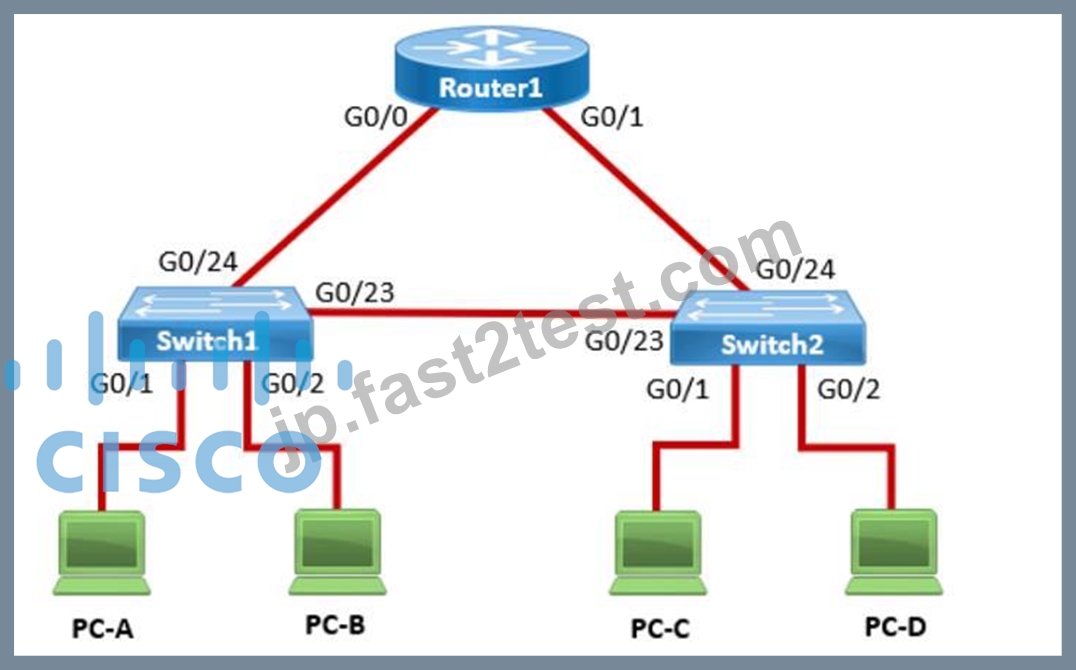
PC-A sends a frame to PC-C. Switch1 does not have a mapping entry for the MAC address of PC-C. Which action does Switch1 take?
- A. Switch1 sends an ARP request to obtain the MAC address of PC-C.
- B. Switch1 drops the frame and sends an error message back to PC-A.
- C. Switch1 queries Switch2 for the MAC address of PC-C.
- D. Switch1 floods the frame out all active ports except port G0/1.
正解:D
解説:
Understanding How Layer 2 Switches Handle Unknown MAC Addresses
Switches operate atLayer 2 (Data Link Layer)of the OSI model and maintain aMAC address table (CAM table)to forward frames efficiently.
* When a switch receives a frame, itchecks its MAC address tableto see if it knows the destination MAC address.
* If the destinationMAC address is not in the table(meaning the switch does not know which port leads to PC-C), the switch follows theflooding behavior.
What Happens When Switch1 Receives a Frame from PC-A to PC-C?
* Switch1 checks its MAC table:
* The source MAC (PC-A) is recorded in the table on portG0/1.
* The destination MAC (PC-C)is not in the table.
* Switch1 does not know where PC-C is:
* Itfloodsthe frame out of allactive ports except the port it was received on (G0/1).
* This means the frame is sent to:
* Switch2 (via G0/23)
* PC-B (via G0/2)
* Switch2 receives the frame and follows the same process:
* If Switch2 has PC-C's MAC in its table, it forwards the frame appropriately.
* If not,it floodsthe frame again until PC-C replies.
* Once PC-C responds, Switch1 and Switch2 learn its MAC address and update their tables.
Why Other Options Are Incorrect:
#A. Switch1 queries Switch2 for the MAC address of PC-C.
* Incorrect:Switches do not query other switches directly for MAC addresses. Instead, they rely on learning MAC addresses dynamically through frame forwarding.
#B. Switch1 drops the frame and sends an error message back to PC-A.
* Incorrect:Switchesdo not drop frames for unknown MAC addresses. Instead, theyfloodthe frames out all ports except the incoming port.
#D. Switch1 sends an ARP request to obtain the MAC address of PC-C.
* Incorrect:
* ARP (Address Resolution Protocol)is only used to resolve IP addresses to MAC addresses.
* Since PC-A issending a frame (Layer 2), not an IP packet (Layer 3), ARP isnot involvedhere.
Conclusion
Since Switch1does not know the destination MAC address, itfloods the frame out all active ports except the port it was received on. This is the default behavior of Layer 2 switches when they encounter an unknown MAC address.
Thus, thecorrect answer is:#C. Switch1 floods the frame out all active ports except port G0/1.
References
* Cisco CCNA 200-301 Official Guide - MAC Address Table & Frame Forwarding
* RFC 894 - Standard for Ethernet Frame Forwarding
* Cisco Networking Essentials - Switch Flooding Behavior
質問 # 38
Which protocol allows you to securely upload files to another computer on the internet?
- A. NTP
- B. SFTP
- C. ICMP
- D. HTTP
正解:B
解説:
SFTP, or Secure File Transfer Protocol, is a protocol that allows for secure file transfer capabilities between networked hosts. It is a secure extension of the File Transfer Protocol (FTP). SFTP encrypts both commands and data, preventing passwords and sensitive information from being transmitted openly over the network. It is typically used for secure file transfers over the internet and is built on the Secure Shell (SSH) protocol1.
References :=
*What Is SFTP? (Secure File Transfer Protocol)
*How to Use SFTP to Safely Transfer Files: A Step-by-Step Guide
*Secure File Transfers: Best Practices, Protocols And Tools
The Secure File Transfer Protocol (SFTP) is a secure version of the File Transfer Protocol (FTP) that uses SSH (Secure Shell) to encrypt all commands and data. This ensures that sensitive information, such as usernames, passwords, and files being transferred, are securely transmitted over the network.
*ICMP (Internet Control Message Protocol) is used for network diagnostics and is not designed for file transfer.
*NTP (Network Time Protocol) is used to synchronize clocks between computer systems and is not related to file transfer.
*HTTP (HyperText Transfer Protocol) is used for transmitting web pages over the internet and does not inherently provide secure file transfer capabilities.
Thus, the correct protocol that allows secure uploading of files to another computer on the internet is SFTP.
References :=
*Cisco Learning Network
*SFTP Overview (Cisco)
質問 # 39
You plan to use a network firewall to protect computers at a small office.
For each statement about firewalls, select True or False.
Note: You will receive partial credit for each correct selection.
正解:
解説: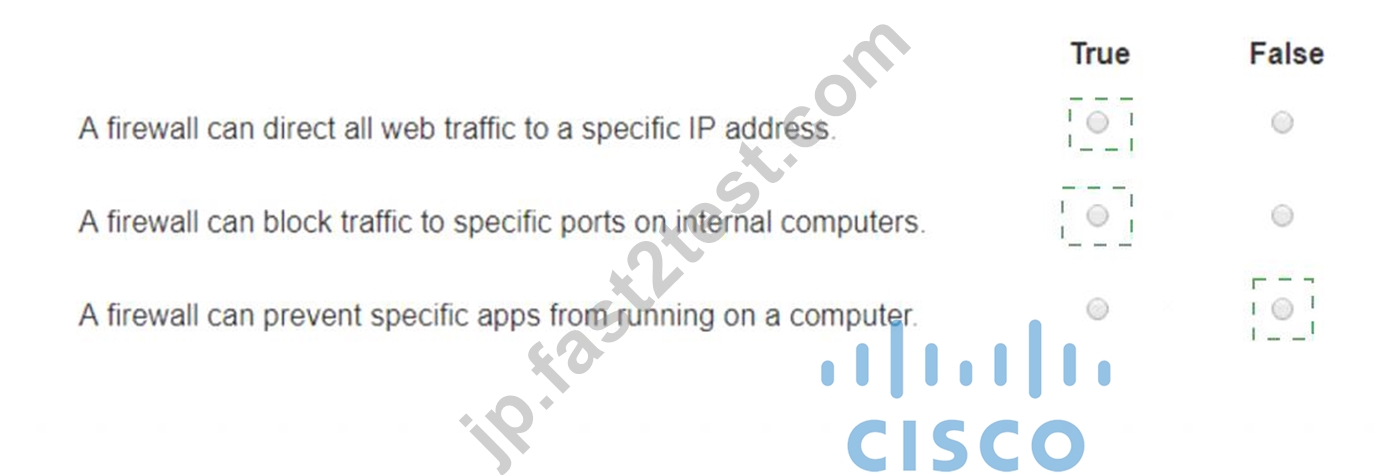
Explanation:
* A firewall can direct all web traffic to a specific IP address.
* True: Firewalls can be configured to perform Network Address Translation (NAT) and port forwarding, which can direct all web traffic (typically on port 80 and 443) to a specific internal IP address.
* A firewall can block traffic to specific ports on internal computers.
* True: Firewalls can be configured with access control lists (ACLs) or rules to block traffic to specific ports on internal computers, enhancing security by restricting unwanted or harmful traffic.
* A firewall can prevent specific apps from running on a computer.
* False: Firewalls typically control traffic flow and do not prevent specific applications from running on a computer. Application control is usually managed by endpoint security software or application control systems.
* Directing Web Traffic: Firewalls can manage traffic redirection using NAT and port forwarding rules to route web traffic to designated servers or devices within the network.
* Blocking Specific Ports: Firewalls can enforce security policies by blocking or allowing traffic based on port numbers, ensuring that only permitted traffic reaches internal systems.
* Application Control: While firewalls manage network traffic, preventing applications from running typically requires software specifically designed for endpoint protection and application management.
References:
* Understanding Firewalls: Firewall Capabilities
* Network Security Best Practices: Network Security Guide
質問 # 40
A Cisco switch is not accessible from the network. You need to view its running configuration.
Which out-of-band method can you use to access it?
- A. Telnet
- B. Console
- C. SNMP
- D. SSH
正解:B
解説:
Out-of-band management
When a Cisco switch is not accessible from the network, the recommended out-of-band method to access its running configuration is through theconsole port. Out-of-band management involves accessing the network device through a dedicated management channel that is not part of the data network.The console port provides direct access to the switch's Command Line Interface (CLI) without using the network, which is essential when the switch cannot be accessed remotely via the network12.
References:=
* Out-of-band (OOB) network interface configuration guidelines
* Out of band management configuration
質問 # 41
Which device protects the network by permitting or denying traffic based on IP address, port number, or application?
- A. Access point
- B. VPN gateway
- C. Intrusion detection system
- D. Firewall
正解:D
解説:
* Firewall: A firewall is a network security device that monitors and controls incoming and outgoing network traffic based on predetermined security rules. It permits or denies traffic based on IP addresses, port numbers, or applications.
* Access Point: This is a device that allows wireless devices to connect to a wired network using Wi-Fi.
It does not perform traffic filtering based on IP, port, or application.
* VPN Gateway: This device allows for secure connections between networks over the internet, but it is not primarily used for traffic filtering based on IP, port, or application.
* Intrusion Detection System (IDS): This device monitors network traffic for suspicious activity and policy violations, but it does not actively permit or deny traffic.
References:
* Understanding Firewalls: Firewall Basics
質問 # 42
Which command will display the following output?
- A. show ip interface
- B. show mac-address-table
- C. show cdp neighbor
- D. show inventory
正解:C
解説:
The command that will display the output provided, which includes capability codes, local interface details, device IDs, hold times, and platform port ID capabilities, is the show cdp neighbor command. This command is used in Cisco devices to display current information about neighboring devices detected by Cisco Discovery Protocol (CDP), which includes details such as the interface through which the neighbor is connected, the type of device, and the port ID of the device1.
References :=
*Cisco - show cdp neighbors
The provided output is from the Cisco Discovery Protocol (CDP) neighbor table. The show cdp neighbor command displays information about directly connected Cisco devices, including Device ID, Local Interface, Holdtime, Capability, Platform, and Port ID.
*A. show mac-address-table: Displays the MAC address table on the switch.
*C. show inventory: Displays information about the hardware inventory of the device.
*D. show ip interface: Displays IP interface status and configuration.
Thus, the correct answer is B. show cdp neighbor.
References :=
*Cisco CDP Neighbor Command
*Understanding CDP
質問 # 43
Computers in a small office are unable to access companypro.net. You run the ipconfig command on one of the computers. The results are shown in the exhibit.
You need to determine if you can reach the router.
Which command should you use? Complete the command by selecting the correct options from each drop- down lists.
正解:
解説: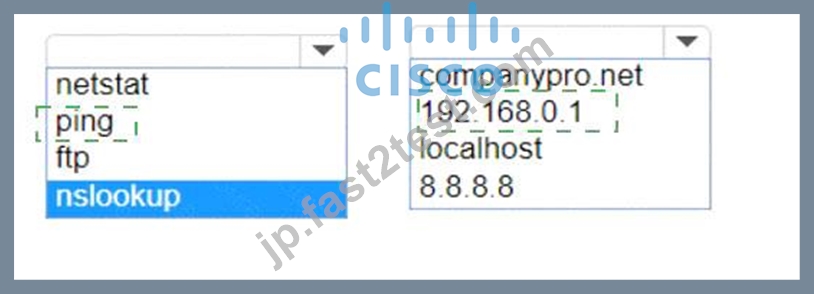
Explanation:
To determine if you can reach the router, you should use thepingcommand followed by the IP address of the router. Thepingcommand is a network utility used to test the reachability of a host on an Internet Protocol (IP) network and to measure the round-trip time for messages sent from the originating host to a destination computer.
The Default Gateway in theipconfigresults is typically the router's IP address in a home or small office network. In this case, the Default Gateway is192.168.0.1, which is the address you would ping to check connectivity to the router.
References:=
* How to Use the Ping Command
* Testing Network Connectivity with the Ping Command
To determine if you can reach the router, you should use thepingcommand with the IP address of the router.
* Command:ping
* Target:192.168.0.1
So, the completed command is:
* ping 192.168.0.1
Step by Step Comprehensive and Detailed Explanation:
* ping: The ping command sends ICMP Echo Request messages to the target IP address and waits for an Echo Reply. It is commonly used to test the reachability of a network device.
* 192.168.0.1: This is the IP address of the default gateway (the router) as shown in theipconfigoutput.
Pinging this address will help determine if the computer can communicate with the router.
References:
* Using the ping Command: ping Command Guide
質問 # 44
Move the MFA factors from the list on the left to their correct examples on the right. You may use each factor once, more than once, or not at all.
Note: You will receive partial credit for each correct selection.
正解:
解説:
Explanation:
The correct matching of the MFA factors to their examples is as follows:
* Entering a one-time security code sent to your device after logging in: Possession
* Holding your phone to your face to be recognized: Inherence
* Specifying your user name and password to log on to a service: Knowledge Here's why each factor matches the example:
* Possession: This factor is something the user has, like a mobile device. A one-time security code sent to this device falls under this category.
* Inherence: This factor is something the user is, such as a biometric characteristic. Facial recognition using a phone is an example of this factor.
* Knowledge: This factor is something the user knows, like a password or PIN.
Multi-Factor Authentication (MFA) enhances security by requiring two or more of these factors to verify a user's identity before granting access.
* Entering a one-time security code sent to your device after logging in.
* Factor: Possession
* Explanation: This factor relates to something you have, such as a device that receives a security code.
* Holding your phone to your face to be recognized.
* Factor: Inference (typically referred to as Inherence or Biometric)
* Explanation: This factor relates to something you are, such as biometric authentication like facial recognition.
* Specifying your username and password to log on to a service.
* Factor: Knowledge
* Explanation: This factor relates to something you know, such as a username and password.
* Possession Factor: This involves something the user has in their possession. Receiving a one-time security code on a device (e.g., phone) is an example of this.
* Inference Factor (Inherence/Biometric): This involves something inherent to the user, such as biometric verification (e.g., facial recognition or fingerprint scanning).
* Knowledge Factor: This involves something the user knows, such as login credentials (username and password).
References:
* Multi-Factor Authentication (MFA) Explained: MFA Guide
* Understanding Authentication Factors: Authentication Factors
質問 # 45
What is the most compressed valid format of the IPv6 address 2001 :0db8:0000:0016:0000:001b: 2000:0056?
- A. 2001:db8: : 16: : 1b: 2000: 56
- B. 2001:db8: 0:16: :1b: 2000:56
- C. 2001:db8: : 16: : 1b:2:56
- D. 2001:db8: 16: :1b:2:56
正解:B
解説:
IPv6 addresses can be compressed by removing leading zeros and replacing consecutive groups of zeros with a double colon (::). Here's how to compress the address 2001:0db8:0000:0016:0000:001b:2000:0056:
* Remove leading zeros from each segment:
* 2001:db8:0000:0016:0000:001b:2000:0056 becomes 2001:db8:0:16:0:1b:2000:56
* Replace the longest sequence of consecutive zeros with a double colon (::). In this case, the two consecutive zeros between the 16 and 1b:
* 2001:db8:0:16::1b:2000:56
Thus, the most compressed valid format of the IPv6 address is 2001:db8:0:16::1b:2000:56.
References:=
* Cisco Learning Network
* IPv6 Addressing (Cisco)
質問 # 46
......
2025年最新のリアルな無料Cisco CCST-Networking試験問題集問題と解答:https://jp.fast2test.com/CCST-Networking-premium-file.html