

[2024年11月19日]Blue Prism AD01日本語リアル試験問題と解答を無料で提供いたします
合格できるBlue Prism AD01日本語試験情報と無料練習テスト問題
質問 # 63
現在 Process Studio でテストされている Blue Prism プロセスから抽出された次の図を調べてください。
「顧客アカウントへのアクセス*」サブページにはブレークポイントは含まれていませんが、ページにはエラーが含まれています。
プロセスのデバッグ時にステップ オーバー (F10) を選択するとどうなりますか?
- A. プロセスは、例外がスローされるまで「顧客アカウントへのアクセス」ページのすべてのステージで動作し、その後フォーカスが「Recover1」ステージに移動します。
- B. プロセスは、例外がスローされるまで「顧客アカウントへのアクセス」ページのすべてのステージで動作し、その後、「顧客アカウントへのアクセス」ページのエラーを含むステージにフォーカスが移動します。
- C. プロセスは、例外がスローされるまで、「顧客アカウントへのアクセス」ページのすべてのステージで動作し、例外がスローされると、フォーカスは「顧客アカウントへのアクセス」ページの適切な回復ステージに移動します。
- D. プロセスは、例外がスローされるまで「顧客アカウントへのアクセス」ページのすべてのステージで動作し、その後フォーカスが「顧客詳細の取得」ステージに移動します。
正解:A
解説:
* Understanding the Diagram and Process Flow:
* The process includes a sub-page called 'Access Customer Account', which contains an error.
* When debugging, choosing to "Step Over" (F10) will execute the sub-page without stepping into each individual stage within it.
* Exception Handling in Blue Prism:
* If an error occurs within the 'Access Customer Account' sub-page, the process will throw an exception.
* The process will then move to the appropriate Recover stage to handle the exception.
* Recover Stage Focus:
* Option A: Incorrect. Focus will not move directly to the stage containing the error within the sub-page.
* Option B: Incorrect. The process does not move to the internal recover stage of the sub-page if there are no breakpoints.
* Option C: Correct. The process will move to the 'Recover1' stage after the exception is thrown, as it is the appropriate recover stage for handling the error.
* Option D: Incorrect. Focus will not move to the 'Get Customer Details' stage, as the exception handling logic will direct it to 'Recover1'.
* Conclusion:
* The correct answer is C. The process will work all stages in the 'Access Customer Account' page until the exception is thrown, and then focus will move to the 'Recover1' stage.
References:
* Blue Prism Developer Documentation: Exception Handling and Recovery Stages
* Blue Prism Training Material on Debugging and Exception Management
質問 # 64
次の計算ステージは、Today関数を使用して現在の日付を日付値として取得し、「Today」というタイトルのデータアイテムに配置します。
次の説明のうち、正しいものはどれですか。
- A. データアイテム「Today」がデータタイプがテキストで構成されている場合、計算ステージの実行時に例外がスローされます
- B. データ項目「今日」が日付のデータ型で構成されている場合、計算ステージの実行時に例外がスローされます
- C. データ項目「Today」がDateTimeのデータ型で構成されている場合、計算ステージの実行時に例外がスローされます
- D. これらのステートメントはどれも正しくありません
正解:C
質問 # 65
自動化されているアプリケーションは、ネットワーク トラフィックが多いと応答が遅くなる傾向があります。自動化を設計する際、開発者はこれらのパフォーマンスの問題をどのように管理すべきでしょうか?
- A. システムの遅延に十分対応できるグローバル タイムアウト値を持つ条件付き待機ステージを使用します。
- B. ナビゲート ステージの周囲にブロックを配置し、リカバリ ステージを追加します。これを、ナビゲート ステージを再開して再試行する再試行ループに接続します。
- C. 無条件 WAN (スロットル) を使用して、コントローラーがオートメーションの実行速度を増減できるようにします。
- D. システム レイテンシに十分対応できるグローバル タイムアウト値を使用して、条件付き待機ステージの前にスリープ ステージを追加します。
正解:A
解説:
* Understanding the Scenario:
* The application being automated is prone to respond slowly due to network traffic.
* The automation needs to handle these latency issues efficiently.
* Evaluating the Options:
* Option A: An Unconditional Wait (Throttle) is not an optimal solution as it does not adapt to varying response times and can unnecessarily slow down the automation.
* Option B: Using a block and recovery with a retry loop is complex and not the best approach for handling expected latency issues. This is better suited for handling unexpected errors.
* Option C: Adding a Sleep stage before a Conditional Wait stage is not efficient as it adds unnecessary wait time before checking the condition.
* Option D: A Conditional Wait stage with a Global Timeout is the best approach. It allows the automation to wait for a condition to be met (e.g., an element to appear) with a maximum wait time that accommodates system latency. This method is adaptive and efficient.
* Conclusion:
* The best way to manage performance issues due to slow responses is to use D. Use a Conditional Wait stage with a Global Timeout value which is sufficient to accommodate the system latency.
References:
* Blue Prism Developer Documentation: Wait Stages and Performance Optimization
* Blue Prism Training Material on Handling System Latency
質問 # 66
ケースが作業キューで正常に処理されたことを示すものは次のうちどれですか?
- A.

- B.

- C.

- D.

正解:B
質問 # 67
プロセス内のフローの pan: を示す次の画像を確認してください。
プロセスフローにどのような問題があると思いますか? (回答を 2 つ選択)
- A. 予約のキャンセル ページで例外がスローされ、回復ステージでキャッチされるまでバブルアップされた場合、予約の作成アクションは再試行されません。
- B. フロー内のルートの 1 つで Resume ステージが欠落しています。
- C. 再試行回数は再試行ごとに増加しません。
- D. フロー内のルートの 1 つでリカバリ ステージが欠落しています。
正解:A、C
質問 # 68
環境変数として公開されているデータ項目の値を更新するために使用できるオプションは次のどれですか?
(該当する項目をすべて選択してください)
- A. 同じプロセス内の計算ステージを使用して値を更新する
- B. Environment Manager のグローバル変数ストアを使用して値を更新します。
- C. 「内部 - グローバル変数」ビジネスオブジェクトを使用して値を更新する
- D. システム マネージャーを使用して値を更新します。
正解:B、C、D
解説:
* Understanding Environment Variables:
* Environment variables are global variables that are accessible across multiple processes and sessions within Blue Prism.
* They are typically used to store configuration settings and other information that need to be consistent across different processes.
* Updating Environment Variables:
* Internal - Global Variables Business Object (Option A): This business object can be used to update the value of environment variables programmatically within a process.
* Calculation Stage (Option B): This stage cannot be used to update environment variables directly because it only works with data items within the context of the process.
* Global Variables Store in Environment Manager (Option C): This is a specific area within the Environment Manager where environment variables can be managed and updated.
* System Manager (Option D): This is another tool within Blue Prism where environment variables can be updated.
* Conclusion:
* The correct options to update the value of a data item exposed as an Environment Variable are:
* A. Using the 'Internal - Global Variables' Business Object to update the value.
* C. Using the Global Variables store in Environment Manager to update the value.
* D. Using System Manager to update the value.
References:
* Blue Prism Developer Documentation: Environment Variables
* Blue Prism Training Material on Variable Management and Configuration
質問 # 69
Order Systemアプリケーションが正常に起動し、Blue Prismがアプリケーションを次の画面に移動しました。
画面とのインターフェイスをさらに行う前に、この画面にフォーカスがあることを確認する必要があります。 [新規注文]画面がフォーカスされていることを確認するための正しい構成はどれですか。
- A. オプション

- B. オプション

- C. オプション

- D. オプション

正解:D
解説:
ウィンドウアプリケーションで新しい画面がフォーカスされていることを確認するには、アプリケーションではなく新しい画面をアクティブにする必要があります。
質問 # 70
次のステージのうち、プロセススタジオでオブジェクトスタジオではないものはどれですか。
- A. オプションD
- B. オプションA
- C. オプションB
- D. オプションC
正解:A
質問 # 71
次のプロセスフローを調べます。
これは、完了する前に「計算」ページを呼び出す単純なプロセスのメインページです。
データ項目は次のように構成されています。
値-1は、初期値が100の数値データ項目です。
値2は、初期値が4の数値データ項目です。
結果は、初期値のない数値データ項目です。
計算ページ参照ステージは、次のように構成されています。
計算ページは次のように構成されています。
データ項目は次のように構成されます。
値-1は、初期値が200の数値データ項目です。
値-2は、初期値が4の数値データ項目です。
結果は、初期値のない数値データ項目です
開始ステージは、値1と値2の値を入力パラメーターとして渡すように構成されています。
「除算」計算ステージ式は[値-1] / [値-2]です。
Endステージは、結果データ項目の値を出力パラメーターとして返すように構成されています。
プロセスの実行後、メインページの結果データ項目には何が含まれますか?
- A. 0
- B. 1
- C. 2
- D. 37.5
正解:A
質問 # 72
ページが実行された後の結果はどうなりますか?
- A. データ項目の出力値にAが含まれている
- B. データ項目の出力値にCが含まれています
- C. 内部例外がスローされます
- D. データ項目の出力値にBが含まれています
正解:C
質問 # 73
展示品をご参照ください。
開発者は、Citrix 環境内で SAP Windows ベースのアプリケーションを自動化しています。アプリケーション ウィンドウに同じラベルとボタンが 2 つあるため、[文書番号] フィールドを識別して強調表示するときに重複一致が見つかるという問題があります。
開発者は、Surface Automation を使用して正しいフィールドを識別するためにどのスパイ モードを使用する必要がありますか?
- A. 地域
- B. ブラウザ
- C. Win32
- D. アプリケーション ナビゲータ
正解:A
解説:
In a Citrix environment, where traditional spying modes might not work effectively due to the nature of remote desktop applications, Surface Automation techniques are used. The Region mode allows you to define specific areas of the screen to interact with, making it suitable for environments where duplicate elements are present.
* Region (Option D): This spy mode allows you to define a specific area on the screen and interact with elements within that region. This is particularly useful in Citrix environments where other spy modes might fail to differentiate between duplicate elements.
The other options are less effective in this scenario:
* Win32 (Option A): This mode is used for traditional Windows applications but might not work well in a Citrix environment.
* Browser (Option B): This mode is designed for web-based applications and is not suitable for Windows applications in Citrix.
* Application Navigator (Option C): This mode is not typically used for surface automation in Citrix environments.
ReferencesConsult Blue Prism's documentation on surface automation techniques and best practices for automating applications in Citrix environments.
質問 # 74
ビジネスオブジェクツに関する次の説明のうち、正しいものはどれですか。
- A. ビジネスオブジェクトをコントロールルームに公開できます
- B. ビジネスオブジェクトがBlue PrismのStudio領域で構成されている
- C. Business Objectsにビジネスルールを含めることがBlue Prismのベストプラクティスです
- D. 個々のステージのロギングはBusiness Objectsで設定できません
正解:B
解説:
理由:ビジネスオブジェクトがObject Studioでのみ構成されているため。
残りのすべての他の理由は失敗します。
質問 # 75
次のプロセスフローを調べます。
「顧客リストのループ」ループは、「顧客リスト」コレクションをループするように構成されています。
「Eメール顧客」サブページで発生した例外は、同じページで解決されます。
「EmailCustomer」サブページは何回実行されますか?
- A. 0
- B. 1
- C. ループは無限大になります
- D. 2
- E. 「Eメールカスタマー」サブページを見ずに言うことは不可能です
正解:D
質問 # 76
次の Blue Prism ステージのうち、Process Studio と Object Studio の両方にあるものはどれですか? (該当する項目をすべて選択してください)
- A.

- B.

- C.

- D.

- E.

- F.

正解:A、B、C、D、F
解説:
* Understanding Blue Prism Stages:
* Blue Prism automation involves various stages that represent different actions and decisions in a
* process or object. These stages are used to build process flows in both Process Studio and Object Studio.
* Certain stages are common to both studios, while some are specific to one.
* Identification of Stages in the Image:
* Option A: Decision Stage
* Option B: Calculation Stage
* Option C: Multi-Calculation Stage (a combination of calculations)
* Option D: Data Item
* Option E: Process Stage
* Option F: Navigate Stage (specific to Object Studio)
* Stages Common to Both Process Studio and Object Studio:
* Decision Stage (Option A): Used to make decisions based on conditions.
* Calculation Stage (Option B): Used to perform calculations.
* Multi-Calculation Stage (Option C): Represents multiple calculations grouped together.
* Data Item (Option D): Represents variables or data items used in the process.
* Process Stage (Option E): Used to invoke sub-processes or other processes within a main process.
* Stage Specific to Object Studio:
* Navigate Stage (Option F): Used to interact with applications, specific to Object Studio.
References:
* Blue Prism Developer Documentation: Process and Object Studio Stages
* Blue Prism Training Material on Building Processes and Objects
質問 # 77
ビジネスオブジェクトのアクションは、グローバル送信キーを使用して、Centrix DataSolutionsと呼ばれるアプリケーションの「スタッフ番号」フィールドに入力する必要があります。アプリケーションにフォーカスがあり、カーソルが[スタッフ番号]フィールドに置かれます。
以下のステージプロパティウィンドウを調べます。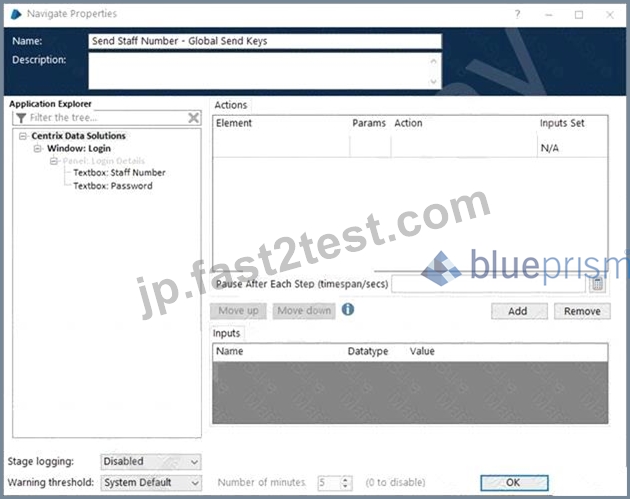
上に表示されたアプリケーションエクスプローラツリーのどの要素が[スタッフ番号]フィールドに入力されるようにグローバル送信キーアクションを構成するには、この操作を完了できるように、ステージの[要素]列にドラッグしますか?
- A. テキストボックス:スタッフ番号
- B. ウィンドウ:ログイン
- C. パネル:ログインの詳細
- D. Centrixデータソリューション
正解:A
質問 # 78
Object Studioアクション内の次のフローを検討してください。
このフローの開発者は、画面に要素が存在していても、ターゲットアプリケーションへの資格情報の書き込みが例外で失敗する場合があることを発見しました。彼は単に例外をキャッチし、2秒待ってから再試行すると問題が解決することを発見しました。
フロー内でどのような問題が見られますか?
- A. 再開ステージは、回復ステージと同じ例外ブロック内にないため、機能しません
- B. フローに待機段階は必要ありません。
- C. 資格情報ステージは読み取りステージであり、書き込みステージではありません
- D. 資格情報のステージが何らかの予期しない理由で例外をスローし続ける場合、無限ループの可能性があります
正解:D
質問 # 79
Process Studioでテストされているプロセスからの抜粋である次の図を見てください。
「顧客アカウントへのアクセス」サブページにはブレークポイントはありませんが、エラーがあります。プロセスのデバッグ時にステップオーバー(F10)を選択するとどうなりますか?
- A. プロセスは、エラーがスローされるまで「顧客アカウントへのアクセス」ページのすべてのステージで機能し、その後、フォーカスは「回復1」ステージに移動します。
- B. プロセスは、エラーがスローされるまで「顧客アカウントへのアクセス」ページのすべてのステージで機能し、その後、フォーカスは「顧客アカウントへのアクセス」ページの適切な復旧ステージに移動します。
- C. プロセスは、すべての段階で機能します。エラーがスローされるまで[顧客アカウント]ページにアクセスし、フォーカスが[顧客の詳細を取得]ステージに移動します。
- D. プロセスは、エラーがスローされるまで「顧客アカウントへのアクセス」ページのすべてのステージに進み、その後、「顧客アカウントへのアクセス」ページのエラーを含むステージにフォーカスが移動します。
正解:A
質問 # 80
ワークキューでケースが正常に処理されたことを示すのは次のどれですか?
- A. オプション

- B. オプション

- C. オプション

- D. オプション

正解:B
質問 # 81
現在の例外を保持することを目的とするプロセスのメインページで、次のプロセスフローを調べます。
デザインの何が問題になっていますか?
- A. フローはプロセスのメインページ上にあるため、例外がバブルアップする親/呼び出しページがないため、「再スロー」例外ステージがあってはなりません。
- B. アラートの送信プロセスは実行されません
- C. Recover2によってキャッチされた例外は、Re-Throw Exceptionステージによって保持されません
- D. 例外処理は例外ブロック内ではありません。
正解:C
解説:
Reason: After resume stage the exception is dead so the Re thrown will not worked.
質問 # 82
展示品をご参照ください。


生成されるレポートにはフルタイム従業員が何名含まれますか?
- A. 0
- B. 1
- C. 2
- D. 3
正解:A
解説:
* Loop Structure:
* The loop iterates through each row in the Data collection.
* For each row, it checks the "Full Time?" condition.
* Condition:
* If "Full Time?" is true, the process continues to "Generate Report of Full Time Employees".
* If "Full Time?" is false, the row is removed from the collection.
* Loop Execution:
* Initially, there are 4 rows in the Data collection.
* If any row is not full-time, it is removed.
* Outcome:
* The decision to generate the report happens only if all rows satisfy the "Full Time?" condition.
* Since the diagram does not specify that any rows are full-time and the decision to remove rows occurs based on a negative condition, all rows could potentially be removed.
* Final Report:
* Given the process flow and assuming all rows do not meet the "Full Time?" condition, no rows are left for generating the report.
References:
* Blue Prism documentation on loop stages and decision stages.
質問 # 83
ケースがワークキューで正常に処理されたことを示すのは次のうちどれですか?
B)
C)
D)
- A. オプションD
- B. オプションB
- C. オプションC
- D. オプションA
正解:D
質問 # 84
Web ベースのアプリケーションには、テスト開発、トレーニング、および実稼働用に異なる URL があります。ベスト プラクティスによれば、次の記述のうち正しいものはどれですか?
- A. URL を保存するには環境変数を使用する必要があります。
- B. 正しい URL を選択するには動的一致を使用する必要があります
- C. URL はグローバル データ項目として保存される必要があります。
- D. アプリケーションに違いがある場合に備えて、オブジェクトは URL ごとに構築される必要があります
正解:A
解説:
Using environment variables is a best practice in Blue Prism for managing configuration settings that may vary across different environments (e.g., Testing, Development, Training, and Production). This approach allows for easy updates and changes without modifying the underlying code.
* Environment Variable: Storing the URLs in an environment variable allows you to change the URL for different environments without altering the business object or process code. This makes the automation more flexible and easier to maintain.
Other options are less optimal:
* Build per URL (Option A): Creating separate objects for each URL is inefficient and increases maintenance effort.
* Dynamic Match (Option B): This does not specifically address URL management.
* Global Data Items (Option C): While global data items can store URLs, environment variables are more suited for managing environment-specific configurations.
ReferencesRefer to Blue Prism's best practices on managing environment-specific configurations using environment variables.
質問 # 85
Blue Prism Control Room で実行できるアクティビティは次のうちどれですか?
(該当する項目をすべて選択してください)
- A. ワークキューを暗号化する
- B. ワークキューから項目を削除します
- C. ワークキューの名前を変更します
- D. ワークキューを作成する
- E. 作業キューの最大試行回数パラメータを設定します。
- F. ワークキューデータを更新します
正解:A、B、E、F
解説:
* Understanding Control Room Functions:
* The Control Room in Blue Prism is used to manage and monitor running processes and manage work queues.
* Capabilities of Control Room:
* Set the Maximum Attempts parameter for the Work Queue (Option A): This is a parameter setting available in the Control Room for work queues.
* Rename a Work Queue (Option B): Work queues cannot be renamed from the Control Room.
* Delete items from a Work Queue (Option C): Items in a work queue can be deleted from the Control Room.
* Refresh Work Queue data (Option D): The Control Room allows refreshing the data displayed for work queues.
* Create a Work Queue (Option E): Work queues are created in the System Manager, not in the Control Room.
* Encrypt a Work Queue (Option F): This can be managed from the Control Room to ensure data security.
* Conclusion:
* The activities you can perform in Blue Prism Control Room are:
* A. Set the Maximum Attempts parameter for the Work Queue
* C. Delete items from a Work Queue
* D. Refresh Work Queue data
* F. Encrypt a Work Queue
References:
* Blue Prism Developer Documentation: Control Room Functions
* Blue Prism Training Material on Work Queue Management
質問 # 86
......
最新のAD01日本語試験問題集でBlue Prism試験が合格できます:https://jp.fast2test.com/AD01-JPN-premium-file.html