

[2024年06月16日]ARA-R01問題集PDFとテストエンジン 試験問題
検証済みのARA-R01テスト問題集と解答で正確な163問題解答あります
質問 # 73
A user has activated primary and secondary roles for a session.
What operation is the user prohibited from using as part of SQL actions in Snowflake using the secondary role?
- A. Insert
- B. Truncate
- C. Delete
- D. Create
正解:D
解説:
In Snowflake, when a user activates a secondary role during a session, certain privileges associated with DDL (Data Definition Language) operations are restricted. The CREATE statement, which falls under DDL operations, cannot be executed using a secondary role. This limitation is designed to enforce role-based access control and ensure that schema modifications are managed carefully, typically reserved for primary roles that have explicit permissions to modify database structures.References: Snowflake's security and access control documentation specifying the limitations and capabilities of primary versus secondary roles in session management.
質問 # 74
The Business Intelligence team reports that when some team members run queries for their dashboards in parallel with others, the query response time is getting significantly slower What can a Snowflake Architect do to identify what is occurring and troubleshoot this issue?
- A.

- B.
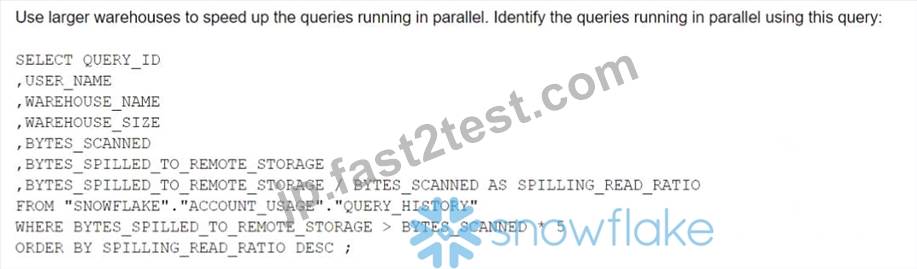
- C.

- D.
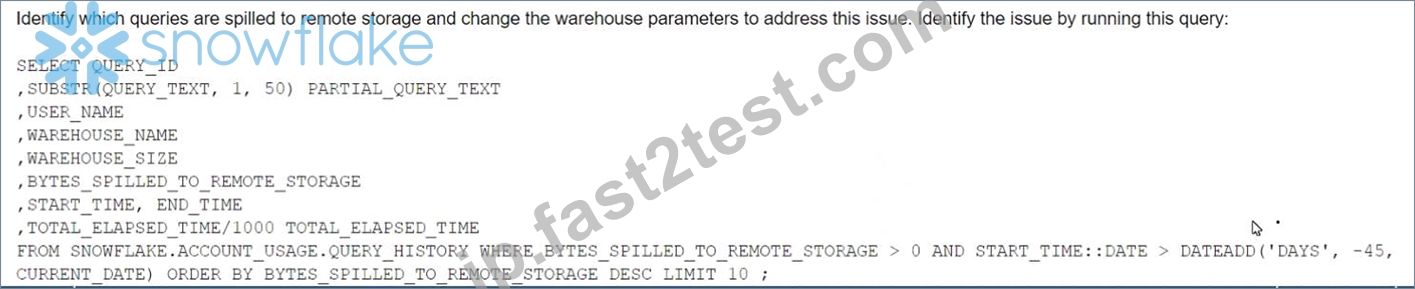
正解:B
解説:
The image shows a SQL query that can be used to identify which queries are spilled to remote storage and suggests changing the warehouse parameters to address this issue. Spilling to remote storage occurs when the memory allocated to a warehouse is insufficient to process a query, and Snowflake uses disk or cloud storage as a temporary cache. This can significantly slow down the query performance and increase the cost. To troubleshoot this issue, a Snowflake Architect can run the query shown in the image to find out which queries are spilling, how much data they are spilling, and which warehouses they are using. Then, the architect can adjust the warehouse size, type, or scaling policy to provide enough memory for the queries and avoid spilling12. References:
* Recognizing Disk Spilling
* Managing the Kafka Connector
質問 # 75
An Architect for a multi-national transportation company has a system that is used to check the weather conditions along vehicle routes. The data is provided to drivers.
The weather information is delivered regularly by a third-party company and this information is generated as JSON structure. Then the data is loaded into Snowflake in a column with a VARIANT data type. This table is directly queried to deliver the statistics to the drivers with minimum time lapse.
A single entry includes (but is not limited to):
- Weather condition; cloudy, sunny, rainy, etc.
- Degree
- Longitude and latitude
- Timeframe
- Location address
- Wind
The table holds more than 10 years' worth of data in order to deliver the statistics from different years and locations. The amount of data on the table increases every day.
The drivers report that they are not receiving the weather statistics for their locations in time.
What can the Architect do to deliver the statistics to the drivers faster?
- A. Divide the table into several tables for each location by using the location address information from the JSON dataset in order to process the queries in parallel.
- B. Create an additional table in the schema for longitude and latitude. Determine a regular task to fill this information by extracting it from the JSON dataset.
- C. Add search optimization service on the variant column for longitude and latitude in order to query the information by using specific metadata.
- D. Divide the table into several tables for each year by using the timeframe information from the JSON dataset in order to process the queries in parallel.
正解:C
解説:
To improve the performance of queries on semi-structured data, such as JSON stored in a VARIANT column, Snowflake's search optimization service can be utilized. By adding search optimization specifically for the longitude and latitude fields within the VARIANT column, the system can perform point lookups and substring queries more efficiently. This will allow for faster retrieval of weather statistics, which is critical for the drivers to receive timely updates.
References: The solution is supported by Snowflake documentation that details how search optimization can enhance query performance for semi-structured data1.
質問 # 76
A company is using a Snowflake account in Azure. The account has SAML SSO set up using ADFS as a SCIM identity provider. To validate Private Link connectivity, an Architect performed the following steps:
* Confirmed Private Link URLs are working by logging in with a username/password account
* Verified DNS resolution by running nslookups against Private Link URLs
* Validated connectivity using SnowCD
* Disabled public access using a network policy set to use the company's IP address range However, the following error message is received when using SSO to log into the company account:
IP XX.XXX.XX.XX is not allowed to access snowflake. Contact your local security administrator.
What steps should the Architect take to resolve this error and ensure that the account is accessed using only Private Link? (Choose two.)
- A. Generate a new SCIM access token using system$generate_scim_access_token and save it to Azure AD.
- B. Add the IP address in the error message to the allowed list in the network policy.
- C. Open a case with Snowflake Support to authorize the Private Link URLs' access to the account.
- D. Update the configuration of the Azure AD SSO to use the Private Link URLs.
- E. Alter the Azure security integration to use the Private Link URLs.
正解:B、D
解説:
The error message indicates that the IP address in the error message is not allowed to access Snowflake because it is not in the allowed list of the network policy. The network policy is a feature that allows restricting access to Snowflake based on IP addresses or ranges. To resolve this error, the Architect should take the following steps:
Add the IP address in the error message to the allowed list in the network policy. This will allow the IP address to access Snowflake using the Private Link URLs. Alternatively, the Architect can disable the network policy if it is not required for security reasons.
Update the configuration of the Azure AD SSO to use the Private Link URLs. This will ensure that the SSO authentication process uses the Private Link URLs instead of the public URLs. The configuration can be updated by following the steps in the Azure documentation1.
These two steps should resolve the error and ensure that the account is accessed using only Private Link. The other options are not necessary or relevant for this scenario. Altering the Azure security integration to use the Private Link URLs is not required because the security integration is used for SCIM provisioning, not for SSO authentication. Generating a new SCIM access token using system$generate_scim_access_token and saving it to Azure AD is not required because the SCIM access token is used for SCIM provisioning, not for SSO authentication. Opening a case with Snowflake Support to authorize the Private Link URLs' access to the account is not required because the authorization can be done by the account administrator using the SYSTEM$AUTHORIZE_PRIVATELINK function2.
質問 # 77
A Snowflake Architect Is working with Data Modelers and Table Designers to draft an ELT framework specifically for data loading using Snowpipe. The Table Designers will add a timestamp column that Inserts the current tlmestamp as the default value as records are loaded into a table. The Intent is to capture the time when each record gets loaded into the table; however, when tested the timestamps are earlier than the loae_take column values returned by the copy_history function or the Copy_HISTORY view (Account Usage).
Why Is this occurring?
- A. The timestamps are different because there are parameter setup mismatches. The parameters need to be realigned
- B. The Snowflake timezone parameter Is different from the cloud provider's parameters causing the mismatch.
- C. The Table Designer team has not used the localtimestamp or systimestamp functions in the Snowflake copy statement.
- D. The CURRENT_TIMEis evaluated when the load operation is compiled in cloud services rather than when the record is inserted into the table.
正解:D
解説:
The correct answer is D because the CURRENT_TIME function returns the current timestamp at the start of the statement execution, not at the time of the record insertion. Therefore, if the load operation takes some time to complete, the CURRENT_TIME value may be earlier than the actual load time.
Option A is incorrect because the parameter setup mismatches do not affect the timestamp values. The parameters are used to control the behavior and performance of the load operation, such as the file format, the error handling, the purge option, etc.
Option B is incorrect because the Snowflake timezone parameter and the cloud provider's parameters are independent of each other. The Snowflake timezone parameter determines the session timezone for displaying and converting timestamp values, while the cloud provider's parameters determine the physical location and configuration of the storage and compute resources.
Option C is incorrect because the localtimestamp and systimestamp functions are not relevant for the Snowpipe load operation. The localtimestamp function returns the current timestamp in the session timezone, while the systimestamp function returns the current timestamp in the system timezone.
Neither of them reflect the actual load time of the records. References:
Snowflake Documentation: Loading Data Using Snowpipe: This document explains how to use Snowpipe to continuously load data from external sources into Snowflake tables. It also describes the syntax and usage of the COPY INTO command, which supports various options and parameters to control the loading behavior.
Snowflake Documentation: Date and Time Data Types and Functions: This document explains the different data types and functions for working with date and time values in Snowflake. It also describes how to set and change the session timezone and the system timezone.
Snowflake Documentation: Querying Metadata: This document explains how to query the metadata of the objects and operations in Snowflake using various functions, views, and tables. It also describes how to access the copy history information using the COPY_HISTORY function or the COPY_HISTORY view.
質問 # 78
When loading data into a table that captures the load time in a column with a default value of either CURRENT_TIME () or CURRENT_TIMESTAMP() what will occur?
- A. All rows loaded using a specific COPY statement will have varying timestamps based on when the rows were inserted.
- B. Any rows loaded using a specific COPY statement will have varying timestamps based on when the rows were read from the source.
- C. Any rows loaded using a specific COPY statement will have varying timestamps based on when the rows were created in the source.
- D. All rows loaded using a specific COPY statement will have the same timestamp value.
正解:D
解説:
According to the Snowflake documentation, when loading data into a table that captures the load time in a column with a default value of either CURRENT_TIME () or CURRENT_TIMESTAMP(), the default value is evaluated once per COPY statement, not once per row. Therefore, all rows loaded using a specific COPY statement will have the same timestamp value. This behavior ensures that the timestamp value reflects the time when the data was loaded into the table, not when the data was read from the source or created in the source.
References:
Snowflake Documentation: Loading Data into Tables with Default Values
Snowflake Documentation: COPY INTO table
質問 # 79
An Architect is designing a pipeline to stream event data into Snowflake using the Snowflake Kafka connector. The Architect's highest priority is to configure the connector to stream data in the MOST cost-effective manner.
Which of the following is recommended for optimizing the cost associated with the Snowflake Kafka connector?
- A. Utilize a lower Buffer.count.records in the connector configuration.
- B. Utilize a higher Buffer.flush.time in the connector configuration.
- C. Utilize a higher Buffer.size.bytes in the connector configuration.
- D. Utilize a lower Buffer.size.bytes in the connector configuration.
正解:B
解説:
The minimum value supported for the buffer.flush.time property is 1 (in seconds). For higher average data flow rates, we suggest that you decrease the default value for improved latency. If cost is a greater concern than latency, you could increase the buffer flush time. Be careful to flush the Kafka memory buffer before it becomes full to avoid out of memory exceptions.https://docs.snowflake.com/en/user-guide/data-load-snowpipe-streaming-kafka
質問 # 80
When using the Snowflake Connector for Kafka, what data formats are supported for the messages? (Choose two.)
- A. Avro
- B. JSON
- C. Parquet
- D. XML
- E. CSV
正解:A、B
解説:
The data formats that are supported for the messages when using the Snowflake Connector for Kafka are Avro and JSON. These are the two formats that the connector can parse and convert into Snowflake table rows. The connector supports both schemaless and schematized JSON, as well as Avro with or without a schema registry1. The other options are incorrect because they are not supported data formats for the messages. CSV, XML, and Parquet are not formats that the connector can parse and convert into Snowflake table rows. If the messages are in these formats, the connector will load them as VARIANT data type and store them as raw strings in the table2. References: Snowflake Connector for Kafka | Snowflake Documentation, Loading Protobuf Data using the Snowflake Connector for Kafka | Snowflake Documentation
質問 # 81
When using the copy into <table> command with the CSV file format, how does the match_by_column_name parameter behave?
- A. The parameter will be ignored.
- B. It expects a header to be present in the CSV file, which is matched to a case-sensitive table column name.
- C. The command will return an error.
- D. The command will return a warning stating that the file has unmatched columns.
正解:A
解説:
Option B is the best design to meet the requirements because it uses Snowpipe to ingest the data continuously and efficiently as new records arrive in the object storage, leveraging event notifications. Snowpipe is a service that automates the loading of data from external sources into Snowflake tables1. It also uses streams and tasks to orchestrate transformations on the ingested data. Streams are objects that store the change history of a table, and tasks are objects that execute SQL statements on a schedule or when triggered by another task2.
Option B also uses an external function to do model inference with Amazon Comprehend and write the final records to a Snowflake table. An external function is a user-defined function that calls an external API, such as AmazonComprehend, to perform computations that are not natively supported by Snowflake3. Finally, option B uses the Snowflake Marketplace to make the de-identified final data set available publicly for advertising companies who use different cloud providers in different regions. The Snowflake Marketplace is a platform that enables data providers to list and share their data sets with data consumers, regardless of the cloud platform or region they use4.
Option A is not the best design because it uses copy into to ingest the data, which is not as efficient and continuous as Snowpipe. Copy into is a SQL command that loads data from files into a table in a single transaction. It also exports the data into Amazon S3 to do model inference with Amazon Comprehend, which adds an extra step and increases the operational complexity and maintenance of the infrastructure.
Option C is not the best design because it uses Amazon EMR and PySpark to ingest and transform the data, which also increases the operational complexity and maintenance of the infrastructure. Amazon EMR is a cloud service that provides a managed Hadoop framework to process and analyze large-scale data sets.
PySpark is a Python API for Spark, a distributed computing framework that can run on Hadoop. Option C also develops a python program to do model inference by leveraging the Amazon Comprehend text analysis API, which increases the development effort.
Option D is not the best design because it is identical to option A, except for the ingestion method. It still exports the data into Amazon S3 to do model inference with Amazon Comprehend, which adds an extra step and increases the operational complexity and maintenance of the infrastructure.
References: 1: Snowpipe Overview 2: Using Streams and Tasks to Automate Data Pipelines 3: External Functions Overview 4: Snowflake Data Marketplace Overview : [Loading Data Using COPY INTO] : [What is Amazon EMR?] : [PySpark Overview] The copy into <table> command is used to load data from staged files into an existing table in Snowflake. The command supports various file formats, such as CSV, JSON, AVRO, ORC, PARQUET, and XML1.
The match_by_column_name parameter is a copy option that enables loading semi-structured data into separate columns in the target table that match corresponding columns represented in the source data. The parameter can have one of the following values2:
CASE_SENSITIVE: The column names in the source data must match the column names in the target table exactly, including the case. This is the default value.
CASE_INSENSITIVE: The column names in the source data must match the column names in the target table, but the case is ignored.
NONE: The column names in the source data are ignored, and the data is loaded based on the order of the columns in the target table.
The match_by_column_name parameter only applies to semi-structured data, such as JSON, AVRO, ORC, PARQUET, and XML. It does not apply to CSV data, which is considered structured data2.
When using the copy into <table> command with the CSV file format, the match_by_column_name parameter behaves as follows2:
It expects a header to be present in the CSV file, which is matched to a case-sensitive table column name. This means that the first row of the CSV file must contain the column names, and they must match the column names in the target table exactly, including the case. If the header is missing or does not match, the command will return an error.
The parameter will not be ignored, even if it is set to NONE. The command will still try to match the column names in the CSV file with the column names in the target table, and will return an error if they do not match.
The command will not return a warning stating that the file has unmatched columns. It will either load the data successfully if the column names match, or return an error if they do not match.
References:
1: COPY INTO <table> | Snowflake Documentation
2: MATCH_BY_COLUMN_NAME | Snowflake Documentation
質問 # 82
A retailer's enterprise data organization is exploring the use of Data Vault 2.0 to model its data lake solution.
A Snowflake Architect has been asked to provide recommendations for using Data Vault 2.0 on Snowflake.
What should the Architect tell the data organization? (Select TWO).
- A. Change data capture can be performed using the Data Vault 2.0 HASH_DIFF concept.
- B. Using the multi-table insert feature, multiple Point-in-Time (PIT) tables can be loaded sequentially from a single join query from the data vault.
- C. Change data capture can be performed using the Data Vault 2.0 HASH_DELTA concept.
- D. There are performance challenges when using Snowflake to load multiple Point-in-Time (PIT) tables in parallel from a single join query from the data vault.
- E. Using the multi-table insert feature in Snowflake, multiple Point-in-Time (PIT) tables can be loaded in parallel from a single join query from the data vault.
正解:A、E
解説:
Data Vault 2.0 on Snowflake supports the HASH_DIFF concept for change data capture, which is a method to detect changes in the data by comparing the hash values of the records. Additionally, Snowflake's multi-table insert feature allows for the loading of multiple PIT tables in parallel from a single join query, which can significantly streamline the data loading process and improve performance1.
References =
*Snowflake's documentation on multi-table inserts1
*Blog post on optimizing Data Vault architecture on Snowflake2
質問 # 83
What are some of the characteristics of result set caches? (Choose three.)
- A. The data stored in the result cache will contribute to storage costs.
- B. The result set cache is not shared between warehouses.
- C. Snowflake persists the data results for 24 hours.
- D. The retention period can be reset for a maximum of 31 days.
- E. Time Travel queries can be executed against the result set cache.
- F. Each time persisted results for a query are used, a 24-hour retention period is reset.
正解:C、D、F
解説:
Comprehensive and Detailed Explanation: According to the SnowPro Advanced: Architect documents and learning resources, some of the characteristics of result set caches are:
Snowflake persists the data results for 24 hours. This means that the result set cache holds the results of every query executed in the past 24 hours, and can be reused if the same query is submitted again and the underlying data has not changed1.
Each time persisted results for a query are used, a 24-hour retention period is reset. This means that the result set cache extends the lifetime of the results every time they are reused, up to a maximum of 31 days from the date and time that the query was first executed1.
The retention period can be reset for a maximum of 31 days. This means that the result set cache will purge the results after 31 days, regardless of whether they are reused or not. After 31 days, the next time the query is submitted, a new result is generated and persisted1.
The other options are incorrect because they are not characteristics of result set caches. Option A is incorrect because Time Travel queries cannot be executed against the result set cache. Time Travel queries use the AS OF clause to access historical data that is stored in the storage layer, not the result set cache2. Option D is incorrect because the data stored in the result set cache does not contribute to storage costs. The result set cache is maintained by the service layer, and does not incurany additional charges1. Option F is incorrect because the result set cache is shared between warehouses. The result set cache is available across virtual warehouses, so query results returned to one user are available to any other user on the system who executes the same query, provided the underlying data has not changed1. References: Using Persisted Query Results | Snowflake Documentation, Time Travel | Snowflake Documentation
質問 # 84
A Snowflake Architect created a new data share and would like to verify that only specific records in secure views are visible within the data share by the consumers.
What is the recommended way to validate data accessibility by the consumers?
- A. Create a row access policy as shown below and assign it to the data share.
create or replace row access policy rap_acct as (acct_id varchar) returns boolean -> case when
'acctl_role' = current_role() then true else false end; - B. Set the session parameter called SIMULATED_DATA_SHARING_C0NSUMER as shown below in order to impersonate the consumer accounts.
alter session set simulated_data_sharing_consumer - 'Consumer Acctl* - C. Create reader accounts as shown below and impersonate the consumers by logging in with their credentials.
create managed account reader_acctl admin_name = userl , adroin_password 'Sdfed43da!44T , type = reader; - D. Alter the share settings as shown below, in order to impersonate a specific consumer account.
alter share sales share set accounts = 'Consumerl' share restrictions = true
正解:B
解説:
The SIMULATED_DATA_SHARING_CONSUMER session parameter allows a data provider to simulate the data access of a consumer account without creating a reader account or logging in with the consumer credentials. This parameter can be used to validate the data accessibility by the consumers in a data share, especially when using secure viewsor secure UDFs that filter data based on the current account or role. By setting this parameter to the name of a consumer account, the data provider can see the same data as the consumer would see when querying the shared database. This is a convenient and efficient way to test the data sharing functionality and ensure that only the intended data is visible to the consumers.
References:
Using the SIMULATED_DATA_SHARING_CONSUMER Session Parameter
SnowPro Advanced: Architect Exam Study Guide
質問 # 85
What is a characteristic of event notifications in Snowpipe?
- A. Snowflake can process all older notifications when a paused pipe Is resumed.
- B. When a pipe Is paused, event messages received for the pipe enter a limited retention period.
- C. The load history is stored In the metadata of the target table.
- D. Notifications identify the cloud storage event and the actual data in the files.
正解:B
解説:
Event notifications in Snowpipe are messages sent by cloud storage providers to notify Snowflake of new or modified files in a stage. Snowpipe uses these notifications to trigger data loading from the stage to the target table. When a pipe is paused, event messages received for the pipe enter a limited retention period, which varies depending on the cloud storage provider. If the pipe is not resumed within the retention period, the event messages will be discarded and the data will not be loaded automatically. To load the data, the pipe must be resumed and the COPY command must be executed manually. This is a characteristic of event notifications in Snowpipe that distinguishes them from other options. References: Snowflake Documentation: Using Snowpipe, Snowflake Documentation: Pausing and Resuming a Pipe
質問 # 86
A table, EMP_ TBL has three records as shown: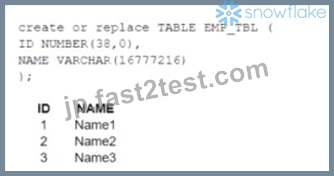
The following variables are set for the session:
Which SELECT statements will retrieve all three records? (Select TWO).
- A. SELECT * FROM EMP_TBL WHERE identifier(Scol_ref) IN ('Namel','Name2', 'Name3');
- B. SELECT * FROM $tb1_ref WHERE $col_ref IN ($var1, Svar2, Svar3);
- C. SELECT * FROM identifier<Stbl_ref> WHERE NAME IN ($var1, $var2, $var3);
- D. SELECT * FROM identifier($tbl_ref) WHERE ID IN Cvarl','var2','var3');
- E. Select * FROM Stbl_ref WHERE Scol_ref IN ('Name1','Nam2','Name3');
正解:A、B
解説:
The correct answer is B and E because they use the correct syntax and values for the identifier function and the session variables.
The identifier function allows you to use a variable or expression as an identifier (such as a table name or column name) in a SQL statement. It takes a single argument and returns it as an identifier. For example, identifier($tbl_ref) returns EMP_TBL as an identifier.
The session variables are set using the SET command and can be referenced using the $ sign. For example, $var1 returns Name1 as a value.
Option A is incorrect because it uses Stbl_ref and Scol_ref, which are not valid session variables or identifiers. They should be $tbl_ref and $col_ref instead.
Option C is incorrect because it uses identifier<Stbl_ref>, which is not a valid syntax for the identifier function. It should be identifier($tbl_ref) instead.
Option D is incorrect because it uses Cvarl, var2, and var3, which are not valid session variables or values. They should be $var1, $var2, and $var3 instead. References:
Snowflake Documentation: Identifier Function
Snowflake Documentation: Session Variables
Snowflake Learning: SnowPro Advanced: Architect Exam Study Guide
質問 # 87
A new user user_01 is created within Snowflake. The following two commands are executed:
Command 1-> show grants to user user_01;
Command 2 ~> show grants on user user 01;
What inferences can be made about these commands?
- A. Command 1 defines which role owns user_01
Command 2 defines all the grants which have been given to user_01 - B. Command 1 defines which user owns user_01
Command 2 defines all the grants which have been given to user_01 - C. Command 1 defines all the grants which are given to user_01 Command 2 defines which user owns user_01
- D. Command 1 defines all the grants which are given to user_01
Command 2 defines which role owns user 01
正解:D
解説:
The SHOW GRANTS command in Snowflake can be used to list all the access control privileges that have been explicitly granted to roles, users, and shares. The syntax and the output of the command vary depending on the object type and the grantee type specified in the command1. In this question, the two commands have the following meanings:
Command 1: show grants to user user_01; This command lists all the roles granted to the user user_01.
The output includes the role name, the grantee name, and the granted by role name for each grant. This command is equivalent to show grants to user current_user if user_01 is the current user1.
Command 2: show grants on user user_01; This command lists all the privileges that have been granted on the user object user_01. The output includes the privilege name, the grantee name, and the granted by role name for each grant. This command shows which role owns the user object user_01, as the owner role has the privilege to modify or drop the user object2.
Therefore, the correct inference is that command 1 defines all the grants which are given to user_01, and command 2 defines which role owns user_01.
References:
SHOW GRANTS
Understanding Access Control in Snowflake
質問 # 88
Company A has recently acquired company B.
The Snowflake deployment for company B is located in the Azure West Europe region.
As part of the integration process, an Architect has been asked to consolidate company B's sales data into company A's Snowflake account which is located in the AWS us-east-1 region.
How can this requirement be met?
- A. Migrate company B's Snowflake deployment to the same region as company A's Snowflake deployment, ensuring data locality. Then perform a direct database-to-database merge of the sales data.
- B. Export the sales data from company B's Snowflake account as CSV files, and transfer the files to company A's Snowflake account. Import the data using Snowflake's data loading capabilities.
- C. Build a custom data pipeline using Azure Data Factory or a similar tool to extract the sales data from company B's Snowflake account. Transform the data, then load it into company A's Snowflake account.
- D. Replicate the sales data from company B's Snowflake account into company A's Snowflake account using cross-region data replication within Snowflake. Configure a direct share from company B's account to company A's account.
正解:D
解説:
The best way to meet the requirement of consolidating company B's sales data into company A's Snowflake account is to use cross-region data replication within Snowflake. This feature allows data providers to securely share data with data consumers across different regions and cloud platforms. By replicating the sales data from company B's account in Azure West Europe region to company A's account in AWS us-east-1 region, the data will be synchronized and available for consumption. To enable data replication, the accounts must be linked and replication must be enabled by a user with the ORGADMIN role. Then, a replication group must be created and the sales database mustbe added to the group. Finally, a direct share must be configured from company B's account to company A's account to grant access to the replicated data. This option is more efficient and secure than exporting and importing data using CSV files or migrating the entire Snowflake deployment to another region or cloud platform. It also does not require building a custom data pipeline using external tools.
References:
Sharing data securely across regions and cloud platforms
Introduction to replication and failover
Replication considerations
Replicating account objects
質問 # 89
A user can change object parameters using which of the following roles?
- A. ACCOUNTADMIN, SECURITYADMIN
- B. ACCOUNTADMIN, USER with PRIVILEGE
- C. SECURITYADMIN, USER with PRIVILEGE
- D. SYSADMIN, SECURITYADMIN
正解:B
解説:
According to the Snowflake documentation, object parameters are parameters that can be set on individual objects such as databases, schemas, tables, and stages. Object parameters can be set by users with the appropriate privileges on the objects. For example, to set the object parameter AUTO_REFRESH on a table, the user must have the MODIFY privilege on the table. The ACCOUNTADMIN role has the highest level of privileges on all objects in the account, so it can set any object parameter on any object. However, other roles, such as SECURITYADMIN or SYSADMIN, do not have the same level of privileges on all objects, so they cannot set object parameters on objects they do not own or have the required privileges on. Therefore, the correct answer is C. ACCOUNTADMIN, USER with PRIVILEGE.
References:
* Parameters | Snowflake Documentation
* Object Parameters | Snowflake Documentation
* Object Privileges | Snowflake Documentation
質問 # 90
A company is designing its serving layer for data that is in cloud storage. Multiple terabytes of the data will be used for reporting. Some data does not have a clear use case but could be useful for experimental analysis.
This experimentation data changes frequently and is sometimes wiped out and replaced completely in a few days.
The company wants to centralize access control, provide a single point of connection for the end-users, and maintain data governance.
What solution meets these requirements while MINIMIZING costs, administrative effort, and development overhead?
- A. Import all the data in cloud storage to be used for reporting into a Snowflake schema with native tables.
Then create two different roles with grants to the different datasets to match the different user personas, and grant these roles to the corresponding users. - B. Import the data used for reporting into a Snowflake schema with native tables. Then create external tables pointing to the cloud storage folders used for the experimentation data. Then create two different roles with grants to the different datasets to match the different user personas, and grant these roles to the corresponding users.
- C. Import the data used for reporting into a Snowflake schema with native tables. Then create views that have SELECT commands pointing to the cloud storage files for the experimentation data. Then create two different roles to match the different user personas, and grant these roles to the corresponding users.
- D. Import all the data in cloud storage to be used for reporting into a Snowflake schema with native tables.
Then create a role that has access to this schema and manage access to the data through that role.
正解:B
解説:
The most cost-effective and administratively efficient solution is to use a combination of native and external tables. Native tables for reporting data ensure performance and governance, while external tables allow for flexibility with frequently changing experimental data. Creating roles with specific grants to datasets aligns with the principle of least privilege, centralizing access control and simplifying user management12.
References
*Snowflake Documentation on Optimizing Cost1.
*Snowflake Documentation on Controlling Cost2.
質問 # 91
An Architect on a new project has been asked to design an architecture that meets Snowflake security, compliance, and governance requirements as follows:
1) Use Tri-Secret Secure in Snowflake
2) Share some information stored in a view with another Snowflake customer
3) Hide portions of sensitive information from some columns
4) Use zero-copy cloning to refresh the non-production environment from the production environment To meet these requirements, which design elements must be implemented? (Choose three.)
- A. Create a materialized view.
- B. Use the Enterprise edition of Snowflake.
- C. Create a secure view.
- D. Use Dynamic Data Masking.
- E. Define row access policies.
- F. Use the Business-Critical edition of Snowflake.
正解:C、D、F
解説:
These three design elements are required to meet the security, compliance, and governance requirements for the project.
To use Tri-Secret Secure in Snowflake, the Business Critical edition of Snowflake is required. This edition provides enhanced data protection features, such as customer-managed encryption keys, that are not available in lower editions. Tri-Secret Secure is a feature that combines a Snowflake-maintained key and a customer-managed key to create a composite master key to encrypt the data in Snowflake1.
To share some information stored in a view with another Snowflake customer, a secure view is recommended. A secure view is a view that hides the underlying data and the view definition from unauthorized users. Only the owner of the view and the users who are granted the owner's role can see the view definition and the data in the base tables of the view2. A secure view can be shared with another Snowflake account using a data share3.
To hide portions of sensitive information from some columns, Dynamic Data Masking can be used.
Dynamic Data Masking is a feature that allows applying masking policies to columns to selectively mask plain-text data at query time. Depending on the masking policy conditions and the user's role, the data can be fully or partially masked, or shown as plain-text4.
質問 # 92
What transformations are supported in the below SQL statement? (Select THREE).
CREATE PIPE ... AS COPY ... FROM (...)
- A. The ON ERROR - ABORT statement command can be used.
- B. Data can be filtered by an optional where clause.
- C. Columns can be omitted.
- D. Incoming data can be joined with other tables.
- E. Type casts are supported.
- F. Columns can be reordered.
正解:B、C、F
解説:
The SQL statement is a command for creating a pipe in Snowflake, which is an object that defines the COPY INTO <table> statement used by Snowpipe to load data from an ingestion queue into tables1. The statement uses a subquery in the FROM clause to transform the data from the staged files before loading it into the table2.
The transformations supported in the subquery are as follows2:
Data can be filtered by an optional WHERE clause, which specifies a condition that must be satisfied by the rows returned by the subquery. For example:
SQLAI-generated code. Review and use carefully. More info on FAQ.
createpipe mypipeas
copyintomytable
from(
select*from@mystage
wherecol1='A'andcol2>10
);
Columns can be reordered, which means changing the order of the columns in the subquery to match the order of the columns in the target table. For example:
SQLAI-generated code. Review and use carefully. More info on FAQ.
createpipe mypipeas
copyintomytable (col1, col2, col3)
from(
selectcol3, col1, col2from@mystage
);
Columns can be omitted, which means excluding some columns from the subquery that are not needed in the target table. For example:
SQLAI-generated code. Review and use carefully. More info on FAQ.
createpipe mypipeas
copyintomytable (col1, col2)
from(
selectcol1, col2from@mystage
);
The other options are not supported in the subquery because2:
Type casts are not supported, which means changing the data type of a column in the subquery.
For example, the following statement will cause an error:
SQLAI-generated code. Review and use carefully. More info on FAQ.
createpipe mypipeas
copyintomytable (col1, col2)
from(
selectcol1::date, col2from@mystage
);
Incoming data can not be joined with other tables, which means combining the data from the staged files with the data from another table in the subquery. For example, the following statement will cause an error:
SQLAI-generated code. Review and use carefully. More info on FAQ.
createpipe mypipeas
copyintomytable (col1, col2, col3)
from(
selects.col1, s.col2, t.col3from@mystages
joinothertable tons.col1=t.col1
);
The ON ERROR - ABORT statement command can not be used, which means aborting the entire load operation if any error occurs. This command can only be used in the COPY INTO <table> statement, not in the subquery. For example, the following statement will cause an error:
SQLAI-generated code. Review and use carefully. More info on FAQ.
createpipe mypipeas
copyintomytable
from(
select*from@mystage
onerror abort
);
References:
1: CREATE PIPE | Snowflake Documentation
2: Transforming Data During a Load | Snowflake Documentation
質問 # 93
A DevOps team has a requirement for recovery of staging tables used in a complex set of data pipelines. The staging tables are all located in the same staging schema. One of the requirements is to have online recovery of data on a rolling 7-day basis.
After setting up the DATA_RETENTION_TIME_IN_DAYS at the database level, certain tables remain unrecoverable past 1 day.
What would cause this to occur? (Choose two.)
- A. The tables exceed the 1 TB limit for data recovery.
- B. The staging schema has not been setup for MANAGED ACCESS.
- C. The DevOps role should be granted ALLOW_RECOVERY privilege on the staging schema.
- D. The staging tables are of the TRANSIENT type.
- E. The DATA_RETENTION_TIME_IN_DAYS for the staging schema has been set to 1 day.
正解:D、E
解説:
The DATA_RETENTION_TIME_IN_DAYS parameter controls the Time Travel retention period for an object (database, schema, or table) in Snowflake. This parameter specifies the numberof days for which historical data is preserved and can be accessed using Time Travel operations (SELECT, CREATE ... CLONE, UNDROP)1.
The requirement for recovery of staging tables on a rolling 7-day basis means that the DATA_RETENTION_TIME_IN_DAYS parameter should be set to 7 at the database level. However, this parameter can be overridden at the lower levels (schema or table) if they have a different value1.
Therefore, one possible cause for certain tables to remain unrecoverable past 1 day is that the DATA_RETENTION_TIME_IN_DAYS for the staging schema has been set to 1 day. This would override the database level setting and limit the Time Travel retention period for all the tables in the schema to 1 day. To fix this, the parameter should be unset or set to 7 at the schema level1. Therefore, option B is correct.
Another possible cause for certain tables to remain unrecoverable past 1 day is that the staging tables are of the TRANSIENT type. Transient tables are tables that do not have a Fail-safe period and can have a Time Travel retention period of either 0 or 1 day. Transient tables are suitable for temporary or intermediate data that can be easily reproduced or replicated2. To fix this, the tables should be created as permanent tables, which can have a Time Travel retention period of up to 90 days1. Therefore, option D is correct.
Option A is incorrect because the MANAGED ACCESS feature is not related to the data recovery requirement. MANAGED ACCESS is a feature that allows granting access privileges to objects without explicitly granting the privileges to roles. It does not affect the Time Travel retention period or the data availability3.
Option C is incorrect because there is no 1 TB limit for data recovery in Snowflake. The data storage size does not affect the Time Travel retention period or the data availability4.
Option E is incorrect because there is no ALLOW_RECOVERY privilege in Snowflake. The privilege required to perform Time Travel operations is SELECT, which allows querying historical data in tables5.
References: : Understanding & Using Time Travel : Transient Tables : Managed Access : Understanding Storage Cost : Table Privileges
質問 # 94
An Architect Is designing a data lake with Snowflake. The company has structured, semi-structured, and unstructured data. The company wants to save the data inside the data lake within the Snowflake system. The company is planning on sharing data among Its corporate branches using Snowflake data sharing.
What should be considered when sharing the unstructured data within Snowflake?
- A. A scoped URL should be used to save the unstructured data into Snowflake in order to share data over secure views, with a 24-hour time limit for the URL.
- B. A file URL should be used to save the unstructured data into Snowflake in order to share data over secure views, with a 7-day time limit for the URL.
- C. A file URL should be used to save the unstructured data into Snowflake in order to share data over secure views, with the "expiration_time" argument defined for the URL time limit.
- D. A pre-signed URL should be used to save the unstructured data into Snowflake in order to share data over secure views, with no time limit for the URL.
正解:C
解説:
According to the Snowflake documentation, unstructured data files can be shared by using a secure view and Secure Data Sharing. A secure view allows the result of a query to be accessed like a table, and a secure view is specifically designated for data privacy. A scoped URL is an encoded URL that permits temporary access to a staged file without granting privileges to the stage. The URL expires when the persisted query result period ends, which is currently 24 hours. A scoped URL is recommended for file administrators to give scoped access to data files to specific roles in the same account. Snowflake records information in the query history about who uses a scoped URL to access a file, and when. Therefore, a scoped URL is the best option to share unstructured data within Snowflake, as it provides security, accountability, and control over the data access. References:
Sharing unstructured Data with a secure view
Introduction to Loading Unstructured Data
質問 # 95
Which of the following ingestion methods can be used to load near real-time data by using the messaging services provided by a cloud provider?
- A. Snowflake streams
- B. Spark
- C. Snowpipe
- D. Snowflake Connector for Kafka
正解:D
解説:
Snowflake Connector for Kafka and Snowpipe are two ingestion methods that can be used to load near real-time data by using the messaging services provided by a cloud provider. Snowflake Connector for Kafka enables you to stream structured and semi-structured data from Apache Kafka topics into Snowflake tables.
Snowpipe enables you to load data from files that are continuously added to a cloud storage location, such as Amazon S3 or Azure Blob Storage. Both methods leverage Snowflake's micro-partitioning and columnar storage to optimize data ingestion and query performance. Snowflake streams and Spark are not ingestion methods, but rather components of the Snowflake architecture. Snowflake streams provide change data capture (CDC) functionality by tracking data changes in a table. Spark is a distributed computing framework that can be used to process large-scale data and write it to Snowflake using the Snowflake Spark Connector. References:
* Snowflake Connector for Kafka
* Snowpipe
* Snowflake Streams
* Snowflake Spark Connector
質問 # 96
An Architect needs to design a data unloading strategy for Snowflake, that will be used with the COPY INTO
<location> command.
Which configuration is valid?
- A. Location of files: Snowflake internal location
. File formats: CSV, XML
. File encoding: UTF-8
. Encryption: 128-bit - B. Location of files: Amazon S3
. File formats: CSV, JSON
. File encoding: Latin-1 (ISO-8859)
. Encryption: 128-bit - C. Location of files: Azure ADLS
. File formats: JSON, XML, Avro, Parquet, ORC
. Compression: bzip2
. Encryption: User-supplied key - D. Location of files: Google Cloud Storage
. File formats: Parquet
. File encoding: UTF-8
Compression: gzip
正解:D
解説:
For the configuration of data unloading in Snowflake, the valid option among the provided choices is "C." This is because Snowflake supports unloading data into Google Cloud Storage using the COPY INTO
<location> command with specific configurations. The configurations listed in option C, such as Parquet file format with UTF-8 encoding and gzip compression, are all supported by Snowflake. Notably, Parquet is a columnar storage file format, which is optimal for high-performance data processing tasks in Snowflake. The UTF-8 file encoding and gzip compression are both standard and widely used settings that are compatible with Snowflake's capabilities for data unloading to cloud storage platforms.References:
* Snowflake Documentation on COPY INTO command
* Snowflake Documentation on Supported File Formats
* Snowflake Documentation on Compression and Encoding Options
質問 # 97
......
Snowflake ARA-R01 認定試験の出題範囲:
| トピック | 出題範囲 |
|---|---|
| トピック 1 |
|
| トピック 2 |
|
| トピック 3 |
|
| トピック 4 |
|
Snowflake ARA-R01テストエンジンPDFで完全版無料問題集:https://jp.fast2test.com/ARA-R01-premium-file.html