

[2024年05月04日] 無料Microsoft Dynamics 365 MB-800試験問題を使おう
MB-800問題集でMicrosoft Dynamics 365必ず合格できる練習問題集
Microsoft MB-800試験は、Microsoft Dynamics 365 Business Centralの機能と特徴を深く理解している個人を対象としています。試験では、ソリューションを構成および実装し、財務と運用を管理し、販売と購入プロセスを設定し、パワープラットフォームコンポーネントを利用する候補者の能力をテストします。認定試験は、候補者に必要なスキルと知識を備えて、組織がビジネスプロセスを合理化し、生産性を向上させることを目的としています。
MB-800認定を達成することは、個人がビジネスのニーズを満たすためにMicrosoft Dynamics 365 Business Centralを構成および実装するための技術的知識と専門知識を持っていることを示しています。この認定は、この人気のあるビジネスアプリケーションに習熟度を示す優れた方法であり、雇用機会の増加と給与の増加につながる可能性があります。
質問 # 45
You are implementing Dynamics 365 Business Central.
The purchasing manager wants to implement an approval system by using email notifications.
You need to set up the notification system.
Which setup should you use? To answer, drag the appropriate setup to the correct actions. Each setup may be used once, more than once, or not at all. You may need to drag the split bar between panes or scroll to view content.
NOTE: Each correct selection is worth one point.
正解:
解説:
Reference:
https://docs.microsoft.com/en-gb/dynamics365/business-central/across-how-to-set-up-approval-users
https://docs.microsoft.com/en-gb/dynamics365/business-central/across-how-to-specify-when-and-how-to-receive-notifications
質問 # 46
You set up a new company for a customer.
The customer provides you with a Microsoft Excel file that contains master data.
You need to import the master data by using configuration packages.
Which four actions should you perform in sequence? To answer, move the appropriate actions from the list of actions to the answer area and arrange them in the correct order.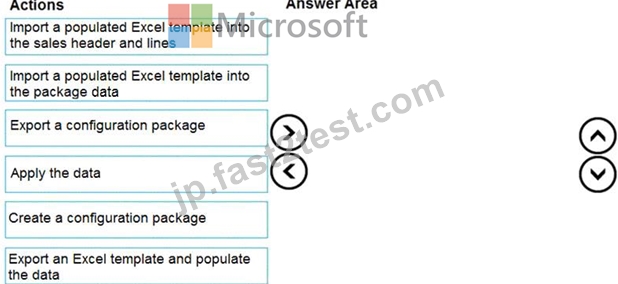
正解:
解説:
Explanation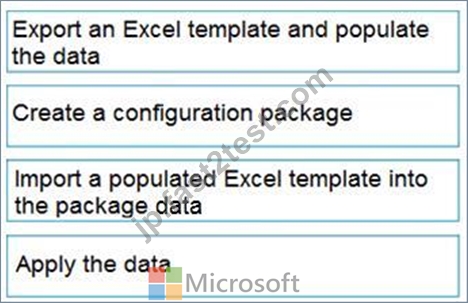
Reference:
https://docs.microsoft.com/en-gb/dynamics365/business-central/admin-how-to-prepare-a-configuration-package
https://docs.microsoft.com/en-gb/dynamics365/business-central/admin-how-to-configure-new-companies
質問 # 47
You need to configure the system to meet the requirements for sending invoices.
Which three actions should you perform? Each correct answer presents part of the solution.
NOTE: Each correct selection is worth one point.
- A. Assign a Document Sending Profile to the Customer where Email is set to Yes.
- B. Set Email to Yes (Prompt for Settings).
- C. Assign a Document Sending Profile to the Customer where Email is set to No.
- D. Apply Office Server Settings to the SMTP Mail Setup.
- E. Allow Sender Substitution for SMTP Mail Setup.
- F. Set Email to Yes (Use Default Settings).
正解:A、D、F
解説:
Reference:
https://docs.microsoft.com/en-gb/dynamics365/business-central/sales-how-setup-document-send-profiles
質問 # 48
A company is implementing Dynamics 365 Business Central.
The accountant must be able to report discounts received on purchased items separately from costs.
You need to configure the system to meet the requirement.
How should you configure the system? To answer, select the appropriate configurations in the answer area.
NOTE: Each correct selection is worth one point.
正解:
解説:
Reference:
https://docs.microsoft.com/en-gb/dynamics365/business-central/purchasing-how-record-purchase-price-discount-payment-agreements
質問 # 49
You are setting up a new company for a customer.
The customer wants to understand the structure of the elements involved in inventory posting.
You need to describe the relationship between elements in a basic inventory setup.
What is the hierarchical order of the elements included in inventory posting beginning with the master data? To answer, move the appropriate three entities from the list of actions to the answer area and arrange them in the correct order.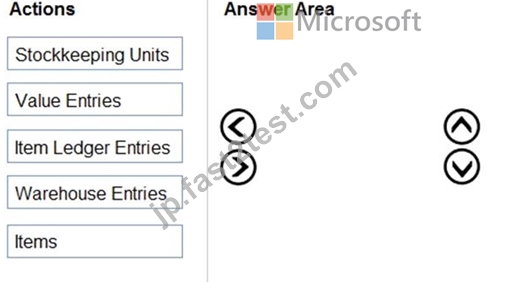
正解:
解説:
1 - Items
2 - Items Ledger Entries
3 - Value Entries
質問 # 50
A company uses Dynamics 365 Business Central.
The company wants to automate sales credit memo processing.
You need to configure the system to meet the requirements.
What should you do? To answer, select the appropriate options in the answer area.
NOTE: Each correct selection is worth one point.
正解:
解説: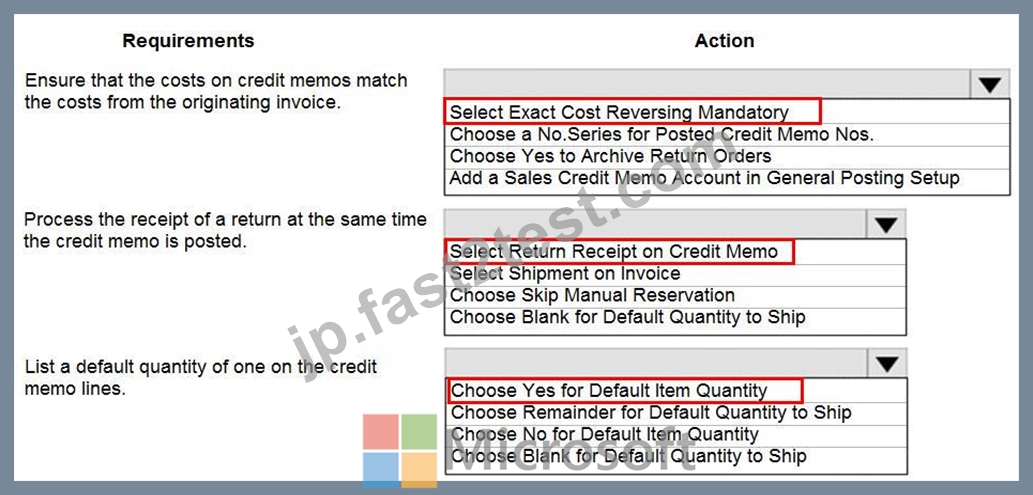
質問 # 51
You need to configure a new journal template.
What should you do? To answer, drag the appropriate fields to the correct requirements. Each field may be used once, more than once, or not at all. You may need to drag the split bar between panes or scroll to view content.
NOTE: Each correct selection is worth one point.
正解:
解説: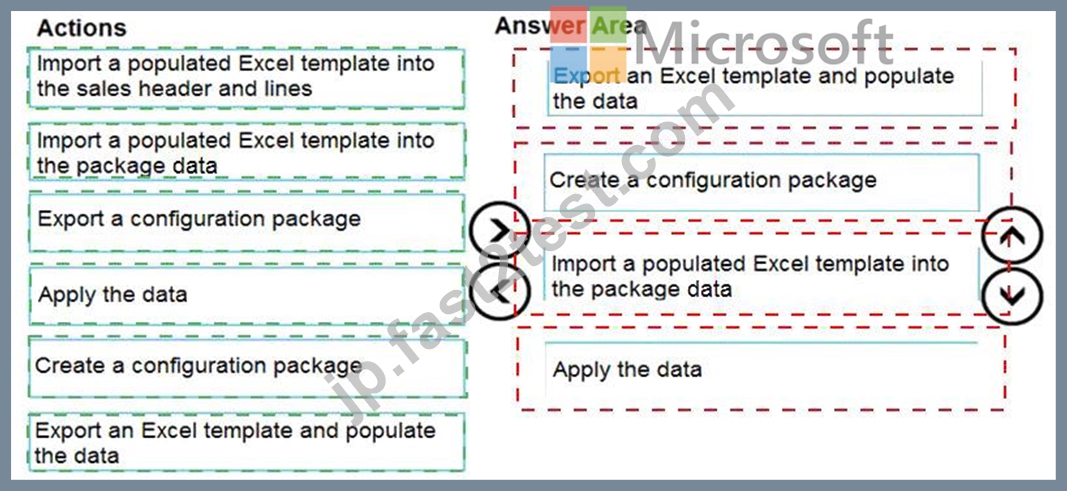
Explanation
Reference:
https://docs.microsoft.com/en-us/learn/modules/general-journal-templates-dynamics-365-business-central/1-temp
質問 # 52
You are setting up new customers and items in Dynamics 365 Business Central.
You need to configure the system.
Which posting group should you use? To answer, drag the appropriate posting groups to the correct use cases. Each posting group may be used once, more than once, or not at all. You may need to drag the split bar between panes or scroll to view content.
NOTE: Each correct selection is worth one point.
正解:
解説: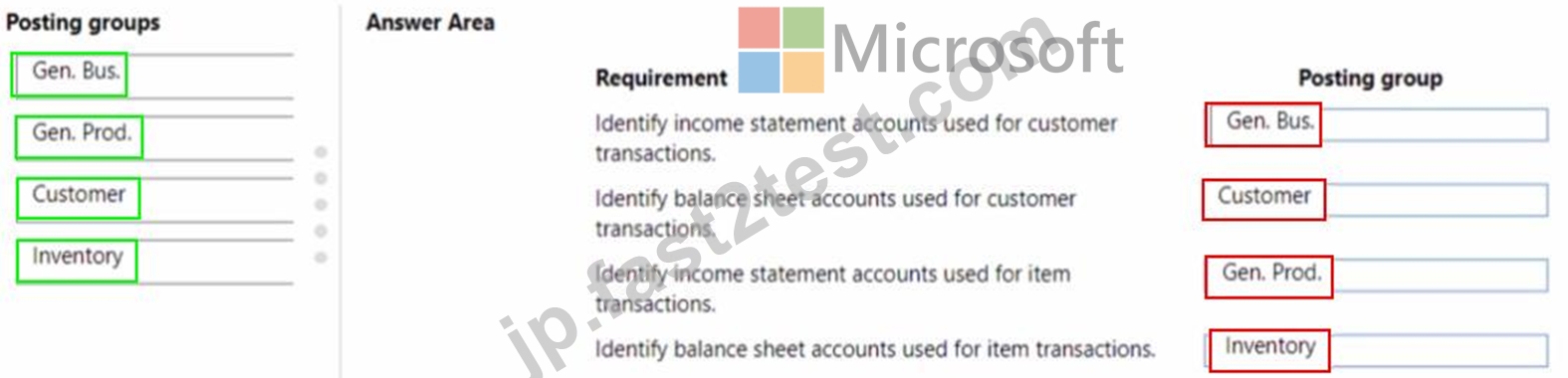
質問 # 53
You are setting up the general journals and batches for an accounting department.
The accounting department has multiple users who will work simultaneously within different general journals.
You need to set up the different journal templates and batches for each user according to the company's requirements.
Which options should you use? To answer, drag the appropriate options to the correct requirements. Each option may be used once, more than once, or not at all. You may need to drag the split bar between panes or scroll to view content.
NOTE: Each correct selection is worth one point.
正解:
解説:
Reference:
https://docs.microsoft.com/en-us/learn/modules/general-journal-templates-dynamics-365-business-central/1-templates
https://docs.microsoft.com/en-us/learn/modules/general-journal-templates-dynamics-365-business-central/2-batches
質問 # 54
You need to configure the system to show the sales discounts.
How should you configure the system? To answer, select the appropriate options in the answer area.
NOTE: Each correct selection is worth one point.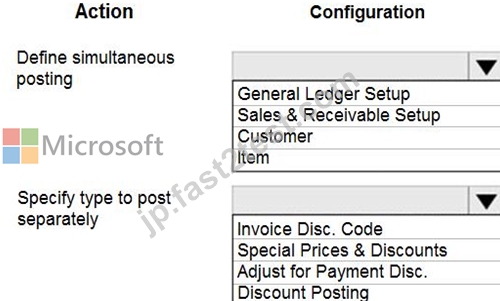
正解:
解説:
質問 # 55
You need to create the process for salespeople.
What should you do? To answer, select the appropriate options in the answer area.
NOTE: Each correct selection is worth one point.
正解:
解説: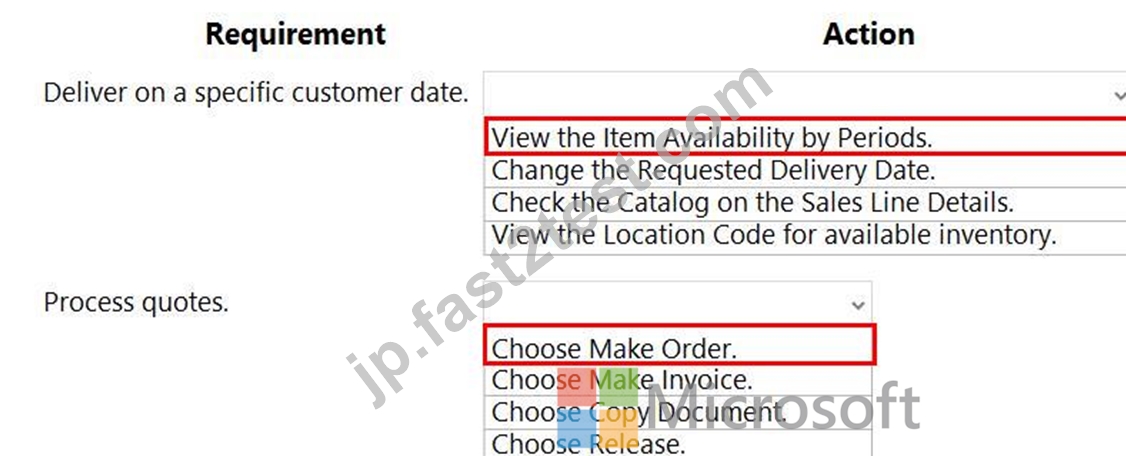
Reference:
https://docs.microsoft.com/en-gb/dynamics365/business-central/inventory-how-availability-overview
https://docs.microsoft.com/en-gb/dynamics365/business-central/sales-how-make-offers
質問 # 56
You need to configure the system to meet the requirements for received items.
What should you do?
- A. Set the value of the Automatic Cost Adjustment option to Always
- B. Set the default costing method to Standard
- C. Turn on Expected Cost Posting
- D. Turn on Automatic Cost Posting
正解:C
解説:
Reference:
https://docs.microsoft.com/en-gb/dynamics365/business-central/design-details-expected-cost-posting
質問 # 57
You are implementing Dynamics 365 Business Central for a customer. The local currency code (LCY) for the company is set to US dollars ($).
The customer plans to set up a bank account. The customer provides the following information for the account:
Account number
Name
Address
Bank account posting group
The account must meet the following requirements:
Use US dollars.
Use 9075 as the number of the next bank account statement for reconciliation in Business Central.
You need to set up the account for the customer.
Which values should you use? To answer, select the appropriate options in the answer area.
NOTE: Each correct selection is worth one point.
正解:
解説:
Reference:
https://docs.microsoft.com/en-gb/dynamics365/business-central/bank-how-reconcile-bank-accounts-separately
質問 # 58
You need to design a process to resolve the broker issues for Accounts.
Which three actions should perform in sequence? To answer, move the appropriate actions from the list of actions to the answer area and arrange them in the correct order.
NOTE: More than one order of answer choices is correct. You will receive credit for any of the correct orders you select.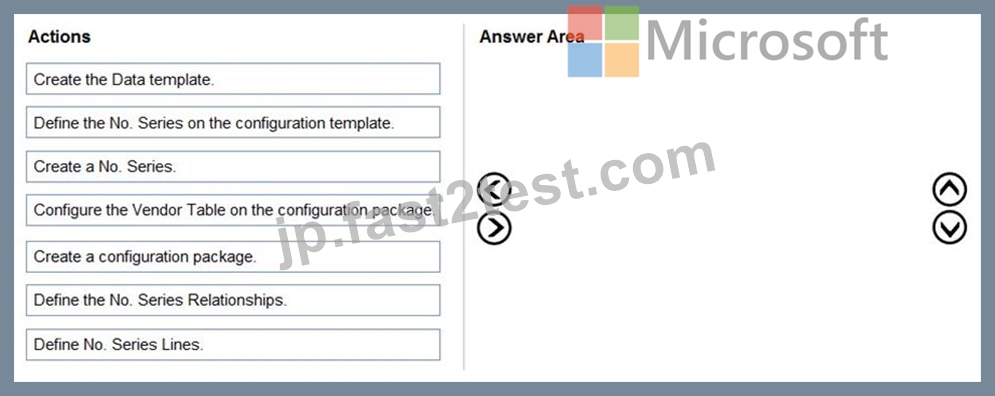
正解:
解説: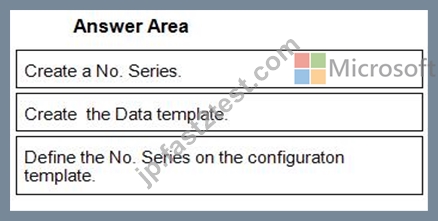
1 - Create a No. Series.
2 - Create the Data template.
3 - Define the No. Series on the configuraton template.
Reference:
https://docs.microsoft.com/en-gb/dynamics365/business-central/ui-create-number-series
https://docs.microsoft.com/en-gb/dynamics365/business-central/admin-use-templates-to-prepare-customer-data-for-migration
質問 # 59
You need to configure discounting for sales.
Which three actions should you perform in sequence? To answer, move the appropriate actions from the list of actions to the answer area.
正解:
解説: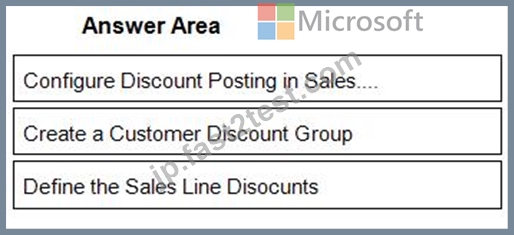
1 - Configure Discount Posting in Sales....
2 - Create a Customer Discount Group
3 - Define the Sales Line Disocunts
質問 # 60
You need to configure the new customer creation process.
Which two areas must you configure? Each correct answer presents part of the solution NOTE: Each correct selection is worth one point.
- A. Permissions
- B. Responsibility center
- C. Configuration worksheet
- D. Configuration template
正解:A、D
解説:
Reference:
https://usedynamics.com/business-central/sales/create-customer-templates/
Topic 1, Wide World Importers
Current environment
Cash and carry sales
When a customer makes a purchase at the company's cash and carry desk, the sale is handwritten on a three-part form.
The cash and carry associate retrieves the items listed on the order from the warehouse.
Special prices and discounts are used to move products that will expire soon or that are overstocked.
Cash is accepted for payments.
The cash drawer is balanced at the end of every day. A deposit is created for the cash and given to the accountant.
Brokered sales orders
Brokered sales are called in to customer service by the brokers and sometimes directly by customers. The sales are entered into QuickBooks.
Because inventory is not tracked in QuickBooks, the generic item Brokered Item is used.
Two copies of the packing slip and printed from QuickBooks and sent to the warehouse.
Order picking
The warehouse manager provides a container and the two copies of the packing slip to a picker.
Items that are out of stock are marked on both copies of the packing slip.
The shipping amount is determined and written on the packing slips.
One copy of the completed packing slip is placed in a basket for customer service.
Completed orders are boxed up with a copy of the invoice and shipped to customers.
Order invoicing
Throughout the day, the customer service manager collects the packing slip copies and updates the invoices in QuickBooks.
The customer service manager adds a line for shipping with the amount provided by the packer.
The customer service manager prints a copy of the final invoice and sends it to the warehouse.
The accountant uses Microsoft Word to create weekly invoices for all shipments invoiced in QuickBooks during the week for some customers.
Cash and carry sales
One-line sales invoices are saved in QuickBooks for each cash and carry sale to a miscellaneous customer.
Customer details for cash and carry sales are not kept in QuickBooks.
Deposits
The accountant receives the deposit bag from the cash and carry sales desk at the end of every day.
Receipts are recorded in QuickBooks against cash and carry and brokered sales based on the deposit slips.
Brokers commission
Brokers fees are paid as a percentage of sales.
A Sales by Product/Service Summary report is run in QuickBooks every month for Brokered Item to calculate what is owned.
Requirements
Customers
Users with permission must be able to quickly add new customers.
The original source of all customers in the accounting system must be identified to be from cash and carry or brokered sales.
The company needs to keep a record of special price promotions given to specific customers.
Customers must be identified with a unique general business posting group so that the correct freight G/L account is used in sales transactions.
Sales
The customer source must be used to identify the business line, and the customer source must be indicated on every sales transactions.
Customer service and cash and carry desk associates must be able to enter sales into Dynamics 365 Business Central by customer.
Excess paper must be eliminated, and paper management must be reduced.
If a customer is not already listed in the system, a cash and carry associate or customer service associate must be able to quickly add the new customer in the process of recording the first sale.
A point-of-sale system is not needed, but users must be able to record which items are purchased by customers, accept and record their payment, and print receipts indicating paid in full.
Items
The sales manager and warehouse manager must be able to set a specific timeframe for special promotion discounts on items.
For special promotions, discounts must be consistent for all items in a product line using a single discount calculation.
Special pricing may be given to a retail chain or buying group. This pricing must be automatically applied when an order is taken for any of these customers. The original price must be recorded with each sale.
Customers must always be charged the lowest amount for an item at the time of the sale. For example, an overstocked olive oil has a regular price of $20 per unit. Customers in a buying group for restaurants can buy it for $18 per unit. There is an autumn promotion price for the item at $19 per unit. However, on a specific day only, there is an overstock special at a 15 percent discount off the regular price.
Sales invoices
Warehouse workers must be able to indicate the following in the system for each order:
1. the items picked
2. the shipping charges
3. notifications, if any, that customer service needs to provide to the customer Items sold at a discount must show the original price, discount, and net amount on each line of the invoice. Invoices must be posted at the cash and carry desk at the time of sale. For orders, accounting must post invoices and send them to customers.
Warehouse employees must be able to indicate what has been shipped on an order. They will use the G/L account for shipping charges. They need to use the correct G/L account for sales versus cost through proper assignment of sales and purchase accounts in the general posting setup.
Some of the brokered customers require one invoice per week regardless of the number of orders or shipments.
Accounts
Payment terms vary by customer.
The amount paid to brokers must be calculated from sales after invoice discounts.
Broker vendors must be easily identifiable from other vendors in lists
Commission paid on sales not collected within 120 days must be deducted from brokers' next compensation payment.
Reporting
Wide World Importers requires reporting on the following:
the overall profitability of each line of business at any time for any given period the cost of outbound shipping in the overall profitability of sales by business line in all related reports freight sales and cost by account in the trial balance the cost of brokers' compensation in reporting the overall profitability of sales by business line the effect of item discount promotions in financial statements.
Issues
Pricing
Spreadsheets are used to maintain special item pricing and discounts. The only source of product line discount information is a whiteboard in the warehouse. The price charged is frequently incorrect.
Customers complain when they think they think they have not received the best price available. Promotions are sometimes applied in error after a special pricing event ends, for example, when discounts are offered temporarily to reduce overstock.
Management cannot see original versus actual price on all sales. Discounts given by brokers requires spreadsheets and comparison between price list and price on sales invoice. Management needs to be able to quickly see the discount given on each sale.
Payment terms
Agreed-upon payment terms are frequently entered incorrectly on orders, causing cashflow issues.
Invoices already paid in full exist on the sales aging reports. The frequent cause of this issue is that sales from the cash and carry desk are not indicated as cash sales and are not posted as paid in full.
Some buying groups require that all invoices sent during a month be due on the 20th of the following month.
Invoicing
Paperwork is frequently misplaced between the warehouse, customer service, and accounting.
Invoices that are posted in the accounting system based on shipments and invoices that are sent to customers weekly do not match due to errors transferring the data from one document to another.
Users are selecting the incorrect freight type (expense versus sales) on purchase and sales transactions, making it difficult to reconcile freight costs.
Sales placed from the cash and carry desk by customers originally acquired through a broker are not being recognized with the correct customer source. Reporting by business line is inaccurate.
Accounts
Users often forget which fields to use to enter information when they add new customers to QuickBooks. This results in errors and inconsistencies in data and affects sales reporting. Confidence in sales reporting accuracy is low.
Adding new brokers is a different process than adding other purchase vendors. Users often forget which fields to select and how to correctly assign the vendor number to add new brokers.
Manual entries to certain G/L accounts cause reconciliation issues.
質問 # 61
Note: This question is part of a series of questions that present the same scenario. Each question in the series contains a unique solution that might meet the stated goals. Some question sets might have more than one correct solution, while others might not have a correct solution.
After you answer a question in this section, you will NOT be able to return to it. As a result, these questions will not appear in the review screen.
You are configuring default reports and layouts in Dynamics 365 Business Central.
You must add new data items to the report and change the layout associated with the default Purchase Order report.
A developer creates and deploys a new report object that includes the new data items and layout.
You need to configure Business Central to use the new report object as the system default when printing purchase orders.
Solution: On the Custom Report Layouts page, select the new report object. Use the Update Layout function to force Business Central to use the current report design.
Does the solution meet the goal?
- A. Yes
- B. No
正解:B
解説:
Reference:
https://docs.microsoft.com/en-gb/dynamics365/business-central/across-report-selections
質問 # 62
A company uses Dynamics 365 Business Central.
The company's funds are limited and some invoices that are due cannot be paid on time.
You need to prioritize vendors when you suggest vendor payments.
Which three actions should you perform in sequence? To answer, move the appropriate actions from the list of actions to the answer area and arrange them in the correct order.
正解:
解説:
Explanation
Reference:
https://docs.microsoft.com/en-us/learn/modules/suggest-vendor-payments-dynamics-365-business-central/2-prio
質問 # 63
A company uses Dynamics 365 Business Central.
The company plans to use multiple unit prices for the same items from different vendors.
You need to configure the purchase price of the items.
In which two locations can you configure the purchase price? Each correct answer presents a complete solution.
NOTE: Each correct selection is worth one point.
- A. Customer card
- B. Item card
- C. Purchase order
- D. Vendor card
- E. Resource prices
正解:B、D
質問 # 64
Note: This question is part of a series of questions that present the same scenario. Each question in the series contains a unique solution that might meet the stated goals. Some question sets might have more than one correct solution, while others might not have a correct solution.
After you answer a question in this section, you will NOT be able to return to it. As a result, these questions will not appear in the review screen.
You are implementing Dynamics 365 Business Central for a company. The company provides subscription services to their customers. The subscription invoices are almost identical each month.
The company wants to set up recurring sales lines for subscription invoices.
You need to create systems for creating subscription invoices.
Solution: Create a sales quote for each customer. Add the sales lines to the quote. Then, use the Copy Document feature to create a new invoice.
Does the solution meet the goal?
- A. Yes
- B. No
正解:B
解説:
Reference:
https://docs.microsoft.com/en-gb/dynamics365/business-central/sales-how-work-standard-lines
質問 # 65
An accounting manager provides you with a chart of accounts.
The accounting manager wants you to configure the General Posting Setup.
You need to complete the configuration as efficiently as possible.
What are three ways to complete the configuration? Each correct answer presents a complete solution.
NOTE: Each correct selection is worth one point.
- A. Create a new General Posting Setup Card, and then use the Suggest Accounts action
- B. Import a configuration package that contains the General Posting Setup
- C. Use the Suggest Accounts action to create all possible posting setup combinations
- D. Create a new General Posting Setup Card, and then use the Copy action
- E. Use the Copy action to create a new General Posting Setup Card
正解:A、B、D
解説:
Reference:
https://docs.microsoft.com/en-us/learn/modules/posting-groups-dynamics-365-business-central/4-configure
質問 # 66
You are implementing Dynamics 365 Business Central.
The purchasing manager wants to implement an approval system by using email notifications.
You need to set up the notification system.
Which setup should you use? To answer, drag the appropriate setup to the correct actions. Each setup may be used once, more than once, or not at all. You may need to drag the split bar between panes or scroll to view content.
NOTE: Each correct selection is worth one point.
正解:
解説:
Reference:
https://docs.microsoft.com/en-gb/dynamics365/business-central/across-how-to-set-up-approval-users
https://docs.microsoft.com/en-gb/dynamics365/business-central/across-how-to-specify-when-and-how-to-receive-notifications
質問 # 67
......
Microsoft MB-800の試験は、Microsoft Dynamics 365 Business Central機能コンサルタントとしてのあなたのスキルと知識を評価するための認定テストです。この試験は、ビジネスセントラルアプリケーションを使う個人を対象にしており、製品とその機能の理解やお客様向けにシステムを実装および構成する能力を測定します。
Microsoft MB-800実際の問題とブレーン問題集:https://jp.fast2test.com/MB-800-premium-file.html
合格させるMB-800試験には更新されたのはMB-800試験問題集PDF2024:https://drive.google.com/open?id=1bftWOEGIF__XDhIkwQpDPYFnslamBjZB