

[2023年更新]MS-203日本語リアルな試験問題集でMS-203日本語練習テスト
MS-203日本語問題集でMicrosoft 365 Certified高確率練習問題集
質問 # 29
Microsoft Exchange Server2019組織とMicrosoft365E5サブスクリプションがあります。
次の展示に示すように、Microsoft365管理センターからデータ移行を開きます。
ドロップダウンメニューを使用して、図に示されている情報に基づいて各ステートメントを完了する回答の選択肢を選択します。
注:正しい選択はそれぞれ1ポイントの価値があります。
正解:
解説:
Reference:
https://www.stellarinfo.com/blog/hybrid-migration-migrate-exchange-mailboxes-office-365/
https://www.kerneldatarecovery.com/blog/migrate-from-exchange-on-premises-to-exchange-online-in-hybrid-environment/
質問 # 30
Microsoft ExchangeOnlineテナントがあります。
PSTファイルを従来のアーカイブソリューションからExchangeOnlineにインポートする必要があります。インターネット経由でPSTファイルをインポートします。
どの5つのアクションを順番に実行する必要がありますか?回答するには、適切なアクションをアクションのリストから回答領域に移動し、正しい順序で配置します。
正解:
解説:
Reference:
https://docs.microsoft.com/en-us/microsoft-365/compliance/use-network-upload-to-import-pst-files?view=o365-worldwide
質問 # 31
Microsoft ExchangeOnlineテナントがあります。
最近、Admin5とAdmin6という名前の2人の新しい管理者を採用しました。新しい管理者に次の権限を付与する必要があります。
* Admin5は、ユーザーにライセンスを割り当てることができる必要があります。
* Admin6は、すべてのユーザーの電子メールスパム設定を変更できる必要があります。
* Admin5は、すべてのユーザーのメール転送設定を構成できる必要があります。
* Admin5およびAdmin6は、すべてのユーザーのメールボックス権限を管理できる必要があります。
ソリューションは、最小特権の原則を使用する必要があります。
各ユーザーにどの役割を割り当てる必要がありますか?答えるには、適切なオプションを選択してください。注:正しい選択はそれぞれ1ポイントの価値があります。
正解:
解説:
質問 # 32
ADatum Corporationという名前の会社には、次の表に示す共有ポリシーを含むMicrosoft ExchangeOnlineサブスクリプションがあります。
サブスクリプションには、次の表に示すメールボックスが含まれています。
ADatumは、次の表に示すパートナー企業と取引を行っています。
次の各ステートメントについて、ステートメントがtrueの場合は、[はい]を選択します。それ以外の場合は、[いいえ]を選択します。
注:正しい選択はそれぞれ1ポイントの価値があります。
正解:
解説:
質問 # 33
注:この質問は、同じシナリオを提示する一連の質問の一部です。シリーズの各質問には、述べられた目標を達成する可能性のある独自の解決策が含まれています。一部の質問セットには複数の正しい解決策がある場合がありますが、他の質問セットには正しい解決策がない場合があります。
このセクションの質問に回答した後は、その質問に戻ることはできません。その結果、これらの質問はレビュー画面に表示されません。
あなたの会社には、MBX1とMBX2という名前の2つのメールボックスサーバーを含むMicrosoft Exchange Server2019ハイブリッド展開があります。
同社には、次の表に示す部門があります。
オンプレミス組織から、アウトバウンド電子メールはDNSルックアップを使用してインターネットに直接送信されます。
一部の営業部門のユーザーがスパムとして識別される電子メールメッセージを送信することが通知されます。
営業部門のユーザーが繰り返しスパムを送信するのを自動的にブロックする必要があります。
解決策:MBX1メールボックスサーバーでInstall-AntispamAgents.pslPowerShellスクリプトを実行します。
これは目標を達成していますか?
- A. はい
- B. いいえ
正解:B
解説:
Reference:
https://docs.microsoft.com/en-us/exchange/antispam-and-antimalware/antispam-protection/antispam-on-mailbox-servers?view=exchserver-2019
質問 # 34
Microsoft ExchangeOnlineテナントがあります。
階層アドレス帳(HAB)を有効にします。
Contosoという名前の新しい配布グループを作成します。
Contosoグループを階層のルートとして構成する必要があります。グループのメンバーは、階層に表示される必要があります。
PowerShellコマンドをどのように完了する必要がありますか?
正解:
解説:
質問 # 35
仮想マシンがロードされるまでお待ちください。ロードしたら、ラボセクションに進むことができます。これには数分かかる場合があり、待機時間は全体のテスト時間から差し引かれません。
[次へ]ボタンが使用可能になったら、それをクリックしてラボセクションにアクセスします。このセクションでは、ライブ環境で一連のタスクを実行します。ほとんどの機能はライブ環境と同じように利用できますが、一部の機能(コピーと貼り付け、外部Webサイトへの移動機能など)は設計上不可能です。
スコアリングは、ラボで説明されているタスクを実行した結果に基づいています。言い換えれば、タスクをどのように達成するかは問題ではありません。それを正常に実行すると、そのタスクのクレジットを獲得できます。
ラボの時間は個別に設定されていません。この試験には、完了する必要のあるラボが複数ある場合があります。各ラボを完了するのに必要なだけの時間を使用できます。ただし、提供された時間内にラボおよび試験の他のすべてのセクションを完了できるように、時間を適切に管理する必要があります。
ラボ内で[次へ]ボタンをクリックして作業を送信すると、ラボに戻ることができないことに注意してください。
必要に応じて、次のログイン資格情報を使用します。
ユーザー名を入力するには、[サインイン]ボックスにカーソルを置き、下のユーザー名をクリックします。
パスワードを入力するには、[パスワードの入力]ボックスにカーソルを置き、下のパスワードをクリックします。
Microsoft 365ユーザー名:[email protected]
Microsoft 365パスワード:xxxxxx
Microsoft 365ポータルがブラウザーに正常に読み込まれない場合は、Ctrlキーを押しながらKキーを押して、新しいブラウザータブでポータルを再読み込みします。
以下の情報は、技術サポートのみを目的としています。
ラボインスタンス:XXXXXX
ユーザーがMicrosoftOutlookで電子メールメッセージを迷惑メールではないとマークしたときに、通知電子メールが[email protected]に送信されるようにする必要があります。
このタスクを完了するには、Microsoft365管理センターにサインインします。
正解:
解説:
See explanation below.
Explanation
Go to the Microsoft 365 Defender portal and under select Policies & rules > Alert policy.
* An alert policy consists of the following settings and conditions.
- Activity the alert is tracking. You create a policy to track an activity or in some cases a few related activities, such a sharing a file with an external user by sharing it, assigning access permissions, or creating an anonymous link. When a user performs the activity defined by the policy, an alert is triggered based on the alert threshold settings.
- Activity conditions. For most activities, you can define additional conditions that must be met to trigger an alert. Common conditions include IP addresses (so that an alert is triggered when the user performs the activity on a computer with a specific IP address or within an IP address range), whether an alert is triggered if a specific user or users perform that activity, and whether the activity is performed on a specific file name or URL. You can also configure a condition that triggers an alert when the activity is performed by any user in your organization. The available conditions are dependent on the selected activity.
* You can also define user tags as a condition of an alert policy. This results in the alerts triggered by the policy to include the context of the impacted user. You can use system user tags or custom user tags.
- When the alert is triggered. You can configure a setting that defines how often an activity can occur before an alert is triggered. This allows you to set up a policy to generate an alert every time an activity matches the policy conditions, when a certain threshold is exceeded, or when the occurrence of the activity the alert is tracking becomes unusual for your organization.
* If you select the setting based on unusual activity, Microsoft establishes a baseline value that defines the normal frequency for the selected activity. It takes up to seven days to establish this baseline, during which alerts won't be generated. After the baseline is established, an alert is triggered when the frequency of the activity tracked by the alert policy greatly exceeds the baseline value. For auditing-related activities (such as file and folder activities), you can establish a baseline based on a single user or based on all users in your organization; for malware-related activities, you can establish a baseline based on a single malware family, a single recipient, or all messages in your organization.
- Alert category. To help with tracking and managing the alerts generated by a policy, you can assign one of the following categories to a policy.
- Data loss prevention
- Information governance
- Mail flow
- Permissions
- Threat management
- Others
* When an activity occurs that matches the conditions of the alert policy, the alert that's generated is tagged with the category defined in this setting. This allows you to track and manage alerts that have the same category setting on the page in the compliance center because you can sort and filter alerts based on category.
- Alert severity. Similar to the alert category, you assign a severity attribute (Low, Medium, High, or Informational) to alert policies. Like the alert category, when an activity occurs that matches the conditions of the alert policy, the alert that's generated is tagged with the same severity level that's set for the alert policy.
Again, this allows you to track and manage alerts that have the same severity setting on the Alerts page. For example, you can filter the list of alerts so that only alerts with a severity are displayed.
- Email notifications. You can set up the policy so that email notifications are sent (or not sent) to a list of users when an alert is triggered. You can also set a daily notification limit so that once the maximum number of notifications has been reached, no more notifications are sent for the alert during that day. In addition to email notifications, you or other administrators can view the alerts that are triggered by a policy on the Alerts page. Consider enabling email notifications for alert policies of a specific category or that have a higher severity setting.
Reference:
https://docs.microsoft.com/en-us/microsoft-365/compliance/alert-policies?view=o365-worldwide#how-alert-poli
質問 # 36
ADatum Corporationという名前の会社には、次の表に示す共有ポリシーを含むMicrosoft ExchangeOnlineサブスクリプションがあります。
サブスクリプションには、次の表に示すメールボックスが含まれています。
ADatumは、次の表に示すパートナー企業と取引を行っています。
次の各ステートメントについて、ステートメントがtrueの場合は、[はい]を選択します。それ以外の場合は、[いいえ]を選択します。
注:正しい選択はそれぞれ1ポイントの価値があります。
正解:
解説:
質問 # 37
次の展示に示すようにスパム対策設定が構成されたExchangeOnlineテナントがあります。
ドロップダウンメニューを使用して、図に示されている情報に基づいて各ステートメントを完了する回答の選択肢を選択します。
注:正しい選択はそれぞれ1ポイントの価値があります。
正解:
解説:
Explanation
Reference:
https://docs.microsoft.com/en-us/microsoft-365/security/office-365-security/safety-tips-in-office-365?view=o365
https://docs.microsoft.com/en-us/microsoft-365/security/office-365-security/bulk-complaint-level-values?view=o
質問 # 38
注:この質問は、同じシナリオを提示する一連の質問の一部です。シリーズの各質問には、述べられた目標を達成する可能性のある独自の解決策が含まれています。一部の質問セットには複数の正しい解決策がある場合がありますが、他の質問セットには正しい解決策がない場合があります。
このセクションの質問に回答した後は、その質問に戻ることはできません。その結果、これらの質問はレビュー画面に表示されません。
あなたの会社にはMicrosoft365サブスクリプションがあります。
同社の財務部門の何人かのユーザーは最近、電子メールメッセージのリンクをクリックして安全でないWebサイトにアクセスしました。
会社のマーケティング部門のユーザーは、電子メールメッセージに埋め込まれているすべてのリンクにアクセスできる必要があると報告しています。
財務部門のユーザーが安全でないWebサイトにアクセスする可能性を減らす必要があります。ソリューションは、財務部門のユーザーにのみ影響する必要があります。
解決策:新しいセーフリンクポリシーを作成し、そのポリシーを財務部門のユーザーに適用します。
これは目標を達成していますか?
- A. はい
- B. いいえ
正解:A
解説:
Reference:
https://docs.microsoft.com/en-us/microsoft-365/security/office-365-security/set-up-safe-links-policies?view=o365-worldwide
質問 # 39
litwareinc.comの名前空間を使用するMicrosoftExchangeOnlineサブスクリプションがあります。
次の展示に示すように構成されたコネクタをExchangeOnlineで作成します。
ドロップダウンメニューを使用して、図に示されている情報に基づいて各ステートメントを完了する回答の選択肢を選択します。
注:正しい選択はそれぞれ1ポイントの価値があります。
正解:
解説:
質問 # 40
電子メールアドレスの計画された変更をサポートするように環境を構成する必要があります。
コマンドをどのように完了する必要がありますか?回答するには、回答領域で適切なオプションを選択します。
注:正しい選択はそれぞれ1ポイントの価値があります。
正解:
解説:
Reference:
https://docs.microsoft.com/en-us/powershell/module/exchange/email-addresses-and-address-books/new-emailaddresspolicy?view=exchange-ps
https://docs.microsoft.com/en-us/Exchange/email-addresses-and-address-books/email-address-policies/email-address-policies?view=exchserver-2019
質問 # 41
Microsoft Exchange Server2019ハイブリッド展開を管理します。すべてのユーザーメールボックスは、オンプレミスとクラウドの両方にあります。
オンプレミスのメールボックスがパブリックフォルダーにアクセスできるように、展開を構成する必要があります。どの3つのコマンドを実行する必要がありますか?それぞれの正解は、解決策の一部を示しています。
注:正しい選択はそれぞれ1ポイントの価値があります。
- A. Set-OrganizationConfig -PublicFoldersEnabled Local -RemotePublicFolderMailboxes
- B. Set-OrganizationConfig -PublicFoldersEnabled Remote
- C. Sync-MailPublicFolders.ps1
- D. 同期-MailPublicFoldersCloudToOnprem.ps1
- E. インポート-PublicFolderMailboxes.ps1
正解:B、D、E
解説:
Topic 2, Litware, inc
Physical Locations
Litware has a main office in Paris and branch offices in Munich, London, Brussels, Vienna, and Rome.
Each branch office has its own compliance officer.
Existing Environment
The network contains one Active Directory forest named litware.com. The forest contains a single Active Directory domain. Each office is configured as an Active Directory site.
Each branch office is represented organizational unit (OU) in an OU named Offices in Active Directory.
Each branch office has a special Administrators group that contains the delegated administrators for that office. Each Administrators group is named based on its location in a format of RegionalAdmins_Brussels, RegionalAdmins_Munich, RegionalAdmins_London, RegionalAdmins_Vienna and RegionalAdmins_Rome.
Network Infrastructure
Each office contains two domain controllers from the litware.com domain. All the domain controllers are configured as DNS servers. All client computers connect only to the DNS servers in their respective office.
All offices have a high-speed connection to the Internet. Each office connects to the Internet by using a VPN appliance.
Each office has the following servers and client computers:
The office in Brussels contains an Exchange Server 2016 server that has the Unified Messaging role installed and hosted voicemail configured.
Mailboxes are hosted on all the Exchange servers. Public folders are hosted only on an Exchange server in the main office. Litware uses a disjoint namespace to access the servers.
Each user has an archive mailbox. Archiving is configured to use the default settings.
Exchange services are published to the internet by using a reverse proxy in each office.
A full backup of Exchange is performed nightly. Incremental backups occur every six hours.
All the users in the transport department connect to network resources by using a connection in the main office.
Requirements
Planned Changes
Litware plans to implement the following changes:
Implement calendar sharing to partner companies.
Implement a solution that prevents malware from being delivered to end users.
Use personal archives to eliminate the need for PST files.
Ensure the Brussels office and move all the users in the Brussels office to the main office. All the mailboxes in the Brussels office will be moved to a server in the main office.
Implement a compliance solution to ensure that items deleted from public folders are retained. If an item in a public folder is modified, the original version of the item must be available.
Technical Requirements
Litware identifies the following technical requirements:
Minimize administrative effort.
Use the principle of least privilege.
Ensure that junk email is deleted automatically after 14 days.
Ensure that sent items and deleted items are deleted automatically after 30 days.
Ensure that users in the customer service department can open multiple mailboxes.
Ensure that all the former Brussels office users always maintain access to hosted voicemail.
Ensure that the staff in the IT department can manage the email environment without and-user involvement.
Ensure that users cannot recover email messages that are deleted from the Junk Email folder and the Deleted Items.
Ensure that if an email message has a spam confidence level (SCL) of 3 or higher, the message automatically moves to the Junk Email folder.
Problem statements
The transport department users report that accessing a public folder named TransportPF is sometimes very slow.
Users in the customer service department report that Microsoft Outlook sometimes hangs when many mailboxes are open.
質問 # 42
User2とUser3のデバイスのリモートワイプを実行する必要があります。
次のコマンドを実行します。
Clear-MobileDevice -id User2-Device -NotificationEmailAddress "[email protected]" Clear-MobileDevice -id User3-Device -NotificationEmailAddress "[email protected]"各デバイスで何が発生しますか?回答するには、回答領域で適切なオプションを選択します。
注:正しい選択はそれぞれ1ポイントの価値があります。
正解:
解説:
Reference:
https://docs.microsoft.com/en-us/exchange/clients/exchange-activesync/remote-wipe?view=exchserver-2019
質問 # 43
次の図に示すように、Get-WebServicesVirtualDirectoryコマンドレットを実行します。
ドロップダウンメニューを使用して、図に示されている情報に基づいて各質問に回答する回答の選択肢を選択します。
注:正しい選択はそれぞれ1ポイントの価値があります。
正解:
解説:
Explanation
Box 1:
The MRS proxy endpoint needs to be enabled on all mailbox servers.
Box 2:
SMTP is used to deliver email between on-premise users and Exchange Online users. This requires a third-party (public CA) certificate.
Reference:
https://docs.microsoft.com/en-us/Exchange/architecture/mailbox-servers/mrs-proxy-endpoint?view=exchserver-2
質問 # 44
Contoso、Ltd。という名前の会社には、次の表に示すメールボックスデータベースを含むMicrosoft Exchange Server2019組織があります。
Managersという名前のグループ内のすべてのユーザーにManagersという名前のオフラインアドレスブック(OAB)を割り当てる必要があります。
PowerShellスクリプトをどのように完了する必要がありますか?回答するには、回答領域で適切なオプションを選択します。
注:正しい選択はそれぞれ1ポイントの価値があります。
正解:
解説:
質問 # 45
Microsoft Exchange Online テナントがあります。
SMTP を使用して電子メール アラートを送信するオンプレミス アラーム システムを実装する予定です。アラーム システムは TLS をサポートしません。
Exchange Online を使用して、警報システムが内部および外部の両方の受信者にアラートを送信できることを確認する必要があります。
「実行する必要がある 2 つのアクションはどれですか? 各正解は、ソリューションの一部を示しています。
注: 各正解は 1 ポイントの価値があります。
- A. テナントの TXT レコードを使用するようにアラーム システムの設定を構成します。
- B. テナントの MX レコードを使用するようにアラーム システムの設定を構成します。
- C. コネクタを作成します。
- D. ダイレクト送信を設定します。
- E. SMTP AUTH クライアントの送信を構成します。
正解:C、D
解説:
C: Create a connector1. A connector is a configuration setting that controls how email messages are delivered to or received from your own email servers or a partner organization1. You need to create a connector to route mail between Exchange Online and your on-premises alarm system that uses SMTP1 D: You can specify the IP address of your alarm system as a trusted sender and configure the connector to use certificate-based authentication or IP address-based authentication1.
E: Configure direct send2. Direct send is an option that allows you to send mail directly from your printer or application to Microsoft 365 or Office 365 without using a local email server2. You need to configure direct send on your alarm system settings to use an MX record of the tenant as the SMTP server address2. For example, contoso-com.mail.protection.outlook.com . Direct send does not require TLS encryption or SMTP authentication
質問 # 46
次の表に示すユーザーを含むMicrosoftExchange Server2019ハイブリッド展開があります。
ExchangeOnlineに保存されているアーカイブメールボックスを各ユーザーに提供する必要があります。
各ユーザーの構成を実行するには、どの管理センターを使用する必要がありますか?回答するには、適切な管理センターを適切なユーザーにドラッグします。各管理センターは、1回使用することも、複数回使用することも、まったく使用しないこともできます。コンテンツを表示するには、分割バーをペイン間でドラッグするか、スクロールする必要がある場合があります。
注:正しい選択はそれぞれ1ポイントの価値があります。
正解:
解説:
Reference:
https://docs.microsoft.com/en-us/office365/securitycompliance/enable-archive-mailboxes
https://docs.microsoft.com/en-us/exchange/hybrid-deployment/create-cloud-based-archive
質問 # 47
仮想マシンがロードされるまでお待ちください。ロードしたら、ラボセクションに進むことができます。これには数分かかる場合があり、待機時間は全体のテスト時間から差し引かれません。
[次へ]ボタンが使用可能になったら、それをクリックしてラボセクションにアクセスします。このセクションでは、ライブ環境で一連のタスクを実行します。ほとんどの機能はライブ環境と同じように利用できますが、一部の機能(コピーと貼り付け、外部Webサイトへの移動機能など)は設計上不可能です。
スコアリングは、ラボで説明されているタスクを実行した結果に基づいています。言い換えれば、タスクをどのように達成するかは問題ではありません。それを正常に実行すると、そのタスクのクレジットを獲得できます。
ラボの時間は個別に設定されていません。この試験には、完了する必要のあるラボが複数ある場合があります。各ラボを完了するのに必要なだけの時間を使用できます。ただし、提供された時間内にラボおよび試験の他のすべてのセクションを完了できるように、時間を適切に管理する必要があります。
ラボ内で[次へ]ボタンをクリックして作業を送信すると、ラボに戻ることができないことに注意してください。
必要に応じて、次のログイン資格情報を使用します。
ユーザー名を入力するには、[サインイン]ボックスにカーソルを置き、下のユーザー名をクリックします。
パスワードを入力するには、[パスワードの入力]ボックスにカーソルを置き、下のパスワードをクリックします。
Microsoft 365ユーザー名:[email protected]
Microsoft 365パスワード:xxxxxx
Microsoft 365ポータルがブラウザーに正常に読み込まれない場合は、Ctrlキーを押しながらKキーを押して、新しいブラウザータブでポータルを再読み込みします。
以下の情報は、技術サポートのみを目的としています。
ラボインスタンス:XXXXXX
contoso.comの別の管理者は、131.107.2.200のIPアドレスを使用するSMTPスマートホストを展開することを計画しています。
SMTPホストを使用して、組織から@ contoso.comドメインのユーザーに送信されるすべての電子メールをルーティングするソリューションを準備する必要があります。管理者がスマートホストを展開するまで、ソリューションのステータスを[オフ]に設定する必要があります。
このタスクを完了するには、Exchange管理センターにサインインします。
正解:
解説:
See explanation below.
Explanation
* In the EAC, navigate to Mail flow +. This starts the New Send
connector wizard.
* On the first page, enter the following information:
- Name: Enter a descriptive name for the Send connector, for example, Smart host to Internet.
- Type: Select a descriptive value. For example,
When you're finished, click Next.
* On the next page, select Route mail through smart hosts, and then click Add +. In the Add smart host dialog box that appears, identify the smart host by using one of the following values:
- IP address: For example, 192.168.3.2.
- Fully qualified domain name (FQDN): For example, securitydevice01.contoso.com. Note that the Exchange source servers for the Send connector must be able to resolve the smart host in DNS by using this FQDN.
When you're finished, click Save.
* You can enter multiple smart hosts by repeating Step 3. When you're finished, click Next.
* On the next page, in the Route mail through smart hosts section, select the authentication method that's required by the smart host. Valid values are:
Table Description automatically generated
* When you're finished, click
* On the next page, in the Address space Add domain dialog box that
appears, enter the following information:
- Type: Verify SMTP is entered.
- Fully Qualified Domain Name (FQDN): Enter an asterisk (*) to indicate the Send connector applies to messages addressed to all external domains. Alternatively, you can enter a specific external domain (for example, contoso.com), or a domain and all subdomains (for example, *.contoso.com).
- Cost: Verify 1 is entered. A lower value indicates a more preferred route for the domains you specified.
When you're finished, click Save.
* Back on the previous page, the Scoped send connector setting is important if your organization has Exchange servers installed in multiple Active Directory sites:
- If you don't select Scoped send connector, the connector is usable by all transport servers (Exchange 2013 or later Mailbox servers and Exchange 2010 Hub Transport servers) in the entire Active Directory forest. This is the default value.
- If you select Scoped send connector, the connector is only usable by other transport servers in the same Active Directory site.
When you're finished, click Next.
* On the next page, in the Source server section, click Add +. In the Select a Server dialog box that appears, select one or more Mailbox servers that you want to use to send outbound mail to the smart host. If you have multiple Mailbox servers in your environment, select the ones that can route mail to the smart host. If you have only one Mailbox server, select that one. After you've selected at least one Mailbox server, click Add, click OK, and then click Finish After you create the Send connector, it appears in the Send connector list.
From the Send connector list, you can turn the connector on or off.
Reference:
https://docs.microsoft.com/en-us/exchange/mail-flow/connectors/outbound-smart-host-routing?view=exchserver
質問 # 48
contoso.comの名前空間を使用するMicrosoftExchange Server2019組織があります。
contoso.comの電子メールアドレスポリシーは、アドレスポリシーの展示に示されているように構成されています。
マーケティングメールアドレスポリシーは、マーケティングポリシーの展示に表示されます。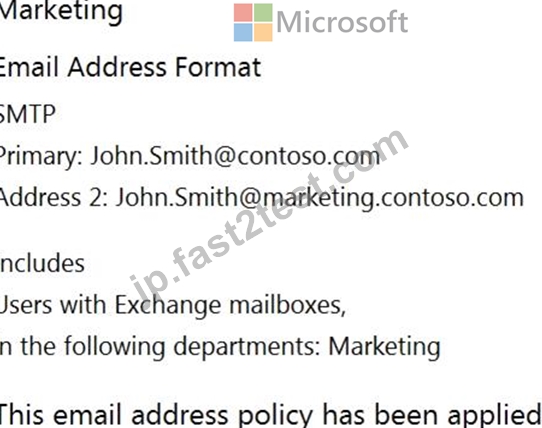
販売メールアドレスポリシーは、販売ポリシー展示に表示されます。
次の各ステートメントについて、ステートメントがtrueの場合は、[はい]を選択します。それ以外の場合は、[いいえ]を選択します。
注:正しい選択はそれぞれ1ポイントの価値があります。
正解:
解説:
Reference:
https://docs.microsoft.com/en-us/exchange/email-addresses-and-address-books/email-address-policies/email-address-policies?view=exchserver-2019
質問 # 49
......
MS-203日本語リアルな問題と知能問題集:https://jp.fast2test.com/MS-203J-premium-file.html