

[2023年更新]合格できるMS-600試験にはリアルな問題解答
MS-600試験問題ゲット最新[2023]と正解回答
Microsoft MS-600は、Microsoft 365 Core Servicesを使用してアプリケーションやソリューションを構築したい開発者向けの認定試験です。この試験は、Microsoft 365認定:開発者アソシエイトの認定パスの一部であり、SharePoint、Teams、Power Platformを含むMicrosoft 365サービスの強力な理解を持つ人を対象としています。
質問 # 44
You create an incoming webhook for a Microsoft Teams team channel.
You need to verify the webhook by using PowerShell.
How should you complete the PowerShell command? To answer, select the appropriate options in the answer area.
NOTE: Each correct selection is worth one point.
正解:
解説:
Explanation
Graphical user interface, table Description automatically generated
Reference:
https://techcommunity.microsoft.com/t5/microsoft-365-pnp-blog/how-to-configure-and-use-incoming-webhooks
質問 # 45
You are building a server-based web app that will use OAuth2 and will be registered with the Microsoft identity platform.
Which two values does the app require to obtain tokens from the Azure Active Directory (Azure AD) authorization endpoint? Each correct answer presents part of the solution.
NOTE: Each correct selection is worth one point.
- A. the tenant ID
- B. the context token
- C. the application secret
- D. the application ID
- E. the authorization code
正解:D、E
解説:
C: The required client_id is the Application (client) ID that the Azure portal - App registrations experience assigned to your app.
E: The authorization code flow begins with the client directing the user to the /authorize endpoint.
Reference: https://docs.microsoft.com/en-us/azure/active-directory/develop/v2-oauth2-auth-code-flow
質問 # 46
You are developing a Microsoft Office Add-in for Word.
You need to persist the user state across sessions by using the Office JavaScript API.
Which two objects can you use to persist the state? Each correct answer presents a complete solution.
NOTE: Each correct selection is worth one point.
- A. CustomProperties
- B. CustomXMLParts
- C. Settings
- D. RoamlngSeccings
正解:A、C
解説:
Settings: Office application support by Word, Excel, or PowerPoint.
The document, spreadsheet, or presentation the add-in is working with. Content and task pane add-in settings are available to the add-in that created them from the document where they are saved.
CustomXmlParts: Office application support by Word (using the Office JavaScript Common API) Excel (using the application-specific Excel JavaScript API.
The document, spreadsheet, or presentation the add-in is working with.
Reference:
https://docs.microsoft.com/en-us/office/dev/add-ins/develop/persisting-add-in-state-and-settings
質問 # 47
You are building a single-page application (SPA) that will have the following parameters:
* App Id: DBA22F72-64PA4C44-AA2C-FAA0DA5A471B
* Tenant Id: DC045C4D-5881-43C7-97AB-3C5A1ADB8DBC
* AppName: Contoso.Spa
You have a line-of-business API for invoicing that is secured by using the Microsoft identity platform. The API has the following parameters:
* App Id: 8/9A43D7-1794-47A0-AB2B-440B63FEC248
* Tenant Id: DC04SC4D S881-43C7-97AB 3C5A1ADB8DBC
* AppName: Contoso.lnvoicing
Contoso.Invoicing declares the following custom scopes:
* Invoices-Read
* Invoices. Read Write
Contoso.Spa needs to call Contoso.lnvoicing to create new invoices.
Which code should you use in Contoso.Spa to obtain an access token for Contoso.Invoicing? To answer, select the appropriate options in the answer area.
NOTE: Each correct select is worth one point.
正解:
解説: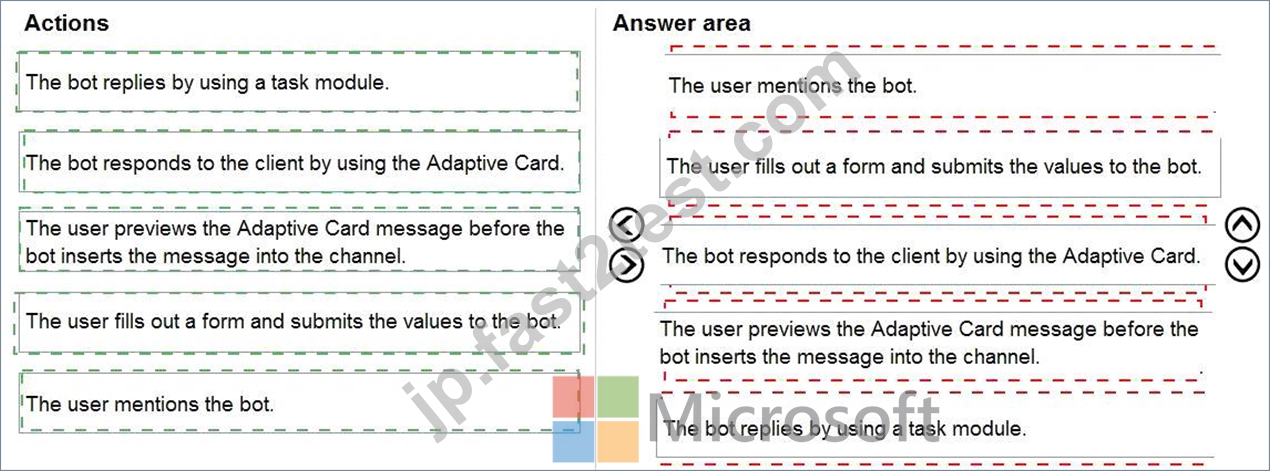
Explanation
Text Description automatically generated
Graphical user interface, text Description automatically generated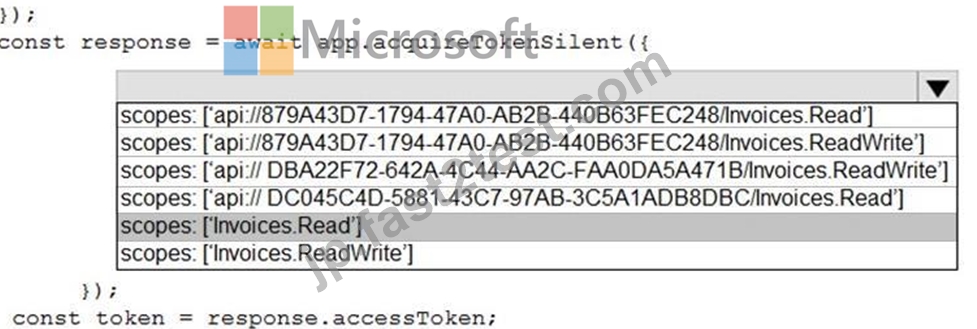
質問 # 48
You are developing a SharePoint Framework (SPFx) web part.
Which API should you use to retrieve the Microsoft Teams memberships of a user by using the minimum amount of code?
- A. XMLHttpRequest
- B. MSGraphClient
- C. SPHttpClient
- D. AadHttpClient
正解:B
解説:
You can use the Microsoft Graph API to work with Microsoft Teams. In Microsoft Graph, Microsoft Teams is represented by a group resource.
If you are targeting Microsoft Graph, you can use the MSGraphClient client object, which provides a more fluent syntax compared to AadHttpClient.
Note: In versions of the SharePoint Framework starting with v.1.4.1, you can access Microsoft Graph by using either the native graph client (MSGraphClient), or the low-level type used to access any Azure AD-secured REST API (AadHttpClient).
The AadHttpClient client object is useful for consuming any REST API. You can use it to consume Microsoft Graph or any other third-party (or first-party) REST API.
The MSGraphClient client object can consume the Microsoft Graph only. Internally it uses the AadHttpClient client object and supports the fluent syntax of the Microsoft Graph SDK.
References: https://docs.microsoft.com/en-us/graph/api/resources/teams-api-overview?view=graph-rest-1.0
https://docs.microsoft.com/en-us/sharepoint/dev/spfx/use-aad-tutorial
質問 # 49
You are creating a report that will query Azure Active Directory (Azure AD) for group information by using the Microsoft Graph API.
You need to retrieve an ordered list of groups by title. The solution must minimize the amount of data returned in the response.
How should you complete the Graph API call? To answer, select the appropriate options in the answer area.
NOTE: Each correct selection is worth one point.
正解:
解説:
Explanation
Text Description automatically generated
Box 1: $select=..
Example:
GET https://graph.microsoft.com/v1.0/groups/{id}?$select=displayName
Header: Authorization:Bearer {access_token}
Box 2: &$orderBy=Displayname
Order by title.
Reference: https://stackify.dev/185172-how-to-get-users-group-name-from-azure-active-directory-in-angular
質問 # 50
You are developing a web app that will display emails from the Microsoft 365 mailbox of the current signed-in user.
For performance reasons, you do not want all the emails to be loaded simultaneously, rather page-by-page as the user navigates the app.
You plan to display 30 emails per page. The most recent emails must be displayed first.
How should you complete the query parameters for the REST request to display the third page of emails? To answer, drag the appropriate query parameters to the correct targets. Each query parameter may be used once, more than once, or not at all. You may need to drag the split bar between panes or scroll to view content.
NOTE: Each correct selection is worth one point.
正解:
解説:
Explanation
A picture containing diagram Description automatically generated
Box 1: top
Number of items to return in a result
Box 2: skip
$skip Indexes into a result set. Also used by some APIs to implement paging and can be used together with
$top to manually page results.
Reference: https://developer.microsoft.com/en-us/graph/docs/overview/query_parameters
質問 # 51
You are developing a SharePoint Framework (SPFx) solution.
For each of the following statements, select Yes if the statement is true. Otherwise, select No.
NOTE: Each correct selection is worth one point.
正解:
解説:
質問 # 52
For each of the following statements, select Yes if the statement is true. Otherwise, select No.
NOTE: Each correct selection is worth one point.
正解:
解説:
Explanation
Graphical user interface, text, application, email Description automatically generated
Box 1: No
Box 2: Yes
Partial table lists the events that your bot can receive and take action on.
Graphical user interface, text, application, email Description automatically generated
Box 3: Yes
The messageReaction event is sent when a user adds or removes his or her reaction to a message which was originally sent by your bot.
Reference: https://docs.microsoft.com/en-us/microsoftteams/platform/resources/bot-v3/bots-notifications
質問 # 53
You have an application that has the code shown in the exhibits. (Click the JavaScript Version tab or the C# Version tab.) For each of the following statements, select Yes if the statement is true. Otherwise, select No.
NOTE: Each correct selection is worth one point.
JavaScript Version
C# Version

正解:
解説:
質問 # 54
Note: This question is part of a series of questions that present the same scenario. Each question in the series contains a unique solution that might meet the stated goals. Some question sets have more than one correct solution, while others might not have a correct solution.
After you answer a question in this section, you will NOT be able to return to it. As a result, these questions will not appear in the review screen.
You are developing a new application named App1 that uses the Microsoft identity platform to authenticate to Azure Active Directory (Azure AD).
Currently, App1 can read user profile information.
You need to allow App1 to read the user's calendar.
Solution: From the Azure portal, add the Microsoft Graph API and the Calendar.Read permission by using the API permission list of App1. Grant tenant admin consent.
Does this meet the goal?
- A. Yes
- B. No
正解:A
解説:
Microsoft Graph Calendars.Read allows the app to read events in user calendars.
For your app to access data in Microsoft Graph, the user or administrator must grant it the correct permissions via a consent process.
Application permissions are used by apps that run without a signed-in user present; for example, apps that run as background services or daemons. Application permissions can only be consented by an administrator.
References: https://docs.microsoft.com/en-us/azure/active-directory/develop/v2-permissions-and-consent
https://docs.microsoft.com/en-us/graph/permissions-reference
質問 # 55
You have a Microsoft 365 tenant.
You develop a custom Microsoft Office Add-in for Word.
You need to sideload the add-in.
You sign in to Microsoft 365 in a web browser and create a new Word document What should you do next?
- A. Upload the add-in to Microsoft AppSource.
- B. Upload the add-in to the tenant app catalog.
- C. Attach a remote debugger by using Microsoft Visual Studio Code.
- D. Select Upload My Add-in and verify that the add-in was installed.
正解:A
質問 # 56
You plan to develop a new way for users to generate tickets in a support system by filling out a form that pops up in a Microsoft Teams app.
You already have the built form in an existing web app.
You need to ensure that the existing form can be hosted in a custom tab in a Microsoft Teams app.
Which three actions should you perform? Each correct answer presents part of the solution.
NOTE: Each correct selection is worth one point.
- A. Create a custom tab that references the Microsoft Teams JavaScript API.
- B. Invoke the microsoftTeams.tasks.startTask() function.
- C. Create a configuration page.
- D. Point the TaskInfo.url property to the URL of the existing form.
- E. Point the TaskInfo.card property to the URL of the existing form.
正解:B、D、E
解説:
Reference:
https://docs.microsoft.com/en-us/microsoftteams/platform/task-modules-and-cards/task-modules/task-modules-ta
質問 # 57
You create a personal bot that you plan to distribute as a Microsoft Teams team app.
The bot has the following app manifest.
For each of the following statements, select Yes if the statement is true. Otherwise, select No. NOTE: Each correct selection is worth one point
正解:
解説:
質問 # 58
You create an incoming webhook for a Microsoft Teams team channel.
You need to verify the webhook by using PowerShell.
How should you complete the PowerShell command? To answer, select the appropriate options in the answer area.
NOTE: Each correct selection is worth one point.
正解:
解説:
Reference:
https://techcommunity.microsoft.com/t5/microsoft-365-pnp-blog/how-to-configure-and-use-incoming-webhooks-in-microsoft-teams/ba-p/2051118
質問 # 59
You are building a Microsoft Teams application.
For each of the following statements, select Yes if the statement is true. Otherwise, select No.
NOTE: Each correct selection is worth one point.
正解:
解説:
Explanation
Box 1: Yes
Once an outgoing webhook is added to a team, it acts like bot, listening in channels for messages using
@mention, sending notifications to external web services, and responding with rich messages that can include cards and images.
Box 2: Yes
Webhooks are a great way for Teams to integrate with external apps. A webhook is essentially a POST request sent to a callback URL. In Teams, outgoing webhooks provide a simple way to allow users to send messages to your web service without having to go through the full process of creating bots via the Microsoft Bot Framework. Outgoing webhooks post data from Teams to any chosen service capable of accepting a JSON payload.
Box 3: Yes
Create an outgoing webhook
* Select the appropriate team and select Manage team from the (* * * ) drop-down menu.
* Choose the Apps tab from the navigation bar.
* From the window's lower right corner select Create an outgoing webhook.
* In the resulting popup window complete the required fields:
* Name - The webhook title and @mention tap.
* Callback URL - The HTTPS endpoint that accepts JSON payloads and will receive POST requests from Teams.
Reference:
https://docs.microsoft.com/en-us/microsoftteams/platform/webhooks-and-connectors/how-to/add-outgoing-webh
質問 # 60
Your company publishes a price list lo a web service.
You need to provide users with the ability to check the prices from a Microsoft Teams chat and share the results directly in the current chat by querying the web service. The users must be able to get the prices by invoking a Microsoft Teams app. As soon as the app is invoked, a list of prices for popular products must be displayed without any input from the users.
Which three actions should you perform in sequence? To answer, move the appropriate actions from the list of actions to the answer area and arrange them in the correct order.
正解:
解説:
1 - Create a Microsoft Bot Framework registration resource in Azure.
2 - Set initialRun to true.
3 - Add composeExtensions to the app manifest.
質問 # 61
For each of the following statements, select Yes if the statement is true. Otherwise, select NO.
NOTE: Each correct selection is worth one point.
正解:
解説:
質問 # 62
Note: This question is part of a series of questions that present the same scenario. Each question in the series contains a unique solution that might meet the stated goals. Some question sets have more than one correct solution, while others might not have a correct solution.
After you answer a question in this section, you will NOT be able to return to it. As a result, these questions will not appear in the review screen.
You are developing a new application named App1 that uses the Microsoft identity platform to authenticate to Azure Active Directory (Azure AD).
Currently, App1 can read user profile information.
You need to allow App1 to read the user's calendar.
Solution: In the code of App1, dynamically request the Calendar.Read permission from the Microsoft Graph API.
Does this meet the goal?
- A. Yes
- B. No
正解:B
解説:
For your app to access data in Microsoft Graph, the user or administrator must grant it the correct permissions via a consent process.
Application permissions can only be consented by an administrator.
Reference:
https://docs.microsoft.com/en-us/graph/permissions-reference
質問 # 63
You have a Microsoft 365 tenant that has Microsoft 365 Content Delivery Network (CDN) enabled.
You plan to deploy a web part that will use Microsoft 365 CDN.
Which three actions should you perform in sequence? To answer, move the appropriate actions from the list of actions to the answer area and arrange them in the correct order.
正解:
解説:
1 - Disable and enable Microsoft 365 CDN to clear the cache.
2 - Bundle and package the app by using the gulp command.
3 - Add the includeClientSideAssets....
質問 # 64
You need to complete the MSAL.js code for SSO.
Which code segment should you insert at line 06?
- A. cacheLocation: 'localStorage'
- B. cacheLocation: 'sessionStorage'
- C. storeAuthStateInCookie: true
- D. storeAuthStateInCookie: false
正解:A
解説:
Explanation
Scenario: Implement single sign-on (SSO) and minimize login prompts across browser tabs.
When your application is open in multiple tabs and you first sign in the user on one tab, the user is also signed in on the other tabs without being prompted. MSAL.js caches the ID token for the user in the browser localStorage and will sign the user in to the application on the other open tabs.
By default, MSAL.js uses sessionStorage which does not allow the session to be shared between tabs. To get SSO between tabs, make sure to set the cacheLocation in MSAL.js to localStorage.
Reference: https://docs.microsoft.com/bs-latn-ba/Azure/active-directory/develop/msal-js-sso
質問 # 65
......
Microsoft MS-600試験は、Microsoft 365コアサービスを使用してアプリケーションやソリューションを構築したい開発者向けに設計された認証資格です。この試験では、Microsoft Teams、SharePoint、PowerApps、Microsoft Graphを含むMicrosoft 365サービスを統合するソリューションの設計と開発能力を評価します。
練習できるMS-600問題で認証試験問題集ガイド解答は練習専門Fast2test:https://jp.fast2test.com/MS-600-premium-file.html
無料Microsoft MS-600テスト練習テスト問題試験問題集:https://drive.google.com/open?id=13f1jDhpQPxPSf0E1vCkmR2ysd0kkIPSU