

100%無料FCP_FMG_AD-7.6試験問題集リアルFortinet Network Security Expert問題集35解答を掴み取れ!
あなたを余裕でFCP_FMG_AD-7.6試験合格させます!100%試験高合格率保証 [2025]
Fortinet FCP_FMG_AD-7.6 認定試験の出題範囲:
| トピック | 出題範囲 |
|---|---|
| トピック 1 |
|
| トピック 2 |
|
| トピック 3 |
|
| トピック 4 |
|
質問 # 17
Refer to the exhibits.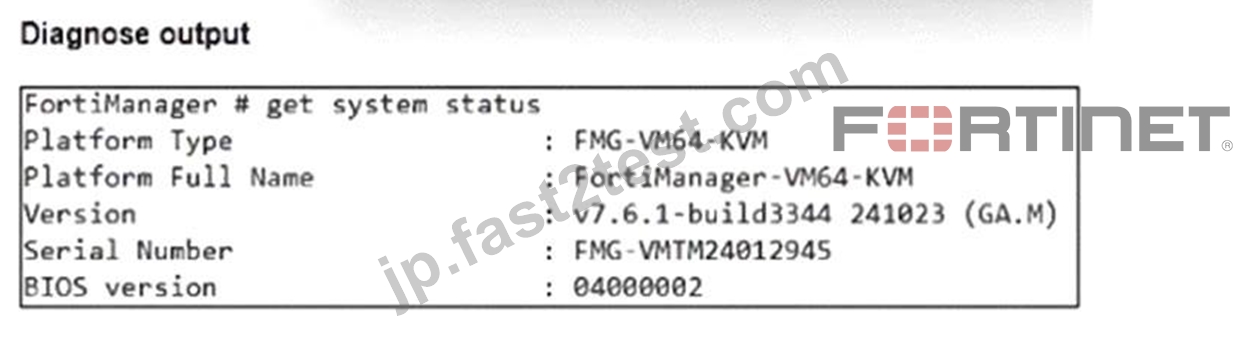
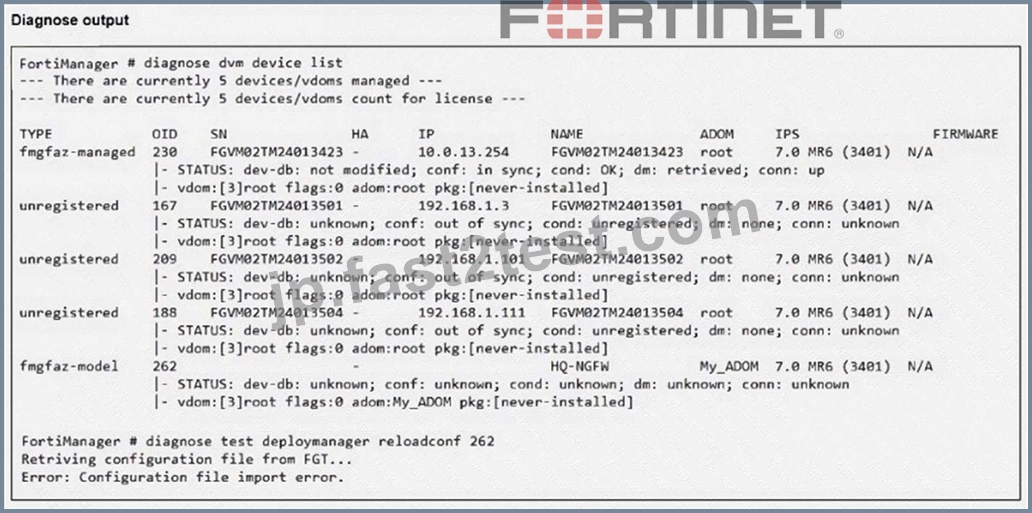
An administrator runs the reload failure commanddiagnose test deploymanager reloadconf 262on FortiManager.
Why does the administrator receive an error message?
- A. FortiManager does not support FortiOS version 7.0.
- B. The administrator must use the FortiGate name instead of the ID number.
- C. The administrator just recently added FortiGate HQ-NGFW as a model device.
- D. FortiManager requires the FortiGate serial number instead of the ID number.
正解:C
解説:
The error occurs because the FortiGate HQ-NGFW device with ID 262 is a newly added model device and has not yet been fully synchronized or installed with a configuration package, which causes the reload configuration command to fail.
質問 # 18
Which output is displayed right after moving the ISFW device from one ADOM to another?
- A.

- B.

- C.

- D.

正解:B
解説:
Right after moving the ISFW device to a new ADOM, the status typically shows the policy package as never- installed, indicating that the device has been assigned to the new ADOM but no policy package has yet been installed in that ADOM.
質問 # 19
An administrator configures a new BGP peer in the FortiManager device-level database of FortiGate. They reinstall the policy package to the managed FortiGate device without any errors. However, when the administrator logs in to FortiGate, they do not see the BGP configuration changes.
What is the most likely reason why FortiManager did not push the BGP peer changes to FortiGate?
- A. The administrator must run a sanity check on FortiManager to make sure the database is not corrupted.
- B. Fortigate has a BGP template assigned on the FortiManager database.
- C. The administrator must use the Install Wizard and select Install device settings only to push BGP settings
- D. The FortiGate firmware version is different from the FortiManager ADOM version.
正解:B
解説:
If a BGP template is assigned to the FortiGate device on FortiManager, device-level BGP configurations made directly in the device-level database are overridden by the template settings, so the changes do not get pushed to the device.
質問 # 20
Refer to the exhibit.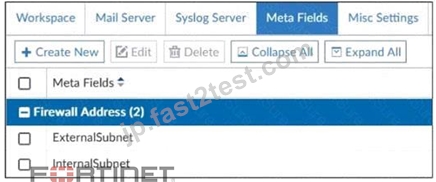
An administrator created two new meta fields in FortiManager.
Which operation can you perform with these parameters?
- A. You can add them to objects as custom attributes.
- B. You can invoke them using the $ character.
- C. You can use them as variables in scripts.
- D. You can export them to be used in other ADOMs.
正解:A
解説:
Meta fields in FortiManager can be added to objects as custom attributes, allowing administrators to categorize and add additional information to firewall objects for easier management and identification.
質問 # 21
An administrator has a FortiGate-HQ device with VDOMs-root, HR and Facilities, currently managed under the FortiManager ADOM-Site1. They try to move VDOM HR to the FortiManager ADOM-Site2, but it does not work.
Why is the administrator not able to move FortiGate-HQ VDOM HR to FortiManager ADOM-Site2?
- A. The FortiGate-HQ must be managed under the FortiManager ADOM-root to allow moving its VDOMs to different ADOMs.
- B. The administrator must have full access in the device layer of FortiGate-HQ VDOM-root before they can VDOMs to different ADOMs.
- C. The administrator must delete the FortiGate-HQ device from FortiManager and add it again using the Add Device wizard before moving the VDOM.
- D. FortiManager must be in ADOM normal mode, which does not allow VDOMs to be managed separately.
正解:A
解説:
FortiGate devices must be managed under the FortiManager ADOM corresponding to the root VDOM to allow their individual VDOMs to be moved and managed in different ADOMs. Managing the root VDOM in a different ADOM prevents moving subordinate VDOMs across ADOMs.
質問 # 22
What is the best explanation of how FortiManager helps with mass provisioning?
- A. It sends email alerts when new devices connect.
- B. It upgrades the OS of each FortiGate device.
- C. It uses templates to configure the same settings on many devices simultaneously.
- D. It provides local FortiGuard Distribution Server (FDS) services to the network.
正解:C
解説:
FortiManager helps with mass provisioning by using templates that allow administrators to configure the same settings on multiple FortiGate devices simultaneously, streamlining deployment and management.
質問 # 23
Which is recommended when you are managing a high volume of logs in your network?
- A. Enable advanced ADOM mode on FortiManager.
- B. Store logs on FortiManager and use FortiView.
- C. Forward logs from FortiAnalyzer to FortiManager daily.
- D. Add and manage FortiAnalyzer from FortiManager.
正解:D
解説:
Adding and managing FortiAnalyzer from FortiManager is recommended for handling a high volume of logs, as FortiAnalyzer is designed specifically for centralized log management, analysis, and reporting, which offloads this workload from FortiManager.
質問 # 24
An administrator wants to configure and manage multiple objects in the FortiManager database and give access to other users who work in the same database.
To stay in control of the changes made to firewall policies by other team members, the administrator needs a setup where all modifications go through a central check before they can be installed.
How can the administrator create this setup?
- A. Enable device lock and the advanced mode feature in the ADOM.
- B. Enable the prompt asking the administrator to accept firewall policies changes before saving.
- C. Enable the workspace (for all ADOMs) to control all changes made by any administrator.
- D. Enable workflow mode and the ADOM lock feature.
正解:D
解説:
Enabling workflow mode along with the ADOM lock feature ensures that all configuration changes go through a centralized review and approval process before installation, allowing controlled and coordinated management of firewall policies by multiple administrators.
質問 # 25
Refer to the exhibit.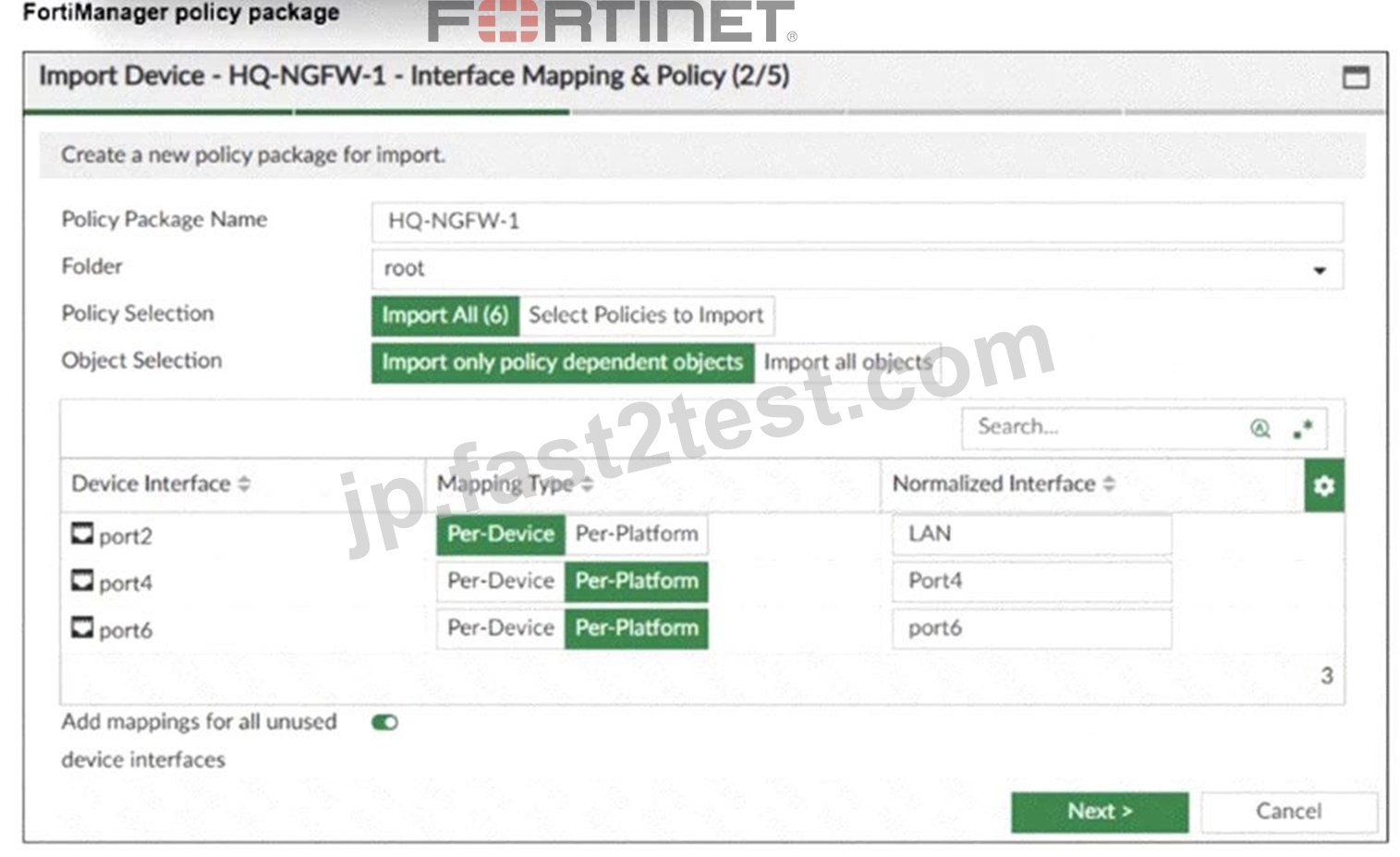
An administrator added a FortiGate device to FortiManager with the default object settings at the ADOM layer.
What can you conclude from the import policy package process of the HQ-NGFW- 1 device?
- A. The administrator must manually create the port4 interface on the ADOM layer to avoid import policy errors.
- B. FortiManager will create LAN, port4, and port6 as normalized interfaces at the ADOM layer.
- C. FortiGate may not work as expected when the administrator does not import all objects.
- D. The administrator must select Per Platform for all interfaces to correctly detect all interfaces from HQ- NGFW-1.
正解:B
解説:
The import process shows that FortiManager will create normalized interfaces named LAN, port4, and port6 at the ADOM layer, mapping them to the corresponding device interfaces based on the import settings.
質問 # 26
Refer to the exhibit.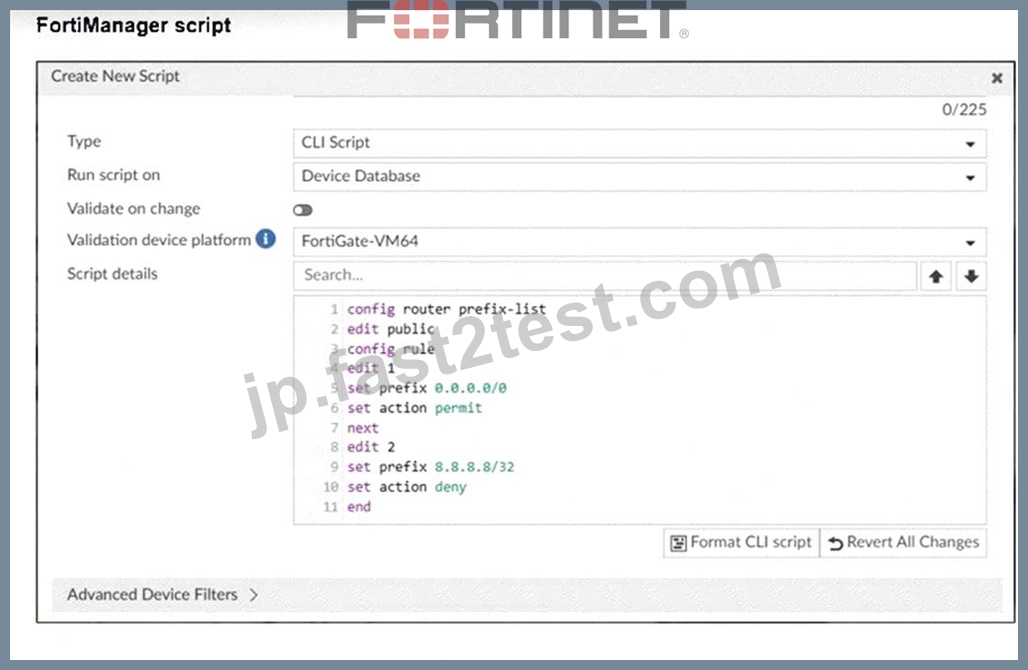
Which two results occur if you run the script using theDevice Databaseoption? (Choose two.)
- A. The administrator must install these changes on a managed device using the Install Wizard.
- B. The device Config Status is tagged as Modified.
- C. The successful execution of a script on the Device Database creates a new revision history.
- D. The script history shows the successful installation of the script on the remote FortiGate.
正解:A、B
解説:
Running a script on the Device Database marks the configuration as modified but does not immediately apply changes to the device.
The administrator must use the Install Wizard to push and install these changes from the Device Database onto the managed device.
質問 # 27
Refer to the exhibits.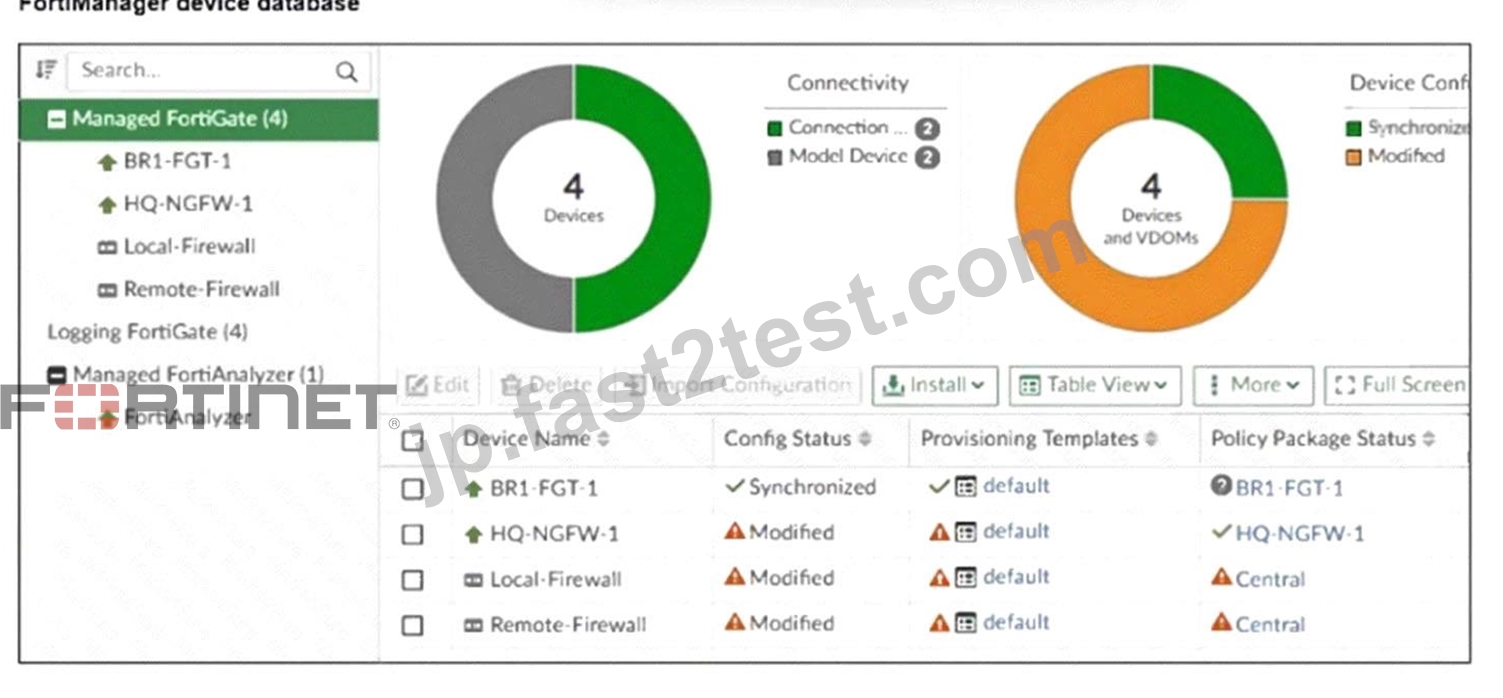
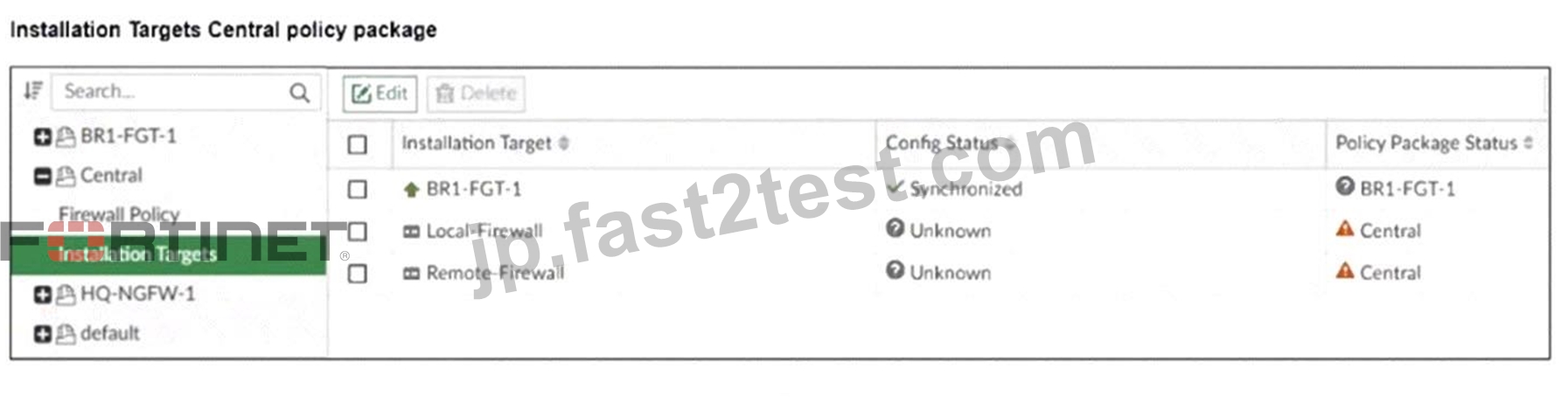
An administrator has been asked to install the same policies from a central policy package onto the BR1-FGT-
1 firewall.
The administrator added BR1-FGT-1 as a target in the central policy package installation.
What should the administrator do when reinstalling the central policy package on the BR1-FGT-1 firewall?
- A. Use the install wizard to install the central policy package on the BR1-FGT-1 firewall.
- B. Assign only one policy package to the firewall because FortiManager does not allow more than one policy package assigned per device at the same time.
- C. Import the policy package to change the unknown status and synchronize the policy package.
- D. First resolve the modified status in the configuration and provisioning templates to allow a smooth installation.
正解:A
解説:
Using the Install Wizard is the recommended method to reinstall the central policy package on the BR1-FGT-
1 firewall, ensuring all settings, installation targets, and dependencies are correctly processed during installation.
質問 # 28
What is the purpose of ADOM revisions?
- A. ADOM revisions compare previous snapshots of the Policy Package and ADOM-level objects with the device-level database.
- B. ADOM revisions find unused, duplicate, and unnecessary firewall policies and objects.
- C. ADOM revisions save the current state of all policy packages and objects for an ADOM.
- D. ADOM revisions show specific changes in a policy package when it is installed.
正解:C
解説:
ADOM revisions save the current state of all policy packages and objects within an ADOM, allowing administrators to track changes over time and revert to previous configurations if needed.
質問 # 29
Refer to the exhibit.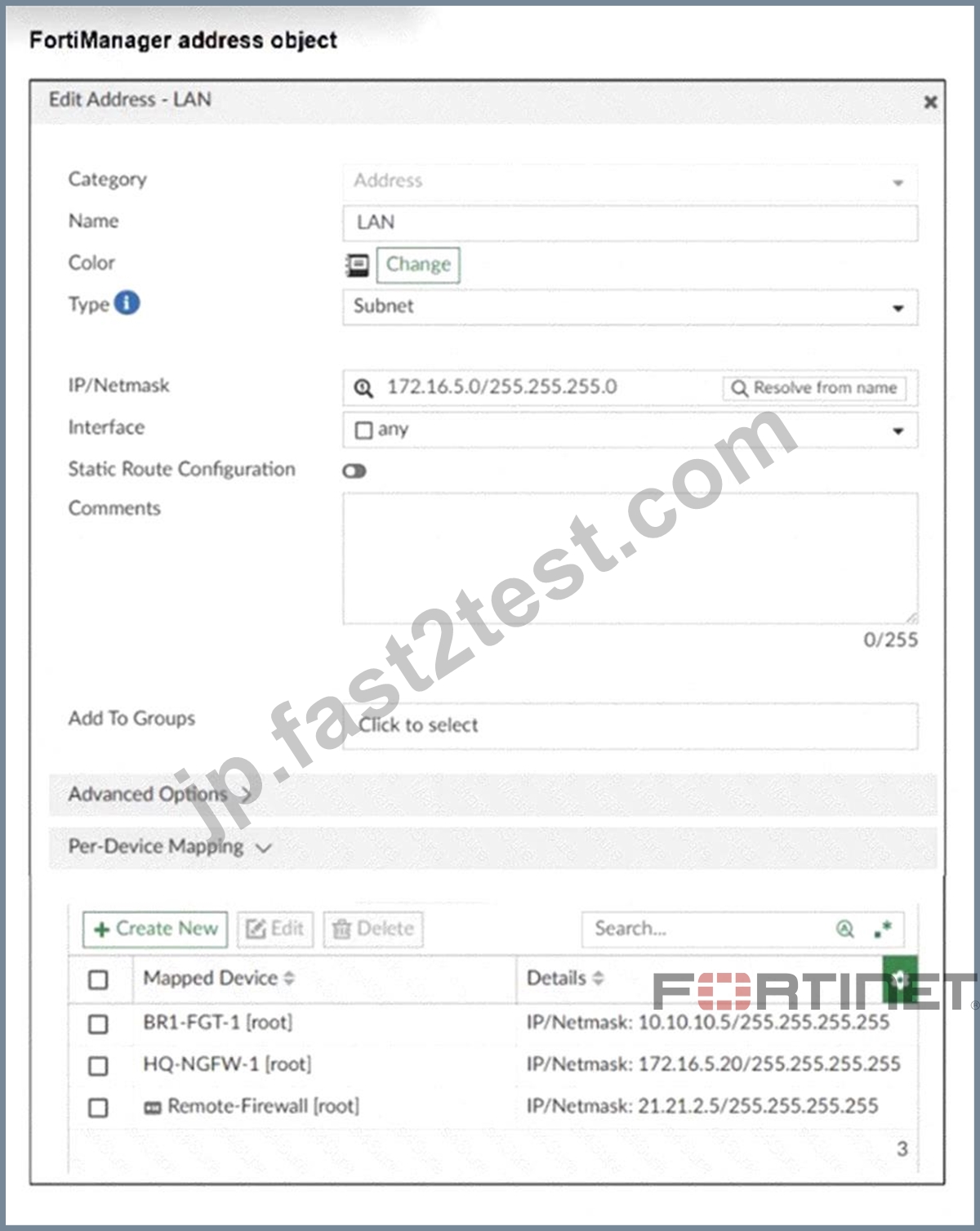
An administrator has created a firewall address object that is used in multiple policy packages for multiple FortiGate devices in an ADOM.
After the installation operation is performed, which IP/netmask will be installed on Remote-Firewall
[VDOM1] for the LAN firewall address object?
- A. 172.16.5.0/255.255.255.0
- B. 10.10.10.5/255.255.255.255
- C. 172.16.5.20/255.255.255.255
- D. 21.21.2.5/255.255.255.255
正解:D
解説:
The per-device mapping overrides the global IP/netmask setting for the firewall address object. For the device
"Remote-Firewall," the mapped IP/netmask is 21.21.2.5/255.255.255.255, so this value will be installed on Remote-Firewall [VDOM1].
質問 # 30
Which two conditions trigger FortiManager to create a new revision history? (Choose two.)
- A. When FortiManager is auto-updated with configuration changes made directly on a managed device
- B. When FortiManager installs device-level changes on a managed device
- C. When changes to the device-level database are made on FortiManager
- D. When a provisioning template is assigned to a managed device on the device-level database
正解:A、C
解説:
FortiManager creates a new revision history entry whenever changes are made to the device-level database on FortiManager.
FortiManager also creates a new revision when it auto-updates its database with configuration changes detected directly on a managed device.
質問 # 31
......
学習材料は有効FCP_FMG_AD-7.6効率的問題集:https://jp.fast2test.com/FCP_FMG_AD-7.6-premium-file.html
FCP_FMG_AD-7.6問題集本日限定!無料アクセス可能に!:https://drive.google.com/open?id=1gt-6bEV5_xz9Tmaz64-KQ7EeZxyo1KIk