

試験問題集でWorkday-Pro-Talent-and-Performance練習で無料最新のWorkday練習テスト
Workday-Pro-Talent-and-Performance試験問題、リアルWorkday-Pro-Talent-and-Performance練習問題集
質問 # 25
While configuring the Performance Review business process, you added a Complete Additional Manager Evaluation step. However, when testing, the manager is not receiving the Inbox task to select other managers.
What do you configure on the employee review template to route this step to the manager's Inbox?
- A. Add a rule in the Applies To field to limit performance reviews to workers with additional jobs.
- B. Enable the Additional Manager Evaluation for All Sections on the Other Reviewer Options section.
- C. Add a competencies section to the template.
- D. Require Additional Managers to enter a comment in the Overall section.
正解:B
解説:
* When you add aComplete Additional Manager Evaluationstep in the Performance Review BP, the system only generates the Inbox task if the employee review template is configured to allow it.
* This is controlled in theOther Reviewer Options sectionof the template.
* You must enable"Additional Manager Evaluation for All Sections"for the task to route correctly.
* Incorrect options:
* A. Adding a competencies section is unrelated to routing.
* B. Requiring comments in the Overall section doesn't trigger the step.
* D. Applies To field rules limit applicability but won't control routing to the direct manager.
References:
Workday Employee Review Template configuration guide.
Workday Pro exam material: "Enable Additional Manager Evaluation for All Sections in the template to activate the BP step."
質問 # 26
An organization has recently started the talent review process. A manager wants to take action on assigned tasks, while also viewing the team's current performance ratings and potential assessments.
What report would allow the manager to do so?
- A. Talent Review Status Summary report
- B. Employee Review Status Summary report
- C. Talent Snapshot report
- D. My Team's Performance Reviews report
正解:A
解説:
* TheTalent Review Status Summary reportprovides managers with visibility into their team's currentperformance ratings, potential assessments, and status within the talent review cycle.
* It also allows them to take action on assigned tasks during the process.
* Incorrect options:
* A. Employee Review Status Summary # shows progress of performance reviews, not talent reviews.
* C. My Team's Performance Reviews # focused only on performance review tasks.
* D. Talent Snapshot # shows detailed worker profiles, not task/action tracking in talent reviews.
References:
Workday delivered reporting catalog.
Workday Pro Talent Review training content.
質問 # 27
You want to configure your Performance Review business process so that other users can rate an employee's competencies.
Which subprocesses do you configure for this?
- A. Get Additional Reviewers for Performance Review and Complete Additional Manager Evaluation for Performance Review
- B. Get Additional Manager Evaluation for Performance Review and Complete Additional Evaluation for Performance Review
- C. Get Additional Manager Evaluation for Performance Review and Complete Additional Manager Evaluation for Performance Review
- D. Get Additional Reviewers for Performance Review and Complete Additional Evaluation for Performance Review
正解:D
解説:
* To allow other users (besides the direct manager) to rate competencies:
* UseGet Additional Reviewers for Performance Review# allows nominating additional evaluators.
* Then useComplete Additional Evaluation for Performance Review# routes the evaluation step to the selected additional reviewers.
* Incorrect options mix up "Additional Manager" with "Additional Reviewer." Managers are a subset, but to include broader participants, the correct subprocesses areReviewers + Evaluation.
References:
Workday Performance Review BP design documentation.
Workday Pro Talent & Performance exam material:"For additional reviewers (not limited to managers), configure Get Additional Reviewers + Complete Additional Evaluation subprocesses."
質問 # 28
What task do you configure to use suggested skills?
- A. Edit Tenant Setup - HCM
- B. Maintain Skills and Experience Setup
- C. Configure Optional Fields
- D. Edit Tenant Setup - System
正解:B
解説:
* Suggested skills functionality is enabled and configured using theMaintain Skills and Experience Setuptask.
* This controls whether Workday will suggest skills to workers based on their profiles and activity.
* Incorrect options:
* Edit Tenant Setup - SystemandEdit Tenant Setup - HCM# global settings, not skill suggestions.
* Configure Optional Fields# defines visibility of fields but not skill suggestion functionality.
References:
Workday Talent & Performance documentation:"Suggested skills are configured in Maintain Skills and Experience Setup." Pro Talent certification material confirms this task.
質問 # 29
Your performance review template has three sections, in addition to an Overall section. The template uses item averaging to calculate an overall rating.
Managers will enter ratings for multiple items in each of the first three sections.
What is the expected behavior when Workday calculates the overall rating?
- A. The calculation includes assigned weightings for each item and each section.
- B. The calculation includes assigned weightings for each item.
- C. The calculation includes assigned weightings for each section.
- D. The calculation includes an equal weight to each item rated.
正解:D
解説:
* When a performance review template usesItem Averaging:
* Workday calculates the average rating acrossall rated itemswithin the sections.
* Each item carriesequal weight, regardless of section or item weighting.
* If weighting was required, you would instead useWeighted Average, which allows assigning weights to items and/or sections.
* Therefore, item averaging =equal weight for each item.
References:
Workday Performance Review configuration: Item Averaging vs. Weighted Averaging.
Workday Pro Talent & Performance exam guide: "Item averaging gives equal weight to all items across sections."
質問 # 30
You want to launch a performance review with calibration. The Talent Administrator would like to verify that all performance reviews are complete before calibration launches.
How do you configure the business process to meet this requirement?
- A. Shared Participation step on the Launch Calibration business process
- B. The Await Calibration Completion service step in the Complete Manager Evaluation for Performance Review business process
- C. To Do step on the Complete Manager Evaluation for Performance Review business process
- D. Update Performance Review Rating for Manager Evaluation step on the Complete Manager Evaluation for Performance Review business process
正解:B
解説:
* When usingcalibrationwith performance reviews, Workday requires reviews to becompleted firstbefore calibration begins.
* The correct configuration is to insert the"Await Calibration Completion" service stepinto theComplete Manager Evaluation for Performance Reviewbusiness process.
* This ensures that calibration will not launch until all manager evaluations are complete.
* Other options:
* To Do step# only generates a reminder, not an enforced process dependency.
* Shared Participation step on Launch Calibration# configures collaboration for calibration itself, not sequencing.
* Update Performance Review Rating step# controls how ratings are updated, not workflow dependencies.
References:
Workday Talent & Performance BP configuration documentation.
Workday Pro study materials:"Use Await Calibration Completion step in Complete Manager Evaluation BP to enforce review completion before calibration."
質問 # 31
An employee had a manager from January through August. The employee then had a new manager from September through December.
In the Start Performance Review business process, for the Complete Manager Evaluation step, what security group would you use to route the step to the employee's manager that they had in January?
- A. Manager
- B. Primary Manager
- C. Matrix Manager
- D. Manager for Majority of Event
正解:D
解説:
* In a performance review event spanning multiple months, Workday determines which manager should receive the evaluation step.
* The optionManager for Majority of Eventensures that the manager who supervised the employee for thelongest portion of the review period(in this case, January-August) is the one who receives the task.
* Incorrect options:
* A. Manager # routes to current manager by default, not historical.
* C. Matrix Manager # used for matrix org relationships, not standard review.
* D. Primary Manager # is the current primary manager at the time of launch.
References:
Workday Business Process configuration rules for manager evaluation steps.
Workday Pro study content: "Use Manager for Majority of Event when you need the prior manager to complete the evaluation."
質問 # 32
What do you use a talent pool for?
- A. To organize and segment groups of workers for development.
- B. To assess the readiness of internal candidates and consider external candidates for job profiles.
- C. To organize workers by hierarchical structure.
- D. To create a short list of ranked candidates who are preparing to take over a position.
正解:A
解説:
* Talent Poolsare designed to group employees for development and succession planning purposes.
* They help organizations track readiness, identify high potentials, and prepare workers for future roles.
* Incorrect options:
* A. Organizing by hierarchy is done viaSupervisory Organizations, not talent pools.
* B. A short list of ranked candidates is closer toSuccession Planning, not talent pools.
* D. Assessing readiness for job profiles (including external candidates) isSuccession Planning, not pools.
References:
Workday Talent Management Guide:"Talent pools are collections of workers for development and growth opportunities." Workday Pro Talent & Performance certification prep.
質問 # 33
A worker is providing feedback and they only want it to be visible to the feedback recipient.
What kind of feedback allows for this?
- A. Private
- B. Public
- C. Confidential
- D. Anonymous
正解:A
解説:
* In Workday,Private Feedbackis visible only to thefeedback recipient.
* Confidential Feedbackis visible to both the recipient and their manager.
* Anonymous Feedbackhides the identity of the feedback giver but may still be visible to managers or admins depending on configuration.
* Public Feedbackis broadly visible across the organization or workgroup.
Therefore, the only feedback type that ensures visibilityonly to the recipientisPrivate Feedback.
References:
Workday Talent & Performance study material on feedback types.
Workday Pro Talent & Performance training notes: "Private feedback is restricted to the recipient alone; confidential feedback includes the manager, while public feedback is visible more broadly."
質問 # 34
Refer to the following scenario to answer the question below.
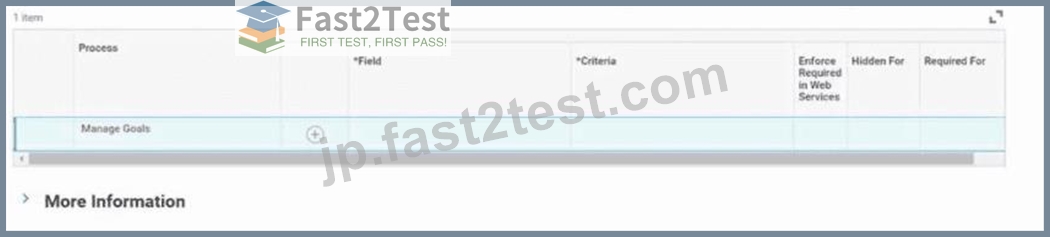
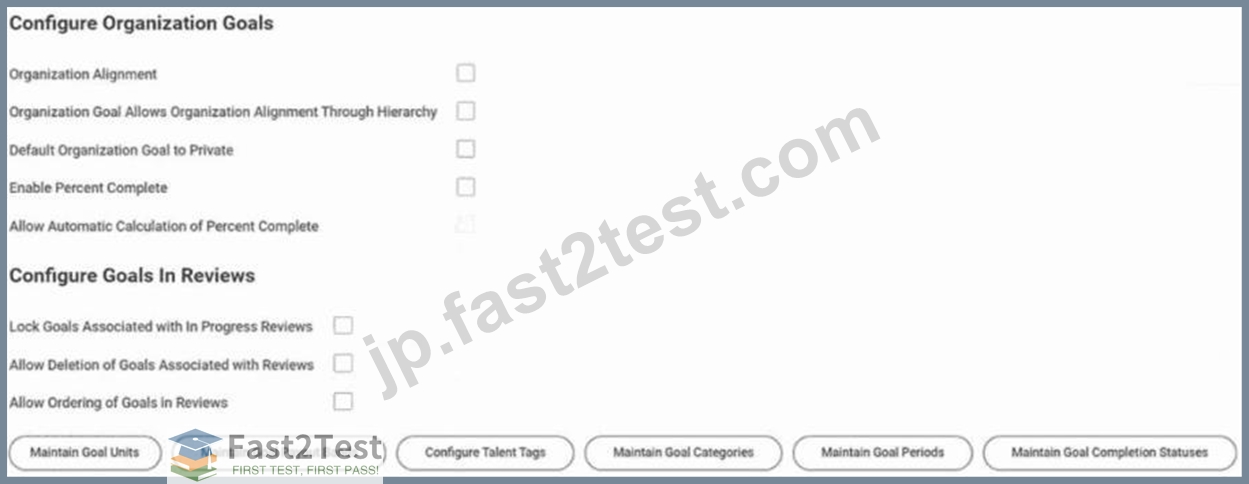
An enterprise creates organizational goals that include the following criteria:
* The organizational goals span five years.
* Workers can align their individual goals with the organizational goals.
* Workers must provide a description for each individual goal.
* Each individual goal must fall within one of three groupings.
Workers' individual goals fall within one of three groups: Innovation, Financial, or Productivity.
Where do you configure the groupings?
- A. Maintain Goal Categories task
- B. Configure Talent Tags task
- C. Configure Organization Goals section
- D. Configure Goals to Review section
正解:A
解説:
* In the scenario, each worker's goal must fall under one of three groupings:Innovation, Financial, Productivity.
* These groupings are set up usingGoal Categories.
* TheMaintain Goal Categoriestask allows administrators to define these categories and enforce categorization for goal entry.
* Incorrect options:
* Configure Goals in Review section# affects reviews, not groupings.
* Configure Organization Goals section# applies to enterprise-level goals, not categorization.
* Configure Talent Tags task# defines tags used for reporting, not enforced groupings.
References:
Workday Goal Management admin setup: "Use Maintain Goal Categories to define groupings for goals." Workday Pro Talent & Performance certification material: Goals must be categorized via categories, not talent tags.
質問 # 35
How do dynamic talent pools determine pool membership?
- A. Based on manual selection
- B. Based on a custom report you define
- C. Based on the Compare Workers report
- D. Based on the results of a saved search
正解:D
解説:
* Dynamic Talent Poolsautomatically determine membership by using the results of asaved search.
* This allows pool membership to update as workers meet or no longer meet the search criteria.
* Incorrect options:
* Compare Workers report# used for side-by-side comparison, not pool membership.
* Manual selection# applies to static pools, not dynamic.
* Custom report# not the driver; Workday specifically requires saved searches for dynamic pools.
References:
Workday Talent Pools configuration guide.
Workday Pro exam material: "Dynamic pools are maintained by saved search results."
質問 # 36
Which configuration is responsible for determining what actions employees and managers can take during a talent review?
- A. Organization membership
- B. Employee potential
- C. Domain security
- D. Talent review template rule
正解:D
解説:
This question is aboutTalent Reviewsin Workday and what drives the permissions or actions that employees and managers can take during the review process.
Let's analyze the choices:
* A. Organization membership
* Incorrect.
* Organization membership (e.g., supervisory org, talent pool) determineswhich workersare included in the review.
* It does not determinewhat actionsmanagers or employees can take.
* B. Employee potential
* Incorrect.
* Employee potential is anattribute(like performance, loss impact, retention risk) used for evaluation in the talent review grid.
* It informs thecontentof the review, not the actions available to participants.
* C. Domain security
* Partially correct but not the best answer.
* Domain security determineswho has accessto initiate or view Talent Reviews, but it does not driveprocess actions inside the review(such as rating, adding notes, or calibrating).
* D. Talent review template rule
* Correct.
* TheTalent Review Template Ruledefines theconfiguration of the talent review process, including:
* Which sections appear (e.g., 9-box grid, attributes, notes).
* Which actions participants (employees, managers, HR partners) can perform.
* Whether calibration is enabled, whether participants can move employees between grid boxes, and other interactive review behaviors.
* This is the configuration responsible for controllingwhat employees and managers can do during a talent review event.
Therefore, the correct answer isTalent review template rule.
#References
* Workday Pro Talent & Performance Certification Guide - Talent Reviews:"The talent review template rule determines the structure of the review and what actions participants may take during the review."
* ERP Cloud Training - Workday Talent Reviews:"Template rules control functionality such as allowing participants to update potential ratings, add notes, or move workers in the grid. Security domains only manage access."
* Workday Community Documentation - Talent Review Configuration:Confirms thattemplate rules define the actions and behaviors within a talent review session.
質問 # 37
As an administrator, what is an attribute of feedback badges?
- A. You can create custom badges using Workday-delivered icons.
- B. You can make badges required when entering feedback.
- C. You can allow recipients to decline badges.
- D. You can delete badges at any time.
正解:B
解説:
In Workday Talent & Performance,feedback badgesare a visual and motivational way to recognize employees when providing feedback. Administrators configure the rules and usage of these badges.
Let's carefully review the options:
* A. You can delete badges at any time.
* Not correct.
* Once a badge is actively in use (already given to workers in feedback), it cannot simply be deleted, because that would break historical data. Instead, administrators can make badgesinactive
, but they remain in the system for reporting integrity.
* B. You can make badges required when entering feedback.
* Correct.
* Workday configuration allows admins torequire that feedback entries include a badge. This ensures that every feedback submission carries a visual, standardized recognition element alongside the narrative text.
* This aligns with the study guide underFeedback and Recognition, which highlights that "badges may be configured as required fields for any feedback process."
* C. You can create custom badges using Workday-delivered icons.
* Not exactly.
* You can createcustom badges, but you upload yourown images/icons. Workday provides sample ones, but they aren't the only option. You are not restricted to Workday-delivered icons.
* D. You can allow recipients to decline badges.
* Incorrect.
* Employeescannot declinebadges once they are attached to feedback. Feedback is submitted as part of the talent/performance process, and the badge is embedded.
Therefore, the unique administrator attribute here is the ability tomake badges required when entering feedback.
#References
* Workday Pro Talent & Performance Guide- Feedback Badges configuration:"Administrators can make badge selection mandatory when submitting feedback, ensuring consistent recognition across the organization."
* ERP Cloud Training (Talent & Performance Badges section): Confirms thatbadges can be required for feedback, cannot be declined by recipients, and must be inactivated (not deleted) when no longer in use.
* Workday Community (Feedback and Recognition documentation):Custom badges can be created by uploading images, not restricted to Workday-delivered icons.
質問 # 38
You want to define level-based behavioral indicators for proficiency ratings on a competency.
What criteria can you use?
- A. Supervisory Organization
- B. Management Level
- C. Talent Pool
- D. Job Profile
正解:D
解説:
* Behavioral indicatorscan be tied to proficiency rating levels on a competency to describe expected behaviors at each level.
* These indicators are assigned byJob Profile.
* Other options (Supervisory Organization, Management Level, Talent Pool) are not used to define behavioral indicators.
* Linking by Job Profile allows organizations to customize behaviors expected for different roles.
References:
Workday Talent & Performance competency management documentation.
Workday Pro Talent & Performance training material:"Behavioral indicators are assigned at the job profile level to define expected behaviors for each proficiency rating."
質問 # 39
What field does Workday require when you create a competency?
- A. Competency Description
- B. Name
- C. Proficiency Rating Scale
- D. Category
正解:B
解説:
When creating aCompetencyin Workday Talent & Performance, the system enforces certain required fields.
* Name:
* This is themandatory field. Every competency must have a name so it can be identified in job profiles, performance reviews, and talent pools.
* Without a name, Workday will not allow you to save or proceed.
* Proficiency Rating Scale:
* This is important for measuring competencies (e.g., Basic # Intermediate # Advanced # Expert).
* However, it isnot requiredat the point of creation. If you don't assign one, the system can still save the competency, though you may not be able to rate employees effectively without linking a scale later.
* Competency Description:
* Highly recommended for clarity and reporting.
* But this field isoptional, not enforced by Workday.
* Category:
* Used to group competencies (e.g., Leadership, Technical, Communication).
* Again,optionaland for organizational purposes only.
Thus, while other fields add functionality and structure,the only required field to create a competency is the Name.
#References
* Talent & Performance Learning Material: Competencies are created with"Name" as required, while "Description, Proficiency Scale, and Category" are optional metadata used to support evaluation and reporting.
* Workday Pro Talent & Performance study outlines: Under theCompetencies section, it explicitly states:"The only mandatory field is Name. Description, Proficiency Rating Scale, and Category are optional fields that can be configured for richer competency management."#web source Talent & Performance training + community notes#
* ERP Cloud Training - Workday Talent & Performance course: Highlights that"Name is required when creating a competency; all other fields are optional depending on business needs."
質問 # 40
Your annual performance review includes goals, feedback, and responsibilities. Your business process includes these steps:
* Set Review Content
* Get Additional Reviewers
* Assess Potential
* Complete Manager Evaluation
What step will the workflow not use?
- A. Get Additional Reviewers
- B. Assess Potential
- C. Set Review Content
- D. Complete Manager Evaluation
正解:B
解説:
* In Workday'sannual performance review process, typical default steps are:
* Set Review Content# defines template contents (goals, feedback, responsibilities).
* Get Additional Reviewers# allows adding reviewers.
* Complete Manager Evaluation# manager provides evaluation.
* Assess Potentialisnot part of the performance review process; it belongs toTalent Review / Succession Planning processes.
* Therefore, the workflow will not useAssess Potentialin a performance review.
References:
Workday Performance Review vs. Talent Review process distinction in Pro materials.
Workday configuration: "Assess Potential" is a Talent module step, not part of standard performance review flows.
質問 # 41
You want to create a talent pool that automatically updates its members based on criteria. You also want those in the Manager role to only have permissions to the members of their organization.
What type of talent pool do you create?
- A. Restricted Dynamic Talent Pool
- B. Restricted Static Talent Pool
- C. Open Dynamic Talent Pool
- D. Open Static Talent Pool
正解:A
解説:
* ADynamic Talent Poolautomatically updates membership based on the results of a saved search.
* Making itRestrictedensures that access is limited-so onlyManagershave visibility/permissions to the members of their supervisory organization.
* Incorrect options:
* Open Dynamic# open visibility, not restricted by role.
* Open Static# membership is manual, not automatic, and visibility is open.
* Restricted Static# membership is manual, not dynamic.
References:
Workday Talent Pool documentation:"Restricted Dynamic Talent Pools allow managers to see only their organizational members with dynamic updates."
質問 # 42
Refer to the following scenario to answer the question below.
Your organization is initiating employee reviews. There are several objectives for these reviews, including:
* Setting goals and reviewing them quarterly.
* Checking in with the new hire at 90 days.
* Annually reviewing performance.
* Performing multi-rater reviews.
The New Hire 90 Day Check-In template has several sections, including Questions and Overall. As an administrator, you want to schedule this process to route to all new hires each month.
What Employee Review Template configuration restricts the template to only new hires after 90 days?
- A. Period Start Date/Period End Date
- B. Layout Override
- C. Review Type
- D. Applies to
正解:D
解説:
* TheApplies Tofield on the Employee Review Template determines which population is eligible for the review.
* To restrict the 90-Day Check-In template so that it only applies tonew hires after 90 days, you configure theApplies Tocriteria accordingly (e.g., based on hire date relative to review launch date).
* Incorrect options:
* Review Type# categorizes reviews (annual, quarterly, etc.), but does not restrict worker population.
* Period Start/End Dates# define review timeframe, not eligibility rules.
* Layout Override# controls template layout, not applicability.
References:
Workday Employee Review Template configuration guide.
Workday Pro Talent & Performance exam prep: "Use Applies To to restrict review templates to new hires after 90 days."
質問 # 43
During testing, you launched a Performance Review event with calibrations and all events are still in- progress. You notice that the goals are not populating as planned.
What is the first task you should run before you correct your configuration?
- A. The Mass Rescind Business Process task for Start Performance Review only, including the subprocesses
- B. The Mass Rescind Business Process task for Start Performance Review and Launch Calibration, without the subprocesses
- C. The Mass Cancel Business Process task for Start Performance Review only, without the subprocesses
- D. The Mass Cancel Business Process task for Start Performance Review and Launch Calibration, including the subprocesses
正解:A
解説:
This scenario deals withtesting a Performance Review event that includes calibrations. Since the goals are not populating as expected, you need toreset the process correctly before fixing the configuration.
Here's why the correct choice isMass Rescind - Start Performance Review (including subprocesses):
* Rescind vs Cancel
* Rescind: Completelyremoves the business process instanceand all of its subprocesses from the system as if it never occurred. This is the proper action duringtesting, because it clears the data and lets you start fresh with corrected configuration.
* Cancel: Stops the process, but leaves historical records behind. This is not ideal for configuration testing, because it doesn't fully reset the process state.
* Why Start Performance Review only (not Calibration)
* Calibration events are tied to performance reviews. If you rescind theperformance review, the associated calibration processes are also cleared.
* If you attempt to rescind or cancel both Performance Review and Calibration separately, it can cause unnecessary complications.
* Why including subprocesses
* Performance Review has multiplesubprocesses(e.g., goal population, manager review, employee self-evaluation, calibration triggers).
* To fully clear the faulty test run, you must include all subprocesses; otherwise, remnants of the process remain in-progress and may block future testing.
* Incorrect Options Explained
* A. Mass Rescind (Performance Review + Calibration, no subprocesses)# Wrong, because calibration rescinds automatically when you rescind the review, and leaving out subprocesses creates incomplete cleanup.
* C. Mass Cancel (Performance Review + Calibration, with subprocesses)# Wrong, because Canceldoes not fully reset configuration testing.
* D. Mass Cancel (Performance Review only, no subprocesses)# Wrong, same reason:Cancelis insufficient, and leaving subprocesses active breaks cleanup.
References
* Workday Pro Talent & Performance Study Guide - Calibration & Performance Reviews:"When testing configuration errors, rescind the performance review with all subprocesses. Do not cancel, as this preserves process history and does not allow a clean retest."
* ERP Cloud Training - Workday Performance Review & Calibration:"Rescind clears all subprocesses linked to the review, including calibration. Cancel only halts the process without fully removing it."
* Workday Community Documentation - Mass Business Process Actions:Confirms thatRescind fully clears test data, while Cancel leaves records intact.
質問 # 44
You recently created a talent pool to help develop potential new managers. You added ten managers to the pool. Now you want to assign two self-development goals to each member of the talent pool.
What task allows you to assign those two goals to all members in one event?
- A. Manage Organization Goals
- B. Maintain Goals Setup
- C. Add Goal To Employees
- D. Create Goal for Worker
正解:C
解説:
In Workday Talent & Performance, when you want to assign goals to a group of employees (such as everyone in a talent pool), you must use the"Add Goal To Employees"task.
Here's why:
* Create Goal for Worker
* This task is specific toone workerat a time. It would not allow you to mass-assign goals to multiple workers.
* Suitable when you want to add a goal for an individual employee.
* Manage Organization Goals
* Used to defineorganization-wide goals(e.g., company objectives).
* These can be cascaded, but they are not tied to an action that assigns two goals directly to all members of a talent pool.
* Maintain Goals Setup
* This is forconfiguring goal settings(e.g., categories, weights, behaviors) at the tenant level.
* It doesn't execute the action of assigning goals to workers.
* Add Goal To Employees
* Specifically designed formass goal assignment.
* You can select multiple employees (for example, all 10 members of your talent pool) and assign the same goals in a single event.
* This is the only option that fulfills the requirement of assigningtwo self-development goals to all membersin one step.
#References
* Talent & Performance Study Guide topics:
* Goal Management: Covers the difference between worker-specific vs. mass goal actions.
* Talent Pools: Workday documentation explains that pools are often used for succession planning and development, and "Add Goal to Employees" is the correct bulk action for assigning development activities.
* External Training Reference: ERP Cloud Training notes that"The Add Goal To Employees task allows administrators to assign multiple goals across groups such as talent pools or organizations, enabling faster alignment with development plans."#web source on Talent & Performance training#
* Workday Pro Talent & Performance Flashcards: Confirm that the correct way to mass assign goals is viaAdd Goal To Employeestask, not Manage Organization Goals (which is only for defining org-level goals).
質問 # 45
......
Workday Workday-Pro-Talent-and-Performance 認定試験の出題範囲:
| トピック | 出題範囲 |
|---|---|
| トピック 1 |
|
| トピック 2 |
|
| トピック 3 |
|
| トピック 4 |
|
| トピック 5 |
|
確認済みWorkday-Pro-Talent-and-Performance試験問題集と解答で時間限定無料提供!Workday-Pro-Talent-and-Performanceには正解付き:https://jp.fast2test.com/Workday-Pro-Talent-and-Performance-premium-file.html
あなたを合格させるWorkday-Pro-Talent-and-Performance無料問題集最新のWorkday練習テスト:https://drive.google.com/open?id=1K1-TFyFrt6n99M7GuUr-16AL-4b0O_E6