

試験問題と解答はNSE7_EFW-7.2学習ガイド問題を試そう!
Fortinet NSE 7 - Enterprise Firewall 7.2認証サンプル問題と練習試験合格させます
質問 # 29
Refer to the exhibit, which shows an ADVPN network.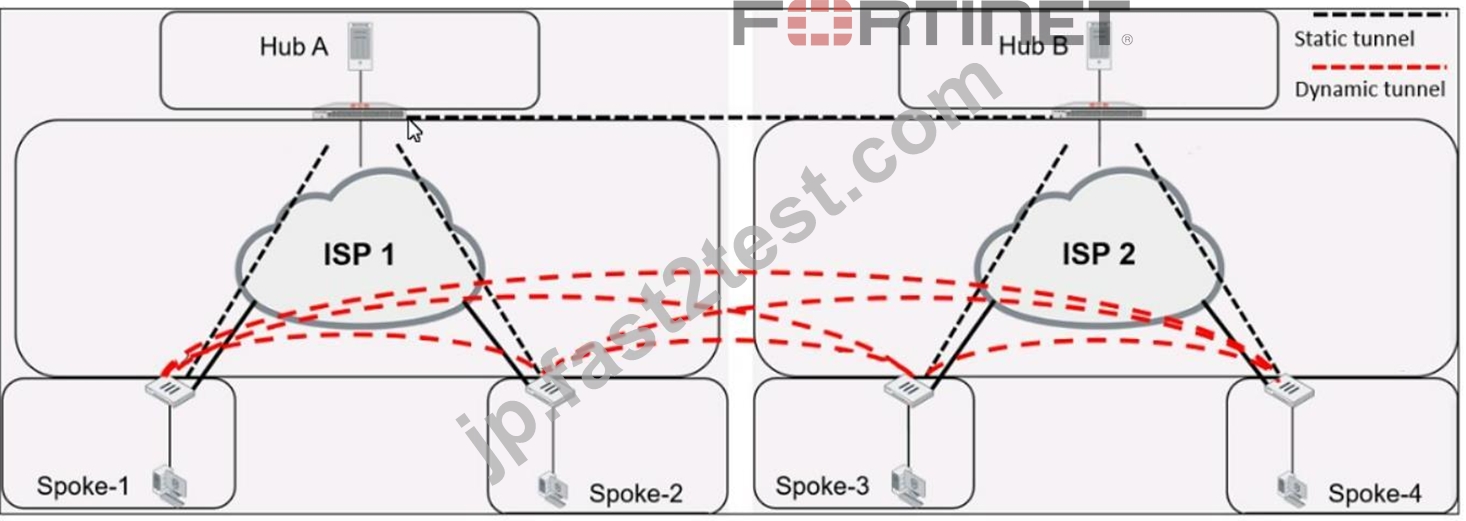
Which VPN phase 1 parameters must you configure on the hub for the ADVPN feature to function? (Choose two.)
- A. set auto-discovery-forwarder enable
- B. set auto-discovery-receiver enable
- C. set auto-discovery-sender enable
- D. set add-route enable
正解:A、B
解説:
For the ADVPN feature to function properly on the hub, the following phase 1 parameters must be configured:
A: set auto-discovery-forwarder enable: This enables the hub to forward shortcut information to the spokes, which is essential for them to establish direct tunnels.
C: set auto-discovery-receiver enable: This allows the hub to receive shortcut offers from the spokes.
This information is corroborated by the Fortinet documentation, which explains that in an ADVPN setup, the hub must be able to both forward and receive shortcut information for dynamic tunnel creation between spokes.
質問 # 30
Refer to the exhibit.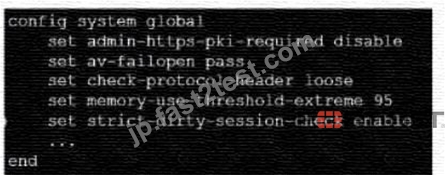
which contains a partial configuration of the global system. What can you conclude from this output?
- A. NPs and CPs arc disabled
- B. Only CPs arc disabled
- C. NPs and CPs are enabled
- D. Only NPs are disabled
正解:A
解説:
The configuration output shows various global settings for a FortiGate device. The terms NP (Network Processor) and CP (Content Processor) relate to FortiGate's hardware acceleration features. However, the provided configuration output does not directly mention the status (enabled or disabled) of NPs and CPs.
Typically, the command to disable or enable hardware acceleration features would specifically mention NP or CP in the command syntax. Therefore, based on the output provided, we cannot conclusively determine the status of NPs and CPs, hence option D is the closest answer since the output does not confirm that they are enabled.
References:
* FortiOS Handbook - CLI Reference for FortiOS 5.2
質問 # 31
After enabling IPS you receive feedback about traffic being dropped.
What could be the reason?
- A. Fail-open is set to disable
- B. Np-accel-mode is set to enable
- C. Traffic-submit is set to disable
- D. IPS is configured to monitor
正解:A
解説:
Fail-open is a feature that allows traffic to pass through the IPS sensor without inspection when the sensor fails or is overloaded. If fail-open is set to disable, traffic will be dropped in such scenarios1. Reference: = IPS | FortiGate / FortiOS 7.2.3 - Fortinet Documentation
質問 # 32
Refer to the exhibit, which shows two configured FortiGate devices and peering over FGSP.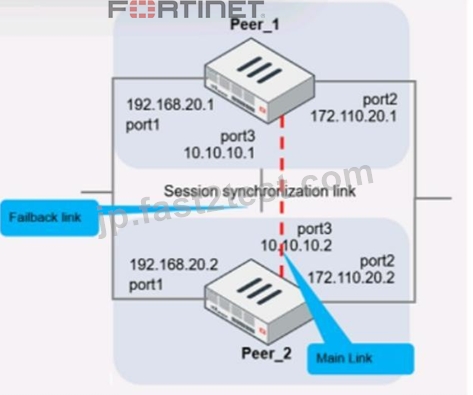
The main link directly connects the two FortiGate devices and is configured using the set session-syn-dev <interface> command.
What is the primary reason to configure the main link?
- A. To have both sessions and configuration synchronization in layer 3
- B. To have only configuration synchronization in layer 3
- C. To have both sessions and configuration synchronization in layer 2
- D. To load balance both sessions and configuration synchronization between layer 2 and 3
正解:A
解説:
The primary purpose of configuring a main link between the devices is to synchronize session information so that if one unit fails, the other can continue processing traffic without dropping active sessions.
A:To have both sessions and configuration synchronization in layer 2.This is incorrect because FGSP is used for session synchronization, not configuration synchronization.
B:To load balance both sessions and configuration synchronization between layer 2 and 3.FGSP does not perform load balancing and is not used for configuration synchronization.
C:To have only configuration synchronization in layer 3.The main link is not used solely for configuration synchronization.
D:To have both sessions and configuration synchronization in layer 3.The main link in an FGSP setup is indeed used to synchronize session information across the devices, and it operates at layer 3 since it uses IP addresses to establish the peering.
質問 # 33
Which two statements about the Security fabric are true? (Choose two.)
- A. Only the root FortiGate collects network topology information and forwards it to FortiAnalyzer
- B. FortiGate uses the FortiTelemetry protocol to communicate with FortiAnatyzer.
- C. Only the root FortiGate sends logs to FortiAnalyzer
- D. Only FortiGate devices with configuration-sync receive and synchronize global CMDB objects that the toot FortiGate sends
正解:A、B
解説:
In the Security Fabric, only the root FortiGate sends logs to FortiAnalyzer (B). Additionally, only FortiGate devices with configuration-sync enabled receive and synchronize global Central Management Database (CMDB) objects that the root FortiGate sends (C). FortiGate uses the FortiTelemetry protocol to communicate with other FortiGates, not FortiAnalyzer (A). The last option (D) is incorrect as all FortiGates can collect and forward network topology information to FortiAnalyzer.
References:
* FortiOS Handbook - Security Fabric
質問 # 34
Exhibit.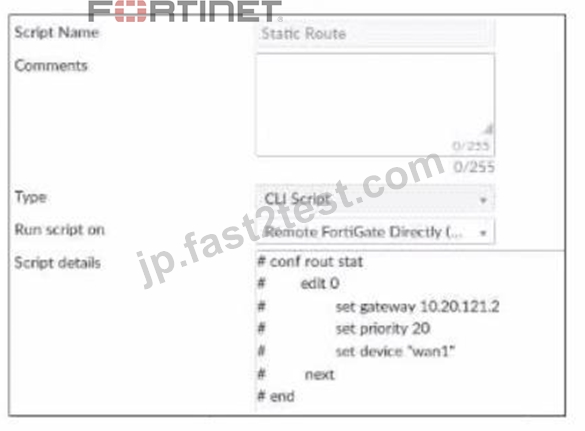
Refer to the exhibit, which contains a CLI script configuration on fortiManager. An administrator configured the CLI script on FortiManager rut the script tailed to apply any changes to the managed device after being executed.
What are two reasons why the script did not make any changes to the managed device? (Choose two)
- A. Static routes can be added using only TCI scripts.
- B. CLI scripts must start with #!.
- C. The commands that start with the # sign did not run.
- D. Incomplete commands can cause CLI scripts to fail.
正解:C、D
解説:
The commands that start with the # sign did not run because they are treated as comments in the CLI script.
Incomplete commands can cause CLI scripts to fail because they are not recognized by the FortiGate device.
The other options are incorrect because static routes can be added using CLI or GUI, and CLI scripts do not need to start with #!. References := Configuring custom scripts | FortiManager 7.2.0 - Fortinet Documentation, section "CLI script syntax".
質問 # 35
Refer to the exhibit, which contains partial output from an IKE real-time debug.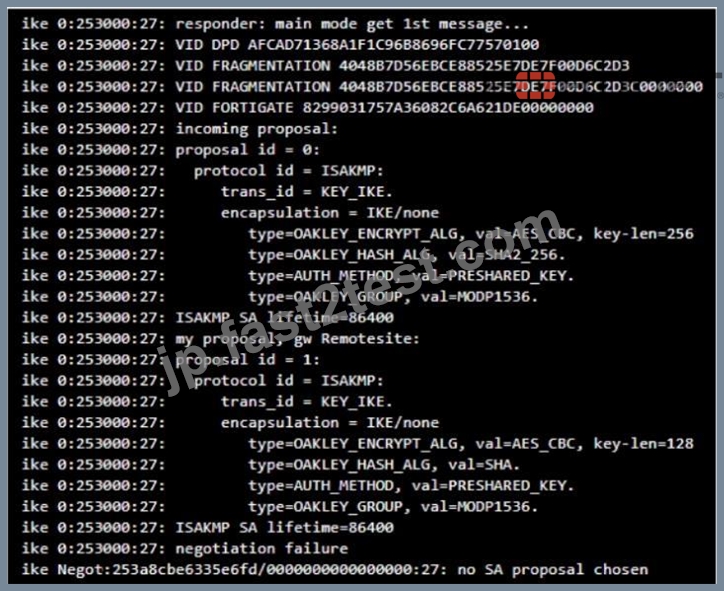
Why did the tunnel not come up?
- A. The proposal ID does not match between local and remote gateways.
- B. The encapsulation method for phase 2 is set to none on local and remote gateways.
- C. The local gateway has configured less secure encryption and hashing algorithms compared to the remote gateway.
- D. The Diffie-Hellman group does not match on the local and remote gateways.
正解:C
解説:
local gateway: encryption AES-128, hash SHA
remote gateway: encryption AES-256, hash SHA-256
So local gateway has less secure settings
質問 # 36
Refer to the exhibit, which shows a routing table.
What two options can you configure in OSPF to block the advertisement of the 10.1.10.0 prefix?
(Choose two.)
- A. Configure a distribute-list-out
- B. Configure a route-map out
- C. Remove the 10.1.10.0 prefix from the OSPF network
- D. Disable Redistribute Connected
正解:C、D
解説:
On OSFP distribute-list and route-maps exist only incoming, and because you want to exclude a connected network from redistribution you can not use the option "redistibute connected", so you have to specify the networks manually.
質問 # 37
You created a VPN community using VPN Manager on FortiManager. You also added gateways to the VPN community. Now you are trying to create firewall policies to permit traffic over the tunnel however, the VPN interfaces do not appear as available options.
- A. Refresh the device status using the Device Manager so that FortiGate populates the IPSec interfaces
- B. install the VPN community and gateway configuration on the fortiGate devices so that the VPN interfaces appear on the Policy Objects on fortiManager.
- C. Create interface mappings for the IPsec VPN interfaces before you use them in a policy.
- D. Configure the phase 1 settings in the VPN community that you didnt initially configure. FortiGate automatically generates the interfaces after you configure the required settings
正解:B
解説:
To use the VPN interfaces in a policy, you need to install the VPN community and gateway configuration on the FortiGate devices first. This will create the VPN interfaces on the FortiGate and sync them with FortiManager. References:
* Creating IPsec VPN communities
* VPN | FortiGate / FortiOS 7.2.0
質問 # 38
Exhibit.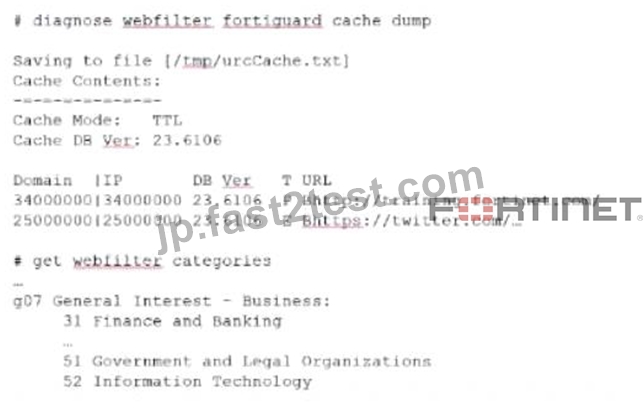
Refer to the exhibit, which shows the output from the webfilter fortiguard cache dump and webfilter categories commands.
Using the output, how can an administrator determine the category of the training.fortinet.comam website?
- A. The administrator can look up the hex value of 34 in the second command output.
- B. The administrator must convert the first three digits of the IP hex value to binary
- C. The administrator must add both the Pima in and Iphex values of 34 to get the category number
- D. The administrator must convert the first two digits of the Domain hex value to a decimal value
正解:A
解説:
* Option B is correct because the administrator can determine the category of the training.fortinet.com website by looking up the hex value of 34 in the second command output. This is because the first command output shows that the domain and the IP of the website are both in category (Hex) 34, which corresponds to Information Technology in the second command output1.
* Option A is incorrect because the administrator does not need to convert the first three digits of the IP hex value to binary. The IP hex value is already in the same format as the category hex value, so the administrator can simply compare them without any conversion2.
* Option C is incorrect because the administrator does not need to add both the Pima in and Iphex values of 34 to get the category number. The Pima in and Iphex values are not related to the category number, but to the cache TTL and the database version respectively3.
* Option D is incorrect because the administrator does not need to convert the first two digits of the Domain hex value to a decimal value. The Domain hex value is already in the same format as the category hex value, so the administrator can simply compare them without any conversion2. References:
=
* 1: Technical Tip: Verify the webfilter cache content4
* 2: Hexadecimal to Decimal Converter5
* 3: FortiGate - Fortinet Community6
* : Web filter | FortiGate / FortiOS 7.2.0 - Fortinet Documentation7
質問 # 39
Refer to the exhibits, which show the configurations of two address objects from the same FortiGate.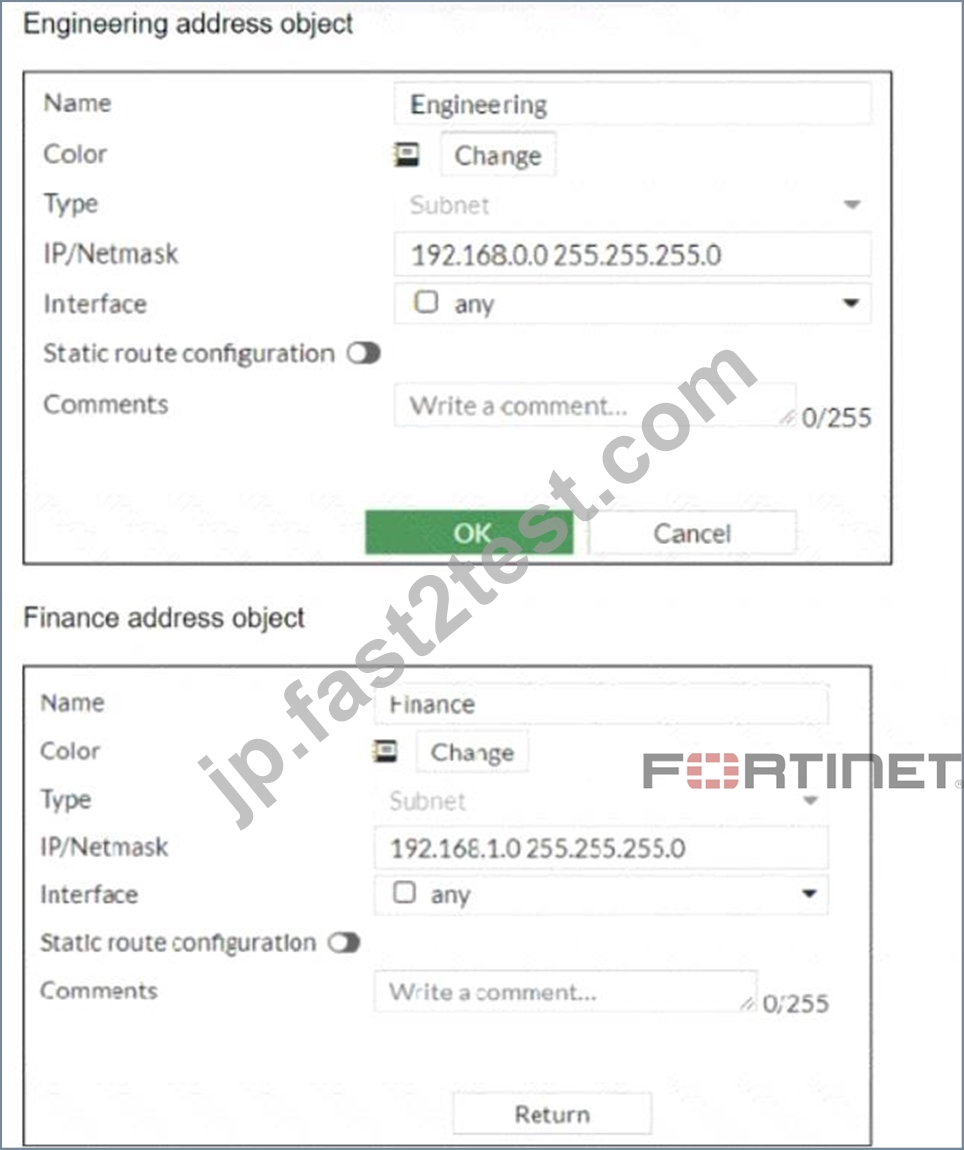
Why can you modify the Engineering address object, but not the Finance address object?
- A. You have read-only access.
- B. FortiGate is registered on FortiManager.
- C. Another user is editing the Finance address object in workspace mode.
- D. FortiGate joined the Security Fabric and the Finance address object was configured on the root FortiGate.
正解:D
解説:
The inability to modify the Finance address object while being able to modify the Engineering address object suggests that the Finance object is being managed by a higher authority in the Security Fabric, likely the root FortiGate. When a FortiGate is part of a Security Fabric, address objects and other configurations may be managed centrally. This aligns with the Fortinet FortiGate documentation on Security Fabric and central management of address objects.
質問 # 40
Exhibit.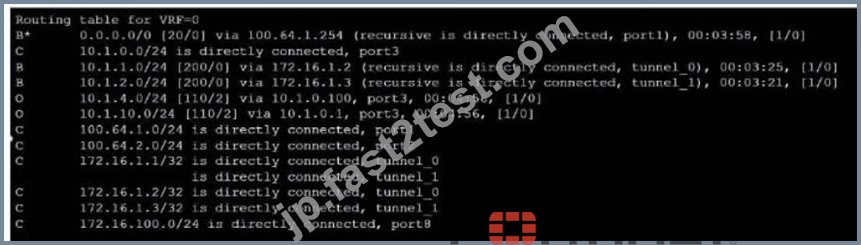
Refer to the exhibit, which shows a partial touting table
What two concisions can you draw from the corresponding FortiGate configuration? (Choose two.)
- A. net-device is enabled in the tunnel IPSec phase 1 configuration
- B. IPSec Tunnel aggregation is configured
- C. add-route is disabled in the tunnel IPSec phase 1 configuration.
- D. OSPI is configured to run over IPSec.
正解:A、C
解説:
Option B is correct because the routing table shows that the tunnel interfaces have a netmask of 255.255.255.255, which indicates that net-device is enabled in the phase 1 configuration. This option allows the FortiGate to use the tunnel interface as a next-hop for routing, without adding a route to the phase 2 destination1.
Option D is correct because the routing table does not show any routes to the phase 2 destination networks, which indicates that add-route is disabled in the phase 1 configuration. This option controls whether the FortiGate adds a static route to the phase 2 destination network using the tunnel interface as the gateway2.
Option A is incorrect because IPSec tunnel aggregation is a feature that allows multiple phase 2 selectors to share a single phase 1 tunnel, reducing the number of tunnels and improving performance3. This feature is not related to the routing table or the phase 1 configuration.
Option C is incorrect because OSPF is a dynamic routing protocol that can run over IPSec tunnels, but it requires additional configuration on the FortiGate and the peer device4. This option is not related to the routing table or the phase 1 configuration. Reference: =
1: Technical Tip: 'set net-device' new route-based IPsec logic2
2: Adding a static route5
3: IPSec VPN concepts6
4: Dynamic routing over IPsec VPN7
質問 # 41
Exhibit.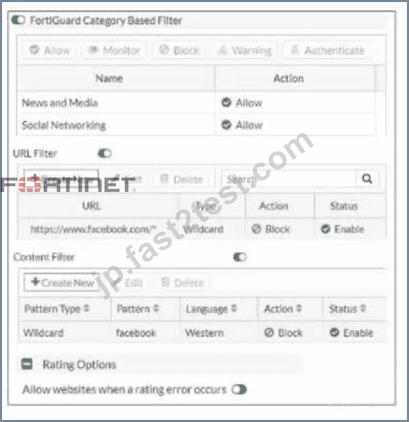
Refer to the exhibit, which shows a partial web filter profile conjuration What can you cone udo from this configuration about access to www.facebook, com, which is categorized as Social Networking?
- A. The access is hocked if the local or the public FortiGuard server does not reply
- B. The access is blocked based on the URL Filter configuration
- C. The access is blocked based on the Content Filter configuration
- D. The access is allowed based on the FortiGuard Category Based Filter configuration
正解:B
解説:
The access to www.facebook.com is blocked based on the URL Filter configuration. In the exhibit, it shows that the URL "www.facebook.com" is specifically set to "Block" under the URL Filter section1. References :
= Fortigate: How to configure Web Filter function on Fortigate, Web filter | FortiGate / FortiOS 7.0.2 | Fortinet Document Library, FortiGate HTTPS web URL filtering ... - Fortinet ... - Fortinet Community
質問 # 42
Refer to the exhibit, which shows two configured FortiGate devices and peering over FGSP.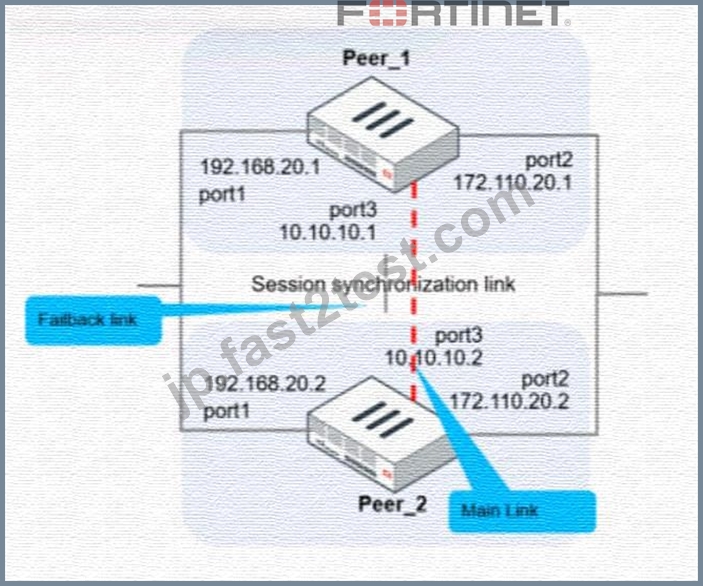
The main link directly connects the two FortiGate devices and is configured using the set session-syn-dev <interface> command.
What is the primary reason to configure the main link?
- A. To have both sessions and configuration synchronization in layer 3
- B. To have only configuration synchronization in layer 3
- C. To have both sessions and configuration synchronization in layer 2
- D. To load balance both sessions and configuration synchronization between layer 2 and 3
正解:A
解説:
The primary purpose of configuring a main link between the devices is to synchronize session information so that if one unit fails, the other can continue processing traffic without dropping active sessions.
A).To have both sessions and configuration synchronization in layer 2.This is incorrect because FGSP is used for session synchronization, not configuration synchronization.
B).To load balance both sessions and configuration synchronization between layer 2 and 3.FGSP does not perform load balancing and is not used for configuration synchronization.
C).To have only configuration synchronization in layer 3.The main link is not used solely for configuration synchronization.
D).To have both sessions and configuration synchronization in layer 3.The main link in an FGSP setup is indeed used to synchronize session information across the devices, and it operates at layer 3 since it uses IP addresses to establish the peering.
質問 # 43
Which ADVPN configuration must be configured using a script on fortiManager, when using VPN Manager to manage fortiGate VPN tunnels?
- A. Set protected network to all
- B. Enable AD-VPN in IPsec phase 1
- C. Configure IP addresses on IPsec virtual interfaces
- D. Disable add-route on hub
正解:B
解説:
To enable AD-VPN, you need to edit an SD-WAN overlay template and enable the Auto-Discovery VPN toggle. This will automatically add the required settings to the IPsec template and the BGP template. You cannot enable AD-VPN directly in the IPsec phase 1 settings using VPN Manager. References := ADVPN | FortiManager 7.2.0 - Fortinet Documentation
質問 # 44
Exhibit.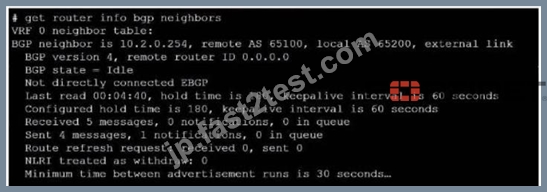
Refer to the exhibit, which provides information on BGP neighbors.
Which can you conclude from this command output?
- A. The bfd configuration to set to enable.
- B. You must change the AS number to match the remote peer.
- C. BGP is attempting to establish a TCP connection with the BGP peer.
- D. The router are in the number to match the remote peer.
正解:C
解説:
The BGP state is "Idle", indicating that BGP is attempting to establish a TCP connection with the peer. This is the first state in the BGP finite state machine, and it means that no TCP connection has been established yet.
If the TCP connection fails, the BGP state will reset to either active or idle, depending on the configuration. References: You can find more information about BGP states and troubleshooting in the following Fortinet Enterprise Firewall 7.2 documents:
* Troubleshooting BGP
* How BGP works
質問 # 45
......
NSE7_EFW-7.2認証問題集NSE 7 Network Security Architect NSE7_EFW-7.2ガイド 100%有効:https://jp.fast2test.com/NSE7_EFW-7.2-premium-file.html