

良質なAZ-700日本語のPDF問題集でAZ-700日本語試験問題を試せます
一番最新のMicrosoft AZ-700日本語試験問題集PDF2024年更新
質問 # 37
オンプレミス ネットワークがあります。
VNet1 という名前の仮想ネットワークを含む Azure サブスクリプションがあります。VNet1 は、Hub1 という名前の Azure Virtual WAN ハブに接続されています。
Hub1 を使用して、オンプレミス ネットワークと VNet1 間の接続を有効にする必要があります。
どの 3 つのアクションを順番に実行する必要がありますか? 回答するには、アクション リストから適切なアクションを回答領域に移動し、正しい順序で並べます。
正解:
解説:
1 - Create a VPN site.
2 - Connect the VPN site to Hub1.
3 - Configure a Site-toSite (S2S) VPN gateway.
質問 # 38
ネットワークセキュリティ要件を満たすために、NSG10とNSG11を作成します。
次の各ステートメントについて、[はい]を選択します。ステートメントが正しい場合。それ以外の場合は、[いいえ]を選択します。
注:正しい選択はそれぞれ1ポイントの価値があります。
正解:
解説:
質問 # 39
www.contoso.comのFQDNを使用するWebサイトがあります。 www.contoso.comのDNSレコードは、オンプレミスのWebサーバーに解決されます。
WebサイトをWeb1という名前のAzureWebアプリに移行することを計画しています。 Web1のWebサイトは、ContosoFD1という名前のAzure FrontDoorインスタンスを使用して公開されます。
Web1でWebサイトを構築します。
テスト用にWebサイトを公開するようにContosoFD1を構成する予定です。
ContosoFD1でwww.contoso.comのカスタムドメインを構成しようとすると、展示に示されているエラーメッセージが表示されます。
オンプレミスWebサーバーへのユーザーアクセスに影響を与えることなく、WebサイトとContosoFD1をテストする必要があります。
contoso.com DNSドメインにどのレコードを作成する必要がありますか?
- A. www.contoso.comをWeb1.contoso.comにマップするCNAMEレコード
- B. afdverify.www.contoso.comをafdverify.ContosoFD1.azurefd.netにマップするCNAMEレコード
- C. www.contoso.comをContosoFD1.azurefd.netにマップするCNAMEレコード
- D. afdverify.www.contoso.comをContosoFD1.azurefd.netにマップするCNAMEレコード
正解:B
解説:
Reference:
https://docs.microsoft.com/en-us/azure/frontdoor/front-door-custom-domain#map-the-temporary-afdverify-subdo
質問 # 40
注:この質問は、同じシナリオを提示する一連の質問の一部です。シリーズの各質問には、述べられた目標を達成する可能性のある独自の解決策が含まれています。一部の質問セットには複数の正しい解決策がある場合がありますが、他の質問セットには正しい解決策がない場合があります。
このセクションの質問に回答した後は、その質問に戻ることはできません。その結果、これらの質問はレビュー画面に表示されません。
Azure Web Application Firewall(WAF)が有効になっているAzureアプリケーションゲートウェイがあります。
トラフィックをアプリケーションゲートウェイのURLに転送するようにアプリケーションゲートウェイを構成します。
URLにアクセスしようとすると、HTTP403エラーが発生します。診断ログを表示して、次のエラーを発見します。
URLがアプリケーションゲートウェイを介してアクセス可能であることを確認する必要があります。
解決策:137.135.10.24を含むリクエストヘッダーに対してWAFポリシー除外を作成します。
これは目標を達成していますか?
- A. はい
- B. いいえ
正解:B
質問 # 41
Vnet2 と Vnet3 でデフォルト ルートを構成する必要があります。ソリューションは仮想ネットワーク要件を満たしている必要があります。
デフォルトルートの設定には何を使用する必要がありますか?
- A. BGPルート交換
- B. Vnet1 の GatewaySubnet に割り当てられたユーザー定義ルート
- C. ルートフィルター
- D. Vnet2 および Vnet3 の GatewaySubnet に割り当てられたユーザー定義ルート
正解:A
質問 # 42
Subscnption1とSubscription2という名前の2つのAzureサブスクリプションがあります。 Subscription1には、Vnet1という名前の仮想ネットワークが含まれています。 Vnet1にはアプリケーションサーバーが含まれています。 Subscription2には、Vnet2という名前の仮想ネットワークが含まれています。
プライベートエンドポイントを使用して、Vnet2の仮想マシンにVnet1のアプリケーションサーバーへのアクセスを提供する必要があります。
順番に実行する必要がある4つのアクションはどれですか?回答するには、適切なアクションをアクションのリストから回答領域に移動し、正しい順序に並べます。
正解:
解説:
1 - In Subscription1, accept the private endpoint connection request.
2 - Enable virtual network peering between Vnet1 and Vnet2.
3 - Deploy an Azure Standard Load Balancer in front of the application server.
4 - In Subscription1, create a private link service and attach the service to the frontend IP configuration of teh load balancer.
質問 # 43
会社の本社とAzure仮想ネットワークの間にサイト間VPN接続を確立できません。
IPsecトンネルを確立できない原因をトラブルシューティングする必要があります。
どの診断ログを確認する必要がありますか?
- A. IKEDiagnosticLog
- B. TunnelDiagnosticLog
- C. RouteDiagnosticLog
- D. GatewayDiagnosticLog
正解:A
解説:
Reference:
https://docs.microsoft.com/en-us/azure/vpn-gateway/troubleshoot-vpn-with-azure-diagnostics IKEDiagnosticLog = The IKEDiagnosticLog table offers verbose debug logging for IKE/IPsec. This is very useful to review when troubleshooting disconnections, or failure to connect VPN scenarios.
GatewayDiagnosticLog = Configuration changes are audited in the GatewayDiagnosticLog table.
TunnelDiagnosticLog = The TunnelDiagnosticLog table is very useful to inspect the historical connectivity statuses of the tunnel.
RouteDiagnosticLog = The RouteDiagnosticLog table traces the activity for statically modified routes or routes received via BGP.
P2SDiagnosticLog = The last available table for VPN diagnostics is P2SDiagnosticLog. This table traces the activity for Point to Site.
https://docs.microsoft.com/en-us/azure/vpn-gateway/troubleshoot-vpn-with-azure-diagnostics
質問 # 44
storage1への接続を提供する必要があります。ソリューションは、PaaSネットワーキング要件とビジネス要件を満たす必要があります。
ソリューションに何を含める必要がありますか?
- A. Azureフロントドア
- B. Azure Traffic Manager
- C. サービスエンドポイント
- D. プライベートエンドポイント
正解:C
解説:
Reference:
https://docs.microsoft.com/en-us/azure/virtual-network/virtual-network-service-endpoints-overview
Topic 2, Contoso Case Study 2
Overview
This is a case study. Case studies are not timed separately. You can use as much exam time as you would like to complete each case. However, there may be additional case studies and sections on this exam. You must manage your time to ensure that you are able to complete all questions included on this exam in the time provided.
To answer the questions included in a case study, you will need to reference information that is provided in the case study. Case studies might contain exhibits and other resources that provide more information about the scenario that is described in the case study. Each question is independent of the other questions in this case study.
At the end of this case study, a review screen will appear. This screen allows you to review your answers and to make changes before you move to the next section of the exam. After you begin a new section, you cannot return to this section.
To start the case study
To display the first question in this case study, click the Next button. Use the buttons in the left pane to explore the content of the case study before you answer the questions. Clicking these buttons displays information such as business requirements, existing environment, and problem statements. If the case study has an All Information tab. note that the information displayed is identical to the information displayed on the subsequent tabs. When you are ready to answer a question, click the Question button to return to the question.
Existing Environment:
Azure Network Infrastructure
Contoso has an Azure Active Directory (Azure AD) tenant named contoso.com.
The Azure subscription contains the virtual networks shown in the following table.
Vnet1 contains a virtual network gateway named GW1.
Azure Virtual Machines
The Azure subscription contains virtual machines that run Windows Server 2019 as shown in the following table.
The NSGs are associated to the network interfaces on the virtual machines. Each NSG has one custom security rule that allows RDP connections from the internet. The firewall on each virtual machine allows ICMP traffic.
An application security group named ASG1 is associated to the network interface of VM1.
Azure Private DNS Zones
The Azure subscription contains the Azure private DNS zones shown in the following table.
Zone1.contoso.com has the virtual network links shown in the following table.
Other Azure Resources
The Azure subscription contains additional resources as shown in the following table.
Requirements:
Virtual Network Requirements
Contoso has the following virtual networks requirements:
* Create a virtual network named Vnet6 in West US that will contain the following resources and configurations:
Two container groups that connect to Vnet6
Three virtual machines that connect to Vnet6
Allow VPN connections to be established to Vnet6
Allow the resources in Vnet6 to access KeyVault1, DB1, and Vnet1 over the Microsoft backbone network
* The virtual machines in Vnet4 and Vnet5 must be able to communicate over the Microsoft backbone network.
* A virtual machine named VM-Analyze will be deployed to Subnet1. VM-Analyze must inspect the outbound network traffic from Subnet2 to the internet.
Network Security Requirements
Contoso has the following network security requirements:
* Configure Azure Active Directory (Azure AD) authentication for Point-to-Site (P2S) VPN users.
* Enable NSG flow logs for NSG3 and NSG4.
* Create an NSG named NSG10 that will be associated to Vnet1/Subnet1 and will have the custom inbound security rules shown in the following table.
* Create an NSG named NSG11 that will be associated to Vnet1/Subnet2 and will have the custom outbound security rules shown in the following table.
質問 # 45
次の表に示す仮想マシンを含むAzureサブスクリプションがあります。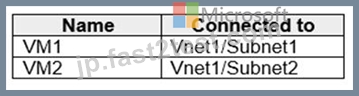
Subnet1とSubnet2は、次のアウトバウンドルールを持つNSG1という名前のネットワークセキュリティグループ(NSG)に関連付けられています。
優先度:100
ポート:任意
プロトコル:任意
出典:任意
宛先:ストレージ
アクション:拒否
次の設定を持つプライベートエンドポイントを作成します。
名前:Private1
リソースタイプ:Microsoft.Storage / storageAccounts
リソース:storage1
ターゲットサブリソース:blob
仮想ネットワーク:Vnet1
サブネット:サブネット1
次の各ステートメントについて、[はい]を選択します。ステートメントはtrueです。それ以外の場合は、[いいえ]を選択します。
注:正しい選択はそれぞれ1ポイントの価値があります。
正解:
解説: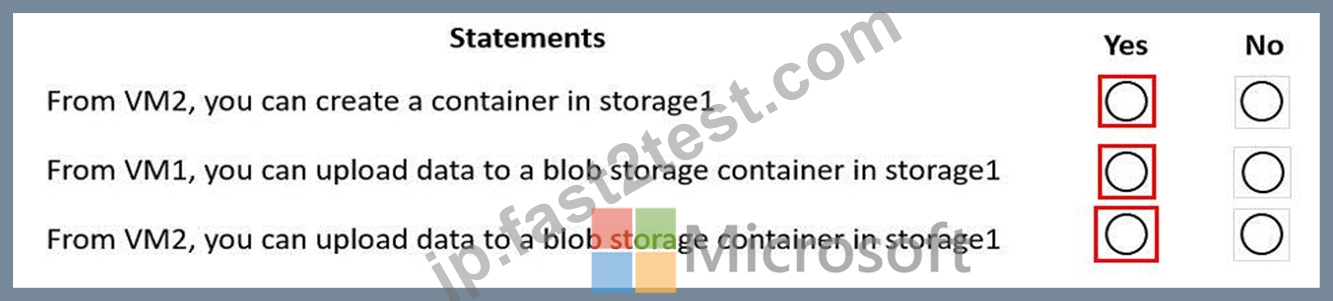
質問 # 46
次の各ステートメントについて、ステートメントがtrueの場合は、[はい]を選択します。それ以外の場合は、[いいえ]を選択します。
注:正しい選択はそれぞれ1ポイントの価値があります。
正解:
解説:
Explanation
Graphical user interface, text, application, email Description automatically generated
Box 1: No
Zone2.contoso.com is not linked to any virtual networks. Therefore, no VMs are able to resolve names in the zone.
Box 2: Yes
VM4 is in VNet3. Zone1.contoso.com has a link to VNet3 and auto-registration is enabled on the link.
Box3: No
VNet3 is linked to zone1.contoso.com and auto-registration is enabled on the link. A virtual network can only have one registration zone. You can link zone2.contoso.com to VNet3 but you won't be able to enable auto-registration on the link.
質問 # 47
App1という名前のWebアプリ用のAzureアプリケーションゲートウェイがあります。アプリケーションゲートウェイでは、エンドツーエンドの暗号化が可能です。
エンタープライズ署名付き証明書をアップロードして、HTTPSのリスナーを構成します。
アプリケーションゲートウェイがApp1にエンドツーエンドの暗号化を提供できることを確認する必要があります。あなたは何をするべきか?
- A. 公開鍵証明書をHTTP設定にアップロードします。
- B. リスナーのSSLプロファイルを有効にします。
- C. リスナータイプをマルチサイトに設定します。
- D. カスタムプローブの異常しきい値設定を増やします。
正解:A
解説:
Reference:
https://docs.microsoft.com/en-us/azure/application-gateway/end-to-end-ssl-portal
質問 # 48
Azure仮想ネットワークで2つのネットワーク仮想アプライアンス(NVA)を構成しています。 NVAは、仮想ネットワーク内のすべてのトラフィックを検査するために使用されます。
NVAに高可用性を提供する必要があります。ソリューションは、管理作業を最小限に抑える必要があります。ソリューションに何を含める必要がありますか?
- A. Azureフロントドア
- B. Azure標準ロードバランサー
- C. Azure Traffic Manager
- D. Azure Application Gateway
正解:B
解説:
Reference:
https://docs.microsoft.com/en-us/azure/architecture/reference-architectures/dmz/nva-ha?tabs=cli
質問 # 49
あなたの会社はアムステルダムとアムステルダムにオフィスを持っています。会社は Azure サブスクリプションを持っています。どちらのオフィスも、サイト間 VPN 接続を使用して Azure に接続します。
アムステルダムのオフィスは、北欧 Azure リージョンのリソースを使用しています。ニューヨークのオフィスは、米国東部の Azure リージョンのリソースを使用しています。
各オフィスを最寄りの Azure リージョンに接続するには、ExpressRoute 回線を実装する必要があります。ExpressRoute 回線が接続されたら、アムステルダム オフィスのオンプレミス コンピューターは、ExpressRoute 回線を使用してニューヨーク オフィスのオンプレミス サーバーに接続できる必要があります。
どの ExpressRoute オプションを使用する必要がありますか?
- A. ExpressRoute ローカル
- B. ExpressRoute ファストパス
- C. ExpressRoute のグローバル リーチ
- D. ExpressRoute ダイレクト
正解:C
解説:
Reference:
https://docs.microsoft.com/en-us/azure/expressroute/expressroute-global-reach
質問 # 50
注:この質問は、同じシナリオを提示する一連の質問の一部です。シリーズの各質問には、述べられた目標を達成する可能性のある独自の解決策が含まれています。一部の質問セットには複数の正しい解決策がある場合がありますが、他の質問セットには正しい解決策がない場合があります。
このセクションの質問に回答した後は、その質問に戻ることはできません。その結果、これらの質問はレビュー画面に表示されません。
Azure Web Application Firewall(WAF)が有効になっているAzureアプリケーションゲートウェイがあります。
トラフィックをアプリケーションゲートウェイのURLに転送するようにアプリケーションゲートウェイを構成します。
URLにアクセスしようとすると、HTTP403エラーが発生します。診断ログを表示して、次のエラーを発見します。
URLがアプリケーションゲートウェイを介してアクセス可能であることを確認する必要があります。
解決策:カスタムCookieと除外ルールを構成します。
これは目標を達成していますか?
- A. はい
- B. いいえ
正解:A
質問 # 51
Subnet1 と Subnet2 という名前の 2 つのサブネットを含む Vnet1 という名前の Azure 仮想ネットワークがあります。両方のサブネットに仮想マシンが含まれています。次の図に示すように、NATgateway1 という名前の NAT ゲートウェイを作成します。
ドロップダウン メニューを使用して、図に示されている情報に基づいて各ステートメントを完成させる回答の選択肢を選択します。注: それぞれの正しい選択は 1 ポイントの価値があります。
正解:
解説:
質問 # 52
Subscnption1とSubscription2という名前の2つのAzureサブスクリプションがあります。 Subscription1には、Vnet1という名前の仮想ネットワークが含まれています。 Vnet1にはアプリケーションサーバーが含まれています。 Subscription2には、Vnet2という名前の仮想ネットワークが含まれています。
プライベートエンドポイントを使用して、Vnet2の仮想マシンにVnet1のアプリケーションサーバーへのアクセスを提供する必要があります。
順番に実行する必要がある4つのアクションはどれですか?回答するには、適切なアクションをアクションのリストから回答領域に移動し、正しい順序に並べます。
正解:
解説: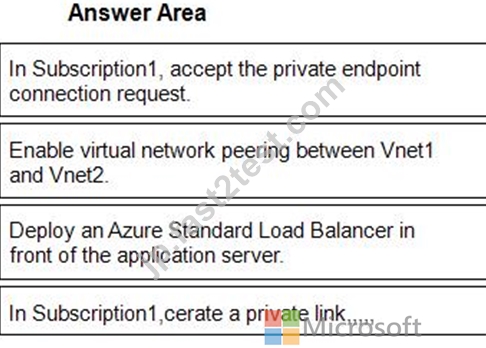
1 - In Subscription1, accept the private endpoint connection request.
2 - Enable virtual network peering between Vnet1 and Vnet2.
3 - Deploy an Azure Standard Load Balancer in front of the application server.
4 - In Subscription1,cerate a private link,,,,,
質問 # 53
タスク 7
VNET2 上のホストが VNET1 と VNET3 の両方のホストにアクセスできることを確認する必要があります。このソリューションでは、VNET1 と VNET3 上のホストが VNET2 を介して通信できないようにする必要があります。
正解:
解説:
See the Explanation below for step by step instructions.
Explanation
Here are the steps and explanations for ensuring that hosts on VNET2 can access hosts on both VNET1 and VNET3, but hosts on VNET1 and VNET3 cannot communicate through VNET2:
To connect different virtual networks in Azure, you need to use virtual network peering. Virtual network peering allows you to create low-latency, high-bandwidth connections between virtual networks without using gateways or the internet1.
To create a virtual network peering, you need to go to the Azure portal and select your virtual network. Then select Peerings under Settings and select + Add2.
On the Add peering page, enter or select the following information:
Name: Type a unique name for the peering from the source virtual network to the destination virtual network.
Virtual network deployment model: Select Resource manager.
Subscription: Select the subscription that contains the destination virtual network.
Virtual network: Select the destination virtual network from the list or enter its resource ID.
Name of the peering from [destination virtual network] to [source virtual network]: Type a unique name for the peering from the destination virtual network to the source virtual network.
Configure virtual network access settings: Select Enabled to allow resources in both virtual networks to communicate with each other.
Allow forwarded traffic: Select Disabled to prevent traffic that originates from outside either of the peered virtual networks from being forwarded through either of them.
Allow gateway transit: Select Disabled to prevent either of the peered virtual networks from using a gateway in the other virtual network.
Use remote gateways: Select Disabled to prevent either of the peered virtual networks from using a gateway in the other virtual network as a transit point to another network.
Select Add to create the peering2.
Repeat the previous steps to create peerings between VNET2 and VNET1, and between VNET2 and VNET3. This will allow hosts on VNET2 to access hosts on both VNET1 and VNET3.
To prevent hosts on VNET1 and VNET3 from communicating through VNET2, you need to use network security groups (NSGs) to filter traffic between subnets. NSGs are rules that allow or deny inbound or outbound traffic based on source or destination IP address, port, or protocol3.
To create an NSG, you need to go to the Azure portal and select Create a resource. Search for network security group and select Network security group. Then select Create4.
On the Create a network security group page, enter or select the following information:
Subscription: Select your subscription name.
Resource group: Select your resource group name.
Name: Type a unique name for your NSG.
Region: Select the same region as your virtual networks.
Select Review + create and then select Create to create your NSG4.
To add rules to your NSG, you need to go to the Network security groups service in the Azure portal and select your NSG. Then select Inbound security rules or Outbound security rules under Settings and select + Add4.
On the Add inbound security rule page or Add outbound security rule page, enter or select the following information:
Source or Destination: Select CIDR block.
Source CIDR blocks or Destination CIDR blocks: Enter the IP address range of the source or destination subnet that you want to filter. For example, 10.0.1.0/24 for VNET1 subnet 1,
10.0.2.0/24 for VNET2 subnet 1, and 10.0.3.0/24 for VNET3 subnet 1.
Protocol: Select Any to apply the rule to any protocol.
Action: Select Deny to block traffic from or to the source or destination subnet.
Priority: Enter a number between 100 and 4096 that indicates the order of evaluation for this rule.
Lower numbers have higher priority than higher numbers.
Name: Type a unique name for your rule.
Select Add to create your rule4.
Repeat the previous steps to create inbound and outbound rules for your NSG that deny traffic between VNET1 and VNET3 subnets. For example, you can create an inbound rule that denies traffic from
10.0.1.0/24 (VNET1 subnet 1) to 10.0.3.0/24 (VNET3 subnet 1), and an outbound rule that denies traffic from 10.0.3.0/24 (VNET3 subnet 1) to 10.0.1.0/24 (VNET1 subnet 1).
To associate your NSG with a subnet, you need to go to the Virtual networks service in the Azure portal and select your virtual network. Then select Subnets under Settings and select the subnet that you want to associate with your NSG5.
On the Edit subnet page, under Network security group, select your NSG from the drop-down list. Then select Save5.
Repeat the previous steps to associate your NSG with the subnets in VNET1 and VNET3 that you want to isolate from each other.
質問 # 54
3つのオンプレミスサイトがあります。各サイトにはサードパーティのVPNデバイスがあります。
Hub1という名前のハブを持つVWAN1という名前のAzure仮想WANがあります。 Hub1は、サイト間VPN接続を使用して、3つのオンプレミスサイトのうちの2つを接続します。
Hub1を使用して、3番目のサイトを他の2つのサイトに接続する必要があります。
順番に実行する必要がある4つのアクションはどれですか?回答するには、適切なアクションをアクションのリストから回答領域に移動し、正しい順序に並べます。
正解:
解説: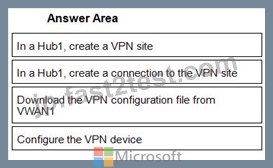
1 - In a Hub1, create a VPN site
2 - In a Hub1, create a connection to the VPN site
3 - Download the VPN configuration file from VWAN1
4 - Configure the VPN device
Reference:
https://docs.microsoft.com/en-us/azure/virtual-wan/virtual-wan-site-to-site-portal
質問 # 55
オンプレミスネットワークとAzure環境を接続する必要があります。ソリューションはExpressRouteを使用し、ExpressRouteに障害が発生した場合のサイト間VPN接続へのフェイルオーバーをサポートする必要があります。
何を設定する必要がありますか?回答するには、回答領域で適切なオプションを選択します。
注:正しい選択はそれぞれ1ポイントの価値があります。
正解:
解説: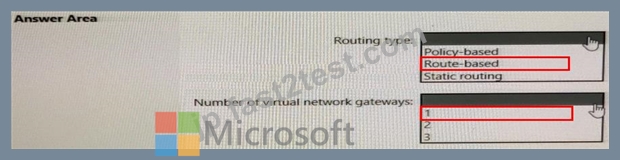
Reference:
https://docs.microsoft.com/en-us/azure/expressroute/expressroute-howto-coexist-resource-manager
質問 # 56
Hub1とSpoke1という名前の2つのAzure仮想ネットワークがあります。 Hub1は、サイト間VPN接続を使用してオンプレミスネットワークに接続します。
Hub1とSpoke1の間にピアリングを実装しています。
Spoke1に接続された仮想マシンが、Hub1を介してオンプレミスネットワークに接続できることを確認する必要があります。
PowerShellスクリプトをどのように完了する必要がありますか?答えるには、適切な値を正しいターゲットにドラッグします。各値は、1回使用することも、複数回使用することも、まったく使用しないこともできます。コンテンツを表示するには、ペイン間で分割バーをドラッグするか、スクロールする必要がある場合があります。
注:正しい選択はそれぞれ1ポイントの価値があります。
正解:
解説:
Explanation
Graphical user interface, text, application Description automatically generated
Reference:
https://docs.microsoft.com/en-us/azure/architecture/reference-architectures/hybrid-networking/hub-spoke?tabs=c
質問 # 57
......
100%無料Microsoft Certified: Azure Network Engineer Associate AZ-700日本語問題集PDFお試しサンプル認定ガイドカバー率:https://jp.fast2test.com/AZ-700J-premium-file.html