

正真正銘のMD-102日本語問題集には100%合格率練習テスト問題集
Microsoft MD-102日本語リアル試験問題保証付き 更新された問題集
質問 # 71
お客様のMicrosoft Entraテナントには、以下の表に示すユーザーが含まれています。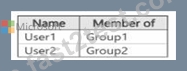
以下の表に示すように、Microsoft Intuneに登録されているデバイスがあります。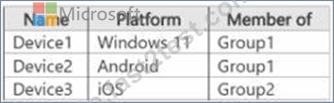
Intune から、Notification! という名前のカスタム通知を作成し、Group1 に送信します。以下の各項目について、該当する場合は「はい」を選択してください。該当しない場合は「いいえ」を選択してください。
注:正解ごとに1ポイントが加算されます。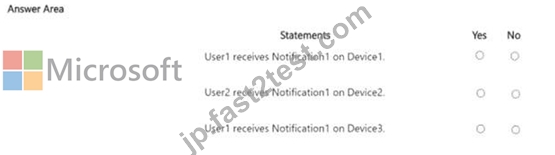
正解:
解説: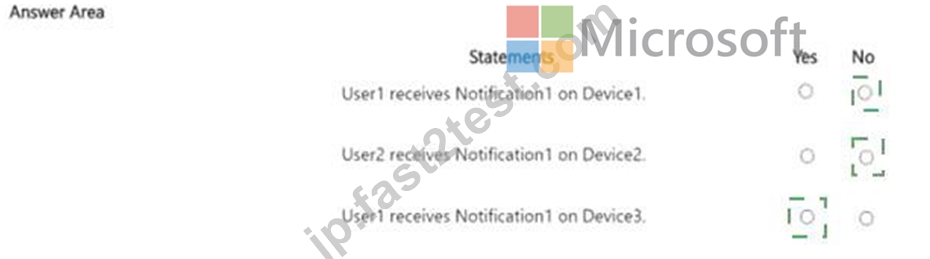
Explanation: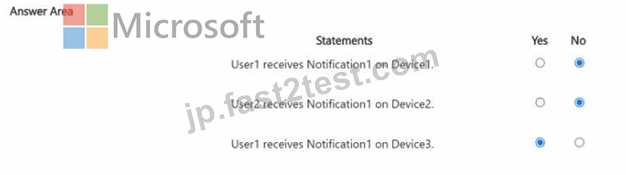
質問 # 72
ホットスポットに関する質問
ネットワークには Active Directory ドメインが含まれています。Active Directory は Azure AD と同期されています。
Windows 10 を実行し、Microsoft Intune に登録されている Active Directory ドメインに参加しているコンピューターが 500 台あります。
Microsoft Defender Exploit Guard を実装する予定です。
カスタムの Microsoft Defender Exploit Guard ポリシーを作成し、そのポリシーをすべてのコンピューターに配布する必要があります。
どうすればいいでしょうか? 回答するには、回答エリアで適切なオプションを選択してください。
注意: 正しい選択ごとに 1 ポイントが付与されます。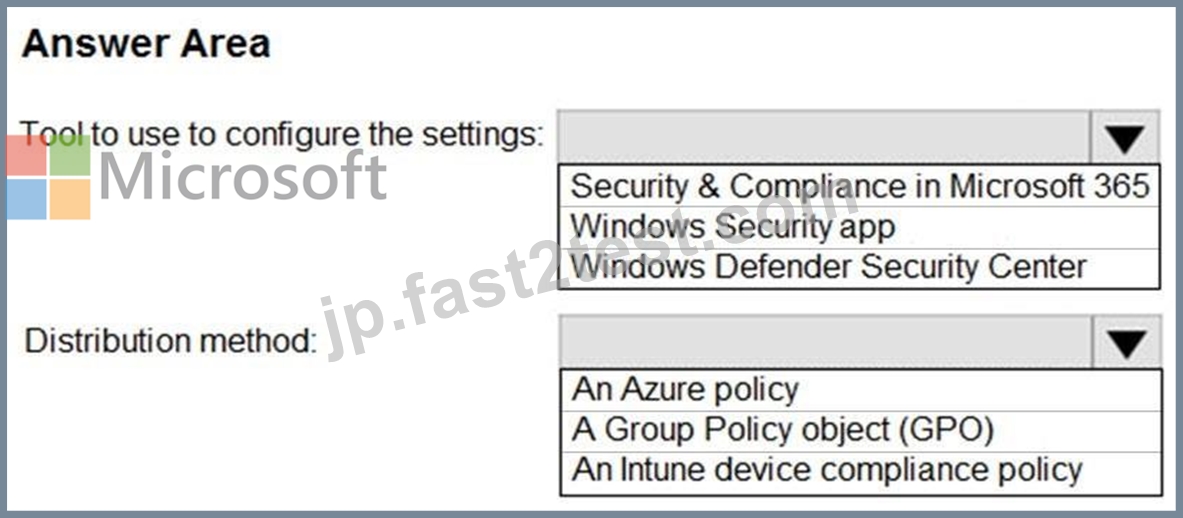
正解:
解説: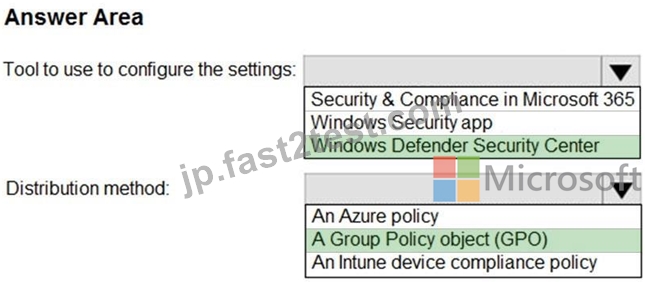
Explanation:
You can enable each mitigation separately by using any of these methods:
Windows Security app
Microsoft Intune
Mobile Device Management (MDM)
Microsoft Endpoint Configuration Manager
Group Policy
PowerShell
https://docs.microsoft.com/en-us/microsoft-365/security/defender-endpoint/enable-exploit- protection?view=o365-worldwide
質問 # 73
次の表に示すユーザーを含む Azure AD テナントがあります。
次の表に示すデバイスがあります。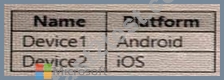
次の設定を持つ CAPolicy1 という名前の条件付きアクセス ポリシーがあります。
* 課題
o ユーザーまたはワークロード ID: ユーザー 1。User1
o クラウドアプリまたはアクション: Office 365 Exchange Online
o 条件: デバイスプラットフォーム: Windows、iOS
* アクセス制御
o 多要素認証を要求する
次の設定を持つ CAPolicy2 という名前の条件付きアクセス ポリシーがあります。
課題
o ユーザーまたはワークロード ID: 使用済み、ユーザー 2
o クラウドアプリまたはアクション: Office 365 Exch
o 条件
* デバイスプラットフォーム: Android、iOS
* デバイスのフィルター
* ルールに一致するデバイス: フィルタリングされたデバイスをポリシーから除外する
* ルール構文: device. displayName- に「1」が含まれる
* アクセス制御
* ブロックアクセスを許可する
次の各文について、正しい場合は「はい」を選択してください。そうでない場合は「いいえ」を選択してください。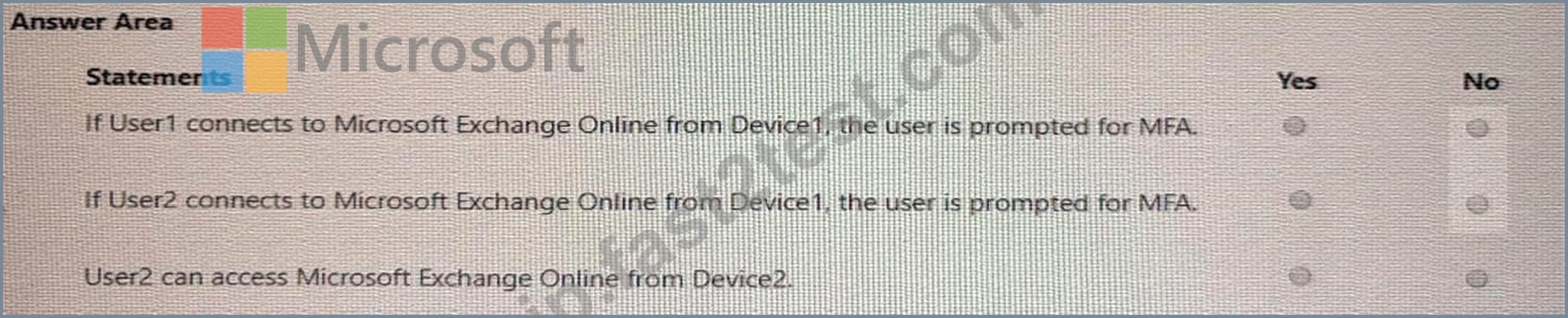
正解:
解説:
Explanation: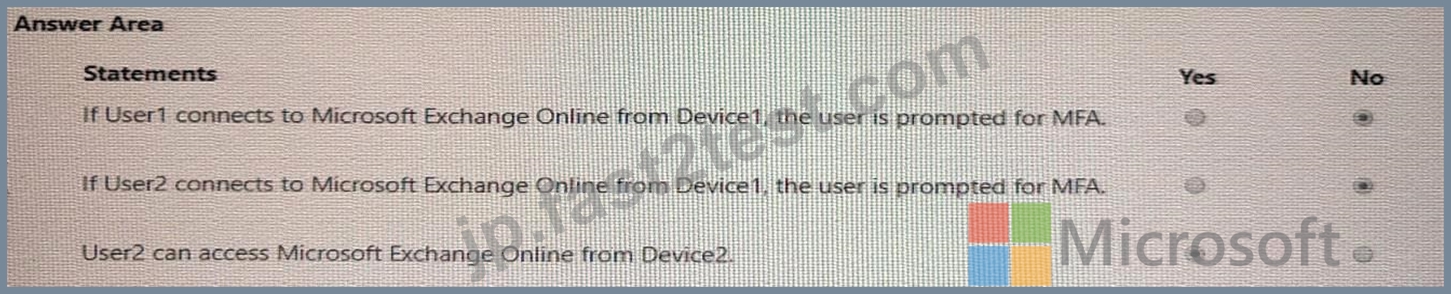
質問 # 74
Windows 10 を実行し、Microsoft Intune を使用して管理されているコンピューターがあります。
ユーザーは、D:\Folder1 という名前のフォルダーにファイルを保存します。
信頼できるアプリケーションのリストにのみ、D:\Folder1 への書き込みアクセス権が付与されるようにする必要があります。
デバイス構成プロファイルでは何を構成する必要がありますか?
- A. Microsoft Defender エクスプロイト ガード
- B. Microsoft Defender スマートスクリーン
- C. Microsoft Defender アプリケーション ガード
- D. Microsoft Defender アプリケーション制御
正解:A
質問 # 75
ホットスポットに関する質問
Microsoft Endpoint Manager を使用して管理されている Windows 10 デバイスが 100 台あります。
デバイスにアプリをサイドロードする予定です。
サイドローディングを有効にするには、Microsoft Endpoint Manager を構成する必要があります。
どのデバイス プロファイル タイプと設定を構成する必要がありますか? 回答するには、回答領域で適切なオプションを選択します。
注意: 正しい選択ごとに 1 ポイントが付与されます。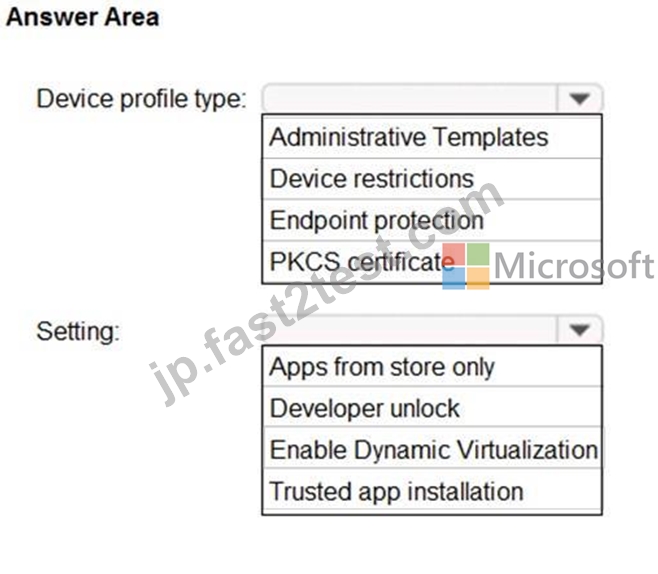
正解:
解説: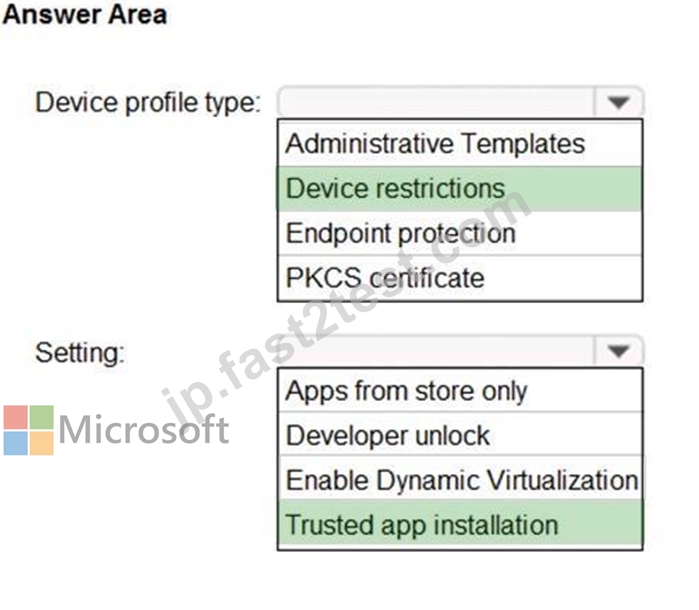
Explanation:
Box 1: Device restrictions
In a Windows 10/11 device restrictions profile, most configurable settings are deployed at the device level using device groups. Policies deployed to user groups apply to targeted users. The policies also apply to users who have an Intune license, and users that sign in to that device.
Box 2: Trusted app installation
Trusted app installation: Choose if non-Microsoft Store apps can be installed, also known as sideloading. Sideloading is installing, and then running or testing an app that isn't certified by the Microsoft Store. For example, an app that is internal to your company only.
Reference:
https://docs.microsoft.com/en-us/mem/intune/configuration/device-restrictions-windows-10
質問 # 76
ロサンゼルス オフィスのパフォーマンス問題を解決する必要があります。
更新設定をどのように構成すればよいですか? 回答するには、回答領域で適切なオプションを選択してください。
注意: 正しい選択ごとに 1 ポイントが付与されます。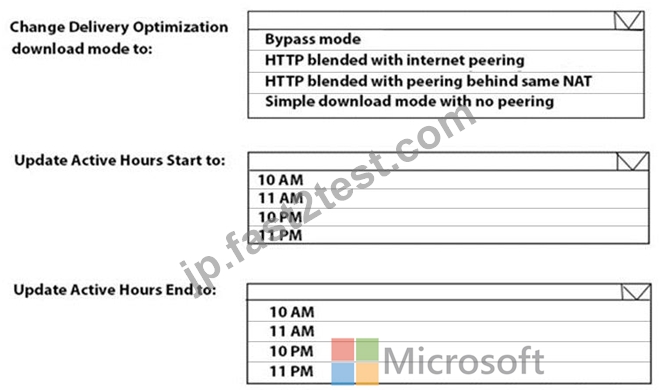
正解:
解説: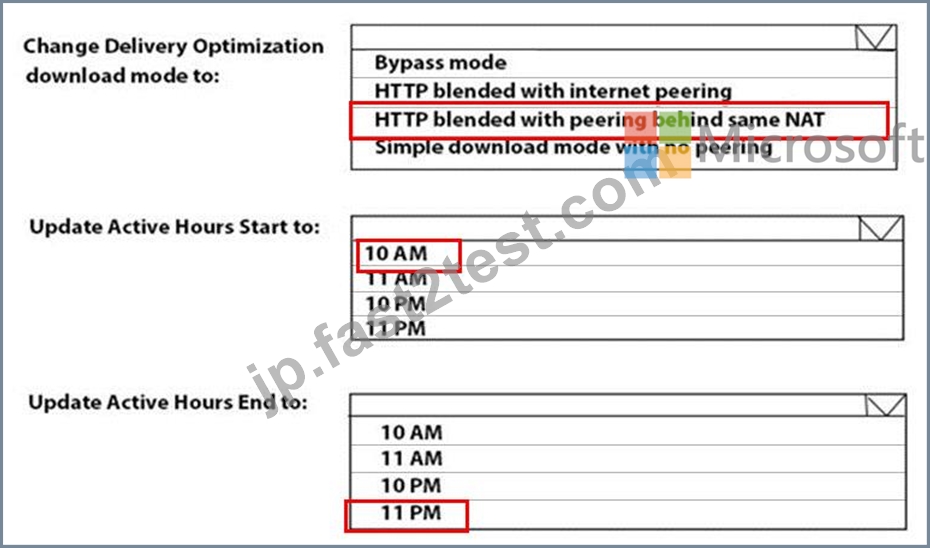
Reference:
https://docs.microsoft.com/en-us/windows/deployment/update/waas-delivery-optimization
https://2pintsoftware.com/delivery-optimization-dl-mode/
質問 # 77
ドラッグアンドドロップの質問
オンプレミスのエンタープライズ証明機関 (CA) への PFX 証明書コネクタを使用するように構成された Microsoft Intune サブスクリプションがあります。
公開キー ペア (PKCS) 証明書を使用して Android デバイスの自動登録を構成するには、Intune を使用する必要があります。
どの 3 つのアクションを順番に実行する必要がありますか? 回答するには、アクション リストから適切なアクションを回答領域に移動し、正しい順序で並べます。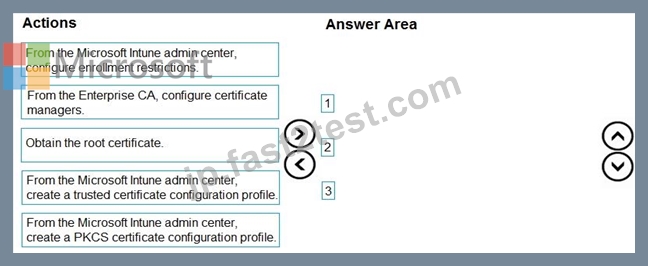
正解:
解説: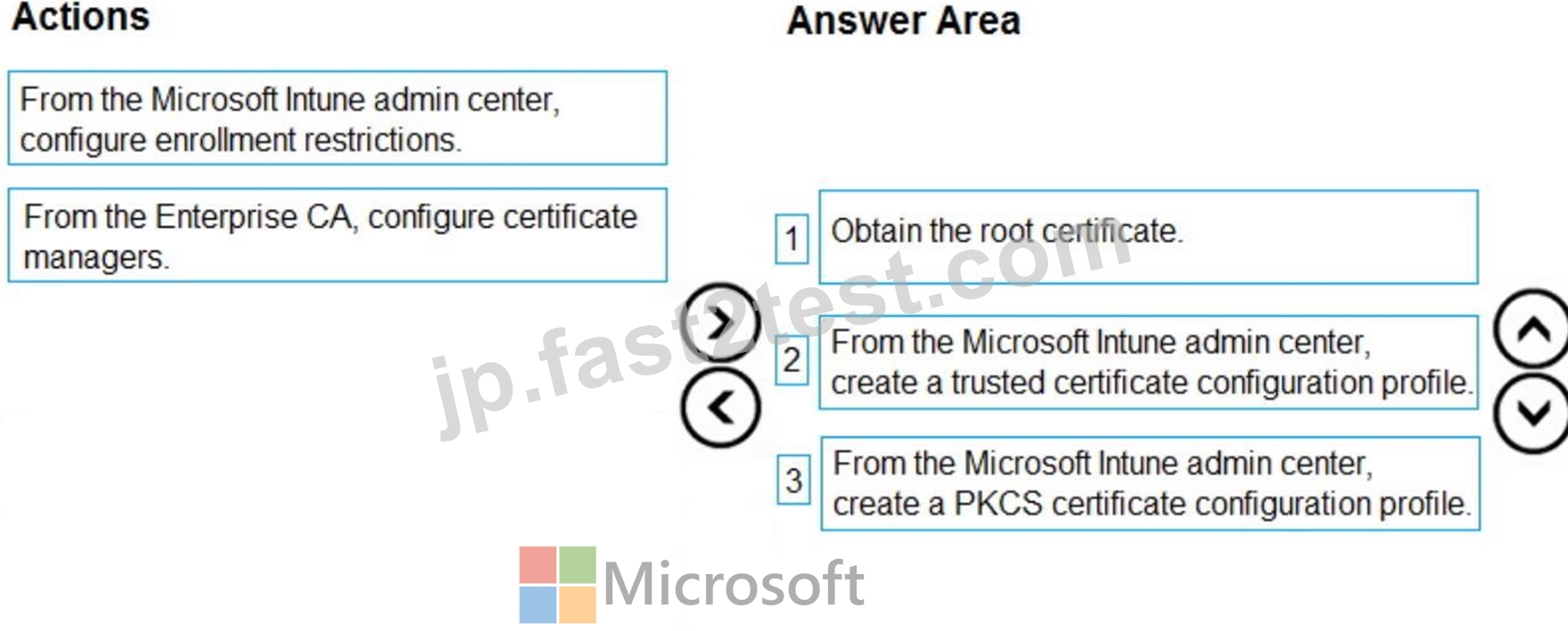
Explanation:
Step 1: Obtain the root certificate.
Export the root certificate from the Enterprise CA.
To authenticate a device with VPN, WiFi, or other resources, a device needs a root or intermediate CA certificate.
Step 2: From the Microsoft Endpoint Manager admin center, create a trusted certificate profile Create a trusted certificate profile
1. Sign in to the Microsoft Endpoint Manager admin center.
2. Select and go to Devices > Configuration profiles > Create profile.
3. Enter the following properties:
Platform:
Profile: Select Trusted certificate. Or, select Templates > Trusted certificate.
Select Create.
4. Etc.
Step 3: From the Microsoft Endpoint Manager admin center, create a PKCS certificate profile Create a PKCS certificate profile
1. Sign in to the Microsoft Endpoint Manager admin center.
2. Select and go to Devices > Configuration profiles > Create profile.
3. Enter the following properties:
Platform:
Profile: Select PKCS certificate. Or, select Templates > PKCS certificate.
Select Create.
4. Etc.
Reference:
https://docs.microsoft.com/en-us/mem/intune/protect/certificates-pfx-configure
質問 # 78
Microsoft Deployment Toolkit (MDT) 展開共有があります。
展開ワークベンチから、新しいタスク シーケンス ウィザードを開き、標準クライアント アップグレード タスク シーケンスのタスク シーケンス テンプレートを選択します。
次の図に示すように、[OS の選択] ページにオペレーティング システム イメージがリストされていないことがわかります。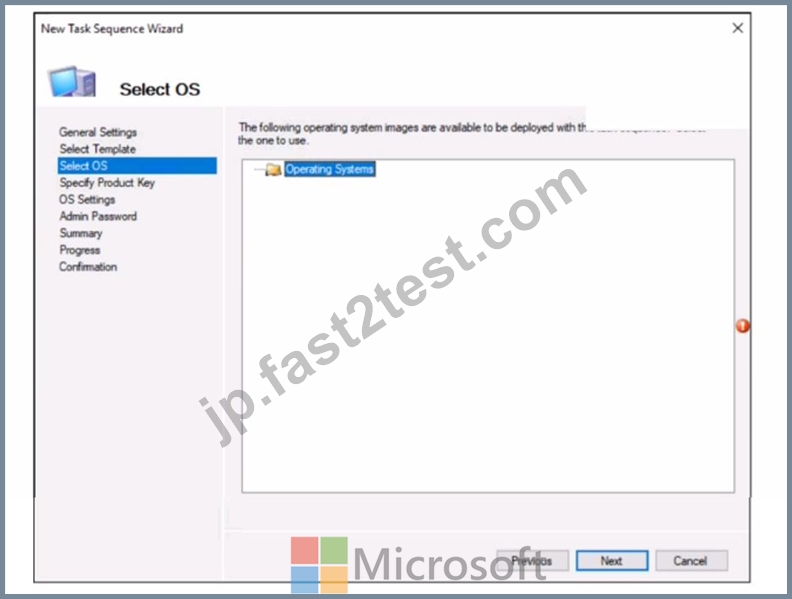
Windows 11 のインプレース アップグレードを実行するには、オペレーティング システム イメージを選択できる必要があります。
あなたは何をするべきか?
- A. ソース ファイルの完全なセットをインポートします。
- B. カスタムイメージファイルをインポートします。
- C. 展開共有の監視を有効にします。
- D. 展開共有の更新ウィザードを実行する
正解:D
質問 # 79
ネットワークにはオンプレミスの Active Directory ドメイン サービス (AD DS) ドメインが含まれています。
Microsoft Intune が含まれ、AD DS ドメインと同期する Microsoft 365 E5 サブスクリプションがあります。
Windows ローカル管理者パスワード ソリューション (Windows LAPS) が Microsoft Entra ID で有効になっています。
サブスクリプションには、次の表に示すカスタム ロールがあります。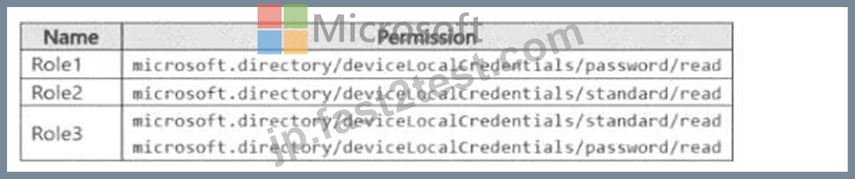
Microsoft Entra には、次の表に示すユーザーが含まれます。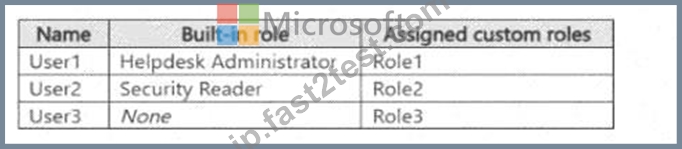
次の表に示すデバイスがあります。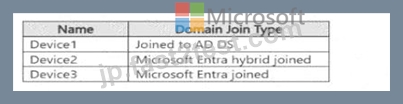
以下の各文について、正しい場合は「はい」を選択してください。そうでない場合は「いいえ」を選択してください。
注意: 正しい選択ごとに 1 ポイントが付与されます。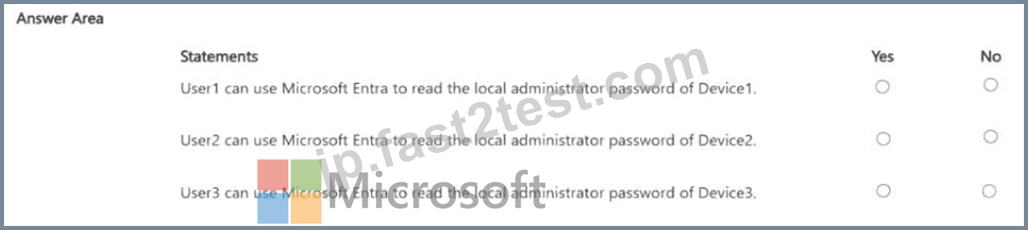
正解:
解説: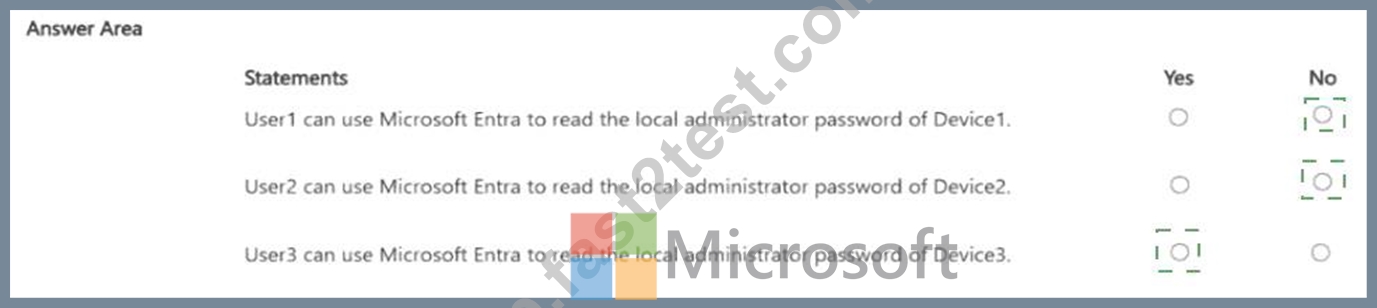
Explanation: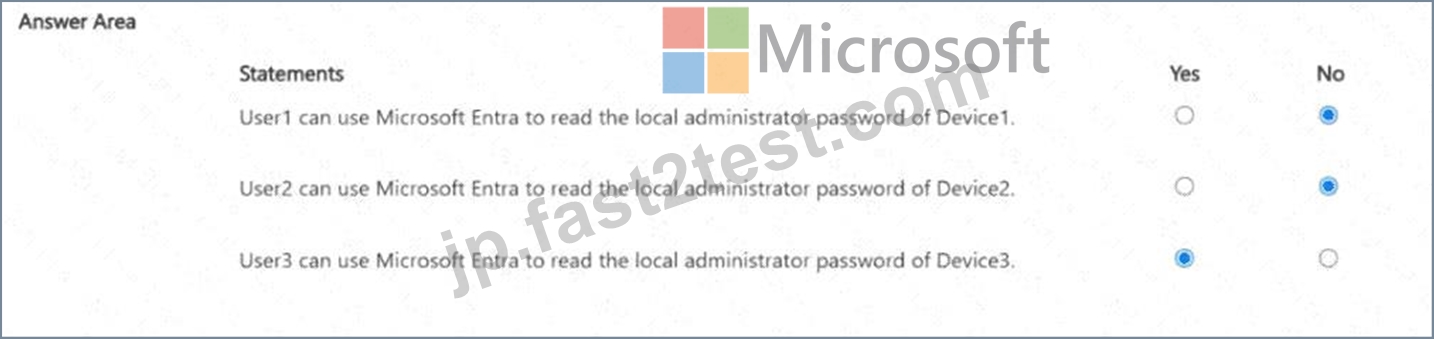
質問 # 80
ネットワークには Active Directory ドメインが含まれています。フォレストとドメインの機能レベルは Windows Server 2012 R2 です。
ドメインには、Windows 10 を実行する 500 台のコンピューターが含まれています。すべてのコンピューターは、Microsoft System Center 2012 R2 Configuration Manager を使用して管理されています。
共同管理を有効にする必要があります。
まず何をすべきでしょうか?
- A. ドメインの機能レベルを上げます。
- B. Microsoft Intune クライアントを展開します。
- C. Configuration Manager を Current Branch にアップグレードします。
- D. フォレストの機能レベルを上げます。
正解:C
解説:
Co-management enables you to concurrently manage Windows 10 devices by using both Configuration Manager and Microsoft Intune. It lets you cloud-attach your existing investment in Configuration Manager by adding new functionality.
Windows 10 device has the Configuration Manager client and is enrolled to Intune, you get the benefits of both services.
https://docs.microsoft.com/en-us/configmgr/comanage/overview#prerequisites
質問 # 81
次の表に示すデバイスを含む contoso.com という名前の Azure AD テナントがあります。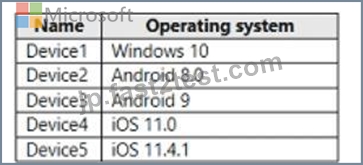
AH デバイスには App1 という名前のアプリが含まれており、Microsoft Intune に登録されています。
ユーザーが App1 からデータをコピーして他のアプリに貼り付けることを防ぐ必要があります。
Intune で作成する必要があるポリシーの種類と数はどれですか? 回答するには、回答領域で適切なオプションを選択してください。
注意: 正しい選択ごとに 1 ポイントが付与されます。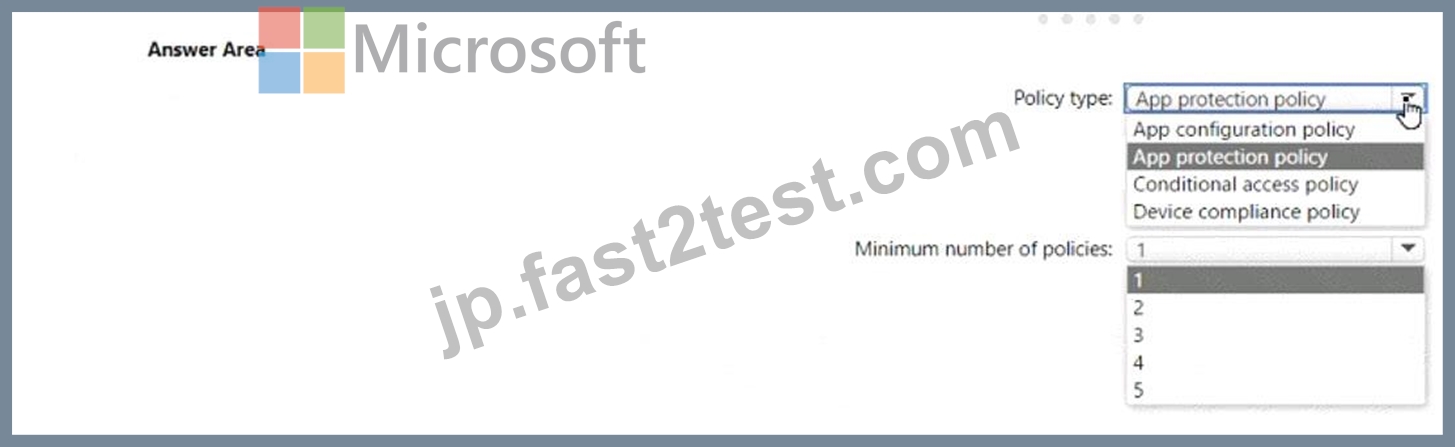
正解:
解説: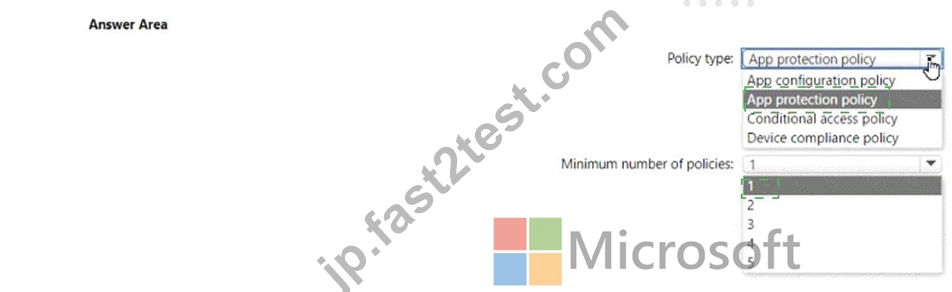
Explanation:
Policy type: App protection policy Minimum number of policies: 1 Comprehensive Explanation of Correct Answer Only: The correct answer is app protection policy because it allows you to customize the settings of apps for iOS/iPadOS or Android devices1. One of the settings you can configure is Restrict cut, copy, and paste between other apps, which lets you prevent users from copying data from App1 and pasting the data into other apps2. You only need one policy to apply this setting to all devices that have App1 installed1.
References: 1: App configuration policies for Microsoft Intune | Microsoft Learn https://learn.microsoft.com
/en-us/mem/intune/apps/app-configuration-policies-overview 2: Troubleshoot restricting cut, copy, and paste between applications - Intune | Microsoft Learn https://learn.microsoft.com/en-us/troubleshoot/mem/intune
/app-protection-policies/troubleshoot-cut-copy-paste
質問 # 82
次の表に示すデバイスを含む Microsoft Entra テナントがあります。
テナントには、次の表に示すグループが含まれます。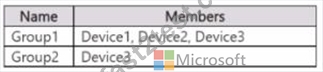
展開プロファイルの図に示すように、Windows Autopilot 展開プロファイルを作成します ([展開プロファイル] タブをクリックします)。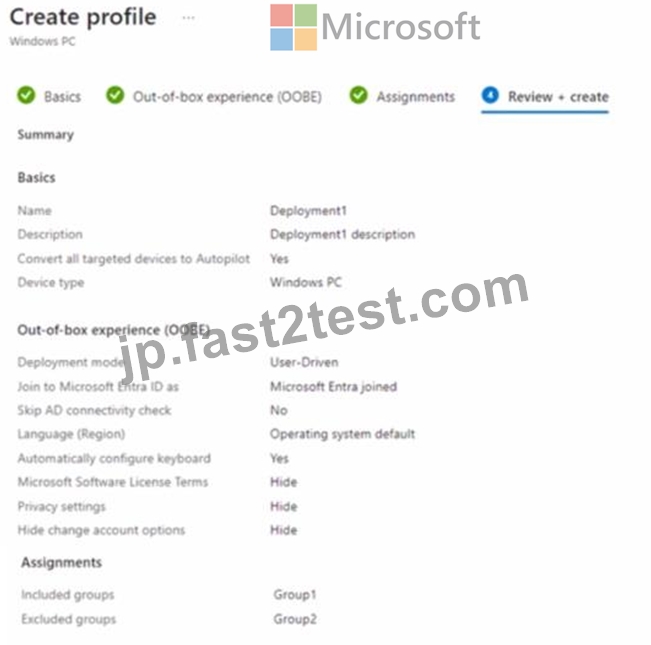
次の各文について、正しい場合は「はい」を選択してください。そうでない場合は「いいえ」を選択してください。
注意: 正しい選択ごとに 1 ポイントが付与されます。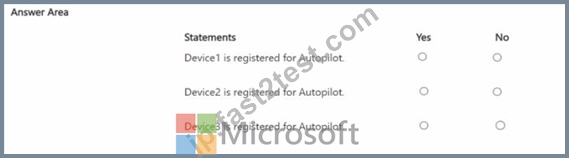
正解:
解説: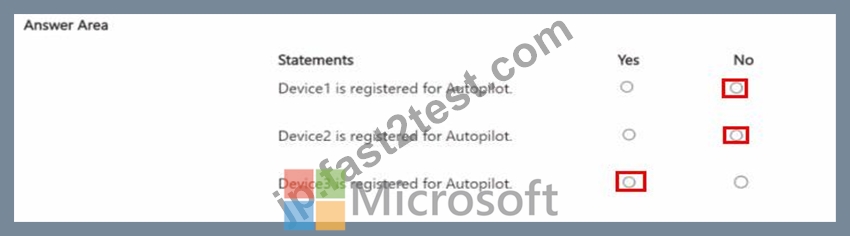
質問 # 83
ネットワークには、オンプレミスの Active Directory ドメインと Azure AD テナントが含まれています。
既定のドメイン ポリシー グループ ポリシー オブジェクト (GPO) には、次の表に示す設定が含まれています。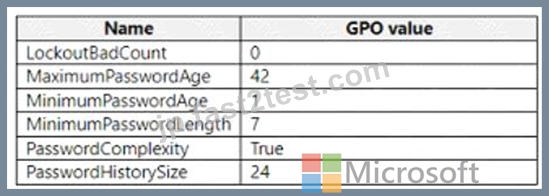
どのデバイス構成プロファイル タイプのテンプレートを使用する必要がありますか?
- A. 管理用テンプレート
- B. デバイスの制限
- C. エンドポイント保護
- D. カスタム
正解:A
解説:
To configure the settings shown in the table, you need to use the Administrative Templates device configuration profile type template. This template allows you to configure hundreds of settings that are also available in Group Policy. You can use this template to configure settings such as password policies, account lockout policies, and audit policies. References:
https://docs.microsoft.com/en-us/mem/intune/configuration/administrative-templates-windows
質問 # 84
次の表に示すデバイスを含む Microsoft 365 サブスクリプションをお持ちです。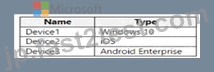
信頼できるファームウェアまたはオペレーティング システム ビルドを実行しているデバイスのみがネットワーク リソースにアクセスできるようにする必要があります。
各デバイスにどのコンプライアンス ポリシー設定を構成する必要がありますか? 答えるには、適切な設定を正しいデバイスにドラッグします。各設定は、1 回、複数回、またはまったく使用されない場合があります。コンテンツを表示するには、ペイン間の分割バーをドラッグするか、スクロールする必要がある場合があります。
注意: 正しい選択ごとに 1 ポイントが付与されます。
正解:
解説:
Explanation:
質問 # 85
Microsoft Intune を使用する Microsoft 365 サブスクリプションがあります。
Android Enterprise デバイスにアプリを展開できることを確認する必要があります。
まず何をすべきでしょうか?
- A. 管理対象 Google Play アカウントを Intune にリンクします。
- B. 構成プロファイルを作成します。
- C. 証明書コネクタを追加します。
- D. パートナー デバイス管理設定を構成します。
正解:A
質問 # 86
次の表に示すデバイスを含む Microsoft Entra テナントがあります。
テナントには、次の表に示すグループが含まれます。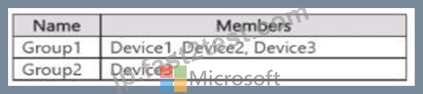
展開プロファイルの図に示すように、Windows Autopilot 展開プロファイルを作成します ([展開プロファイル] タブをクリックします)。
次の各文について、正しい場合は「はい」を選択してください。そうでない場合は「いいえ」を選択してください。
注意: 正しい選択ごとに 1 ポイントが付与されます。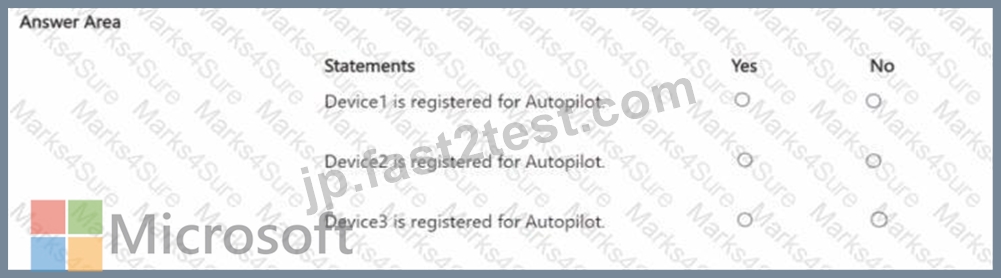
正解:
解説: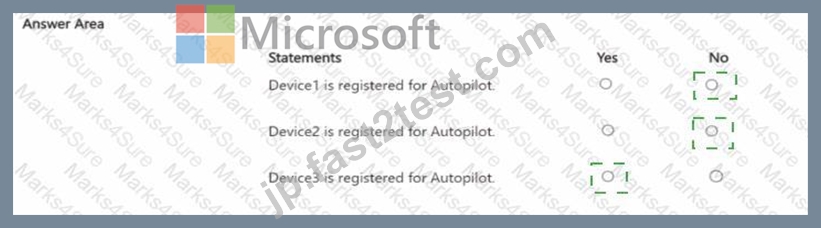
Explanation: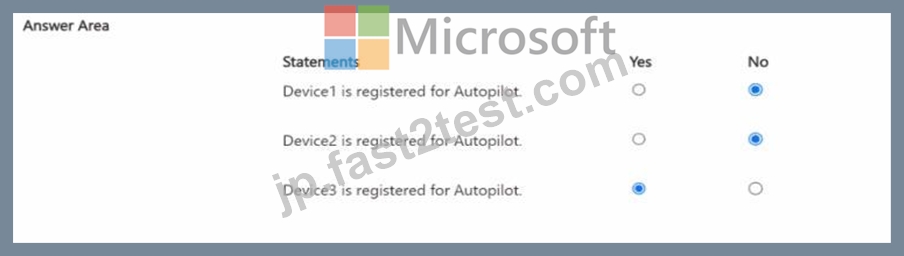
質問 # 87
共同管理をサポートするように環境を構成する前に、何をアップグレードする必要がありますか?
- A. ドメイン コントローラ
- B. ドメインの機能レベル
- C. Windows Server 更新サービス (WSUS)
- D. 構成マネージャー
正解:D
解説:
References:
https://docs.microsoft.com/en-us/sccm/comanage/tutorial-co-manage-clients
質問 # 88
ネットワークには、contoso.com という名前の Active Directory ドメインが含まれています。このドメインには、Windows 10 を実行し、ドメインに参加しているコンピューターが含まれています。
ドメインは Microsoft Azure Active Directory (Azure AD) に同期されます。
Azure Log Analytics ワークスペースを作成し、Update Compliance ソリューションをデプロイします。
コンピューターを Update Compliance ソリューションに登録する必要があります。
どのグループ ポリシー設定を構成する必要がありますか?
- A. イントラネットの Microsoft 更新サービスの場所を指定します
- B. テレメトリを許可する
- C. 商用IDを設定する
- D. 接続されたユーザーエクスペリエンスとテレメトリ
正解:C
解説:
Microsoft uses a unique commercial ID to map information from user computers to your Azure workspace.
Copy your commercial ID key from any of the Windows Analytics solutions you have added to your Windows Portal, and then deploy it to user computers.
Reference:
https://docs.microsoft.com/en-us/windows/deployment/update/update-compliance-get-started
質問 # 89
App1 を購入して割り当てることができるのはどのユーザーですか?
- A. ユーザー1、ユーザー3、ユーザー4のみ
- B. ユーザー1、ユーザー2、ユーザー3、ユーザー4
- C. ユーザー3とユーザー4のみ
- D. ユーザー3のみ
- E. ユーザー1とユーザー3のみ
正解:E
解説:
Reference:
https://docs.microsoft.com/en-us/microsoft-store/acquire-apps-microsoft-store-for-business
https://docs.microsoft.com/en-us/microsoft-store/assign-apps-to-employees
質問 # 90
計画された変更に基づいて Boundary1 を実装します。
192.168.1.0/24 のネットワーク境界が適用されているデバイスはどれですか?
- A. デバイス3のみ
- B. デバイス 1、デバイス 2、デバイス 3、デバイス 4 のみ
- C. デバイス2のみ
- D. デバイス1、デバイス2、およびデバイス5のみ
正解:B
解説:
Reference:
https://docs.microsoft.com/en-us/mem/intune/configuration/network-boundary-windows
質問 # 91
会社には、Windows 10 を実行する Computer1 という名前のコンピューターがあります。
計算されたのは、会社を退職したユーザーによって使用されました。
Computer1 を再利用し、そのコンピューターを新しいユーザーに割り当てる予定です。
Windows Autopilot を使用して Computer1 を再展開する必要があります。
どの 3 つのアクションを順番に実行する必要がありますか? 回答するには、アクション リストから適切なアクションを回答領域に移動し、正しい順序で並べます。
正解:
解説: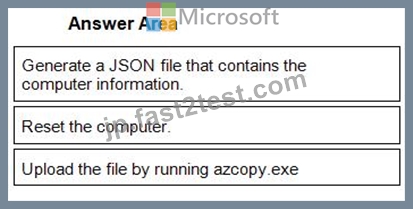
1 - Generate a JSON file that contains the computer information.
2 - Reset the computer.
3 - Upload the file by running azcopy.exe
質問 # 92
contoso.com という名前の Azure AD テナントがあります。
Windows 11 を実行する Computer! という名前のワークグループ コンピューターがあります。
Computer1 を contoso.com に追加する必要があります。
何を使うべきでしょうか?
- A. 設定アプリ
- B. コンピュータ管理
- C. netdom.exe
- D. dsreecmd.exe
正解:D
質問 # 93
ホットスポットに関する質問
Share1 という名前の Microsoft Deployment Toolkit (MDT) 展開共有があります。
次の表に示すように、Windows 10 イメージを Share1 に追加します。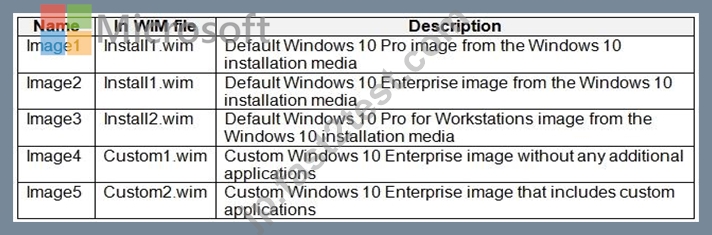
標準クライアント タスク シーケンスで使用できるイメージと、標準クライアント アップグレード タスク シーケンスで使用できるイメージはどれですか?
注意: 正しい選択ごとに 1 ポイントが付与されます。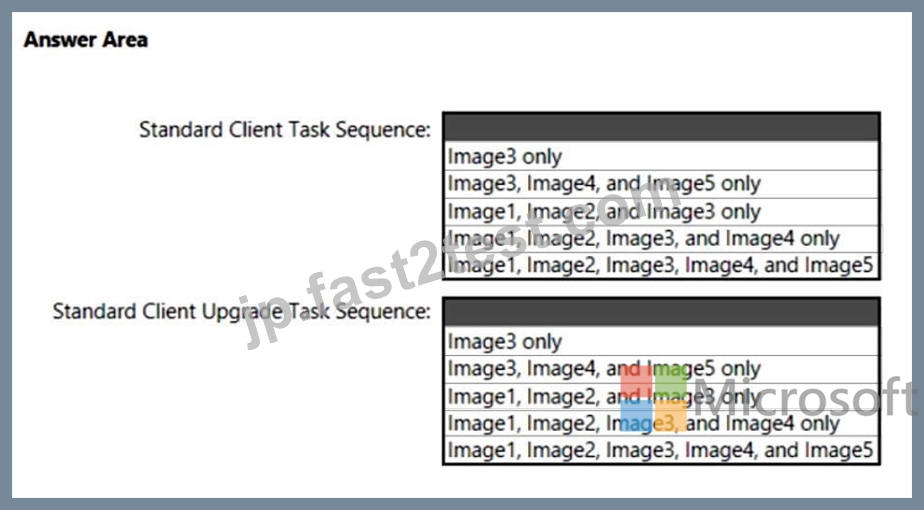
正解:
解説: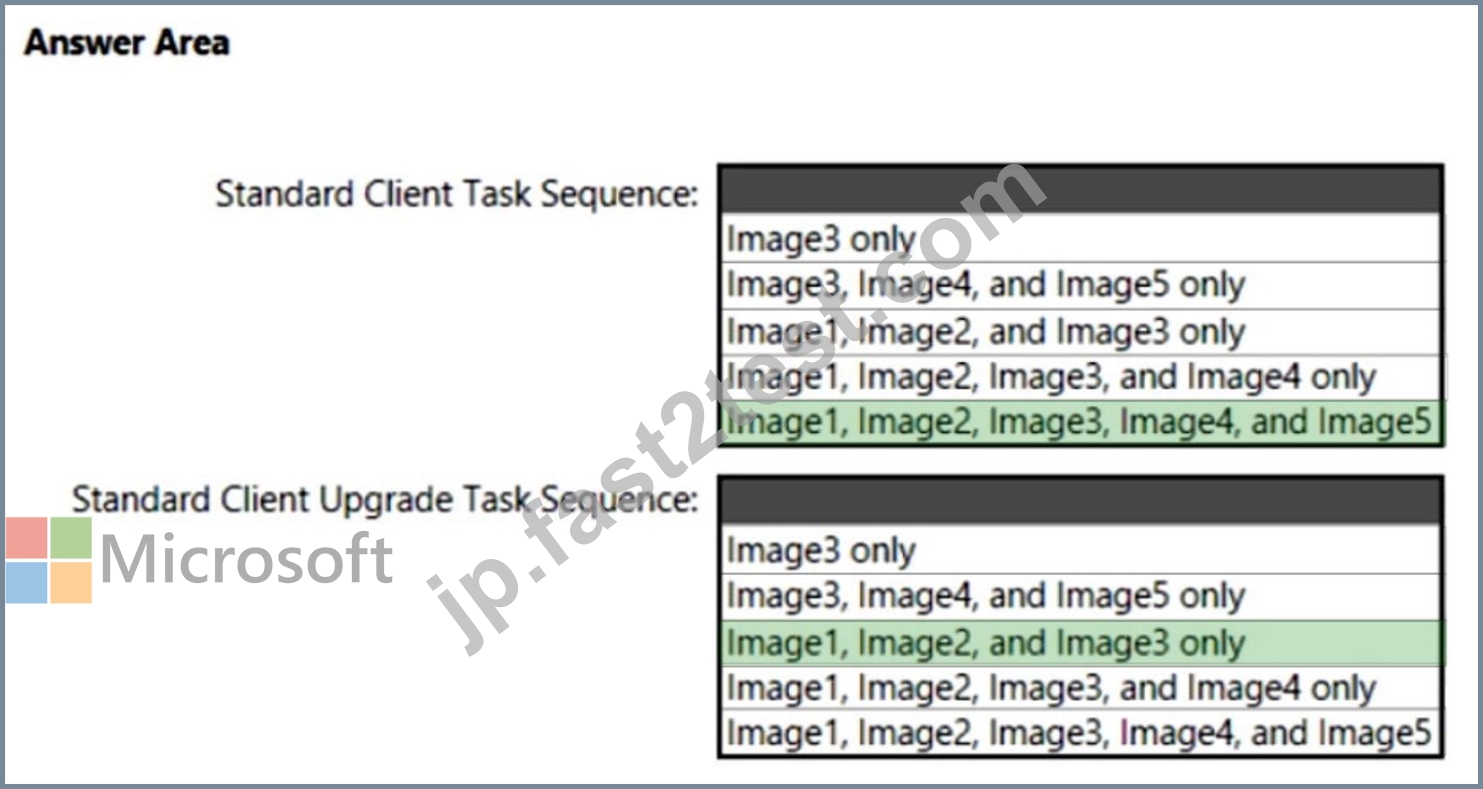
Explanation:
Box 1: Image1, Image2, Image3, Image4, and Image5.
All images.
Standard Client Task Sequence
Standard Client task sequence. The most frequently used task sequence. Used for creating reference images and for deploying clients in production.
Box 2: Image1, Image2 and Image3 only.
Reference:
https://docs.microsoft.com/en-us/windows/deployment/deploy-windows-mdt/get-started-with-the- microsoft-deployment-toolkit
質問 # 94
......
検証済み!合格できるMD-102日本語試験一発合格保証付き:https://jp.fast2test.com/MD-102-JPN-premium-file.html