

正真正銘の101-500日本語問題集には100%合格率練習テスト問題集
Lpi 101-500日本語リアル試験問題保証付き 更新された問題集
質問 # 92
BIOSはどこでブートローダーを検索しますか?
- A. 定義された起動デバイスの順序のハードディスクドライブのみ。
- B. 定義された起動デバイスの順序で接続されているすべてのストレージメディア。
- C. BIOSは有効なブートローダーを検索する責任を負いません。
- D. 最後に追加されたストレージメディアのみ。
- E. ブートデバイスの順序に関係なく、接続されているすべてのストレージメディア。
正解:B
解説:
The BIOS (Basic Input/Output System) is a firmware program that is stored in a ROM chip on the motherboard, and it performs some basic tasks when the system is powered on, such as:
* initializing the hardware components and peripherals
* performing the power-on self-test (POST) to check the system integrity
* selecting a boot device from the boot order list
* loading and executing the bootloader program from the boot device
The boot device is the data carrier that contains the bootloader, which is a small program that is responsible for loading and executing the kernel. The boot device can be a hard disk, a USB drive, a CD-ROM, or a network device. The BIOS has a boot order list, which is a sequence of possible boot devices that the BIOS will search for a valid bootloader. The boot order list can be configured by the user through the BIOS setup utility, which is usually accessed by pressing a key such as F2, F10, or Del during the POST.
The BIOS will search for a bootloader by means of a special signature, which is a sequence of bytes that indicates the presence of a bootloader. The signature is usually located in the first sector of the boot device, which is called the boot sector or the master boot record (MBR). The BIOS will read the boot sector of each boot device in the boot order list, and check if the last two bytes are 0x55 and 0xAA, which are the standard boot signature. If the boot signature is found, the BIOS will load the boot sector into memory and execute it.
If the boot signature is not found, the BIOS will move on to the next boot device in the boot order list. If none of the boot devices have a valid boot signature, the BIOS will display an error message such as:
No bootable device - insert boot disk and press any key
References:
How does the BIOS know where the bootloader is located? - Super User
Bootloader: What is it and how does it work? - IONOS
Boot Process with Systemd in Linux - GeeksforGeeks
Linux Boot Process Step-by-Step Explained - javatpoint
質問 # 93 
正解:
解説:
質問 # 94
インストールされたパッケージ postfix の変更ログを調べたいとします。変更ログを表示するにはどのコマンドを使用しますか?
- A. rpm --changelogpostfix
- B. rpm -Vc postfix
- C. rpm -q --changelog postfix
- D. rpm -qpil postfix
- E. rpm -qa --changelog postfix
正解:C
質問 # 95 
- A. / var / share / doc
- B. / etc / share / doc
- C. / usr / local / share / documentation
- D. / usr / share / documentation
- E. / usr / share / doc
正解:A
質問 # 96
システムのブートサイクル中に、BIOSがタスクを完了した後に実行されるプログラムは何ですか?
- A. カーネル
- B. ブートローダー
- C. inetdプログラム
- D. initプログラム
正解:B
解説:
The bootloader is a program that is executed by the BIOS after it completes its tasks of initializing the hardware and performing the POST (Power-On Self Test). The bootloader is responsible for loading the kernel and other necessary files into memory and passing control to the kernel. The bootloader can be either installed in the Master Boot Record (MBR) of the disk or in a separate partition. Some examples of bootloaders are GRUB, LILO, and SYSLINUX. References: LPI Linux Essentials - 1.101.1, LPI Linux Administrator - 102.1
質問 # 97
コマンドについて:
nice -5 / usr / bin / prog
次のうち正しいものはどれですか?
- A. / usr / bin / progは、-5のナイスレベルで実行されます。
- B. / usr / bin / progは、-5の優先度で実行されます。
- C. / usr / bin / progは優先度5で実行されます。
- D. / usr / bin / progがナイスレベル5で実行されます。
正解:D
質問 # 98
ext3ファイルシステムのメタデータとオプションを変更するために使用されるコマンドは次のうちどれですか?
- A. mod3fs
- B. tune3fs
- C. dump2fs
- D. tune2fs
- E. mod2fs
正解:D
解説:
The tune2fs command is used to change metadata and options for ext2, ext3, and ext4 filesystems. The tune2fs command can adjust various parameters such as the maximum mount count, the check interval, the reserved blocks percentage, the volume label, and the UUID. The tune2fs command can also enable or disable some filesystem features, such as the journal, the dir_index, the acl, and the user_xattr. The tune2fs command requires the device name or the UUID of the filesystem as an argument, and one or more options to specify the changes to be made. For example, to change the volume label of an ext3 filesystem on /dev/sda1 to "data", use the following command:
tune2fs -L data /dev/sda1
The other options are not valid commands or options. The mod3fs and mod2fs commands do not exist on a standard Linux system. The tune3fs command is a synonym for tune2fs, but it is not commonly used. The dump2fs command is used to display the superblock and blocks group information for ext2, ext3, and ext4 filesystems, but it does not change any parameters or options. References:
* tune2fs - adjust tunable filesystem parameters on ext2/ext3/ext4 ...
* Chapter 5. The Ext3 File System - Red Hat Customer Portal
* Chapter 37. Getting started with an ext3 file system - Red Hat Customer ...
質問 # 99
コマンド seq 1 5 20 はどのような出力を生成しますか?
- A. 1
2
3
4 - B. 2
3
4
5 - C. 1
5
10
15 - D. 1
6 11
16 - E. 5
10
15
20
正解:C
質問 # 100
すべての一般的なファイルタイプに関する情報を含む定義データベースファイルを使用して、ファイルのタイプを決定するコマンドはどれですか?
- A. hash
- B. magic
- C. type
- D. pmagic
- E. file
正解:E
解説:
The file command determines the type of a file by using a definition database file which contains information about all common file types. The database file is usually located at /usr/share/misc/magic or /usr/share/file
/magic and can be customized by the user. The file command analyzes the content and structure of the file and compares it with the patterns in the database file to identify the file type. The file command can also check the file name extension, but it does not rely on it. The other options are either invalid or do not perform the desired task. The magic, pmagic and hash commands are not valid Linux commands. The type command is used to display information about command type, not file type. References:
* LPIC-1 Exam 101 Objectives, Topic 103: GNU and Unix Commands, 103.3 Perform basic file management
* LPIC-1 Linux Administrator 101-500 Exam FAQ, LPIC-1 Exam 101 Objectives, GNU and Unix Commands (Total Weight: 25)
質問 # 101
シミュレーション
どのプログラムが、locate コマンドによって使用されるデータベースを更新しますか?
正解:
解説:
updatedb
質問 # 102
SCSI-1 は周辺機器の SCSI ID をいくつサポートできますか?
- A. 0
- B. 1
- C. 2
- D. 3
正解:B
質問 # 103 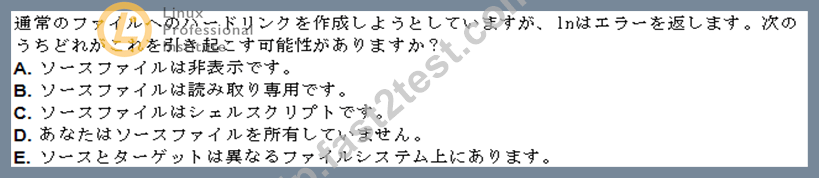
- A. Option C
- B. Option B
- C. Option D
- D. Option E
- E. Option A
正解:D
質問 # 104
ネストされたディレクトリ構造では、特定の数のサブディレクトリを検索するようにコマンドを制限するために、どのコマンドラインオプションが使用されますか?
- A. -s
- B. -maxdepth
- C. -maxlevels
- D. -dirmax
- E. -n
正解:B
解説:
Explanation
The find command is used to search for files and directories that match certain criteria. The option -maxdepth can be used to restrict the command to searching down a particular number of subdirectories. The argument to
-maxdepth is a positive integer that specifies the maximum depth of the directory tree to be searched. For example, -maxdepth 0 means only the current directory, -maxdepth 1 means the current directory and its direct subdirectories, and so on1. The option -maxdepth should be placed before any other expressions, as it affects the behavior of the whole command2. For example, to find all the files with the extension .txt in the current directory and its direct subdirectories, the command would be:
find . -maxdepth 1 -type f -name "*.txt"
The other options are not correct because:
* A. -dirmax is not a valid find option.
* C. -maxlevels is not a valid find option.
* D. -depth is a valid find option, but it does not restrict the command to searching down a particular number of subdirectories. It only changes the order of the search, so that the files and directoriesare processed in depth-first order, meaning that the contents of a directory are processed before the directory itself1. References:
* find(1) - Linux manual page
* How to use find command to search for multiple extensions - Unix & Linux Stack Exchange
質問 # 105 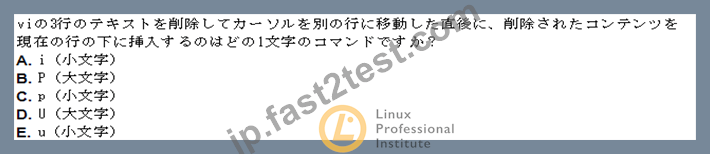
- A. Option C
- B. Option B
- C. Option D
- D. Option E
- E. Option A
正解:A
質問 # 106
ファイル myfile.txt には次のデータが含まれています。
joe:x:100:100:Joe:/home/joe:/bin/bash
mike:x:101:101:Mike:/home/mike:/bin/sh
kevin:x:102:102:Kevin:/home/kevin:/bin/sh
matt:x:103:103:Matt:/home/matt:/bin/sh
次のコマンドを実行すると、画面にどのような出力が表示されますか。
grep -o home myfile.txt
- A. /home/joe
/home/mike
/home/Kevin
/home/matt - B. joe
mike
Kevin
matt - C. home
home
home
home - D. 画面に出力は表示されません
正解:C
質問 # 107 
- A. Option C
- B. Option B
- C. Option D
- D. Option E
- E. Option A
正解:A
質問 # 108
/ etc / passwdファイルからユーザー名のリスト(最初の列)とそのプライマリグループ(4番目の列)を出力するコマンドはどれですか?
- A. split -c 1,4 /etc/passwd
- B. fmt -f 1,4 /etc/passwd
- C. paste -f 1,4 /etc/passwd
- D. sort -t : -k 1,4 /etc/passwd
- E. cut -d : -f 1,4 /etc/passwd
正解:E
解説:
The command that prints a list of usernames (first column) and their primary group (fourth column) from the
/etc/passwd file is cut -d : -f 1,4 /etc/passwd. The cut command is used to extract selected fields or characters from each line of a file or standard input. The -d or --delimiter option specifies the character that separates the fields, which in this case is a colon (:). The -f or --fields option specifies the fields to be printed, which in this case are the first and the fourth fields. The /etc/passwd file is a text file that contains information about the user accounts on the system, such as the username, password, user ID, group ID, home directory, and login shell. The first column of the file is the username and the fourth column is the group ID, which corresponds to the primary group of the user. The cut command will print these two columns separated by a colon for each line of the file. For example, running cut -d : -f 1,4 /etc/passwd will produce an output like this:
root:0 daemon:1 bin:1 sys:3 sync:4 games:5 man:12 lp:7 mail:8 news:9 uucp:10 proxy:13 www-data:33 backup:34 list:38 irc:39 gnats:41 nobody:65534 systemd-network:100 systemd-resolve:101 syslog:102 messagebus:103 _apt:104 lxd:105 uuidd:106 dnsmasq:107 sshd:108 pollinate:109 vboxadd:999 ubuntu:1000 The other commands are either invalid or do not perform the desired task. The fmt command is used to reformat paragraphs of text, but it does not have a -f option. The sort command is used to sort lines of text, but it does not have a -t option. The paste command is used to merge lines of files, but it does not have a -f option.
The split command is used to split a file into pieces, but it does not have a -c option. References:
* Linux Essentials - Linux Professional Institute Certification Programs
* Exam 101 Objectives - Linux Professional Institute
* cut(1) - Linux manual page
* /etc/passwd file - Linux.com
質問 # 109
ユーザークォータを自動的に有効にするには、どのオプションを /etc/fstab にリストする必要がありますか?
正解:
解説:
usrquota
質問 # 110
/ dev / sr0にすでに挿入されているCD-ROMを、root権限で発行されたときに既存のディレクトリ/ mnt / cdromにマウントするコマンドは次のうちどれですか
- A. mount -l cdrom /dev/sr0 /mnt/cdrom
- B. mount /dev/sr0 /mnt/cdrom
- C. mount -t cdrom /dev/sr0 /mnt/cdrom
- D. mount -f /dev/sr0/mnt/cdrom
- E. mount /dev/cdrom /mnt/cdrom
正解:B
解説:
The mount command is used to attach a filesystem to a directory on the system, which is called a mount point.
The mount command requires the device name or the UUID of the filesystem as the first argument, and the mount point as the second argument. Optionally, the mount command can also take some options, such as the filesystem type, the mount options, and the label. The syntax of the mount command is:
mount [options] device mountpoint
In this question, the device name of the CD-ROM is /dev/sr0, and the mount point is /mnt/cdrom. Therefore, the correct command to mount the CD-ROM is:
mount /dev/sr0 /mnt/cdrom
This command will mount the CD-ROM as a read-only filesystem with the type iso9660, which is the standard format for optical discs. The mount command can automatically detect the filesystem type and the mount options, so there is no need to specify them explicitly. However, if you want to specify them, you can use the -t and -o options, respectively. For example, the following command is equivalent to the previous one:
mount -t iso9660 -o ro /dev/sr0 /mnt/cdrom
The other options are not correct because:
* A. mount /dev/cdrom /mnt/cdrom: This command may work on some systems, but it is not guaranteed to be correct. The /dev/cdrom is usually a symbolic link to the actual device name of the CD-ROM, which can vary depending on the system. For example, on some systems, the /dev/cdrom may point to
/dev/sr0, but on others, it may point to /dev/scd0 or /dev/hdc. Therefore, it is better to use the actual device name of the CD-ROM, which can be found by using the lsblk or the dmesg command.
* C. mount -t cdrom /dev/sr0 /mnt/cdrom: This command is not valid because cdrom is not a valid filesystem type. The filesystem type for optical discs is iso9660, not cdrom. The mount command will fail with an error message saying:
mount: unknown filesystem type 'cdrom'
* D. mount -l cdrom /dev/sr0 /mnt/cdrom: This command is not valid because -l is not a valid option for the mount command. The -l option is used to list all the mounted filesystems, not to mount a filesystem.
The mount command will fail with an error message saying:
mount: can't find /dev/sr0 in /etc/fstab
* E. mount -f /dev/sr0/mnt/cdrom: This command is not valid because it is missing a space between the device name and the mount point. The mount command requires two separate arguments for the device name and the mount point, separated by a space. Also, the -f option is used to fake the mount operation, not to perform the actual mount. The mount command will fail with an error message saying:
mount: /dev/sr0/mnt/cdrom: mount point does not exist.
References:
How to mount cdrom in Linux - Learn Linux Configuration
Mount CD-ROM in Linux using Command Line - nixCraft
Mounting the CD or DVD (Linux) - IBM
質問 # 111
Bashシェルから、次のコマンドのどれがファイルから命令を直接実行しますか
サブシェルを起動せずに/usr/local/bin/runme.sh? (2つの回答を選択してください。)
- A. . /usr/local/bin/runme.sh
- B. source /usr/local/bin/runme.sh
- C. /bin/bash /usr/local/bin/runme.sh
- D. run /usr/local/bin/runme.sh
- E. /usr/local/bin/runme.sh
正解:A、B
解説:
Explanation
The commands that directly execute the instruction from the file /usr/local/bin/runme.sh without starting a subshell are source /usr/local/bin/runme.sh and . /usr/local/bin/runme.sh. These commands use the source or dot builtins, which read and execute commands from the given file in the current shell environment. This means that any changes made by the file, such as setting variables, defining functions, or changing directories, will affect the current shell. This is different from running the file as a script, which will create a new shell process and execute the commands in a separate environment. The source or dot commands are useful for loading configuration files, such as ~/.bashrc or /etc/profile, or for running scripts that modify the current state of the shell.
The other commands are incorrect for the following reasons:
* C. /bin/bash /usr/local/bin/runme.sh: This command will run the file as a script using the /bin/bash interpreter. This will create a new shell process and execute the commands in a separate environment.
Any changes made by the file will not affect the current shell.
* D. /usr/local/bin/runme.sh: This command will also run the file as a script, but using the interpreter specified by the shebang line (#!) at the beginning of the file. If the file does not have a shebang line, it will use the default shell interpreter, which may or may not be /bin/bash. This will also create a new shell process and execute the commands in a separate environment. Any changes made by the file will not affect the current shell.
* E. run /usr/local/bin/runme.sh: This command is not valid, as there is no builtin or external command called run. This will produce an error message.
References:
* [LPI Exam 101 Detailed Objectives], Topic 103: GNU and Unix Commands, Objective 103.1: Work on the command line, Weight: 4, Key Knowledge Areas: Use of source and ..
* [Bash Reference Manual], Section 4.2: Bash Builtin Commands, Subsection 4.2.5: Bourne Shell Builtins.
質問 # 112 
- A. -ignore-space
- B. -print0
- C. -nospace
- D. -rep-space
正解:B
質問 # 113
次のコマンドのうち、ファイルデータ内の単語「bob」をすべて「Bob」に変更し、結果を標準出力に印刷するものはどれですか。
- A. sed's/bob/Bob/' data
- B. sed's/bob/Bob/g' data
- C. sed'/bob/Bob/' data
- D. sed'/bob/Bob' data
- E. sed's/bob,Bob/' data
正解:B
解説:
sedコマンドは、ファイルまたはストリームに対して様々なテキスト処理を実行するために使用されます。sコマンドは、パターンを置換文字列に置き換えるために使用されます。gフラグは、行内のパターンのすべての出現箇所を置換するために使用されます。/文字は、パターン、置換文字列、およびフラグを区切るために使用されます。したがって、sedコマンドは
's/bob/Bob/g' というデータは、ファイルデータ内の「bob」という単語をすべて「Bob」に置き換え、結果を標準出力に出力します。その他のコマンドは、構文が間違っているか、「bob」という単語をすべて置き換えていないため、正しくありません。参考資料:
* LPI 101-500 試験目標、トピック 103.7、ウェイト 4
* LPI学習教材、第3.7章「基本的なスクリプト」
* ウェブ検索結果、1
質問 # 114
次のコマンドのうち、ファイル管理用の一般的なLinuxコマンドはどれですか? (3つの正解を選択してください。)
- A. cp
- B. copy
- C. mv
- D. move
- E. mkdir
正解:A、C、E
解説:
Explanation
The common Linux commands for file management are mv, cp and mkdir. The mv command moves or renames files and directories. The cp command copies files and directories. The mkdir command creates directories. The copy and move commands are not valid Linux commands. References:
* LPI Exam 101 Detailed Objectives, Topic 103: GNU and Unix Commands, Weight: 25, Objective
103.1: Work on the command line
* LPI Linux Essentials Study Guide, Chapter 3: Working on the Command Line, Section 3.2: Basic Commands, Page 55
質問 # 115
特定のユーザーが at を使用してタスクをスケジュールできないようにするにはどうすればよいですか?
- A. 特定のユーザーをno jobsグループに追加することで
- B. 特定のユーザーを/etc/atd.confファイルの「deny」セクションに追加することで
- C. atd -deny [user] コマンドを実行する
- D. 特定のユーザーを/etc/at.denyファイルに追加することで
- E. 特定のユーザーを/etc/at.allowファイルに追加することで
正解:D
質問 # 116
どのプログラムが特定の間隔でコマンドを実行し、プログラムの出力の表示を更新しますか?
(パスまたはパラメーターなしでコマンドのみを指定します。)
正解:
解説:
watch
質問 # 117
......
検証済み!合格できる101-500日本語試験一発合格保証付き:https://jp.fast2test.com/101-500J-premium-file.html