

最新のAD0-E903実際の無料試験問題更新された74問あります
無料で使えるAD0-E903試験ブレーン問題集認定ガイドの問題と解答
質問 # 24
To whom or what would a project owner assign a task so the task is visible in a Scrum or Kanban backlog?
- A. A user that has access to a burndown
- B. A team marked as an agile team
- C. A job role labeled as Agile User
正解:B
質問 # 25
A project manager is asked to provide a list of all projects the Marketing Group is working on for Acme Company.
What steps should the project manager take to create a custom Workfront report with this information?
- A. Visit the Reports page, create a new Project report, and add filters for Company ID and Group ID.
- B. Visit the Reports page, create a new Project report, and add filters for Company ID and Owner ID.
- C. Visit the Reports page, create a new Project report, and add filters for Owner ID and Project Status.
正解:A
解説:
To provide a list of all projects for a specific company (Acme) and group (Marketing), the correct approach is to filter by both Company ID and Group ID in the custom project report. This allows the project manager to isolate projects related to Acme Company that the Marketing Group is responsible for.
質問 # 26
A project manager has been asked to work on a cross-departmental company-wide initiative. There will be many individuals assigned to each task.
What should the project manager ask users to do when it comes to completing tasks?
- A. Mark the task as "Done with my part."
- B. Users do not need to complete tasks when multiple users are assigned.
- C. Make an update and tag the project manager.
正解:A
解説:
In scenarios where multiple individuals are assigned to a task, Workfront allows each user to mark the task as "Done with my part" to signify their portion of the task is complete. This ensures that progress is tracked for each user, and the task is only marked as complete when all assigned users have finished their work.
質問 # 27
A company expects managers to complete a Workfront Business Case and submit it to the Project Sponsor for approval before a project enters Planning status.
What Workfront process will effectively facilitate the Project Sponsor review?
- A. Project Submission Process
- B. Request Submission Process
- C. Project Approval Process
- D. Request Approval Process
正解:B
解説:
In Workfront, the "Request Submission Process" is used when a formal submission is required for review before the project proceeds to the planning phase. This process ensures that all necessary documentation, such as the business case, is completed and submitted to the sponsor for approval, streamlining the review process.
質問 # 28
Which wildcard should be used on a project report when filtering for projects that have a planned completion date greater than 1 month from the current date?
- A. CURRENTDATE + 4w
- B. TODAY + 1m
- C. TODAY + 1bm
正解:A
解説:
In Adobe Workfront, the correct wildcard to filter for a project completion date greater than 1 month from the current date is CURRENTDATE + 4w. This wildcard ensures that the filter captures projects scheduled to be completed more than four weeks (or one month) from the current day. Workfront uses such wildcards for dynamic date filtering in reports.
質問 # 29
Given this information regarding a Task:
* Planned Start Date: May 14
* Actual Start Date: May 14
* Planned Completion Date: May 20
* Projected Completion Date: May 22
* Percent Complete: 50%
* Duration: 5 Days
* Planned Hours: 8 Hours
* Status: In Progress
If today's date were May 19, what would be the Task's progress status?
- A. On Time
- B. Behind
- C. At Risk
正解:C
解説:
In Workfront, when the projected completion date exceeds the planned completion date and the task is only 50% complete by May 19, it is automatically flagged as "At Risk." This alerts the project manager that the task is not progressing according to the original plan, potentially causing delays in the project timeline.
質問 # 30
A project manager checks an Incomplete Tasks report and notices that several tasks are listed even though the items are marked as 100% complete. What column can the project manager add to the view to understand why those tasks are included in the report?
- A. Actual Completion Date
- B. Status
- C. Progress Status
正解:B
解説:
Even though tasks may be marked as 100% complete, their Status may still be listed as incomplete in reports if the task's status has not been updated to "Completed." The Status column provides insight into the current state of the task, which helps identify if the task is still listed as "In Progress" or another incomplete status despite being marked as fully complete. Adding this column clarifies why the task appears in the Incomplete Tasks Report.
質問 # 31
Which element is defined as a reportable variable determined by the relationship between the planned, projected, and estimated dates of the project?
- A. Status
- B. Progress Status
- C. Condition
正解:C
解説:
In Adobe Workfront, Condition is the reportable variable that is determined by the relationship between the Planned, Projected, and Estimated Dates. The Condition field reflects whether a project is On Target, At Risk, or In Trouble based on how its actual progress aligns with the planned schedule and dates. It allows project managers and stakeholders to quickly assess the health of the project.
質問 # 32
An organization has created unique data fields relevant to their projects. Starting by navigating from a project's landing page, where is this data found?
- A. Project Details > Custom Forms
- B. Business Case > Project Info
- C. Project Details > Overview
正解:B
解説:
In Workfront, custom data fields created for projects are typically found within the "Business Case" section, specifically under "Project Info." This area houses key project information and unique custom fields that are relevant to the project's setup. The "Project Details" section is more focused on task-related information and the overall summary of the project.
質問 # 33
Which date type should an assignee update to change the completion date of a task?
- A. Planned Completion Date
- B. Projected Start Date
- C. Actual Completion Date
- D. Commit Date
正解:A
解説:
In Workfront, to update the planned completion of a task, the assignee should modify the "Planned Completion Date." This date is used for scheduling and planning purposes to track when the task is expected to be finished. Changing the "Planned Completion Date" adjusts the task's projected timeline and allows for a recalculation of project dependencies.
質問 # 34
Refer to the exhibit.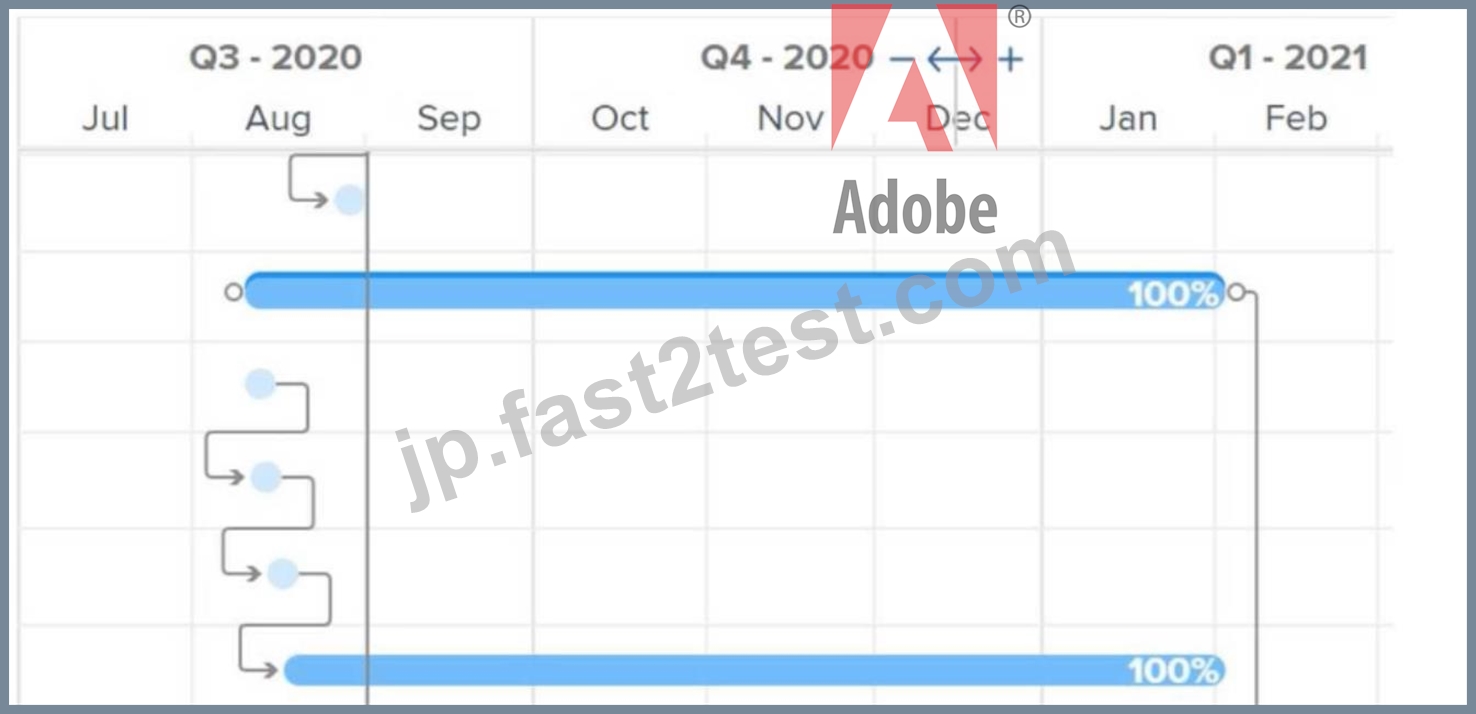
What do the connector lines between tasks in a Gantt chart represent?
- A. Critical path
- B. Predecessor relationship
- C. Multiple assignments
正解:B
解説:
In Workfront, the connector lines in a Gantt chart represent the predecessor relationships between tasks. These lines show how one task depends on another, indicating the order in which tasks need to be completed. This helps project managers visualize task dependencies and how changes in one task can affect others in the timeline.
質問 # 35
A system administrator has created a Marketing Request Queue that routes to the marketing team. This team needs to manage various incoming requests from the organization through emails, instant messaging, and conversations. Team members receive request notifications in their emails but are still having difficulties monitoring and prioritizing incoming requests.
Which reports would be helpful to have on a dashboard for the marketing team to manage incoming work requests?
- A. Two reports showing the priority and actual completion date of each request, i.e., one that shows active requests and another that shows recently completed requests.
- B. Four reports showing the entry date of each request, i.e., one that shows requests in a New status, one that shows requests in an In Progress status, a third report that shows recently completed requests, and a fourth report that shows the schedule assigned to each team member.
- C. Three reports showing the priority and entry date of each request, i.e., one that shows requests in a New status, one that shows requests in an In Progress status, and one that shows recently completed requests.
正解:C
解説:
To help the marketing team manage incoming work requests, the most effective reports would focus on the priority and entry date of requests. These reports would allow the team to quickly view what requests are new, in progress, or completed, enabling them to prioritize work accordingly. A report that tracks the "entry date" helps in monitoring how long a request has been waiting, while status-based reports help in identifying the current stage of each request.
質問 # 36
Which project status defaults the project condition to On Target?
- A. Idea
- B. New
- C. In Progress
正解:C
解説:
In Adobe Workfront, when a project is set to "In Progress," the default project condition is marked as "On Target." This reflects that the project is actively being worked on and progressing as expected without any significant issues or delays. The "On Target" condition is designed to signal that the project is meeting the planned timelines and performance metrics.
The New and Idea statuses are preliminary stages where active progress or development has not started yet, and thus these statuses would not set the project condition to "On Target." Instead, they may represent an early phase of consideration or planning, where progress and targets have not been set in motion.
This is an essential feature within Workfront for project management, allowing teams to understand at a glance whether a project is moving as planned or if it requires attention based on predefined thresholds for performance or timing.
For further detailed information, please refer to the Adobe Workfront documentation on project statuses and conditions, which elaborates on how different statuses affect project tracking and reporting.
質問 # 37
Which two options are available with Workfront reports? (Choose two.)
- A. Filters with a custom grouping
- B. Planned date-based calendar reports
- C. A chart report that references a multi-select custom field
- D. An object name with more than 500 characters
正解:A、B
解説:
In Adobe Workfront, Planned date-based calendar reports are commonly used to visualize project timelines, milestones, and deadlines. They help teams plan and manage workloads based on dates and other time-related factors.
Filters with custom grouping allow users to customize their reports by organizing data in a meaningful way, tailored to specific project or team requirements. Custom groupings enhance the clarity of reports by categorizing data based on selected criteria.
The other options are not correct because Workfront does not support reports that reference multi-select custom fields in a chart format, nor does it allow object names longer than 500 characters.
質問 # 38
A project sponsor has asked to see a summary of all projects that they are the sponsor of which were completed in the past year. The project sponsor wants to see the information grouped by the month the project was completed. What steps should the project manager take to create this view?
- A. Visit the Dashboards page and create a Project report. In the filter, update the actual completion date value to "past year" and update the Project Sponsor ID field to the project sponsor's name. In the grouping tab, add a grouping for the actual completion date. In the Group Dates by field, select "month of year."
- B. Visit the Reports page and create a Project report. In the filter, update the actual completion date value to "past year" and update the Project Sponsor ID field to the project sponsor's name. In the grouping tab, add a grouping for the actual completion date. In the Group Dates by field, select "month."
- C. Visit the Reports page and create a Project Sponsor report. In the filter, update the actual completion date value with custom dates for the past year and update the Project Sponsor ID field to the project sponsor's name. In the grouping tab, add a grouping for the planned completion date. In the Group Dates by field, select "month of year."
正解:B
解説:
The best approach is to generate a Project Report in Workfront, where the report filters the Actual Completion Date for the past year and groups projects by the Sponsor and the month of completion. This allows the sponsor to see exactly which projects they sponsored and when they were completed within the selected timeframe. Grouping by month provides a clear visual of the completion timeline.
質問 # 39
Which two statements are true about Groups and Teams? (Choose two.)
- A. A Group can be assigned to a task, but a Team cannot be assigned to a task.
- B. A Team can be assigned to a task, but a Group cannot be assigned to a task.
- C. Work requests can be routed to either a Group or a Team.
- D. Objects can be shared with either a Group or a Team.
正解:B、C
解説:
In Workfront, Teams are operational entities that can be assigned to tasks, while Groups are organizational entities that are not assignable to tasks. Additionally, work requests can be routed to both Groups and Teams, depending on how the organization is structured and how the routing is set up.
質問 # 40
What is unique to a Scrum iteration?
- A. Burndown Chart
- B. Backlog of stories and issues
- C. Workload Balancer for assigning users to tasks
正解:A
解説:
A Burndown Chart is a visual representation of work remaining versus time in a Scrum iteration. It is unique to agile methodologies like Scrum and is used to track the team's progress during a sprint. The chart helps teams visualize how much work is left to complete the sprint goal, making it a critical tool in Scrum.
質問 # 41
How is the primary assignee of a task determined?
- A. By the user that is assigned first to a task.
- B. By the user on a task that has a primary job role.
- C. By the Home Team assigned to a task.
正解:A
解説:
In Adobe Workfront, when multiple users are assigned to a task, the system designates the user who was assigned first as the primary assignee. This is the user responsible for driving the task to completion, and their name will appear in the primary assignee field. This approach ensures clear accountability within teams.
質問 # 42
What are two characteristics of a Group in Workfront? (Choose two.)
- A. A Group assignment is not required for a user.
- B. A Group can be tagged in an Update thread communication.
- C. A Group can be associated with a Company or a Project.
- D. A user can be assigned as Group Administrator of a Group.
正解:C、D
解説:
Groups in Adobe Workfront serve as organizational entities that can be associated with specific Companies or Projects to manage workflows or permissions more effectively. Additionally, each Group can have a Group Administrator assigned, who is responsible for managing the group's settings, permissions, and workflows. These roles and associations help in structuring how work and permissions are allocated across different teams or departments.
質問 # 43
A project manager wants to see all of the assignees for each task in a project.
Which field should the manager reference to view all task assignees?
- A. Assignments
- B. Assigned
- C. Assigned To
正解:A
解説:
In Adobe Workfront, the "Assignments" field allows a project manager to see all the users assigned to a task. This field is useful for viewing multiple assignees on a single task, as tasks can have more than one person responsible. The "Assigned To" and "Assigned" fields are often used for single-user assignments and are not as comprehensive for viewing all task assignees.
質問 # 44
The second task in a project should be completed within 48 hours and needs to begin 5 business days after the first task is completed.
Which task settings should be configured to meet these requirements?
- A. The task Duration should be set to 2 days. A predecessor with a Finish-Start Dependency Type should be added to the second task with a lag of 5 days.
- B. The task Duration should be set to 48 hours. A predecessor with a Start-Finish Dependency Type should be added to the second task with a lag of 5 days.
- C. Planned Hours should be set to 48 hours. A predecessor with a Finish-Start Dependency Type should be added to the first task with a lag of 5 days.
正解:A
解説:
In Adobe Workfront, to configure tasks according to the requirement of the second task beginning 5 business days after the first task, you need to set the appropriate "Duration" and use "Finish-Start" dependencies. The task's duration is key to determining the time allowed for its completion. The "Finish-Start" dependency ensures that the second task begins only after the first is finished, and a lag can be set to introduce a delay, such as 5 business days. Setting a "Finish-Start" dependency with a lag allows for proper scheduling of tasks in sequence without overlapping.
質問 # 45
......
AD0-E903認定概要最新のAD0-E903のPDF問題集:https://jp.fast2test.com/AD0-E903-premium-file.html